Bass · Sub bass · Serum & Ableton
How to Make Drum and Bass Sub Bass That Works on Any Speaker
The sub is the part of a drum and bass track you feel more than hear, and it is the first thing to fall apart on a laptop or a phone. Here is how Telomic builds a clean, steady DnB sub bass in Serum and Ableton Live: a separate sine under the mid bass, matched glide and movement, a clean low cut, and just enough saturation to survive small speakers. Everything comes from two of our own videos, with screenshots and audio.
Part of our how to make drum and bass guide: this page goes deep on step 4, the sub bass.
Quick answer
What is a DnB sub bass, and how do you make one?
A DnB sub bass is a clean, mono sine wave (or something very close to one) that plays the bassline in the lowest octave, underneath the mid bass that carries the character. To make one, copy the bass MIDI to a new sine synth, match its glide, high-pass the mid bass, keep the sub mono and saturate it gently so phones can hear it.
- Use a separate sine.Built-in subs in moving bass patches rise and fall in level.
- Copy the MIDI.The sub plays the same notes as the bass, in the lowest octave.
- Match glide and movement.Mono, the same portamento, and the same LFO if the bass moves.
- Split the low end.High-pass the mid bass and keep the sub mono.
- Add harmonics.Gentle saturation so the sub still shows on phones.
- Duck it under the kick.Sidechain the sub on its own channel.
- Check on small speakers.Phone, laptop and an analyser.
Telomic’s sub bass video: why and how to put a separate sine sub under a reese and under a moving bass, in Serum and Ableton Live. We also use his video on making the sub audible on any speaker.
What you’ll need
- A DAW. Our videos use Ableton Live, but every step works in FL Studio, Logic or Bitwig with their stock EQ and saturation.
- A synth with a sine wave. Telomic uses Serum in the first video and Serum 2 in the second. Vital is free and its Basic Shapes sine does the same job.
- A bassline to sit under. A reese or any mid bass. Our reese bass guide shows how to build one.
- A spectrum analyser. Ableton’s Spectrum or a free analyser such as SPAN, so you can see the sub as well as hear it.
- Good headphones or monitors, plus a phone. You need to hear the real sub, and also how it falls apart on small speakers.
1.Why use a separate sub?
Because the sub in a moving bass patch moves too. A separate sine on its own channel gives the low end steady power, its own fader, its own sidechain and its own processing, while the mid bass above it can wobble as much as it likes.
Telomic starts with a reese from his own preset pack. In Serum it is two saw oscillators, both at octave -1, detuned with fine +21 and -23, into an MG Low 24 filter, with Serum’s sub oscillator switched on (also octave -1) and Mono plus Legato on (watch at 0:55). The detuned saws give that pulsing reese movement, and that is the problem: the level “dies out” in places, and so does the low end.
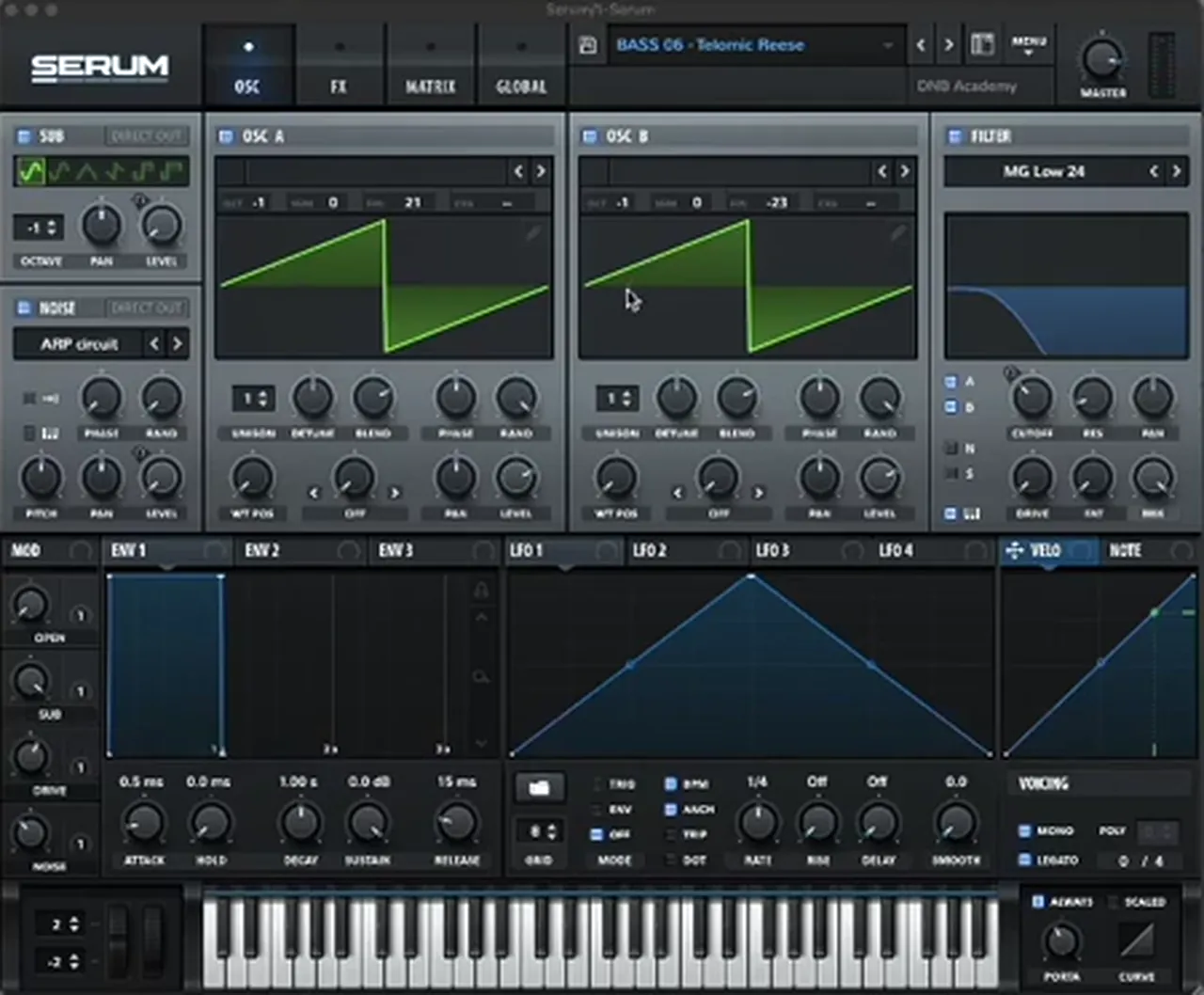
Listen: the reese with only its built-in sub5 sec
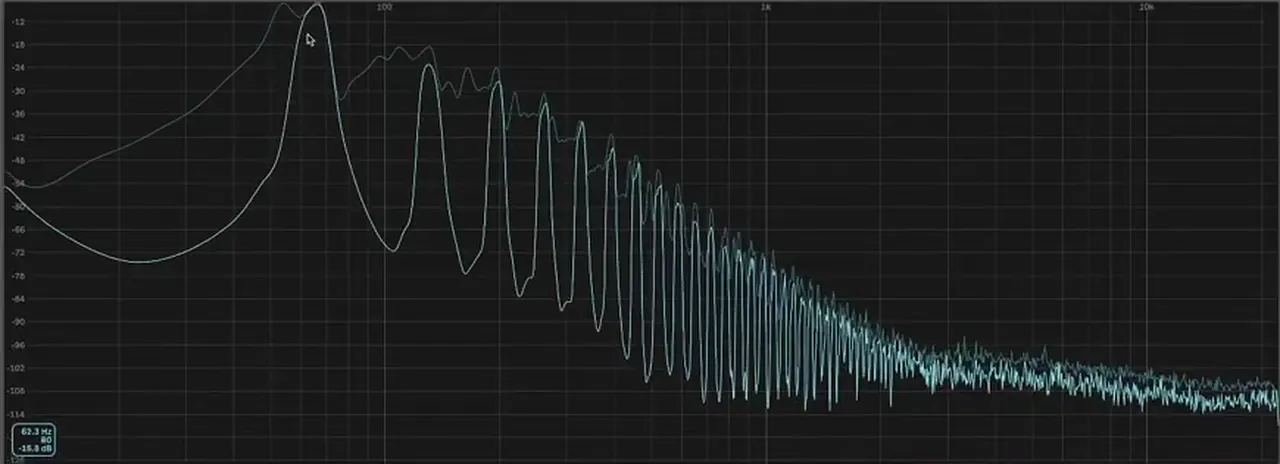
Put a spectrum analyser on it and you can see the sine fundamental “bumping up and down all over the place” (watch at 1:50). Your sub, Telomic says, “should have consistent power”, whether or not the bass above it moves.
There are more reasons to split it out, all from the video (watch at 6:14): you never want chorus on a sub, you rarely want to distort it as hard as the mids, you get a fader just for the sub, and you can sidechain it differently from the mid layer. Telomic doesn’t use one in every single tune, but “in most instances” it is the cleaner way.
2.Choose the oscillator: a plain sine
Use a pure sine wave. It has a single frequency and no harmonics, so it fills the lowest octave without clashing with anything above it, and you can control it with one fader.
Telomic loads a fresh Serum on a new track and leaves it almost on its init settings: Osc A on the Basic Shapes sine at octave -1, everything else off (watch at 2:17). Any synth with a sine works: in Vital, pick the Basic Shapes sine on one oscillator, and in FL Studio our start-to-finish guide uses 3x Osc with three sines.
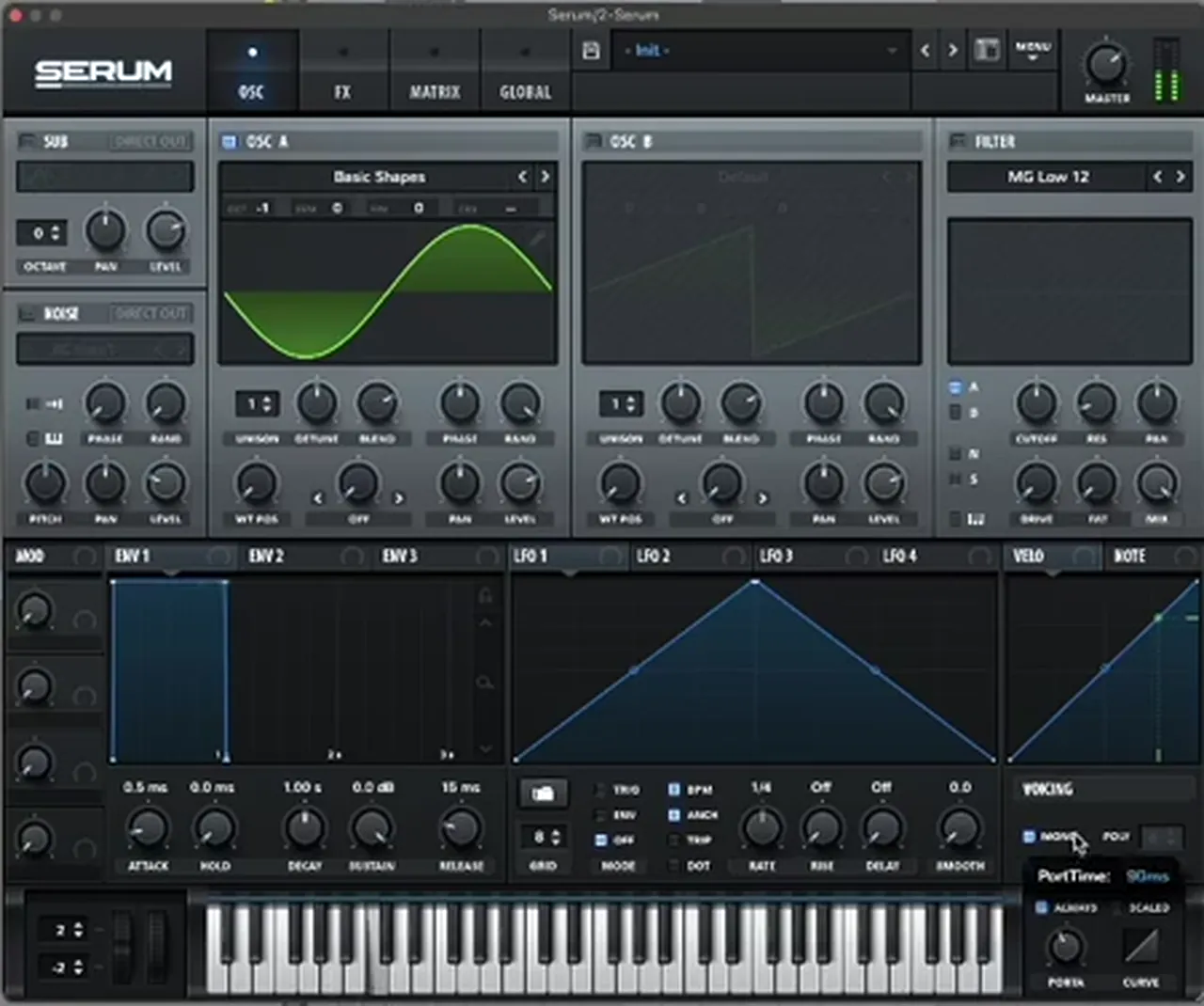
Listen: the plain sine sub on its own7 sec
How low is “low”? In Telomic’s second video a plain sine sub with no effects never shows higher than about 67 Hz on the analyser, “because it’s a sine wave, it’s just a single fundamental” (watch at 1:46). That purity is what makes it clean, and also why it vanishes on phones (step 7).

3.Tuning, key and pitch range
The sub plays exactly the same notes as the bass, so copy the MIDI rather than writing a new part, and set the octave so it sits in the lowest octave under the mid bass.
Telomic simply creates a new track and copies the bass MIDI over (watch at 2:07). Same notes, same lengths, same slides: the sub can never drift out of key with the bass. In his reese the saws and the built-in sub both sit at octave -1, and the new sine also sits at octave -1, so it lands right on the fundamental the reese was already playing.
If your notes sit too high, drop the sub an octave, either with the synth’s octave control or in the piano roll. Write the bassline in your track’s key in the first place: an out-of-tune sub is one of the quickest ways to a muddy low end. Short on ideas for the bassline itself? Our bass patterns tutorial has rhythms to copy.
4.Envelope, glide and mono
Make the sub behave like the bass above it: mono, with the same glide, and an envelope with full sustain so every note holds its level. Telomic’s rule is to mimic the bass patch’s settings.
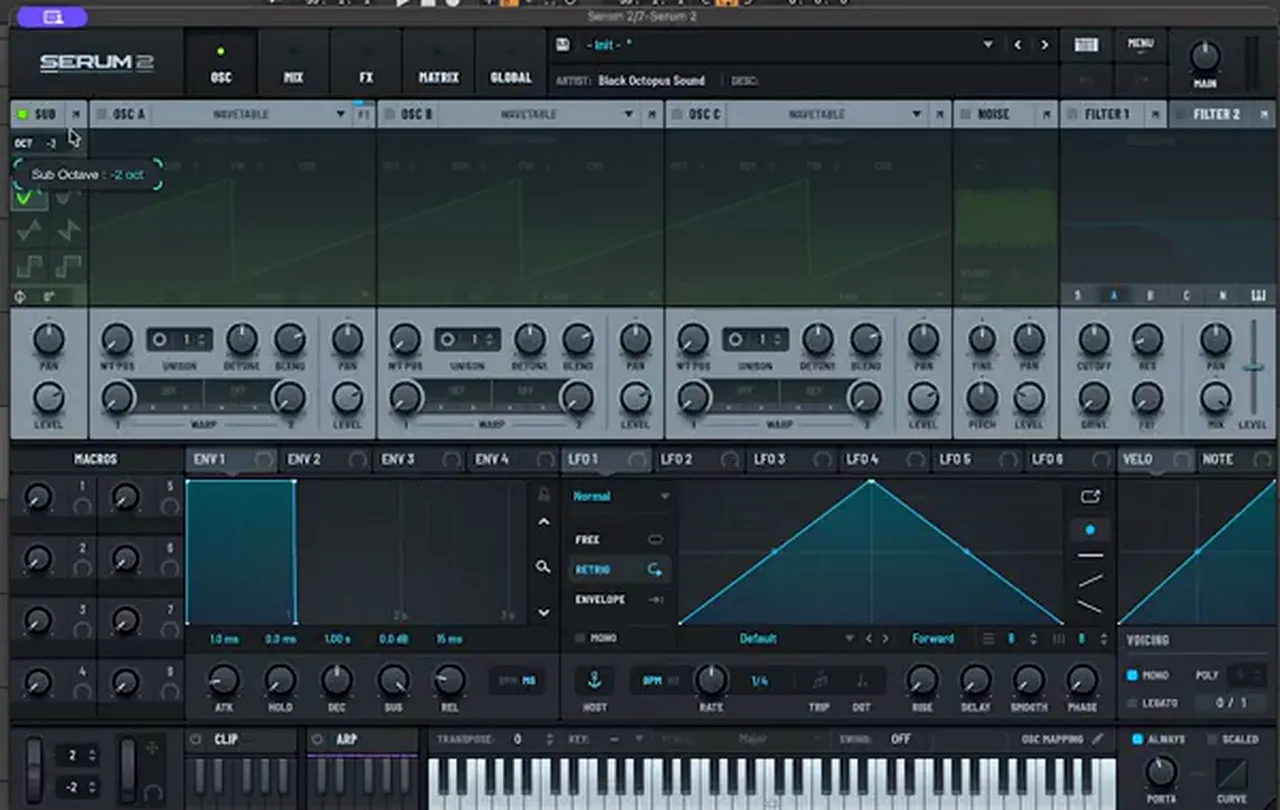
“I tend to try and mimic any settings from the bass,” Telomic says, and he makes sure “glide and everything is the same” (watch at 2:30). On screen the sub Serum has Mono on, Always on, and a portamento time of 90 ms (watch at 2:38). If the reese slides between notes and the sub jumps, you hear two basses instead of one.
The amp envelope stays on Serum’s default, the same as on the reese: 0.5 ms attack, 0.0 ms hold, 1.00 s decay, 0.0 dB sustain and 15 ms release. Sustain at 0.0 dB means full level for as long as the note is held, which is exactly the “power and sustain” a sub needs. The short attack and release keep it tight without clicks.
5.Match a moving bass with the same LFO
If the mid bass moves, make the sub move with it: copy the whole patch, switch off everything except a sine sub, and route the bass’s main LFO to the sub’s level.
Telomic’s second example is a more animated bass from his pack, with an LFO driving the movement. A plain static sub under it “doesn’t really feel like it fits”. So he copies the patch in its entirety, turns off the main oscillators and the effects (the sub should stay clean), keeps Serum’s sub oscillator on at octave -2, and drags the main LFO 1 (2 bar rate, trig mode) onto the sub’s level (watch at 4:50). If several LFOs make the movement, pick the one that best represents it.
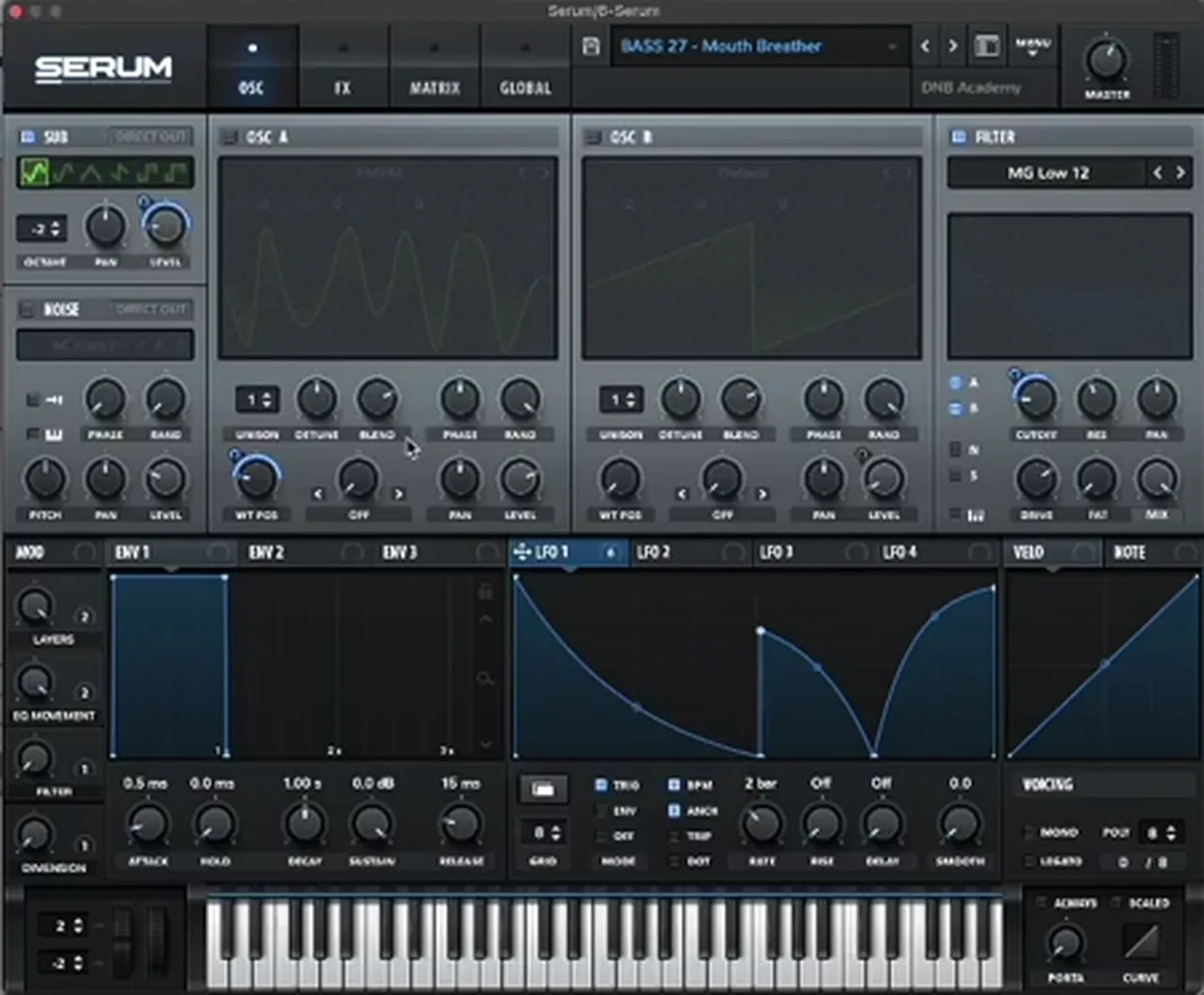
Then he turns the sub level up, high-passes the bass track and puts gentle saturation on the sub itself: the same A Bit Warmer Saturator preset you will see in step 7 (watch at 5:37).

Listen: the moving bass with its LFO-matched sub6 sec
6.Keep the sub mono and low-cut everything else
Only the sub should live in the lowest octave, and it should be mono. High-pass the mid bass so its own low end doesn’t fight the sine, and keep everything below roughly 120 Hz in mono.
Once the sine is in, Telomic puts Ableton’s EQ Eight on the reese with a steep high-pass. On screen it sits at 132 Hz (Q 0.53) in the first example (watch at 3:20) and at 111 Hz (Q 0.61) on the moving bass (watch at 6:55). There is no magic number: find the point where the reese stops adding low end and the sine takes over.

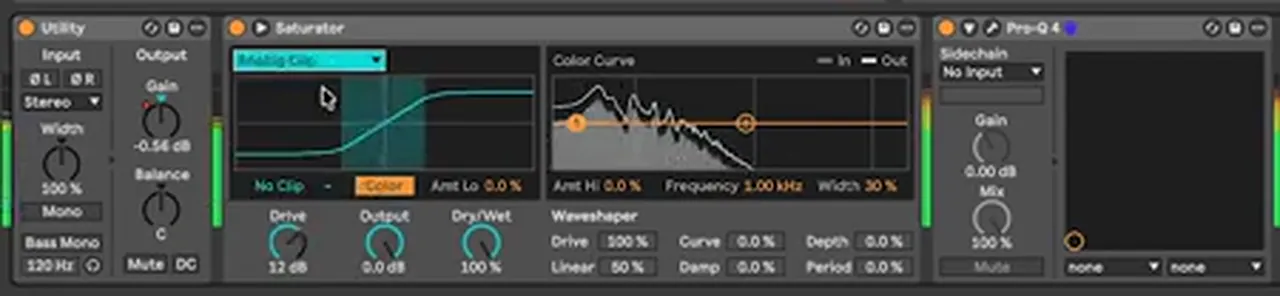
In the second video the whole bass group gets an Ableton Utility with Bass Mono switched on at 120 Hz (watch at 10:10). That folds anything below 120 Hz to mono and leaves the width above it alone, a neat safety net if a layer sneaks some stereo into the low end.
Listen: the reese and the new sine sub together9 sec
Stereo width belongs higher up. For the mix side of this (mid/side EQ, keeping wide mid basses tight in the low end), see the low-end section of our DnB mixing guide.
7.Add harmonics so the sub shows on phones
Phone and laptop speakers roll off somewhere between 200 and 400 Hz, so a pure 60-odd Hz sine can disappear completely. Gentle saturation or an octave layer adds harmonics in that range, which your ear reads as the sub.
“A lot of people are gonna be listening to your music on iPhones,” Telomic says, with a cut-off “anywhere between 200 and 400 hertz” (watch at 0:56). Dancefloor and jump-up basses already live up there; liquid and minimal tracks, with their smoother basses, need more care.
In the first video the sub and the reese go into a group with Ableton’s Saturator on the A Bit Warmer preset: Sinoid Fold, Drive 6.19 dB, Dry/Wet 61.9%. It helps “gel that tone together”, and on the group analyser the sub is now much more constant (watch at 3:00). The dry/wet at roughly 60% keeps part of the clean sine in the signal.

The second video shows other ways to get there. One is to double the sine with an octave: in Serum 2 that is the sub oscillator, set here to -2 oct and then dialled in by ear (watch at 2:13). It won’t reach 400 Hz, but it gives you more to work with.
Listen: the plain sine sub, then with saturation11 sec
Telomic also layers a low-passed reese above the sine and combines everything, and he compares Saturator modes: soft ones stay round, harsh ones add “weird high frequency stuff”. All five methods, with settings, are in the small-speakers part of our mixing guide. One design rule to keep: if your sine has FM movement, be subtle, because heavy distortion or layering can spoil it (watch at 9:29).
8.Sidechain the sub with the kick
Duck the sub whenever the kick hits, so the two take turns instead of stacking. With the sub on its own channel you can duck it differently from the mid bass.
This is one of Telomic’s main reasons for a separate sub: “I can sidechain the sub differently than I can sidechain the mid layer” (watch at 7:08). The kick and the sub share the same frequency range, so the sub usually needs the deeper duck; the mid bass can often stay fuller. Use a compressor keyed from the kick, or automate a Utility’s gain to dip on every hit, as in our punchy drums tutorial. Our mixing guide covers the ducking setups in more detail.
9.Layering the sub with the mid bass
Think of the bass as two layers with a crossover: the sub owns everything below it, the mid bass everything above. Group them, glue them lightly, and keep the heavy processing on the mid bass.
In our videos the crossover lands around 110–130 Hz: the mid bass is high-passed at 111 or 132 Hz and Bass Mono works at 120 Hz. Our start-to-finish guide does it the other way round in FL Studio, high-cutting the sub around 125 Hz and low-cutting the mid bass around 90 Hz. Either way, avoid a big gap or a big overlap where the two meet.
- Group the layers so you can glue them with light saturation and see them together on one analyser.
- Keep chorus, wide reverb and heavy distortion on the mid bass. “You’re not going to want to put chorus on your sub” (watch at 6:27).
- Balance with the sub fader. A separate sub lets you turn it up or down directly instead of re-voicing the whole patch.
For the mid bass itself, see our reese bass, roller bass and foghorn bass tutorials, or browse every bass tutorial in our DnB bass guide.
10.Check the sub on small speakers
Listen on a phone or laptop as well as on headphones, and use an analyser to confirm the sub has harmonics up in the 200–400 Hz range. Then check it against the drums, not on its own.
Telomic finishes by checking the master on an analyser to confirm the processed sub reaches those frequencies, then plays it “in tandem with the drums” (watch at 8:48). If the bassline disappears on phone speakers, add a touch more saturation or a quieter octave layer; if it sounds harsh, back off or switch to a softer mode.
Listen: the finished sub with drums (try it on your phone)12 sec
Common DnB sub bass mistakes
- Relying on a moving patch’s built-in sub. It pulses with the saws, so the low end drops out in places. Add a separate sine.
- Different glide on the sub and the bass. The two layers stop sounding like one sound. Copy the MIDI and match mono and portamento.
- A static sub under a moving bass. Map the same LFO to the sub’s level so they move together.
- Leaving the mid bass full-range. Its low end fights the sine. High-pass it where the sub takes over.
- Stereo or chorus on the sub. Keep the lowest octave mono, for example with Bass Mono at 120 Hz.
- Only checking on big speakers. A pure sine can vanish on phones. Add gentle harmonics and test on a phone.
- Over-saturating. Harsh modes turn the sub fizzy. Use a soft mode and a partial dry/wet, as in the 61.9% Saturator above.

Free download
Basses to practise your sub on
The quickest way to learn the sub is to put one under real basses. The Vital Starter Preset Pack is a neuro DnB starter pack for Vital, which has a free version:
- Neuro bass presets
- Pluck presets
- Lead presets
- Works with the free version of Vital
It’s one of seven free sample and preset packs in DNB Academy Free Access, along with the mixing and mastering e-books and the 3‑day DnB challenge. Join 40,000+ producers in Free Access. Free account, no card needed.
Go deeper
Telomic’s basses and a full track
The basses in our sub video come from Telomic’s own preset pack. Want the sounds, or to see a whole track built around them?
 Preset bundleTelomic Serum presets100 Serum presets for liquid, jungle and deep DnB, including 30 basses, 35 pads and 21 plucks.
 Production courseTelomic production courseA track from scratch in about 6 hours: music theory, bass synthesis and resampling, drums, atmospheres, arrangement, mixing and mastering, with the project file, stems, presets and samples.
 Preset bundleALIX Vital presets100 deep minimal presets for Vital, including 50 sub-focused basses, with every preset also as a WAV file.
Every artist course, preset bundle and sample pack is also in The Vault. Browse courses
Related tutorials
All tutorials → Guide · MixingHow to Mix Drum and Bass: A Mixdown Guide for DnB19 min read · Guide
 Serum · BassHow to Make a Reese Bass for Drum and Bass15 min read · Video + guide
 Guide · BeginnersHow to Make Drum and Bass: A Step-by-Step Guide19 min read · Guide
 Vital · BassDark, Minimal DnB Bass Sound Design in Vital7 min read · Video + guide
FAQ: DnB sub bass
What is a sub bass in drum and bass?
It is the lowest layer of the bass: a clean, mono sine wave, or something very close to one, that plays the bassline in the lowest octave. You feel it more than you hear it. The character of the bass, such as a reese or a neuro growl, comes from a separate mid bass layer above it.
How do you make a sub bass for DnB?
Copy your bass MIDI to a new synth with a plain sine wave, match the bass patch’s mono and glide settings, high-pass the mid bass so only the sine fills the lowest octave, keep the sub mono, add gentle saturation for small speakers and sidechain it to the kick.
Should the sub bass be a separate track?
In most cases, yes. A separate sub gives steady low end even when the mid bass moves, and it gets its own fader, sidechain and processing, so chorus and heavy distortion stay on the mid bass. Telomic doesn’t use one in every tune, but calls it the cleaner way in most instances.
What frequency should a DnB sub bass be?
A plain sine sub sits in the lowest octave; in our video it never shows higher than about 67 Hz on the analyser. Where the sub hands over to the mid bass is the crossover: in our videos the mid bass is high-passed at 111 or 132 Hz and Ableton’s Bass Mono works at 120 Hz.
Why can't I hear my sub bass on my phone?
Phone and laptop speakers roll off somewhere between 200 and 400 Hz, and a pure sine has nothing up there. Add harmonics with gentle saturation, an octave layer or a filtered reese layer above it, then check the result on a phone and against the drums.
Should DnB sub bass be mono?
Yes. Keep the sub mono and put stereo width in the mid bass and higher sounds. A simple safety net is Ableton’s Utility with Bass Mono switched on, set at 120 Hz in our video, which folds everything below that frequency to mono.
What synth is best for DnB sub bass?
Any synth with a sine wave works, because the sub is just a sine. Our videos use Serum and Serum 2. Vital is free and its Basic Shapes sine does the same job, and FL Studio’s stock 3x Osc set to sine waves works too.
How do you make the sub follow a moving bass?
Copy the whole bass patch, switch off its main oscillators and effects, keep only a sine sub, and route the bass’s main LFO to the sub’s level. In our video that is Serum’s sub oscillator at octave -2 with LFO 1 on its level, so the sub moves with the filter movement above it.
Next steps
Take one of your basslines, copy its MIDI onto a plain sine, match the glide, high-pass the bass above it and play the result on your phone. Then build the rest of the track around it:
Free Access
Seven free DnB sample and preset packs, including the Vital Starter Preset Pack, plus mixing and mastering e-books and a 3-day challenge.
Get free packsThe full guide
Tempo, drums, sub, mid bass, chords, arrangement and mixdown: every step of a DnB track.
Read the guideDNB Foundations
A structured drum and bass course with weekly live feedback calls on your tracks, low end included.
See Foundations1:1 Mentorship
Personal guidance on your music from a mentor, built around your goals.
See the mentorship50,000+ producers have joined DNB Academy, and our producer Discord has 5,300+ members.