How to Make a Foghorn Bass in Vital
To make a foghorn bass in Vital, build three layers: a high-pitched FM layer (oscillator 1 modulated by a synced, octave-up saw), a sine sub and some white noise. Add chorus, multiband compression and a filter swept by an LFO, then heavily distort all three layers together. That distortion is what turns the patch into a foghorn. Here are the exact steps from our video.
Part of our how to make DnB guide. For where foghorns sit next to reeses, neuro and rollers, see our guide to every DnB bass type.
Prefer to watch? The full 4-minute video builds this foghorn from an initialised patch.
What you'll need
- Vital. The patch uses only stock Vital oscillators, LFOs and effects. Vital has a free version.
- A DAW and a MIDI note or two. A foghorn is usually a long, held note, so a single sustained note is enough to design it.
- Some FM basics help. If FM is new to you, our roller bass in Vital tutorial uses the same FM OSC 2 trick in a gentler way.
1.Set up three layers: FM source, sub and noise
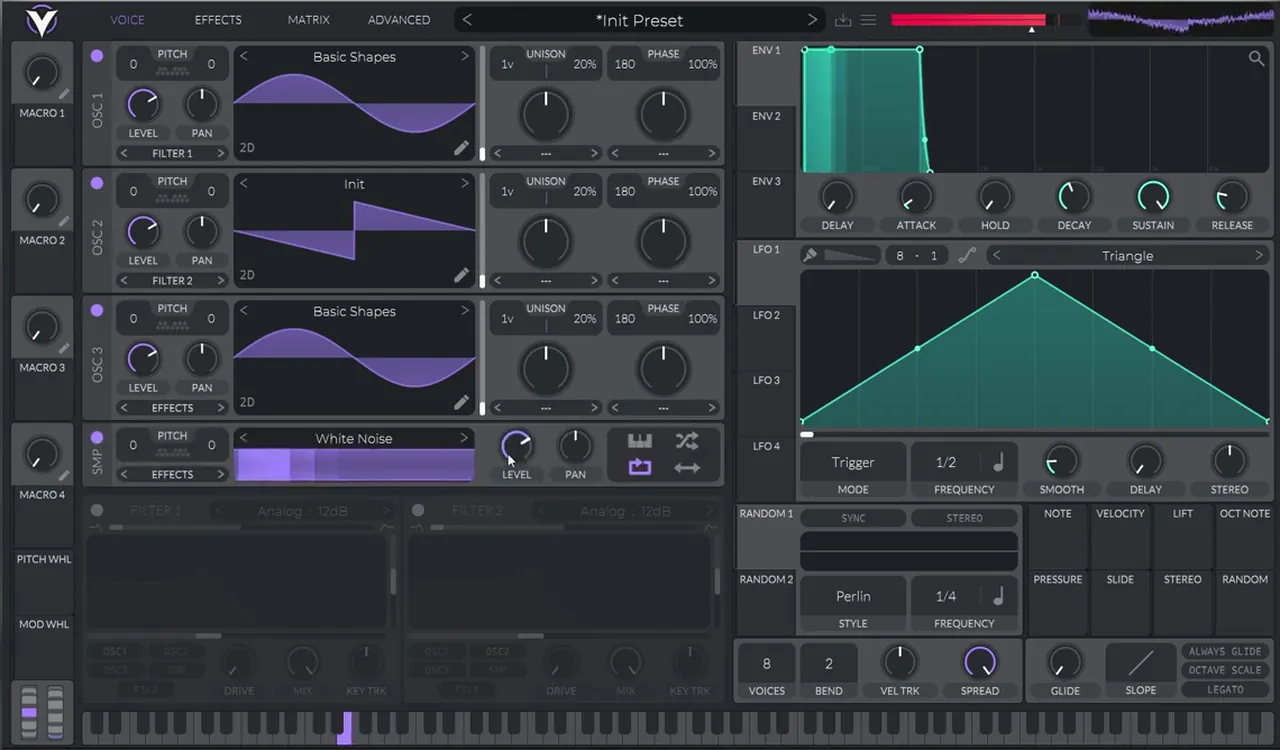
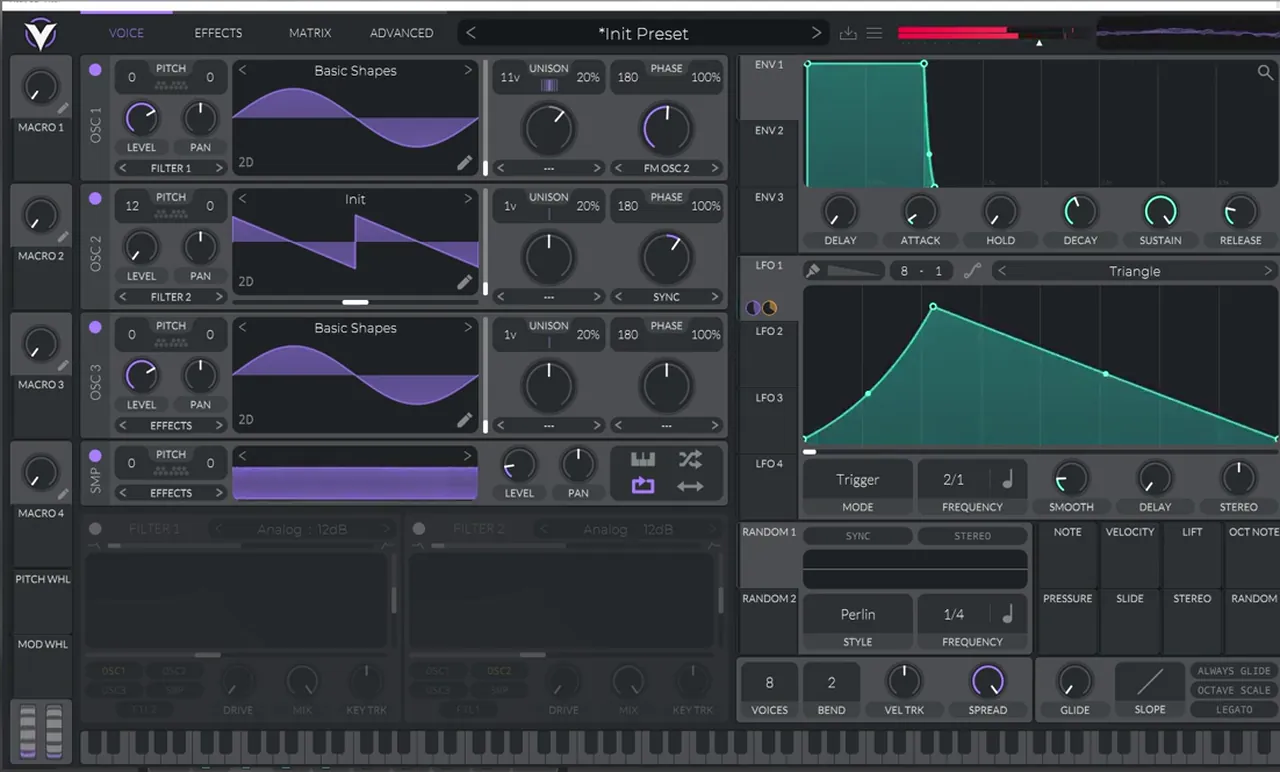
Start from an initialised patch and set up the oscillators:
- Oscillator 1: load the Basic Shapes wavetable (a sine). This becomes the high FM layer.
- Oscillator 2: turn it on and leave it as a saw wave. It will be the modulator.
- Oscillator 3: turn it on and use it as a sub oscillator: load Basic Shapes and leave it as a sine.
- Noise: turn on the white noise, but bring its level a bit lower.
Here's what each part will do once the patch is finished:
| Layer | Source | Job |
|---|---|---|
| FM layer | Osc 1, sine with FM from Osc 2 | High-pitched harmonics that the distortion turns into the horn |
| Modulator | Osc 2, saw with sync, up an octave, level at zero | Drives the FM; never heard directly |
| Sub | Osc 3, sine | Weight, and the low end of the distorted tone |
| Noise | White noise, low level | Breath and grit |
2.Add FM, sync and unison
Now turn oscillator 1 into a rich, high-pitched FM layer:
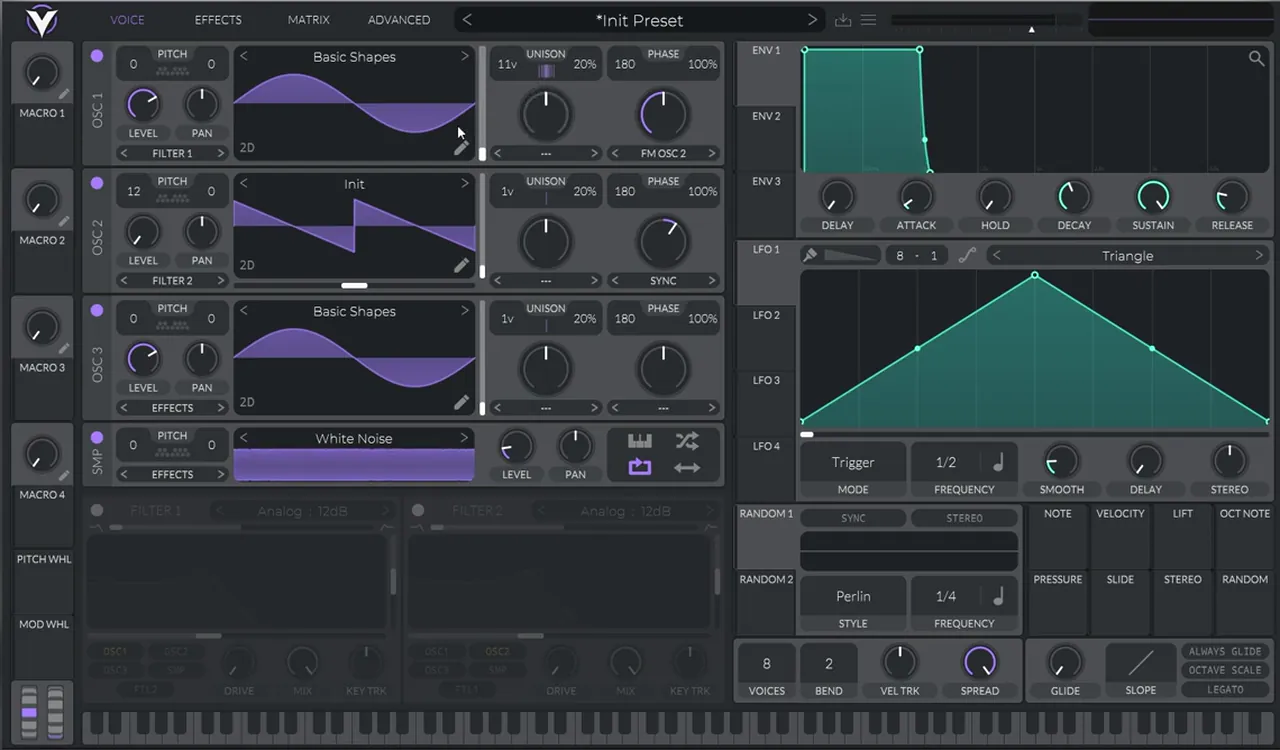
- Bring the level of oscillator 2 all the way down. We only use it to modulate.
- On oscillator 1, select FM OSC 2 in the mode menu under the phase knob (the phase-warp slot).
- On oscillator 2, add some sync (select SYNC in its mode menu).
- Boost the octave of oscillator 2 (pitch 12).
- Add some unison. In the screenshot oscillator 1 runs 11 voices.
Listen: FM with sync, then oscillator 2 up an octave9 sec
On its own this sounds bright and buzzy, not much like a foghorn yet. Keep going: the character arrives when everything hits the distortion.
3.Chorus, OTT-style compression and a filter
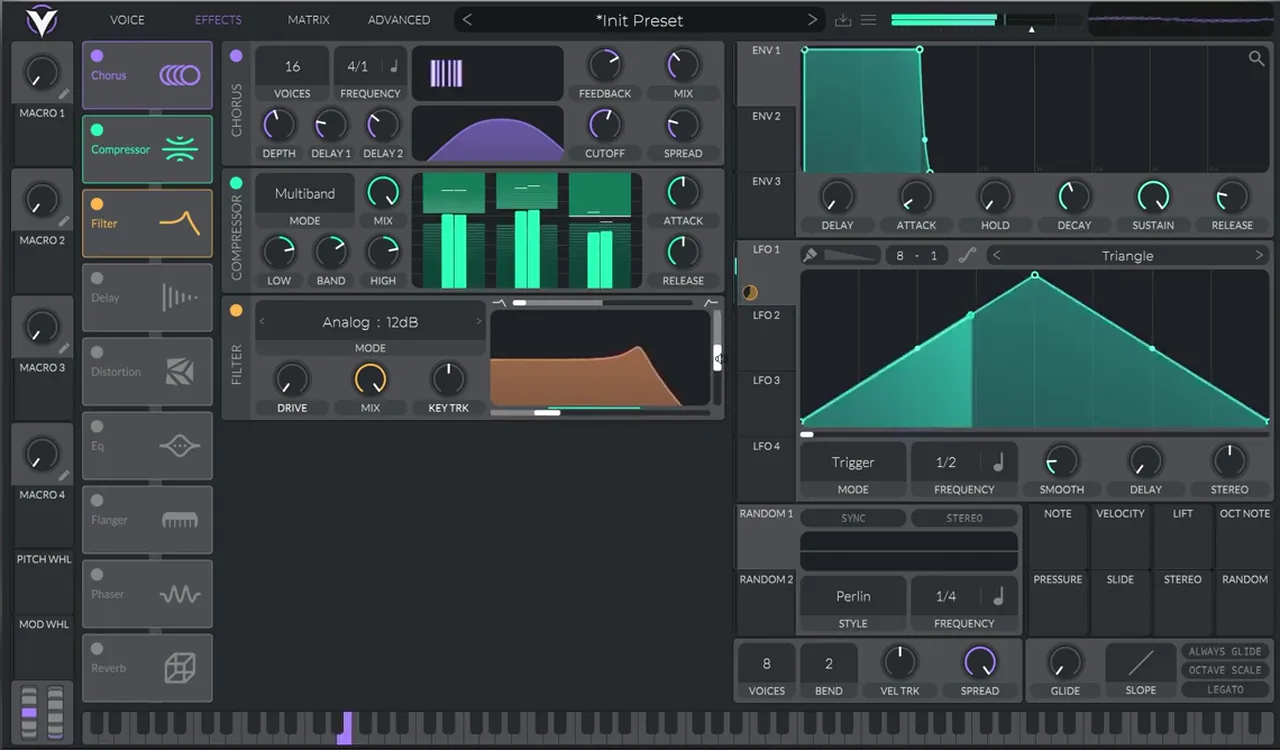
Go to the Effects tab and add a Chorus:
- Bring the depth a bit lower.
- Play with the delays (Delay 1 and Delay 2).
- Turn the spread down and boost the cutoff.
- Decrease the mix a little.
Next add some OTT: in Vital that's the Compressor in Multiband mode. Then add a Filter (Analog 12 dB in the screenshot).
4.Sweep the filter with LFO 1
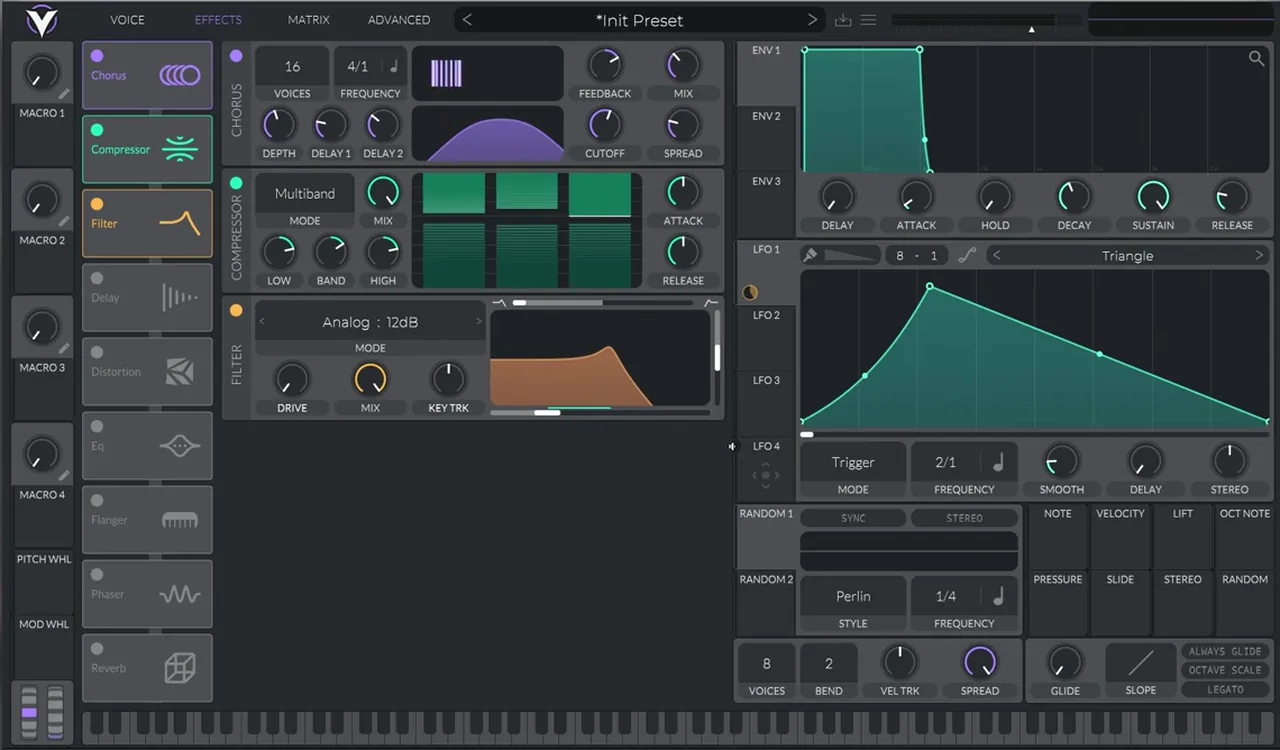
The foghorn "movement" comes from the filter. Drag LFO 1 into the cutoff of the filter, then:
- Bring the filter cutoff a bit lower.
- Decrease the modulation amount a little.
- Draw a shape in the LFO: a quick rise and a longer fall, as in the screenshot.
- Bring the frequency down (2/1 in the screenshot) and add a bit of curve to the shape.
5.Heavily distort the three layers
At this point you might be wondering where the foghorn is. Here's the key idea: when you have a setup like this, a high-pitched FM layer with a sub and some noise, and you heavily distort all three together, you get the foghorn.
Turn on Distortion (Hard Clip in the screenshot) and push it. The sub and the FM layer intermodulate, the noise adds breath and grit, and the filter movement now shapes a thick, horn-like tone.
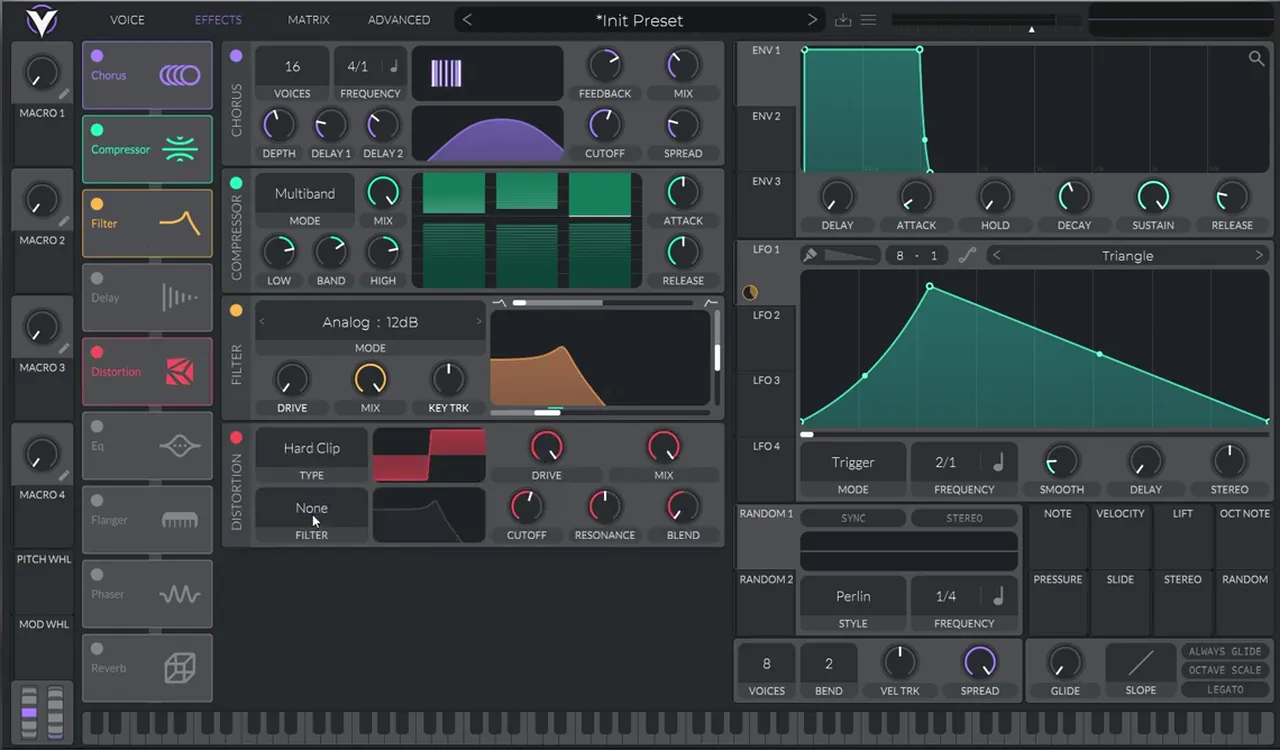
Listen: heavy distortion, then reverb added12 sec
Tip: the same "distort a sine, a high harmonic and noise together" principle is behind our dark, minimal DnB bass in Vital. Compare the two to hear how far it can go.
6.Add reverb, shape the LFO and add pitch movement
Now it's a matter of adding some reverb and playing with the shape of your LFO until the movement feels right. The full chain in the screenshot is Chorus, Compressor (multiband), Filter, Distortion and Reverb.
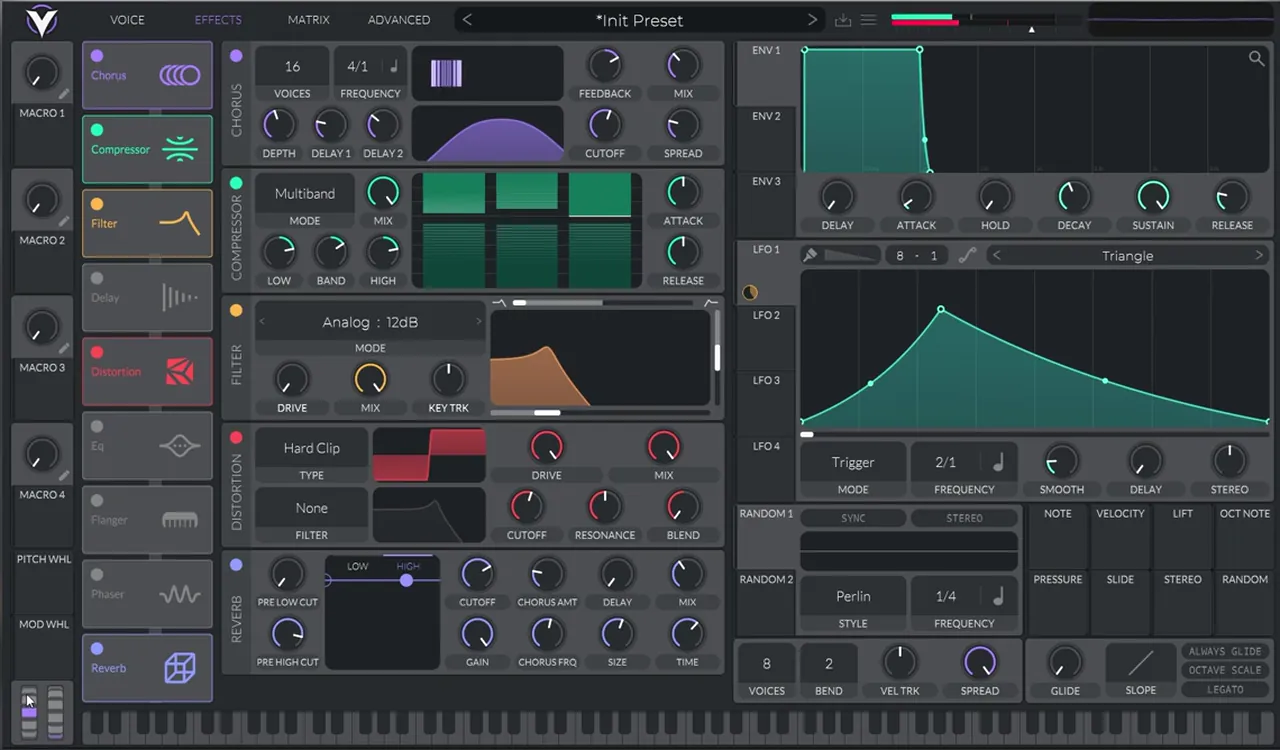
Finally, add some pitch movement so the foghorn bends and slides rather than sitting on one static note. Then play it in context with drums: that's where a foghorn really comes alive.
Listen: the finished foghorn with pitch movement11 sec
Once you have the sound, the next challenge is writing a riff with it. Our guide to writing DnB bass patterns shows how to place calls, responses and fills in a drop.
Common mistakes
- Judging the patch before the distortion. Before the distortion it just sounds like a bright FM synth. The foghorn character only appears when all three layers are heavily distorted together.
- Noise too loud. Keep the white noise lower than the other layers. A little gives breath; too much turns into hiss.
- Hearing oscillator 2 directly. Its level should be all the way down. It's the FM modulator, not a layer.
- Too much filter modulation. Reduce the LFO amount if the sweep sounds like a wobble instead of a horn.
- Designing only in solo. Foghorns are loud and wide; check them with drums so they don't bury the kick and snare.
Go deeper
Vital presets to learn from
Want to see how other heavy and techy basses are put together in Vital? Open these presets and study the layers.
 Preset bundleIcicle Vital preset bundleDeep / Techy: Vital presets for deep, techy drum & bass.
 Preset bundleALIX Vital preset bundleDeep / Minimal: Vital presets for dark, minimal DnB.
Every artist course, preset bundle and sample pack is also in The Vault. Browse courses
Related tutorials
All tutorials → Vital · Bass designHow to Make a Roller Bass in Vital8 min read · Video + guide
 Vital · Bass designDark, Minimal DnB Bass Sound Design in Vital7 min read · Video + guide
 Serum · Bass designHow to Make a Techy Roller Bass in Serum7 min read · Video + guide
 Free packsFree DnB Sample Packs, Presets & LessonsFree downloads

Free download
Vital Starter Preset Pack
Want ready-made Vital presets to take apart and learn from? The Vital Starter Preset Pack gives you:
- A neuro DnB starter pack for the Vital synth
- Neuro bass presets
- Pluck and lead presets
- Works with the free version of Vital
It’s free inside DNB Academy Free Access, along with the other sample and preset packs, the mixing and mastering e-books and the 3‑day DnB challenge. Free account, no card needed.
FAQ
What is a foghorn bass?
A foghorn bass is a thick, horn-like drum and bass bass with a slow, swelling movement. In this patch it comes from a high-pitched FM layer, a sine sub and white noise all heavily distorted together, with an LFO sweeping a filter.
How do you make a foghorn bass in Vital?
Use oscillator 1 as an FM layer modulated by a synced, octave-up saw on oscillator 2, add a sine sub on oscillator 3 and some white noise. Add chorus, a multiband compressor and a filter swept by LFO 1, then heavily distort it with Hard Clip and add reverb and pitch movement.
Why does distortion matter so much for a foghorn bass?
Distorting a high FM layer, a sub and noise together makes them interact and create new harmonics. Before the distortion the patch sounds like a bright synth; after heavy distortion it becomes the dense, horn-like foghorn tone.
Is Vital free?
Vital has a free version, and everything in this tutorial uses its stock oscillators, LFOs and effects, so you can follow along without buying a synth.
How do I make the foghorn move?
Modulate the filter cutoff with LFO 1. In the video the cutoff is lowered, the modulation amount reduced, and the LFO is drawn with a quick rise and longer fall at a slow 2/1 rate with some curve. Pitch movement on top adds the final slide.
Next steps
You now have a foghorn patch you can reshape with the LFO, the distortion and the pitch. When you want to learn the whole process in order, from sound design to finished tracks, here's where to go next:
Course guide
How to learn drum and bass production step by step, and which course fits your level.
Read the guide1:1 Mentorship
Personal guidance on your music from a mentor, built around your goals.
See the mentorship