Jump up · Serum bass design
How to Make Jump Up Drum and Bass: Basslines, Wobbles and Formants
Jump up is the loud, bouncy side of drum and bass: short bass riffs that wobble, growl and talk, over drums that leave them room. Here is how we make it in Serum, from four of our own videos: a classic two-saw bass, a deep FM bassline, a modern formant bass and a bass inspired by Annix’s “Boomerang”, plus the riff, the drums, the sub and the processing. Every setting below is taken from the screen, with audio of each bass being built.
Part of our how to make drum and bass guide: this page goes deep on step 5, designing the mid bass, for one style in our pick your style table.
Quick answer
How do you make jump up drum and bass?
Jump up is energetic, bass-led drum and bass at around 170–176 BPM. Write a short, bouncy bass riff as call and response, design a wobbly, FM or formant mid bass for it in a synth like Serum, keep a clean sub underneath, then add compression, distortion and a little space. Keep the drums punchy and sparse so the bass leads.
- Start a classic bass.Two saws a fifth apart, low-pass filter, re-triggered LFO.
- Try a deep FM bassline.FM oscillator A from a silent oscillator B.
- Make it talk.A formant filter with an LFO on the cutoff.
- Build harmonics by hand.Our Boomerang-inspired bass, with pitch bends.
- Write the riff.A call, then an answer, with gaps and slides.
- Keep the drums simple.Kick, snare and a loop that leave room.
- Layer the sub.A separate, clean sub under a low-cut mid bass.
- Process it.Compression, distortion, resonance, EQ and short reverb.
Our deep jump up video: a default Serum saw turned into a deep FM bassline, step by step. We also use our classic jump up video, our formant bass video and our Annix “Boomerang”-inspired video, all embedded below.
What is jump up drum and bass?
Jump up is an energetic, bass-led style of drum and bass. It focuses on one catchy mid-bass riff, often wobbly, growling or vowel-like, played in short phrases with gaps, slides and pitch bends, over simple, punchy drums at around 174 BPM.
Where neurofunk stacks lots of different technical bass sounds and rollers repeat one groove for minutes, jump up is about the hook: a bass line you could almost sing, built from a question and an answer, then repeated and varied to keep a crowd moving. Our drum and bass subgenres guide compares it with the other styles.
| Element | In jump up | In our videos |
|---|---|---|
| Tempo | Around 170–176 BPM | 172, 174 and 175 BPM projects |
| Bass | Bouncy mid bass: filtered, FM, wobbly or formant | Two saws, FM from oscillator B, a formant filter, custom harmonics |
| Riff | Short call-and-response phrases, gaps, slides, bends | Two-bar riffs around one root note, glide and a 7-semitone pitch bend |
| Drums | Punchy and fairly sparse, so the bass leads | A simple loop under the bass, sidechain on the bass |
| Low end | A clean sub under the mid bass | A separate 808-style sub, low cut on the mid bass |
What you’ll need
| What | In our videos | Alternatives |
|---|---|---|
| A DAW | Ableton Live 12 | Any DAW: FL Studio, Logic, Bitwig |
| A wavetable synth | Serum, mostly from the default preset | Vital, which has a free version |
| Effects | Serum’s own FX, plus Ableton’s EQ Eight, Reverb, Erosion and Saturator, Valhalla Room, FabFilter Pro-Q 3, kHs Resonator and iZotope Trash 2 | Your DAW’s stock EQ, reverb and saturation are enough |
| A drum loop | A simple loop already in the project | The free 174 Marathon pack |
Three of the four basses start from Serum’s default patch, a single saw wave, so you can follow along without any presets. If you use Vital, the same steps apply: it has FM between oscillators, a harmonic editor, formant filter modes and LFOs you can draw.
1.Make a classic jump up bass
The classic jump up bass is two saw waves a fifth apart, dropped three octaves, through a 12 dB low-pass filter whose cutoff is swept by an LFO that restarts on every note. That re-triggered filter “wow” is the sound.
Our classic jump up video: two oscillators, one filter and one LFO.
Our classic video writes the riff first, because it helps to design the sound against the notes you will actually use (watch at 1:43). Then, in Serum:
- Drop the saw three octaves. Oscillator A is the default saw at
Oct -3(watch at 1:58). - Filter it. Turn on the filter with
MG Low 12and route oscillators A and B through it (watch at 2:12). - Put LFO 1 on the cutoff. On screen it’s a fast decaying curve at
1/4with BPM on, set to Trig mode, so every note re-triggers the filter (watch at 2:30). In the Matrix, keep the LFO 1 to cutoff route one-directional for the classic sound (watch at 2:24). - Add oscillator B a fifth up. A second default saw at
Oct -3,Semi +7(watch at 2:48).
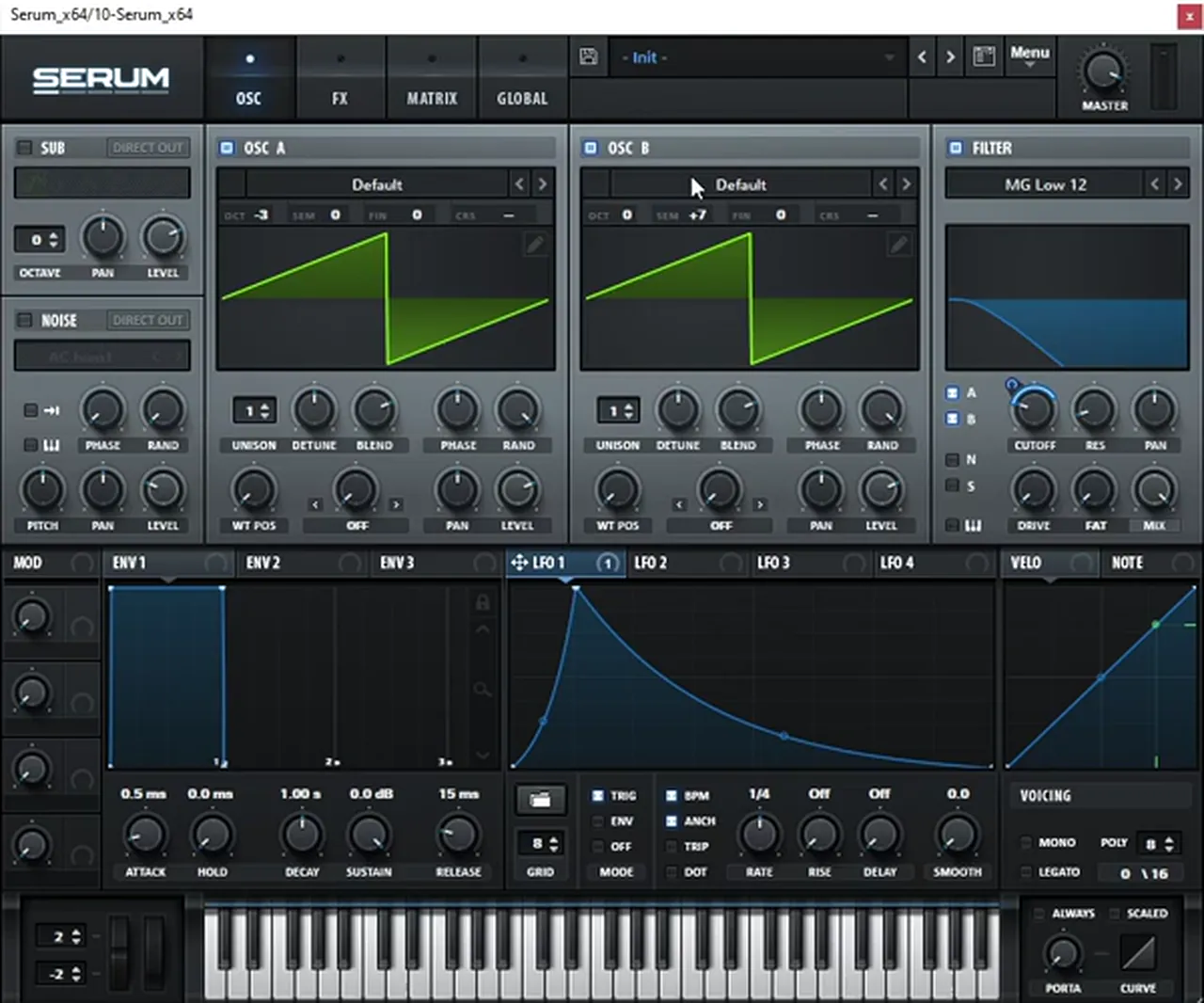
Oct -3, B at +7 semitones, MG Low 12, and LFO 1 (a quick decay, 1/4, Trig) on the cutoff.Listen: a classic two-oscillator jump up bassline12 sec
From there it’s about choices. Higher octaves suit jump up better than the lowest ones (watch at 4:10). Try other filter types (watch at 4:30), switch the LFO to two-directional in the Matrix for a different movement (watch at 4:40), and change the LFO rate or switch it to envelope mode to get very different bass lines from the same patch (watch at 7:30). The video also shows that adding a little FM to this patch pushes it towards neuro territory (watch at 5:40), and that two oscillators really are enough: “the most classic one is just the classic two-oscillator sound” (watch at 6:38).
2.Make a deep jump up FM bassline
For a deeper, darker jump up bass, use frequency modulation: oscillator B, turned all the way down and tuned a fifth up, modulates oscillator A, and an LFO in envelope mode controls how much FM each note gets.
Our deep video starts from Serum’s default saw with the reverb switched off (watch at 0:36). The steps, with the values on screen:
- Turn on the filter and add multiband compression. The filter stays on its default
MG Low 12; the compressor is set to Multiband with the threshold pulled down to about-13.5 dBon screen (watch at 1:04). - Draw an LFO with a little attack. LFO 1 rises quickly, then decays (watch at 1:31).
- Set oscillator A’s warp to FM (from B). Map LFO 1 to that warp knob (watch at 1:53).
- Silence oscillator B and tune it a fifth up. Its level goes all the way down because it’s only there to modulate A, at
Semi +7: “a perfect fifth is always a good idea for this type of stuff” (watch at 2:02). - Put LFO 1 in envelope mode. Now each note gets its own FM sweep (watch at 2:23).
- Mono, glide and a softer attack. Turn on Mono and Legato with some portamento so notes slide into each other, and give envelope 1 a little attack (
13 mson screen) to remove clicks (watch at 2:33).
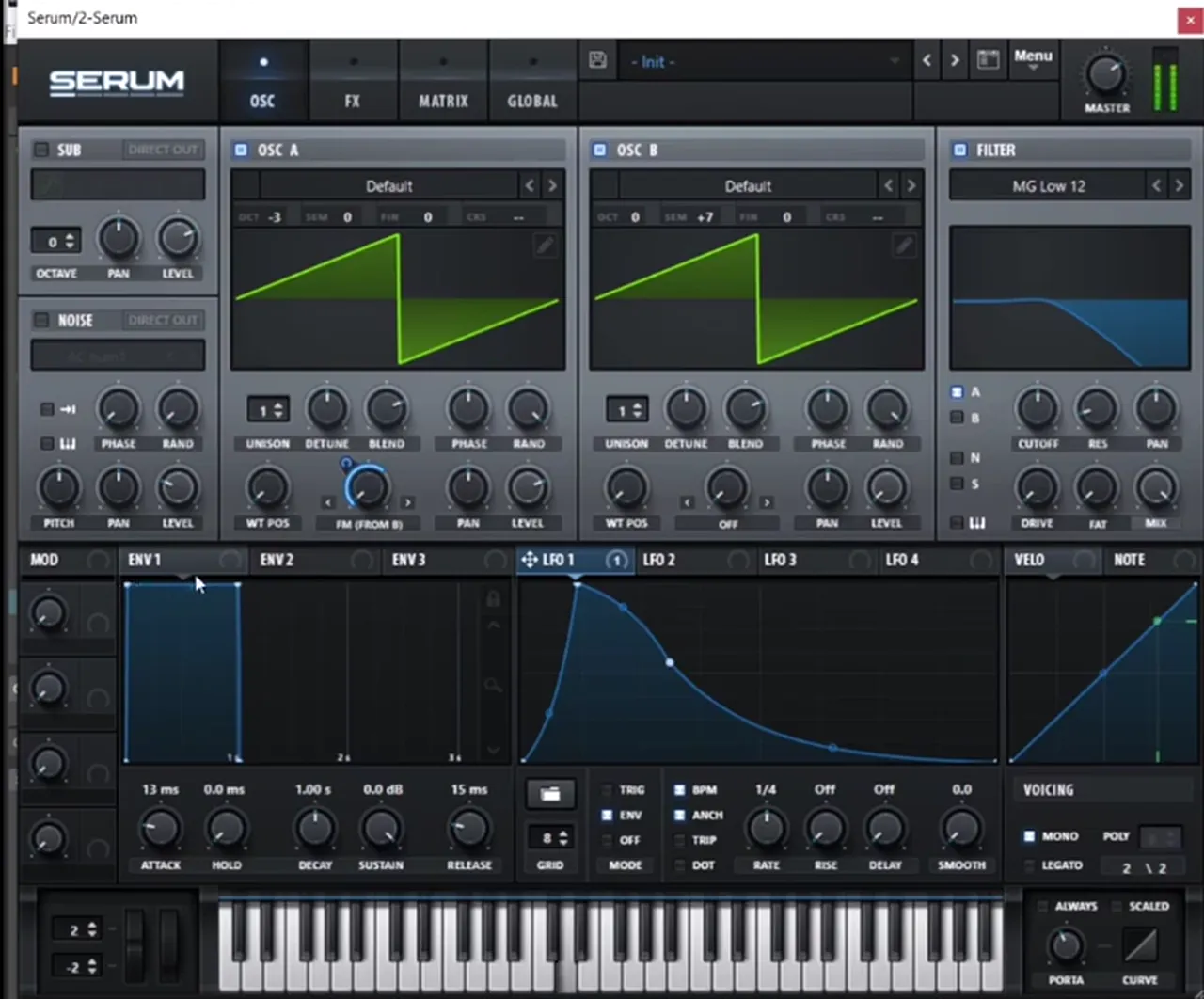
Oct -3 with FM (from B), oscillator B at +7 semitones, LFO 1 in Env mode on the FM amount. Mono and Legato are on in the voicing section.Listen: the deep FM bass with longer notes11 sec
Then shape it. Change oscillator B’s octave or wave: a sine on B gives a smoother FM tone (watch at 3:06). Map the same LFO to the filter cutoff to help the movement, and change the LFO’s length, because the length and shape of the FM sweep change the sound drastically (watch at 3:30). On screen the LFO 1 to warp amount reads 57 and the rate is later set to a full bar for longer notes. Two sine waves also work well (watch at 4:25), and drawing in extra harmonics with the pencil, including some of the odd ones, makes the tone “way cooler” (watch at 5:00).
3.Make a modern jump up formant bass
A formant bass talks. Put Serum’s FX filter in a formant mode, drive it and move its cutoff with an LFO, and a plain saw starts to sound like it’s saying vowels: the “vocal” jump up sound you hear a lot of lately.
Our formant bass video: a talking jump up bass from a blank Serum patch.
Before any sound design, our formant video sets the scene: an 808-style sub on its own track and sidechain already in place, so you hear the new bass in context (watch at 0:41). Then, starting from a blank Serum:
- Add a multiband compressor. Turn on Multiband and pull the threshold down (watch at 1:33).
- Add the formant filter. In Serum’s FX tab, add Filter, open the menu, go to Misc and choose a formant mode; on screen it’s
Formant-I(watch at 2:04). Try it before and after the compressor, because the order changes the sound (watch at 2:30). - Play with drive and cutoff. These get you the talking tone; the formant knob gives you different flavours (watch at 2:45).
- Automate the cutoff with LFO 2. On screen it’s a quick decaying shape in envelope mode at
2 bar(watch at 3:17). - Add width and a little space. Hyper/Dimension (size around
11%on screen) and a touch of reverb (watch at 3:58).
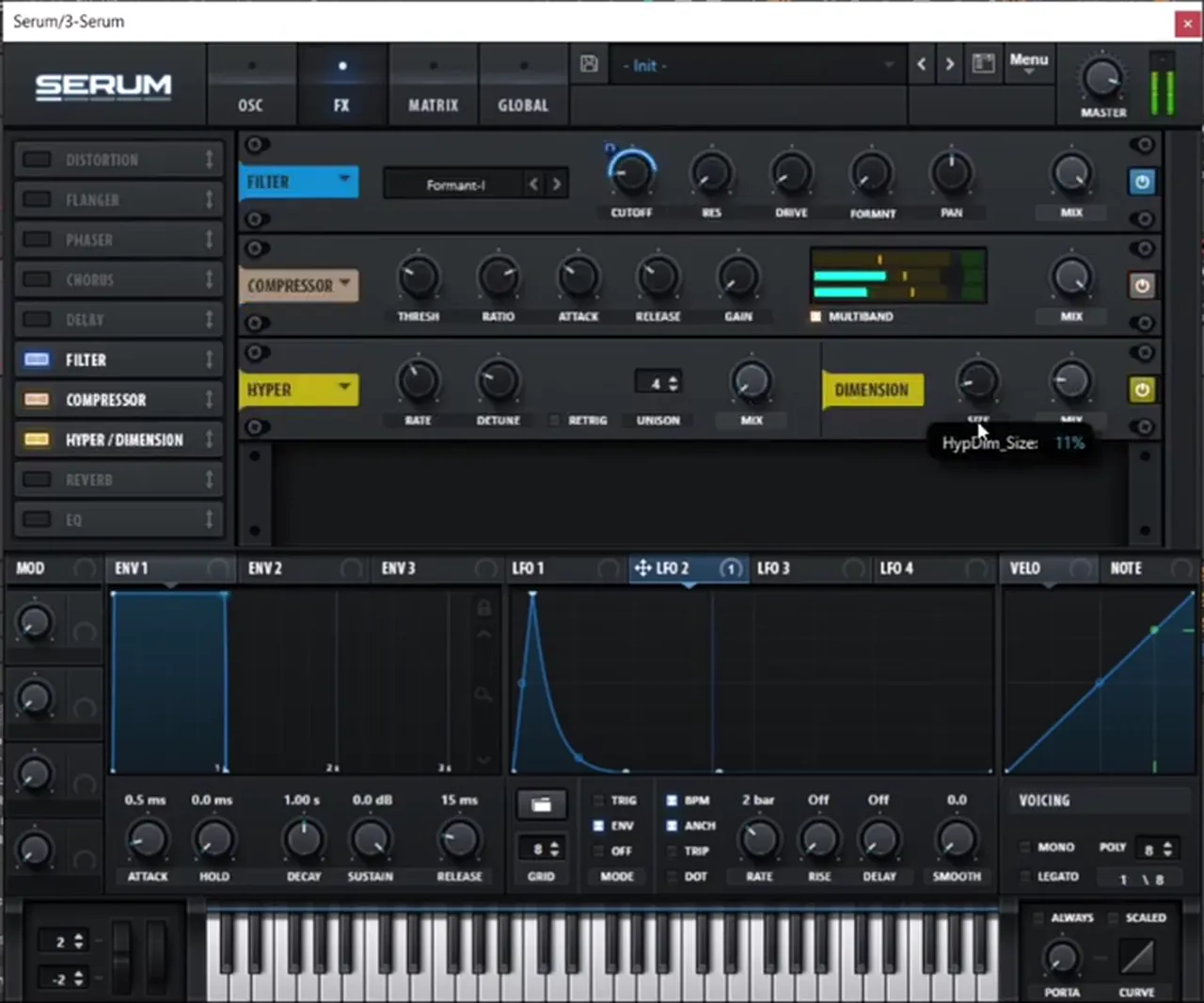
Formant-I, a Multiband compressor and Hyper/Dimension, with LFO 2 (Env, 2 bar) driving the cutoff.Listen: the formant bass with LFO 2 moving the filter12 sec
For more weight, our formant video adds a stronger low end inside the patch: a basic shape on oscillator B with extra harmonics drawn in with the pencil (watch at 4:19). Then it saves the patch as a starting point and keeps experimenting: drive the filter harder, set an LFO to one bar in envelope mode, or try two bars (watch at 6:53). There’s also a second formant mode, Formant-II, which sounds different, but the first is “the one that a lot of people are using” (watch at 7:38). The same idea makes the yo-yo style basses you hear in jump up (watch at 8:01).
4.Make a bass inspired by Annix’s “Boomerang”
Our Annix-inspired video recreates the style of the jump up bass in “Boomerang” by Annix: two notes with a big pitch bend, a weighty sine, a second oscillator built by hand from the 7th harmonic, LFO-driven hits on noise and level, and a lot of character from the effects.
Our recreation with Paulo from DNB Academy, inspired by Annix’s “Boomerang”. We don’t play the original track on this page; listen to it on your usual streaming service for reference.
The notes and the bend
The sequence is simple: just F and E (watch at 0:43). The movement comes from pitch bend: set Serum’s bend range to 7 semitones up and draw the bend rising on chosen notes (watch at 0:51). The project runs at 175 BPM.
The oscillators
- Oscillator A: a sine with harmonics 1 and 3. Load a sine, open the harmonic editor and add the third harmonic to the first, for a squarer shape and a more powerful low end (watch at 1:12).
- Oscillator B: the 7th harmonic. Clear the harmonics and keep only number 7, then add a few harmonics either side of it for a grittier feel (watch at 1:34). Through distortion, those side harmonics add dirt (watch at 2:01).
- Noise with a hit. Add noise (
AC hum1on screen), turn its level right down and map LFO 2 to it for a subtle noise hit (watch at 2:21). - LFO 1 on oscillator B’s level. Turn B down, map LFO 1 to its level, set the LFO to envelope mode and switch BPM off so you can set the length freely;
3.4 Hzon screen (watch at 2:42).
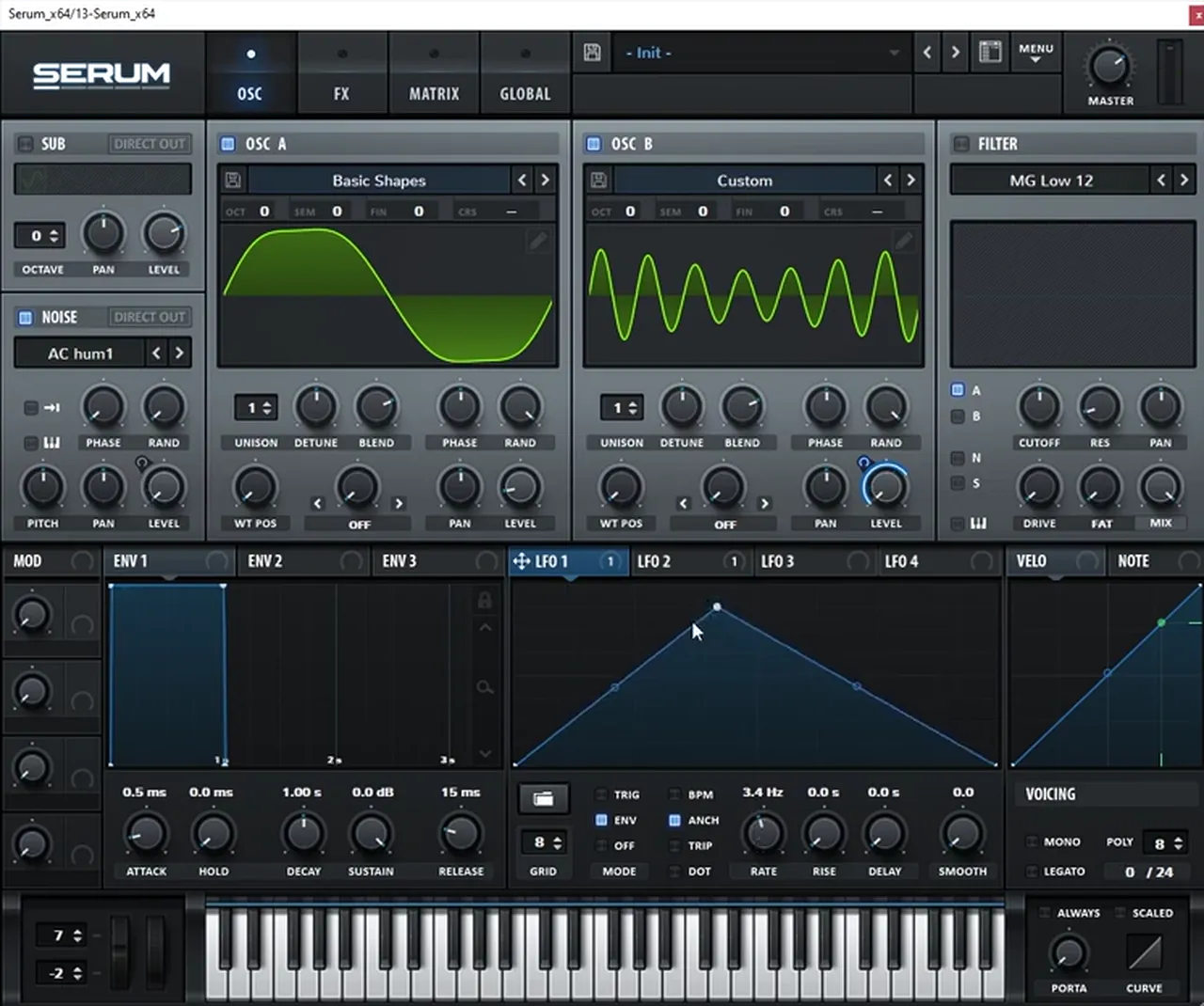
AC hum1 noise, and LFO 1 in Env mode at 3.4 Hz with BPM off. Pitch bend range: 7 up.Listen: oscillator B’s harmonics through distortion10 sec
The Serum effects
- Distortion. Try the different modes; on screen it’s
Diode 1(watch at 3:11). - Hyper/Dimension for a wider bass (watch at 3:21).
- Chorus, with an LFO on its mix so it isn’t always there (watch at 3:28).
- Filter in Reverb mode for an extra layer of metallic noise, again with an LFO on the mix (watch at 3:35). Tip from the video: with the mix fully up, more drive and a very slow LFO, this filter becomes an effect of its own (watch at 4:05).
- Reverb, very subtle, with size and decay right down and an LFO on the mix (watch at 4:33).
- EQ, a gentle high boost (watch at 4:57), then a multiband compressor with some gain and the release all the way up (watch at 5:17).
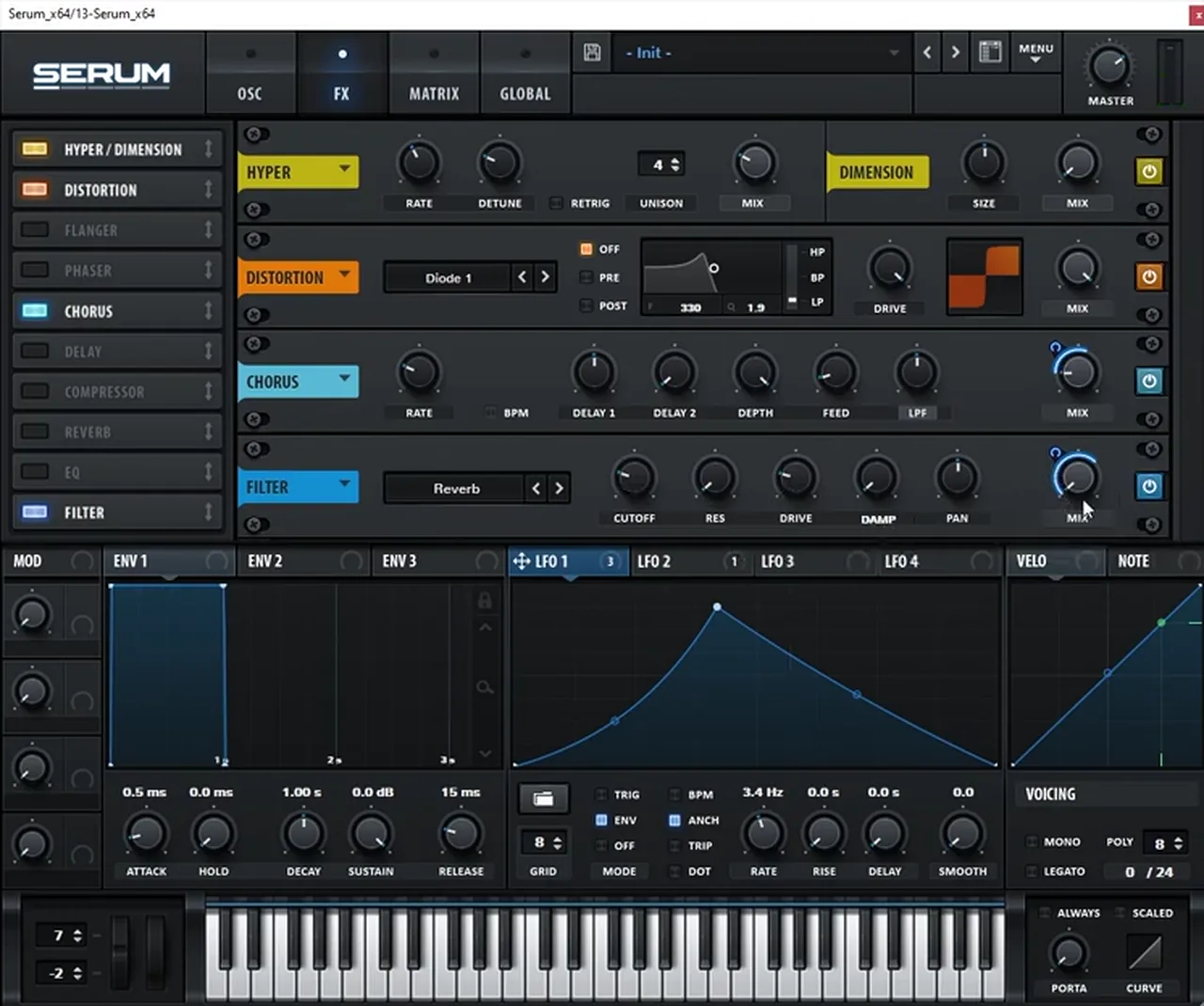
Diode 1), Chorus and a Filter in Reverb mode. Reverb, EQ and the compressor follow below them.The video calls this “basically 80% of the sound” (watch at 5:49); the rest comes from the processing after Serum, which we cover in step 8.
5.Write the call-and-response riff
A jump up riff is a question and an answer: a short phrase that sets up a rhythm on one note, then a reply that moves away from it and comes back. Keep it to one or two bars, leave gaps, and let notes slide or bend into each other.
Look at the riffs in our videos and the same habits appear:
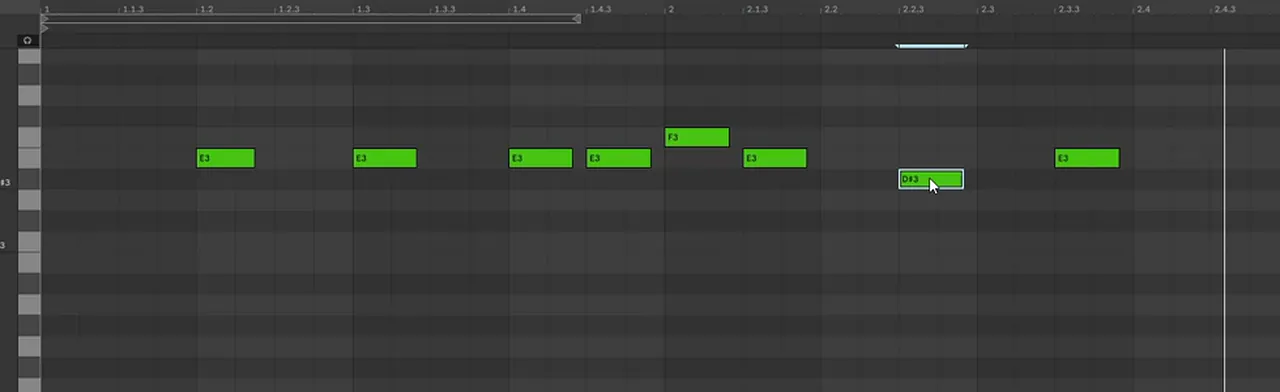
- Stay around one root. The classic riff hammers E3, then answers with the notes either side, F3 and D♯3 (watch at 0:55).
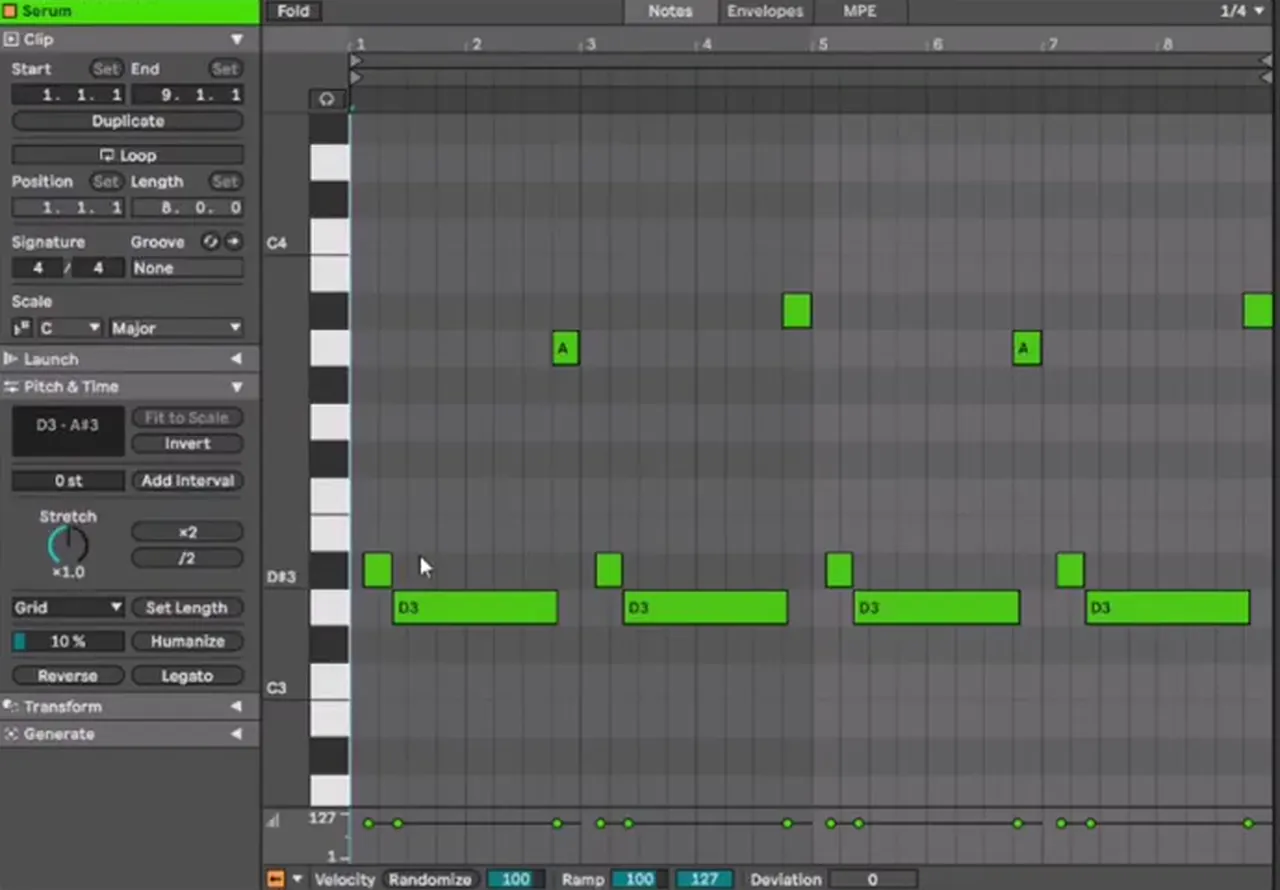
- Slide into the root. The deep riff puts a short D♯3 before each long D3; with mono and glide on, it scoops into the note (watch at 4:10).
- Answer up high. In the same deep riff, short A3 and A♯3 stabs reply above the long notes.
- Bend instead of adding notes. The Boomerang-inspired riff only uses F and E; the 7-semitone pitch bend does the talking (watch at 0:51).
Rhythm changes the character as much as the patch. Our classic video points out that for longer, elongated bass lines you should arrange the MIDI differently rather than only tweak the sound (watch at 7:49), and our Annix-inspired video halves the speed of the MIDI, then rewrites and duplicates phrases to get variations (watch at 8:50). For more on writing bass lines as call and response, see our bass patterns tutorial.
6.Drums for jump up
Jump up drums are punchy and fairly simple: a strong kick and snare on a two-step pattern, a loop on top, and plenty of space for the bass riff. The bass is the lead, so the drums support it rather than compete with it.
None of our four videos programs drums from scratch; each one designs the bass over a simple loop that is already in the project, which is a good way to work: you hear straight away whether the riff and the drums lock together. Our formant video goes one step further and puts sidechain on the bass before designing the sound, so the kick and snare punch through the riff (watch at 0:54). Our Annix-inspired video plays the finished bass with drums at the end (watch at 7:58).
For the beat itself, start with the classic two-step: kick on beat 1 and the “and” of beat 3, snares on beats 2 and 4, at around 174 BPM. Our drum and bass drum patterns guide shows that pattern and its variations, and our punchy DnB drums tutorial shows how to make them hit.
7.Layer the mid bass with the sub
Keep the sub separate. Let the jump up patch be the mid bass, cut its lowest frequencies, and put a clean, mono sub on its own track underneath, playing the same notes, so the riff can be as wild as you like without wrecking the low end.
- Have the sub there from the start. Our formant video designs the bass over an 808-style sub on its own track (watch at 0:41).
- Low cut the mid bass and add the sub back. Our Annix-inspired video puts reverb on the bass and avoids “the sin of adding reverb on the sub” by low-cutting the whole processed bass (around
130 Hzin EQ Eight on screen) and adding a separate sub (watch at 7:45). - Protect the sub from multiband effects. In Trash 2, remove band 1 so the distortion doesn’t touch the sub, and move the bands up if you hear phase issues (watch at 7:30).
- Weight inside the patch is fine, but keep it clean. A sine with added odd harmonics on oscillator A gives a powerful low end that holds up under distortion (watch at 1:12).
Our step-by-step guide explains how to make a clean sub, and our new DnB sub bass tutorial goes deeper.
8.Process the jump up bass
Most of the jump up bite comes from processing: multiband compression to bring up detail, distortion for grit, dimension for width, then resonance, EQ and short, filtered reverb after the synth. Use each one a little, compare, and back off anything that blurs the riff.
Inside Serum
All four videos use Serum’s multiband compressor. The classic video’s chain is compressor (Multiband, threshold about -10.2 dB on screen), a tiny bit of reverb, Hyper/Dimension and distortion in Diode 1 (watch at 3:02). It then tries the patch with and without the effects and prefers it “totally clean” for that riff (watch at 3:59): a good reminder to A/B every effect.
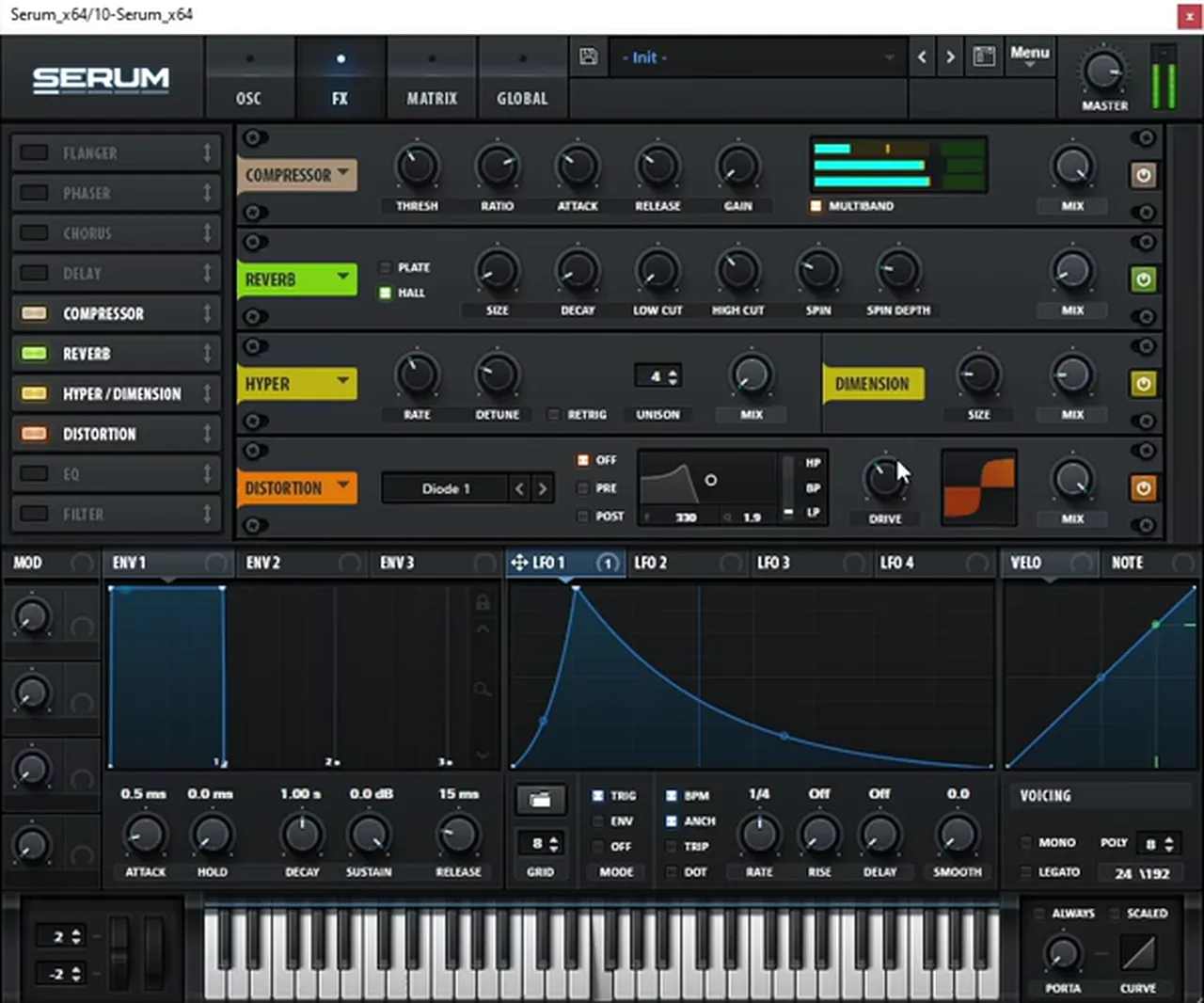
Diode 1).After Serum
- Reverb on a return, with EQ. Our deep video sends the bass to a return with Valhalla Room (preset Ambiences > Large Ambience) and FabFilter Pro-Q 3, then automates the send so the last note is dry (watch at 5:32). Our formant video calls a reverb with an EQ on it its “little secret sauce” for an ambient edge (watch at 6:10).
- Noise and saturation. A little noise and saturation make the bass bigger, and change how every Serum tweak sounds (watch at 6:30). Our formant video uses Ableton’s Erosion (Wide Noise) and Saturator (Analog Clip, about
7.88 dBdrive on screen) (watch at 4:34). - A resonator. Our Annix-inspired video adds kHs Resonator, essentially a comb filter, tuned to about
C2with the intensity lowered; Serum’s own comb filter is an alternative, and the difference is taste (watch at 5:52). - An EQ notch. A narrow cut around 500 Hz cleans the sound up; on screen it’s EQ Eight at
464 Hz,-15 dB, Q1.70(watch at 6:58). - A short reverb, then Trash 2. Ableton’s Reverb kept short (
1.20 sdecay,40%dry/wet on screen), then iZotope Trash 2 to boost the highs (watch at 7:16).
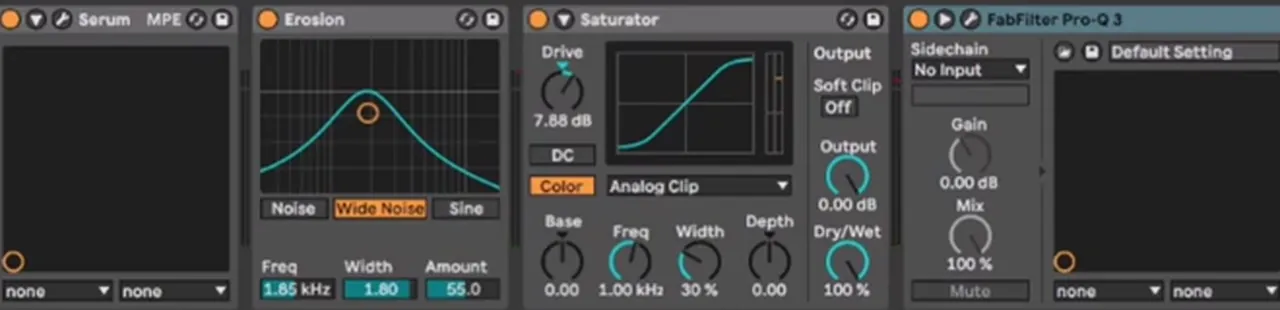
7.88 dB drive) and Pro-Q 3.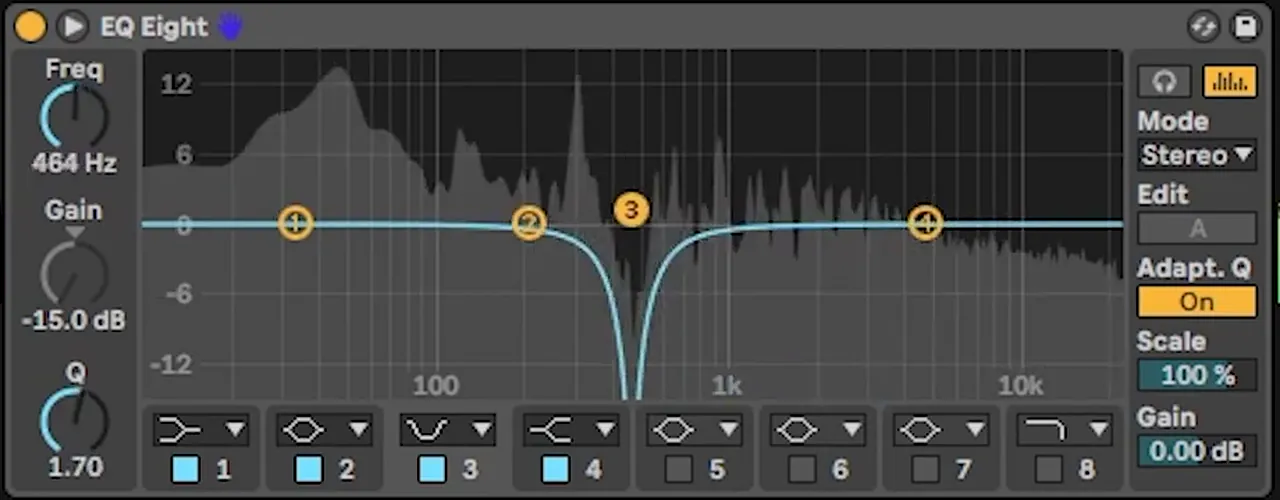
464 Hz, -15 dB, Q 1.70, to clean up the boxy mids.Once the bass sits with the drums, the rest is the mixdown. Our drum and bass mixing guide covers levels, the low end and the master, and our drum and bass bass guide lists every bass style we teach. For a darker, detuned mid bass to put next to these, try our reese bass tutorial.
Common jump up mistakes
- Designing the sound with no riff. Write the notes first; the patch should be built for the riff.
- Too many notes. Jump up riffs are mostly one root, a neighbour or two and gaps. Bends and slides add the movement.
- A filter that doesn’t restart. If the LFO isn’t re-triggered per note (Trig or envelope mode), every hit sounds different by accident.
- Reverb on the sub. Low-cut the processed bass and run a separate, clean sub.
- Effects that blur the hook. Compare with the effects bypassed; sometimes the clean version is better.
- Busy drums. The bass is the lead. Keep the beat punchy and simple, and sidechain the bass to the drums.
- Ignoring the octave. The same patch can sound weak or huge an octave apart; try them all against the drums.
Free download
Drums and samples for your jump up riffs
A bass riff only makes sense against a beat. The 174 Marathon Sample Pack gives you:
- 100+ royalty-free samples
- Drums, bass, FX, melodics and more
- Audio samples, so they work in any DAW
- Made for International Drum & Bass Day and our 174 Production Marathon
It’s one of seven free sample and preset packs in DNB Academy Free Access, along with the mixing and mastering e-books and the 3‑day DnB challenge. Join 40,000+ producers in Free Access. Free account, no card needed.
Go deeper
Jump up presets and a full course
Want ready-made jump up basses to pull apart, or to watch a whole club track being built?
 Preset bundleFrenzy jump up Serum presets100+ Serum presets for classic and modern jump up: 53 basses plus leads, arps, pads, FX and drums.
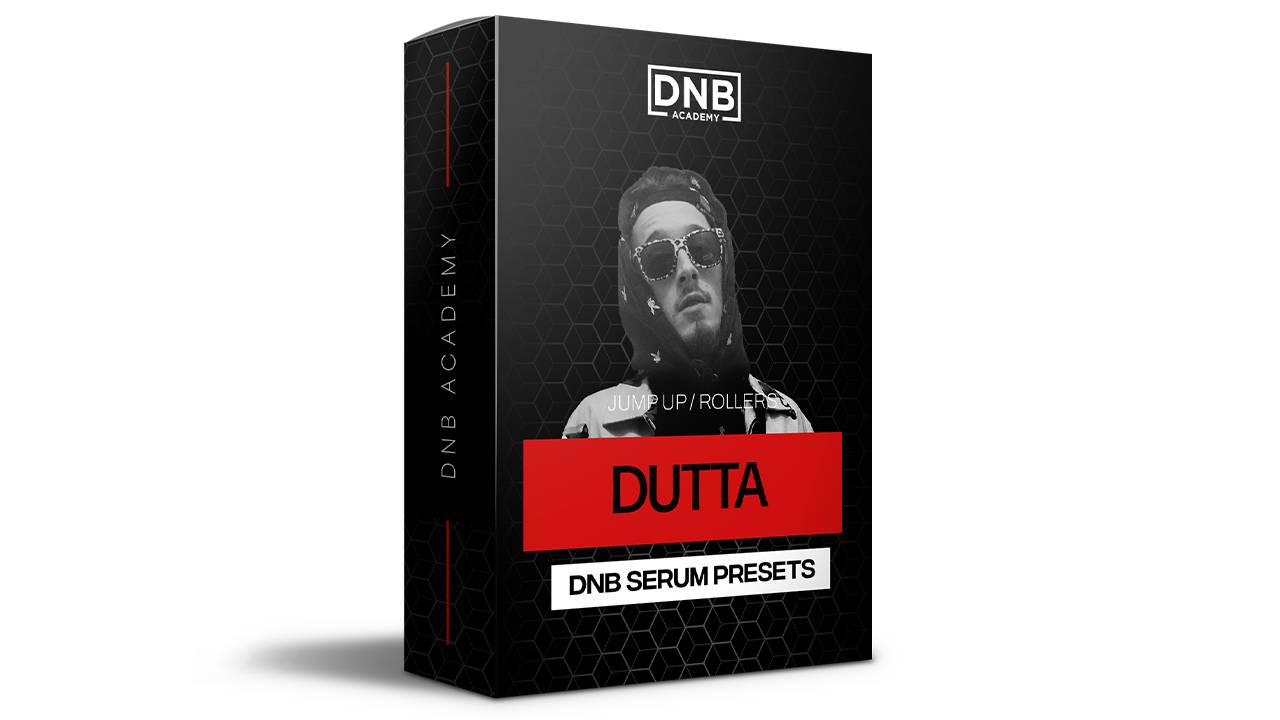 Preset bundleDutta Serum presetsJump up Serum presets in the style of Dutta: 76 basses and 14 synths, royalty-free.
 Production courseBass Brothers production courseA start-to-finish course of 7+ hours on making club-ready jump up and roller drum and bass, with the project files, presets and samples.
Every artist course, preset bundle and sample pack is also in The Vault. Browse courses
Related tutorials
All tutorials → Vital · Jump upHow to Make a Foghorn Bass in Vital6 min read · Video + guide
 Bass · PatternsNeuro Bass Patterns: Call and Response Basslines8 min read · Video + guide
 Bass · Sound designHow to Make a Reese Bass for Drum and Bass15 min read · Video + guide
 Vital · Sound designHow to Make a Bass Like Bou & Mark XTC’s Breathe in Vital9 min read · Video + guide
FAQ: making jump up DnB
What is jump up drum and bass?
Jump up is an energetic, bass-led style of drum and bass at around 170 to 176 BPM. It is built on bouncy, wobbly or formant mid basses played as short call-and-response riffs with lots of pitch movement, over fairly sparse, punchy drums, and it is written to get a big reaction on the dancefloor.
What BPM is jump up DnB?
Most jump up sits in the usual drum and bass range of about 170 to 176 BPM. The projects in our four jump up videos run at 172, 174 and 175 BPM, so 174 is a safe place to start.
How do you make a jump up bass in Serum?
Start from the default saw, put oscillator B seven semitones above oscillator A, drop both a few octaves and run them through the MG Low 12 filter. Then put a decaying LFO on the cutoff in trigger mode so every note re-triggers the filter, add multiband compression, and finish with distortion, dimension and a little reverb.
What is a formant bass?
A formant bass is a bass run through a formant filter, which imitates the resonances of the human voice, so it sounds like it is talking or saying vowels. In our formant video it is Serum’s FX filter set to a formant mode, with an LFO moving the cutoff.
How do you make a jump up bass like Annix’s Boomerang?
Our recreation uses F and E notes with a 7-semitone pitch bend, a sine with added harmonics for weight, a second oscillator built from the 7th harmonic with extra harmonics around it, LFO-driven noise and level hits, then distortion, dimension, chorus and a comb-style resonator, EQ notch and short reverb after Serum.
Do I need Serum to make jump up?
No. All four of our videos use Serum, but the same ideas work in other synths. Vital, which has a free version, also has FM between oscillators, filters with formant modes, LFOs you can draw and the same kind of effects.
What drums work for jump up?
Keep them simple and punchy so the bass riff has room: a solid kick and snare on a two-step pattern with a few top loops. In our videos the bass is written over a simple loop that is already in the project, and the formant video sidechains the bass so the drums punch through.
Where can I get free samples for jump up?
The 174 Marathon Sample Pack in DNB Academy Free Access has 100+ royalty-free samples, including drums, bass, FX and melodics, so you can test your jump up bass against real drums. Free Access is a free account with no card needed.
Next steps
Pick one of the four basses, write a two-bar riff for it around a single root note, and loop it over a simple beat. Then change one thing at a time: the octave, the LFO rate, the filter mode. When it sounds right, build the rest of the track around it:
Free Access
Seven free DnB sample and preset packs, including the 174 Marathon pack, plus e-books and a 3-day challenge.
Get free packsThe full guide
Tempo, drums, sub, mid bass, chords, arrangement and mixdown: every step of a DnB track.
Read the guideDNB Foundations
A structured drum and bass course with weekly live feedback calls on your tracks.
See Foundations1:1 Mentorship
Personal guidance on your music from a mentor, built around your goals.
See the mentorship50,000+ producers have joined DNB Academy, and our producer Discord has 5,300+ members.