Jungle · Production guide
How to Make Jungle Music: Chopping the Amen Break and More
To make jungle, set your project to roughly 160–175 BPM, slice a funk break such as the Amen into single hits and re-sequence them into new patterns, then put a deep, reggae-style sub bass under it and arrange it in 16-bar phrases. Here is the whole process, with Octavate’s breakdown of their jungle track “Straight Up”, Stranjah’s classic jungle basses and our own break and pad videos.
Part of our how to make drum and bass guide: this page goes deep on jungle, the style drum and bass grew out of.
Quick answer
What is jungle?
Jungle is an early-1990s UK breakbeat style and the root of drum and bass. Its drums are sampled funk breaks, most famously the Amen, chopped and re-sequenced into frantic, rolling patterns. Underneath sits deep, reggae and sound-system influenced sub bass. Classic jungle runs at roughly 160–170 BPM; many modern tracks go faster.
- Set the tempo.160–170 BPM for a classic feel, up to full DnB tempo for modern jungle.
- Chop a break.Slice the Amen or another break into single hits.
- Re-sequence it.New orders, re-pitched hits, edits and rolls.
- Add the bass.Deep subs, drop basses and reeses in call and response.
- Arrange.Pads and FX, then 16-bar phrases with a switch-up.
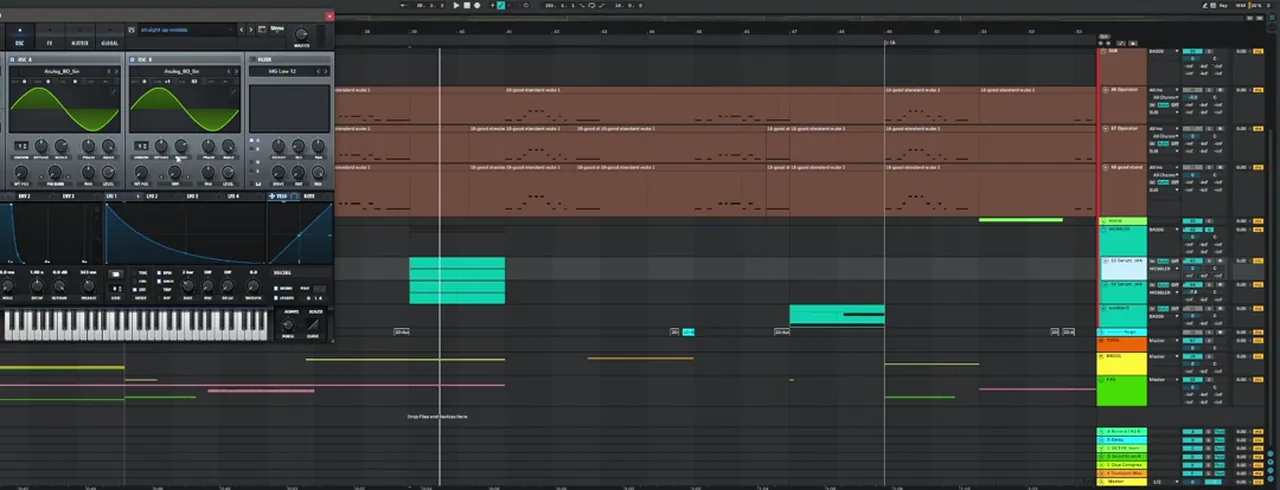
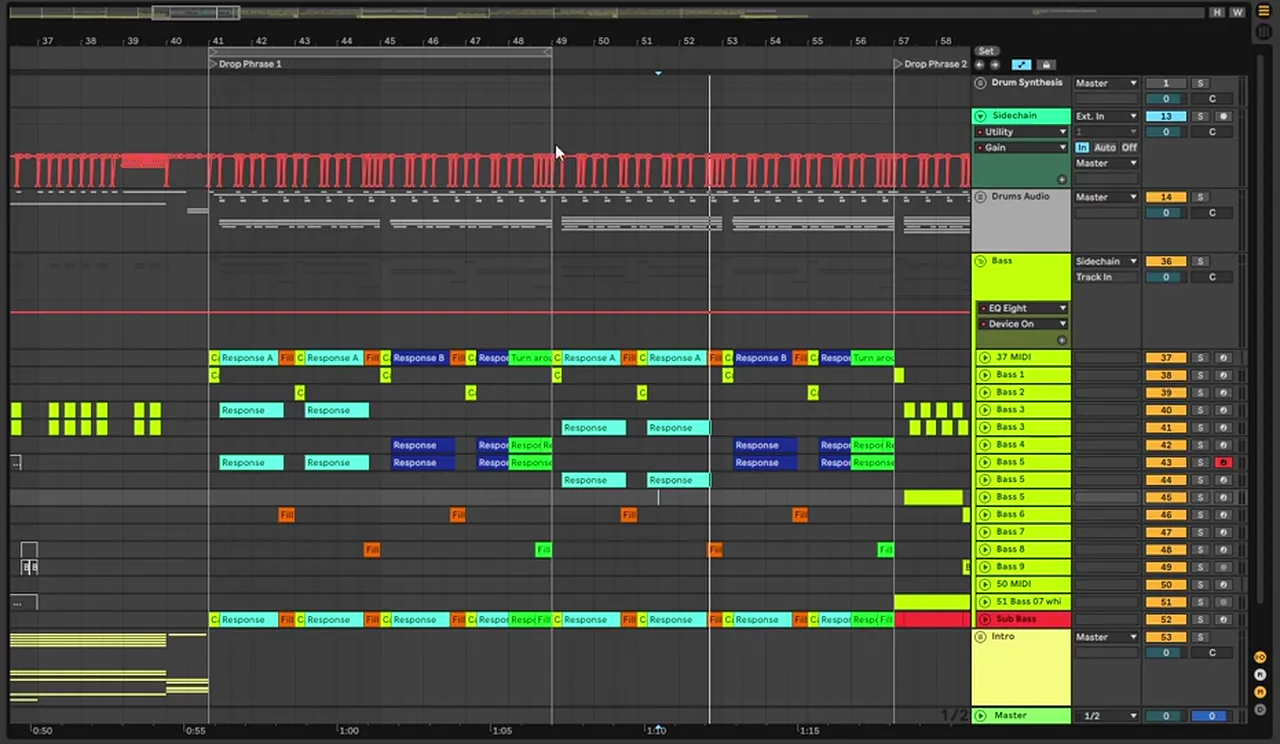
Watch Octavate break down their jungle track “Straight Up” in Ableton: the stacked breaks, the bass “horn” rack, the FX and the arrangement. We use their project throughout this guide.
A short history of jungle
Jungle took shape in early-1990s UK rave culture. Producers sampled breaks, the sections of funk and soul records where only the drums play, sped them up and chopped them into new patterns over basslines borrowed from reggae and dub sound systems, with MCs on top. The Amen break, a short drum solo from The Winstons’ 1969 track “Amen, Brother”, became the most sampled of them all, and by the mid-1990s jungle was growing into what we now call drum and bass. Read more in the jungle section of our subgenres guide.
The Amen break: the facts
- Record“Amen, Brother”
- ArtistThe Winstons
- Year1969
- DrummerGregory Coleman
“Amen, Brother” was the B-side of The Winstons’ 1969 single “Color Him Father”. Drummer Gregory Coleman plays a four-bar break on it, and that break became one of the most sampled drum loops in jungle and drum and bass. The band received no royalties for its sampling.
For your own tracks, always check the licence of any sample you use. The breaks in our free Primal Jungle starter pack are royalty-free.
Source: Wikipedia: Amen break
What you’ll need
- Any DAW with a sampler. Every project here is in Ableton Live, using Simpler and Drum Rack slicing, but FL Studio, Logic or Bitwig can chop breaks just as well.
- A break or two. A funk break like the Amen, or royalty-free breaks such as the five in the free Primal Jungle starter pack.
- A synth for bass. Stranjah and our Bladerunner-style video use Serum. Vital, which has a free version, has the same building blocks: sine, saw and square oscillators, envelopes, LFOs, FM and a filter with drive.
- A wavetable synth for pads. Our pad video uses Ableton’s Wavetable with the Chord MIDI effect.
TipKeep a spectrum analyser on your drum bus. Layered breaks pile up mud in the low mids faster than you think.
1.Set the tempo and the project
Classic jungle sits at roughly 160–170 BPM; many modern jungle tracks run at full drum and bass tempo, around 170–175, or a little faster. Pick the feel first: slower gives the breaks more swing, faster gets you closer to modern DnB.
Our videos cover the range. Our jungle pad project runs at 160 BPM (you can see it in Ableton’s tempo box), Stranjah works at 170 BPM, and our jungle breaks video warps the Amen to 174 BPM. The Primal Jungle starter loops are at 170 BPM, so they drop straight into a project at that tempo.
- Warp your breaks. In Ableton, Beats warp mode with Transients preserved keeps the hits tight when you change tempo. Our breaks video uses it as the starting point for every edit.
- Think in 16-bar blocks. “We work in 16 bar blocks, usually in jungle drum and bass,” says Stranjah (48:28). Octavate drop a locator every 16 bars and label them A, B, C, D so they can talk about each phrase (1:06:55).
- Group early. Octavate’s project has separate groups for the drums, extra drums, drum FX, bass, a lead bass layer, melodic “mids” and FX, which makes the mix much easier later.
For the full tempo and phrase maths, see our drum and bass BPM and structure guide.
2.Chop the Amen (or any break)
Chopping means slicing a break into single hits, each kick, snare and ghost note on its own, so you can play them back in any order. Warp the break to your tempo, slice it at every transient, and map the slices to pads or MIDI notes.
Before you chop, know what you are cutting. Here is the first bar of the Amen as it’s usually transcribed on a 16-step grid. It’s the same grid as pattern 5 in our drum and bass drum patterns guide:
Two kicks open the bar, a double kick sits before beat 4, and the main snares on 2 and 4 are surrounded by softer ghost snares. That is what makes a break “broken”: the backbeat is still there, but the hits around it fall off the simple two-step grid.
Slice to MIDI
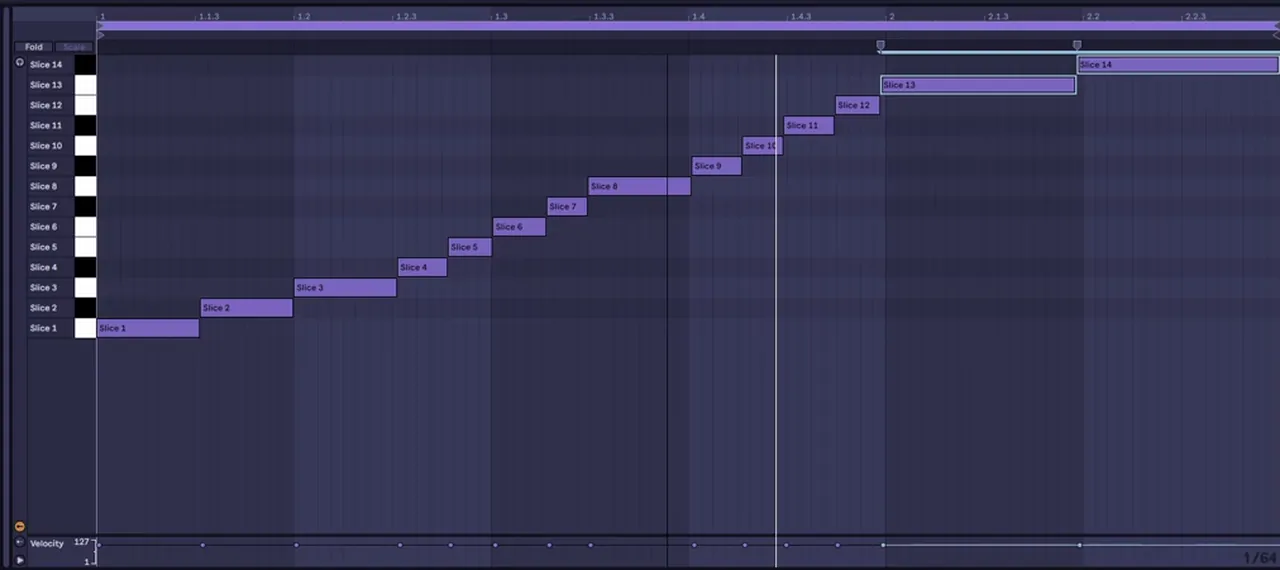
In our marathon video, Stranjah drops an Amen into Ableton and uses Slice to New MIDI Track (40:31). Ableton cuts the break at its transients and builds a Drum Rack with one slice per pad, then writes a MIDI clip that plays the slices in their original order. Play that clip and you hear the break untouched; move the notes and you have a new beat.
Or chop in the audio
You don’t need a sampler. Octavate do a lot of their chopping directly on the audio clips, cutting, moving and reversing pieces “in order to make new break melodies” (15:00). Watch out for clicks at the cut points: short fades fix them.
We don’t play the Amen itself on this page, because it comes from a released record. If you want to clear your own sample use, start from royalty-free breaks instead, like the ones in the Primal Jungle starter pack.
3.Re-sequence, re-pitch, edit and roll
Once the break is sliced, write new patterns with it: move slices to new steps, repeat hits, re-pitch a few for variation and add rolls at the ends of phrases. Then glue it all back together so the edits sound like one drummer.
New orders and switch-ups
Stranjah rearranges his Amen slices into a new jungle pattern, adds a crash, writes a variation for the second bar and uses it as a switch-up from a plain two-step beat to the Amen pattern. He quantises the slices only to save time in the marathon: “Usually I keep it a bit more human.” The Drum Rack’s macros (Pitch, Tight Control, Filter, Drive and more on screen) let you shape every slice at once.
The simplest edit of all is repetition. Our breaks video repeats a slice from a snare onwards to get “a cool different variation and different chops”: one repeated hit can turn a familiar break into a new groove.
Re-pitch the same break in layers
Octavate thicken their breaks without changing their character. Instead of stacking a different break, which brings “a new kind of vibe”, they duplicate the same break and transpose the copies (15:30):
- The original, warped but not transposed.
- A copy at -5 semitones for body: pitched down, it gets slower and fuller in the low mids.
- A copy at +5 semitones for transients: pitched up, the attacks get sharper. They EQ out its tops and some harsh frequencies around 12 kHz.
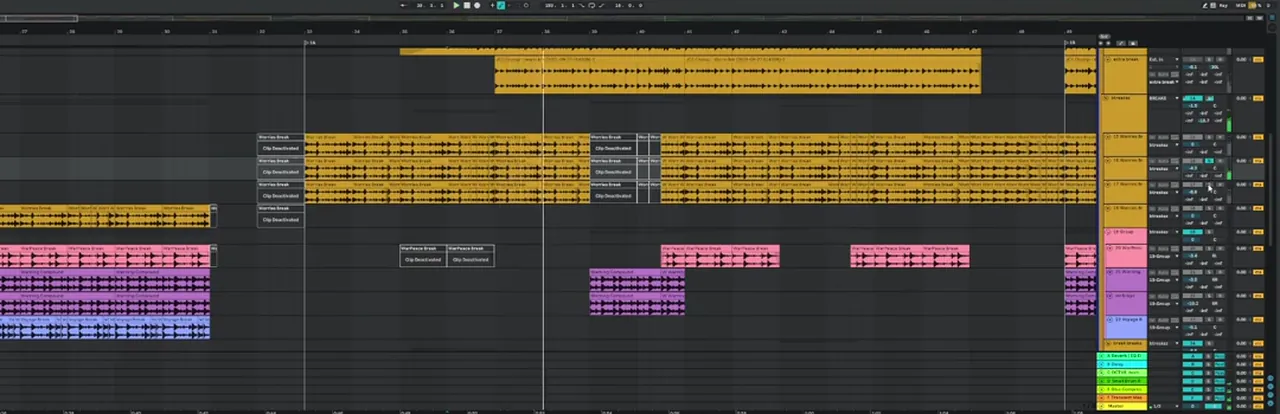
Mix the copies under the original so the main layer still “carries the signal”. In their project the main break runs through the intro and both drops, and different “reply” breaks fill the end of each phrase, a call and response between breaks that works like a bassline.
Rolls and glue
Rolls are fast repeats of one hit, usually a kick or snare, that build into the next phrase. Octavate use a simple kick roll for the intro and build. Afterwards, glue the edits: Octavate put a short reverb before a saturator on their breaks so the saturation hits the dry and wet signal together, merging the sounds (22:50). Parallel compression does a similar job; our punchy drums guide shows how.
Listen: a break without, then with parallel compression6 sec
4.Modernise old breaks
An old break on its own sounds thin next to modern drums. To make it hit, tighten it, add a short transient on every snare, layer a modern kick and snare underneath, keep double kicks quieter and clean the low mids.
Our jungle breaks video (watch it here) takes the classic Amen, warped to 174 BPM, and upgrades it step by step:
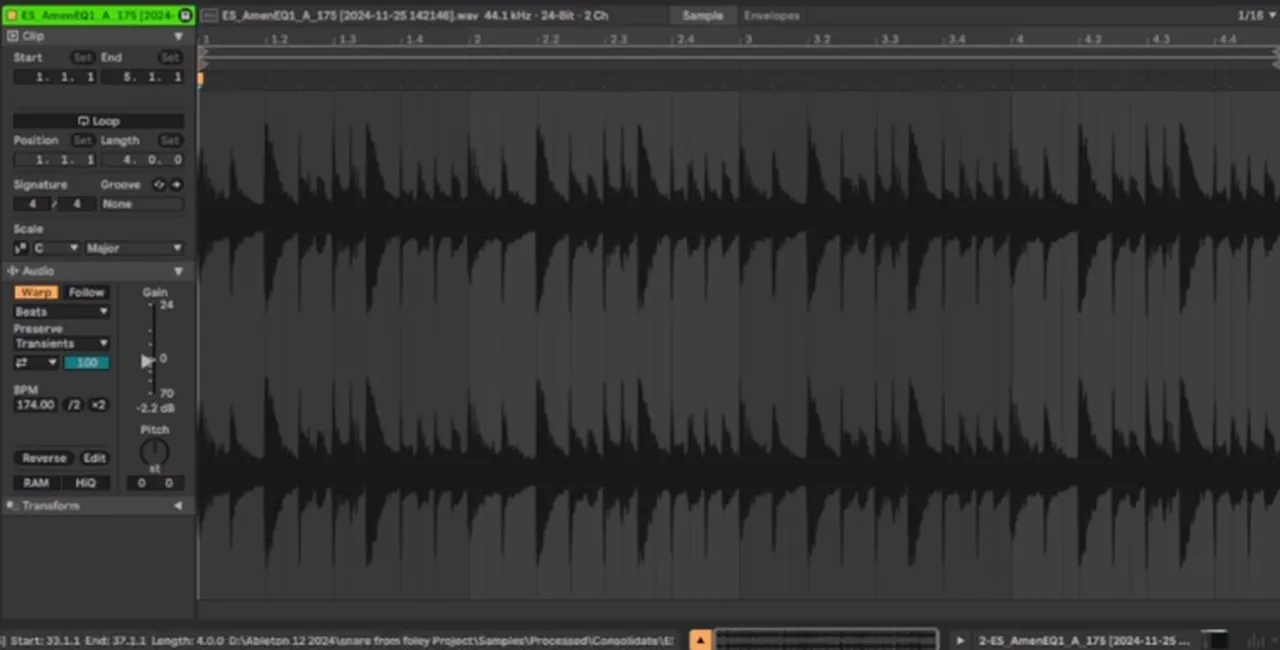
- Tighten it. Use the Transients setting to shorten the hits, or keep the splashy sound if you like it.
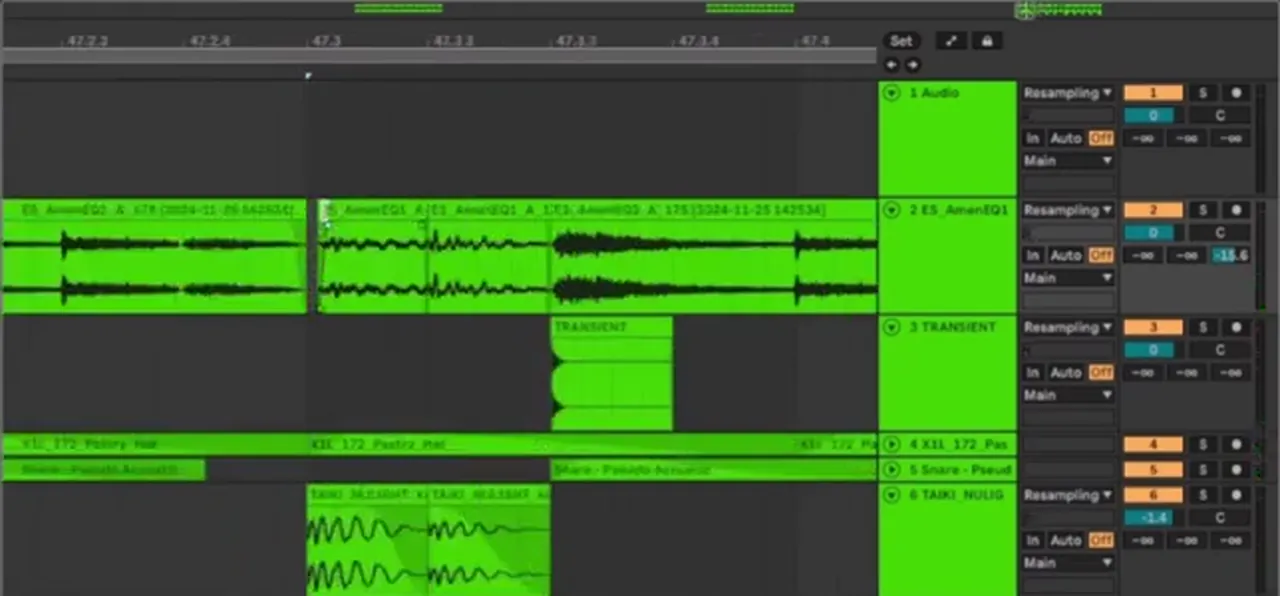
- Add a transient on every snare. Lay a short click sample on each snare with a little fade in front of the original, “so the transient has a bit more space to breathe” (2:11).
- Add straighter hi-hats. Hats that are “more straight and more upfront” help glue the break to modern drums.
- Layer a heavier snare for a neuro feel, fading the layer so it doesn’t fight the transient you just added.
- Layer a modern kick. Fade out the original kick, take out some of its rumble and place an electronic kick on top (7:23).
- Keep double kicks quieter than the main kick, “because that’s also kind of how the drummer plays”.
How Octavate process their breaks
Octavate’s “Straight Up” is built on stacks of organic breaks, and the processing is mostly about controlling them:
- Soft kick, simple snare. One kick with no processing at all: “You don’t want too transient-heavy kicks in jungle typically.” The snare gets a high-pass, a small dip around 500 Hz for mud and a transient shaper (9:03).
- A multiband gate on the breaks. Layered breaks pile up rumble around 200–400 Hz. A multiband gate (they use iZotope Trash) cuts that mud while the highs stay lush, and it can work almost like a transient isolator (21:03).
- A gentle drum bus. Ableton’s Drum Buss on a low mix (26% on screen), its low-pass at about 10 kHz and the transients pulled back; then a Glue Compressor with soft clip and a touch of Saturator, because jungle is “quite gritty and dirty and you don’t want it too clean and clinical” (27:37).
- The “sheen”. A shaker or hat washed out in reverb, compressed hard by the kick and snare and kept very quiet, sitting above 10 kHz. It adds the sense of a room full of players behind the drums (41:25).
5.Jungle bass: subs, drops, reeses and more
Jungle bass is deep and simple underneath and playful on top: a sine or 808-style sub with long notes, plus character basses such as drop basses, reeses, warp basses and foghorns. Play them in call and response, keep the low end mono, and side-chain the bass to the kick.
In our 174 Production Marathon video, Stranjah designs ten classic jungle basses in Serum in 30 minutes, then writes a track with them. Here are the main recipes, with the settings he uses on screen.
Stranjah builds ten classic jungle basses in Serum, then writes a track with them.
Our Bladerunner-style jungle bass recreation, covered below.
The 808
- Sine wave on oscillator A, with a 5 ms attack on the amp envelope to stop the click.
- Pitch attack: envelope 2 on the global master tune, up one octave (12 semitones), sustain down and a very short decay of about 15 ms (1:29).
- Slow pitch drop: LFO 1 in envelope mode, about one bar long, on master tune by just one semitone, so each note sinks slightly, “a little more kind of like an 808”.
- Shape and saturate: sculpt the amp envelope so the waveform isn’t “a brick wall of sound”, then turn the filter on with the cutoff all the way up and use only its drive. Bring the master down to compensate and lengthen the decay (he lands on about 1.5 seconds).
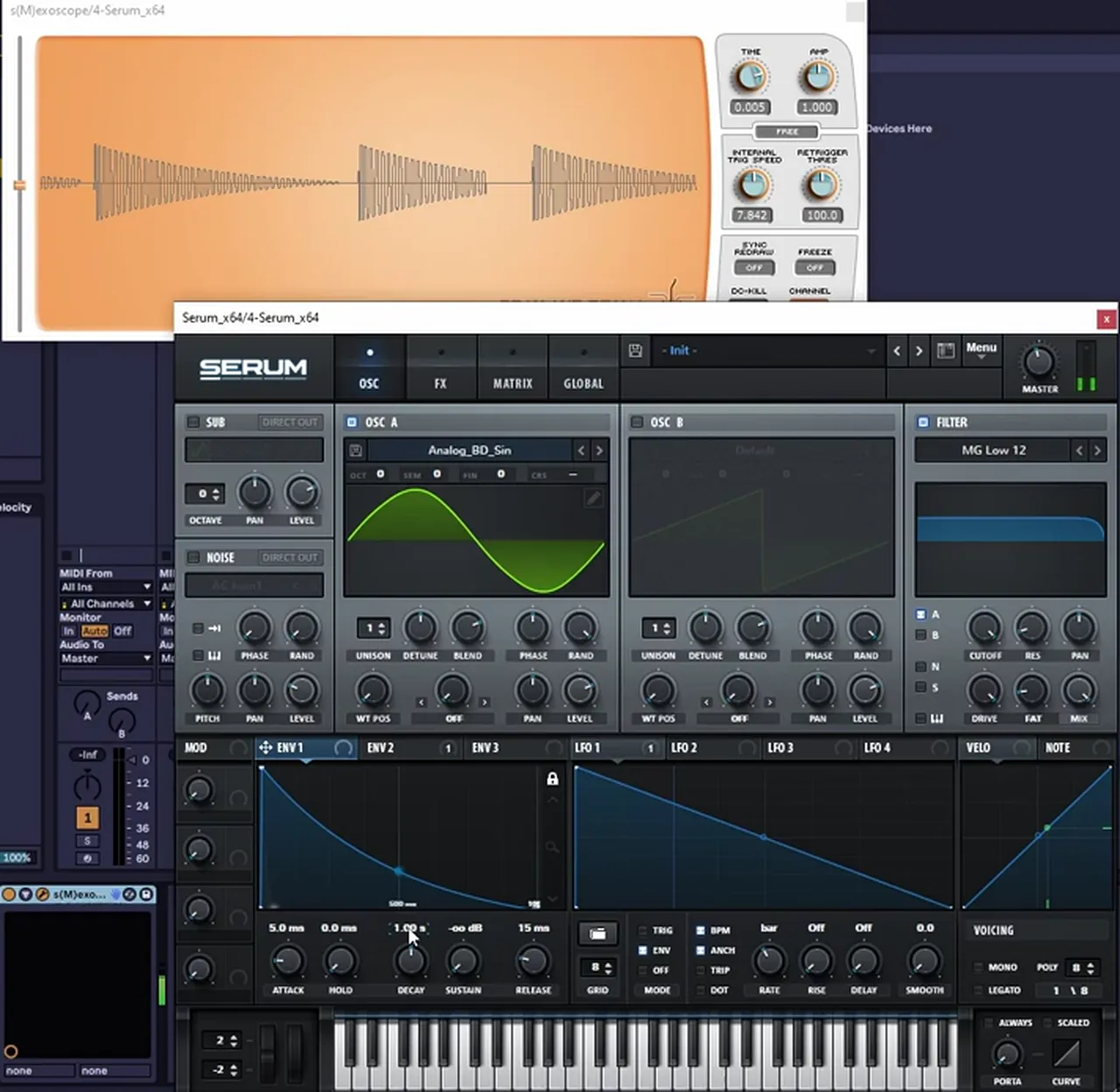
Listen: Stranjah’s 808 bass in Serum8 sec
Drop bass is the same idea with a stronger bend: LFO 1 pitches down seven semitones instead of one, more slowly (about two bars), with a softer attack, a longer amp envelope and less drive. Stranjah also saves a distorted version with a macro that switches an LFO wobble on (5:20).
The old-school reese
Stranjah’s old-school reese starts from two sine waves, not saws. Detune them in opposite directions (fine-tune +50 on one, -50 on the other on screen), then use Serum’s Bend warp mode to bend the sines and add harmonics: “See how it sounds angrier?” A short attack removes the click, and a little Tube distortion finishes it (10:00).
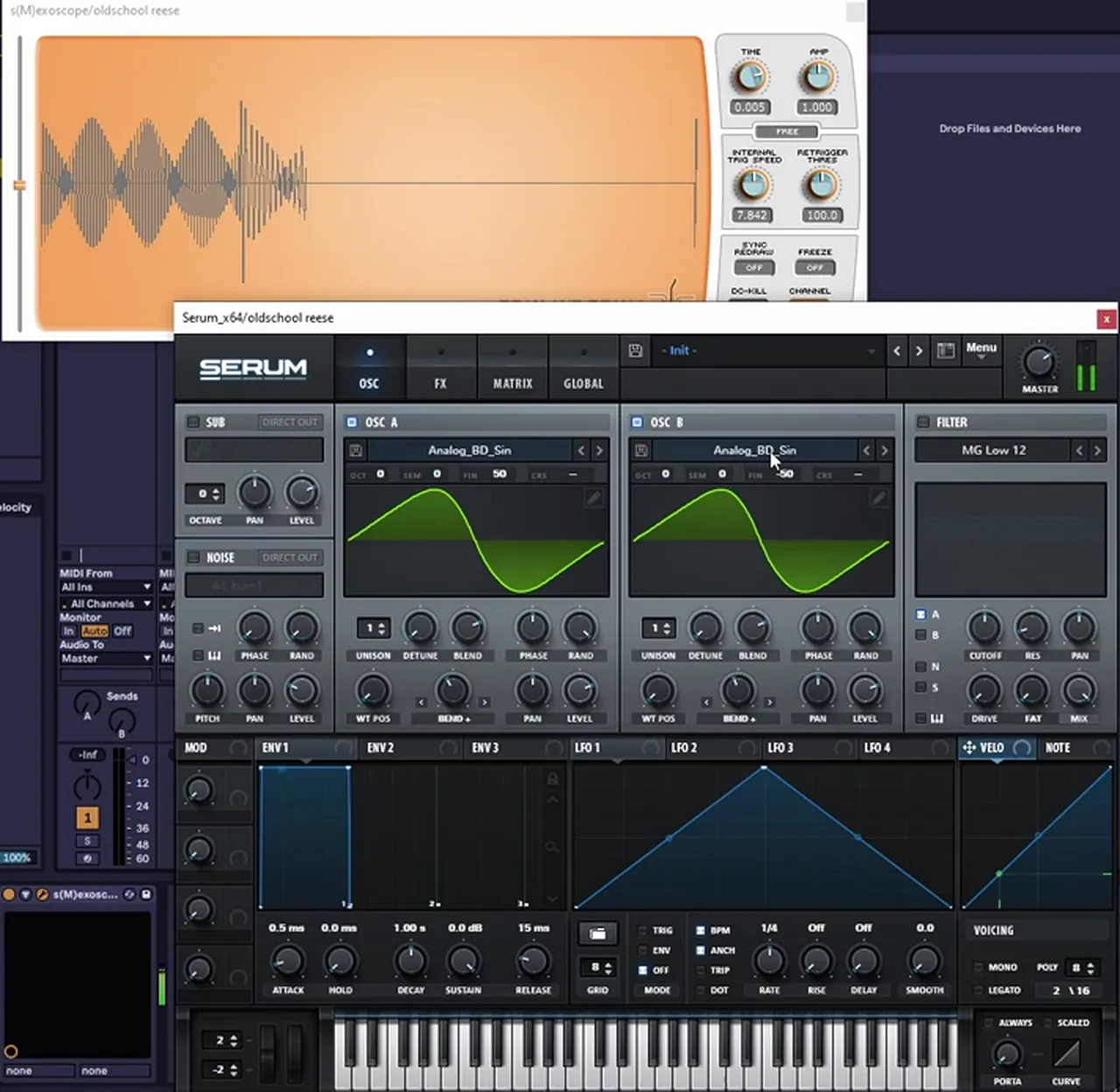
Listen: Stranjah’s old-school reese6 sec
His new-school reese uses a saw with more unison voices, the stereo width pulled right down (to about 30), distortion, a phaser and some portamento for slides (11:35). For the full reese story, see our reese bass guide.
The warp bass
A square wave through a low-pass filter (MG Low 24), with envelope 2 opening the cutoff slowly (a 425 ms attack on screen), resonance up for “juice” and drive to warm it up. Stranjah shapes the note so it ends with a short tail instead of repeating, adds a delay that bounces back once, cuts the bottom end with EQ, then adds distortion and a mid boost (14:29). It’s a recreation of “the very first bass sound I ever downloaded, like 25 years ago”.
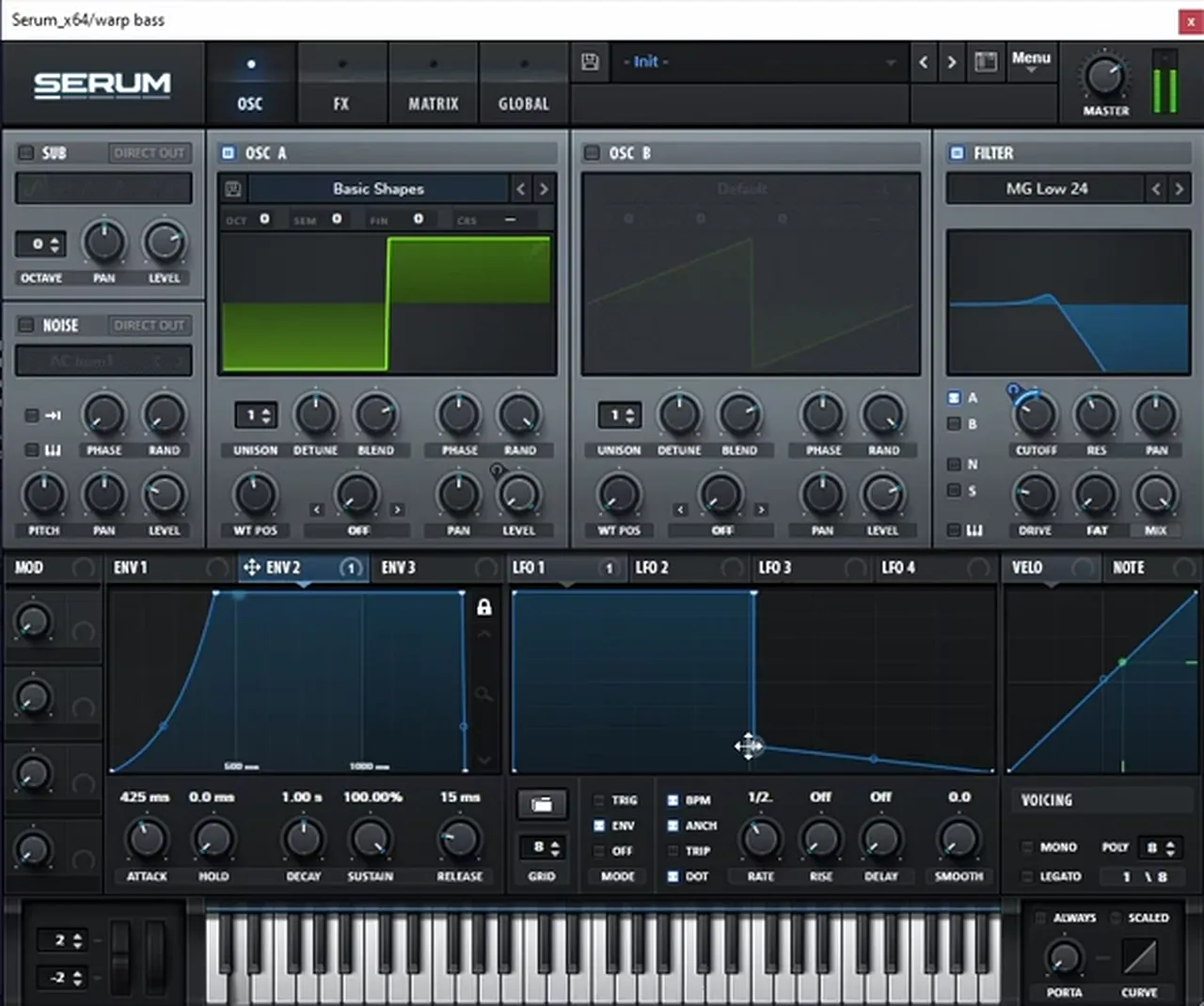
Listen: Stranjah’s warp bass11 sec
Five more classic jungle basses
| Bass | Oscillators | Movement and processing |
|---|---|---|
| “Quest” bass | Two sines detuned further, +75 and -75, for a faster wobble | LFO 1 in envelope mode on global pitch; distortion with the mix down, since drive killed the wobble |
| Pitch LFO square | Square from Basic Shapes, mono | LFO 1 on master tune by seven semitones, legato with portamento at 100 |
| Foghorn | Sine A, frequency-modulated by a silent sine B one octave and seven semitones up (later two octaves) | One LFO in envelope mode moving FM amount, filter cutoff and distortion; reverb with the sub cut out |
| Noise bass | Sine plus a noise oscillator | Only the noise goes to the filter, high-passed, then distortion |
| Drop bass, distorted | The drop bass above | Heavy distortion plus a “wobble” macro that switches on an LFO |
The “Quest” bass is Stranjah’s take on the classic bass from Shimon and Andy C’s “Quest” (18:35); the pitch LFO square is a sound “used a lot in around 1995” (22:38).
Call and response
Jungle basslines talk to each other. Stranjah writes a two-bar phrase where the warp bass plays first and the Quest bass answers, then extends it to four bars with the pitch LFO square and the old-school reese (35:31). Two practical fixes from the session: if notes overlap, switch the synth to mono; and if legato makes a second note too quiet, turn legato off, because the new note carries on from the old envelope.
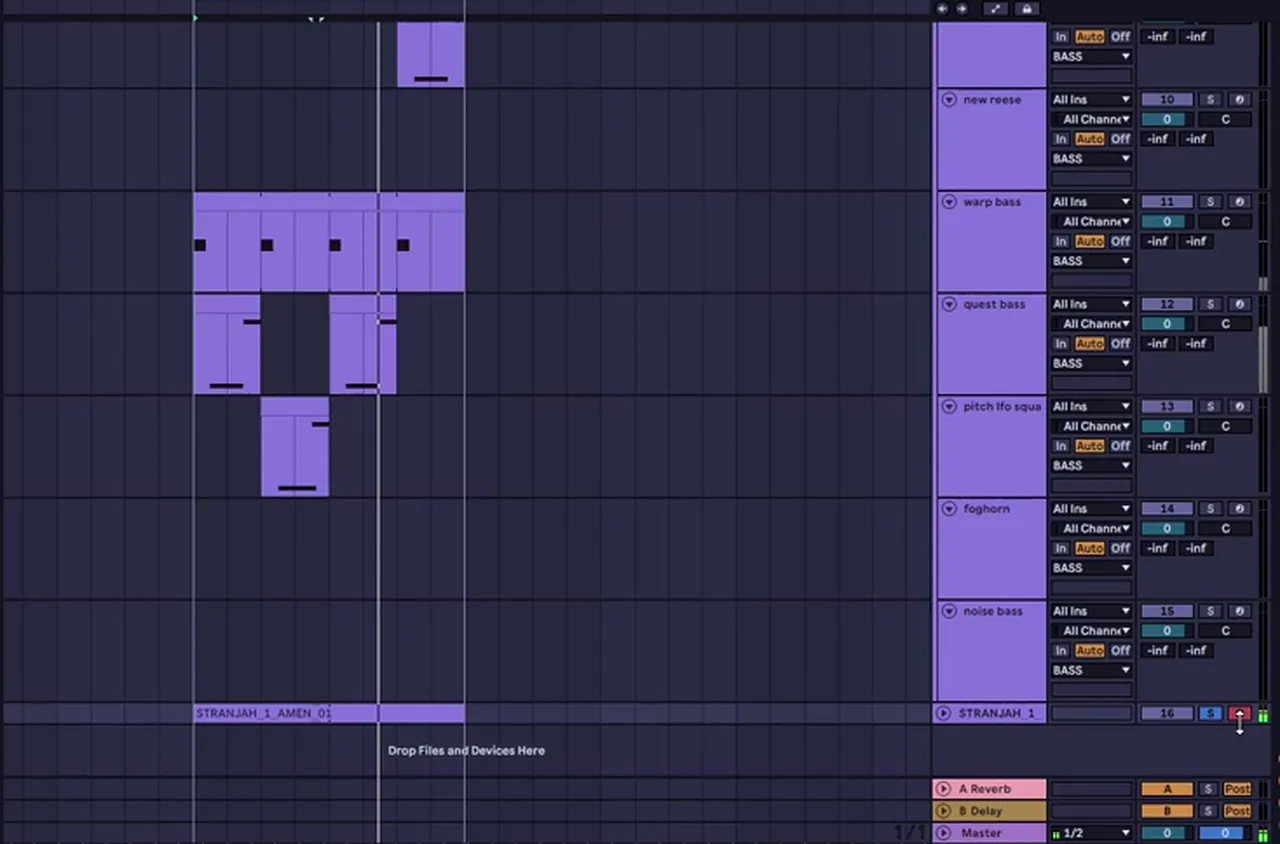
How Octavate build the bass in “Straight Up”
- One part, three layers. The main jungle sub melody is three layers of the same part, processed for different frequency ranges: a sub in Operator, a mid layer EQ’d and compressed for the mids, and a top layer (50:30).
- A “horn” rack. All three layers send to a rack that turns the plain MIDI sound into a horn: a convolution reverb (a default ambience), then an amp, Erosion for noise, EQ, saturating drive and a big-room reverb (52:48). Their tip: an EQ before the amp lets you choose which frequencies distort.
- The “wobbler” reply. One Serum patch with sine waves, an LFO on the tuning and the second sine detuned by 177.52 cents, then Tube distortion, multiband compression, a mono Utility and EQ (1:00:23).
- Bass group. Everything below 140 Hz made mono while the rest gets wider, plus a side-chain to a short “kick trigger” (1:01:24).
A Bladerunner-style jungle bass
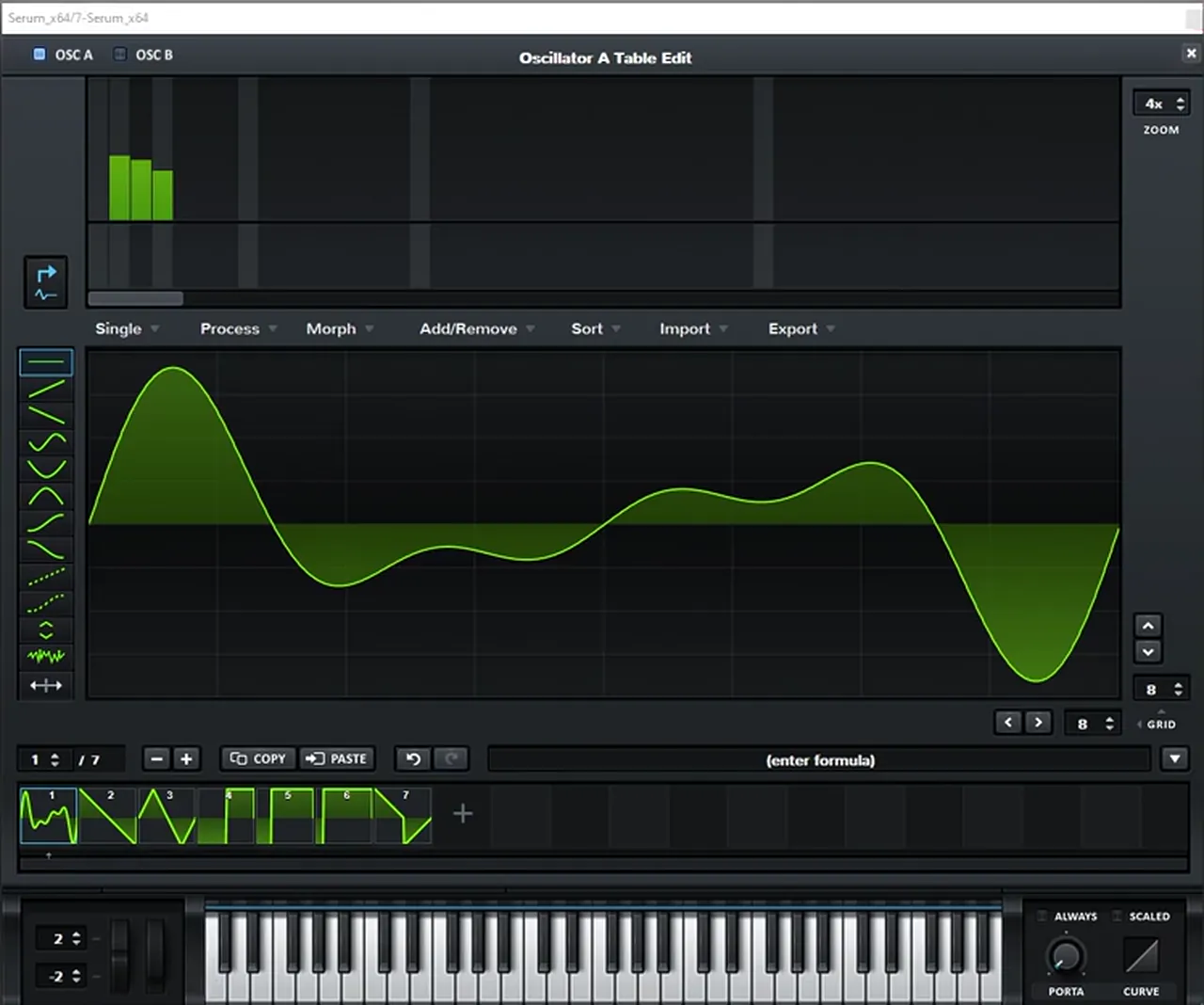
Our recreation of the basses in Bladerunner’s “Jungle Jungle” (an inspiration piece, built from scratch) uses two Serum patches:
- The low reese: 11 voices of unison (13 or 15 also work); what matters is an odd number, so one voice sits perfectly in tune in the middle (1:52). Then distortion boosted a lot, Hyper, multiband compression with the gain up and the highs down, and the filter on MG Low 24 at around 900 Hz. Afterwards, an EQ boosts one harmonic and cuts around 200 Hz.
- The upper harmonics: Basic Shapes with the harmonics reduced to three, oscillator A copied to B and detuned for phasing, and no distortion at all, so it sits clean on top (4:04).
- Movement: on the group, an Auto Pan automated from a 15 Hz rate on the first note down to 3 on the second.
Listen: our Bladerunner-style jungle bass6 sec
6.Pads and atmosphere
Jungle’s calm parts come from pads, chords and lots of space: big reverbs, dub-style delays and samples that sound like they come from an old record. The trick is movement, so the pads never sit still while the breaks race underneath.
A jungle pad in Wavetable
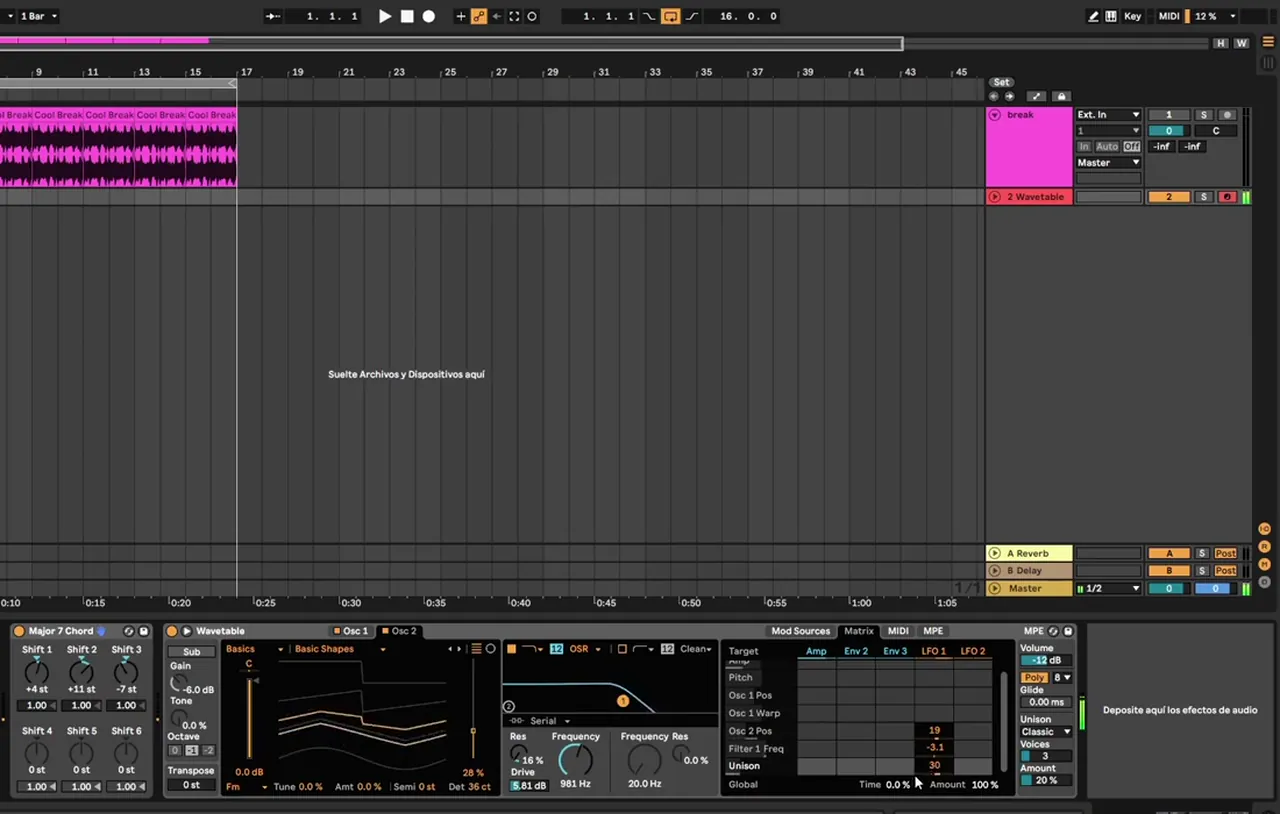
Our jungle pad video builds this in Ableton’s Wavetable (watch from 0:49):
- Oscillator 1 on Basic Shapes, moving the wavetable position for harmonics.
- Chord MIDI effect: load the Major 7 Chord preset, so one note plays a chord, then change shift 3 to -7 (on screen the shifts read +4, +11 and -7).
- Amp envelope: a slower attack, high sustain and a longer release (on screen 29.3 ms, -2.8 dB and 1.61 s).
- Oscillator 2 detuned (36 cents on screen), with its wavetable position moved to taste.
- Filter: pull the cutoff down, then switch the circuit type (OSR on screen) and add drive.
- Unison for a chorus effect (Classic, 3 voices), plus a touch of FM.
- LFO 1 on oscillator 2’s position, very subtly on the filter frequency, and on the unison amount. Finish with reverb.
Listen: the Wavetable jungle pad12 sec
Atmosphere the Octavate way
- A fake old record. The intro “orchestra” is just a free guitar plugin and Ableton’s piano, drenched in tape delay, written as if the drop were a remix of an old tune (1:23:40). Plain MIDI instruments take heavy processing well because they still read as instruments.
- Moving organ chords. Two chords, with filter, tremolo and auto-pan movement, and a frequency shifter automated to turn the chord stack into a riser at the end of a phrase (1:31:31).
- A shouted hook. The “straight up” vocal is one take shouted into a laptop, transposed with Ableton’s warp algorithms and sent into wet reverb and delays, “nice foggy, jungly chaos” (1:14:24).
- Dub delay tails on vocals and FX for “that dub vibe”, and laser FX saved for the drops.
7.Arrange it: Octavate’s “Straight Up” breakdown
Arrange jungle in 16-bar phrases: a spacious intro, a dry, mono-sub drop, a switch-up, a very wet breakdown, a hard cut, a second drop with new bass, and a return to the main groove to finish. Contrast between phrases matters more than adding parts.
Octavate wrote “Straight Up” in person, in long sessions of 12 to 15 hours, with a simple brief: make a jungle tune. Here is how the finished arrangement works (47:40):
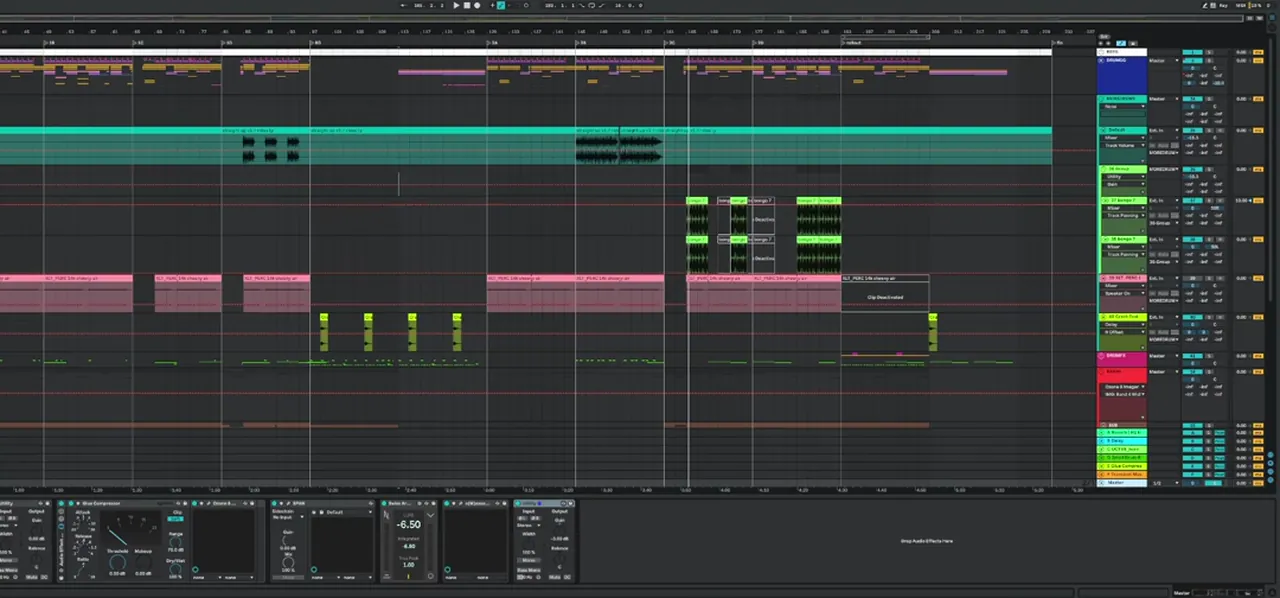
- Intro: zoom out.Distant, reverb-heavy breaks and the rasta “orchestra”, kept organic: no sci-fi FX yet, and no mono sub. “Keep it wide and then zoom in on the drop.”
- First drop: zoom in.Drier drums, the mono sub and the horn bass, so the drop sounds louder even though the intro was full.
- Two phrases, then a switch.The main groove runs for two phrases before a change in the groove; an element introduced in the switch becomes a feature of the second drop.
- Breakdown: very wet.Strings and organ chords in a distant, reverb-soaked space.
- A hard cut.Just before the second drop almost everything stops for a split second: “the contrast of quiet to loud makes it more effective” (1:10:15).
- Second drop: new bass.The reese and alternative basses introduced earlier take over the lead, while FX keep it connected to the first drop.
- Home again.“Home, out, home”: the main groove returns, then the outro mirrors the intro so DJs have something to mix out of.
Two more habits from the breakdown: they leave gaps at the start of phrases, not only at the end, so the vocal and bass carry the groove on their own; and they mix at a realistic level from the start, with no limiter on the master until it is time to bounce a version. For more on phrase lengths and drops, see our DnB song structure guide.
Pick your jungle style
Jungle covers a lot of ground. These four directions use the techniques on this page in different proportions:
| Style | Sound | Drums | Bass | Start with |
|---|---|---|---|---|
| Classic jungle | Raw early-90s sound: chopped funk breaks, reggae and dub-style sub bass, MC and vocal samples. | Amen-style breaks, re-sequenced and rolled, roughly 160–170 BPM | Deep sine or 808-style sub, long notes, drop basses | Steps 2, 3 and 5 |
| Ragga jungle | Jungle with reggae and sound-system culture up front: MC shouts, dub delays and rasta-flavoured samples. | Busy chopped breaks with delay-throw FX | Heavy subs and reggae-style basslines | Octavate’s rasta intro and dub delays in step 6 |
| Modern / neuro-jungle | Old breaks made to hit like modern drums, often at full DnB tempo. | Breaks with new transients, an electronic kick and a heavier snare | Reese, distorted drop basses and harder sound design | Step 4, then the reese and new-school reese in step 5 |
| Atmospheric jungle | Lush and spacious: pads, chords and long reverbs over lighter breaks. | Lighter, intricate breaks | Warm, smooth subs under the pads | The Wavetable pad in step 6 |
Jungle sits next to some close relatives: drumfunk makes the hand-edited break the lead instrument, and atmospheric drum and bass goes further into pads and space.
Common jungle mistakes
- Looping the break untouched. A straight four-bar Amen loop is a sample, not jungle. Chop it, move hits and write variations.
- Stacking different breaks until it’s mud. Layer pitched copies of the same break instead, and gate or EQ the 200–400 Hz range.
- Transient-heavy kicks. Jungle kicks are usually soft and thuddy; a clicky modern kick can fight the break. If you layer one, fade out the original kick first.
- Quantising every slice. It saves time, but the swing of a break lives in its small timing offsets.
- A wide or busy sub. Keep the low end mono (Octavate mono everything below 140 Hz) and let one bass at a time own the sub.
- Clicks at the chops. Short fades at every cut, and a short attack on sine basses.
- No contrast. If the intro, drop and breakdown sit in the same space, nothing hits. Go wide and wet, then dry and close.
Free download
Breaks to start your first jungle track
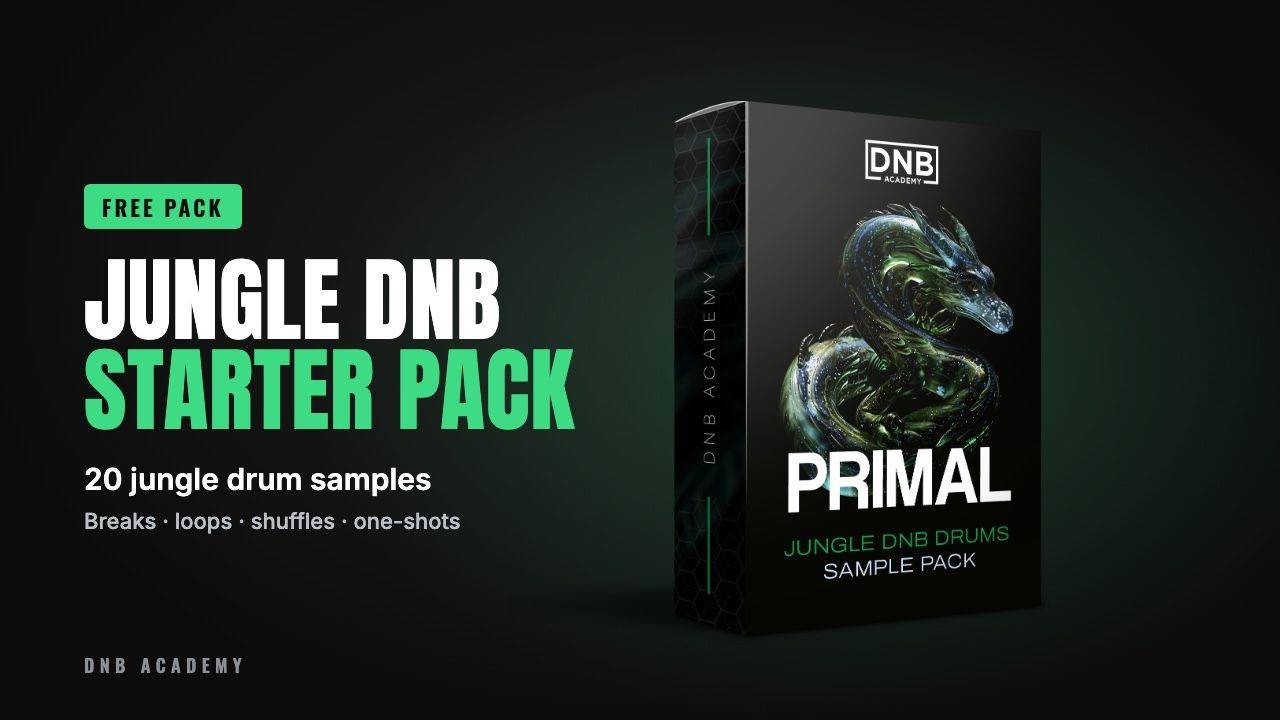
You need breaks to chop. The Primal Jungle DnB Starter Pack has 20 drum samples from our full Primal Jungle DNB Drums Sample Pack:
- 5 jungle breaks of 1, 2 and 4 bars
- 4 drum and tops loops, 2 shuffles and 1 shaker loop
- 3 kicks, 3 snares, 1 hi-hat and 1 ride
- 24-bit WAV, loops at 170 BPM, royalty-free
It’s one of seven free sample and preset packs in DNB Academy Free Access, along with the mixing and mastering e-books and the 3‑day DnB challenge. Join 40,000+ producers in Free Access. Free account, no card needed.
Go deeper
Jungle drums, presets and a course
Want more breaks, sounds and a full track from start to finish? These go deeper.
 Sample packPrimal Jungle DNB DrumsThe full pack: 300 royalty-free sounds, with breaks, shuffles, drum loops, kicks, snares, hats, rides and percussion.
 Preset bundleJAH Jungle DNB Serum presets100 Serum presets for jungle: rolling basses, pads, keys, chords, plucks and FX.
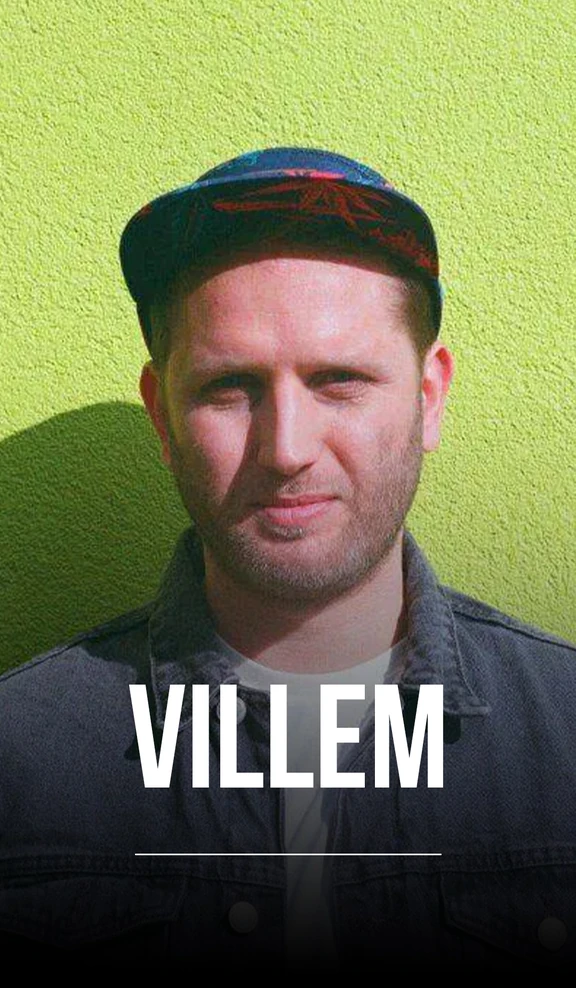 Production courseVillem production courseA start-to-finish track in Logic Pro X with 8+ hours of video, including a lesson on creating your own breaks, plus the project file, samples, presets and stems.
Every artist course, preset bundle and sample pack is also in The Vault. Browse courses
Related tutorials
All tutorials → Drums · PatternsDrum and Bass Drum Patterns: How to Program DnB Beats14 min read · Video + guide
 Serum · BassHow to Make a Reese Bass for Drum and Bass15 min read · Video + guide
 Guide · SubgenresDrum and Bass Subgenres: 12 Types of DnB13 min read · Guide
 Mixing · DrumsHow to Make DNB Drums Punchy: 3 Mixing Techniques8 min read · Video + guide
FAQ: making jungle
What is jungle music?
Jungle is an early-1990s UK breakbeat style and the root of drum and bass. Producers sampled funk breaks such as the Amen, chopped and re-sequenced them into fast, rolling patterns, and put them over deep, reggae and sound-system influenced sub bass, often with MC and vocal samples.
What BPM is jungle?
Classic jungle usually sits at roughly 160 to 170 BPM. Many modern jungle tracks run at full drum and bass tempo, around 170 to 175 BPM, and some go a little faster. Our jungle pad video works at 160 BPM, and the Primal Jungle starter loops are at 170 BPM.
What is the Amen break?
The Amen break is a short drum solo from The Winstons' 1969 track "Amen, Brother". Jungle producers sped it up, sliced it into single hits and re-sequenced those hits into new patterns, and it became the most sampled break in jungle and drum and bass.
How do you chop a break for jungle?
Warp the break to your tempo, then slice it into single hits, for example with Slice to New MIDI Track in Ableton, which puts each slice on its own pad. Play the slices back in a new order, repeat or re-pitch a few hits, add rolls at the ends of phrases and glue the result with saturation or parallel compression.
What is the difference between jungle and drum and bass?
Jungle came first. It uses heavily chopped, swinging breaks and reggae-style sub bass, often at a slightly slower tempo. Drum and bass grew out of it from the mid-1990s with cleaner, more programmed drums and a wider range of bass sounds, though many producers still blend the two.
What bass sounds are used in jungle?
Deep sine subs and 808-style basses with a pitch drop, drop basses, detuned reese basses, filtered warp basses, pitch-modulated squares, FM foghorns and noise basses. In our video Stranjah builds ten of these classic jungle basses in Serum in 30 minutes.
Do I need Ableton to make jungle?
No. Our videos use Ableton Live, but any DAW with a sampler can slice and re-sequence breaks. The bass and pad techniques work in any synth with oscillators, envelopes and LFOs, including Vital, which has a free version.
Where can I get free jungle breaks?
The Primal Jungle DnB Starter Pack in DNB Academy Free Access has 20 royalty-free jungle drum samples, including 5 jungle breaks of 1, 2 and 4 bars, drum and tops loops, shuffles and one-shots, as 24-bit WAV files with loops at 170 BPM. Free Access is a free account with no card needed.
Who played the Amen break?
Gregory Coleman, the drummer of The Winstons. He plays the four-bar break on "Amen, Brother", the B-side of their 1969 single "Color Him Father".
Next steps
Slice a break, write two bars of your own pattern, put a sine sub under it and answer it with a second bass. Then build out from there:
Free Access
Seven free DnB sample and preset packs, including the Primal Jungle starter, plus e-books and a 3-day challenge.
Get free packsThe full guide
Tempo, drums, bass, chords, arrangement and mixdown: every step of a DnB track.
Read the guideDNB Foundations
A structured course with weekly live feedback calls on your tracks. Beginners welcome.
See Foundations1:1 Mentorship
Personal guidance on your music from a mentor, built around your goals.
See the mentorship50,000+ producers have joined DNB Academy, and our producer Discord has 5,300+ members.