How to Make Neuro Basses Like Noisia in Vital
To make a neuro bass in the style of Noisia in Vital, start from an initialised patch, put a sine on oscillator 1 and FM it from oscillator 2 (an octave up, in sync mode), add a sine sub and some white noise, then run it through a Dirty 24dB filter whose cutoff moves with an LFO. Distortion glues the layers together, and chorus, multiband compression, EQ and OTT finish the sound. Every value below is taken from our video.
New to neuro? Our guide to every DnB bass type explains neuro basses, and our step-by-step guide to making drum and bass shows where they fit in a track.
Prefer to watch? The full 6-minute video builds this patch from scratch and plays the finished sound first.
Noisia is our style reference here: this is our own recreation of that wet, moving neurofunk bass, not a Noisia preset. New to the style? The neurofunk section of our subgenres guide explains where it sits in drum & bass.
What you'll need
- Vital. The patch is built in Vital, a wavetable synth with a free version, using only stock modules.
- A DAW. Any DAW that hosts VST/AU instruments. We use Ableton Live for the post processing and automation in steps 8 and 9.
1.Set up oscillator 1 with FM from oscillator 2
Start from an initialised patch (Init Preset). On oscillator 1, load the Basic Shapes wavetable; at its default position this gives you a clean sine to build on.
Now switch on oscillator 2, but bring its level all the way down. We don't want to hear oscillator 2 directly: it's only there to do FM. Go back to oscillator 1, click the mode menu under its right-hand knob and choose FM OSC 2. Leave the amount at about 70%.
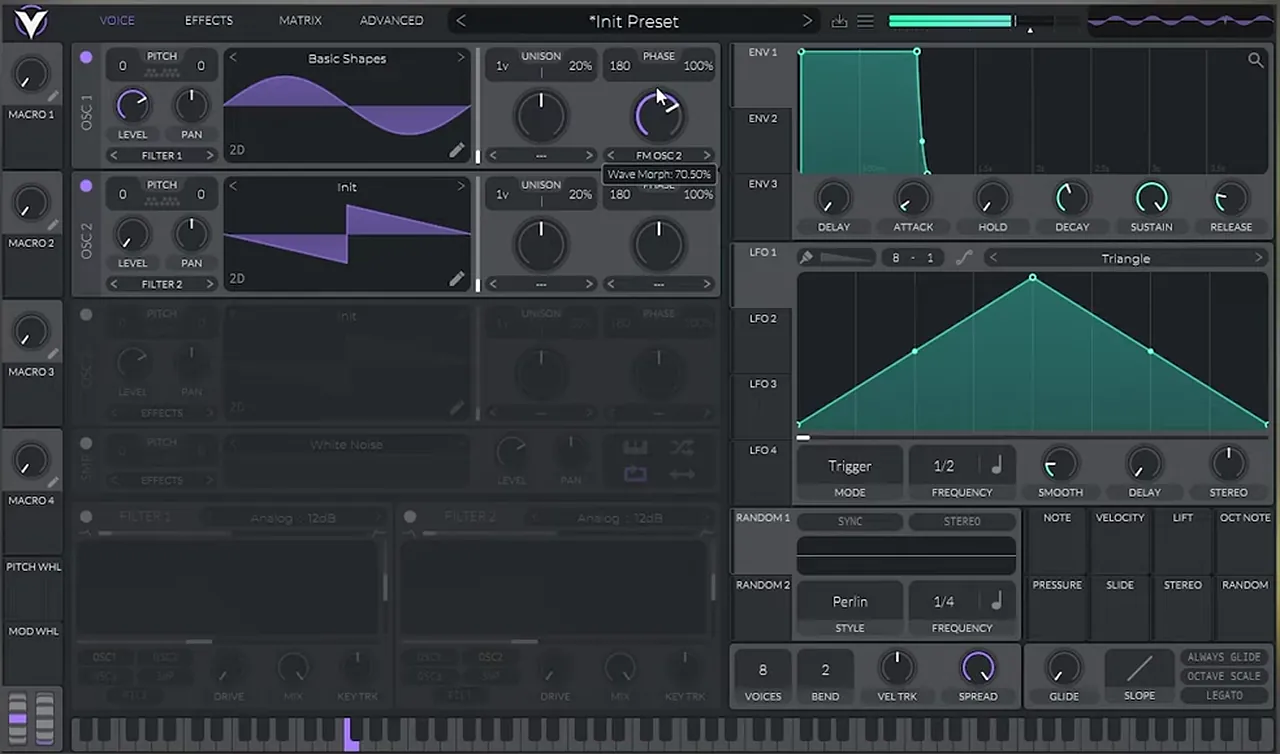
FM is where the growl comes from: oscillator 2 adds metallic overtones to the plain sine. Our roller bass in Vital starts from the same idea.
2.Add sync, a sub and the noise
- Raise oscillator 2 by one octave (pitch 12). This makes the FM harmonics brighter and harsher.
- Add some sync to oscillator 2: set its mode to Sync and turn the amount up a little, to taste. (by ear; no exact value in the video).
- For weight, turn on oscillator 3 with Basic Shapes as a sub oscillator.
- Finally, switch on the white noise (the SMP slot) and bring its level all the way down. We'll modulate it in later.
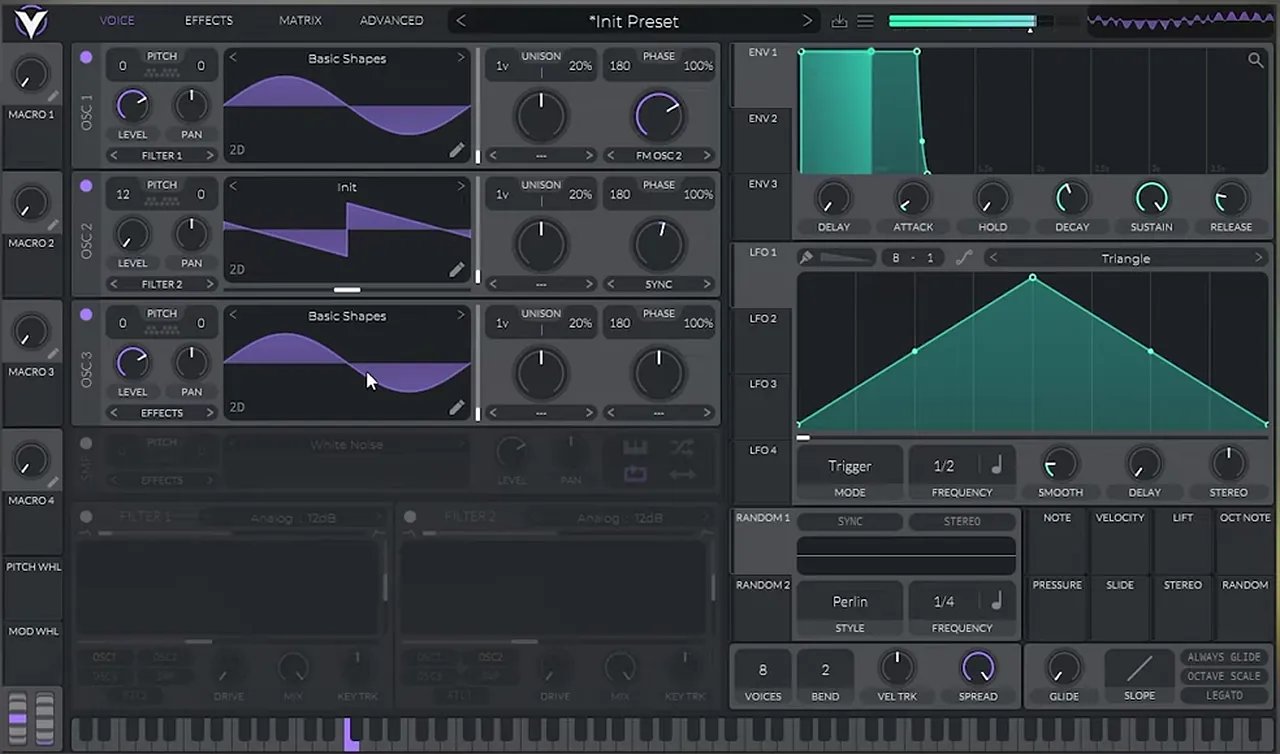
Why sync? It reshapes the modulator's tone without changing its pitch, so it changes the FM harmonics. We come back to it in step 9.
3.Load the Dirty 24dB filter
To add movement, switch on Filter 1 and change its model to Dirty : 24dB. Then boost the resonance and play with the cutoff while you hold a note.
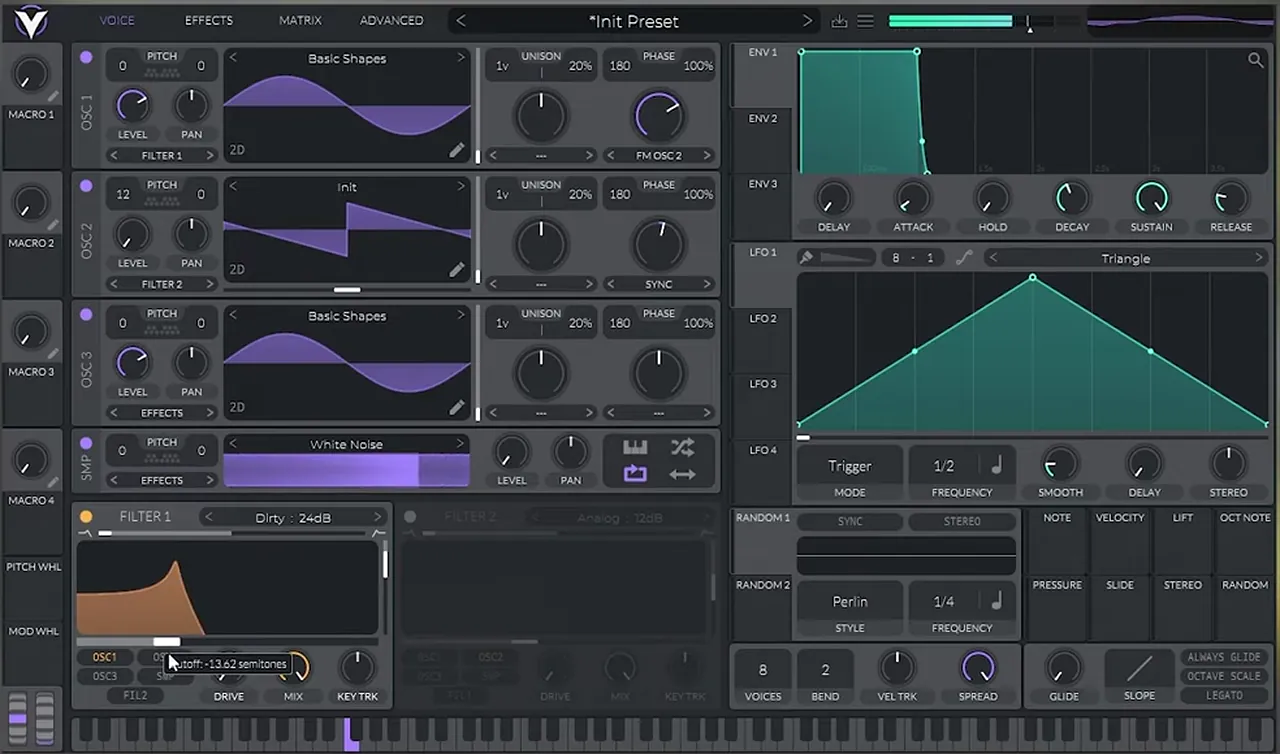
In the screenshot, Filter 1 takes its input from OSC1, the FM layer.
4.Move the cutoff with LFO 1
Drag LFO 1 onto the filter cutoff, then pull the cutoff knob itself a bit back so the LFO has room to open it up. Draw a better shape (we use a curved peak, but experiment) and boost the modulation amount a little.
Set the rate by clicking the LFO frequency, choosing Tempo, then Dotted, then a quarter note (1/4). A dotted rate moves across the beat rather than on it. The mode stays on Trigger.
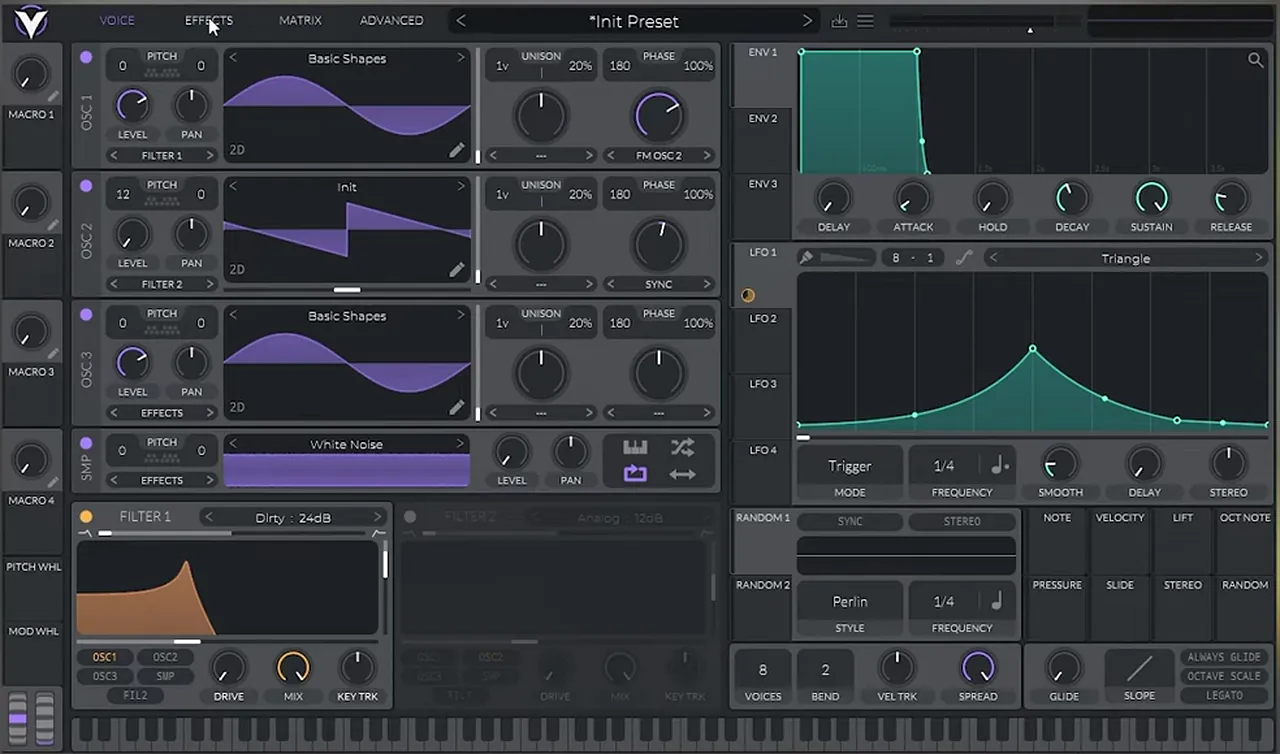
It won't sound like a neuro bass yet: that happens when distortion mixes the layers together.
5.Distort it and balance the levels
Open the Effects tab, switch on the Distortion module (Soft Clip, as shown) and boost the drive.
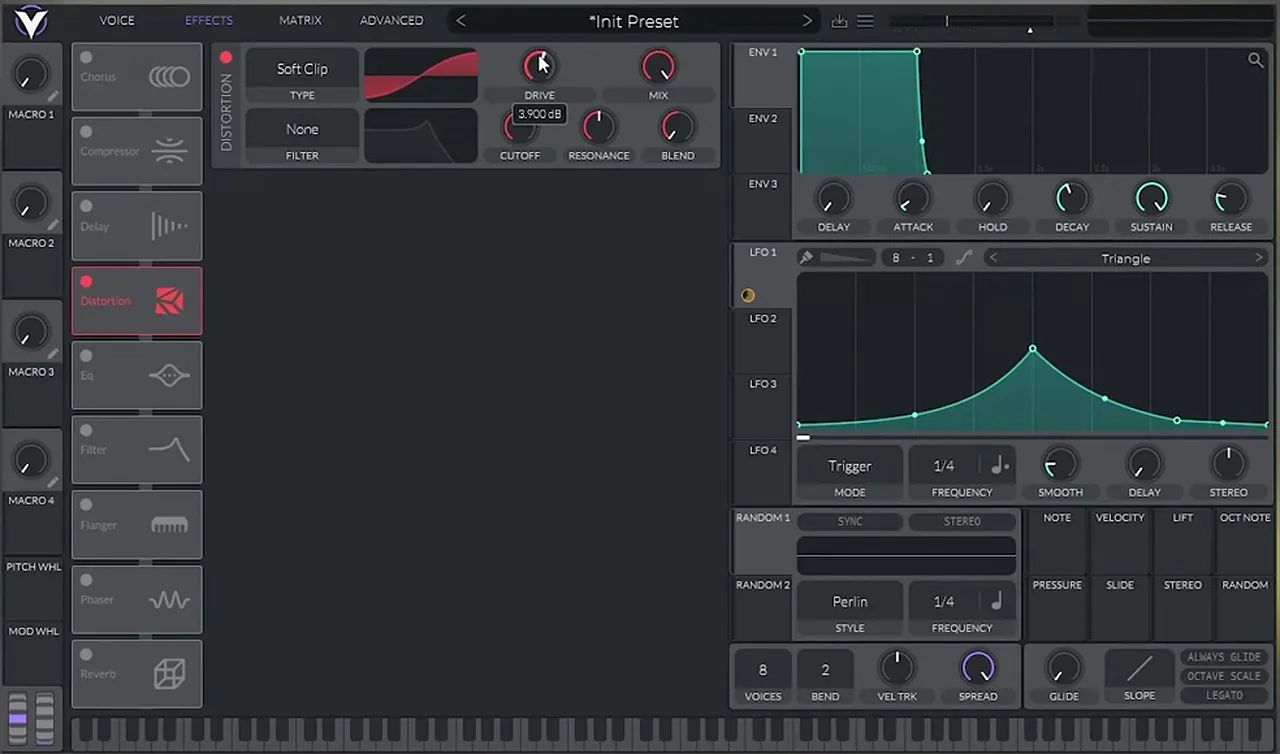
If it sounds muddy, balance the oscillator levels on the Voice tab:
- Bring the level of oscillator 1 a bit lower.
- Put LFO 1 on oscillator 1's level knob as well, so the FM layer pulses with the filter.
- Do the same with the noise: put LFO 1 on its level so the noise only comes in with the movement.
Then play with the filter again: small changes give a different feel.
Listen: layers, distortion and LFO movement9 sec
6.Chorus and the effects order
Turn on the Chorus:
- Bring the spread and the depth all the way down.
- Decrease the voices to 4.
- Play with the chorus cutoff, then boost the mix knob.
Next, drag the Distortion all the way to the top of the effects list. Vital runs its effects top to bottom, so the chorus now works on a distorted signal and the sound changes. Then fine-tune the chorus depth.
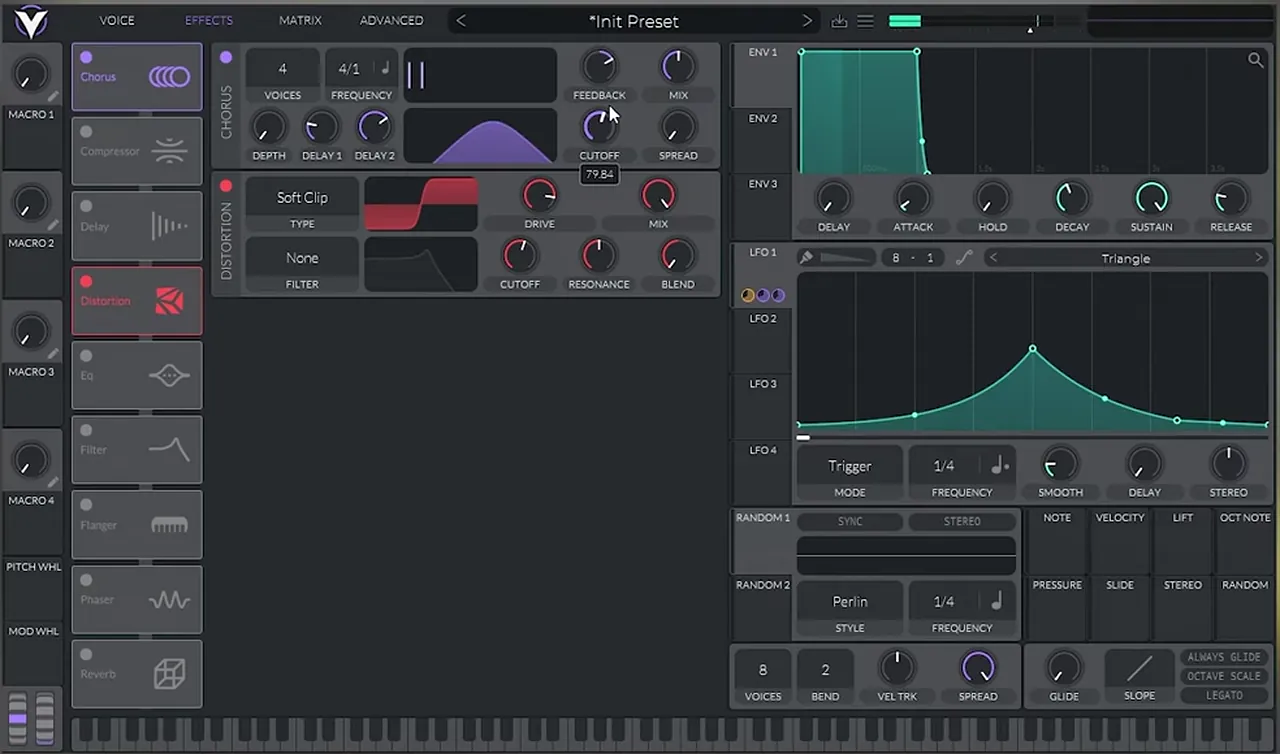
7.Multiband compression and EQ
Turn on the Compressor. In Multiband mode it works much like OTT, bringing the grit forward. Then add an EQ to shape the result.
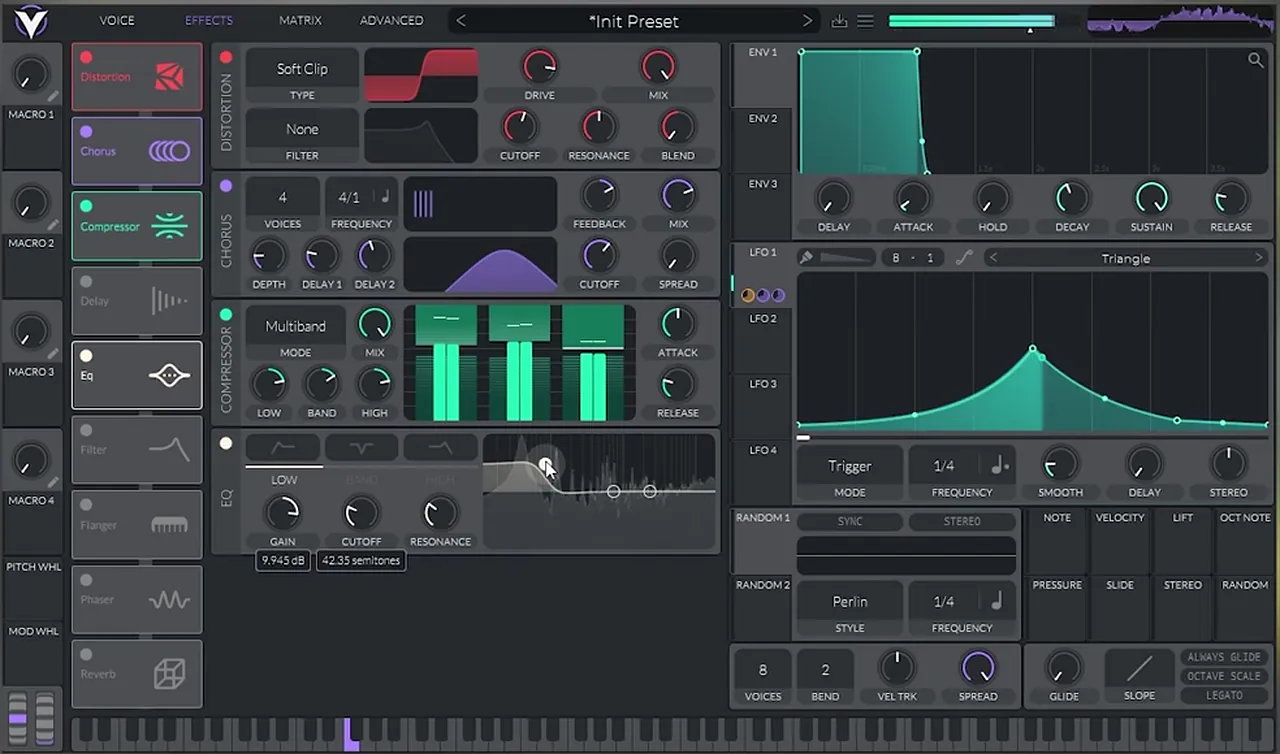
Now experiment with the sync and the filter: the whole chain reacts to them.
Listen: with chorus, compression and EQ9 sec
8.Post processing: OTT, EQ and reverb
The last polish happens after Vital, on the DAW track:
- OTT to make the sound brighter.
- An EQ (EQ Eight in Ableton Live) to boost a low harmonic, so the bass keeps its weight under all the top-end texture.
- Some reverb for the "wet" part of the sound.
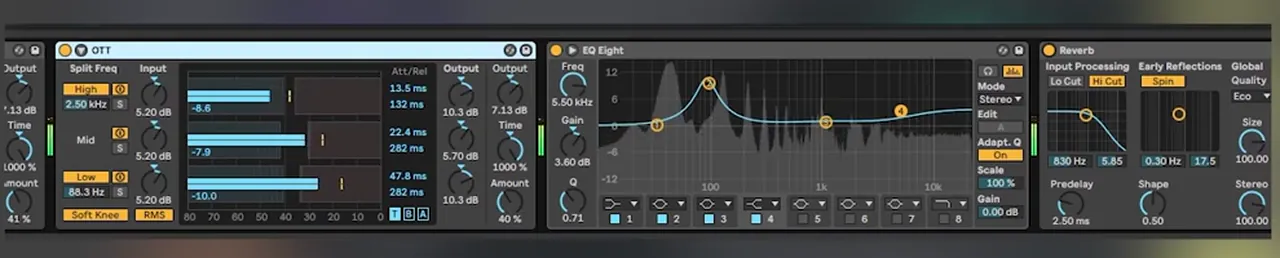
9.Turn it into a drop sequence
A single held note isn't a drop yet. To create the sequence in the video, we bring the sync down on oscillator 2, modulate the sync with a macro, and then play around with that macro over the notes. In our project the macro (Macro 4) is automated in the DAW, so each hit gets a different tone.
Listen: playing the sync macro for the drop sequence8 sec
To turn those sounds into a full bassline, follow our neuro bass patterns tutorial, then build a track with how to make neuro drum and bass in Ableton Live.
Listen: the finished neuro bass10 sec
That's the final result after a lot of fine-tuning. Use the values above as a starting point and keep tweaking by ear.
Common mistakes
- Hearing oscillator 2 directly. Keep its level all the way down: it only modulates oscillator 1.
- Fixing mud after the distortion. Rebalance the oscillator levels first.
- Ignoring the effects order. Distortion before or after the chorus gives two different sounds. Try both.
- Washing out the low end. Too much chorus spread or reverb on a bass blurs the sub. In the video the chorus spread and depth go right down.
Go deeper
Neurofunk courses and presets
Want to go further into neuro sound design and arrangement? These go deep on the style.
 Production courseSynergy production courseNeurofunk / Future: drums, layered bass design, arrangement and mixdown, with presets, samples and project files.
 Production courseMaztek production courseNeurofunk: a technical approach to neuro drum & bass, from start to finish, in 6+ hours of video.
 Preset bundleNeuro Essentials Serum preset bundleNeurofunk: snarling basses, razor leads and cinematic FX for Serum.
Every artist course, preset bundle and sample pack is also in The Vault. Browse courses
Related tutorials
All tutorials → Ableton · NeuroNeuro Bass Patterns: How to Write DnB Basslines8 min read · Video + guide
 Ableton · NeuroHow to Make Neuro Drum and Bass in Ableton Live12 min read · Video + guide
 Vital · NeuroHow to Make a Neuro Stab Bass in Vital with Icicle8 min read · Video + guide
 Serum · NeuroHow to Make a Bass Like Noisia’s Diplodocus in Serum9 min read · Video + guide

Free download
Free Vital neuro presets
Compare your patch with ready-made neuro sounds. In the video we point to the Vital Starter Preset Pack for this preset, and the pack gives you:
- A neuro DnB starter pack for Vital
- Neuro bass presets to open and study
- Pluck and lead presets
- Works with the free version of Vital
It’s one of seven free sample and preset packs in DNB Academy Free Access, alongside the mixing and mastering e-books and the 3‑day DnB challenge. Free account, no card needed.
FAQ
How do you make a neuro bass like Noisia in Vital?
Use Noisia-style neurofunk as the reference and build the sound in layers: a sine on oscillator 1 with FM from oscillator 2 (one octave up, in sync mode), a sine sub on oscillator 3 and white noise. Run it through a Dirty 24dB filter whose cutoff is moved by an LFO, then add distortion, chorus, multiband compression, EQ and OTT.
Can I make neuro basses in Vital for free?
Yes. Vital has a free version, and the synth part of this tutorial uses only stock Vital oscillators, filters, LFOs and effects. In the video the final OTT, EQ and reverb are added in Ableton Live, but any DAW with similar stock effects works.
Why does my neuro bass sound muddy after distortion?
Usually the oscillator levels are out of balance going into the distortion. In the video we lower the level of oscillator 1 and put the LFO on its level and on the noise level, so those layers only come in with the movement instead of all the time.
Does the order of effects matter in Vital?
Yes. Vital processes its effects from top to bottom. Moving the distortion above the chorus means the chorus works on an already distorted sound, which changes the result, so try different orders while you listen.
How do I turn a neuro bass patch into a drop sequence?
Bring the sync on oscillator 2 down, modulate the sync with a macro, then automate or play that macro over your notes in the DAW. Each hit gets a different tone, so one preset gives you stabs, growls and fills.
Next steps
You now have a moving neuro bass patch and a way to turn it into a sequence. When you want to learn the whole process in order, from sound design to finished tracks, here's where to go next:
Free sample packs
Neuro drums, bass samples and Vital presets to practise these techniques on.
Get free packsCourse guide
How to learn drum and bass production step by step, and which course fits your level.
Read the guide1:1 Mentorship
Personal guidance on your music from a mentor, built around your goals.
See the mentorship