How to Make a Neuro Stab Bass in Vital with Icicle
To make a neuro stab bass in Vital, play two notes a third apart through a saw into a steep analog filter, and let a decaying LFO in Trigger mode snap the filter shut on every hit. Icicle then adds FM from a silent second oscillator, a third layer through filter 2 with its own movement, and a touch of chorus and reverb. Here are his exact steps from the video.
New to neuro stabs? The stabs section of our DnB bass guide covers the basics, and our how to make drum and bass guide shows where they sit in a track.
Prefer to watch? In the full 10-minute video Icicle builds this stab from the Init preset, then shapes it in his track.
What you’ll need
- Vital. The stab uses only stock Vital oscillators, filters, LFOs and effects. Vital has a free version.
- A DAW and a riff with gaps. Icicle works in Ableton Live at 172 BPM, but any DAW is fine. Stabs work best answering a bassline that leaves space.
- Optional: an EQ and a reverb plugin for the bus processing at the end. Want more on the style? See the neurofunk section of our subgenres guide.
1.Write a short two-note stab
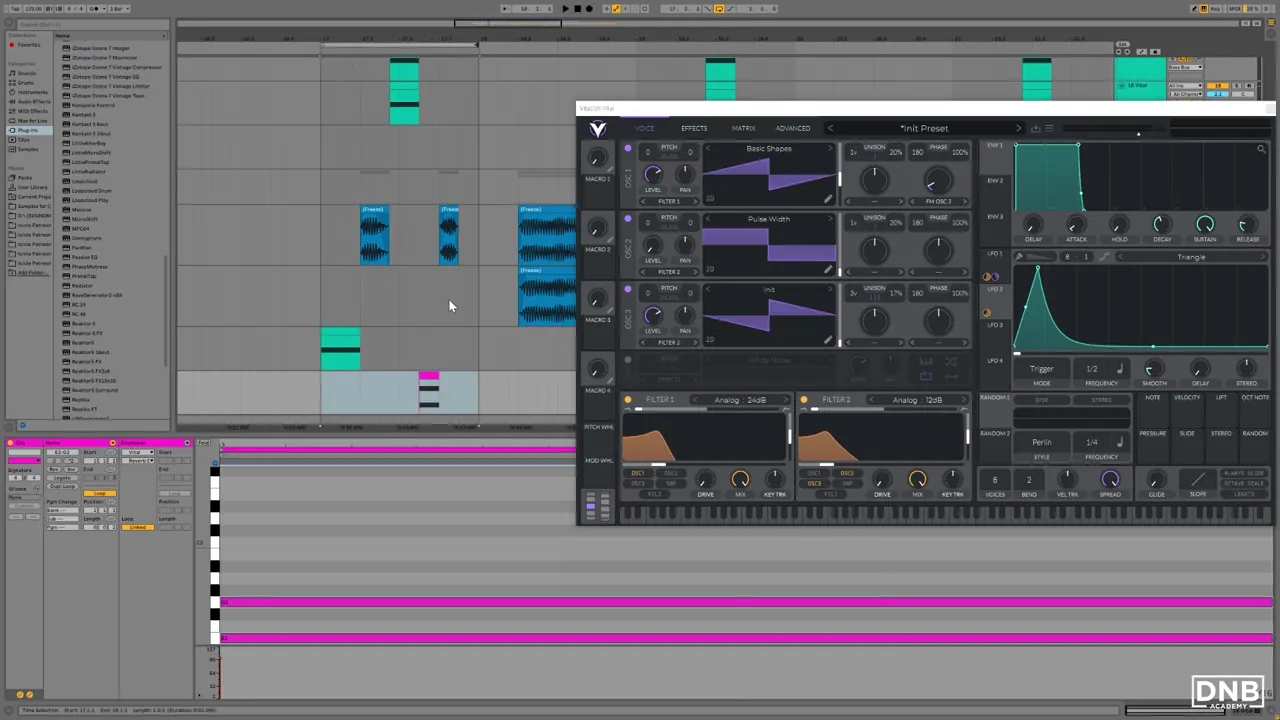
Icicle starts in the arrangement, not in the synth. The project runs at 172 BPM, and there’s a bit of space in the riff, so that’s where the stab goes. The stab itself is simple: two notes a third apart, played as one short chord on a new Vital track. He calls it “a chordy stab”: the basics are just a third played through a filtered saw.
Place it between the main bass hits so the stab answers the riff. For ideas, our guide to neuro bass patterns explains calls, responses and gaps in a drop.
2.Start with a saw through a steep analog filter
Load Vital on the track and start from the Init Preset:
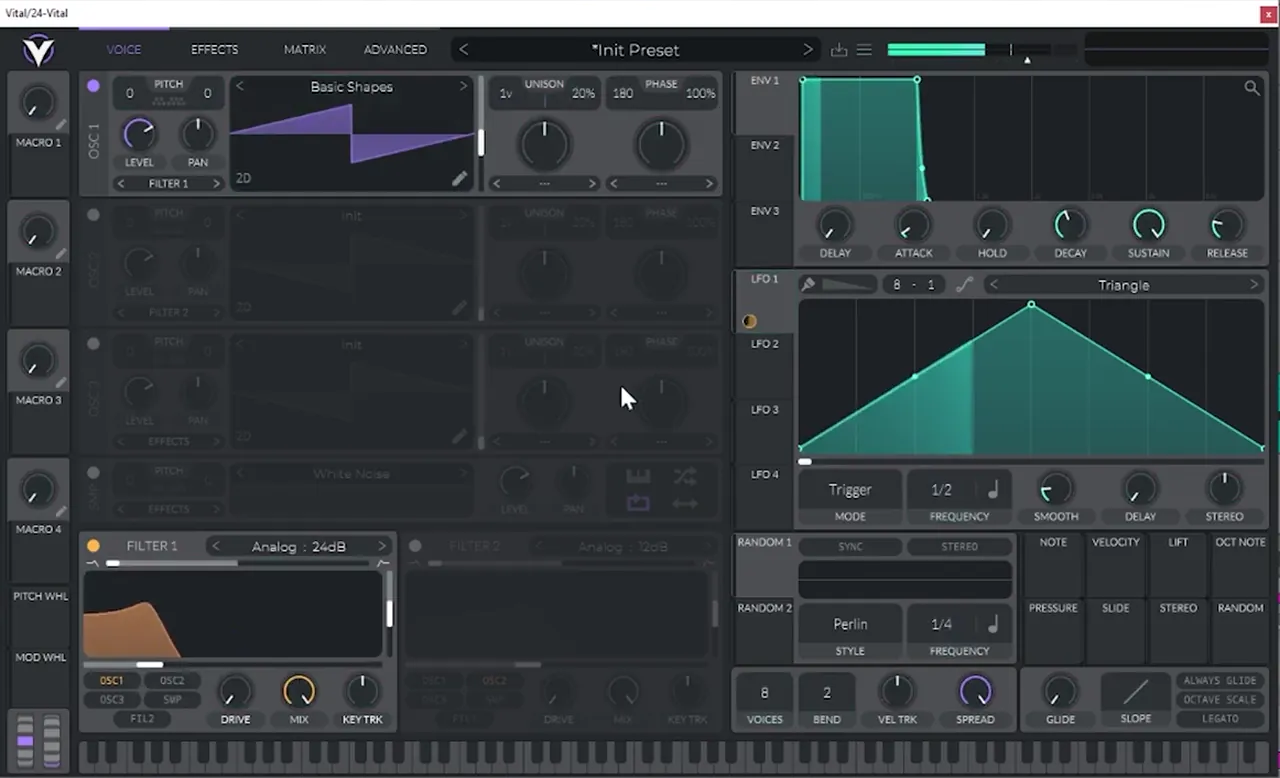
- On oscillator 1, scroll the Basic Shapes wavetable to the saw. (In the video Icicle lands on a noise shape first and moves on to the saw.)
- Turn on Filter 1; oscillator 1 already feeds it.
- Choose the steeper model: Analog 24 dB instead of the default Analog 12 dB.
Listen: the plain filtered saw stab5 sec
3.Turn LFO 1 into a filter envelope
A stab needs the filter to open and close on every hit. Icicle uses LFO 1 for that:
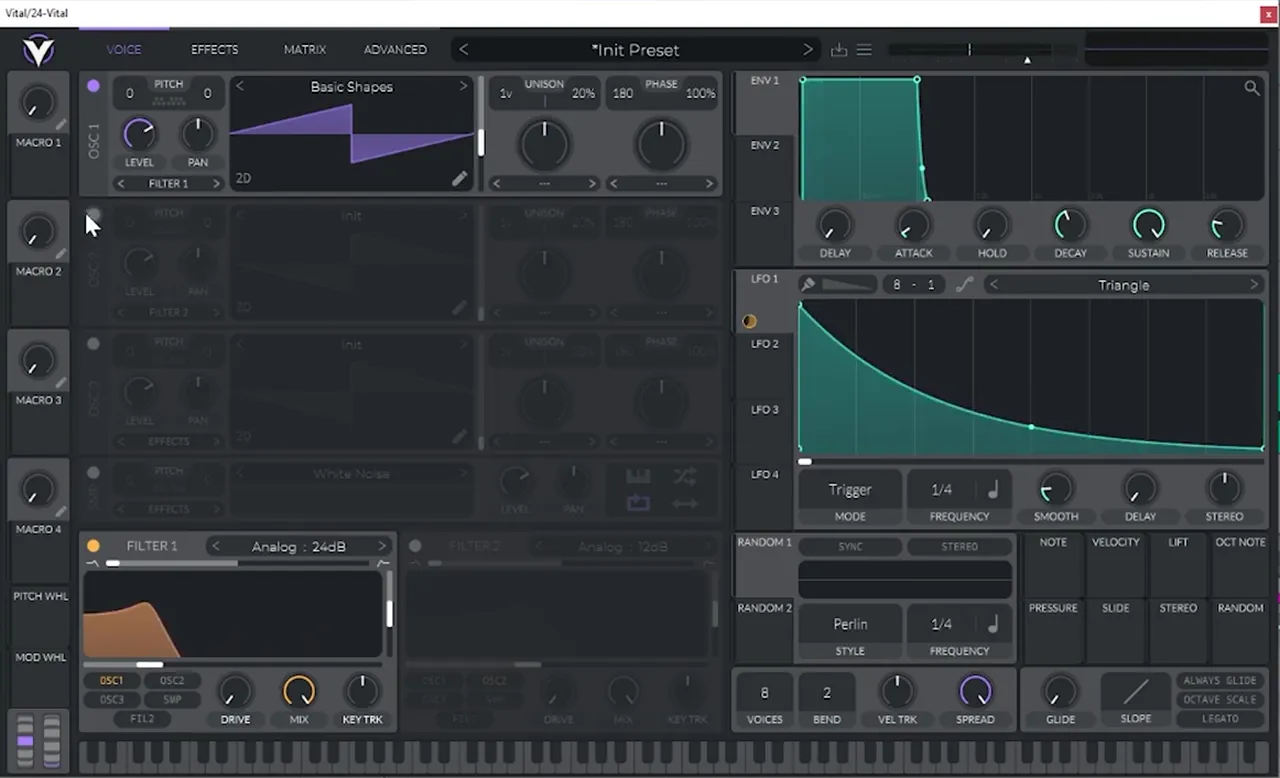
- Drag LFO 1 onto the cutoff of Filter 1.
- Leave the LFO in Trigger mode, so it restarts on every note and behaves like a filter envelope.
- Replace the default triangle with a decaying curve: start at the top and fall quickly, with a long tail.
- Make it a bit faster: the rate goes from 1/2 to 1/4 in the video.
That’s already “quite a nice stab”, in Icicle’s words. Everything after this adds interest and texture.
4.Add FM from oscillator 2
To make it more interesting, Icicle FMs oscillator 1 with the second oscillator:
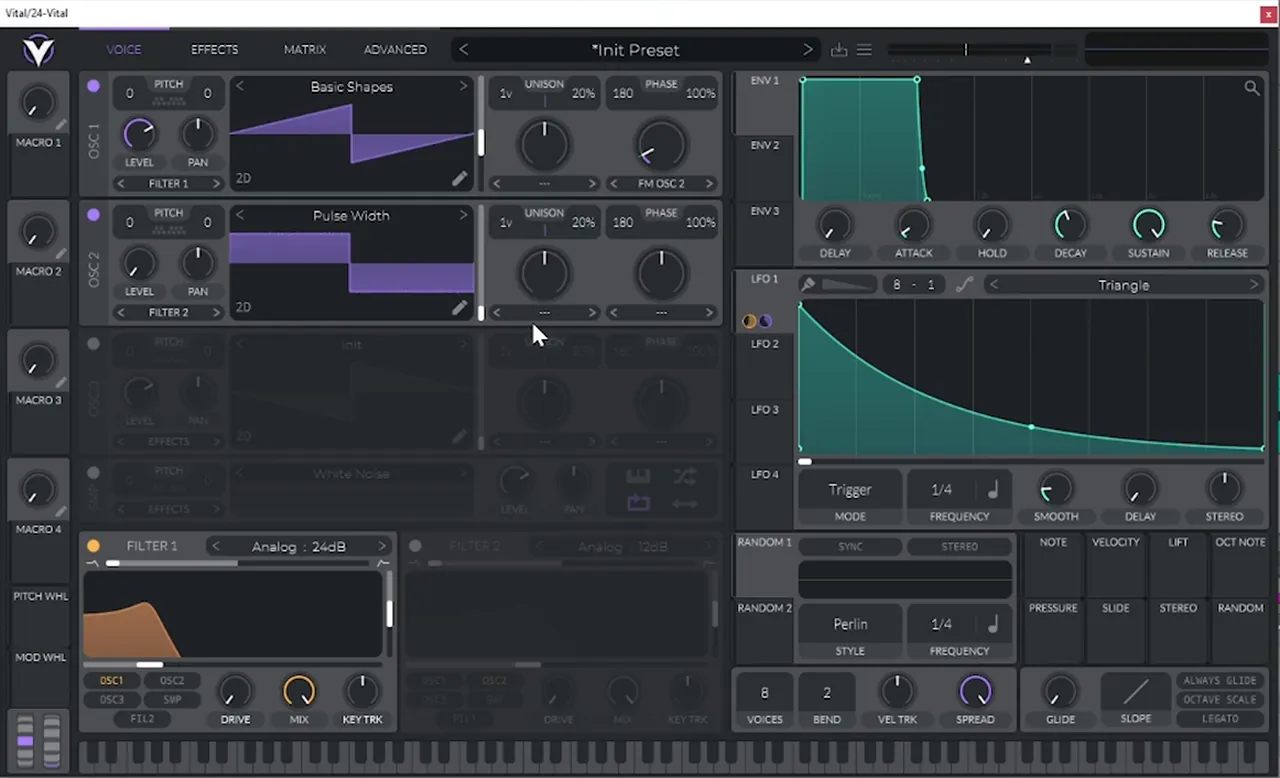
- On oscillator 1, set the mode under the phase knob to FM OSC 2.
- Turn on oscillator 2 and bring its level down. As Icicle puts it: “I don’t want this playing, I just want it existing.” It only feeds the FM.
- Drag LFO 1 onto the FM amount knob too, so the FM follows the same articulation as the filter.
- Try different wavetables on oscillator 2. He tries a noise shape and settles on Pulse Width, which makes the stab “a bit more unsettled and sort of drifty”.
Listen: FM from oscillator 2, with LFO 1 on the FM amount11 sec
If FM in Vital is new to you, our foghorn bass in Vital tutorial uses the same FM OSC 2 mode for a much heavier sound.
5.Add a third layer through filter 2
Next comes a third layer with its own filter movement:
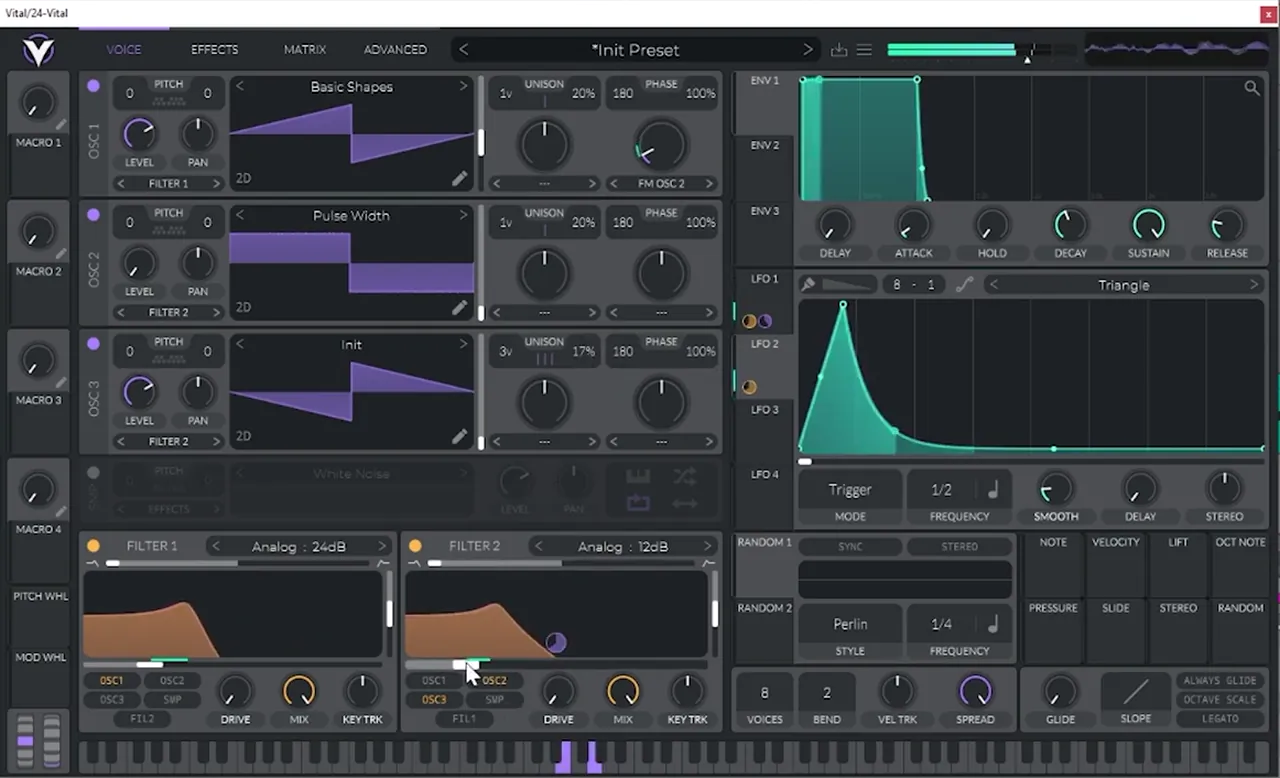
- Turn on oscillator 3 (the default saw) and route it to Filter 2.
- Engage Filter 2; it stays on Analog 12 dB.
- Drag LFO 2 onto the Filter 2 cutoff and draw “a tiny little quick peak”: a fast rise and a fast fall, in Trigger mode at 1/2.
Now the two filters move in different ways, which gives the stab “a bit more texture”.
Listen: third layer through filter 2 and LFO 210 sec
6.Unison, chorus and reverb
Finish the patch with width and space, but keep it subtle:
- Unison on oscillator 3: the screenshot shows 3 voices at 17% detune.
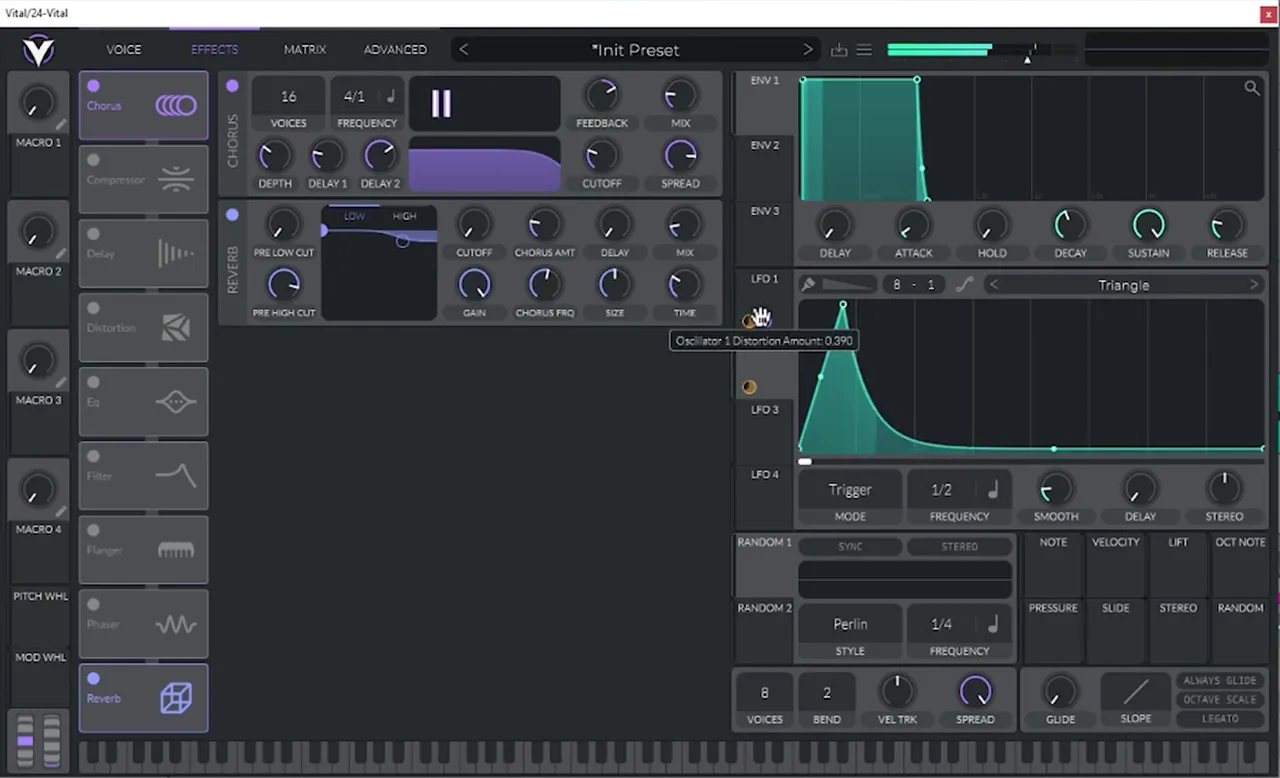
- Chorus: “just the slightest of chorus”. Keep the mix low.
- Reverb: “a bit of this reverb”, enough to give the stab a short tail.
Listen: the finished stab with chorus and reverb6 sec
7.Check it in the groove and EQ it
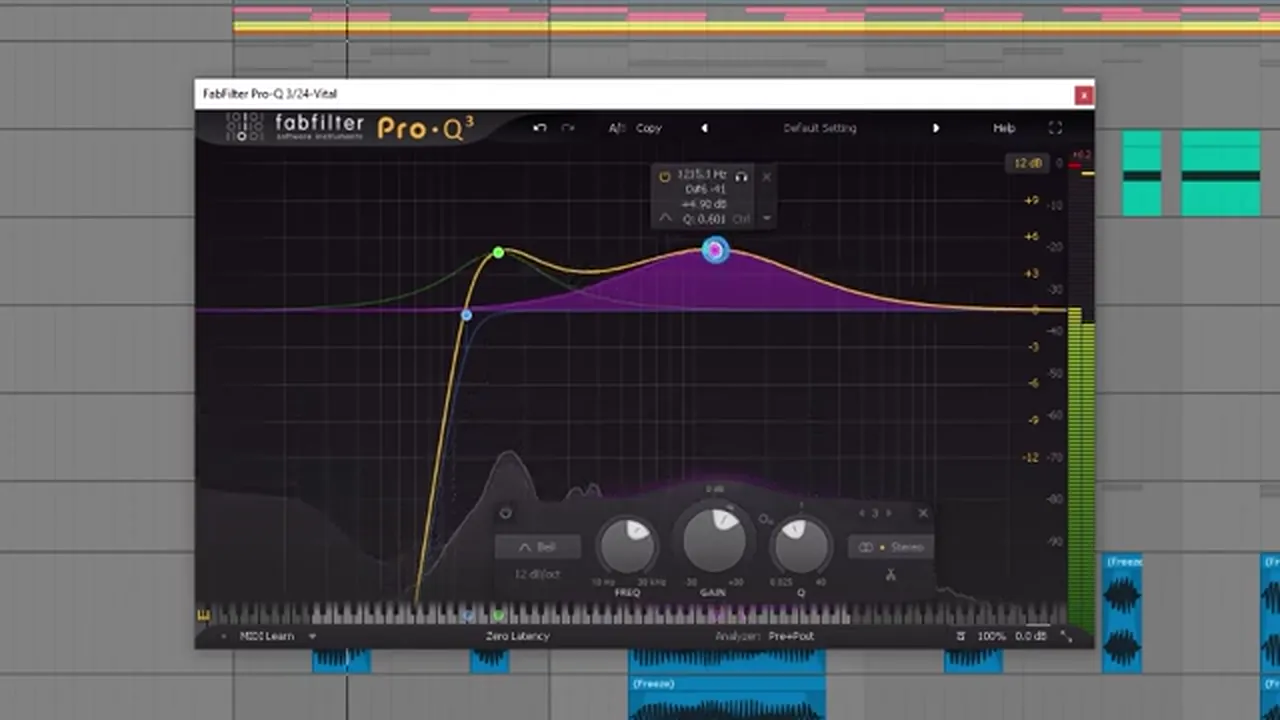
Now Icicle listens to the stab in the groove with the rest of the track, which is where you hear what it really needs. He works on the bottom end first (“see if we can fortify that bottom end”), then puts an EQ after Vital (FabFilter Pro-Q 3 in the video; any EQ works):
- A steep low cut (around 60 Hz at 36 dB/oct in the screenshot).
- He keeps the body (“it’s quite nice when it has the body”) with a bell boost in the low mids.
- Part of the detail is “probably remnant of the FMing”, so he EQs that out.
Listen: the stab in the groove with the rest of the track11 sec
8.Make a variation and group a lead bus
One stab gets repetitive, so Icicle makes an alternate on a second Vital track:
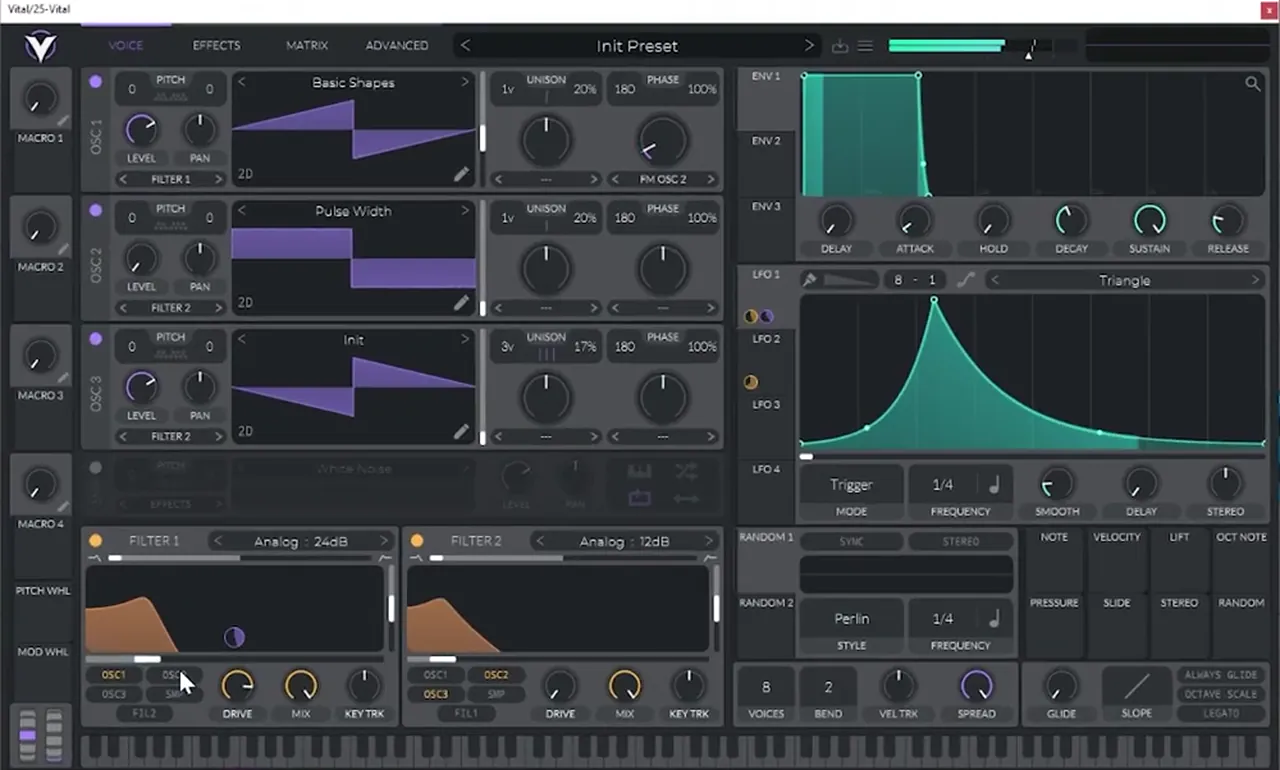
- Change LFO 1 to a rise-and-fall shape so the variation is “more articulated”.
- Give it more reverb.
- Make it a regular occurrence, every four bars.
Then he groups both stabs into a lead bus. Processing on the bus takes some low and a bit of high out with an EQ, and layers a little extra reverb (FabFilter Pro-R) on top. Song structure and where variations land are covered in our DnB BPM and structure guide.
Listen: the stabs in the track through the lead bus reverb11 sec
Common mistakes
- Leaving oscillator 2 audible. For FM it only needs to exist. Turn its level down, or it muddies the chord.
- An LFO that doesn’t retrigger. Keep LFO 1 and LFO 2 in Trigger mode, or the filter won’t snap shut on each hit.
- Both filters moving the same way. The texture comes from Filter 2 moving differently from Filter 1. Draw a different shape on LFO 2.
- Too much chorus and reverb. Icicle uses “the slightest” chorus and only a bit of reverb. A stab drowned in effects stops sounding like a stab.
- Designing it only in solo. The low end and FM leftovers only show up against the drums.
Go deeper
Learn more from Icicle and neuro presets
Study how deep, techy and neuro sounds are put together.
 Production courseIcicle production courseDeep / Techy: an artist course on deep, techy drum & bass.
 Preset bundleIcicle Vital preset bundleDeep / Techy: Vital presets for deep, techy drum & bass.
 Preset bundleNeurofunk Essentials Serum preset bundleNeurofunk: Serum presets for neuro basses and stabs.
Every artist course, preset bundle and sample pack is also in The Vault. Browse courses
Related tutorials
All tutorials → Ableton · NeuroNeuro Bass Patterns: How to Write DnB Basslines8 min read · Video + guide
 Vital · Bass designHow to Make a Foghorn Bass in Vital6 min read · Video + guide
 Vital · NeuroHow to Make Neuro Basses Like Noisia in Vital9 min read · Video + guide
 Guide · SubgenresDrum and Bass Subgenres: 12 Types of DnBGuide

Free download
Get free Vital presets to take apart
Once you’ve built this stab, open some finished patches and compare. The Vital Starter Preset Pack is:
- A neuro DnB starter pack for Vital
- Neuro bass presets
- Pluck and lead presets
- Made for the free version of Vital
It’s in DNB Academy Free Access with 7 free sample and preset packs, two e-books and artist track breakdowns, including Icicle’s “Outer Planes” breakdown with a Q&A. Free, no card needed.
FAQ
What is a neuro stab bass?
A neuro stab is a short, punchy hit that answers the main bass riff in neurofunk and techy drum and bass. In this tutorial Icicle makes a chordy stab: two notes a third apart, played through a filtered saw whose filter snaps shut on every hit.
How do you make a neuro stab in Vital?
Start from the Init preset with a saw on oscillator 1 into Filter 1 on Analog 24 dB. Put LFO 1 on the cutoff in Trigger mode with a fast decay at 1/4, FM oscillator 1 from a quiet oscillator 2, add oscillator 3 through Filter 2 with its own LFO, then add a little unison, chorus and reverb.
Why use an LFO instead of an envelope on the filter?
In Trigger mode an LFO restarts on every note, so a decaying LFO shape works like a filter envelope that you can draw freely. In the video the same LFO 1 also drives the FM amount, so the tone and the FM move together.
Is Vital free?
Vital has a free version, and this stab uses only its stock oscillators, filters, LFOs and effects. The EQ and extra reverb on the bus are separate plugins, and any EQ or reverb will do.
Who teaches this tutorial?
Icicle presents it. The video is an extract from Icicle's Start-to-Finish course on DNB Academy, from the lesson on musical elements in Vital and FM8.
Next steps
You now have a stab you can reshape with the LFO shapes, the FM amount and the second filter. When you want to learn the whole process in order, from sound design to finished tracks, here’s where to go next:
Course guide
How to learn drum and bass production step by step, and which course fits your level.
Read the guide1:1 Mentorship
Personal guidance on your music from a mentor, built around your goals.
See the mentorship