Serum · Neuro bass · Sound design
How to Make a Bass Like Noisia’s Diplodocus in Serum
To make a bass like Noisia’s Diplodocus in Serum, FM a sine on oscillator A from a sine on oscillator B tuned three octaves and three semitones up, shape it into a pluck with a triggered LFO, and automate that LFO’s rate from a macro so every hit moves differently. Then push it through distortion, phasers and multiband saturation on the low mids. Every value below comes from our 11-minute video.
Our Serum walkthrough of a Diplodocus-style bass, from the MIDI to the post processing and some variations. Each step below links to the moment in the video.
Noisia is our style reference here: this is our own recreation of a Diplodocus-style bass, not a Noisia preset. Building in Vital instead? Our neuro basses like Noisia in Vital tutorial builds a different Noisia-style patch in the free synth.
What you’ll need
- Serum. The whole patch starts from an initialised Serum preset and uses Serum’s own oscillators, LFO, macro, filter and FX rack.
- A DAW. We use Ableton Live (the project runs at 172 BPM) for the MIDI, the automation and the post processing with EQ Eight, Phaser and Reverb.
- A multiband distortion. The video uses iZotope Trash 2, twice, for the post processing in steps 8 and 9.
- No Serum? Vital is free and can build the same kind of FM bass; see the Noisia-style bass in Vital walkthrough.
1.Set up the MIDI and pitch bends
Write four short hits on a low D sharp, then automate the pitch bend wheel on each one. The first three get the same small bend; on the fourth, bend from low up to the midpoint and back down. Those bends are a big part of the Diplodocus-style movement.
We start with an initialised patch playing a low D sharp (watch at 1:17). The pitch bend automation is drawn into the MIDI clips: a short bend on each hit, repeated four times, but “in the last time instead of just going” up, it goes from low to the midpoint and back to low. Serum’s pitch bend range stays at its default of +2/-2 semitones in the video.

2.Load sines and FM oscillator A from B
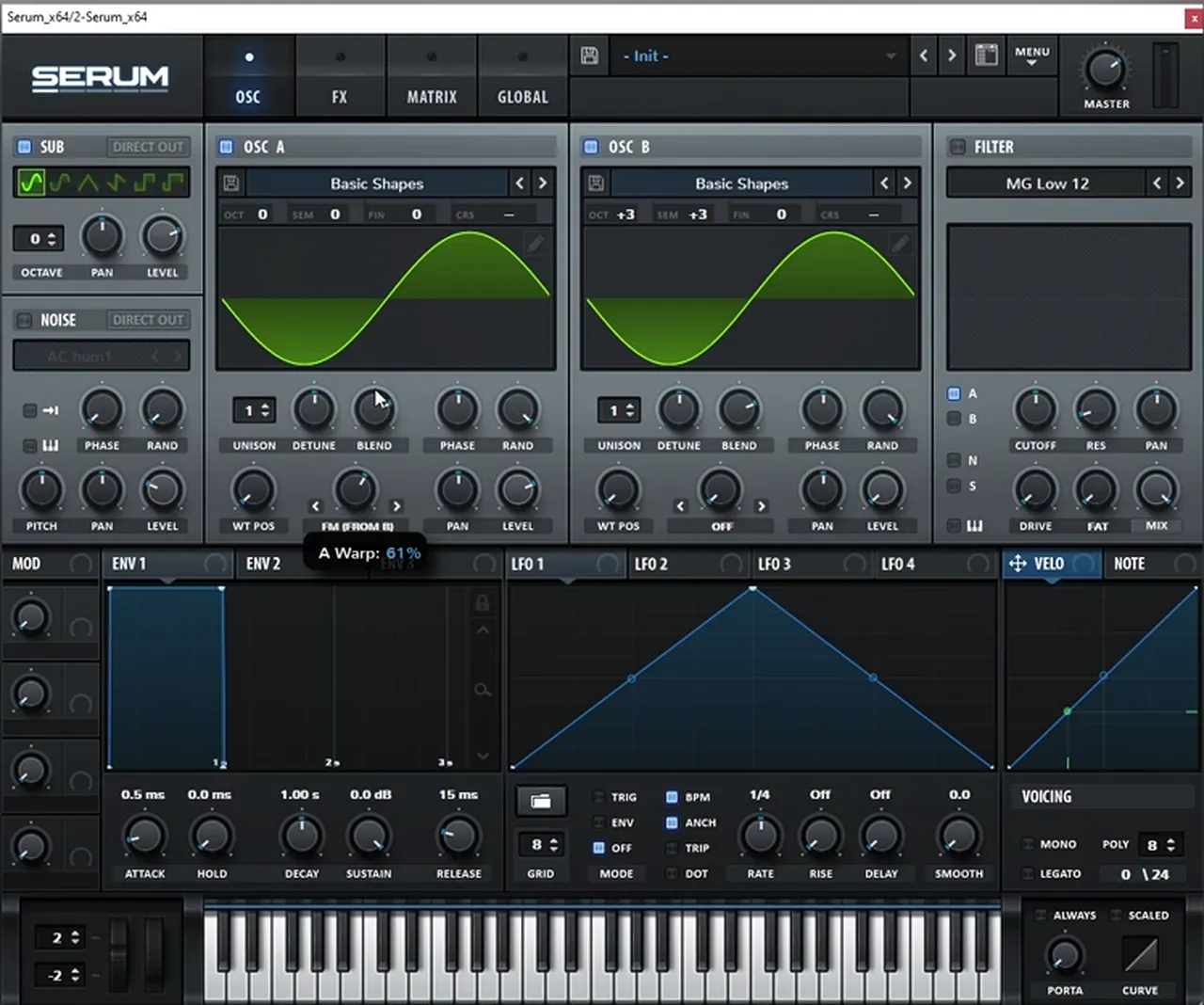
Load sine waves on the sub, oscillator A and oscillator B (leave the noise off). Pitch oscillator B three octaves and three semitones up, bring its level all the way down and run FM from B on oscillator A. B is now only shaping A’s harmonics.
On its own, three sines is “nothing really special, just a big sub” (watch at 1:56). Set oscillator B to octave +3 and semitone +3, turn its level down, then switch oscillator A’s warp mode to FM (from B) and boost the amount. In the screenshot it reads 61%. At this point it still “doesn’t sound too exciting”: the movement comes next.
3.Shape a pluck with LFO 1 on the levels
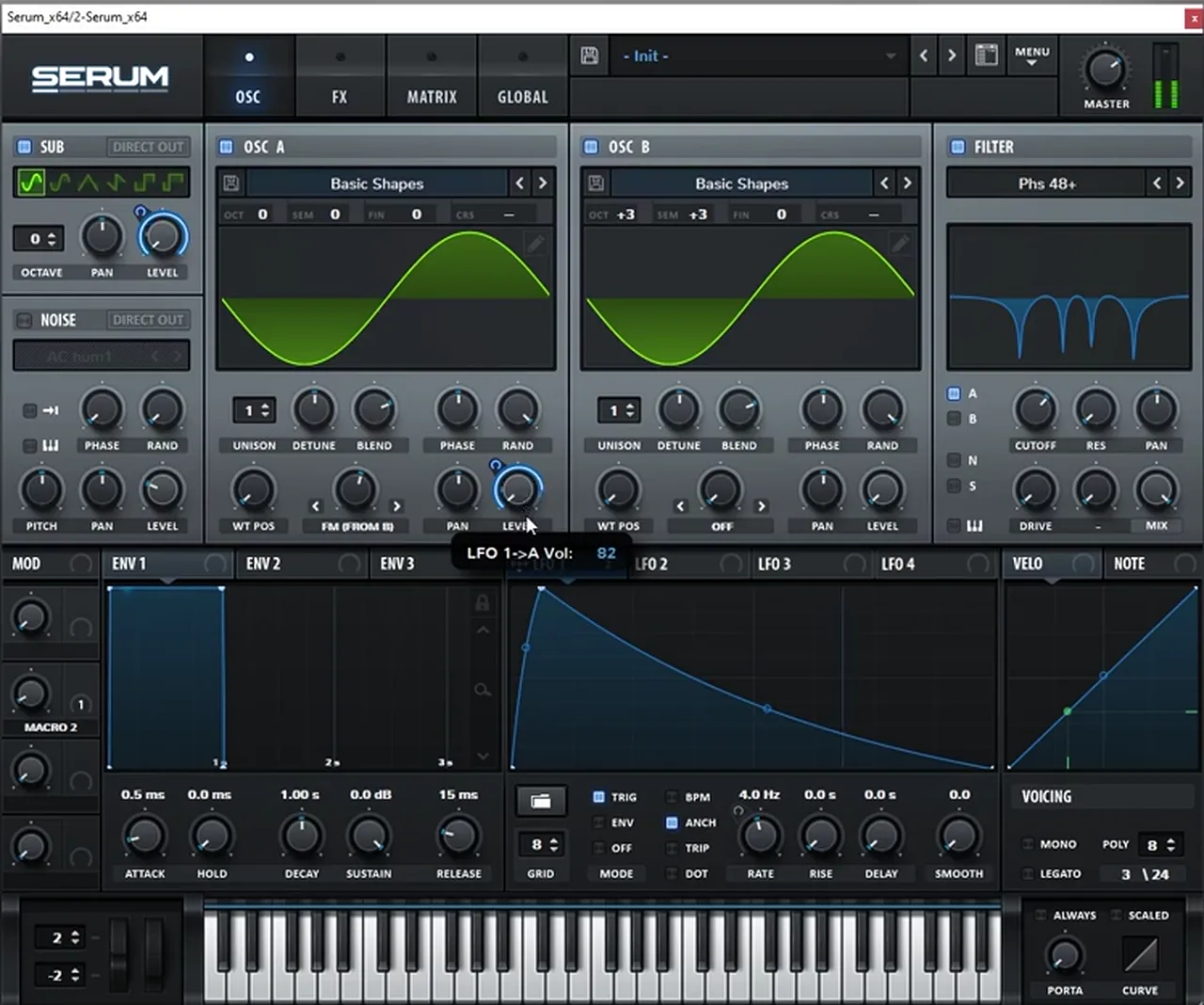
Map an LFO to oscillator A’s level, set it to trigger mode and draw a plucky shape: a fast rise and a long decay. Later, map the same LFO to the sub level too, so the whole sound plucks together.
Drag LFO 1 onto the level of oscillator A, set the LFO to Trig mode so it restarts on every note, remove the envelope and draw the pluck (watch at 2:34). In our patch the LFO 1 → A level amount reads 82. Once the macro from step 4 is in place, map LFO 1 into the sub level as well (watch at 3:34).
4.Automate the LFO rate with a macro
Turn the LFO rate down, assign the rate knob to a macro, then automate that macro in your DAW: hold it steady on one hit and sweep it on the next. A changing LFO rate makes each pluck wobble at a different speed.
We bring the LFO rate down, then make a macro on the rate knob (watch at 2:51); in the project it is Macro 2. Moving the macro by hand already gives the effect. In the MIDI clips, we keep the macro sustained on one hit, automate it on the next, sustain it again and automate it differently on the last (watch at 3:14). “Very cool, huh?”

This is the same trick as the sync macro in our Vital Noisia tutorial: a single macro, automated per hit, turns one patch into a whole sequence. For how to arrange hits like these into call-and-response phrases, see our neuro bass patterns tutorial.
5.Add Hyper, Tube distortion and an EQ cut
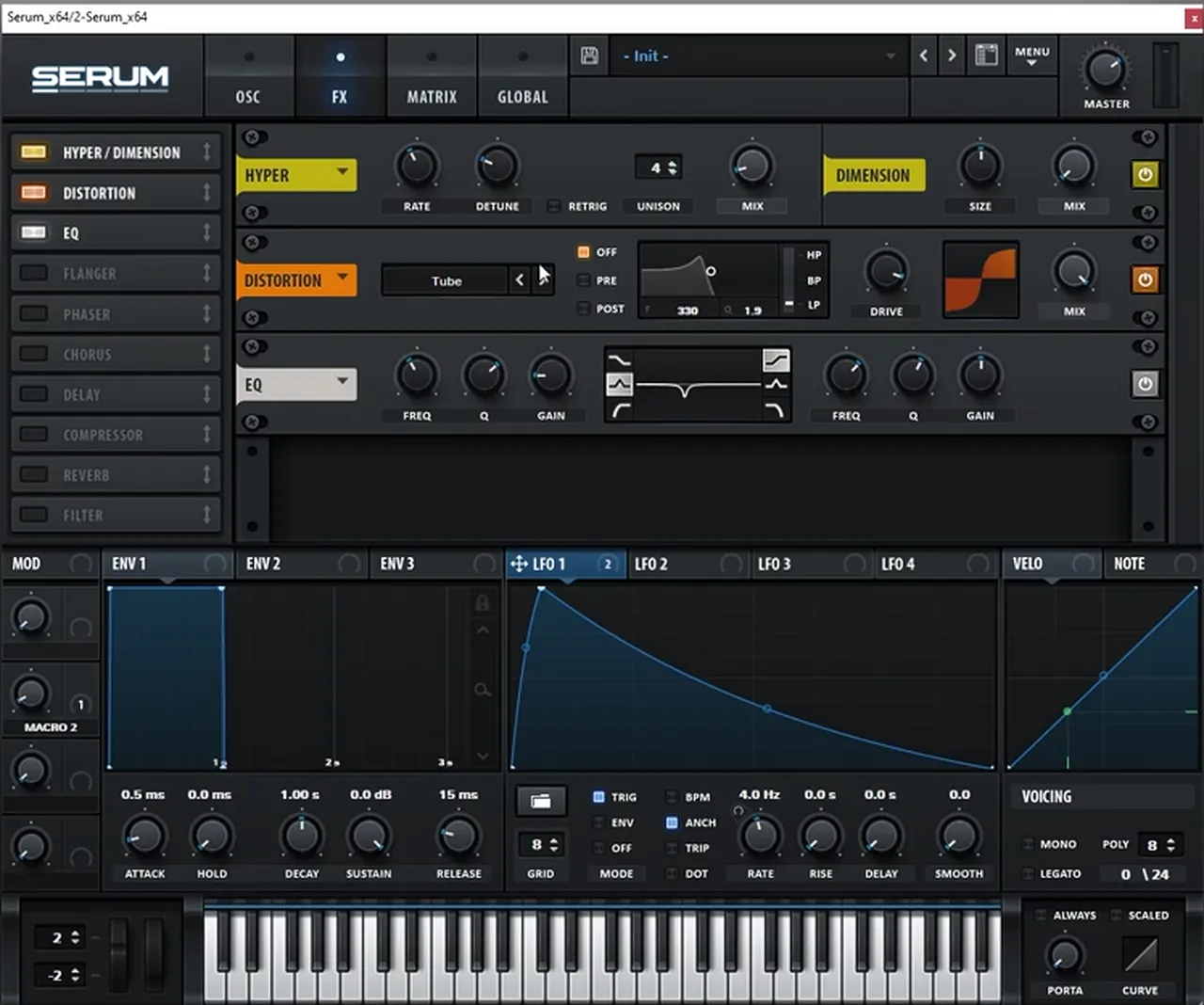
In the FX tab, add Hyper and bring it down, add a lot of Tube distortion, then use an EQ bell to cut some frequencies at around 300 Hz. The distortion turns the FM pluck into a growl, and the cut keeps the low mids from getting boxy.
Open the FX tab and turn on Hyper, then bring it down (watch at 3:40); the screenshot shows Hyper with 4 unison voices. Add Distortion in Tube mode with a lot of drive. Then add the EQ and use a bell to bring down some specific frequencies at around 300 Hz.
6.Load the Phs 48+ filter and tidy the oscillators
Now that the distortion is in place, go back to the oscillator tab and load Serum’s Phs 48+ phaser filter, then fine-tune its cutoff by ear. Rebalance the oscillator mix and bring the random phase all the way down so every hit sounds the same.
The filter goes in after the distortion on purpose: with all that drive, the phaser’s notches have plenty of harmonics to carve (watch at 4:08). Load Phs 48+, fine-tune it, adjust the mix of the oscillators, and bring Rand (random phase) down to zero “so we have a consistent sound every time we hit the notes”.
Listen: the FM pluck through the Phs 48+ filter, with distortion and the LFO rate automation11 sec
7.Phaser, chorus, multiband compression and a double-peak filter
Back in the FX tab, add a phaser with a high rate and low depth, frequency and mix, then a chorus with the mix up and its low-pass lower. A multiband compressor brings the detail forward, and a PP (double peak) filter driven hard and mixed low adds a parallel, distorted layer for a stronger fundamental.
The steps, in order (watch at 5:00):
- Phaser: boost the rate (a “pretty funny effect”), bring the depth down, bring the frequency down, fine-tune it, then bring the mix down.
- Chorus: turn it on, boost the mix and bring its low-pass filter a bit lower.
- Compressor: set it to Multiband, then boost the gain and the release.
- Filter: load the PP filter, “meaning double peaks”: one peak sits on the cutoff and the other on the frequency knob (the video puts one around 30 Hz). Boost the resonance, push the drive all the way up and bring the mix down.
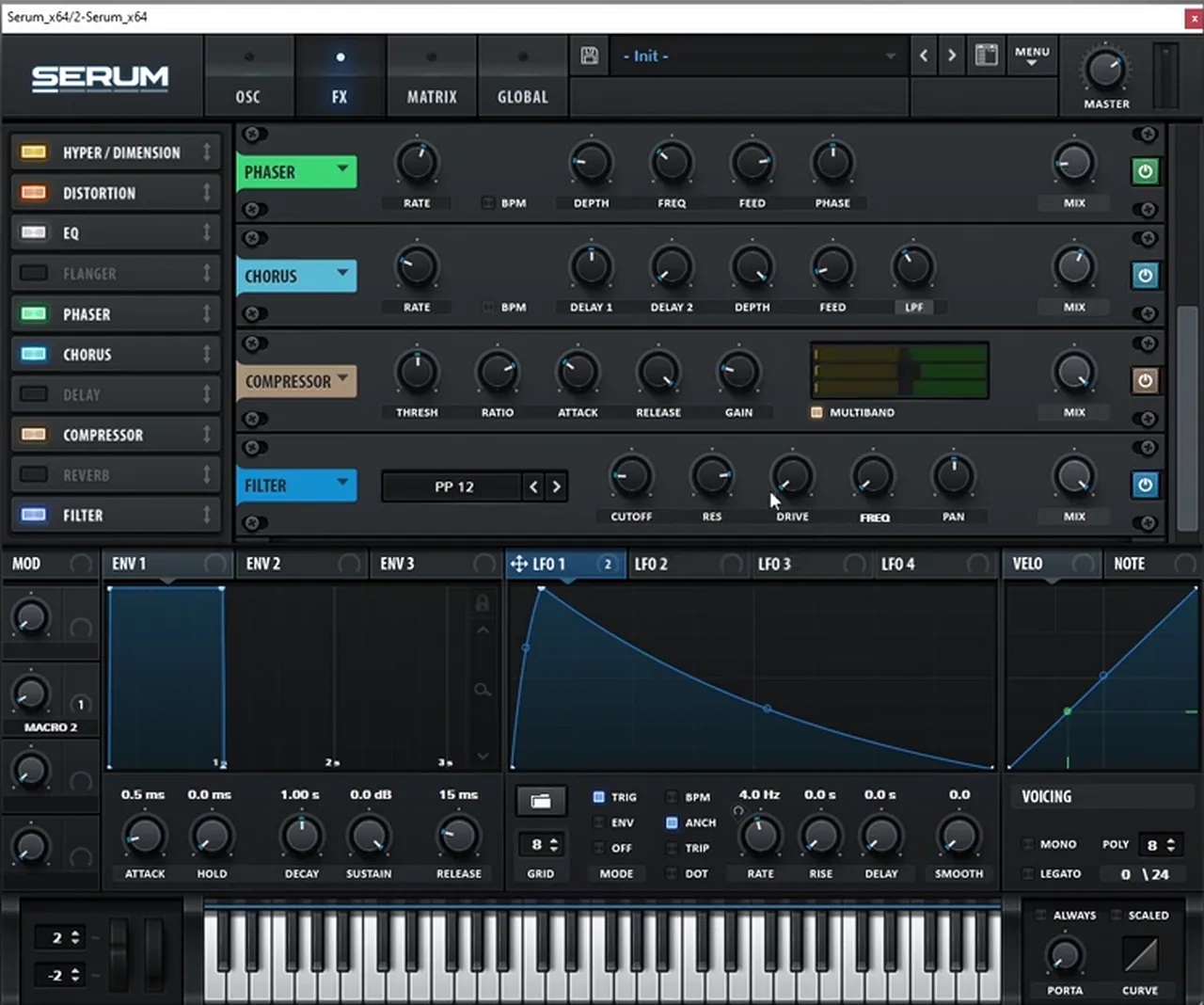
The PP filter is the clever part. With the drive maxed and the mix low, it acts like “a parallel distortion type of layer”, giving a stronger fundamental and more harmonics in the low end (watch at 6:20).
Listen: the bass after the phaser, chorus and multiband compressor5 sec
8.Post processing: multiband saturation with Trash 2
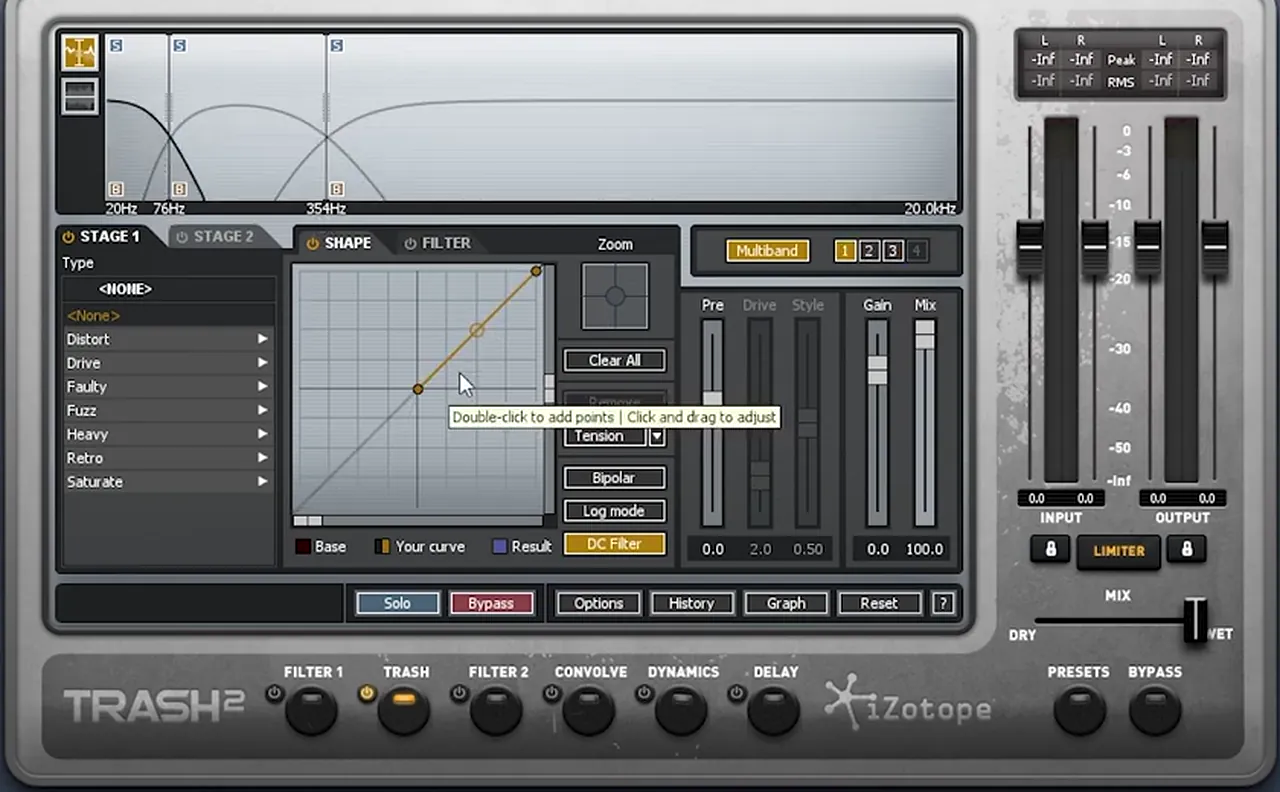
After Serum, add Trash 2 in multiband mode with three bands: 20 to 75 Hz, 76 to 354 Hz and everything above. Leave the sub and top bands unaffected and boost only the waveshaper on the middle band. The low mids get much more power while the sub stays clean.
The first Trash 2 is all about the low mids (watch at 6:29). Compare before and after: “this sound has much more power in the low mids” because only those frequencies are being saturated.
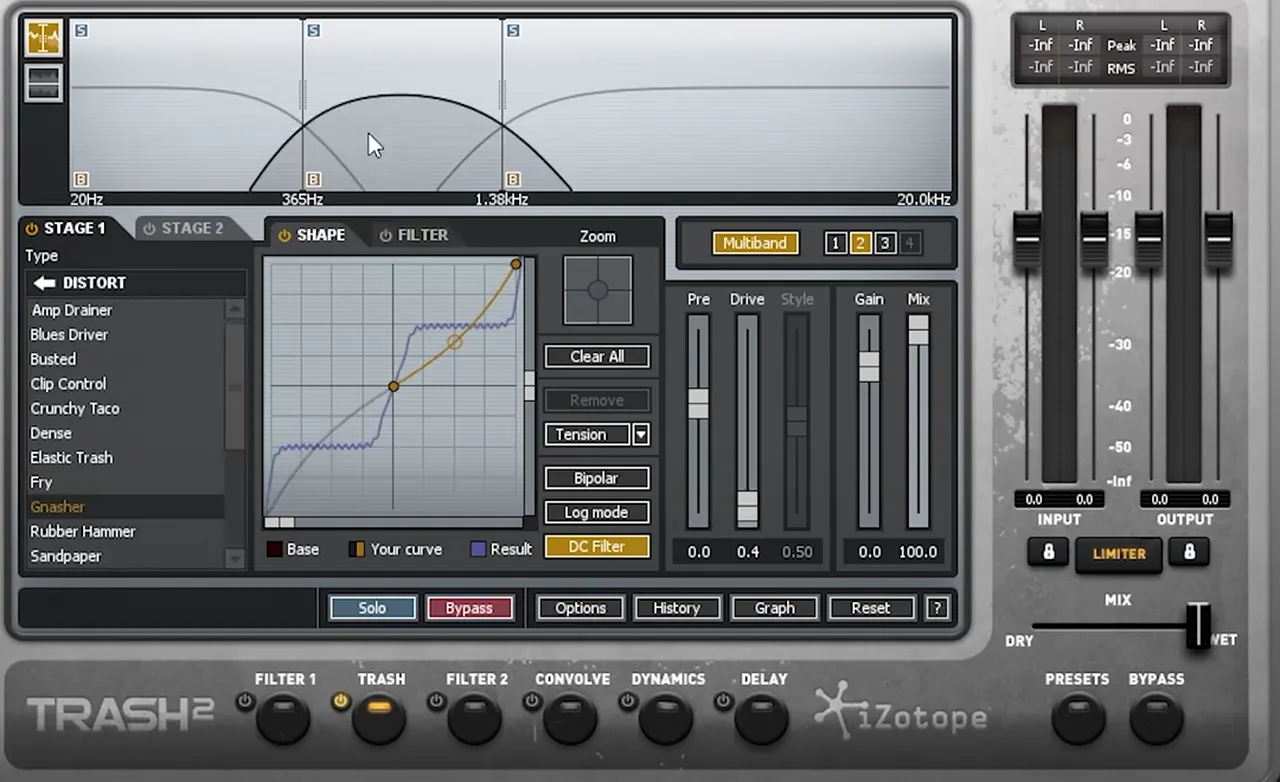
A second Trash 2 follows, again split into three bands (watch at 7:12). Here the crossovers sit at 365 Hz and 1.38 kHz. The sub is unaffected, the mids go through Gnasher (in the Distort category) with a drive of 0.4, and the highs just get the waveshaper boosted a little. It adds a bit more of that upper-mid range.
9.EQ, one more phaser and reverb
Finish the chain with an EQ boosting the sub and low mids, another phaser to add a different formant, and a reverb to put the bass in a space. Keep the phaser and reverb partly dry so the hits stay punchy.
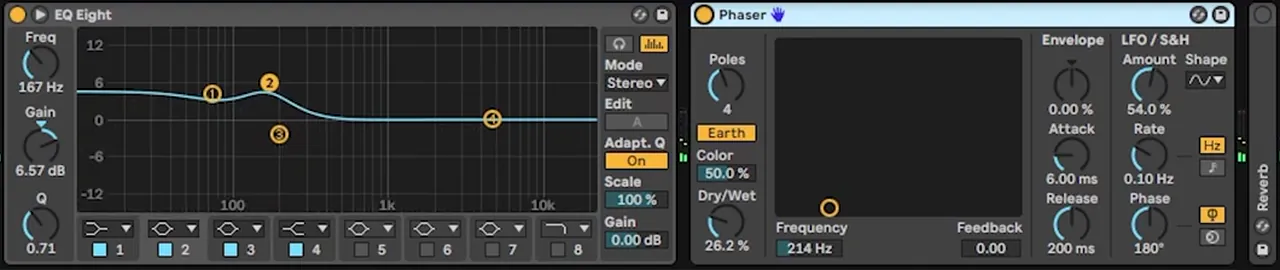
In Ableton, EQ Eight boosts the sub and the low mids (the selected band reads 167 Hz, +6.57 dB). Ableton’s Phaser runs in Earth mode at 214 Hz with the dry/wet at 26.2%, “just adding a different format into the sound”. Last, Reverb puts the sound in a space; the screenshot of our project shows it at a 473 ms decay and 55% dry/wet (watch at 7:46).
To build a full track around a bass like this, follow how to make neuro drum and bass in Ableton Live.
10.Make it your own
Don’t copy the same sound: change it. Write a different riff and rhythm, change the FM amount or oscillator B’s harmonics, retune the phaser filter, change the LFO rate, or swap the wavetables for a long, sustained variation.
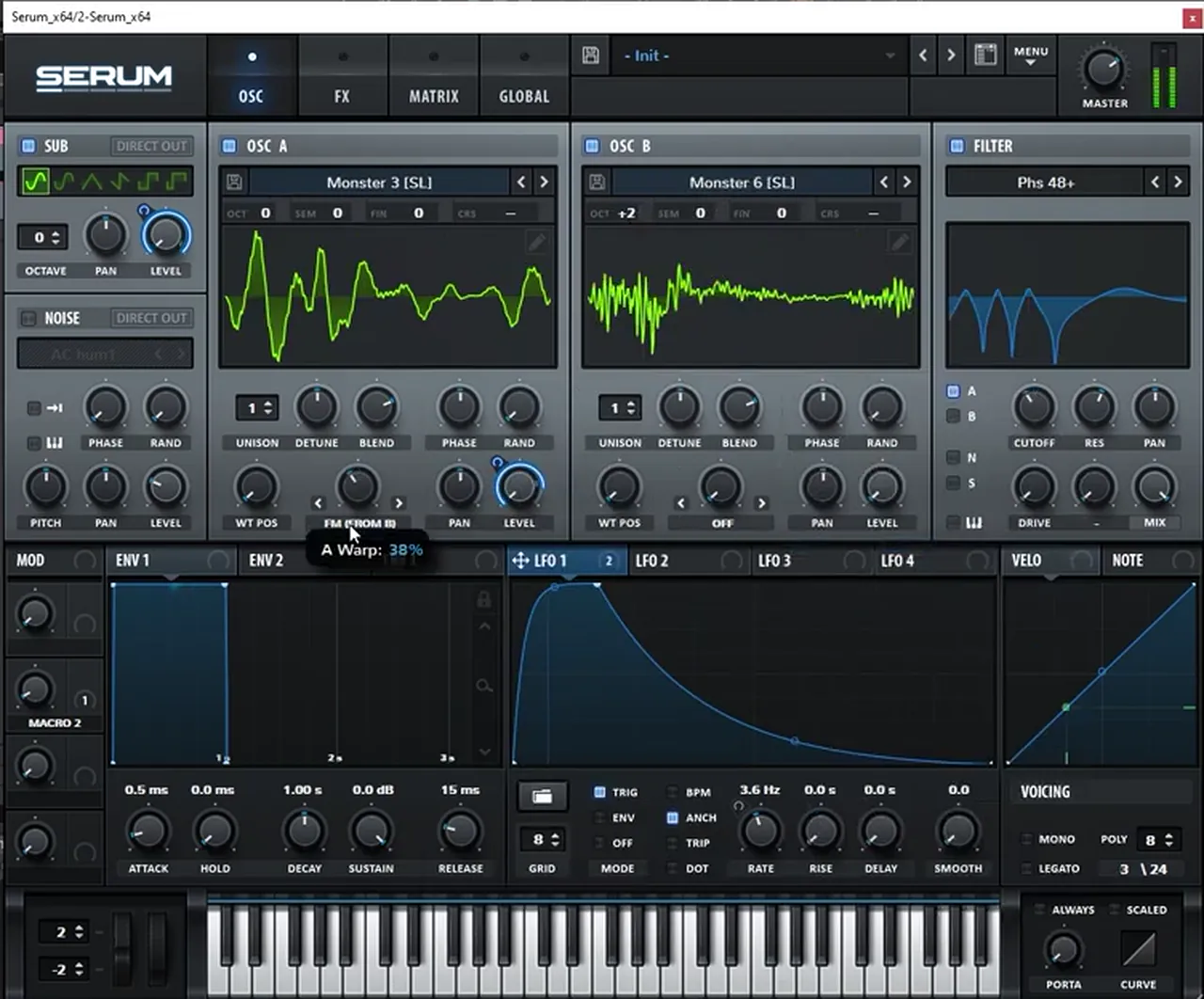
Even on the same riff, small changes give “a different variation of the same sound” (watch at 8:21). Try a different FM amount or tuning on oscillator B and move the phaser filter with it, then change the LFO rate a little. You can also completely change the wavetables: in the video, oscillator A moves to Monster 3 and oscillator B to Monster 6 for a long sustained bass, with more wavetable variations after that (watch at 9:36).
Listen: the Monster wavetable variation of the same bass5 sec
Where this sound sits in the bigger picture is in the neurofunk section of our subgenres guide.
Common mistakes making a Diplodocus-style bass
- Hearing oscillator B. Keep its level all the way down: it only modulates oscillator A.
- Leaving random phase on. Bring Rand down so each hit starts the same way, or the plucks won’t sound consistent.
- One static LFO rate. The movement comes from automating the rate macro differently on each hit, plus the pitch bends.
- Distorting the sub. In both Trash 2 instances the sub band is left unaffected; saturate the low mids and mids instead.
- Full-wet effects. The phaser, PP filter and reverb mixes are all brought down. Too much smears the hits.
- Copying instead of creating. Change the riff, the FM and the wavetables until it sounds like you.
Free download
Free neuro samples for your drop
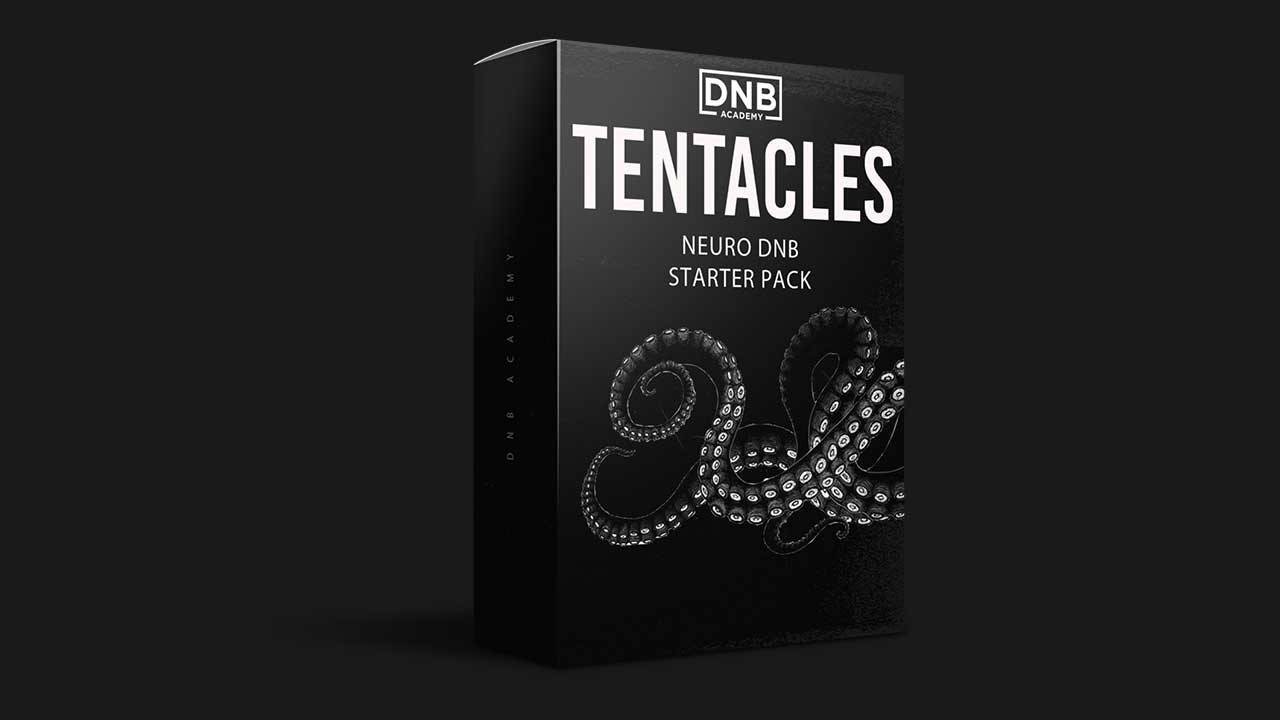
Your Serum bass needs heavy drums and more bass hits around it. The Tentacles Neuro DnB Starter Pack gives you:
- 15 kicks, snares and top loops for heavy drums
- 25 neuro bass samples
- 10 FX samples
- 50 royalty-free samples in total, with Ableton project files
It’s one of seven free sample and preset packs in DNB Academy Free Access, alongside the mixing and mastering e-books and the 3‑day DnB challenge. Join 40,000+ producers in Free Access. Free account, no card needed.
Go deeper
Neuro sound design courses and presets
Want to go further into Serum synthesis, post processing and neuro production?
 Production courseCurrent Value production courseAbout 5 hours of a full track built with synthesis: drum, bass and pad synthesis, Serum and Ableton Operator workflows, post-processing, arrangement and mixing.
 Production courseMaztek production courseNeurofunk: a technical approach to neuro drum & bass, from start to finish, in 6+ hours of video.
 Preset bundleNeuro Essentials Serum preset bundle100 Serum presets for neurofunk, including 50 basses, plus FX, drums, pads and synths.
Every artist course, preset bundle and sample pack is also in The Vault. Browse courses
Related tutorials
All tutorials → Vital · NeuroHow to Make Neuro Basses Like Noisia in Vital9 min read · Video + guide
 Ableton · NeuroNeuro Bass Patterns: How to Write DnB Basslines8 min read · Video + guide
 Ableton · NeuroHow to Make Neuro Drum and Bass in Ableton Live12 min read · Video + guide
 Serum · BassHow to Make a Reese Bass for Drum and Bass15 min read · Video + guide
FAQ: a Diplodocus-style bass in Serum
How do you make a bass like Noisia’s Diplodocus in Serum?
Put sine waves on the sub and both oscillators, tune oscillator B three octaves and three semitones up, turn its level down and use it to FM oscillator A. Add a plucky trigger LFO on the oscillator and sub levels, automate the LFO rate with a macro, then add Hyper, Tube distortion, an EQ cut around 300 Hz, the Phs 48+ filter, phaser, chorus, multiband compression and a double-peak filter. Finish with multiband saturation on the low mids, EQ, phaser and reverb.
What makes the Diplodocus-style bass move?
Three things in our recreation: pitch bend automation on the MIDI notes, a plucky LFO in trigger mode on the oscillator and sub levels, and a macro on that LFO’s rate that is automated differently on each hit. The phaser filter and effects phasers add the vowel-like colour on top.
Why turn oscillator B’s level all the way down?
Oscillator B is only there to frequency-modulate oscillator A. With its level down you don’t hear it directly; you hear the harmonics it creates in oscillator A. Changing B’s tuning or the FM amount changes those harmonics.
Do I need iZotope Trash 2 for this bass?
The video uses Trash 2 in multiband mode to saturate the low mids and mids while the sub band stays unaffected. That idea is what matters: any multiband distortion that lets you leave the sub clean can do a similar job, although the exact sound will differ.
Is this Noisia’s own preset?
No. Noisia’s Diplodocus (the Outer Edges remix) is our style reference, and this is our own recreation of that kind of bass, built from an initialised Serum patch. Use it as a starting point and change the riff, the FM and the wavetables to make it yours.
Can I make this kind of neuro bass in Vital instead?
Yes. Vital is free and has FM between oscillators, LFOs, macros and effects. Our tutorial on neuro basses like Noisia in Vital walks through a Noisia-style patch built entirely in Vital.
Next steps
Open Serum, load three sines and get the FM pluck moving before you touch the effects. Then work down the steps above and finish by changing the riff and the wavetables until the bass is yours.
Free Access
Seven free DnB sample and preset packs, including the Tentacles Neuro DnB Starter Pack, plus mixing and mastering e-books and a 3-day challenge for Ableton Live and FL Studio.
Get free packsThe full guide
Tempo, drums, sub, mid bass, chords, arrangement and mixdown: every step of a DnB track.
Read the guideDNB Foundations
A structured drum and bass course with weekly live feedback calls on your tracks.
See Foundations1:1 Mentorship
Personal guidance on your music from a mentor, built around your goals.
See the mentorship50,000+ producers have joined DNB Academy, and our producer Discord has 5,300+ members.