Vital · Bass design · FM
How to Make a Bass Like Mefjus in Vital
To make a bass in the style of Mefjus in Vital, FM a sine wave with the Water Razor wavetable, turn off phase randomisation so every note hits the same way, add a noise layer, and shape a 24 dB filter and the noise with a triggered LFO. Then drive it through chorus, distortion, compression, reverb and EQ. Here is our five-minute Vital patch, step by step, with the settings from the screen and audio of the result.
After the detuned-saw reese? Our reese bass guide rebuilds a Mefjus “The Sirens”-style reese in Serum. This page is a different patch: an FM bass built from scratch in Vital.
Quick answer
How do you make a bass like Mefjus in Vital?
Start from an init patch. Use the Water Razor wavetable on oscillator 1 as an FM source for a sine on oscillator 2, raise oscillator 1 by an octave and set phase randomisation to 0%. Add a noise sample, a 24 dB analog filter and a triggered LFO on the cutoff and the noise level. Finish with chorus, soft-clip distortion, compression, reverb, EQ and a second LFO on the volume.
- Build the FM core.Water Razor FM-ing a sine at about 55%.
- Lock the attack.Octave up, phase randomisation off, phase and frame tweaked.
- Add noise and a filter.A noise sample and Analog 24 dB.
- Make it move.LFO 1 on the cutoff and the noise level.
- Effects.Chorus, distortion, compressor, reverb, EQ, LFO 2 on gain.
- Balance and finish.Mix the layers, then EQ, OTT, reverb and a low cut.
Our Mefjus-style bass in Vital, built from an init patch in just over five minutes. Every step below links to the moment in the video.
What you’ll need
- Vital. The whole patch lives in Vital, which is free. Everything here uses stock wavetables and effects.
- A noise sample. Any noise in Vital’s sampler works; we just pick one that sounds cool.
- A DAW for the finishing touches. We finish in Ableton Live with EQ Eight, OTT and Reverb after the synth. Any EQ, multiband compressor and reverb can do the same job.
1.Build the FM core
The body of this bass is FM: a sine wave whose pitch is being modulated by a more complex wavetable. In Vital that takes two oscillators. One makes the source sound, the other is the sine you actually hear.
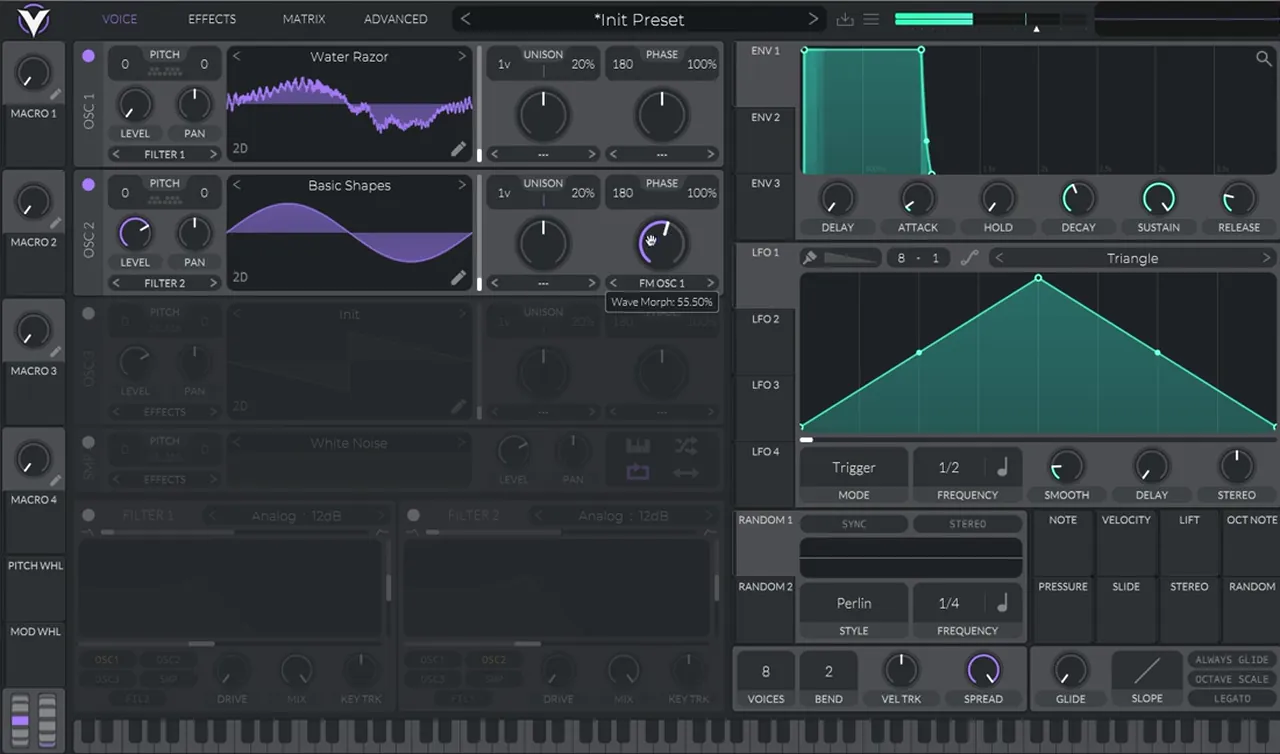
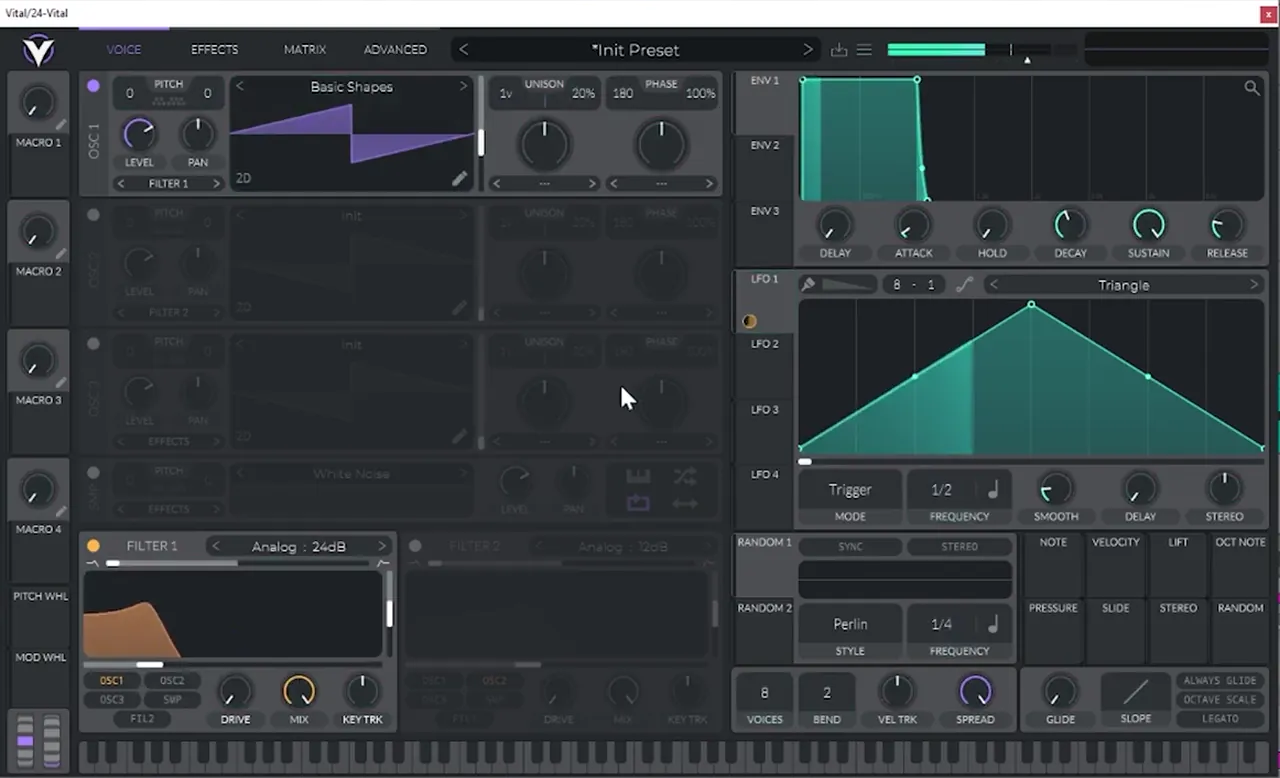
From an initialised patch, load the Water Razor wavetable on oscillator 1 (watch at 0:18). It sounds interesting on its own, but bring its level all the way down: we only want it as a modulator. Turn on oscillator 2, set it to a sine wave from Basic Shapes and switch its mode to FM OSC 1, so oscillator 1 now frequency-modulates the sine. Turn the amount up to around 55% (the screen reads 55.50%).
2.Octave up, phase randomisation off
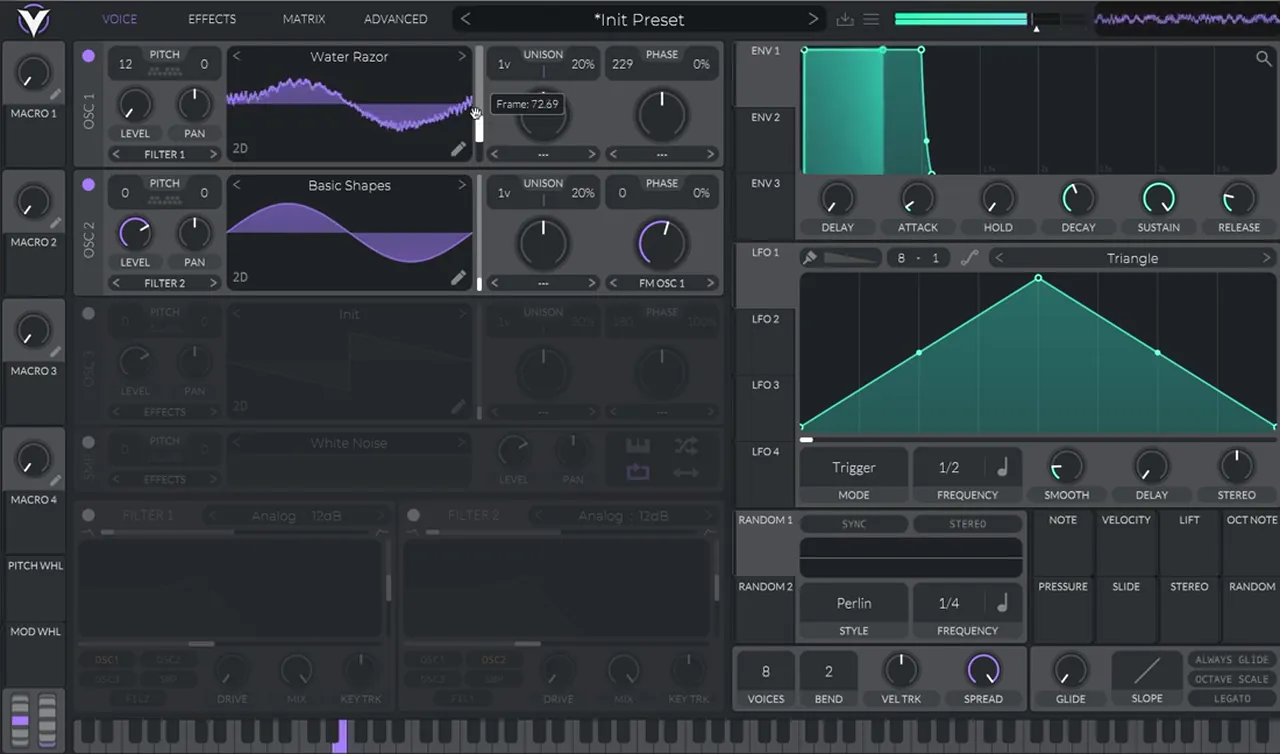
Raise the modulator an octave for a brighter, more aggressive tone, then set phase randomisation to 0% on both oscillators. Otherwise each note starts at a random point in the waveform and the bass sounds slightly different every time you hit it.
Boost the octave on oscillator 1 (pitch +12 on screen). It gets quite squeaky, which is fine at this stage. Now listen to a few notes in a row: each one sounds different. To fix that, turn the phase randomisation all the way down on both oscillators, from 100% to 0% (watch at 1:00). With the start point fixed, you can use the phase knob itself to change the sound slightly: on screen, oscillator 1 ends up at 229 and oscillator 2 at 0. Then drag the frame position of the Water Razor wavetable until you like the tone, and leave it there.
Listen: the FM core after the octave and phase changes, before any filter or effects6 sec
3.Add noise and a 24 dB filter
A noise layer adds grit to the attack, and a steep low-pass filter gives you something to animate. Keep the noise quiet for now, because an LFO will control its level in the next step.
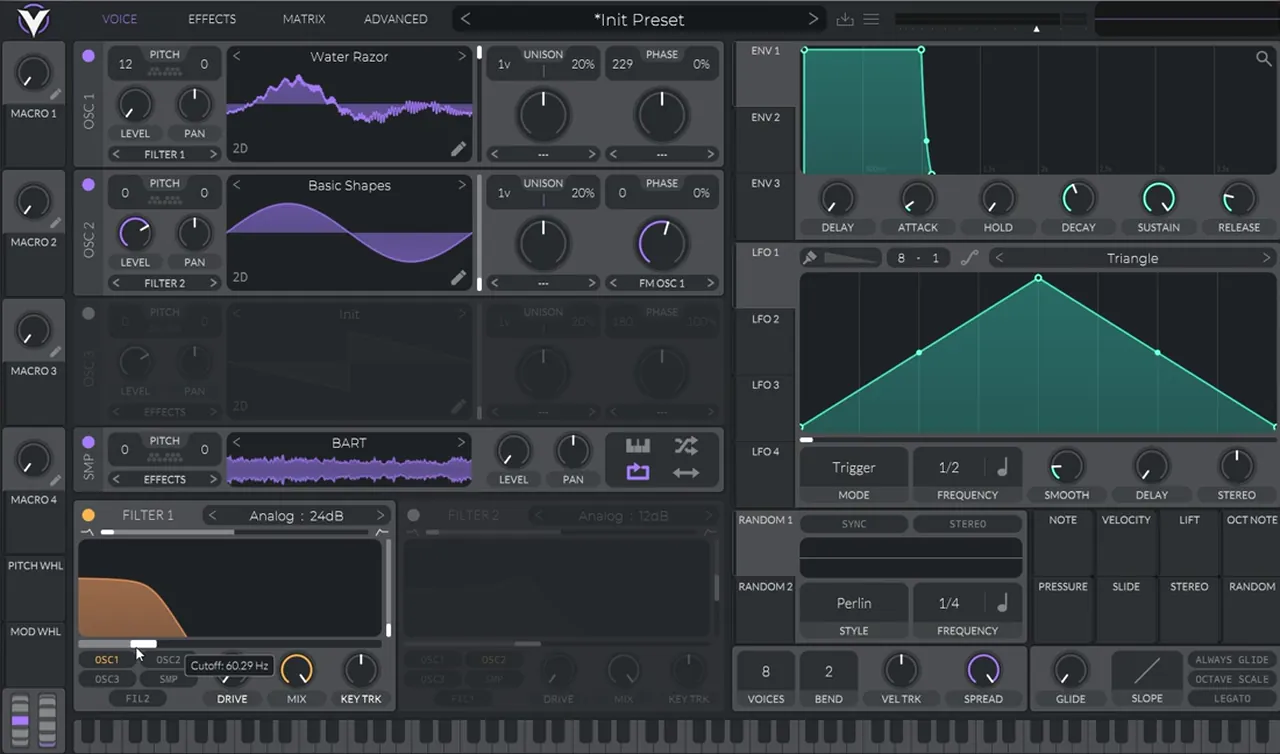
Turn on the sampler and load a noise you like (watch at 1:26); ours is called BART. Bring its level all the way down. Then turn on filter 1 and set it to Analog 24 dB. Check the routing: oscillator 2 has to go into the filter too, or turning the cutoff won’t do much to the FM sound. Play with the cutoff to hear the range.
4.Make it move with LFO 1
The movement in this bass comes from one LFO doing two jobs: opening the filter and bringing the noise in. A triggered LFO restarts with every note, so each hit gets the same shape.
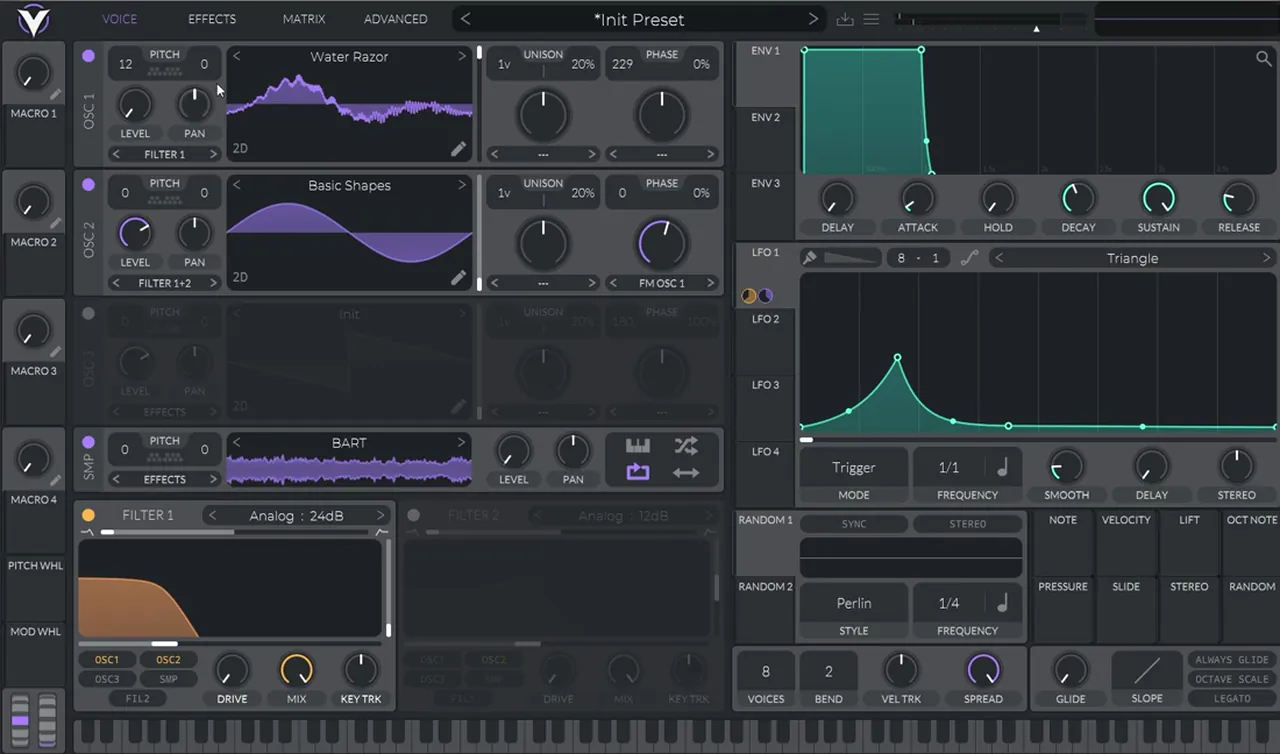
Map LFO 1 to the filter cutoff (watch at 1:54). Draw a shape like ours: a curved rise to a peak early in the cycle, a quick fall, then a long, low tail. Change its frequency (ours goes from 1/2 to 1/1, in Trigger mode). Then map the same LFO to the sampler’s level, so the noise swells with the filter, and decrease the amount of that modulation. You can come back and play with the LFO later.
5.Chorus, distortion, compression, reverb and EQ
The effects do a lot of the character here. Chorus with a raised cutoff acts as an extra filter, so the distortion that follows has a shaped sound to bite into. Compression, a short reverb and a high boost finish the tone.
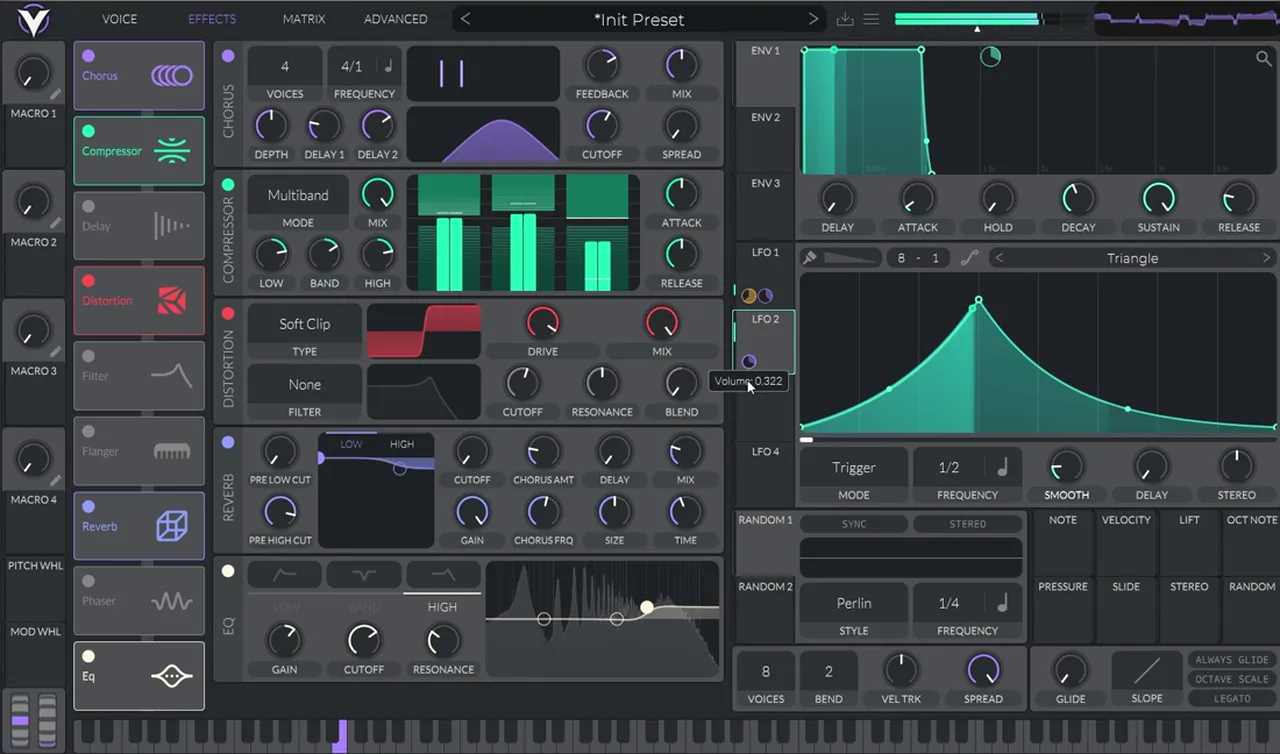
In the Effects tab (watch at 2:27), turn on the chorus, bring the voices down to 4 and the spread all the way down, and boost the cutoff. Next, turn on the distortion (Soft Clip on screen) and boost the drive. Then turn on the compressor: it sounds way too distorted at first, and that’s fine. Turn on the reverb and reduce its time, then add the EQ and boost the highs.
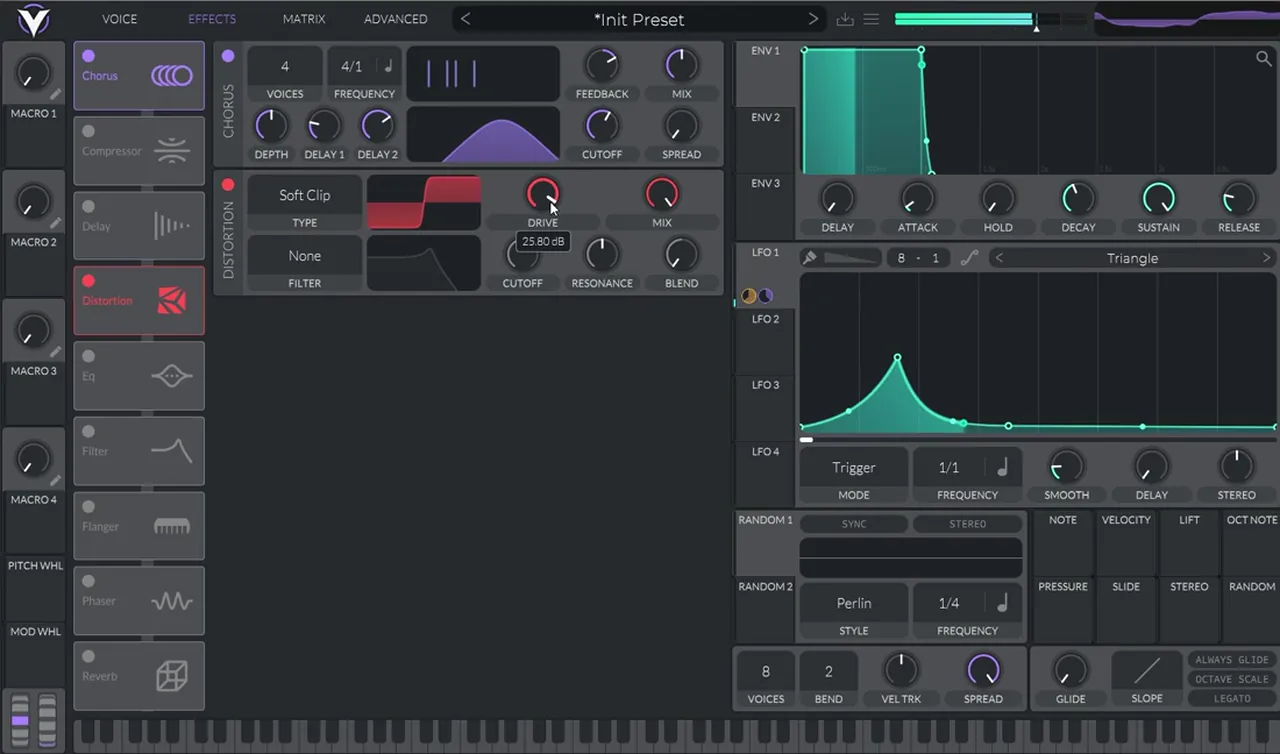
Finally, bring the global gain a bit lower and modulate it with LFO 2 (watch at 3:14). Ours uses a curved triangle at 1/2 in Trigger mode. Decrease the modulation a bit so it shapes the volume of each hit without chopping it up.
Listen: the patch with the effects chain and LFO 2 on the volume5 sec
6.Balance the layers and finish in the DAW
With everything switched on, go back and rebalance the sources. Then a little processing in the DAW finishes the sound: EQ, more compression, some reverb and a simple low cut.
Back on the Voice tab (watch at 3:29), bring the noise a bit lower so it’s less noisy, and lower oscillator 2’s level so it doesn’t distort as much. That gets us really close to the sound. From here it’s fine-tuning: try different LFO shapes and distortion settings, because the patch has a lot of possibilities.
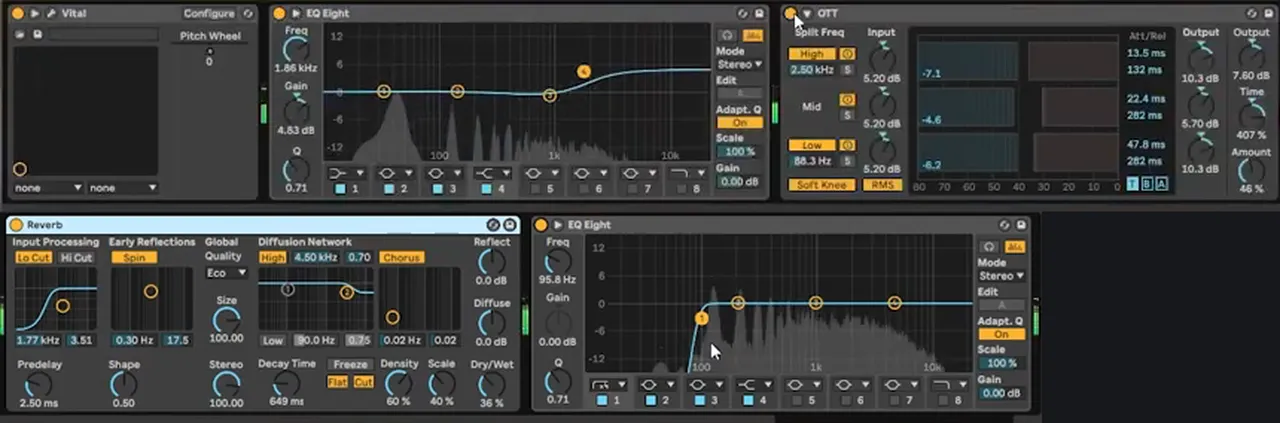
After Vital, our Ableton chain is short (watch at 4:06): EQ Eight with a high shelf (1.86 kHz, +4.83 dB on screen), OTT at 46%, Ableton’s Reverb with a 649 ms decay at 36% dry/wet, and a second EQ Eight with a low cut at 95.8 Hz. If you want to see how a bass like this sits against the sub in a full mix, our DnB sub bass guide covers that.
Listen: the finished Mefjus-style bass after fine-tuning and post-processing11 sec
This exact preset is in the free Vital Starter Preset Pack, so you can open it and compare it with your own version. Mefjus is best known for neurofunk; our drum and bass subgenres guide explains where that style sits.
Common mistakes making a Mefjus-style bass in Vital
- Leaving phase randomisation on. Every note sounds a little different. Set it to 0% on both oscillators for a consistent hit.
- Leaving the FM source audible. Oscillator 1 is only there to modulate the sine. Turn its level down.
- Forgetting the filter routing. If oscillator 2 isn’t going into the filter, the LFO on the cutoff won’t move the FM sound.
- Too much noise. Let the LFO bring the noise in, with a small modulation amount, and pull the level down again once the effects are on.
- Overdriving everything. The compressor makes the distortion louder. Lower oscillator 2 and the global gain instead of fighting it at the end.
- No low cut. A simple low cut after the synth keeps room for your sub.

Free download
Get this Mefjus-style preset free
In the video we put this exact bass in the Vital Starter Preset Pack, so you can check every knob against your own build. The pack gives you:
- A neuro DnB starter pack for Vital
- Neuro bass presets, including this one
- Pluck and lead presets
- Works with the free version of Vital
It’s one of seven free sample and preset packs in DNB Academy Free Access, alongside the mixing and mastering e-books and the 3‑day DnB challenge. Join 40,000+ producers in Free Access. Free account, no card needed.
Go deeper
Neuro bass courses and Vital presets
Want to go further with layered neuro basses, or study more Vital patches?
 Production courseSynergy production course6+ hours of neurofunk production: multi-layered basslines, custom drum design, arrangement, mixing and mastering.
 Preset bundle · VitalIcicle Vital preset bundleDeep / Techy: Vital presets for deep, techy drum & bass.
 Preset bundle · VitalALIX Vital preset bundle100 Vital presets for deep, minimal drum and bass: 50 basses, 25 drums, 10 FX, 10 leads and 5 pads, plus WAV files of every preset.
Every artist course, preset bundle and sample pack is also in The Vault. Browse courses
Related tutorials
All tutorials → Serum 2 · BassHow to Make a Reese Bass for Drum and Bass15 min read · Video + guide
 Vital · NeuroHow to Make Neuro Basses Like Noisia in Vital9 min read · Video + guide
 Vital · NeuroHow to Make a Neuro Stab Bass in Vital with Icicle8 min read · Video + guide
 Vital · BassDark, Minimal DnB Bass Sound Design in Vital7 min read · Video + guide
FAQ: making a bass like Mefjus in Vital
How do you make a bass like Mefjus in Vital?
Start from an init patch. Load the Water Razor wavetable on oscillator 1, turn its level down and use it to FM a sine wave on oscillator 2 at around 55%. Raise oscillator 1 an octave, set phase randomisation to 0%, add a noise sample and an Analog 24 dB filter, and map a triggered LFO to the cutoff and the noise level. Finish with chorus, distortion, compression, reverb, EQ and an LFO on the volume.
How do you set up FM in Vital?
Turn on two oscillators. Put the sound you want to hear on one (a sine wave in our patch) and set its mode to FM from the other oscillator, here FM OSC 1. Turn the amount up to taste; we use about 55%. Lower the level of the modulating oscillator if you only want it as a source.
Why does my Vital bass sound different on every note?
Vital randomises the start phase of each oscillator by default, so every note begins at a different point of the waveform. For a bass that hits the same way every time, turn phase randomisation all the way down on each oscillator, then use the phase knob to fine-tune the tone.
Is Vital free?
Yes. Vital has a free version, and everything in this patch uses Vital’s own wavetables, sampler, filter, LFOs and effects. The Vital Starter Preset Pack in DNB Academy Free Access also works with the free version.
Can I download this Mefjus-style preset?
Yes. The exact preset from the video is in the Vital Starter Preset Pack, one of seven free sample and preset packs in DNB Academy Free Access. Sign up for a free account and download it from your library.
Is this the same as a reese bass?
No. A reese is built from detuned saw waves phasing against each other. This patch is an FM bass: a wavetable modulating a sine, with noise and a moving filter. For a Mefjus-style reese in Serum, see our reese bass guide.
Next steps
Open Vital, start from an init patch and rebuild the FM core first. Once each note hits the same way, add the noise, the filter and the LFO, and only then the effects. For a classic two-saw reese instead, follow our reese bass guide; for more Vital neuro sounds, try neuro basses like Noisia in Vital.
Free Access
Seven free DnB sample and preset packs, including the Vital Starter Preset Pack, plus mixing and mastering e-books and a 3-day challenge for Ableton Live and FL Studio.
Get free packsThe full guide
Tempo, drums, sub, mid bass, chords, arrangement and mixdown: every step of a DnB track.
Read the guideDNB Foundations
A structured drum and bass course with weekly live feedback calls on your tracks.
See Foundations1:1 Mentorship
Personal guidance on your music from a mentor, built around your goals.
See the mentorship50,000+ producers have joined DNB Academy, and our producer Discord has 5,300+ members.