Serum · Leads & harmony · Recreation
How to Make a Lead Like Camo & Krooked and Mefjus’ “No Tomorrow” in Serum
To make a lead in the style of Mefjus and Camo & Krooked’s “No Tomorrow” in Serum, the harmony does most of the work: write a chromatic chord progression (a C major chord, then the same chord with every note a semitone up), add a dissonant bass note and a perfect fourth, and set Serum’s pitch bend range to −24 so you can swoop notes up by two octaves. Then play it with simple saw patches, stack three variations and a sub, and mix the layers. This is our own recreation, step by step, with the settings from the screen and audio of each stage.
This is a recreation for learning, inspired by the main lead in “No Tomorrow”. It’s not the original sound or MIDI: it’s our own patch and progression, built to teach the ideas behind it. For where chords and leads fit in a full track, see the chords step of our drum and bass guide.
Quick answer
How do you make a lead like Camo & Krooked and Mefjus’ “No Tomorrow” in Serum?
Write a short progression: a C major chord (C, E, G), then the same chord with every note one semitone up (C#, F, G#) in a different inversion, a dissonant bass note, and a perfect fourth (C to F) with an extra F stacked below. Set Serum’s pitch bend down range to −24 and automate pitch bends at key points. Play it with an init saw through an EQ that cleans the low mids, a multiband compressor and reverb. Make three variations (full chords, top notes only, with or without unison), add a sub, and balance the layers with EQ and volume.
- Layers.Three Serum layers and a sub.
- Harmony.Chromatic chords, a dissonant bass note and a perfect fourth.
- Top notes.Some layers only play the highest notes.
- Pitch bend.A −24 range and automated bends.
- Patch.Saw, EQ, multiband compressor, reverb.
- Mix.Unison variations, stacking, EQ and levels.
Our recreation of the “No Tomorrow” lead in Serum and Ableton Live: the harmony, the pitch bends and the three layers. Every step below links to the moment in the video.
What you’ll need
- Serum. Every layer starts from an init patch with a plain saw wave and Serum’s own EQ, compressor and reverb. No Serum? Vital is free and has everything this lead needs: saws, unison, a pitch bend range setting and the same kind of effects.
- A DAW with a piano roll and an EQ. We use Ableton Live with EQ Eight, but any DAW works. The harmony is the important part, so a piano roll you’re comfortable with matters more than the synth.
- A little music theory. You only need to know what a major chord, a semitone and an interval are. We explain each one as we go.
1.Split the lead into three Serum layers and a sub
The sound is simple: three layers of Serum plus a sub, and a bit of basic music theory. Each layer plays a different version of the same harmony with a slightly different sound, and the character comes from how you mix them.
In the project, the lead is a group of three Serum tracks with a separate sub track underneath (watch at 0:54). Layer one, layer two and layer three each play their own MIDI clip over the same four bars, and each has its own EQ Eight devices. Soloing them one at a time is the quickest way to hear what each one adds.
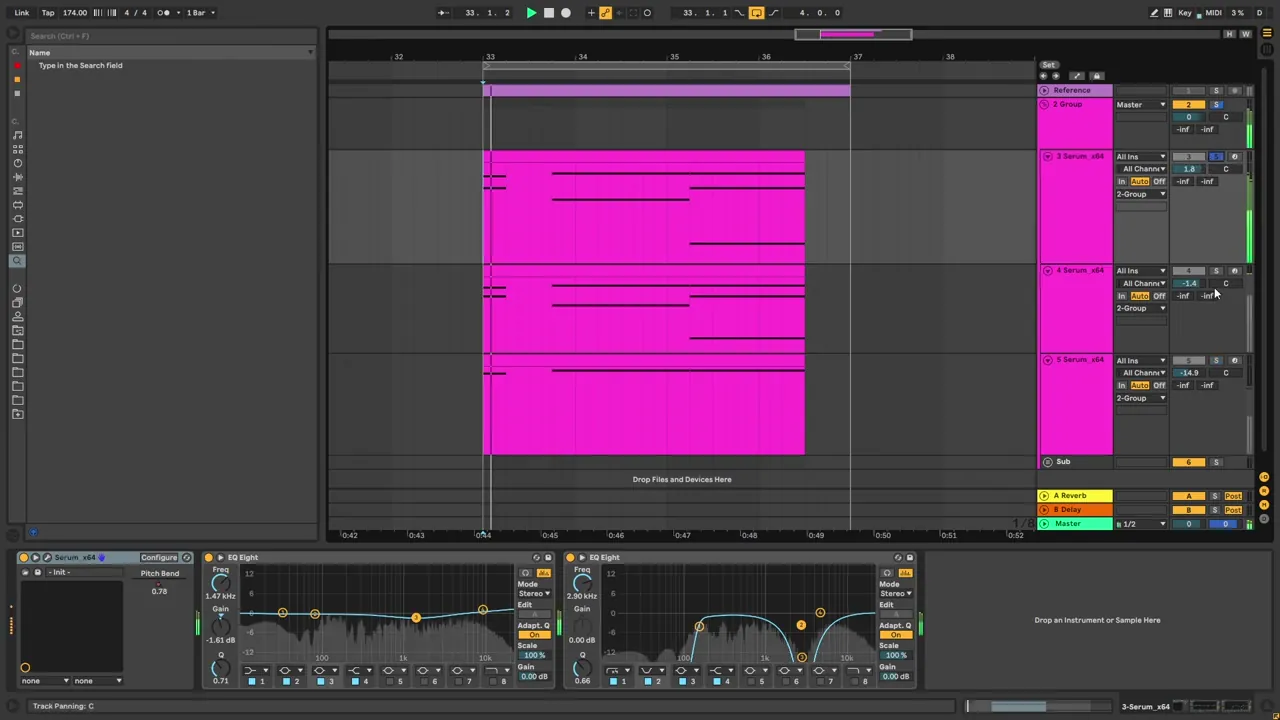
Thinking in layers keeps every part simple. No single patch has to do everything: one can carry the full chords, another only the top line, and the sub holds the low end.
2.Write a chromatic chord progression
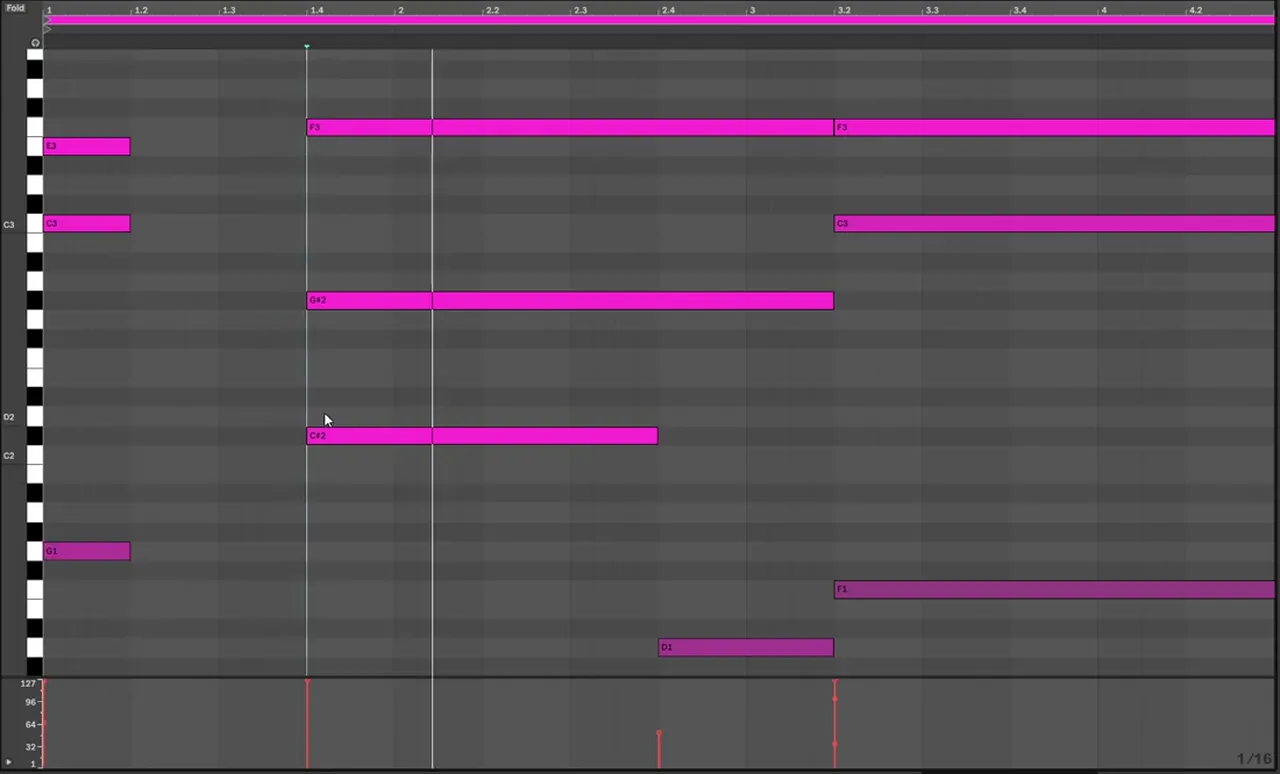
The progression starts on a C major chord (C, E and G). The second chord is the same chord with every note moved up one semitone, in a different inversion. Moving whole chords chromatically like this gives the lead its tense, cinematic sound.
Open the MIDI (watch at 1:13). The first chord is C major: C, E and G (on screen G1, C3 and E3). The next chord is the same chord with every note one semitone up: the G turns into a G#, the C into a C# and the E into an F. It just uses a different inversion (C#2, G#2 and F3 on screen). If you bring all of those notes closer together, you can see that the two chords are chromatic chords: the same shape, a semitone apart, with more interesting inversions.
Listen: the chromatic progression with the dissonant bass note, played by one of our Serum layers4 sec
If chords are new to you, our guide to writing liquid DnB chords covers chord shapes and voicings from the start. The same ideas apply here, just pushed somewhere darker.
3.Add a dissonant bass note and a perfect fourth
Under the second chord sits a single dissonant bass note that clashes on purpose. The last chord is an interval rather than a full chord: C and F, five semitones apart, which is a perfect fourth. An extra F stacked lower makes it heavier.
After the chromatic chords comes a dissonant bass note (watch at 1:59). On screen it’s tried on D1 and then D#1, and it sits at a lower velocity than the chords (51 on screen). It’s short, and it adds a moment of tension before the last chord.
The last chord is just an interesting interval: C and F, five semitones apart, which is called a perfect fourth (watch at 2:08). We stack one more layer of it, another F, and bring it down to an F lower in the range. The fourth has no third, so it’s neither major nor minor, which keeps the lead open and a bit ambiguous.
4.Use only the top notes on some layers
The full progression is the source, but most of the sounds only play its top notes. That gives you a clear melody line on top, while the full chords sit in one layer underneath.
This is the progression we use, but in a lot of the sounds we end up using only the top notes (watch at 2:30). In the piano roll, the lower notes are deactivated and only the highest notes of each chord play: E3, then F3, and the F3 again over the last chord. The simplest layer of all only uses the highest note (watch at 3:24).
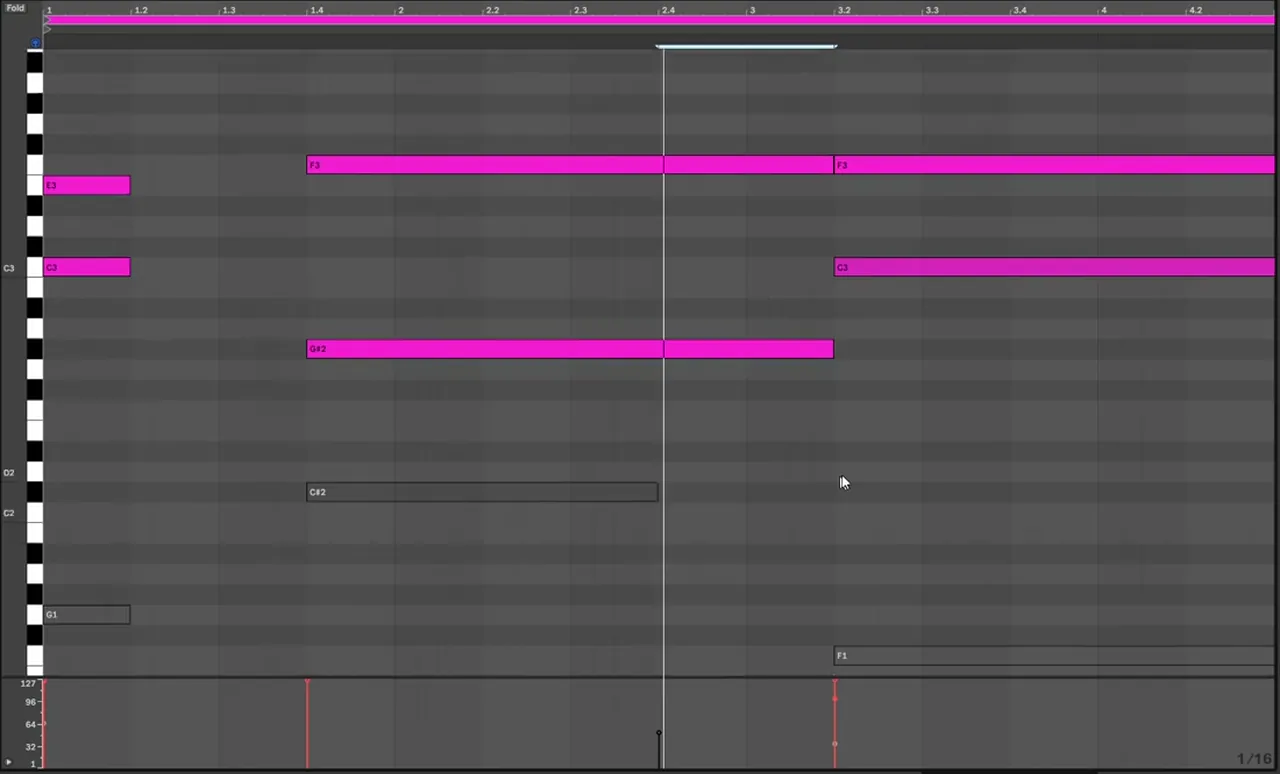
Across the layers we use different variations of the same intervals with different sounds (watch at 3:12). At this stage it’s a lot about experimenting: try which notes each layer plays and listen to how they combine.
5.Set the pitch bend range to −24 and automate it
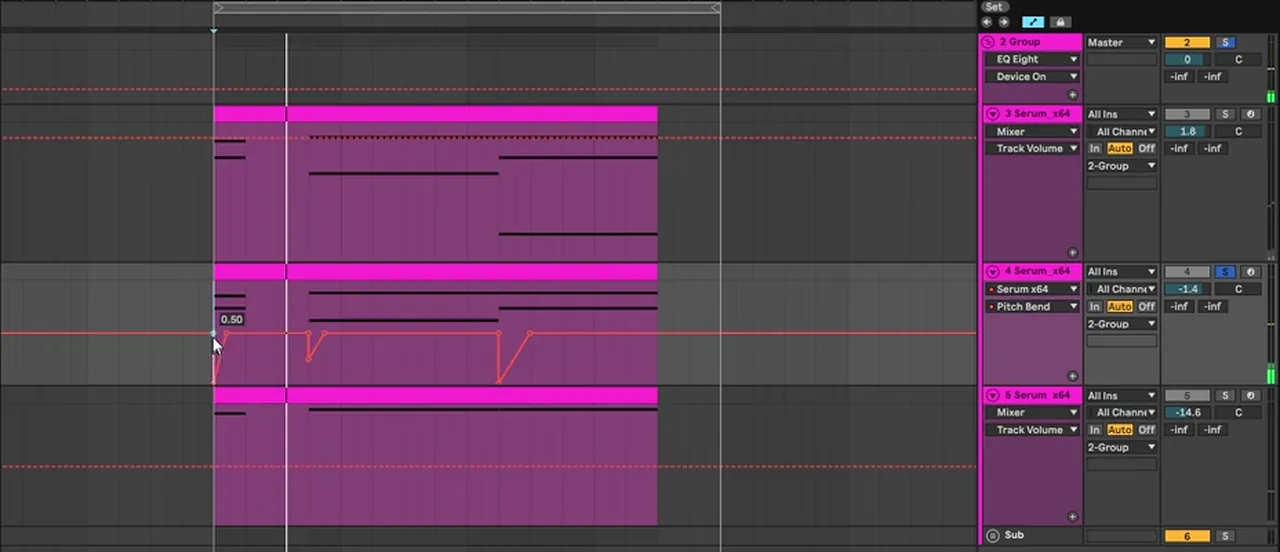
One very important detail: Serum’s pitch bend down range is set to −24 semitones, two octaves. Pitch-bend automation at key points then makes the notes swoop up from far below into the chord.
In Serum, the pitch bend range sits in the bottom-left corner, next to the keyboard (watch at 2:43). Here the up range is 2 and the down range is −24. With the pitch bend fully down, a note plays two octaves lower.
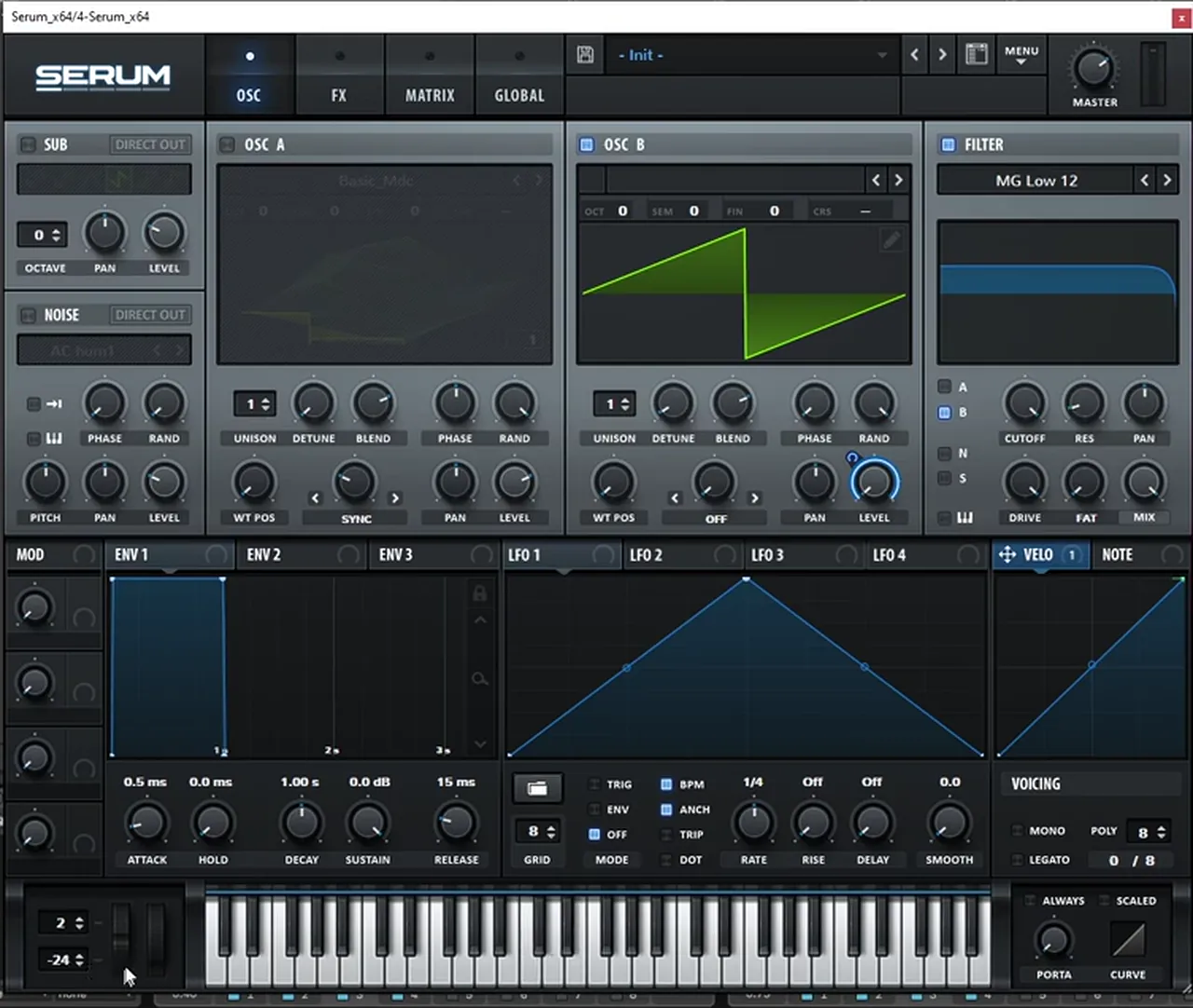
Then the pitch bends are drawn as automation on one of the layers, at certain key points. We bend from −24, two octaves down, up to the middle, and later from the middle back down to the full two-octave bend, so the notes swoop in and out (watch at 2:56). The bends line up with the chord changes, which is where they’re most noticeable.
6.Build the patch: an init saw
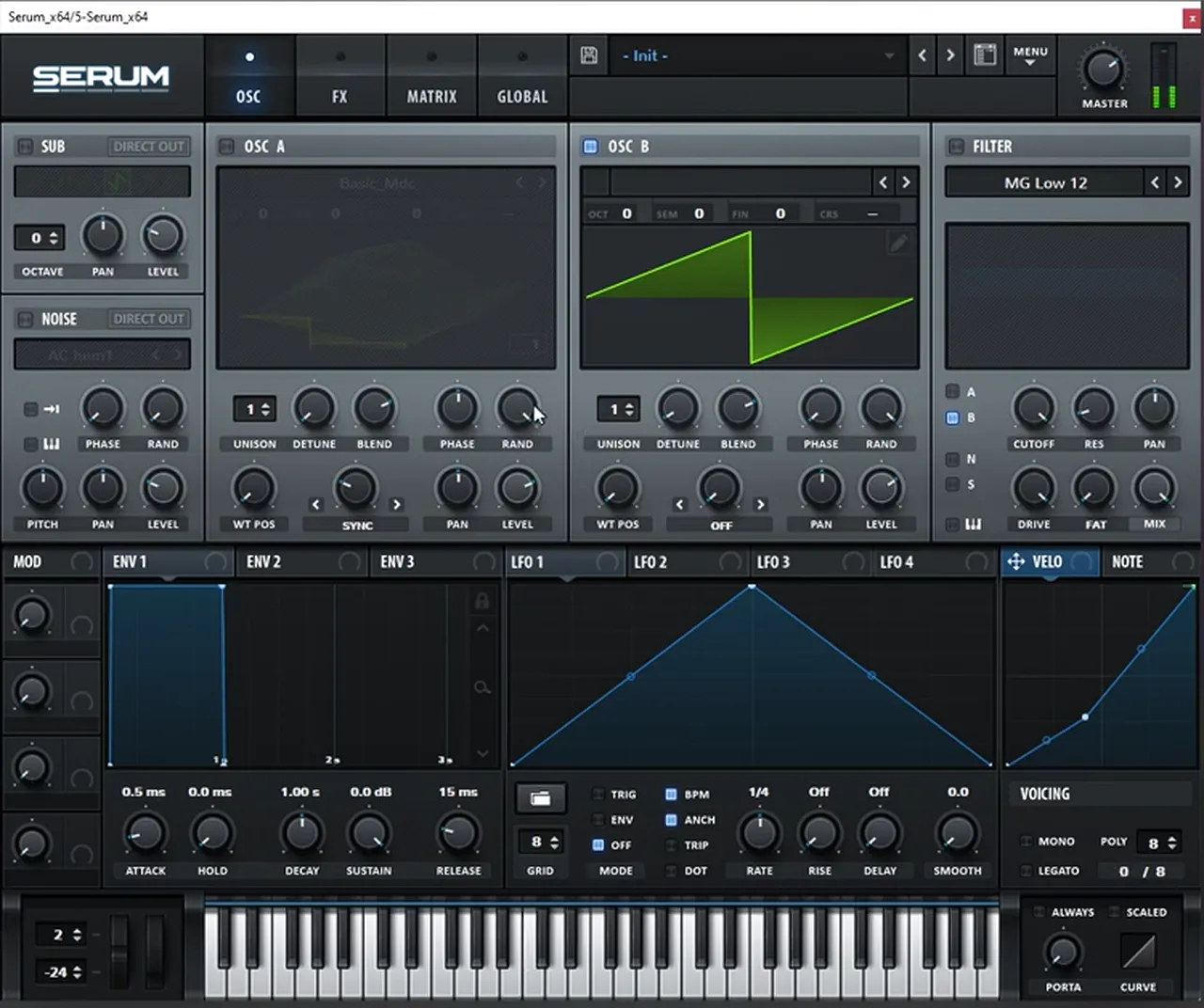
The patch itself is very, very simple: a saw wave playing the harmony. You don’t need complex sound design when the notes are this interesting.
Let’s build a patch from scratch (watch at 3:47). Start from Serum’s Init preset and use a saw wave (on screen it’s oscillator B with its default saw). Keep the same pitch bend range as before, so this layer can follow the bends too. That’s the whole oscillator section.
7.Add EQ, a multiband compressor and reverb
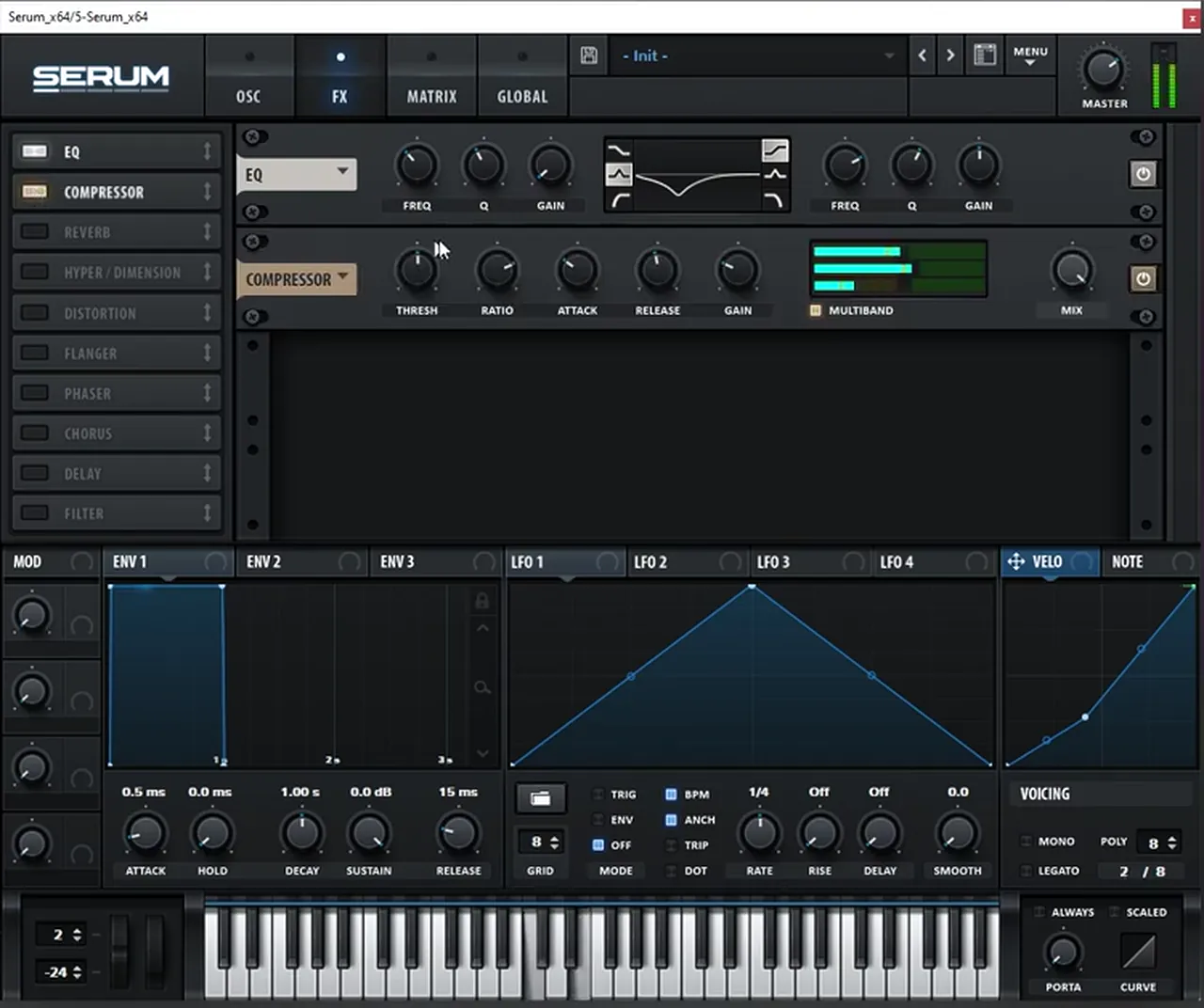
Three effects inside Serum finish each layer: an EQ that cleans up the low-mid frequencies, a multiband compressor that everything runs through, and some reverb.
On the FX page (watch at 4:00), add an EQ to help clean up the low-mid frequencies: a dip with the low band (it reads 360 Hz on screen while it’s being set). Then run everything through a Compressor with MULTIBAND switched on, which evens out the saw and brings up its detail.
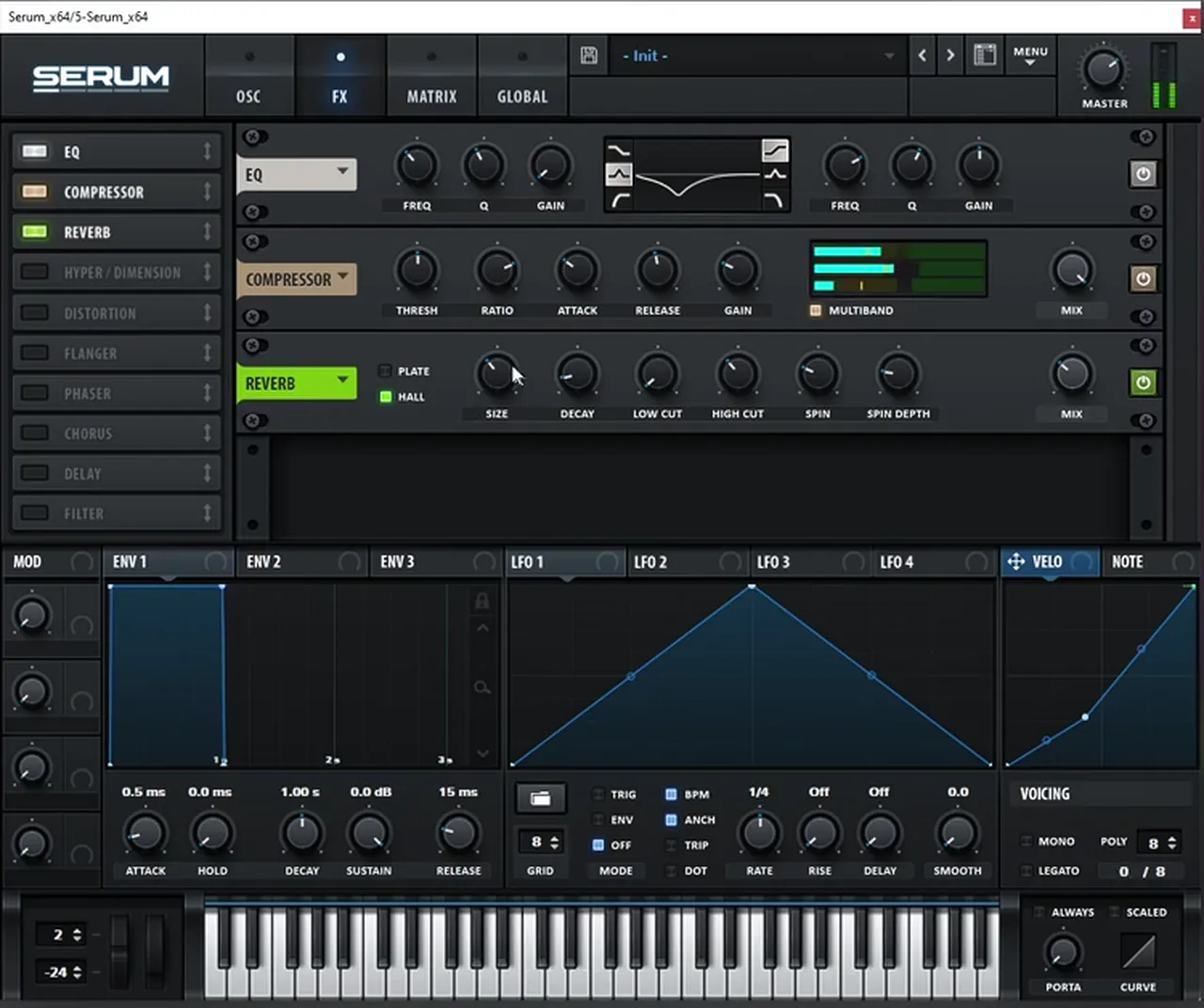
Finally add some Reverb (watch at 4:13). On screen it’s Serum’s reverb in Hall mode. It gives the lead some space without changing the notes.
8.Make variations: unison, or none at all
To vary the patch, add unison for the wider, thicker layers that only play the upper notes, or keep it super simple with no unison. For the simple version, turn random phase all the way down and play one note at a time.
To make a variation, add unison (watch at 4:18). On screen the oscillator is set to 13 unison voices, with the detune shown at 0.05 while it’s being adjusted. This is what we do on the other high layers, the ones that only use the upper notes.
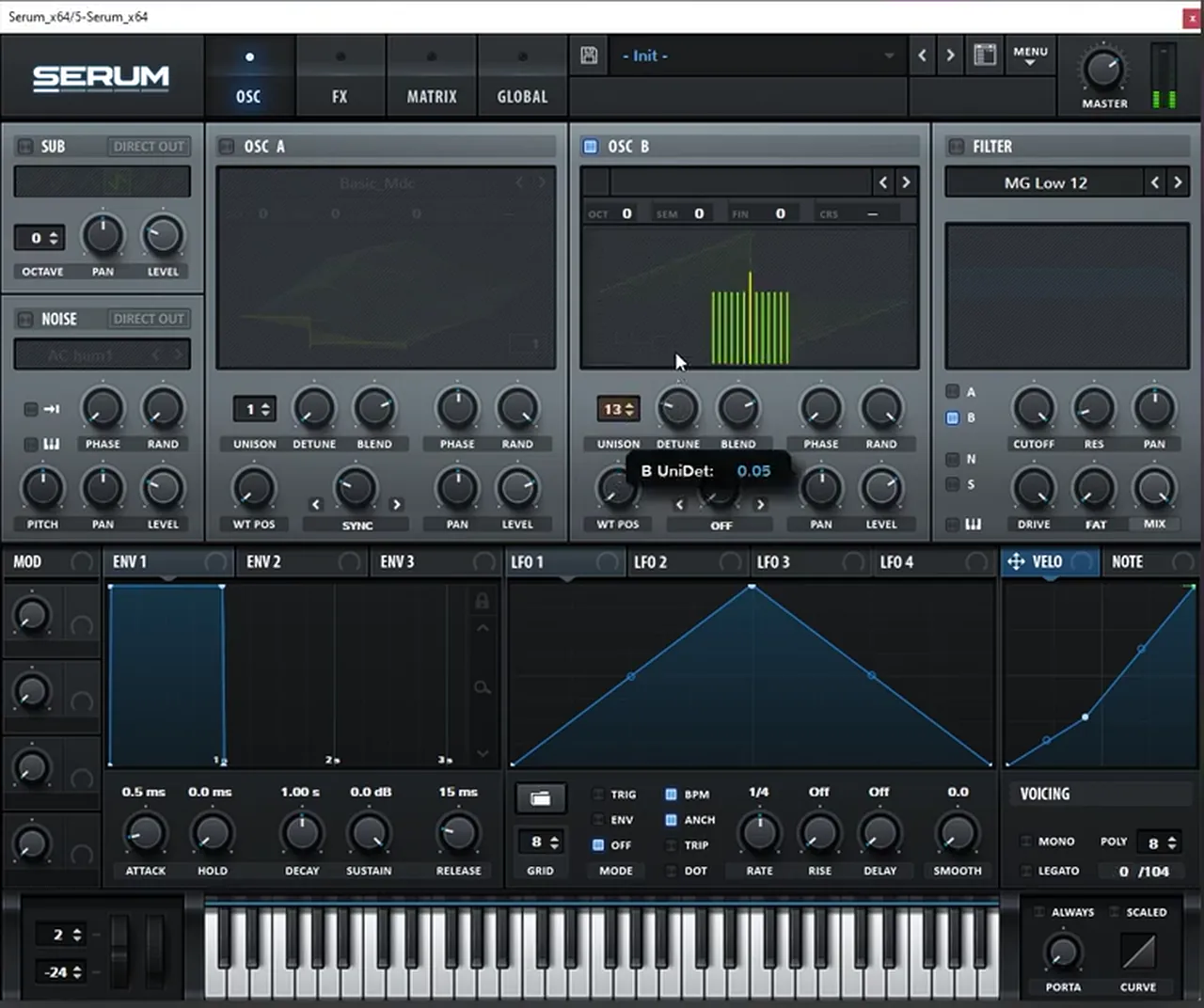
Or you can make it super simple, with no unison at all (watch at 4:33). In that case, make sure you bring the oscillator’s random phase (RAND) all the way down so you get a consistent sound on every note, and then only play one note.
Listen: the simple variation, one saw with no unison, playing a single note line4 sec
9.Stack the variations and mix the layers
Stack the different variations of the sound with each other, add the sub, then balance them. Simple EQ removes annoying spots, and volume decides how much each layer comes through.
At the end, the sound is about how you play with the mix of the three layers (watch at 3:32). Stack the variations of the sound with itself (watch at 4:47), and bring in the sub underneath.
Listen: the three Serum layers playing together, without the sub5 sec
Then do some simple EQing (watch at 5:39). On one layer, the first EQ Eight makes a gentle cut (−1.61 dB around 1.47 kHz on screen), and the second uses a low cut and deep notches to remove annoying spots (one sits at 2.90 kHz on screen). Then level the layers against each other: on screen the third layer sits much lower than the others, at −14.6 dB.

Listen: the finished recreation, all variations stacked with the sub7 sec
That is the principle behind this sound. For more Mefjus-style sound design, try our bass like Mefjus in Vital tutorial. For another big recreated lead and how it sits in an arrangement, see our dancefloor DnB tutorial with DC Breaks, and for where this style sits, the dancefloor section of our subgenres guide.
Learn the harmony, don’t copy the track
The real lesson here isn’t the patch. As the video says, at the end you wouldn’t want to copy the exact same track (watch at 5:03). Learn how to create interesting harmonies like these, then use simple sound design to shape them. A few ways to practise:
- Move a chord by a semitone. Take any chord you like and shift every note up or down one semitone. Try different inversions until the notes move smoothly.
- Add one wrong note. Put a short, low note under a chord that doesn’t belong to it, at a lower velocity. Listen to how it adds tension.
- End on an interval. Instead of a full chord, try a fourth or a fifth and stack the root again lower down.
- Split the voicing. Give the full chords to one layer and only the top notes to another.
If you want a structured way to learn this, the Music Theory and Harmony course in DNB Foundations covers chords and progressions for drum and bass.
Common mistakes making a lead like “No Tomorrow”
- Over-designing the patch. The notes do most of the work. A plain saw with EQ, a multiband compressor and reverb is enough.
- Leaving the pitch bend range at the default. Serum’s default range is small. Set the down range to −24 or the bends won’t reach two octaves.
- Every layer playing the full chords. Stacking full chords with unison gets muddy fast. Give the full chords to one layer and the top notes to the others.
- Random phase left up on a simple layer. Each note will sound slightly different. Turn RAND down for a consistent tone.
- Not cleaning the low mids. Several saw layers pile up between the sub and the melody. Cut there, and notch out any harsh spots.
- All layers at the same volume. Level them. One layer may only need to sit far underneath the others.
Free download
Free samples to finish the track around your lead
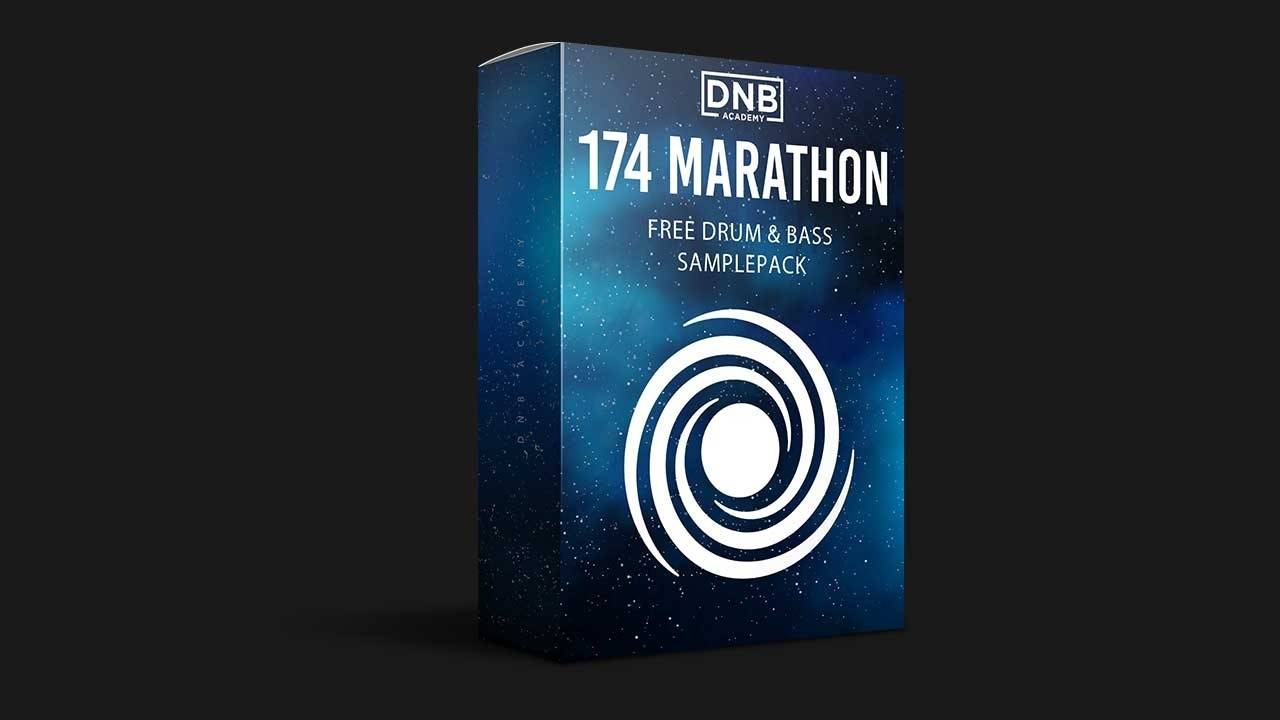
Got the lead? Give it drums, bass and FX to play with. The 174 Marathon Sample Pack was made for International Drum & Bass Day and our 174 Production Marathon. It gives you:
- 100+ samples
- Drums and bass
- FX and melodics
- Royalty-free for your own tracks
It’s one of seven free sample and preset packs in DNB Academy Free Access, alongside the mixing and mastering e-books and the 3‑day DnB challenge. Join 40,000+ producers in Free Access. Free account, no card needed.
Go deeper
Techy dancefloor courses and Serum presets
Want to see full techy, dancefloor tracks built around sounds like this one?
 Production courseMolecular production courseTwo techy DnB tracks built from scratch in 14+ hours, with lessons on filling out the drops and arrangement, plus project files, stems, samples, presets and Ableton racks.
 Production courseKove production courseA start-to-finish track in Kove’s style: 8+ hours of video, with the project files, presets and samples.
 Preset bundleGEST Serum presets100 Serum presets for techy, deep DnB, including 35 basses, 12 pads and 7 stabs, plus WAV files of the presets.
Every artist course, preset bundle and sample pack is also in The Vault. Browse courses
Related tutorials
All tutorials → Vital · Bass designHow to Make a Bass Like Mefjus in Vital7 min read · Video + guide
 Masterclass · MolecularMolecular ‘All Systems’ Track Breakdown: How a Techy DnB Track Is Built11 min read · Video + guide
 Harmony · ChordsHow to Write Liquid Drum and Bass Chords and Pianos18 min read · Video + guide
 Serum · Techy DnBHow to Make Techy Drum and Bass Like Break & DLR: Two Basses in Serum7 min read · Video + guide
FAQ: making a lead like Camo & Krooked and Mefjus’ “No Tomorrow” in Serum
How do you make a lead like Camo & Krooked and Mefjus’ “No Tomorrow” in Serum?
Write a chromatic progression: a C major chord, then the same chord with every note a semitone up in a different inversion, a short dissonant bass note, and a C–F perfect fourth with another F stacked below. Set Serum’s pitch bend down range to −24 and automate bends at the chord changes. Play it with an init saw through an EQ that cleans the low mids, a multiband compressor and reverb, make variations with and without unison, add a sub and mix the layers.
Is this the exact lead from “No Tomorrow”?
No. It’s our own recreation with our own patch and MIDI, made to teach the ideas behind the sound: chromatic harmony, big pitch bends and stacked layers. The video encourages you to learn how to create harmonies like this rather than copy the track.
What are chromatic chords?
Chords that move by a semitone while keeping the same shape. In this progression, C major (C, E, G) becomes C#, F and G#: every note moves up one semitone. Using a different inversion for the second chord keeps the notes close together, so the move sounds smooth but tense.
Why set Serum’s pitch bend range to −24?
So a full pitch bend down reaches two octaves (24 semitones). With automation on the pitch bend, notes can swoop up from two octaves below into the chord, which is a big part of this lead’s movement. Serum’s default range is much smaller.
Can I make this lead in Vital instead?
Yes. Vital is free and has saw oscillators, unison, a pitch bend range setting, EQ, compression and reverb. The harmony and the layering are what matter, so the same steps work in any synth.
Next steps
Open your piano roll, write the C major chord, move it up a semitone, add the low dissonant note and the C–F fourth, then set Serum’s pitch bend down range to −24 and play it with a simple saw. Build two or three variations and mix them. For every step of a full track, read our guide to making drum and bass; for more Serum sound design, try techy DnB basses like Break & DLR in Serum.
Free Access
Seven free DnB sample and preset packs, including the 174 Marathon Sample Pack, plus mixing and mastering e-books and a 3-day challenge for Ableton Live and FL Studio.
Get free packsThe full guide
Tempo, drums, sub, mid bass, chords, arrangement and mixdown: every step of a DnB track.
Read the guideDNB Foundations
A structured drum and bass course with weekly live feedback calls on your tracks.
See Foundations1:1 Mentorship
Personal guidance on your music from a mentor, built around your goals.
See the mentorship50,000+ producers have joined DNB Academy, and our producer Discord has 5,300+ members.