Liquid · Chords & pianos
How to Write Liquid Drum and Bass Chords and Pianos
Liquid drum and bass lives or dies on its chords. Here is how we write them: the scale, the extended chords, two progressions you can copy note for note, a pedal-note hack for when you’re stuck, and how to turn a plain stock piano or saw wave into something lush. Everything comes from three of our own videos, with screenshots and audio.
Part of our how to make drum and bass guide: this page goes deep on step 6, writing chords and a melody.
Quick answer
How do you write liquid DnB chords?
Pick a minor key, then build four- or five-note chords from its notes: minor 7ths and added 9ths sound especially lush. Move between three or four of them over eight bars, keep the voicings close with a low root underneath, push some changes a beat early, then soften the sound with filtering, reverb and delay.
- Pick a minor key.Show its notes in the piano roll so every note you try fits.
- Build extended chords.Add the 7th or the 9th to plain triads.
- Choose a progression.Three or four chords over 4–8 bars.
- Voice it smoothly.Low root, close upper notes, shared notes held.
- Stuck? Use a pedal note.Pick chords that all contain one held note.
- Process the sound.Filter, ping-pong delay, reverb, chorus or texture.
- Give it rhythm.Push chords early, chop them, automate the filter.
- Fit the bass.Play the chord roots underneath and keep the low end clear.
Our liquid pianos video: a C minor progression on FL Keys, a top melody, then resampling and effects, taken from the atmospheric start-to-finish project in DNB Foundations. We also use our lush chords video and Telomic’s chord hack video.
What you’ll need
| What | In our videos | Alternatives |
|---|---|---|
| A DAW with a piano roll | FL Studio (pianos) and Ableton Live 12 (chords and the hack) | Any DAW: Logic, Bitwig, Cubase |
| A piano or synth | FL Keys, Ableton’s Wavetable and a soft felt-piano instrument | Any keys plugin, or Vital, which has a free version |
| Effects | Stock filters, delays, reverbs, chorus and texture devices | Your DAW’s stock effects are enough |
| Basic theory | Scales, triads, 7ths, suspensions | Everything you need is explained below |
You don’t need to play keys. Every chord here was drawn in with a mouse. Our pianos video also makes a point worth copying: when you write liquid, start with the chords and melodies, and make sure the music sounds good with no drums or bass at all (watch at 0:00). Drums add so much rhythm that almost anything sounds fine over them, which hides weak chords.
1.Pick a key and a minor scale
A scale is the set of notes that belong to a key. Minor scales give liquid its warm, slightly melancholy sound, so start there and only use notes from your scale until your ear tells you otherwise.
In our pianos video, the project is set to 174 BPM and the chords use the stock FL Keys plugin. To see the scale, he uses FL Studio’s stamp tool at the top of the piano roll, chooses Minor harmonic and clicks on C4. That drops every note of C harmonic minor into the piano roll (1:51). He duplicates it an octave up and an octave down, then pushes it off to the side as a guide: those are the only notes he plans to use.
Telomic’s hack video goes the other way: it works in A minor, which is all the white keys, so there is nothing to look up (1:57). Ableton Live and other DAWs also have scale highlighting, and there are plenty of websites that list the notes of any key.
2.Build 7th and 9th chords
A basic chord, a triad, stacks every other note of the scale: the 1st, 3rd and 5th. Add the 7th and you get a seventh chord; add the 9th (the 2nd an octave up) and you get an added-9th chord. Those extra notes are where the lush liquid sound comes from.
Telomic’s hack video spells it out. An A minor chord is A, C and E; make it an A minor 7 and you add G (2:03). In our Ableton chords video, the first chord he draws into Wavetable is an E minor with an added 9th: E, G, B and E, with an F♯ on top (2:12). Even with a plain saw wave, he points out, it already sounds good because of the chord.
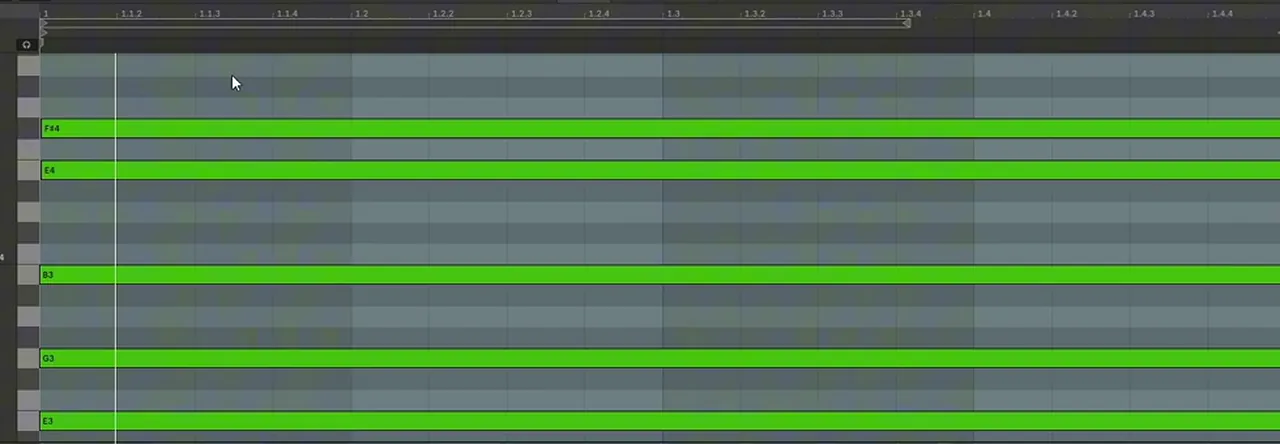
A quick way to build these yourself: play a triad from your scale, then add the next-but-one scale note above the 5th for a 7th, or the note just above the root (moved up an octave) for a 9th. Leave out a note if the chord gets crowded; the 5th is usually the safest one to drop.
3.Chord progressions that work
A liquid progression is usually three or four chords over four or eight bars, looping. Here are the two complete progressions from our videos, note for note, so you can copy them and then change one chord at a time.
| Video and key | Chords | Notes on screen (low to high) |
|---|---|---|
| Pianos video, C minor (iv – i – VI – III) | F minor → C minor → A♭ with B♭ → E♭ major, 1 bar each | F3 C4 F4 G♯4 · C3 C4 D♯4 G4 · G♯3 D♯4 G♯4 A♯4 · D♯3 A♯3 D♯4 G4 |
| Hack video, A minor, over a held A | A minor 7 (2 bars) → D, no 3rd (2) → F (3) → E minor (1) | A1 E2 C3 G3 · D2 A2 C3 A3 · F1 A2 C3 A3 · E1 G2 B2 E3 |
FL Studio names black keys as sharps, so G♯ is the same note as A♭, D♯ is E♭ and A♯ is B♭. The third chord of the pianos progression has no C, so it’s an open A♭ chord with the B♭ (its 9th) added: the out-of-scale note mentioned above (5:10). Watch the whole progression being written from 3:01.
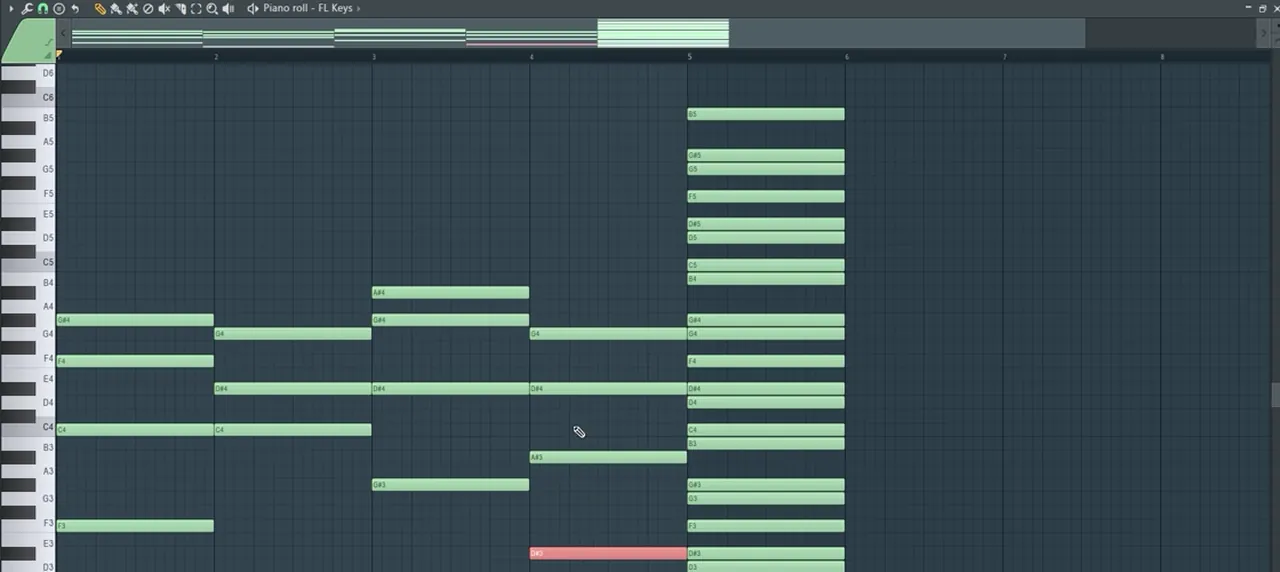
Both loops end on a chord that leads nicely back into the first one, so the progression never feels finished. That’s useful in liquid, where one progression often carries a whole drop.
4.Voicing and inversions
Voicing is how you spread a chord’s notes across the keyboard. Smooth liquid chords keep the upper notes close together and move them as little as possible from chord to chord, with the root on its own low down.
Look at the screenshots and you’ll see the same habits in both videos:
- Double the root an octave down. In the pianos video he copies the F of the first chord down an octave, then does the same with the C of the second and the G♯ of the third.
- Hold shared notes. C4 stays put from F minor to C minor, and D♯4 holds through the last three chords. Only one or two notes move at each change.
- Keep the top line small. The top notes go G♯, G, A♯, G: steps, not leaps.
- Spread the bass, cluster the rest. In the hack video the roots sit low (A1, D2, F1, E1) while the other notes stay between G2 and A3.
An inversion puts a note other than the root at the bottom of the chord, for example C minor played as E♭–G–C instead of C–E♭–G. Even with the root kept low in the bass, re-ordering the upper notes like this is how you get those small steps between chords. Our hack video encourages exactly this: once the chords are written, move their voicings and even their order around until it sounds right (5:18).
5.The pedal-note hack for writer’s block
Hold one note, called a pedal note, and only use chords that contain it. Every chord then fits the held note, so you can write a whole progression from one sound.
Telomic’s chord hack video for DNB Academy: a whole progression built around one held note.
In Telomic’s hack video, a vocal holds a single A (1:16), but it could be any sustained sound, or just a note you imagine. Then he works out which chords in A minor contain an A, and where the A sits in each one:
- A as the root: A minor 7 (A, C, E, G).
- A as the 5th: a D chord (D, A, with C on top).
- A as the 3rd: F major (F, A, C).
- A as a suspension: E minor, where A is the 4th above E. Against the held A it gives a suspended, unresolved colour.
To find a suspension, count backwards down the scale from the held note. In A minor that’s A (4th), G (3rd), F (2nd), E (1st), so E is the chord that has A as its 4th (4:22). The result is the A minor 7, D, F, E minor progression in the table above.
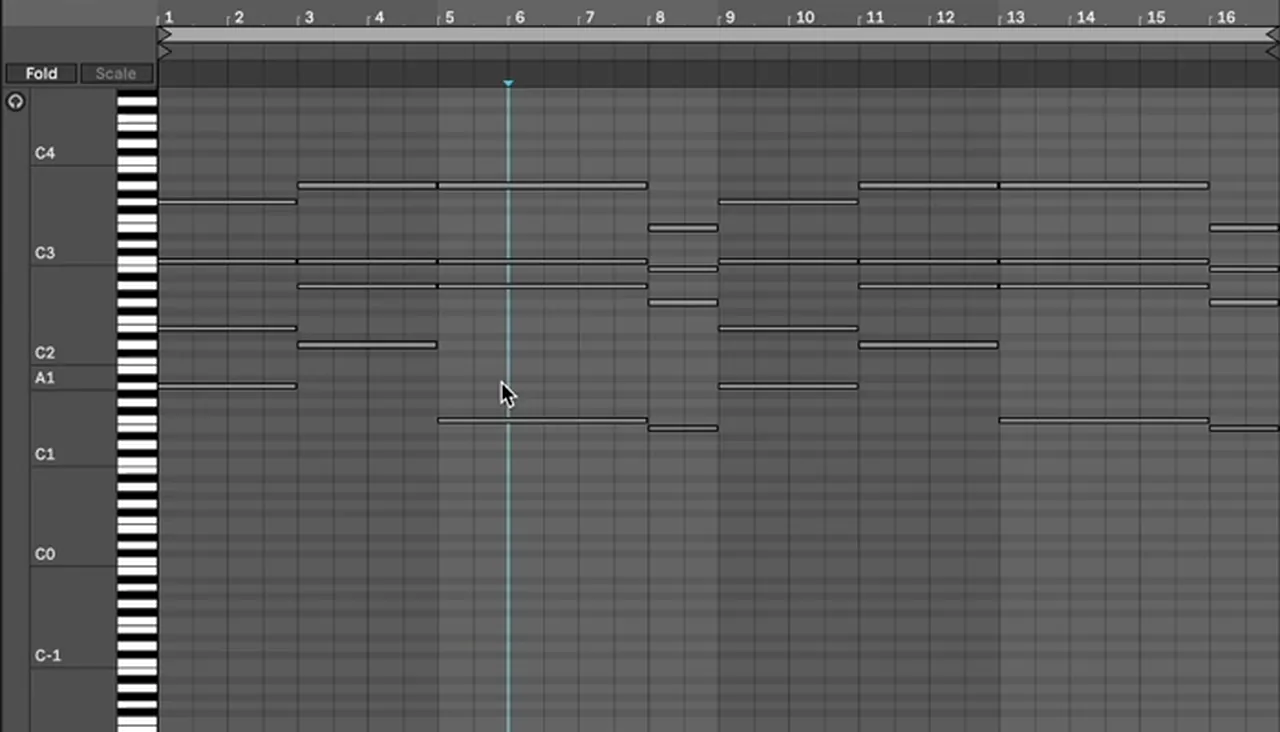
Listen: the pedal-note chords over the held A12 sec
The trick works for bass lines too, and for remixes: take a note the original vocal or lead holds, write new chords around it, and they will still fit (6:10).
6.Make liquid pianos in FL Studio
A stock piano can sound great with good chords and a little processing. Render the chord loop to audio, reverse and re-slice it, then filter it, add a ping-pong delay and chorus, and automate the filter.
FL Keys on its own, he admits in our pianos video, isn’t the best piano. After a top melody is added, the loop goes into the arrangement and gets resampled (12:25):
- Render it. Right-click the track and choose Consolidate this track from track start to turn the pattern into an audio clip.
- Reverse and re-slice. Reverse the sample (13:05), then slice it and rearrange the pieces until something interesting comes out.
- Fruity Filter. Low pass on, high pass off, resonance down, and X2 on for a steeper slope (13:48).
- Fruity Delay 3. Tempo sync with the time at 8:00, Ping pong, Keep pitch on, the feedback filter set to high pass at around 800 Hz, and the wet level brought down a little (14:27).
- Automate the cutoff. Set the cutoff where you want it, right-click, Create automation clip, and ramp it up towards the end (15:54).
- Fruity Chorus on top (16:27).
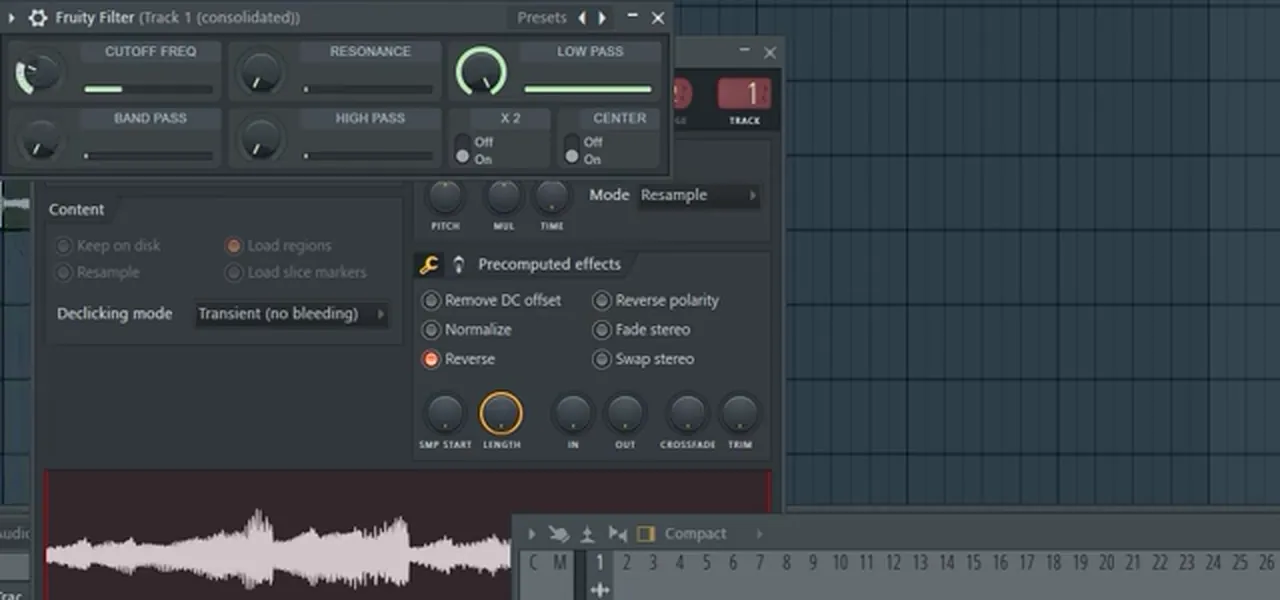
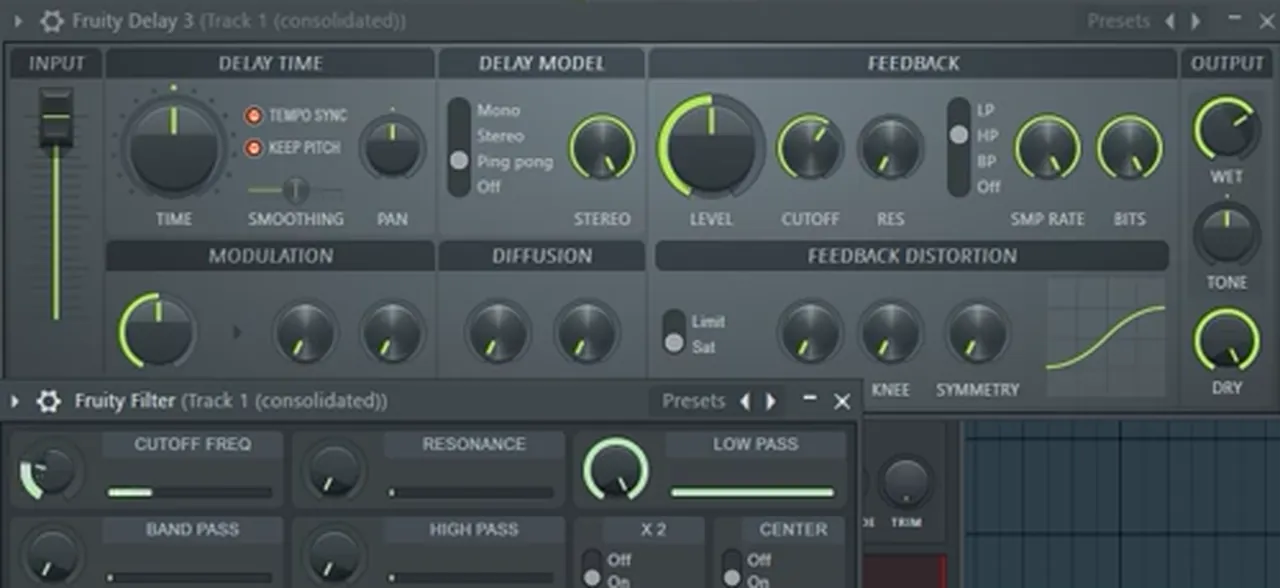
Listen: the resampled piano with filter automation and delay12 sec
If you’d rather start from a piano sample, our liquid drum and bass in FL Studio tutorial shows how to fix a piano loop’s timing and stretch it without changing its pitch.
7.Lush chords and pads in Ableton
Start with a simple saw wave playing good chords, filter it, then layer texture and space with stock effects: noise, reverb, ping-pong delay, bit reduction, resonators and a vocoder.
Our lush chords video: a saw wave in Ableton’s Wavetable turned into a deep liquid chord sound with stock devices only.
Everything in our lush chords video is stock Ableton Live 12. The synth is Wavetable with a saw from Basic Shapes (0:47). On screen the oscillator is transposed −12 st, the filter is a 24 dB Clean low pass with resonance turned up (38% at this point), and the amp envelope reads A 1.00 ms, D 600 ms, S −6.0 dB, R 600 ms. A little detune on the oscillator (9 cents on screen) thickens it up (4:00).

Then the effects, in the order he adds them:
- Roar (new in Live 12) with the Noise shaper for noise injection and texture. On screen the shaper amount is 4.8% and the dry/wet sits low, around 13% (5:05).
- Hybrid Reverb, trying its algorithms (Quartz is selected on screen) and using its EQ to cut the lows; dry/wet 34% (6:00).
- Delay in sync and ping-pong mode so the repeats bounce from ear to ear, feedback 50% (6:22).
- Redux. His tip: turn it fully wet to find the best-sounding setting, then bring the dry/wet right down (8:59).
- Ambient reverb with the stock Reverb, and the delay moved to the end of the chain so you hear more of it (10:57).
- Resonators at a low dry/wet (25% on screen) for extra texture (11:38).
- Vocoder with a noise carrier on 40 bands for a “watery” layer; cut some mud and try different release times (12:29).


Listen: the finished lush chord sound12 sec
None of it needs third-party plugins, which is his point: a very simple synth plus a few effects can carry a liquid track.
8.Give the chords rhythm against the beat
Chords that all change on beat one sound stiff. Push some changes a beat early, chop long chords into shorter hits, and move the filter so each hit sounds a little different.
Once the pianos progression loops, he changes its rhythm (6:21): the first and third chords are cut to three beats, and the second and fourth chords start on beat 4 of the bar before, a beat early. That push, called anticipation, makes the progression lean forward over the drums.
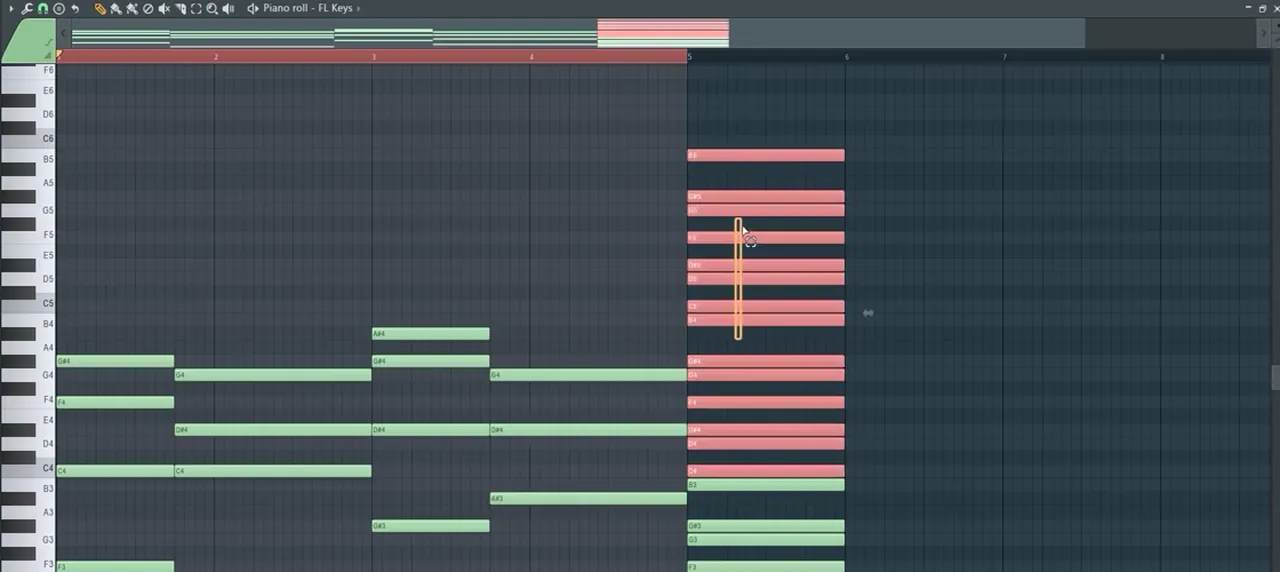
Listen: the pushed chord rhythm on FL Keys10 sec
In our Ableton video the chord is chopped into short hits, and he automates the Wavetable filter frequency so every hit opens a little differently before a longer sweep (3:06). Later he automates the resonance on the first hit for extra energy, which gives a funky, wah-like edge, and copies the filter automation onto the oscillator’s Shape control (Ctrl+C, Ctrl+V) to push the groove further (10:00).
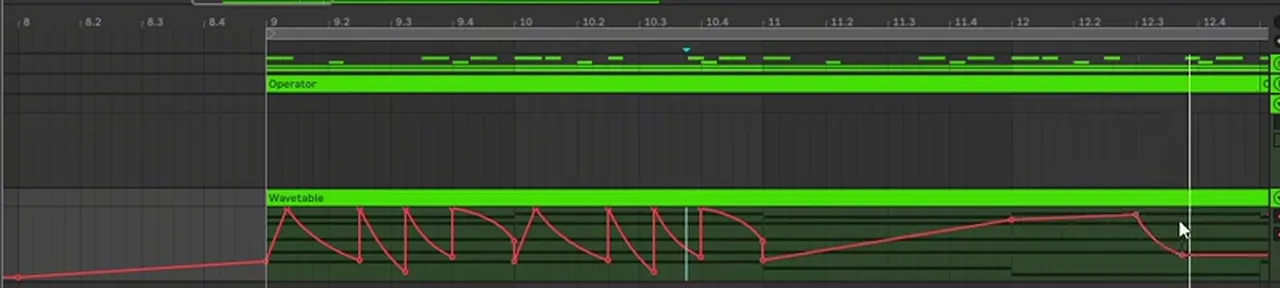
Listen: chopped chord hits with filter automation12 sec
Program the chord rhythm against your actual beat. Our drum and bass drum patterns guide covers the two-step, and the BPM and structure guide shows how to build 16-bar phrases around a progression.
9.Fit the chords with the bass and sub
The simplest liquid bass line plays the root of each chord. Write the chords first, then let the bass follow the roots and keep the chords out of the sub’s way.
Our hack video shows the idea: strip the chords back to their roots and you have a bass line, here A, D, F and E under the held A (5:28). You don’t even need the full chords written out; imagine them and the bass notes imply the harmony. That’s why our pianos video saves drums and bass for last: once the chords are right, the bass line is mostly decided.
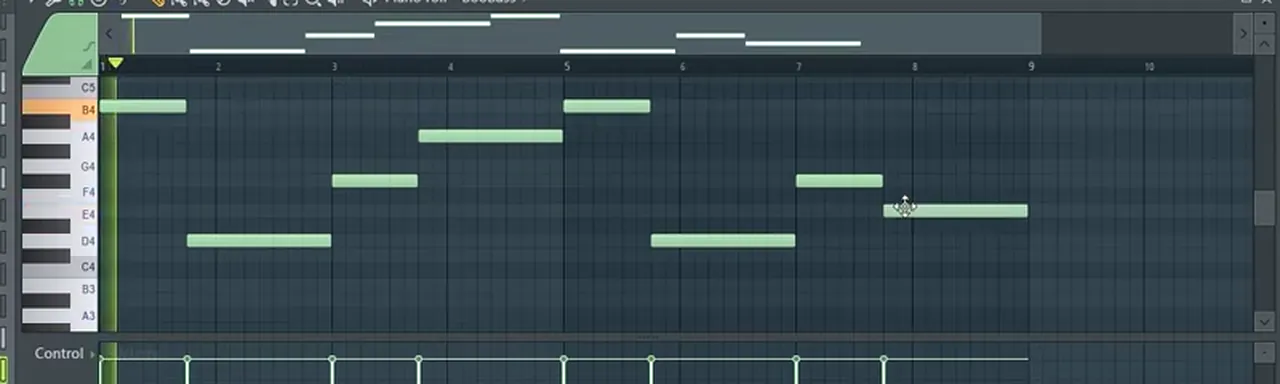
Then make room. Chords with low roots, like the A1 and E1 in our hack video, overlap the sub. When the bass comes in, thin out the bottom of the chords with an EQ or drop their lowest note, so the sub owns the low end on its own. For the sub and mid bass themselves, see the sub bass step of our main guide and our reese bass tutorial. And for how liquid fits among the other styles, read the liquid section of our subgenres guide.
Common liquid chord mistakes
- Starting with the drums. Drums make anything sound good. Get the chords sounding right on their own first.
- Plain triads only. Add the 7th or the 9th; that’s most of the liquid sound.
- Big jumps between chords. Hold shared notes and use inversions so the upper voices move by small steps.
- Every change on beat one. Push a chord or two a beat early, or chop them into hits.
- Following the scale blindly. It’s a guide. An out-of-scale note can be the best one, as the A♯ in our pianos video shows.
- Static sound. Without filter or effect movement, even good chords get boring over a 16-bar phrase.
- Too much of an effect. Find the sweet spot fully wet, then back the dry/wet off, as with Redux in our Ableton video.
- Chords fighting the sub. Clear the low end of the chords once the bass is in.
Free download
Liquid drums to put under your chords
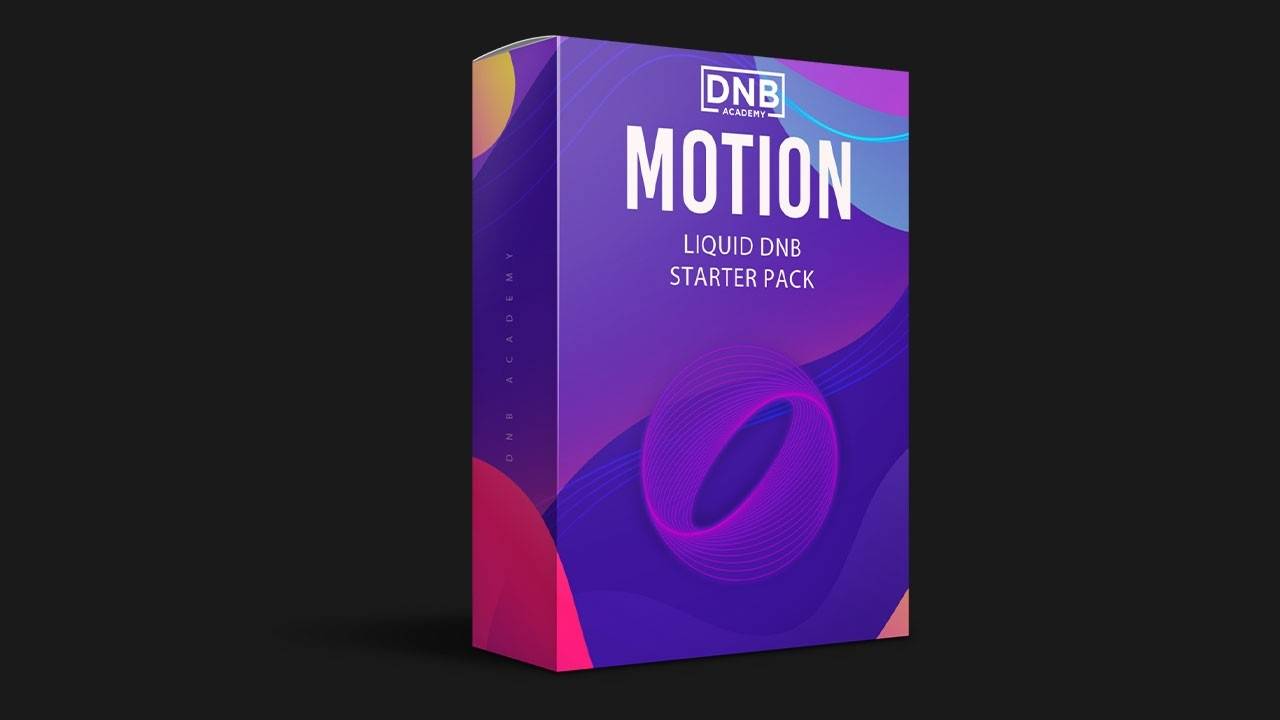
Once your progression sounds good on its own, add a beat. The Motion Liquid DnB Starter Pack gives you:
- 16 kicks, snares and top loops for rolling liquid drums
- 10 musical and FX samples
- 26 royalty-free samples in total
- FL Studio project files
It’s one of seven free sample and preset packs in DNB Academy Free Access, along with the mixing and mastering e-books and the 3‑day DnB challenge. Join 40,000+ producers in Free Access. Free account, no card needed.
Go deeper
Liquid courses, keys and vocals
Want to see full liquid tracks built around chords like these, or need sounds and vocals to go with them?
 Production courseEdlan production courseA liquid track from the first sketch to the master, with songwriting, vocal processing, sound design and sample flipping, plus the project files, presets and samples.
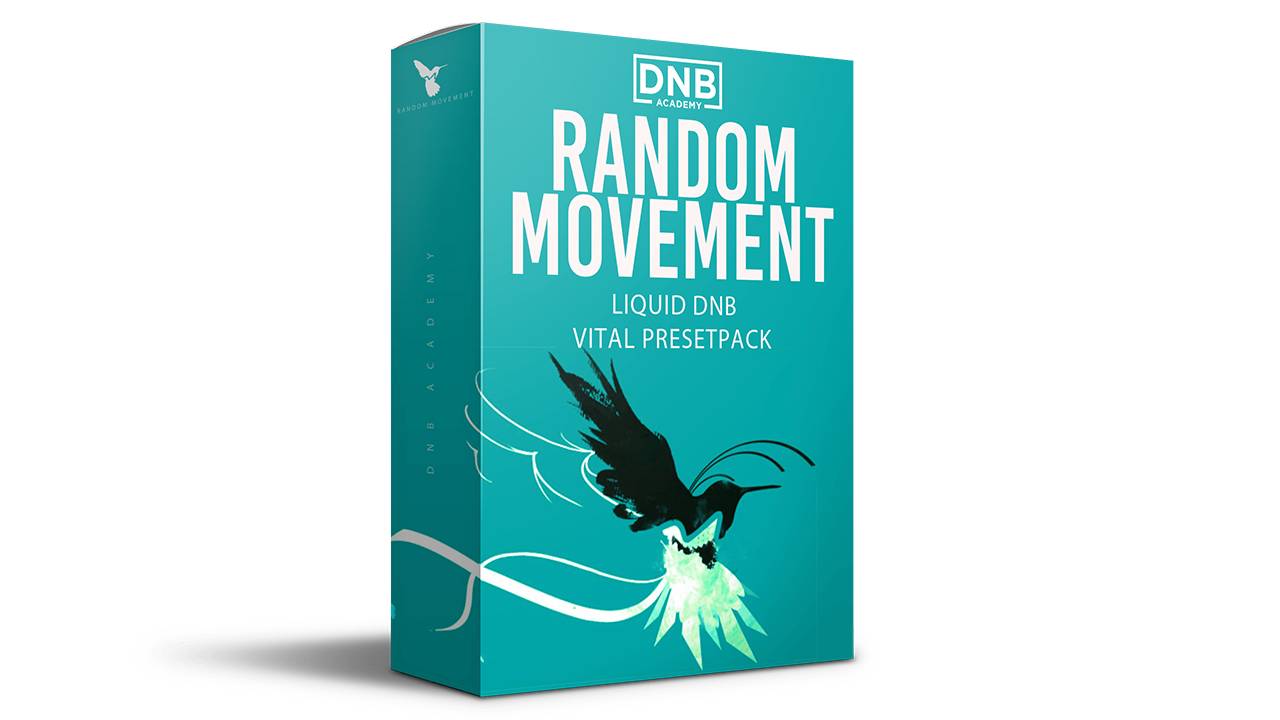 Preset bundleRandom Movement Vital presets100+ liquid funk presets for Vital, including 24 keys and 25 pads, with every preset also included as a WAV file.
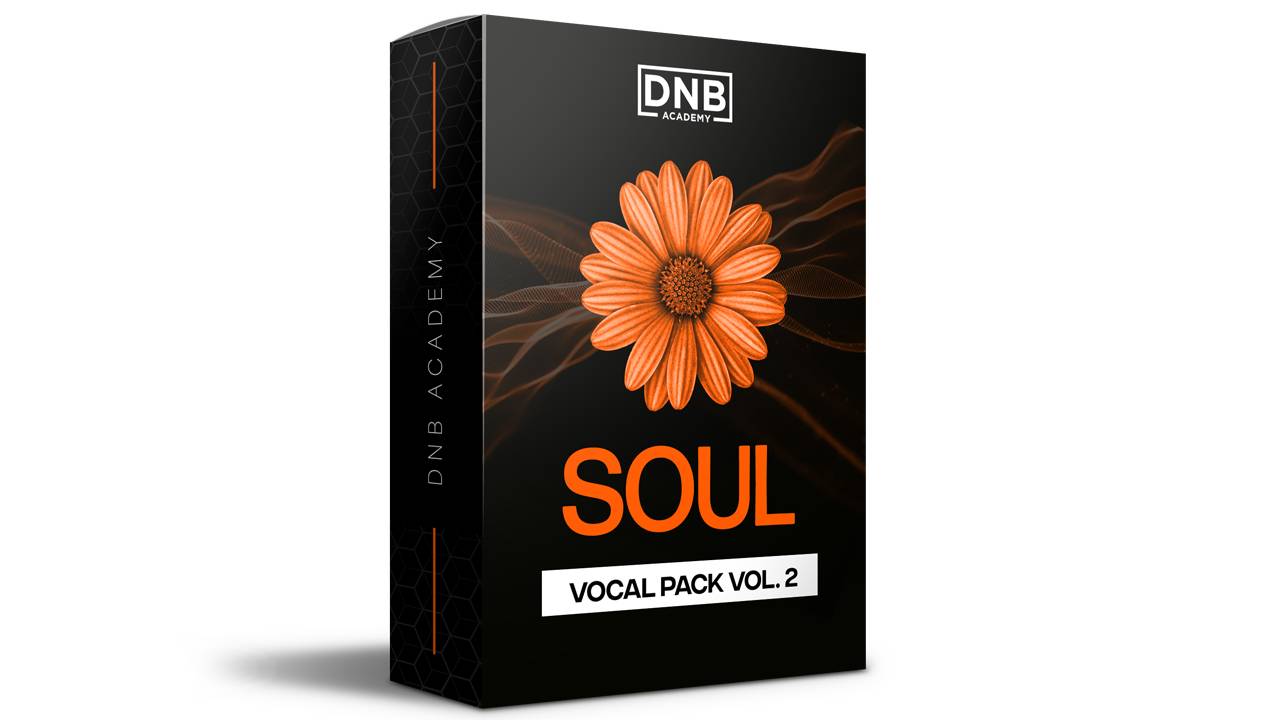 Sample packSoul Vocals Vol. 2285+ royalty-free soul vocal samples: phrases, ad-libs, spoken lines, vocal FX and 2 construction kits, in dry and wet versions.
Every artist course, preset bundle and sample pack is also in The Vault. Browse courses
Related tutorials
All tutorials → Guide · BeginnersHow to Make Drum and Bass: A Step-by-Step Guide19 min read · Guide
- FL Studio · LiquidHow to Make Liquid Drum and Bass in FL Studio11 min read · Video + guide
 Guide · SubgenresDrum and Bass Subgenres: 12 Types of DnB13 min read · Guide
 Guide · ArrangementDrum and Bass BPM & Song Structure Guide12 min read · Guide
FAQ: liquid DnB chords
What chords are used in liquid drum and bass?
Mostly minor-key chords with extra notes on top: minor 7ths, added 9ths and suspended chords, voiced close together over a low root note. In our videos you can hear an A minor 7, an E minor with an added 9th, and a progression of F minor, C minor, A flat with an added B flat and E flat major.
What key is liquid DnB usually in?
There is no fixed key, but liquid drum and bass leans heavily on minor keys for its warm, slightly melancholy sound. Our pianos video works in C harmonic minor, Telomic’s pedal-note hack video in A minor (all white notes) and our Ableton chords video builds its first chord on E minor.
What is a good liquid DnB chord progression?
Two that work, both from our videos: F minor, C minor, A flat (with B flat added) and E flat major in C minor, one bar each; and A minor 7, D, F and E minor in A minor over a held A note, lasting two, two, three and one bars.
What is a pedal note in chord writing?
A pedal note is one note that keeps sounding while the chords change around it. In our hack video a vocal holds an A, and every chord is chosen because it contains an A, as its root, third, fifth or as a suspended fourth, so the progression always fits the held note.
How do you make liquid DnB pianos in FL Studio?
Write the chords with the stock FL Keys plugin, using the piano roll stamp tool to show the notes of your scale. Then render the loop to audio, reverse and re-slice it, and run it through Fruity Filter, a ping-pong Fruity Delay 3 and Fruity Chorus, automating the filter cutoff.
Can you make lush liquid chords with stock Ableton plugins?
Yes. Our Ableton video uses only stock devices: a saw wave in Wavetable with a resonant filter and detune, then Roar for noise texture, Hybrid Reverb, a ping-pong Delay, Redux, Resonators and a Vocoder with a noise carrier, plus filter automation to give the chords a groove.
What BPM should liquid drum and bass chords be written at?
Write them at your track tempo so you can hear how they groove against the beat. Our pianos video sets FL Studio to 174 BPM and our Ableton chords video runs at 172 BPM; most drum and bass sits in roughly that range.
Where can I get free liquid DnB samples?
The Motion Liquid DnB Starter Pack in DNB Academy Free Access has 26 royalty-free samples, 16 kicks, snares and top loops for rolling liquid drums plus 10 musical and FX samples, with FL Studio project files. Free Access is a free account with no card needed.
Next steps
Copy one of the two progressions, swap a single chord for another from the same key, push one change a beat early and filter the result. Then build the rest of the track around it:
Free Access
Seven free DnB sample and preset packs, including the Motion Liquid starter, plus e-books and a 3-day challenge.
Get free packsThe full guide
Tempo, drums, bass, chords, arrangement and mixdown: every step of a DnB track.
Read the guideDNB Foundations
A structured course with weekly live feedback calls on your tracks, including the atmospheric project our pianos video comes from.
See Foundations1:1 Mentorship
Personal guidance on your music from a mentor, built around your goals.
See the mentorship50,000+ producers have joined DNB Academy, and our producer Discord has 5,300+ members.