Dancefloor · Arrangement · Logic Pro & Serum
How to Make Dancefloor DnB: Arrangement Tips from DC Breaks (Plus a Sub Focus-Style Lead)
Dancefloor drum and bass lives or dies on its arrangement: a drop that keeps its energy, a second section that moves on, and a breakdown that resets the room. Here is how Dan from DC Breaks turns a sketch into a structure in Logic Pro, from rewinding the drop to reprogramming chords and writing new melodies, plus a dancefloor lead in Serum inspired by Sub Focus. Everything comes from two of our own videos, with screenshots and audio.
New to the style? Start with the dancefloor section of our DnB subgenres guide. For standard bar counts and song structure, see our BPM and structure guide.
Quick answer
How do you make dancefloor drum and bass?
Write a strong drop first, at 174 BPM in DC Breaks’ project, then arrange around it. Keep the energy up after the drop by rolling out or rewinding back into it, reprogram parts that clash, change what plays in each section, write new melodies for new sections and reuse key elements so the track feels like one piece.
- Start from a sketch.A drop that already works, in folders.
- Decide what follows the drop.A roll-out section, or rewind back into the drop.
- Reprogram what clashes.New chords when the bassline changes.
- Change each section.Remove, add or replace parts.
- Park breakdown ideas.Move good sounds to where they’ll be used.
- Write new melodies.Reuse an old patch with new movement.
- Reuse elements.Fills, rolls and sounds that tie it together.
DC Breaks’ arrangement video for DNB Academy, taken from their start-to-finish course: Dan works on the track “Sunshine” in Logic Pro. The lead section further down uses our Sub Focus-style lead video.
What you’ll need
- A DAW. DC Breaks use Logic Pro and the lead video uses Ableton Live, but every step works in any DAW with an arrangement view.
- A drop or loop you like. Arrangement starts once the main idea works. Our step-by-step DnB guide covers getting there.
- A synth. Both videos use Serum. Vital is free and has the same kind of oscillators, LFOs and filters.
- Big, punchy drums. Dancefloor DnB needs drums that cut through; our punchy drums tutorial shows how.
1.Start from a sketch with a drop
Don’t arrange an empty project. DC Breaks start this stage from a sketch that already has an intro, a build and a first drop, then shape the rest of the track around it.
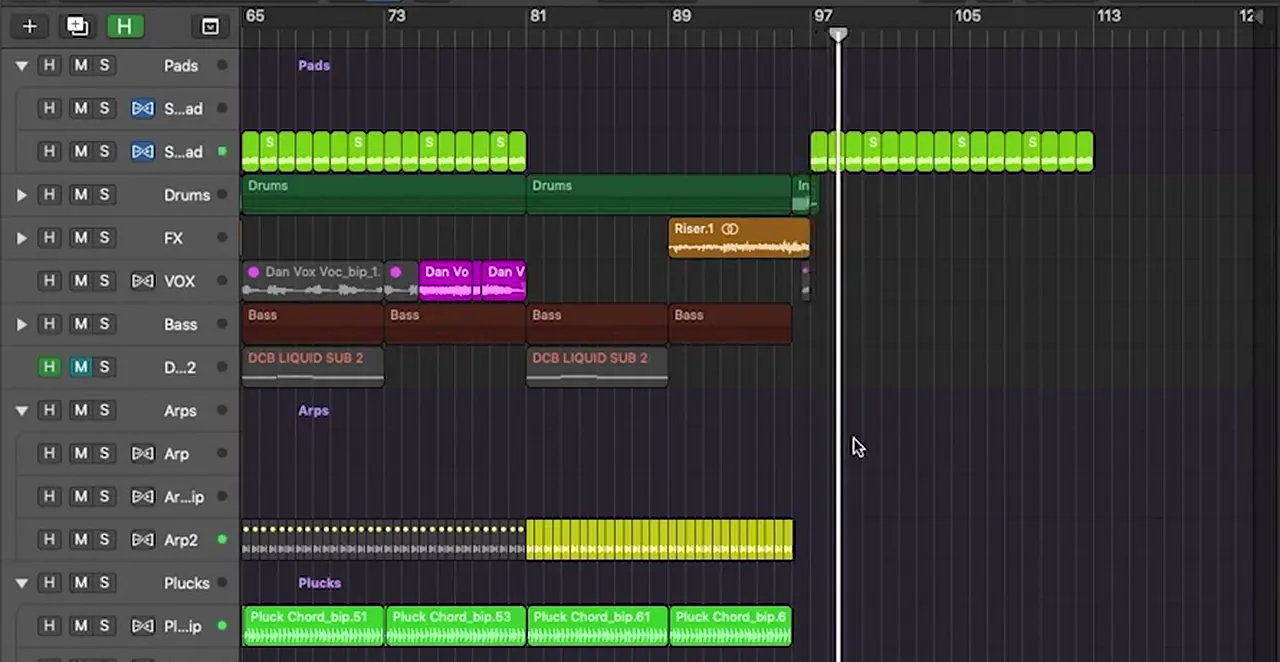
The “Sunshine” sketch was created in earlier videos of the course, and Dan’s partner Chris had pushed it in his own direction before handing it back. The project runs at 174 BPM. Every part lives in a folder: Pads, Drums, FX, VOX, Bass, Arps, Plucks, Lead and chords, plus an “OLD PARTS” folder for ideas that were taken out (watch at 0:53).
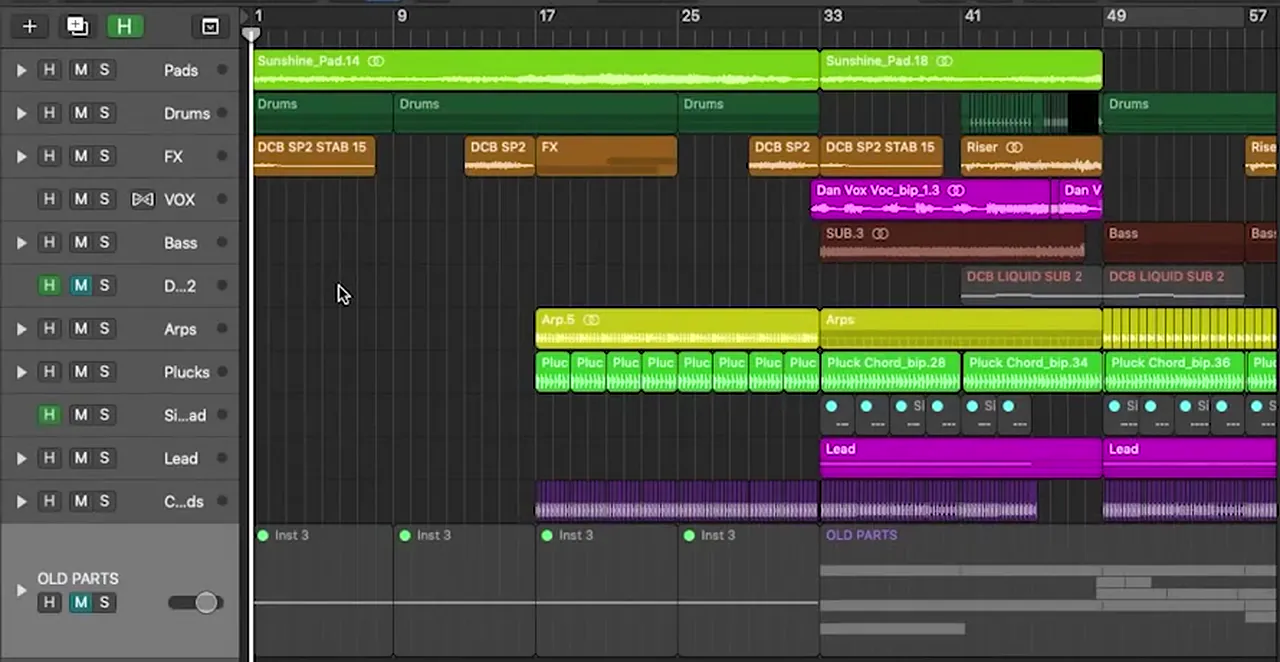
The layering is a lesson in itself: something new arrives every 16 bars, so the energy rises steadily into the drop. “See, this is why we use folders,” Dan says while moving parts around: “it’s really easy to lose your way” (watch at 6:02). Keep removed parts in their own folder instead of deleting them, because DC Breaks pull several of them back in later.
2.Decide what follows the drop: roll out or rewind
After the first drop you have two options in DC Breaks’ workflow: a roll-out section that winds the energy down into the breakdown, or a “rewind” straight back into the start of the drop so the energy keeps going.
A roll-out is “mainly the beats and the bass and a few melodic things”, to take the track down into the breakdown before building back up to the second drop. The other option, which Dan says they do “quite a lot of these days”: when you reach bar 81, rewind back to bar 49, the start of the drop, “so you keep the energy going” (watch at 3:06). That is the route he takes here.
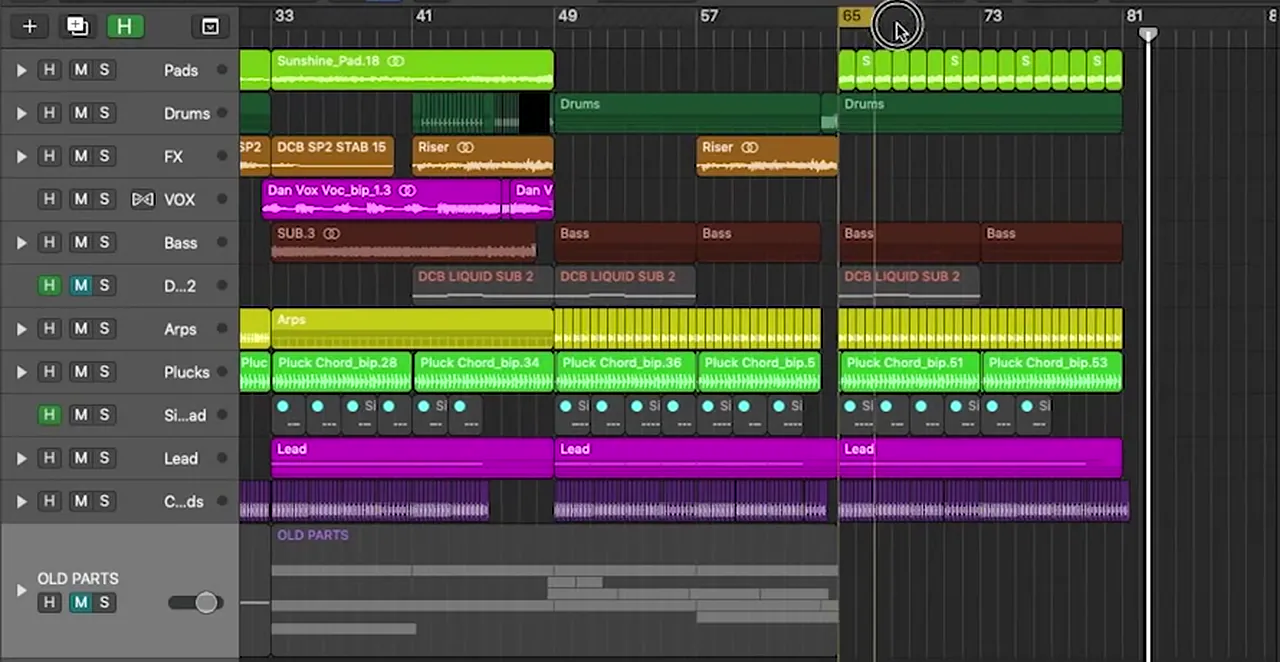
In practice, the second pass through the drop is a copy that changes over time (steps 3 to 7). How long each section should be, and how the classic intro-drop-breakdown-drop-outro layout adds up, is covered in our drum and bass song structure guide, so we won’t repeat it here.
3.Reprogram parts that no longer fit
When one part changes, check everything that plays with it. Here a new, more melodic bassline left the old vocoder chords out of tune, so Dan reprogrammed them as simple two-note chords.
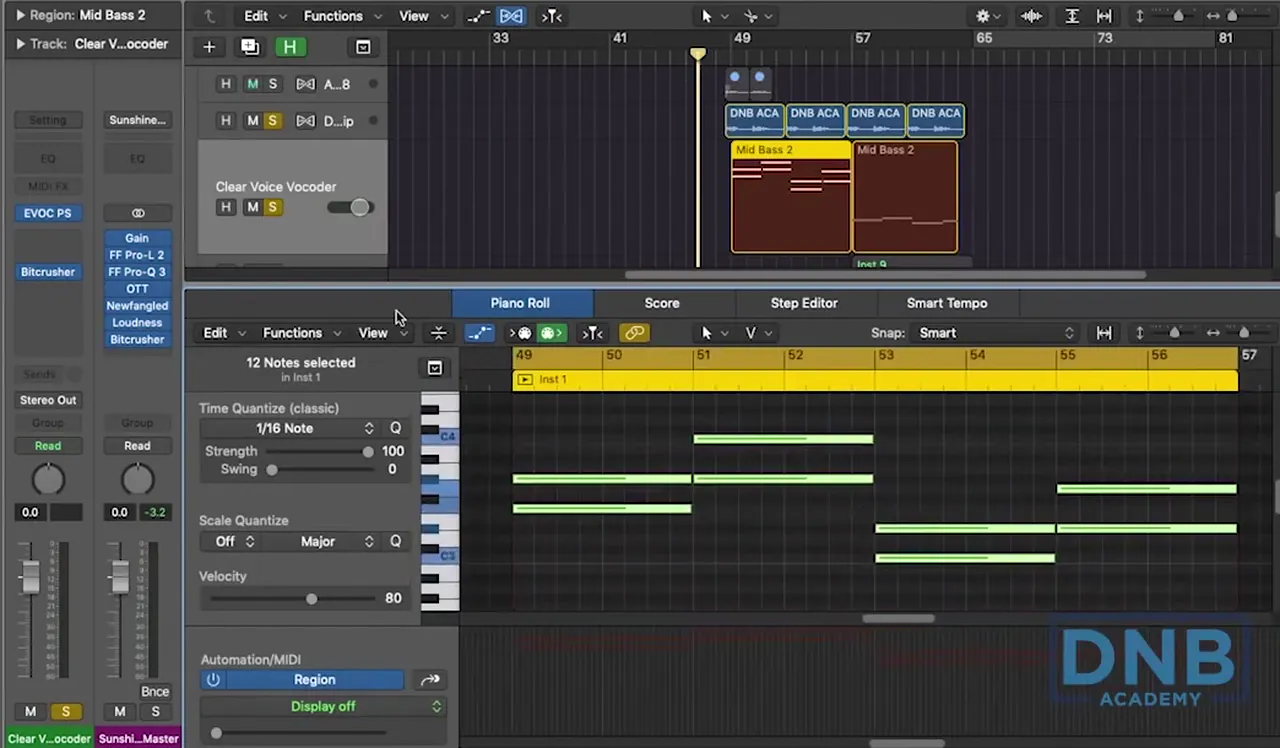
Dan wanted the vocal back in the second section, but Chris had run it through a vocoder, and since the new “melodic bassline that moves around a bit” arrived, the vocoder was “not actually playing the right chords anymore” (watch at 4:00). On screen, the vocoder track is Logic’s EVOC PS followed by Bitcrusher, played from a MIDI part of two-note chords written to follow the bassline (watch at 4:58). “That’s obviously much more in tune.”
Listen: the reprogrammed vocoder chords10 sec
Pulling the new bassline (“Mid Bass 2”) into the vocoder section also gave Dan an idea: it “sounded quite cool low down”, so he saves it for the breakdown (step 5).
4.Remove, add or replace elements in each section
A rewound drop can’t just repeat. Change what plays in each section, removing some parts, bringing others back and replacing a few, so the track feels like it is moving forward.
The second section “has got quite a lot going on”, so Dan starts muting: the leads go (“we’ll bring them back in that last section”), and he tries the plucks with and without (watch at 6:23). On screen the Lead folder holds a simple lead, verb leads and a pluck verb, which can be switched on and off section by section.
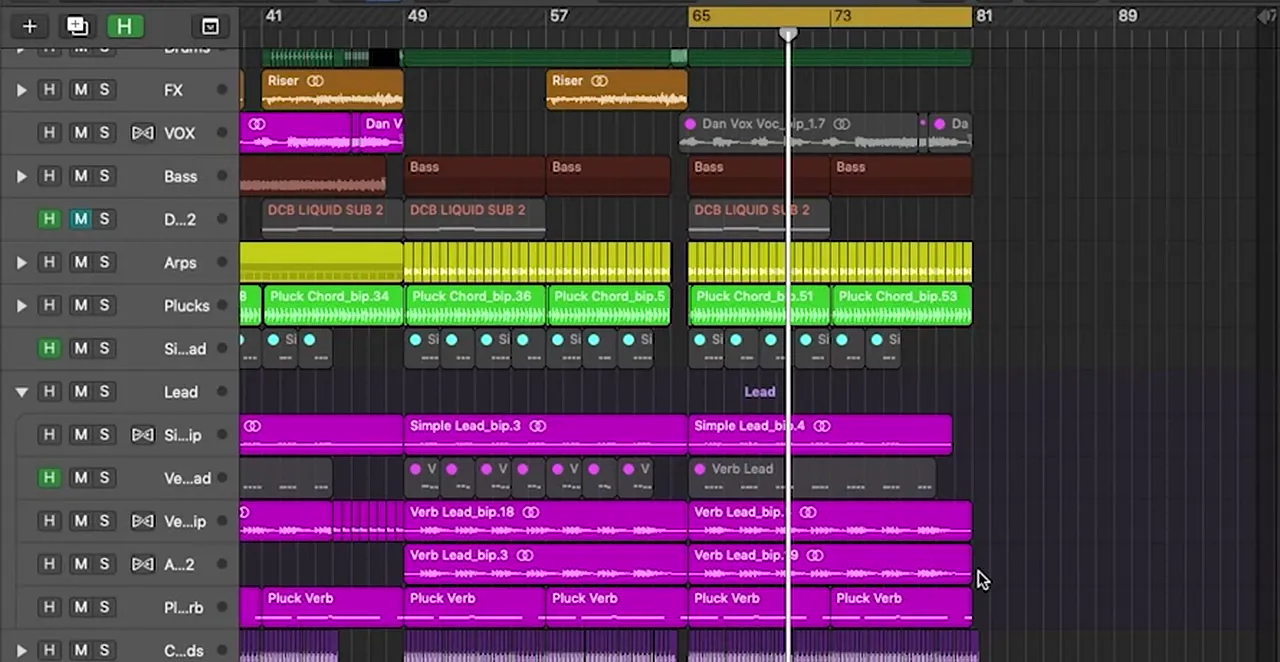
Dan doesn’t fix everything at once either. The vocal “sounds a bit ropey”, so he notes it and moves on: “if there’s time I will address it”. Arranging is about the big picture first; details can wait.
5.Park ideas for the breakdown as you find them
When a sound would work somewhere else, move it there straight away. Dan copies a modulated pad and the low bassline to the breakdown area, “just in case I forget, which happens all the time”.
Digging through the project he finds a pad with modulation from LFOTool and decides it “sounds pretty cool for the breakdown as well”, even though the project doesn’t reach that far yet (watch at 7:06). On the Sunshine pad, LFOTool runs its SVF LP filter at a 1/8 rate with a rising curve, routed to cutoff and resonance, after a Pro-Q 3.
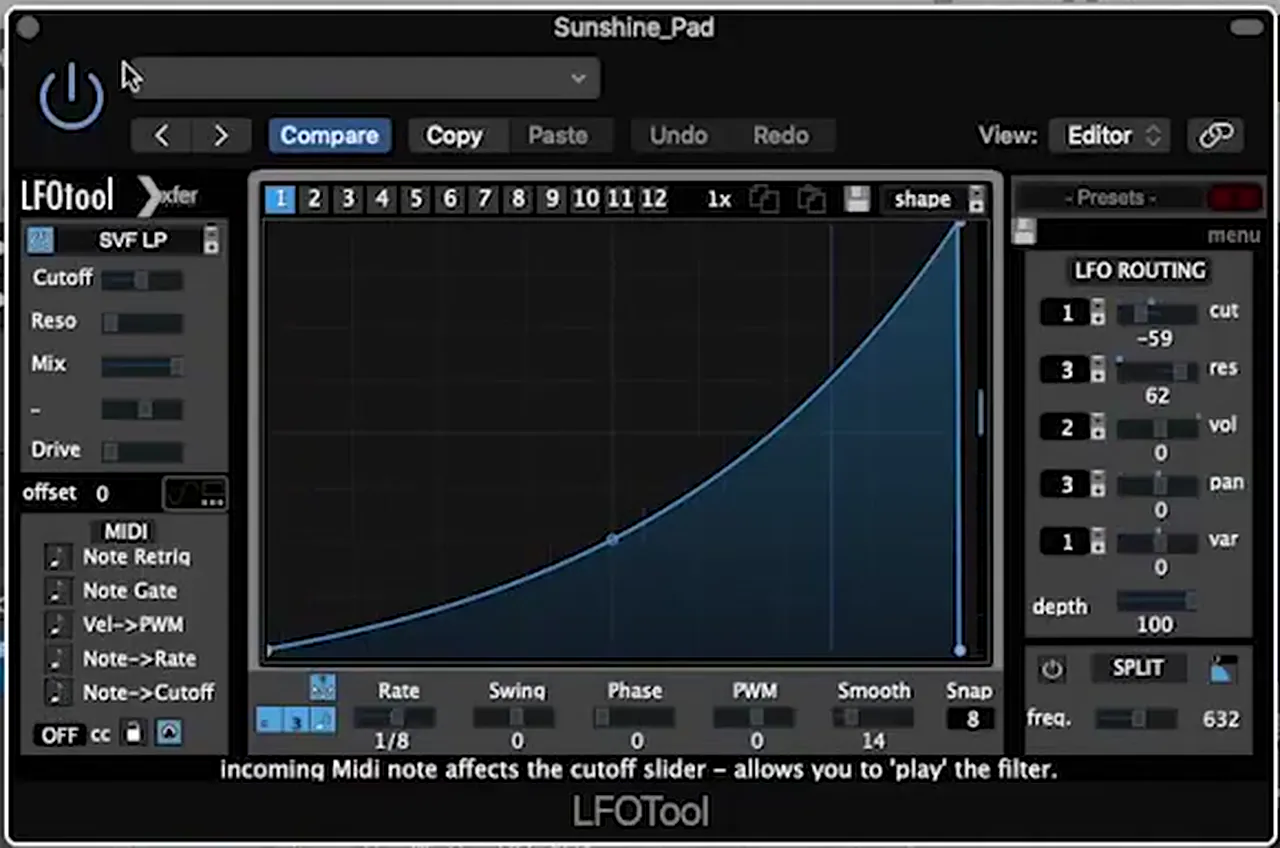
Parking ideas like this means the breakdown is half-written by the time you get there, with sounds that already belong to the track.
6.Introduce new melodies in new sections
A new section needs something new to keep the energy up. DC Breaks rehash an idea from the original sketch: the same Serum patch, with new movement on its pitch, playing a new melody.
“I’d always be rehashing these kind of things where possible,” Dan says, reopening a Serum part from the original idea (watch at 8:55). He takes out the old pad sample, then drags LFO 3 onto the oscillator semitone control, draws a slightly different shape and sets it to a half bar speed (1/2 on screen) (watch at 10:00). Bypass it and you hear the old line; switch it on and “I’ve got a new melody there”.
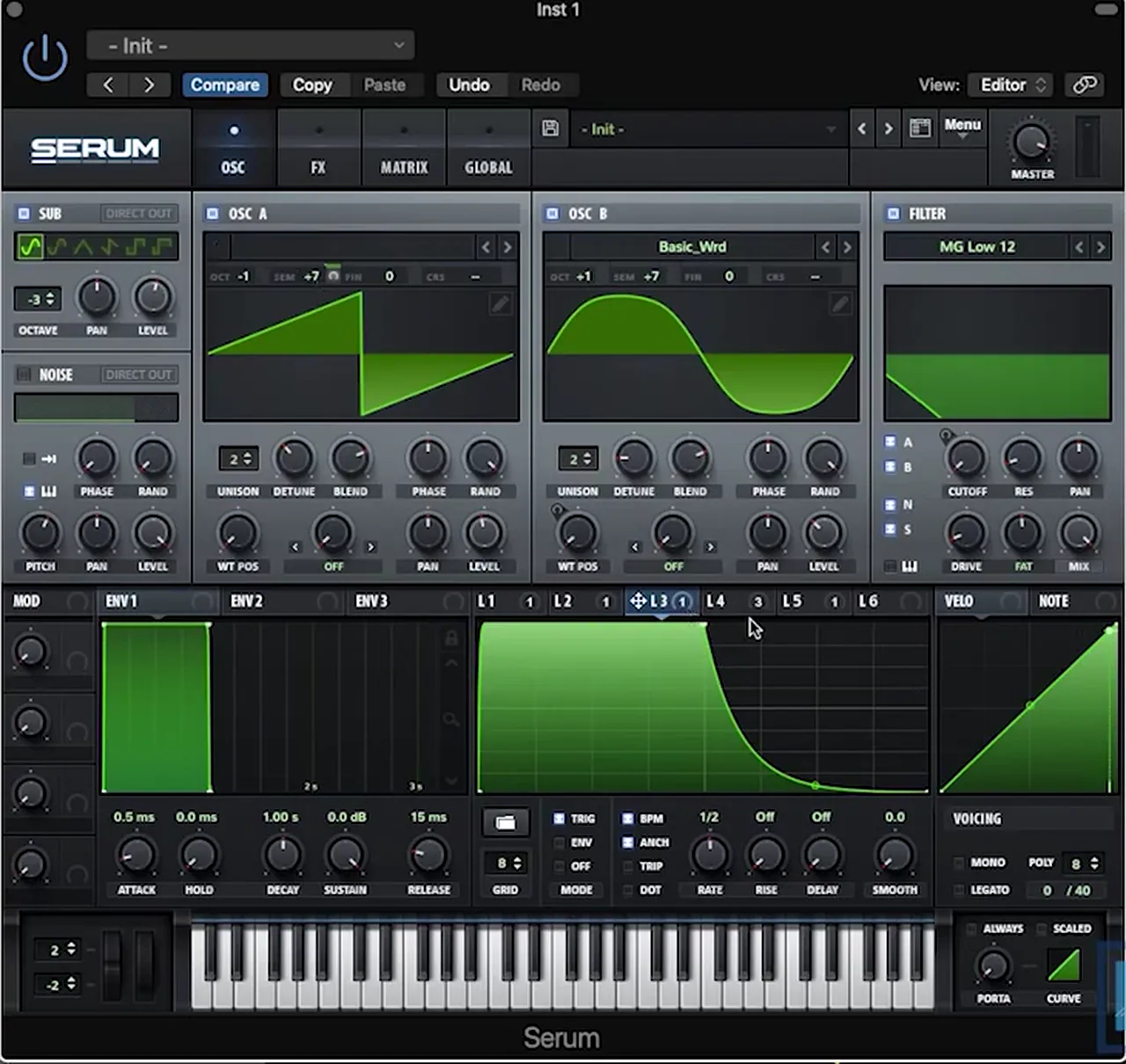
Listen: the new melody from LFO 3 on the semitone8 sec
It is a quick way to write variation that still fits: the patch, the key and the rhythm stay familiar, and only the movement is new. Our bass patterns tutorial uses the same principle for drop basslines: keep the rhythm, change the sounds.
7.Reuse elements through the arrangement
Reusing a fill, a roll or a sound in more than one place ties the track together. Dan copies his snare roll to the drop as well, then copies the whole drop section across, automation included.
“Quite like my snare roll, so I’m going to keep that in. Do you know what, I’m going to stick it at the drop as well, just see what happens” (watch at 10:50). He then “very crudely” grabs the section and copies it over, checking that the automation comes with it, and plays the result.
Listen: into the rewound drop at bar 8110 sec
By the end of the video the structure has moved on: the drop, the rewound section from bar 81 with the full lead back in, a riser, then a breakdown at bar 97 with the pads and no drums. “I think the breakdown’s quite cool, and I’m liking where it’s going structure-wise.”
8.Bonus: a dancefloor lead in the style of Sub Focus
Big, vocal-sounding leads are a dancefloor DnB signature. Our recreation of the lead from Sub Focus’s “Solar System” builds one in Serum from a supersaw, a moving band-pass filter and plenty of effects. It’s our own take for learning, inspired by the track.
Our Sub Focus-style lead tutorial in Serum: a recreation by DNB Academy, inspired by “Solar System”.
Oscillators. From an init saw, turn the unison right up (16 voices on screen), add a second oscillator with the same settings and put both one octave down. Layer in some noise (AC hum1 on screen). Then add a small pitch bend: an LFO in envelope mode on the oscillators’ coarse pitch, made unipolar (hold Shift and Alt and click the modulations) and set at around -9 (watch at 0:41).
Filter. A band-pass filter creates the “vocal movement” of the lead (BN 12 on screen, with both oscillators and the noise going through it). Route LFO 2 to the cutoff, increase the resonance, map it to the filter’s Freq control so the notch moves from high to low, reshape the LFO and switch it to envelope mode too (watch at 1:37).
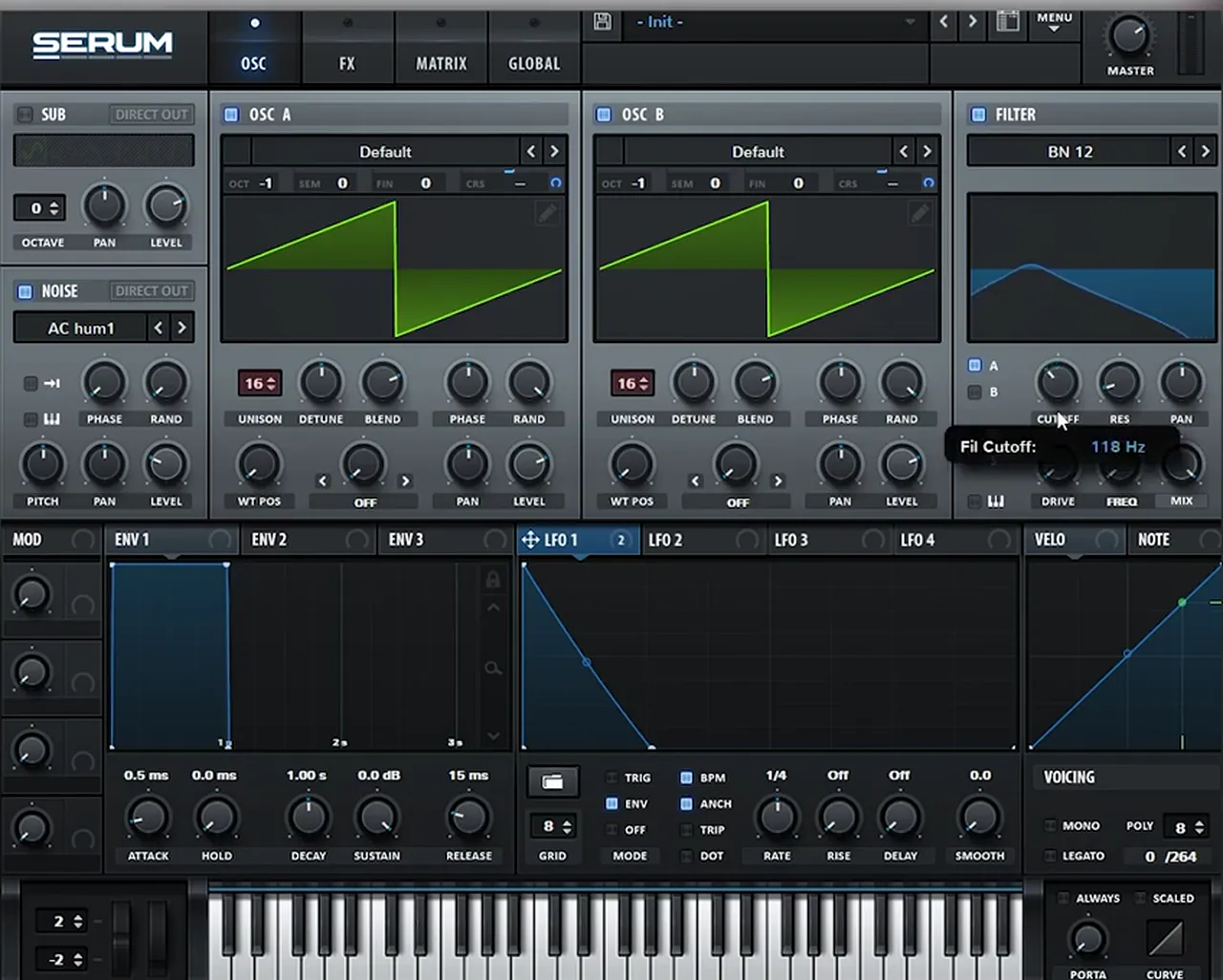
Effects. The band-pass takes away highs, so the effects add them back: Distortion on Stomp Box with the drive boosted (64% on screen), a multiband compressor and an EQ boosting the highs. A second EQ band gets the same LFO on its frequency to push the vocal feel further (9.3 dB of gain on screen). Then a delay with “super long tails”, but filtered, and a Hall reverb with the mix boosted (38% on screen) (watch at 2:51).
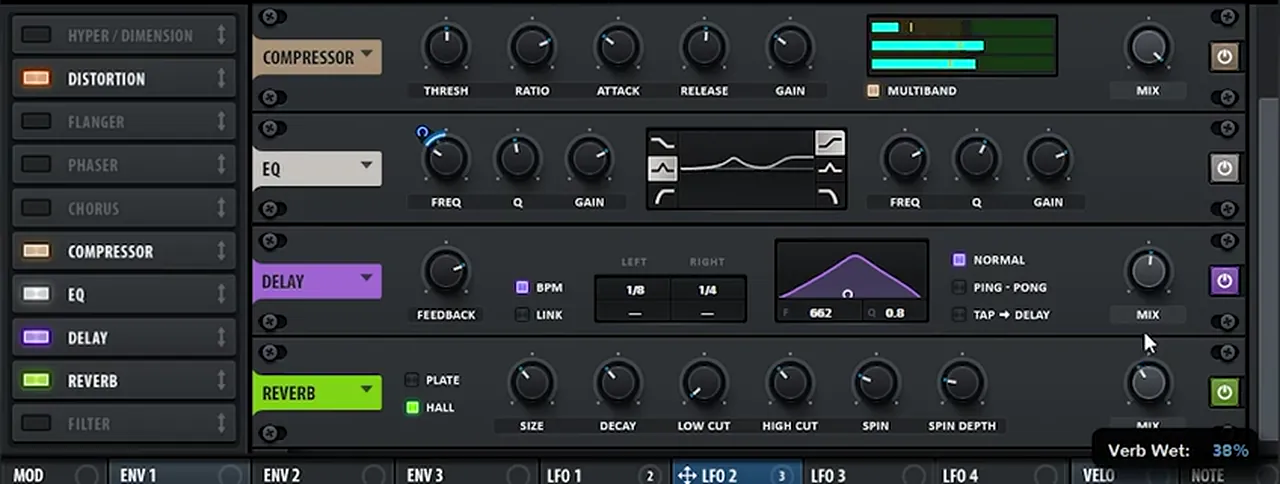
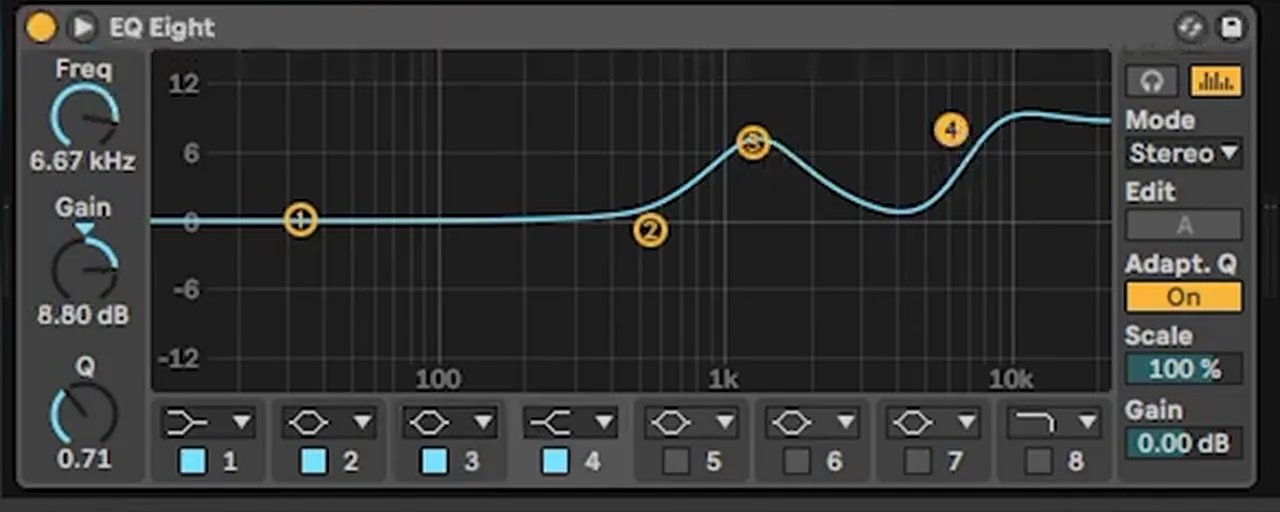
Final EQ. After Serum, an EQ boosts whatever needs it. In the video that is the highs and the area around 1 kHz: on Ableton’s EQ Eight, a peak near 1 kHz and a high shelf at 6.67 kHz, +8.80 dB (watch at 4:50).
Listen: our Sub Focus-style lead patch on its own12 sec
To get the last 10%, experiment with the LFO shapes, the filter cutoff (which changes the vocal movement) and the unison detune. Then try the lead in your own drop: it is exactly the kind of sound Dan mutes in one section and brings back in the next.
Common dancefloor DnB arrangement mistakes
- Arranging before the drop works. Get the main idea right first, then build the structure around it.
- Repeating the drop unchanged. If you rewind into the drop, remove, add or replace parts so the second pass moves forward.
- Keeping parts that clash. When the bassline changes, check the chords, vocoder and pads against it and reprogram them.
- Deleting old ideas. Keep them in an “old parts” folder; DC Breaks pull several back in.
- Waiting to place breakdown sounds. Move a good pad or bassline to where it belongs as soon as you hear it.
- No link between sections. Reuse a roll, a fill or a sound across the track so it feels like one piece.
- Polishing too early. Note small problems, like a ropey vocal, and fix them once the structure is done.
Free download
Sounds to arrange your next track with
The best way to practise arrangement is on a real project. The 174 Marathon Sample Pack was made for International Drum & Bass Day and our 174 Production Marathon:
- 100+ samples
- Drums, bass, FX, melodics and more
- Audio samples that work in any DAW
- Royalty-free, so you can release what you make
It’s one of seven free sample and preset packs in DNB Academy Free Access, along with the mixing and mastering e-books and the 3‑day DnB challenge. Join 40,000+ producers in Free Access. Free account, no card needed.
Go deeper
The whole DC Breaks track, start to finish
Our arrangement video is one part of DC Breaks’ start-to-finish course. Want the full process, or more dancefloor sounds and tracks to study?
 Production courseDC Breaks production courseDan and Chris make a dancefloor DnB track from the first pad to the finished mix: the drop, build-up, breakdown, second drop, vocals and mixing.
 Preset bundleDimensional Serum presets100 Serum presets for dancefloor, festival and rave DnB, including 25 leads and 33 basses.
 Production courseKasger production courseAnother dancefloor DnB track from scratch, with 6+ hours of video, the project file, samples and Serum presets.
Every artist course, preset bundle and sample pack is also in The Vault. Browse courses
Related tutorials
All tutorials → Guide · ArrangementDrum and Bass BPM & Song Structure Guide12 min read · Guide
 Guide · SubgenresDrum and Bass Subgenres: 12 Types of DnB13 min read · Guide
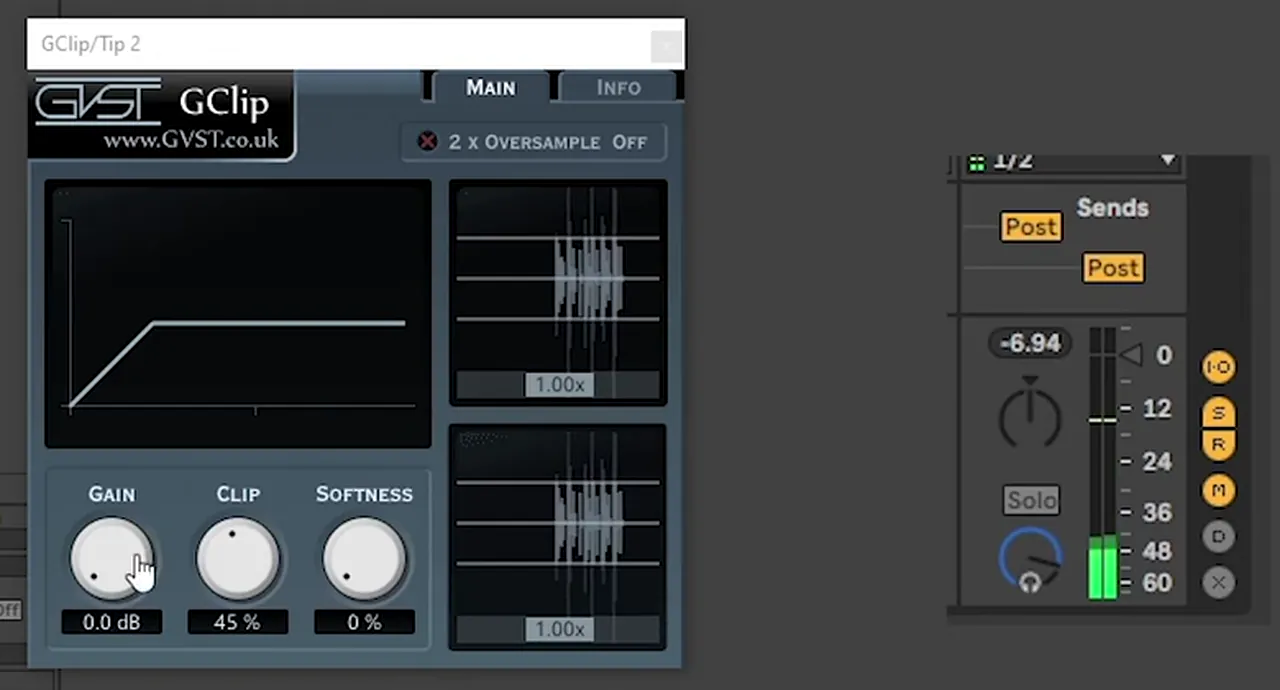 Mixing · DrumsHow to Make DNB Drums Punchy: 3 Techniques That Work8 min read · Video + guide
 Guide · BeginnersHow to Make Drum and Bass: A Step-by-Step Guide19 min read · Guide
FAQ: dancefloor drum and bass
What is dancefloor drum and bass?
Dancefloor DnB is the big, accessible side of drum and bass: long builds, huge drops, vocal hooks and bright leads, mixed loud and polished. It usually sits around 172 to 176 BPM; DC Breaks’ project in our video runs at 174 BPM.
How do you arrange a dancefloor DnB track?
Start from a drop that works, then decide what follows it: a roll-out that winds down into the breakdown, or a rewind back into the drop to keep the energy going. Change parts in each section, add new melodies and reuse fills and sounds so the track holds together.
What does rewinding back to the drop mean?
Instead of winding down after the first drop, the arrangement jumps back to the start of the drop. In DC Breaks’ project that means going from bar 81 back to bar 49, then changing parts so the second pass still moves forward.
How do you keep a second section from sounding the same?
Remove, add or replace elements. In the video Dan mutes the leads and brings them back in the last section, reprograms the vocoder chords and writes a new melody by putting an LFO on a synth’s semitone pitch.
How do you make a lead like Sub Focus in Serum?
Our recreation uses two 16-voice saws an octave down with noise, a small LFO pitch bend, a band-pass filter moved by an LFO for a vocal sound, then distortion, multiband compression, EQ, a long filtered delay and hall reverb. It’s our own take, inspired by Solar System.
Can I make dancefloor DnB without Serum?
Yes. Both videos use Serum, but Vital is free and has the same kind of oscillators, unison, LFOs and filters. The arrangement steps work in any DAW, not just Logic Pro or Ableton Live.
Next steps
Take a drop you have already written, copy it after itself and change one thing every 16 bars: mute the lead, reprogram a chord, add a new melody. Then build the rest of the track around it:
Free Access
Seven free DnB sample and preset packs, including the 174 Marathon Sample Pack, plus mixing and mastering e-books and a 3-day challenge.
Get free packsThe full guide
Tempo, drums, sub, mid bass, chords, arrangement and mixdown: every step of a DnB track.
Read the guideDNB Foundations
A structured drum and bass course with weekly live feedback calls on your tracks, arrangement included.
See Foundations1:1 Mentorship
Personal guidance on your music from a mentor, built around your goals.
See the mentorship50,000+ producers have joined DNB Academy, and our producer Discord has 5,300+ members.