Serum + Ableton Live · Techy DnB · Bass recreation
How to Make Techy Drum and Bass Like Break & DLR: Two Basses in Serum
To make techy drum and bass like Break, build two sounds that answer each other: a short, plucky bass resampled from a distorted sine and square wave, and a clean, tonal Serum bass drawn harmonic by harmonic in the wavetable editor. Then shape both with targeted EQ boosts and parallel chains in your DAW. Our 6-minute recreation of the techy style Break and DLR are known for does exactly that, and below are the steps and settings from the video.
Looking for the FM, band-pass and notch-filter approach to a rolling techy bass? That’s our techy roller bass in Serum tutorial. This page is a different recipe: resampling, harmonic EQ boosts and a wavetable built by ear.
Quick answer
How do you make techy DnB bass like Break?
Layer a sine wave with a square wave an octave and seven semitones up (7 unison voices), drive it hard into distortion, low-pass it and resample it. Shorten the audio with fades so it plucks, boost its second harmonic, and add a parallel chain that is high-passed, boosted around 464 Hz, saturated and chorused. For the second bass, draw harmonics in Serum’s wavetable editor until it matches your reference, then automate its level and pitch bend.
- Sine plus square.Square wave +1 octave, +7 semitones, 7 unison voices.
- Distort and filter.Drive all the way up, then low-pass the top end.
- Resample and shorten.Render to audio and use fades to make it pluckier.
- Warm it up.Boost the second harmonic with an EQ.
- Parallel chain.Dry layer plus a high-passed, saturated, chorused layer.
- Space and brightness.Reverb fading in as the note dies, then OTT.
- Wavetable bass.Draw harmonics in Serum until it matches.
- Movement.Automate the level and a two-semitone pitch bend.
Our recreation of the techy Break and DLR sound, built in Serum and processed in Ableton Live (6 minutes). Every step below links to the moment in the video.
Listen: our finished recreation, with both basses playing6 sec
What you’ll need
- Serum. Both basses start in Serum: the first from basic shapes and the built-in FX, the second from a wavetable drawn in the wavetable editor. No Serum? Vital is free and has basic shapes, distortion, a filter and its own wavetable editor, so you can follow the same idea.
- Ableton Live (or your DAW). The resampling, fades, EQ Eight, Audio Effect Rack, Saturator, Chorus, Reverb and automation all happen in Ableton in the video. Any DAW with fades, an EQ, a saturator and parallel routing can do the same job.
- OTT. A multiband compressor for brightness on both basses. Ableton’s Multiband Dynamics has an OTT preset, and the free Xfer OTT plugin works too.
- A reference track. The Serum bass is matched by ear (and by EQ analyser) against a reference, so pick a techy tune you want to learn from.
1.Build the source: a sine plus a square wave
The first bass is short and plucky, and it starts as a very simple patch: one sine wave plus one square wave, getting distorted. The square brings the bite and the sine keeps the weight underneath.
In Serum, load a sine on oscillator A and a square on oscillator B, both from Basic Shapes (watch at 1:02). Put the square one octave up and seven semitones up, so it sits a fifth above the octave, and give it some unison: the video uses 7 voices. Listen to the square on its own with one voice, then with seven, and you’ll hear how much thicker it gets. Mixed with the sine, that is the raw sound.
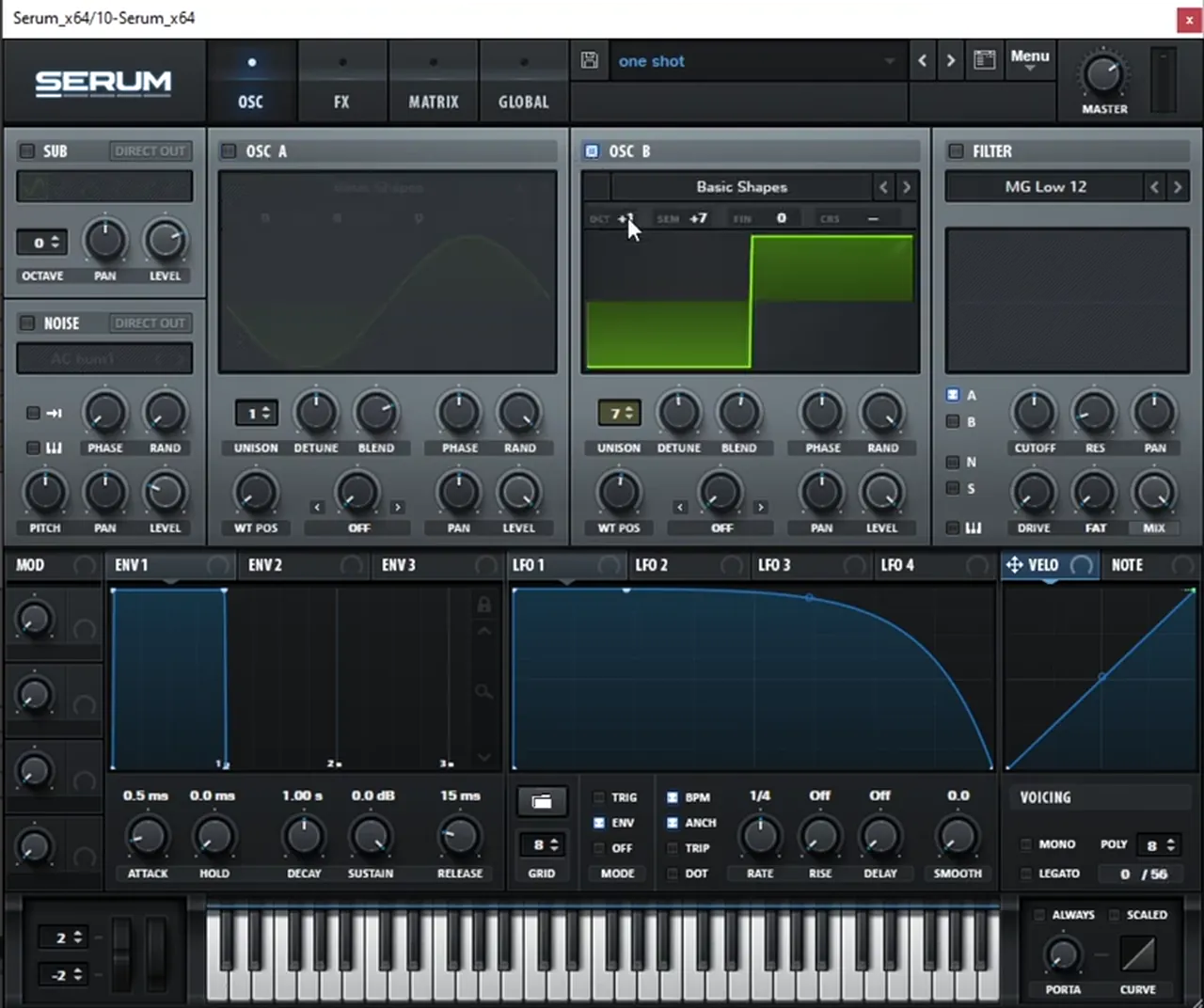
Listen: the plucky bass without effects, then with all of the processing below7 sec
2.Distort it, filter it and resample it
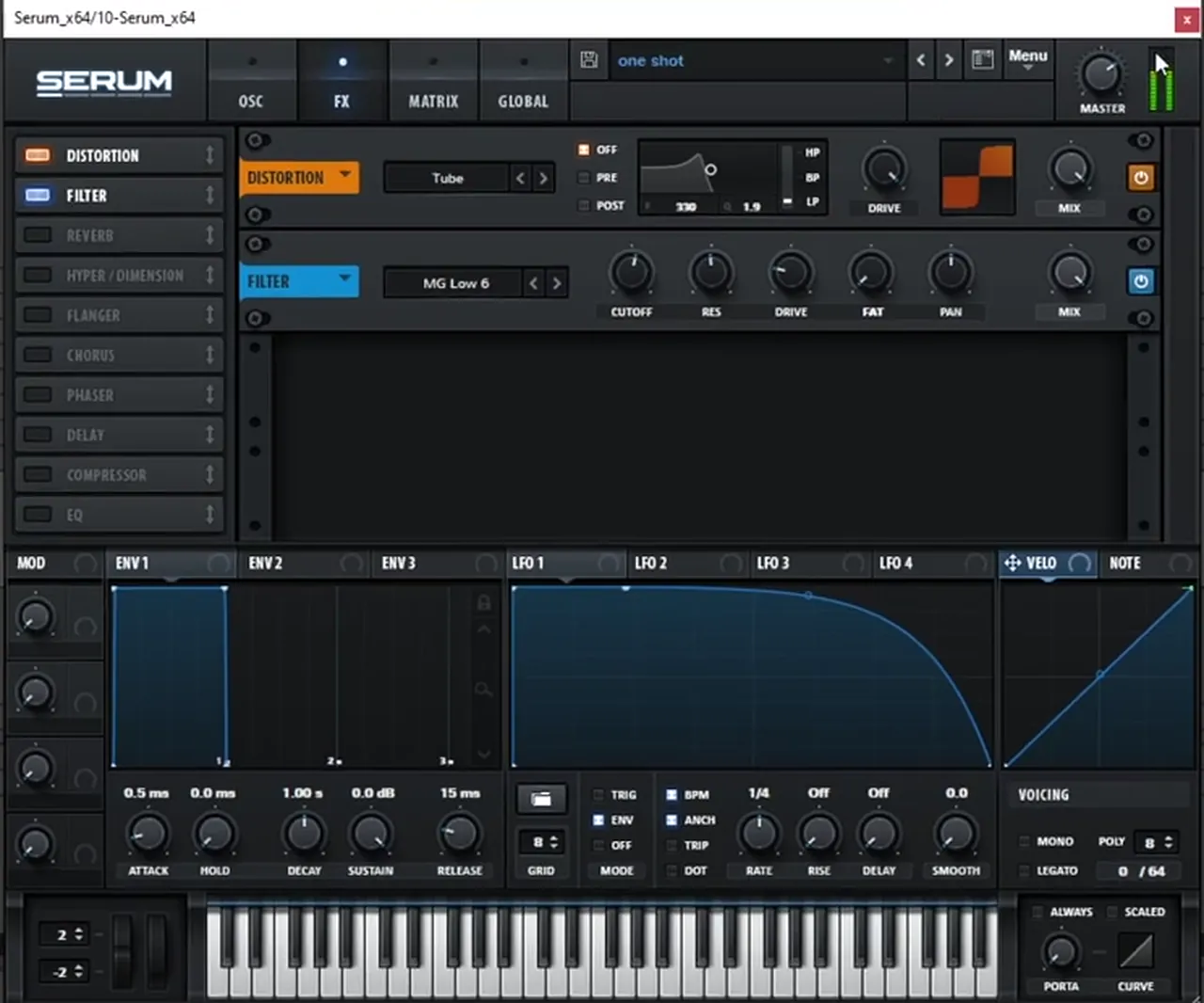
Turn the distortion drive all the way up, then use a filter to get rid of the high frequencies. Once it sounds right, render it to audio and shorten it with fades so it plucks.
In Serum’s FX tab, switch on Distortion (Tube in the screenshot) with the drive all the way up, followed by a Filter set to a low-pass (MG Low 6) to tame the top end (watch at 1:24).
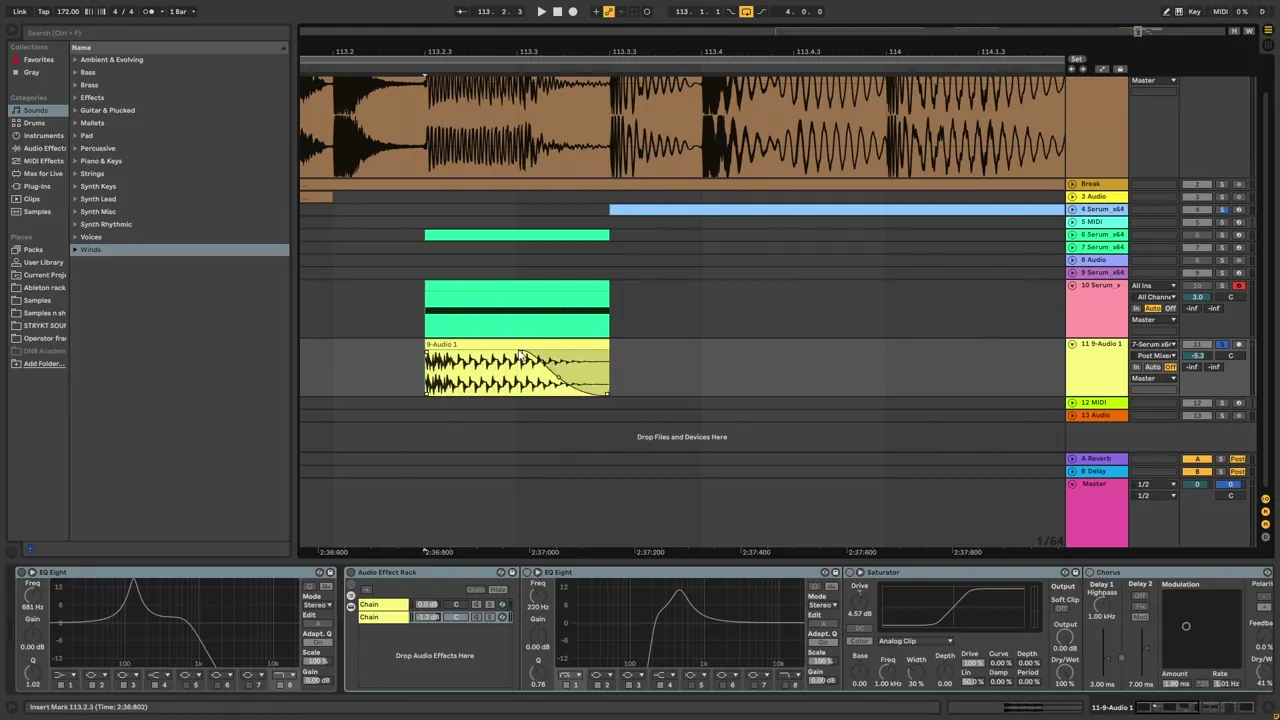
Next, render the sound to audio (watch at 1:36). Working on audio is what lets you shape it the way the techy style needs. In Ableton, use the clip fades to make the render a bit shorter and pluckier: a fade-out pulled well into the note does the job, as you can see on the yellow clip below. The project runs at 172 BPM.
3.Boost the second harmonic for warmth
With the bass rendered, the first move is an EQ boost on the second harmonic. It makes the sound warmer, and it is a cleaner way to add body than turning up the whole low end.
Put an EQ Eight on the audio track and add a bell boost on the second harmonic of the note (watch at 2:00). Use the analyser or sweep the band to find it: the second harmonic sits one octave above the fundamental. The same trick comes back at the very end of the chain, so it is worth getting comfortable with it here.
4.Parallel processing, reverb and OTT
Split the bass into two chains: one is just the dry signal, the other is a high-passed copy that is boosted around 464 Hz, distorted and chorused. Then add reverb that only comes in as the note fades, OTT for brightness and one more second-harmonic boost.
In an Audio Effect Rack, keep the first chain dry (watch at 2:08). On the second chain, add an EQ Eight that high-passes the signal and boosts a band at 464 Hz (+10.8 dB in the screenshot), then distort it: the video uses a Saturator on Analog Clip with 4.57 dB of drive. Put another EQ after it and you’ll see that the 464 Hz peak plus the distortion creates extra harmonics around 1 kHz (watch at 2:37). A Chorus (41% dry/wet in the screenshot) finishes that chain.

After the rack comes a Reverb with its dry/wet automated so the reverb comes in as the sound fades out (watch at 2:48). The hit stays tight and the tail gets the room. Then add OTT to make it brighter, and finally boost the second harmonic once again, which makes it sound more saturated and warm in the low mids. In the screenshot that last EQ band sits at 129 Hz with +11.2 dB and a fairly narrow Q of 2.20.

To recap the first bass: a resample of a distorted square and sine wave, parallel processing, boosts on certain harmonics, and room effects like chorus and reverb.
5.The Serum bass: draw the harmonics
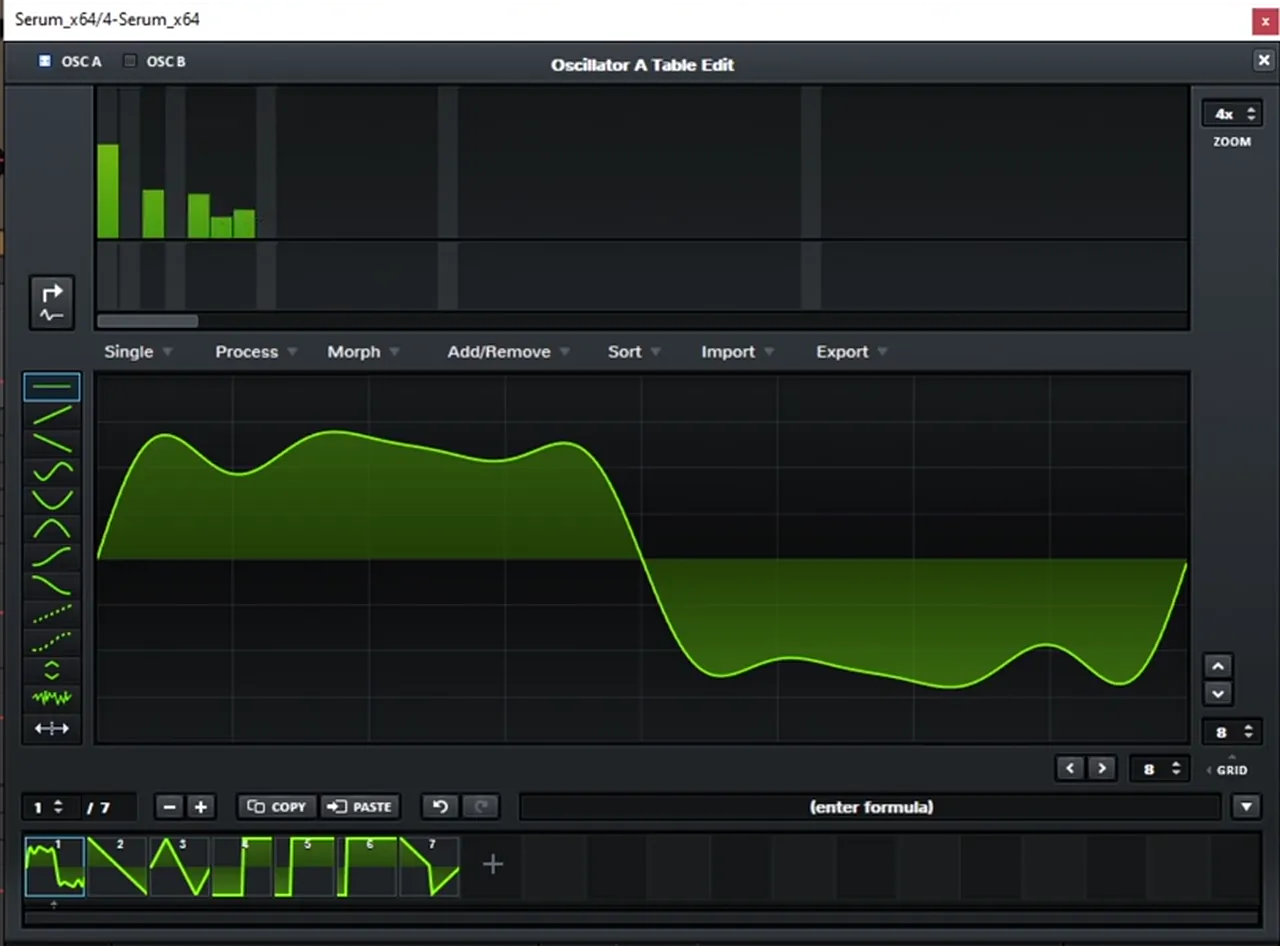
The second bass is made in Serum from a custom wavetable. Open the wavetable editor and play with different combinations of harmonics until the bass matches your reference. An EQ analyser shows you which harmonics you’re aiming for.
Without effects, this bass is clean and tonal (watch at 3:36). In Serum’s wavetable editor, the bar graph along the top is the harmonics view: each bar is one harmonic, and changing their levels reshapes the wave. Work through combinations until the sound matches (watch at 3:47).
Listen: the Serum wavetable bass without effects5 sec
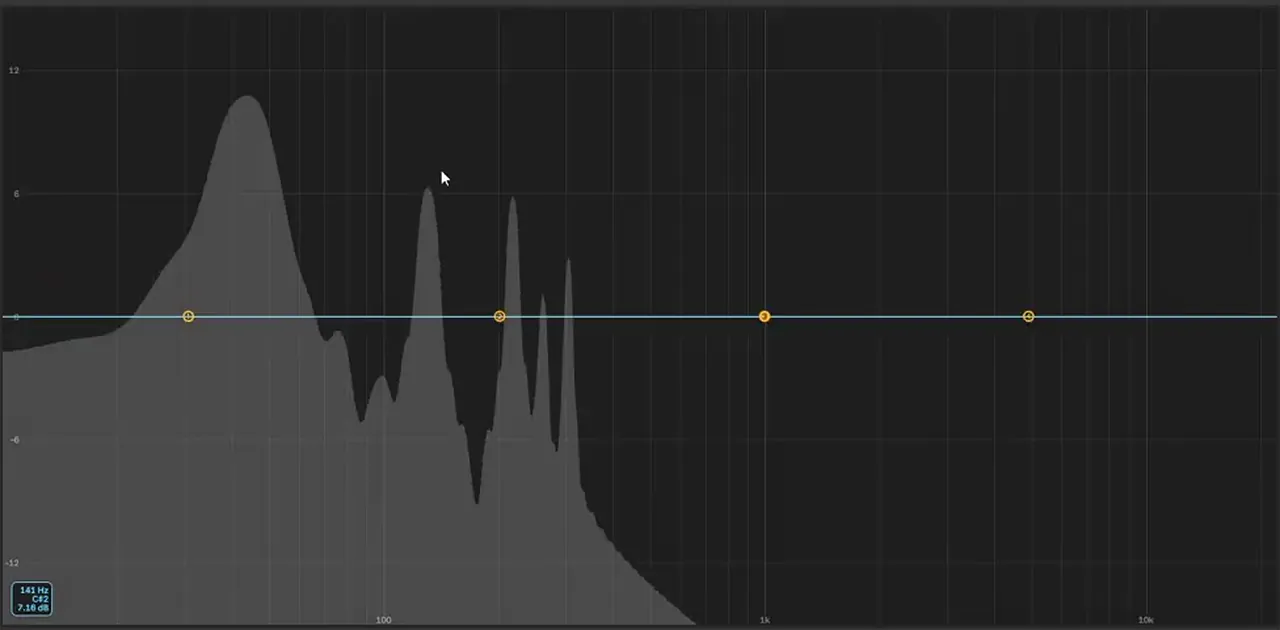
Put an EQ with an analyser on the Serum bass and you can see the combination you made: each peak is one of the harmonics you drew (watch at 4:00). The way to find the target is to put the same analyser on the reference track: you’ll see its harmonics too, and you can match them. It’s the method from our liquid DnB bass like Random Movement tutorial, which goes deeper into reading harmonics with an analyser.
6.Automate the level and the pitch bend
A clean wavetable needs movement to sound techy. Automate Serum’s level knob with a repeating shape, then automate the pitch bend so each note holds and then drops two semitones.
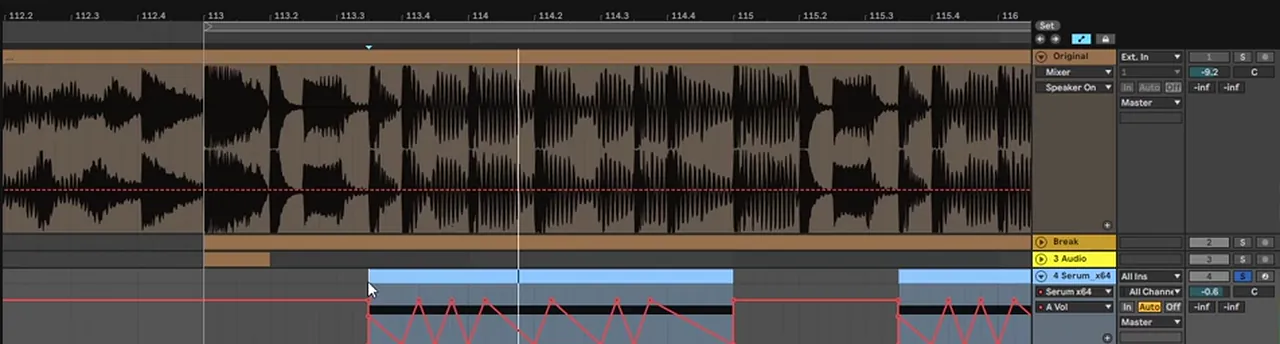
First, automate the level (watch at 4:33). The video draws a fast zigzag across each note, so the bass pulses in volume.
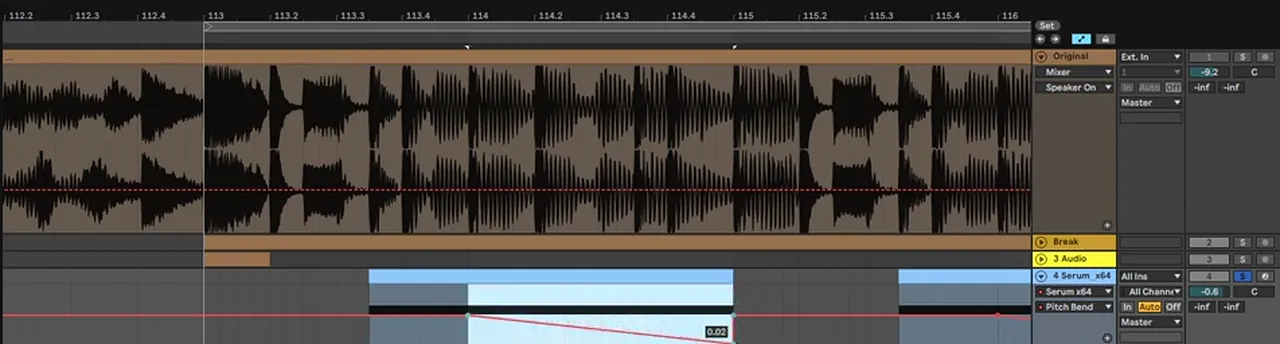
Then modulate the pitch bend (watch at 4:41). It stays put for the first quarter note, then glides two semitones down. Pitch bends like this are a big part of how techy basses talk.
Want more on placing notes like these? Our guide to every drum and bass bass type shows where this kind of bass sits next to subs, reeses and mid basses.
7.Layer the Serum bass in parallel
Finish the Serum bass the same way as the first one: duplicate the sequence, keep one layer dry, and process the other with chorus, reverb and OTT before isolating only the frequencies you want.
Duplicate the whole sequence (watch at 4:57). Leave one layer dry. High-pass the other, then add chorus, reverb and OTT, and after the OTT use an EQ to isolate only the frequencies you want. Layer the two chains and you have the final sound (watch at 5:27).

Once both basses sit together, write the pattern so they answer each other, and keep the low end clean underneath. Our DnB sub bass guide covers that side. Where techy rollers sit among the other styles is in our drum and bass subgenres guide.
Common mistakes making techy DnB bass
- Processing the synth instead of the audio. Resample first. Fades, harmonic boosts and parallel chains are much easier on a rendered sound.
- A long, droning first bass. Use fades to make the render short and plucky, so it leaves space for the second bass.
- Boosting the whole low end. Find the second harmonic and boost that instead, for warmth without mud.
- Distorting the full signal. Keep a dry chain and put the distortion on a high-passed parallel layer.
- Reverb on the hit. Automate the dry/wet so the room only opens as the note fades.
- Guessing the wavetable. Put an analyser on your reference and match the harmonics you can see.
- A static Serum bass. Level and pitch-bend automation give a clean wavetable its movement.
Free download
Free samples to build a techy loop around
Two basses need a beat to answer each other over. The 174 Marathon Sample Pack gives you:
- 100+ royalty-free samples
- Drums, bass, FX, melodics and more
- Audio samples, so they drop straight into Ableton Live or any other DAW
- Made for International Drum & Bass Day and our 174 Production Marathon
It’s one of seven free sample and preset packs in DNB Academy Free Access, alongside the mixing and mastering e-books and the 3‑day DnB challenge. Join 40,000+ producers in Free Access. Free account, no card needed.
Go deeper
Techy bass courses and Serum presets
Want a full artist workflow for technical, rolling DnB, or Serum sounds to pull apart?
 Production courseGEST production courseA full track in 4+ hours of video, with lessons on drum design, bass resampling and bass processing, plus the project files, presets and samples.
 Preset bundleGEST Serum presets100 Serum presets for techy rollers, including 35 basses, plus WAV renders of the presets.
 Production courseCreatures production courseAround 5 hours of start-to-finish production in Ableton Live 11, with the project files, samples and stems.
Every artist course, preset bundle and sample pack is also in The Vault. Browse courses
Related tutorials
All tutorials → Serum · TechyHow to Make a Techy Roller Bass Like DLR & Sofa Sound in Serum7 min read · Video + guide
 Serum · HarmonicsHow to Make a Liquid DnB Bass Like Random Movement in Serum18 min read · Video + guide
 Vital · BassDark, Minimal DnB Bass Sound Design in Vital7 min read · Video + guide
 Guide · BassHow to Make Drum and Bass Bass: A Guide to Every Bass Type15 min read · Video + guide
FAQ: techy DnB bass like Break
How do you make techy drum and bass like Break?
Build two basses that answer each other. The first is a sine plus a square wave an octave and seven semitones up, distorted, low-passed, resampled and shortened with fades, then warmed with second-harmonic EQ boosts and a parallel chain. The second is a clean Serum wavetable drawn harmonic by harmonic, with level and pitch-bend automation.
What Serum settings make the plucky techy bass?
In our recreation: a sine on oscillator A, a square on oscillator B one octave up and +7 semitones with 7 unison voices, Tube distortion with the drive all the way up, then a low-pass filter (MG Low 6) to remove the highs. The sound is rendered to audio and made shorter and pluckier with fades in Ableton.
Why boost the second harmonic of a bass?
Boosting the second harmonic, one octave above the fundamental, makes a bass sound warmer and more saturated in the low mids without turning up the whole low end. Our recreation does it twice: once right after resampling and again at the end of the chain (129 Hz, +11.2 dB, Q 2.20 in the screenshot).
How do you match a bass from a reference track in Serum?
Put an EQ with an analyser on the reference track to see its harmonic peaks, then open Serum’s wavetable editor and change the harmonic levels until your bass shows a similar set of peaks and sounds right. Our liquid DnB bass like Random Movement tutorial covers the same method in more depth.
Is this the same as the techy roller bass tutorial?
No. Our techy roller bass tutorial builds a rolling bass from FM, a band-pass filter and moving notch EQs. This one uses a resampled sine-and-square pluck, harmonic EQ boosts and a hand-drawn wavetable bass, so the two make a good pair for learning the techy style.
Can I make this bass in Vital instead of Serum?
Yes, the idea transfers. Vital is free and has basic shapes, unison, distortion, a filter and a wavetable editor, so you can layer a sine and square, distort and filter them, resample, and draw a wavetable bass the same way. The values may need adjusting by ear.
Next steps
Open Serum, load a sine and a square, set the square one octave and seven semitones up with 7 unison voices, distort and filter it, then resample it. Follow the steps above in order, then build the wavetable bass against a reference you love. For a different take on the same style, try the FM and notch-filter route in our techy roller bass tutorial.
Free Access
Seven free DnB sample and preset packs, including the 174 Marathon Sample Pack, plus mixing and mastering e-books and a 3-day challenge for Ableton Live and FL Studio.
Get free packsThe full guide
Tempo, drums, sub, mid bass, chords, arrangement and mixdown: every step of a DnB track.
Read the guideDNB Foundations
A structured drum and bass course with weekly live feedback calls on your tracks.
See Foundations1:1 Mentorship
Personal guidance on your music from a mentor, built around your goals.
See the mentorship50,000+ producers have joined DNB Academy, and our producer Discord has 5,300+ members.