Vital · Bass design · Recreation
How to Make a Bass Like Bou & Mark XTC’s “Breathe” in Vital
To make a horn-like bass in the style of Bou & Mark XTC’s “Breathe” in Vital, automate the pitch wheel down two semitones across each note, run the oscillator through a steep 24 dB low-pass filter, and let a triggered LFO open the cutoff. Automating that LFO’s speed gives you the rhythm. Then use the Saws for Days wavetable with mono unison, a little white noise, chorus, distortion and EQ, and finish with post-processing and resampling. This is our own recreation, step by step, with the settings from the screen and audio of every stage.
This is a recreation for learning, inspired by the bass at the end of each bar in “Breathe”. It’s our own patch, built from an init preset. For a broader map of bass types, see our drum and bass bass guide.
Quick answer
How do you make a bass like Bou & Mark XTC’s “Breathe” in Vital?
Start from an init patch. Automate the pitch wheel down two semitones over the note, route oscillator 1 into filter 2 set to Analog 24 dB with the resonance down, and map a triggered LFO to the cutoff. Unsync the LFO and automate its frequency in your DAW for the rhythm. Load Saws for Days with four unison voices, stereo unison and detune at zero, add quiet white noise, then chorus, Soft Clip distortion and EQ. Post-process and resample until a take hits right.
- Pitch movement.Pitch wheel automated down 2 semitones.
- Filter movement.Analog 24 dB filter with a triggered LFO on the cutoff.
- Rhythm.LFO in seconds, its frequency automated.
- Tone.Saws for Days, 4 mono unison voices, white noise.
- Effects.Chorus, Soft Clip distortion, EQ.
- Finish.Noise, multiband distortion, EQ, soft clipping, then resample.
Our recreation of the horn-like “Breathe” bass in Vital, from an init patch to a resampled audio take. Every step below links to the moment in the video.
What you’ll need
- Vital. The synth part of this patch uses only stock wavetables and effects in Vital, which is free.
- A DAW with automation. Both movements are drawn as automation. We use Ableton Live at 176 BPM, but any DAW that can automate a plug-in’s parameters will do.
- Some post-processing. After Vital we use Ableton’s Erosion, EQ Eight and Saturator, plus iZotope Trash 2 for multiband distortion. You can get close with whatever noise, EQ and distortion tools you already own.
- Patience for resampling. The last part of the sound comes from bouncing the patch to audio several times and keeping the best take.
1.Set up the pitch-bend movement
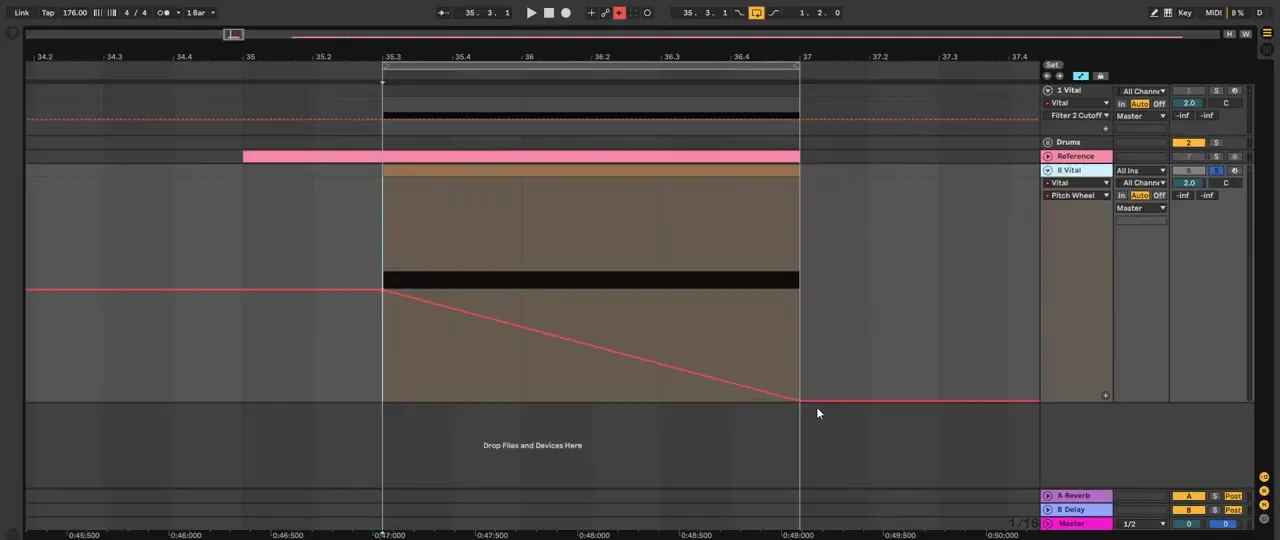
The horn-like character starts with pitch: each note slides down two semitones while it plays. In Vital that is just the pitch wheel, with the bend range at 2, automated from your DAW.
Open an initialised Vital (watch at 1:06). We set up the movement first and only pick the sound later. Vital’s bend range is 2 semitones by default (the BEND box at the bottom reads 2), so automating the pitch wheel from the centre to the bottom drops the note by two semitones. In Ableton, draw that automation as a straight ramp down across the length of the note, then flat at the bottom.
2.Add a 24 dB filter and an LFO on the cutoff
The second movement is a filter that opens and closes on every note. A steep 24 dB low-pass with no resonance, driven by a triggered LFO, gives the bass its “breathing” vowel-like shape.
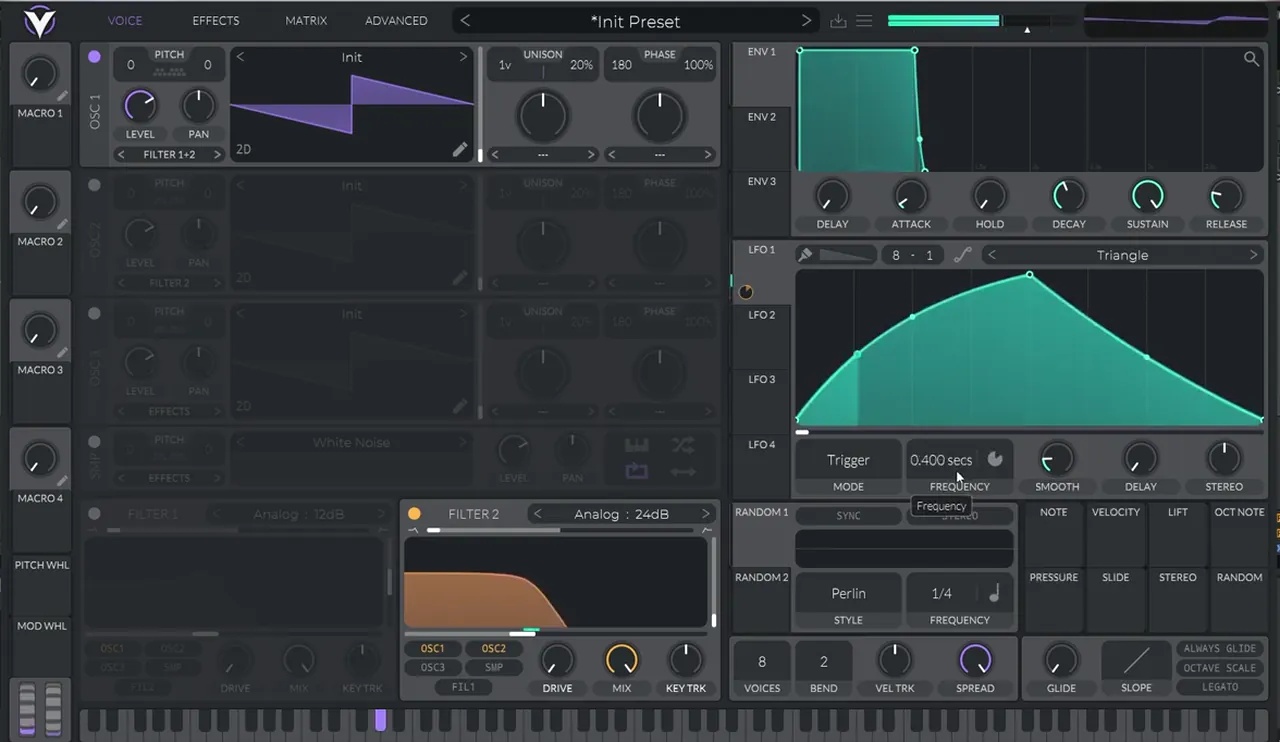
Turn on filter 2 and route oscillator 1 through it (watch at 1:27). Bring the resonance all the way down and switch it to a steeper slope: Analog 24 dB on screen. Then map LFO 1 to the filter’s cutoff. LFO 1 is in Trigger mode, so it restarts with each note. Experiment a little with its shape: ours ends up as a curved rise to a peak and a slower fall.
Listen: the init saw with the pitch-bend automation and the LFO on the filter cutoff5 sec
3.Create the rhythm by automating the LFO speed
Instead of a tempo-synced LFO, we free the LFO and automate how fast it runs. Speeding it up and slowing it down within the note is what turns one filter sweep into a rhythmic, talking pattern.
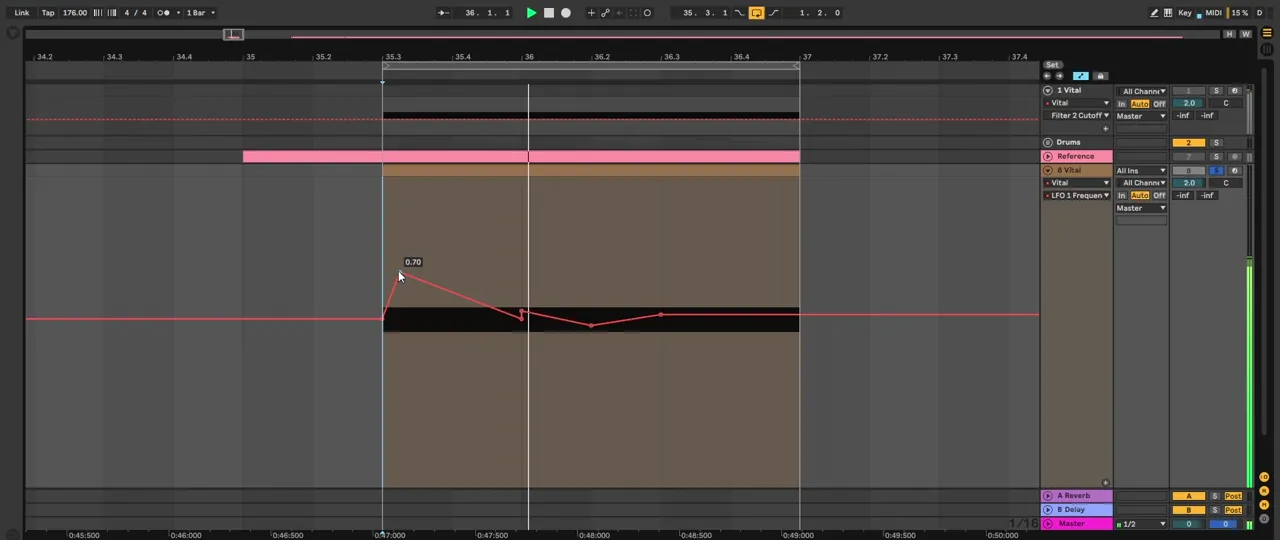
Change the LFO a little, then turn off its tempo sync so the frequency is set in seconds (watch at 1:56); the screen shows 0.400 secs at that point. Now you’re free to experiment. Back in Ableton, automate LFO 1 Frequency (watch at 2:08). Our shape goes up, then down, restarts, goes down, back up, and then sustains for the rest of the note. While you’re designing your own sound, you can change this shape freely; those two automations are the two main movements of the sound.
4.Pick the wavetable and set mono unison
With the movement in place, choose the tone. We use Vital’s Saws for Days wavetable, then find a frame that has plenty of low-mid harmonics but still keeps a fundamental, and widen it with unison that stays mono.
Load Saws for Days on oscillator 1 (watch at 2:49). It has a very cool overtone. Click the oscillator’s display to switch to the spectrum view, which shows you the harmonics. The first frame isn’t what we want: move through the wavetable until you find a frame with more harmonics in the low mids that also contains a fundamental, because the starting one doesn’t.
Listen: Saws for Days through the filter and pitch movement while we pick a frame5 sec
Next, add 4 voices of unison (watch at 3:27). We don’t want a stereo effect here, so open the Advanced tab and bring stereo unison all the way down. You will still hear some odd phasing, so also bring the unison detune all the way down, to 0%.
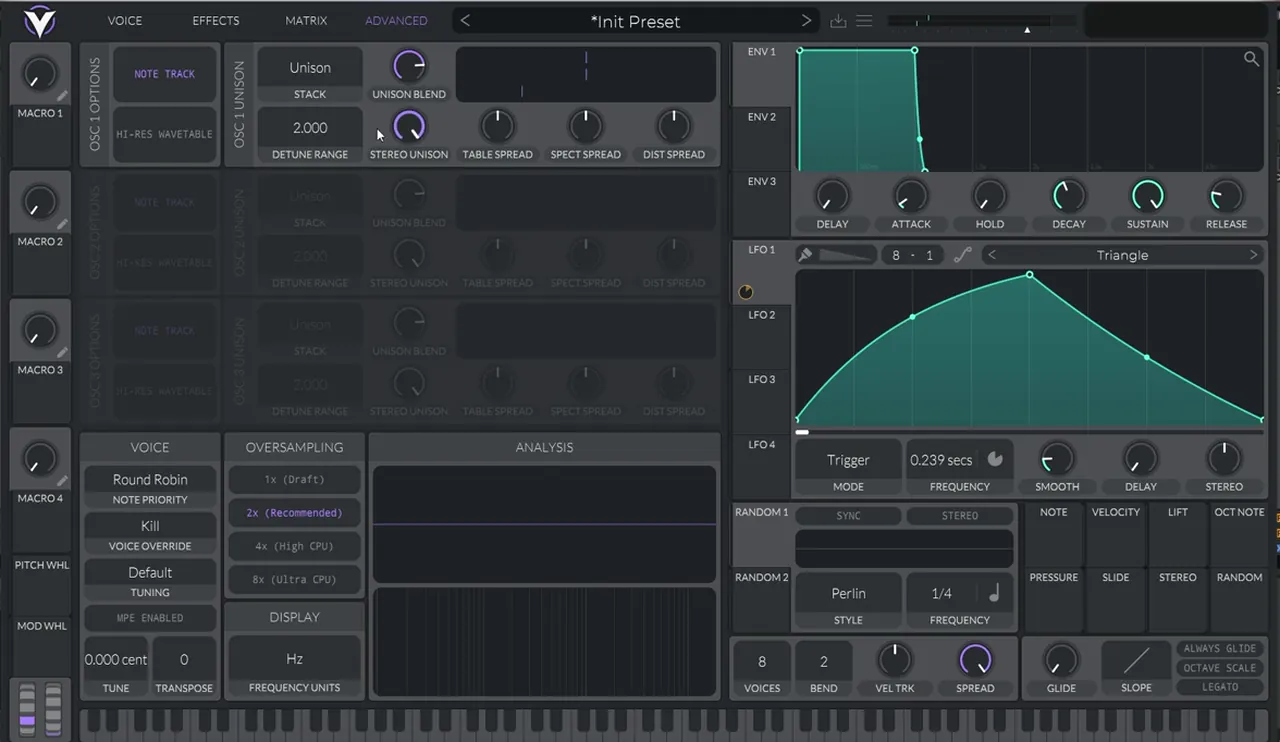
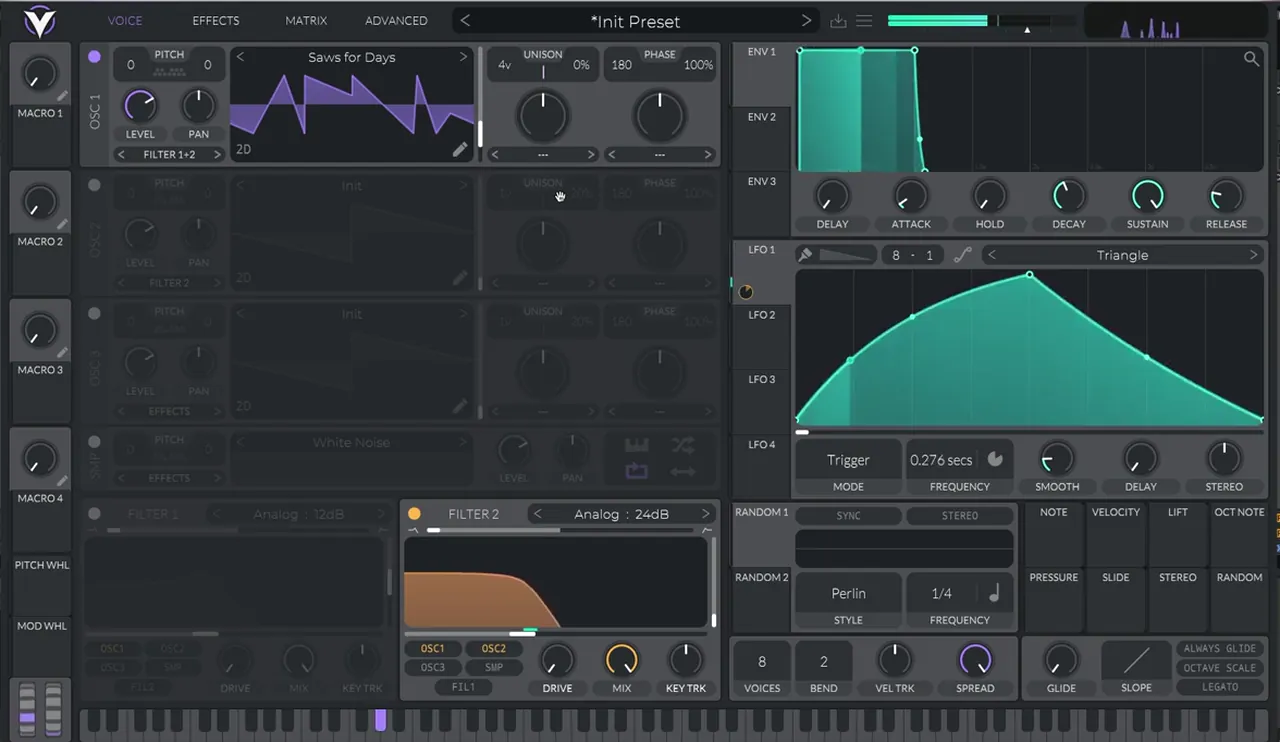
From here it’s partly about getting lucky with the phases. Phase randomisation is still on, so some notes come out with strange results and others give you exactly the sound you want. That is why we resample at the end instead of relying on one MIDI note.
5.Add a little white noise
A quiet noise layer through the same filter adds air and grit, and it moves with the LFO because it shares the cutoff.
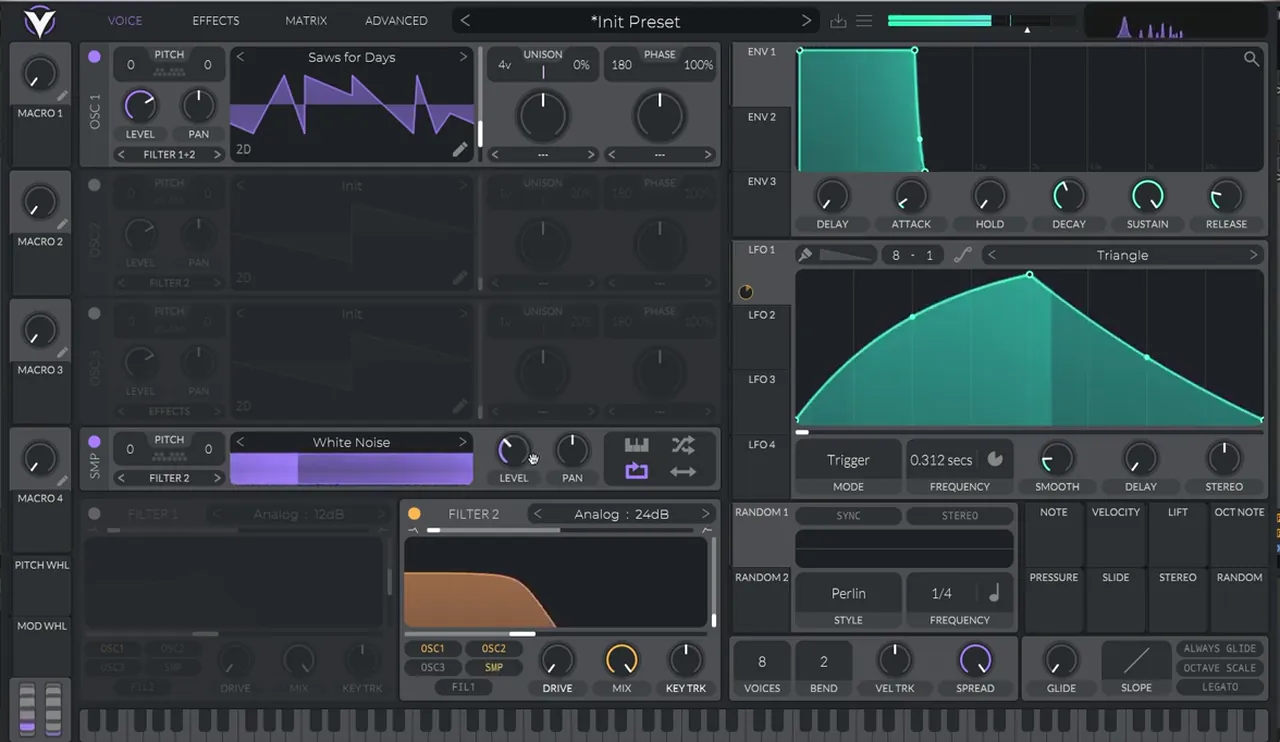
Turn on the sampler, which loads White Noise by default (watch at 4:00). Bring its level down and route it to filter 2 so it mixes with oscillator 1 in the filter.
6.Chorus, distortion and EQ inside Vital
Inside Vital, the effects stay simple: a chorus kept mono for extra movement in the harmonics, Soft Clip distortion for weight, and an EQ before the patch goes out to the DAW.
In the Effects tab (watch at 4:19), turn on the chorus. Again, we don’t want it to go stereo, so bring the spread down and the mix down too. If you’re leaving the recreation behind to make your own sound, a stereo chorus is perfectly valid. The chorus adds a bit more movement to some of the harmonics. Next, turn on the distortion (Soft Clip on screen) and drive it. Then add the EQ, and bring Vital’s output level down so the patch doesn’t hit your DAW too hot.
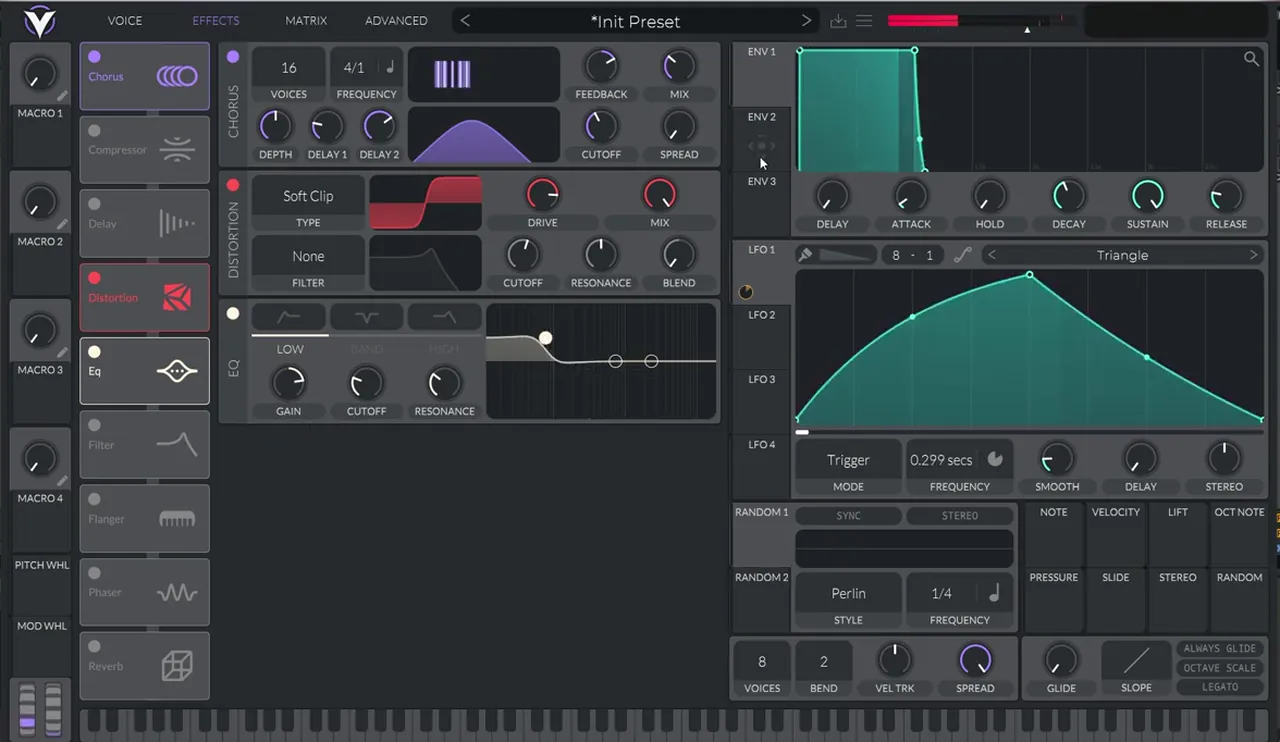
Once more, the retrigger of oscillator 1’s voices decides a lot (watch at 5:13). Keep experimenting with the wavetable frame until a note sounds right.
Listen: the full Vital patch with the chorus, distortion and EQ, before any post-processing10 sec
7.Post-processing: noise, multiband distortion, EQ and soft clipping
The post-processing chain after Vital is short: Erosion for hiss, multiband distortion on the mids only, an EQ to bring out the harmonics you like, and a saturator in soft-clip mode.
First, Ableton’s Erosion (watch at 5:35). It’s a noise generator, set around 3,000 Hz just to add more hiss to the sound: on screen it reads Wide Noise, 3.61 kHz, width 0.30 and amount 34.4.
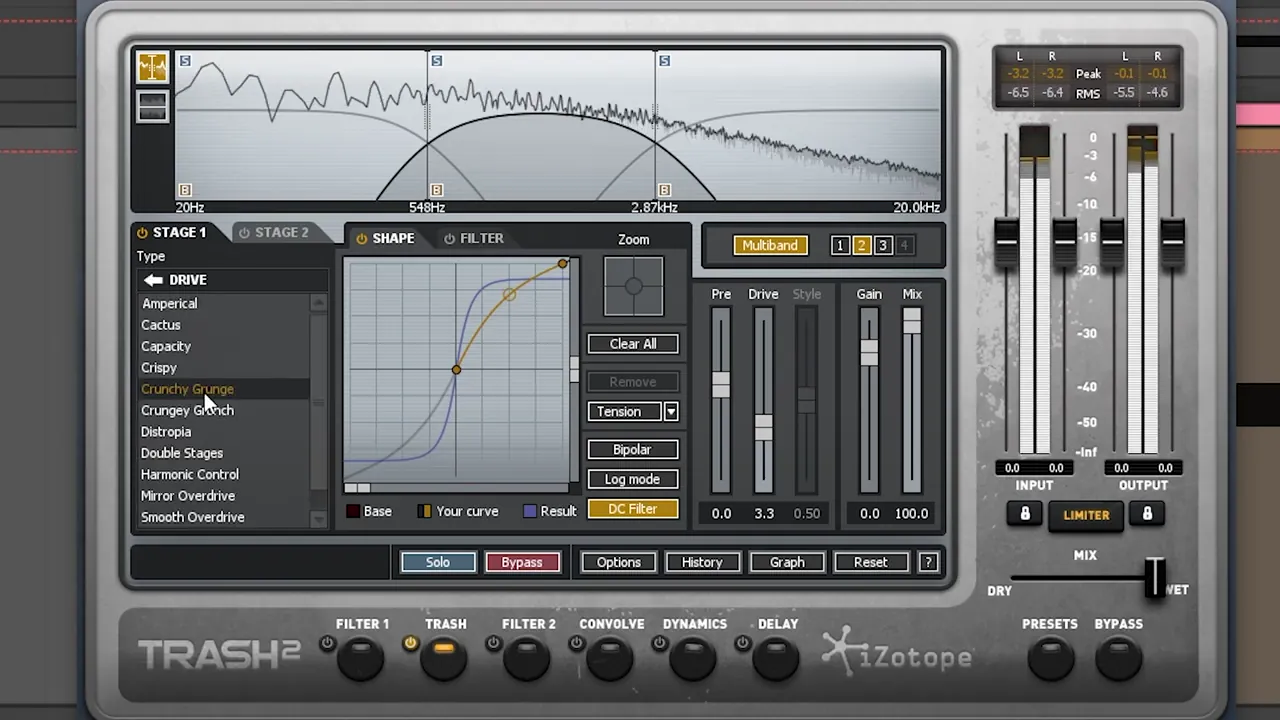
Next comes iZotope Trash 2 in multiband mode (watch at 6:02). There’s nothing on the lows and nothing on the highs. The middle band runs from around 500 Hz up to about 2.8 kHz (548 Hz to 2.87 kHz on screen) and uses Crunchy Grunge from the Drive folder, with a drive of 3.3 and the curve pulled up a little higher.
Then an EQ Eight (watch at 6:53). This is simply to boost the harmonics we like and bring down those we don’t, so ours has narrow bell boosts with a dip between them. Watch out for clipping: if the boosts push it over, bring the EQ’s gain down (ours is at -6 dB) and keep using your bells. Last, a Saturator with Soft Clip switched on (watch at 7:30), which lets us bring the gain up without hard clipping.
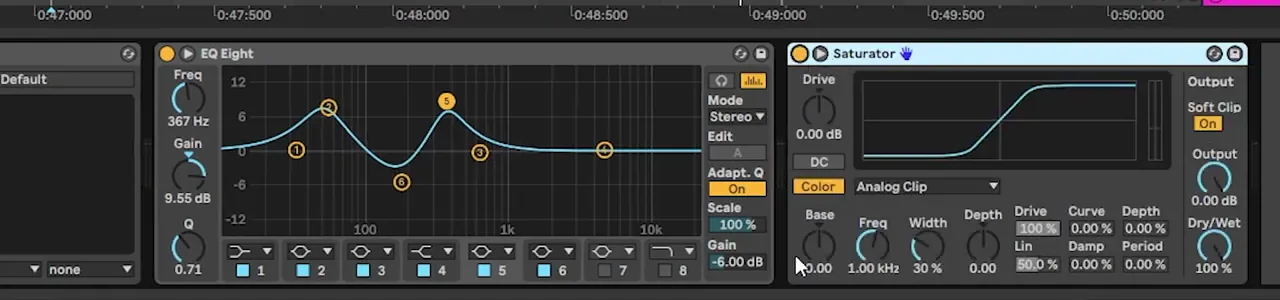
8.Resample until you get a usable take
Because the unison phases change from note to note, the final step is to bounce the sound to audio many times and keep the copy that feels usable in your track.
Record the Vital track and its effects to an audio track, again and again (watch at 7:39), until you get a version you feel you can actually use. When one take sounds a lot like what we want but lacks a bit of low end, we add an EQ to bring the lows up (watch at 8:07). This process can take a while. It’s the same idea as in our foghorn bass in Vital guide: design the movement, then commit it to audio.
Listen: a resampled take of our Breathe-style bass with the full post-processing chain and the extra EQ8 sec
Bou is known for jump up and dancefloor drum and bass. If you’re writing in that style, our drum and bass subgenres guide explains where jump up sits, and our jump up tutorial shows how a bass like this fits into a full tune.
9.Turn the recreation into your own bass
You can always go back into Vital and change the waveforms. Adding a sine sub, a spectral warp mode and some FM turns the recreation into an original bass you can use.
The overtone in this patch is great, so to make a solid bass from it we turn on oscillator 3 with a sine from Basic Shapes for a sub (watch at 8:29), then bring the distortion a little lower and keep the sub’s level low. Then set oscillator 1’s spectral morph to Vocode and move it to change the formant (42% on screen). You can even FM it: turn on oscillator 2, bring its level down, and set oscillator 1 to FM OSC 2 (watch at 9:06). Finally, bring the unison voices down, to one on screen.
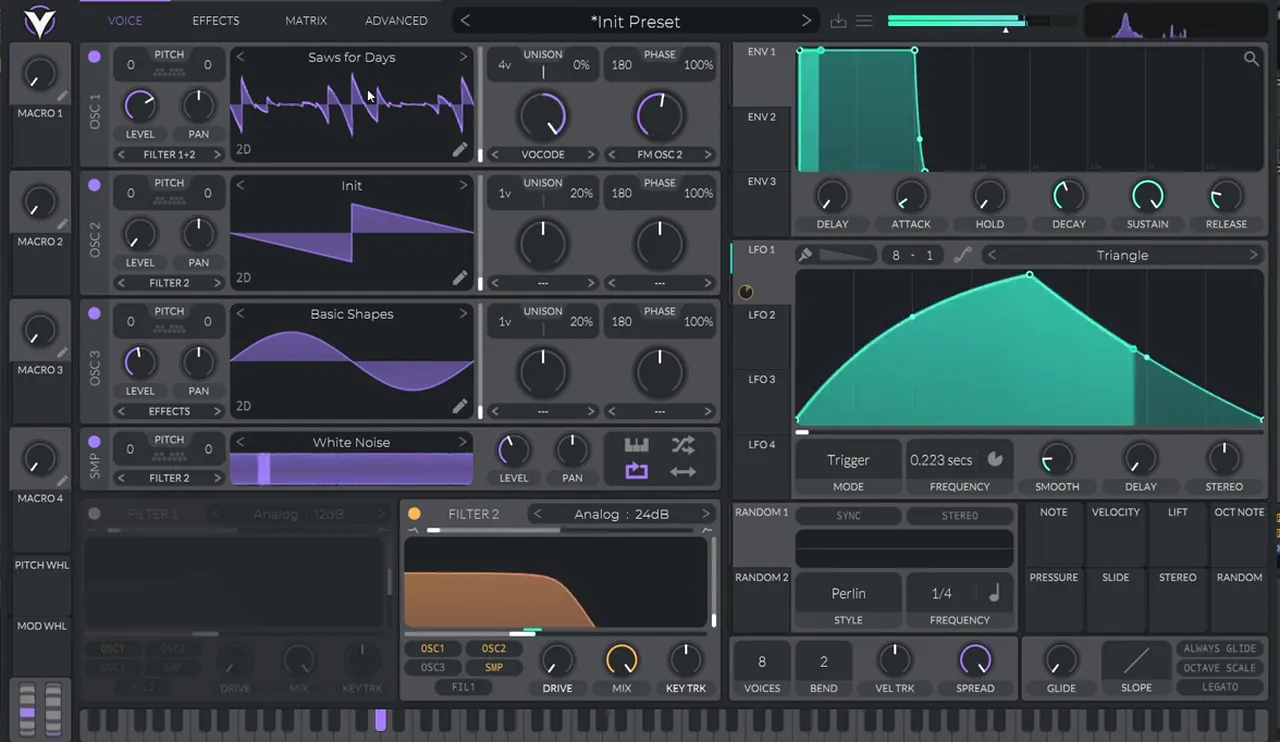
If you want another Vital bass built from the ground up, our bass like Mefjus in Vital takes an FM route instead of automation.
Common mistakes making a Breathe-style bass in Vital
- Starting with the sound instead of the movement. The pitch bend and the filter rhythm do most of the work. Set those up on a plain init saw first.
- Keeping the LFO synced. To automate the speed freely, turn the sync off and work in seconds.
- Too much resonance on the filter. We bring it all the way down and use the steeper 24 dB slope instead.
- Letting it go stereo. Stereo unison, detune and a wide chorus all spread the sound. For the recreation, keep them down.
- Distorting the whole spectrum. In the multiband stage, only the middle band is distorted. The lows and highs stay clean.
- Clipping the EQ. Bell boosts add level fast. Pull the output gain down and keep shaping.
- Judging one note. With phase randomisation on, every bounce is a little different. Resample several times and keep the best take.

Free download
Free Vital presets to start from
Want more Vital patches to study after this one? The Vital Starter Preset Pack is a neuro DnB starter pack for the free synth. It gives you:
- A neuro DnB starter pack for Vital
- Neuro bass presets
- Pluck and lead presets
- Works with the free version of Vital
It’s one of seven free sample and preset packs in DNB Academy Free Access, alongside the mixing and mastering e-books and the 3‑day DnB challenge. Join 40,000+ producers in Free Access. Free account, no card needed.
Go deeper
Jump up courses and Vital presets
Want to go further with jump up basslines, or study more Vital patches?
 Production courseBass Brothers production courseA start-to-finish course of 7+ hours on making club-ready jump up and roller drum and bass, with the project files, presets and samples.
 Preset bundle · VitalALIX Vital preset bundle100 Vital presets for deep, minimal drum and bass: 50 basses, 25 drums, 10 FX, 10 leads and 5 pads, plus WAV files of every preset.
 Preset bundle · VitalIcicle Vital preset bundleDeep / Techy: Vital presets for deep, techy drum & bass.
Every artist course, preset bundle and sample pack is also in The Vault. Browse courses
Related tutorials
All tutorials → Vital · Bass designHow to Make a Foghorn Bass in Vital6 min read · Video + guide
 Serum · Jump upHow to Make Jump Up Drum and Bass15 min read · Video + guide
 Vital · NeuroHow to Make a Bass Like Mefjus in Vital7 min read · Video + guide
 Vital · NeuroHow to Make Neuro Basses Like Noisia in Vital9 min read · Video + guide
FAQ: making a bass like Bou & Mark XTC’s “Breathe” in Vital
How do you make a bass like Bou & Mark XTC’s “Breathe” in Vital?
Start from an init patch. Automate the pitch wheel down two semitones over each note, route oscillator 1 into filter 2 on Analog 24 dB with the resonance down, and map a triggered LFO to the cutoff. Turn the LFO’s sync off and automate its frequency for the rhythm. Then use the Saws for Days wavetable with four mono unison voices, quiet white noise, chorus, Soft Clip distortion and EQ, add post-processing and resample.
What gives this bass its horn-like sound?
In our recreation it comes from two movements working together: the pitch wheel bending each note down two semitones, and a steep 24 dB low-pass filter opened by a triggered LFO whose speed is automated. The Saws for Days wavetable, with plenty of low-mid harmonics, gives that movement something rich to shape.
Why does the bass sound different every time I play it?
The patch keeps Vital’s phase randomisation on with four unison voices, so each note starts at different phases. That’s why we bounce the sound to audio several times and keep the take that sounds best, instead of relying on a single MIDI note.
Is Vital free?
Yes. Vital has a free version, and the synth part of this bass uses Vital’s own wavetables, sampler, filter, LFO and effects. The post-processing uses Ableton Live devices and iZotope Trash 2.
Do I need iZotope Trash 2 for this bass?
We use Trash 2 in multiband mode to distort only the middle band, roughly 548 Hz to 2.87 kHz, with Crunchy Grunge at a drive of 3.3. If you don’t have it, any multiband distortion that lets you leave the lows and highs clean can do a similar job.
How do I make this bass my own?
Change the waveforms in Vital. In the video we add a sine sub on oscillator 3, set oscillator 1’s spectral morph to Vocode, FM oscillator 1 from a quieter oscillator 2, and bring the unison voices down. A stereo chorus or a different LFO speed automation also moves it away from the recreation.
Next steps
Open Vital, load an init patch and set up the two movements first: the pitch bend and the LFO on a 24 dB filter, with its speed automated. Once the rhythm talks, add Saws for Days, mono unison, noise and the effects, then resample. For more bass types and when to use them, read our drum and bass bass guide; for more Vital sound design, try neuro basses like Noisia in Vital.
Free Access
Seven free DnB sample and preset packs, including the Vital Starter Preset Pack, plus mixing and mastering e-books and a 3-day challenge for Ableton Live and FL Studio.
Get free packsThe full guide
Tempo, drums, sub, mid bass, chords, arrangement and mixdown: every step of a DnB track.
Read the guideDNB Foundations
A structured drum and bass course with weekly live feedback calls on your tracks.
See Foundations1:1 Mentorship
Personal guidance on your music from a mentor, built around your goals.
See the mentorship50,000+ producers have joined DNB Academy, and our producer Discord has 5,300+ members.