Serum · Bass design · Call & response
Heavy DnB Bass Sound Design in Serum with Current Value
To build a heavy drum & bass response bass in Serum like Current Value, FM a simple oscillator from a gritty wavetable, shape it with an envelope-mode LFO, add a sub and widen it with one quick unison sweep. Keep the lows mono, compress the top band and drop it in at the end of every four bars to answer your main bassline. Here is his lesson step by step, with the on-screen settings and audio.
New to the idea of a bass that “answers” another? Our neuro bass patterns guide explains call-and-response basslines. This page is the sound design side: building the answering bass itself.
Quick answer
How does Current Value make a heavy response bass in Serum?
From Serum’s init patch he sets oscillator A’s warp to FM (from B), turns oscillator B’s level down so it only modulates, and puts LFO 1 in envelope mode on the FM amount. He swaps in a sine and the 4088 wavetable, moves to a triangle with the sub on, and uses LFO 2 in envelope mode on two-voice unison detune for a stable stereo spread. In Ableton, Utility’s Bass Mono and Multiband Dynamics on the top band finish it.
- FM core.FM from B, oscillator B level down, LFO 1 in envelope mode.
- Waveforms.A sine, then a triangle, against the 4088 wavetable.
- Sub and phase.Sub on, and check oscillator A’s start phase.
- Stereo.LFO 2 in envelope mode on unison detune.
- Ableton.Bass Mono, then compress the top band.
- Arrange and finish.Answer every four bars, vary the call, add FX.
Current Value builds a response bass for a call-and-response section in Serum and Ableton Live. The lesson comes from his Start-to-Finish course; every step below links to the moment in the video.
What you’ll need
- Serum. Current Value builds both basses in Serum, starting from the init preset. If you don’t own it, the free synth Vital has the same building blocks (FM between oscillators, unison, LFOs that run once like an envelope), although the wavetable names differ.
- Ableton Live or another DAW. After Serum he uses Ableton’s Utility, Multiband Dynamics, Overdrive and EQ Eight. Any utility with a mono-bass option, multiband compressor, drive and EQ can do the same jobs.
- A main bassline to answer. The response bass only makes sense next to a “call”. In the video it sits under a busy main bass on its own track.
1.The call-and-response idea
A response bass is a second bass sound that only plays at the end of a phrase, for example at the end of every four or eight bars, to answer the main bassline. It adds contrast without fighting the main bass, because the two rarely play at the same time.
Current Value sets the job up at the start of the lesson (watch at 0:43): a little answering bass that comes in every end of four bars or eight bars. You just have to work out when it plays and what it sounds like. The “when” is arrangement, which we cover in step 7; the “what” is the patch, and that starts in Serum. If you want more ideas for the rhythm side, our neuro bass patterns guide breaks down call-and-response basslines in more detail.
2.Build the FM core
The weight and grit come from FM: one oscillator modulating the pitch of another. In Serum you do this with oscillator A’s warp mode set to FM (from B), with oscillator B turned down so you only hear it through oscillator A.
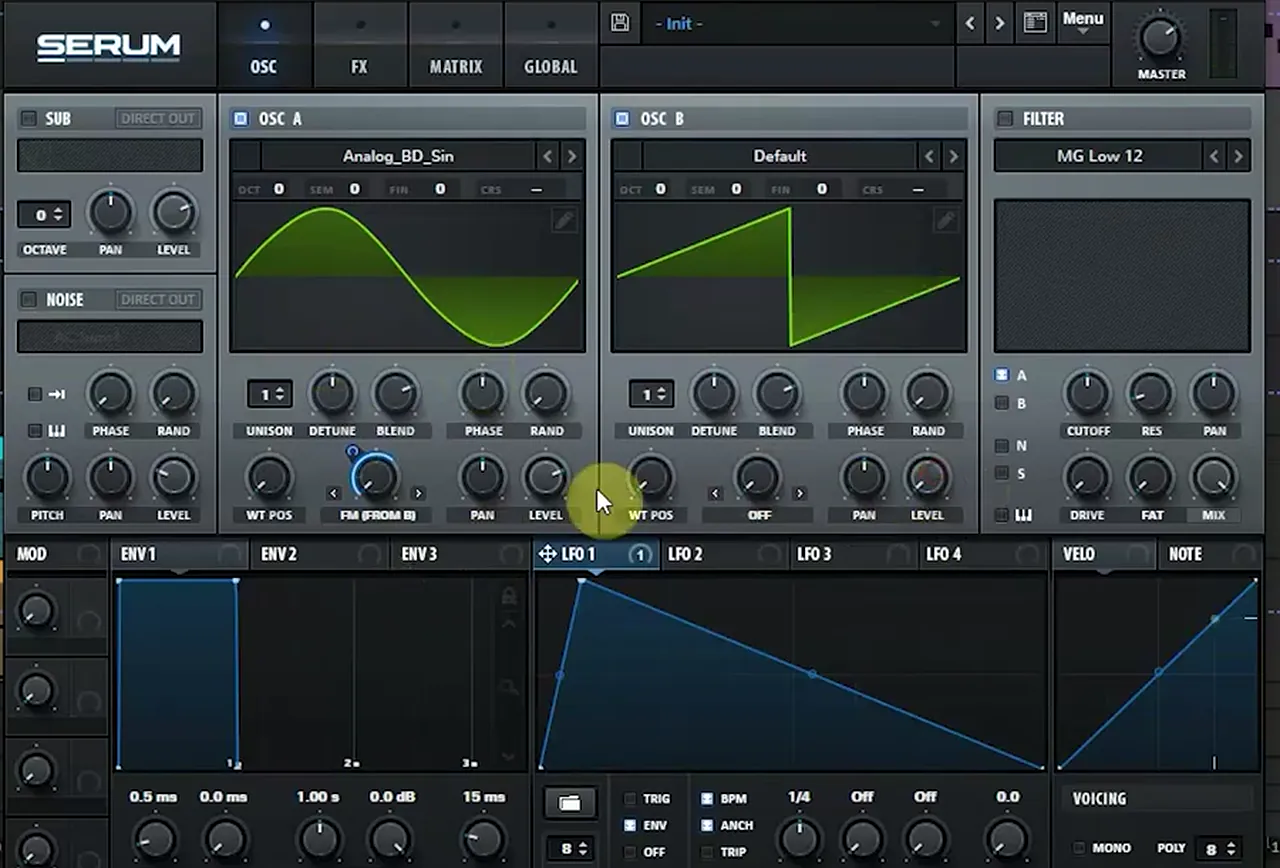
Open a fresh Serum on the init preset (watch at 1:00). Current Value starts with the Analog_BD_Sin wavetable on oscillator A and Serum’s default saw on oscillator B. Set oscillator A’s warp mode to FM (FROM B), then turn down the level of oscillator B: it is now only a modulation source. To stop the FM sounding static, put LFO 1 in envelope (ENV) mode and map it to the FM amount, so the modulation hits on each note and falls away. On screen the LFO is set to 1/4 with a fast rise and a long ramp down.
3.Swap the waveforms
With the routing in place, the character of the bass comes from the two waveforms. A clean sine or triangle as the carrier keeps the low end solid, while a busy wavetable as the modulator brings the harmonics.
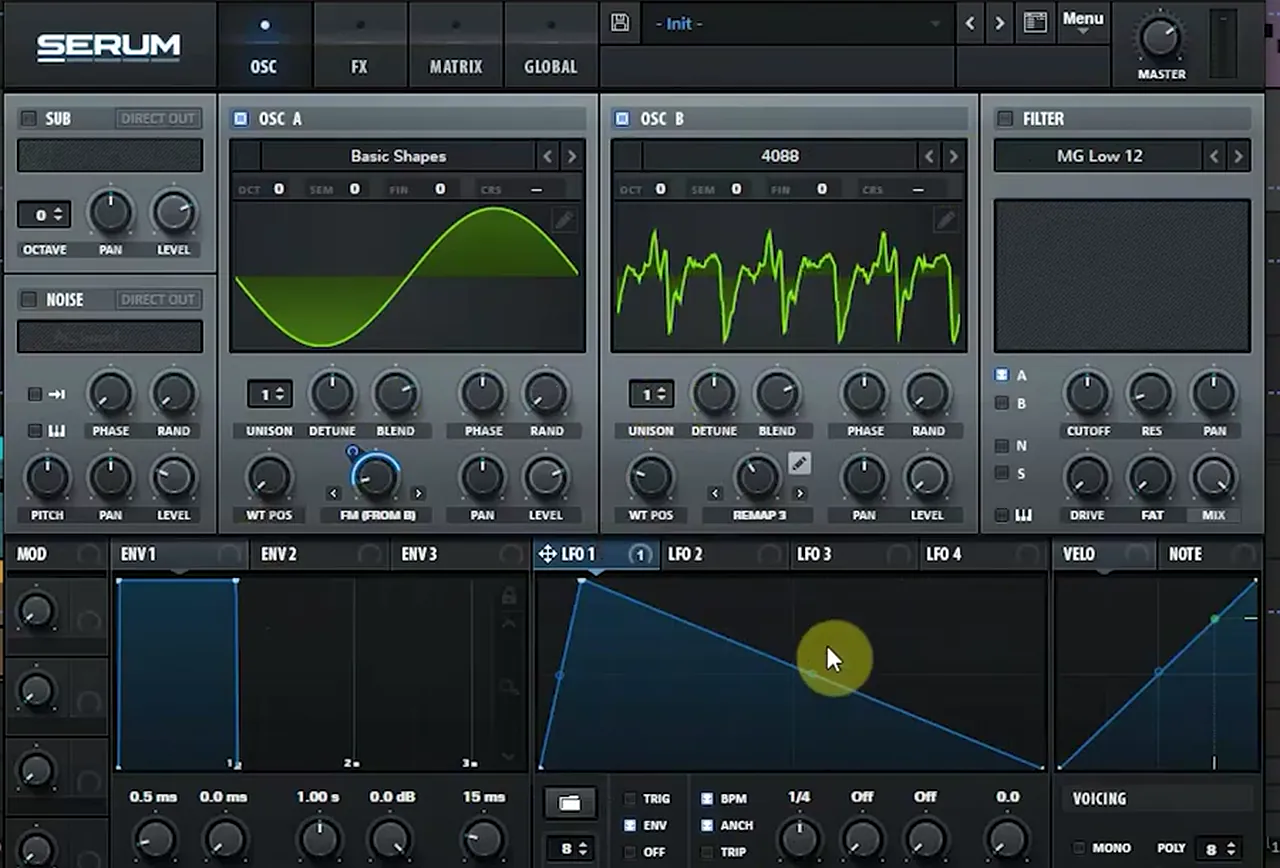
Current Value swaps oscillator A to a plain sine from Basic Shapes and loads the 4088 wavetable on oscillator B, with oscillator B’s warp set to Remap 3 (watch at 1:44). Play a few notes and listen: his verdict is that this could already be a nice answering bass. Try other wavetables on oscillator B too. Because you only hear it through the FM, small changes there make big changes to the tone.
Listen: the answering bass with a sine FM'd by the 4088 wavetable, before any effects7 sec
4.Add the sub and check the start phase
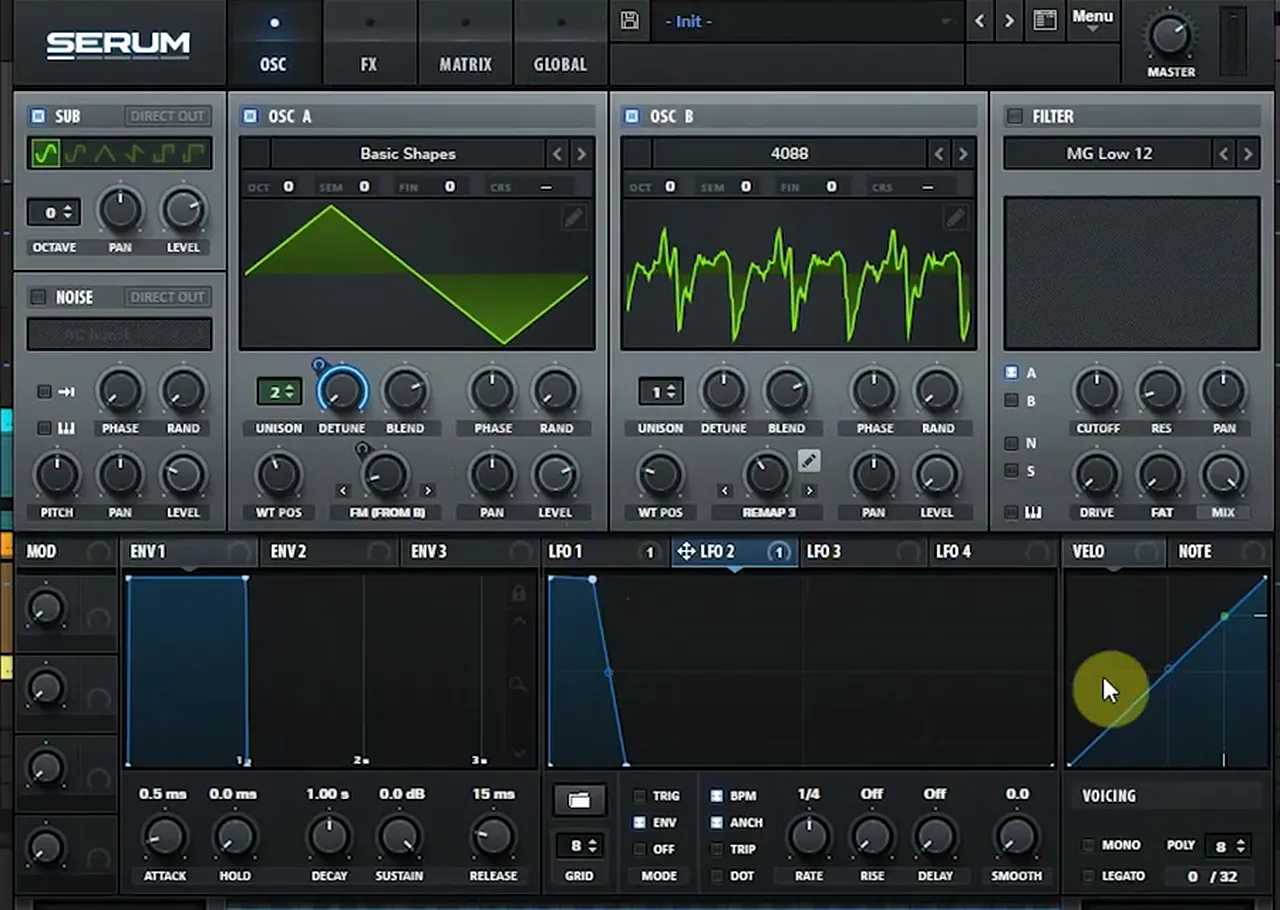
Turn on Serum’s sub oscillator for the low end, then check where oscillator A’s waveform starts. If its start phase is wrong, it can cancel against the sub and the bass weight simply disappears.
Next, oscillator A moves from the sine to a triangle, and the sub oscillator goes on with a sine shape (watch at 2:26). Then comes the most useful tip in the video: always think about the best phase start for oscillator A, because it interferes with the sub. Current Value turns the phase knob to show it. In one position the bass is eliminated because the waveform starts in the wrong place; reset it and the sub comes back nicely. Small things like this make the difference to the overall sound, so solo the bass, play a low note and move the phase until the low end is at its strongest. For more on keeping the bottom end solid, see our DnB sub bass guide.
5.Stereo width without the wobble
Instead of a chorus, which keeps moving, Current Value widens the bass with two unison voices and an envelope-mode LFO on the detune. It goes up quickly and back to zero once per note, so you get a stable stereo image with a one-time phase change.
Set oscillator A’s unison to 2 voices. Then switch LFO 2 to envelope mode, draw a shape that jumps up and drops straight back to zero, and map it to oscillator A’s unison detune (watch at 3:00). The tooltip on screen reads “LFO 2 -> A UniDet: 54”. As he puts it, the aim is not to have it modulating all the time like a chorus, just a quick move up and then shut down again. Choose a setting that sounds wide without eliminating too much phase in the mid spectrum.
6.Keep the lows mono and compress the top
After Serum, a utility with a bass-mono switch keeps everything low in the centre, and a multiband compressor working on the high band brings out the crunch and nastiness of the FM.
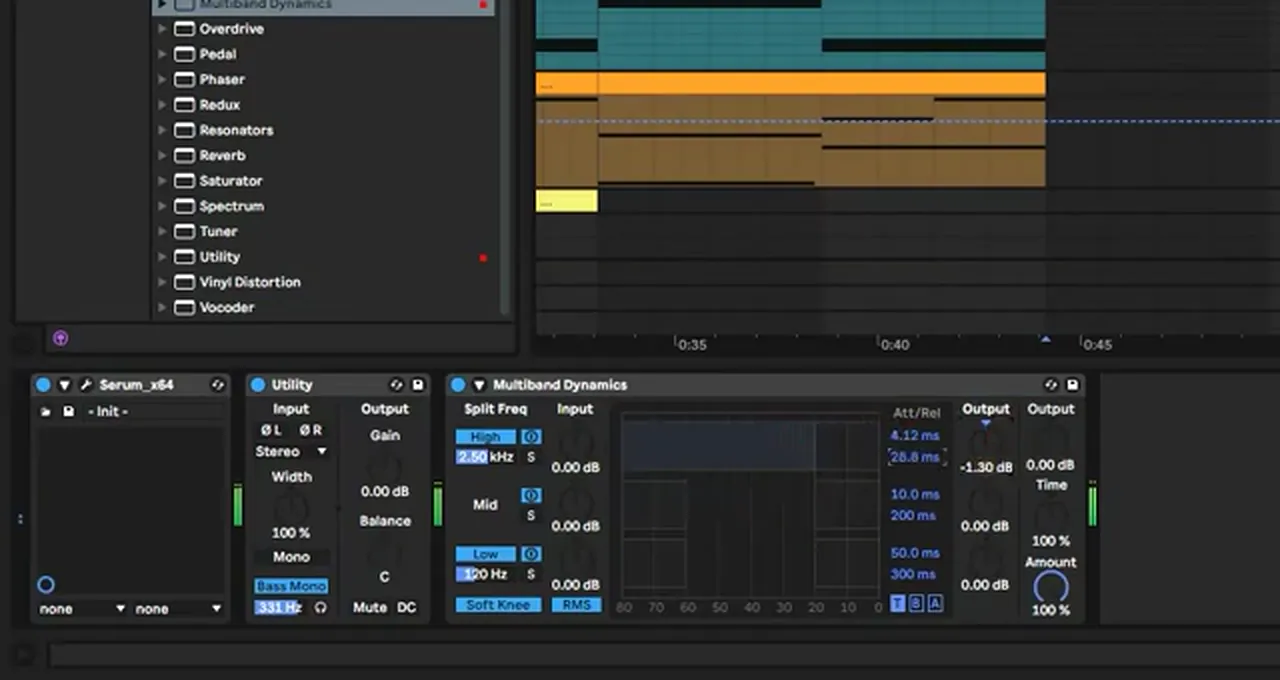
On the response bass track in Ableton, Current Value adds Utility and switches on Bass Mono (331 Hz on screen), just to make sure there is nothing too sketchy going on in the lower mids and upper bass (watch at 3:51). Then he loads Multiband Dynamics and compresses the upper band, which starts at 2.50 kHz on screen, to make the sound really crunchy. The high band’s attack reads 4.12 ms and its output is pulled down to −1.30 dB.
7.Write the answer at the end of each phrase
The response bass only needs a short note or two at the end of each phrase. Placed at the end of every four bars under a busy main bass, it works as the “response” to the main bassline’s “call”.
In the arrangement (watch at 4:31), the main bass clip runs for 16 bars and the response bass gets one short hit at the end of every fourth bar, four in total. Listen to how the two lock together in the clip below: the main bass carries the groove, and the answer fills the gap at the end of each phrase. If you want to see the kick and snare side of Current Value’s sound, our DnB kick and snare guide includes his snare synthesis lesson.
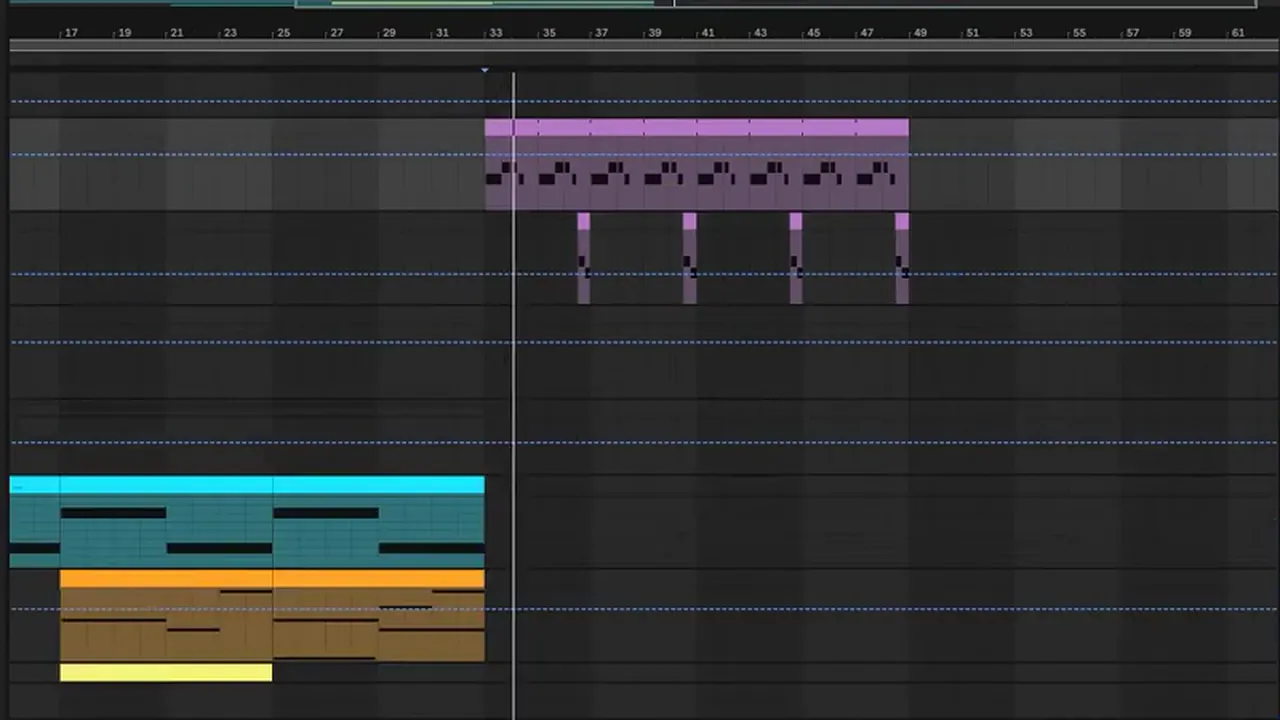
Listen: the main bass and the response bass playing together10 sec
8.Vary the call every eight bars
Sixteen bars of the same bass gets old. Current Value changes the main bass after eight bars by moving a few Serum parameters, so the second half of the phrase sounds related but different.
The main bass is another Serum patch (preset name “Bass 1”): oscillator A on the Anti-Stasis wavetable with FM (FROM B) warp and 2 unison voices, oscillator B on Basic_Cjw (+3 octaves on screen), and a High 18 filter. Using Ableton’s Configure on the Serum device, he exposes three parameters and changes them at bar 41, eight bars into the clip (watch at 5:13): A Warp goes from 0% to 12%, B WT Pos (the wavetable position) from 96 to 234, and the sub oscillator shape from a sine to a triangle. In the end he stays with the triangle instead of the sine. Just making a few changes in the preset like this keeps a long section moving.
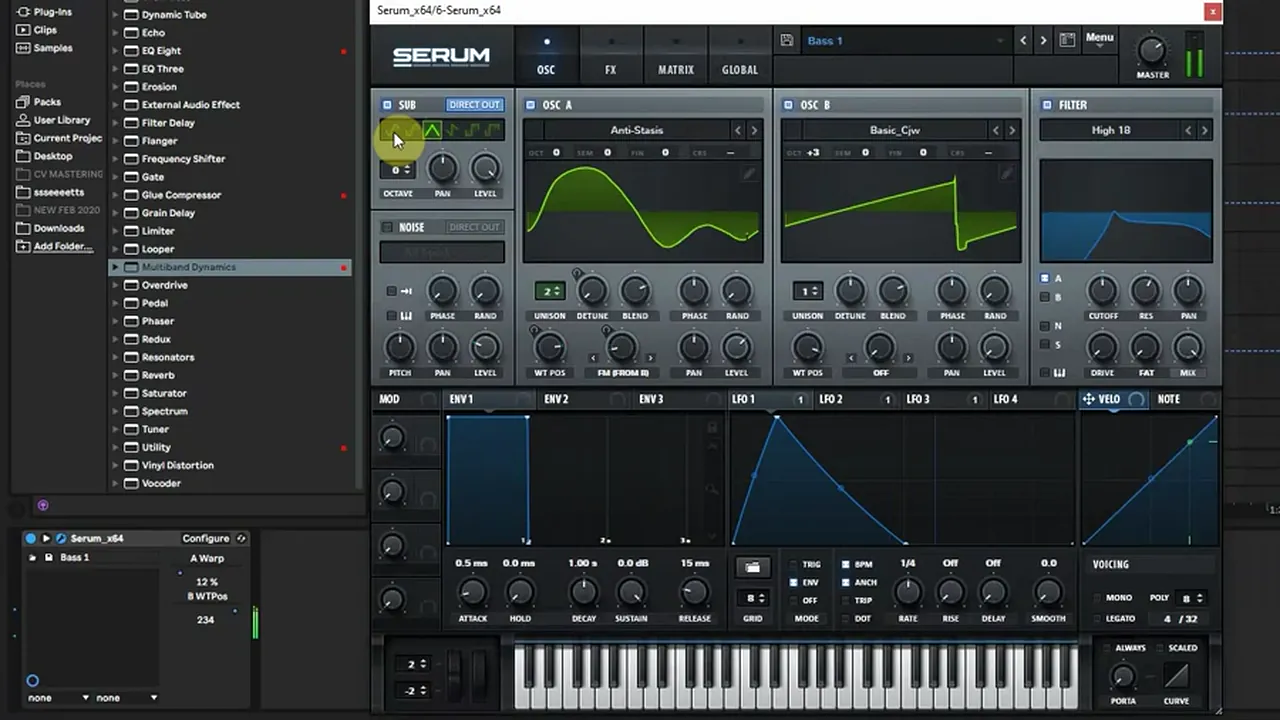
He also adds a Multiband Dynamics to the main bass, but this time with the high band starting at 6.00 kHz, a higher band than on the response bass, just to have a little contrast between the two (watch at 6:36).
9.Tame the reverb, catch an overtone, add distortion
Serum’s FX filter has a Reverb mode, and that is where the main bass’s reverb tail comes from. Turning down its damping control softens a harsh tail, an EQ catches an early harmonic, and Serum’s distortion adds fuzz to the response bass.
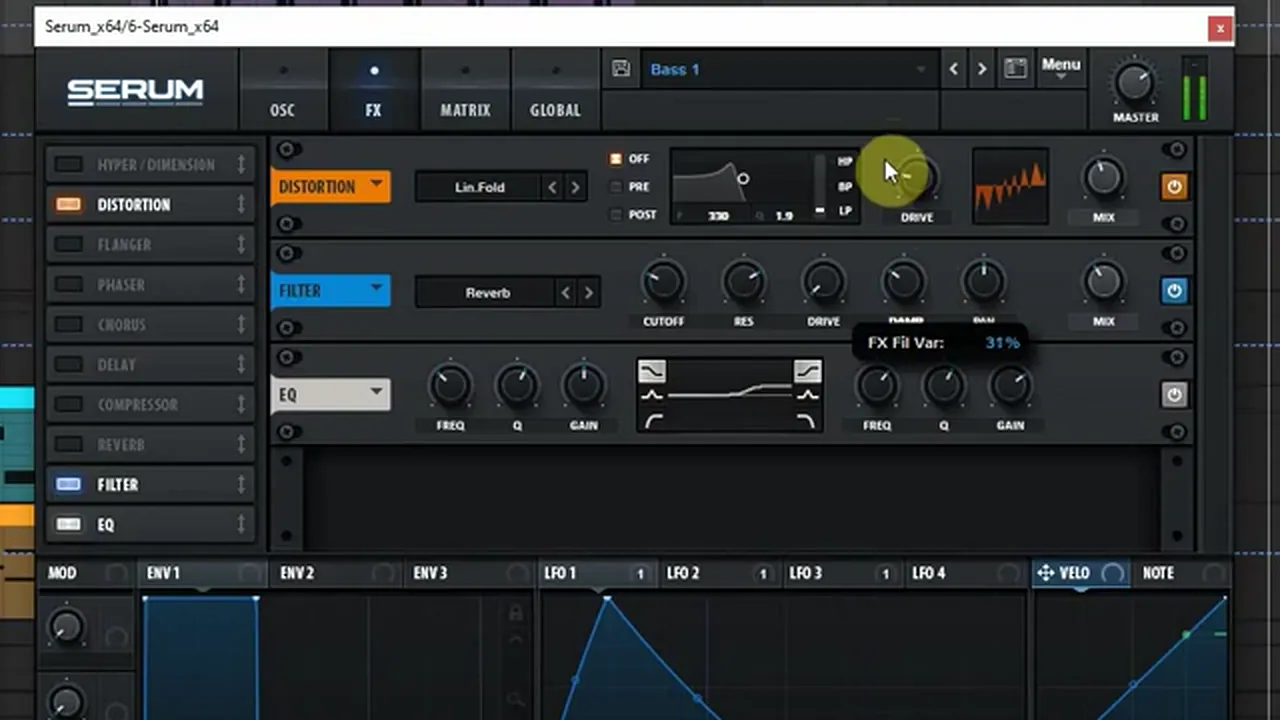
On the main bass, the reverb tail sounds pretty harsh. The source turns out to be Serum’s FX filter in Reverb mode, sitting after a Lin.Fold distortion. Current Value dampens it a little (the tooltip reads “FX Fil Var: 31%” as he moves it) (watch at 6:59). Then he uses Serum’s EQ to try to catch one of the early harmonics. There are tons of ways to bring out overtones, starting with changing the waveform, but an EQ is quick. It adds a little warmth down low, although he admits he hates that word.
Back on the response bass, he turns it up a tiny bit and adds some fuzziness, since no distortion has been used on it yet (watch at 8:19). The FX page gets a Distortion set to Diode 2, followed by the FX filter in Reverb mode (its mix at 53% on screen). His reaction: rich and nice.
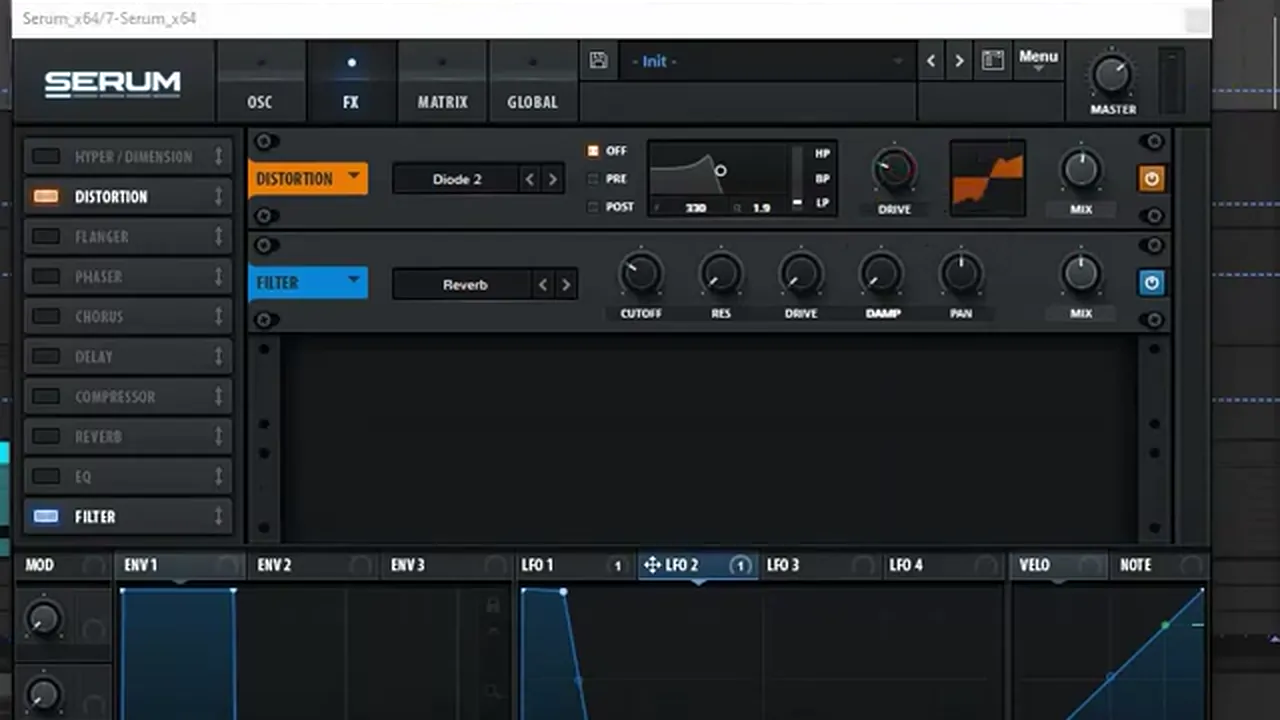
Listen: the response bass with Diode 2 distortion and the reverb filter6 sec
10.Overdrive and EQ to finish the main bass
When there is not much more the Serum FX can do, a little overdrive in the DAW and an EQ with a deep, narrow cut finish the main bass, so it stays heavy without clashing with the response bass.
Current Value feels the main bass is close, but there is not much more he can do with the FX inside the sound, so he tries Ableton’s Overdrive (watch at 10:00). On screen: the band at 1.25 kHz with a width of 6.50, Drive 63%, Tone 50%, Dynamics 50% and Dry/Wet at just 13%, so it adds grit without taking over. After it, EQ Eight gets a low shelf with a small boost and a deep, narrow cut in the low mids (225 Hz, −14 dB, Q 1.52 on screen).

Listen: the call-and-response section with Overdrive and EQ Eight on the main bass12 sec
Heavy, FM-driven basses like these are the core of neurofunk; our drum and bass subgenres guide explains where that style sits.
Common mistakes with a heavy response bass
- Hearing the modulator. Oscillator B is only there to FM oscillator A. Keep its level down.
- Ignoring the start phase. If oscillator A starts in the wrong place, it can cancel the sub. Move the phase until the low end comes back.
- Using a chorus for width. A constant chorus wobbles. A one-shot LFO on unison detune gives width that stays put.
- Stereo low end. Turn on bass mono after the synth so the lows stay centred.
- Letting both basses play at once. The answer works because it fills the gap at the end of the phrase. Keep it short.
- Harsh reverb tails. Check every reverb source, including Serum’s FX filter in Reverb mode, and turn its damping down if the tail gets harsh.
Free download
Free samples to put under your heavy basses
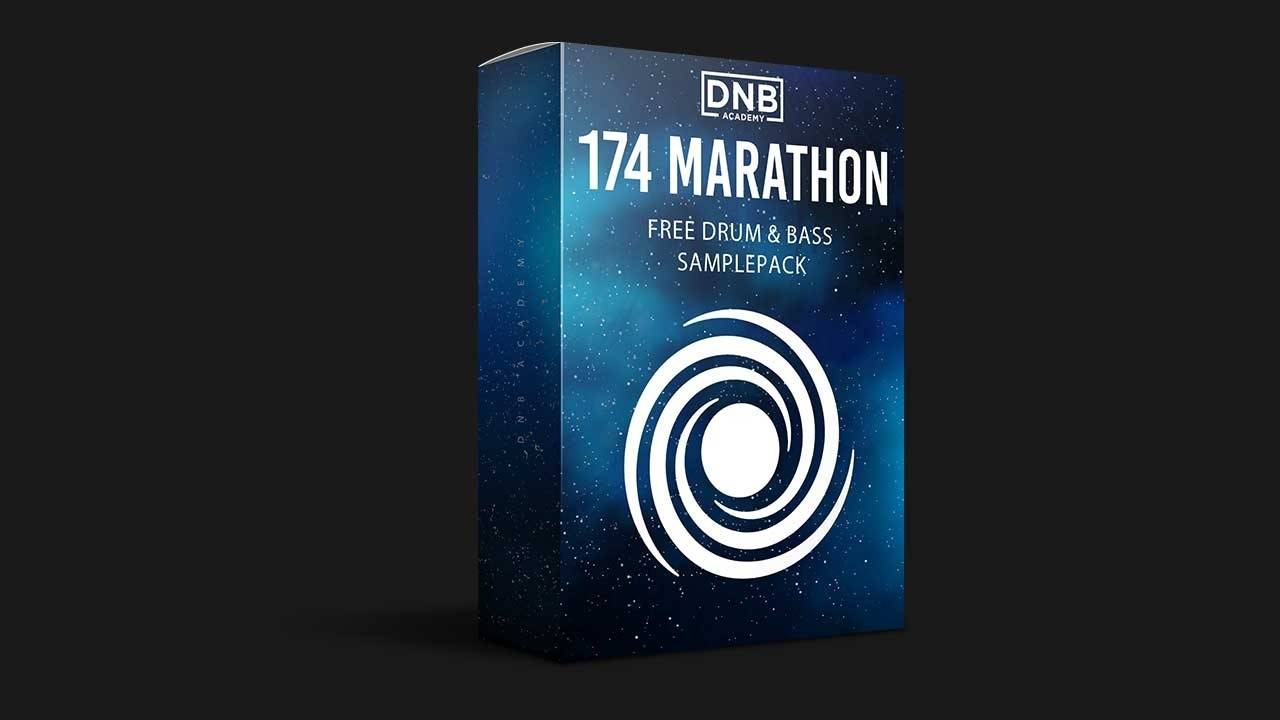
A call and a response need drums to sit on. The 174 Marathon Sample Pack gives you:
- 100+ royalty-free samples
- Drums, bass, FX, melodics and more
- Audio samples, so they drop straight into Ableton Live or any other DAW
- Made for International Drum & Bass Day and our 174 Production Marathon
It’s one of seven free sample and preset packs in DNB Academy Free Access, alongside the mixing and mastering e-books and the 3‑day DnB challenge. Join 40,000+ producers in Free Access. Free account, no card needed.
Go deeper
The full Current Value course and heavy Serum sounds
This lesson is one part of a full start-to-finish track. Want the rest, or more heavy Serum patches to study?
 Production courseCurrent Value production courseAbout 5 hours of a full track built with synthesis: drum, bass and pad synthesis, Serum and Ableton Operator workflows, post-processing, arrangement and mixing.
 Preset bundle · SerumNeuro Essentials Serum preset bundle100 Serum presets for neurofunk, including 50 basses, plus FX, drums, pads and synths.
 Production courseMaztek production courseNeurofunk: a technical approach to neuro drum & bass, from start to finish, in 6+ hours of video.
Every artist course, preset bundle and sample pack is also in The Vault. Browse courses
Related tutorials
All tutorials → Bass · PatternsNeuro Bass Patterns: Call and Response Basslines8 min read · Video + guide
 Serum · DrumsHow to Make DnB Kicks and Snares in Serum (with Jon Tho & Current Value)11 min read · Video + guide
 Serum · NeuroHow to Make a Bass Like Noisia’s Diplodocus in Serum9 min read · Video + guide
 Serum · TechyHow to Make Techy DnB Bass Like Break & DLR in Serum7 min read · Video + guide
FAQ: heavy DnB bass in Serum with Current Value
What is a response bass in drum and bass?
A response bass is a second bass sound that answers the main bassline, usually with a short note or phrase at the end of every four or eight bars. In Current Value’s lesson the main bass plays for 16 bars and the response bass hits once at the end of every four bars.
How do you make an FM bass in Serum?
Set oscillator A’s warp mode to FM (FROM B) and turn oscillator B’s level down, so it only modulates oscillator A. Current Value then puts LFO 1 in envelope mode on the FM amount, and uses a sine or triangle on oscillator A with the 4088 wavetable on oscillator B.
Why does my bass lose its low end when I change the phase?
Oscillator A’s start phase can interfere with the sub oscillator. If the waveform starts in the wrong place the two partly cancel and the bass weight disappears. Solo the bass, play a low note and turn the phase until the low end comes back.
How do you make a bass wide without a chorus?
Use two unison voices and put an LFO in envelope mode on the unison detune, with a shape that jumps up and falls straight back to zero. The detune moves once per note, so you get a stable stereo sound instead of a constant chorus wobble. Keep the lows mono afterwards.
Can I do this in Vital instead of Serum?
The ideas carry over. Vital is free and can FM one oscillator from another, run unison and use an LFO in a one-shot, envelope-like mode. The wavetables Current Value uses are Serum’s, so pick similar shapes by ear.
Where can I learn the rest of Current Value’s track?
This video is taken from the Current Value Start-to-Finish course in the DNB Academy store, which covers drum, bass and pad synthesis, post-processing, arrangement and mixing across a full track.
Next steps
Open Serum on the init preset, build the FM core and the sub first, and check the start phase before you touch any effects. Then write one short answer at the end of every four bars under your main bass. For another heavy Serum patch, try our bass like Noisia’s Diplodocus in Serum; for a cleaner, techier sound, see techy DnB bass like Break in Serum.
Free Access
Seven free DnB sample and preset packs, including the 174 Marathon Sample Pack, plus mixing and mastering e-books and a 3-day challenge for Ableton Live and FL Studio.
Get free packsThe full guide
Tempo, drums, sub, mid bass, chords, arrangement and mixdown: every step of a DnB track.
Read the guideDNB Foundations
A structured drum and bass course with weekly live feedback calls on your tracks.
See Foundations1:1 Mentorship
Personal guidance on your music from a mentor, built around your goals.
See the mentorship50,000+ producers have joined DNB Academy, and our producer Discord has 5,300+ members.