Drums · Sound design · Serum
How to Make DnB Kicks and Snares in Serum (with Jon Tho & Current Value)
A drum and bass kick and snare both start the same way: a sine wave, a short volume envelope and a fast pitch envelope. The kick gets an extra click and a little noise, then saturation to glue it; the snare leans on a noise layer with its own envelope and filter. Here is how Jon Tho synthesises a neurofunk kick in Serum, and how Current Value builds a snare from scratch, with screenshots and audio from both videos.
Part of our how to make drum and bass guide: this page goes deep on designing the two drum sounds that carry every DnB beat.
Quick answer
How do you make a DnB kick and snare in Serum?
Start both from a sine wave with random phase at zero. Shape the volume with an envelope (short for the kick, even shorter for the snare) and add a fast pitch envelope so it hits with a click. For the kick, add a second, narrower pitch envelope for extra snap, a short noise layer and a waveshaper. For the snare, add stereo noise with its own envelope, a high-pass filter and gentle distortion.
- Sine, phase set.Random phase at zero; Jon Tho sets the kick’s phase to 90 degrees.
- Volume envelope.An LFO in envelope mode on the oscillator level.
- Pitch envelope.A fast ramp on the pitch, then tune the kick down.
- Extra click.A second, narrower pitch envelope for the kick’s snap.
- Noise layer.Short noise for the kick; a full noise envelope for the snare.
- Glue it.Waveshaper on the kick, filter and distortion on the snare.
- Test in a beat.Play the kick under a break before you call it done.
Current Value’s snare video, taken from his start-to-finish course: a DnB snare built from scratch in Serum. Part 1 below follows Jon Tho’s kick video, which is linked in that section.
What you’ll need
- Serum, or the free Vital. Both videos use Serum. Vital is free and has the same building blocks: a sine oscillator, a noise oscillator, and LFOs you can draw as envelopes.
- A DAW. Jon Tho works in Ableton Live and Current Value in FL Studio. Any DAW that can host the synth works.
- A waveshaper or saturator. Jon Tho uses MeldaProduction’s MWaveShaper and mentions Image-Line’s waveshaper as his other go-to; any waveshaper will do.
- A spectrum analyser. Jon Tho uses SPAN Plus to see where the click sits.
- A drum loop to test against. A break or a basic beat, so you hear the kick and snare in context.
What makes a DnB kick and snare?
A DnB kick is a short, tuned sine with a fast downward pitch sweep and a hard click on top, so it cuts through busy, distorted music. A DnB snare uses the same sine-and-pitch-envelope body, but shorter, with a noise layer doing most of the work for the crack and the top end.
Jon Tho frames it around neurofunk: a style full of distorted elements where mixdowns “have to be very clean and precise”, so the kick needs to be “really, really, really clicky and punchy” to cut through crispy tops (watch at 0:35). Current Value says the same basics “probably would never really change”: the sine as the base for both kick and snare, the pitch envelope and the amp envelope (watch at 6:55). Everything else is character.
This page is about designing the two sounds. Where they go in the bar is covered in our DnB drum patterns guide, and how to make the whole drum bus hit harder is in how to make DnB drums punchy.
Part 1 · The kick with Jon Tho
1.Kick: start with a sine and set the phase
Jon Tho’s video: a neurofunk kick synthesised in Serum, layered in an Ableton Instrument Rack and tested under a break.
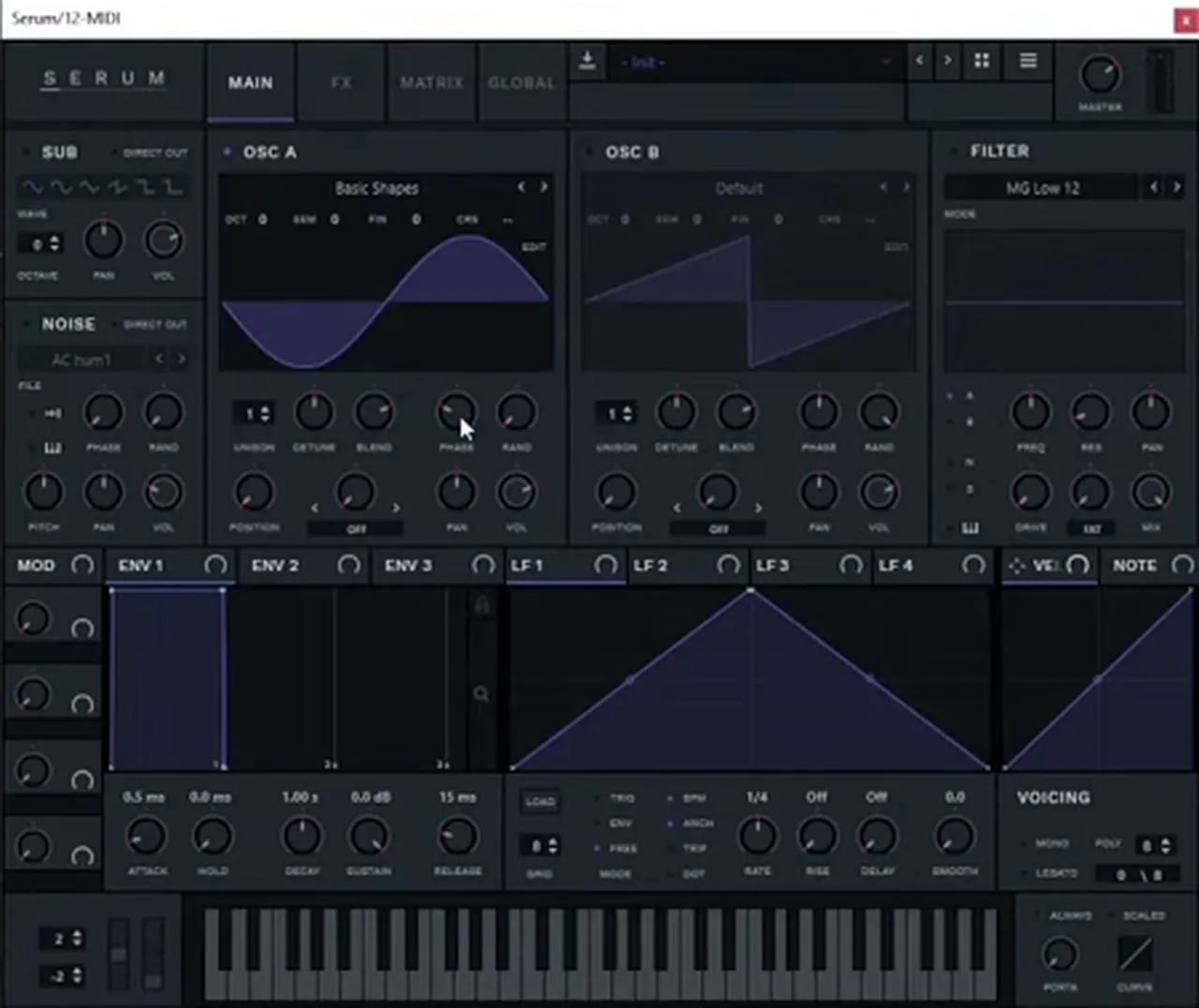
Pick Serum’s plain sine, turn the oscillator’s random phase all the way down and set its phase to 90 degrees. Random phase off makes every hit start the same way; 90 degrees is where Jon Tho gets the most click and punch from the sine.
On a fresh Serum, Jon Tho selects the Basic Shapes sine on Osc A, turns Rand (random phase) all the way down and sets Phase to 90 degrees, “the sweet spot of the sine wave when it comes to drum design” (watch at 1:21). Move the phase somewhere else and you hear the click fade.
2.Kick: attack and volume envelope
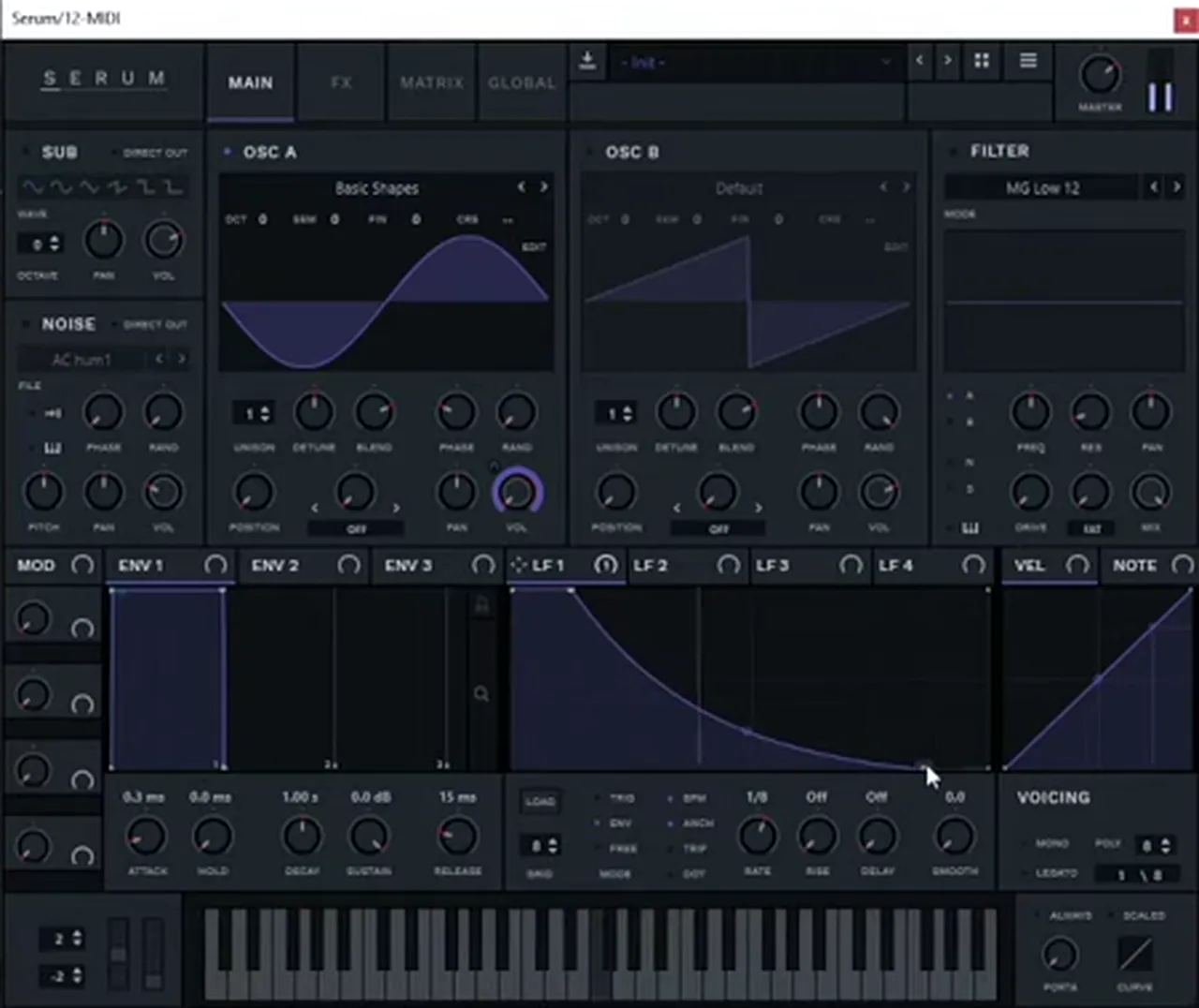
Shorten the attack slightly for a harder click, then draw the kick’s volume shape on an LFO in envelope mode and assign it to the oscillator’s level. That shape decides how long and boomy the kick is.
Serum’s envelope attack defaults to 0.5 ms. Pulling it shorter makes the click “way more intense”, but it can be too much, so Jon Tho settles “somewhere around 0.3, 0.4” (watch at 2:08). Then he switches LFO 1 to envelope mode, sets the rate to 1/8, draws a falling shape and assigns it to the volume. Drag the shape shorter or longer and the kick follows.
3.Kick: pitch envelope and tuning
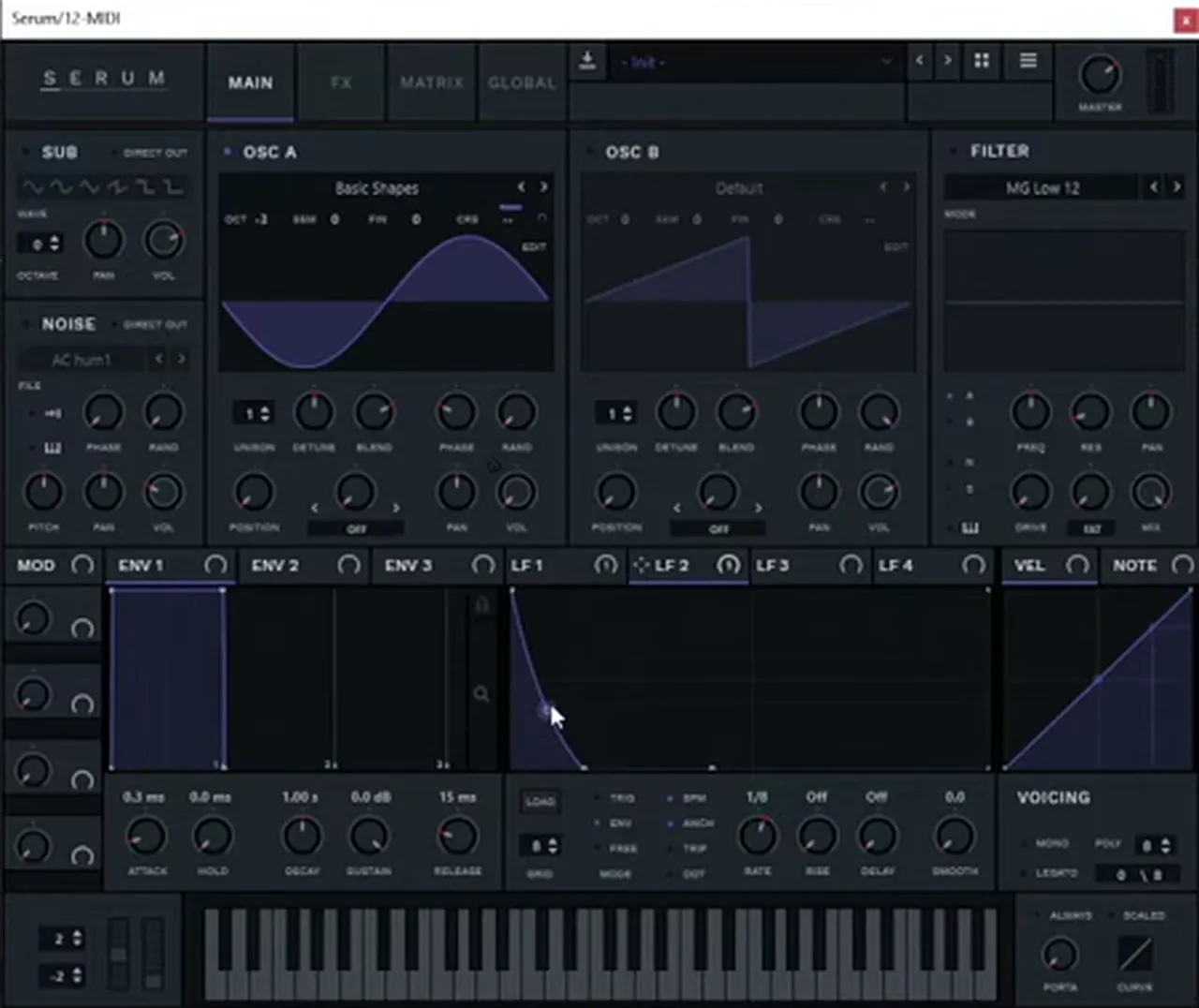
Draw a fast ramp on a second LFO in envelope mode and assign it to the oscillator’s coarse pitch. The quick drop at the start is the click; then tune the oscillator down a couple of octaves so it sounds like a kick, not a blip.
The pitch envelope needs to “bring the click right in as soon as it’s triggered”: Jon Tho draws a standard ramp on LFO 2, assigns it to Osc A’s coarse pitch, makes the modulation polar (he uses Alt and Shift) and puts it on eighths as well (watch at 3:32). His first amount is “obviously just too much”, so he backs it off by ear.
Now drop the oscillator “a couple of octaves down, so that way it becomes a kick”, then nudge the semitones to tune it (watch at 4:21). Later he plays it from a MIDI note on F, and you can retune it to your track at any time.
4.Kick: add a second, narrower click
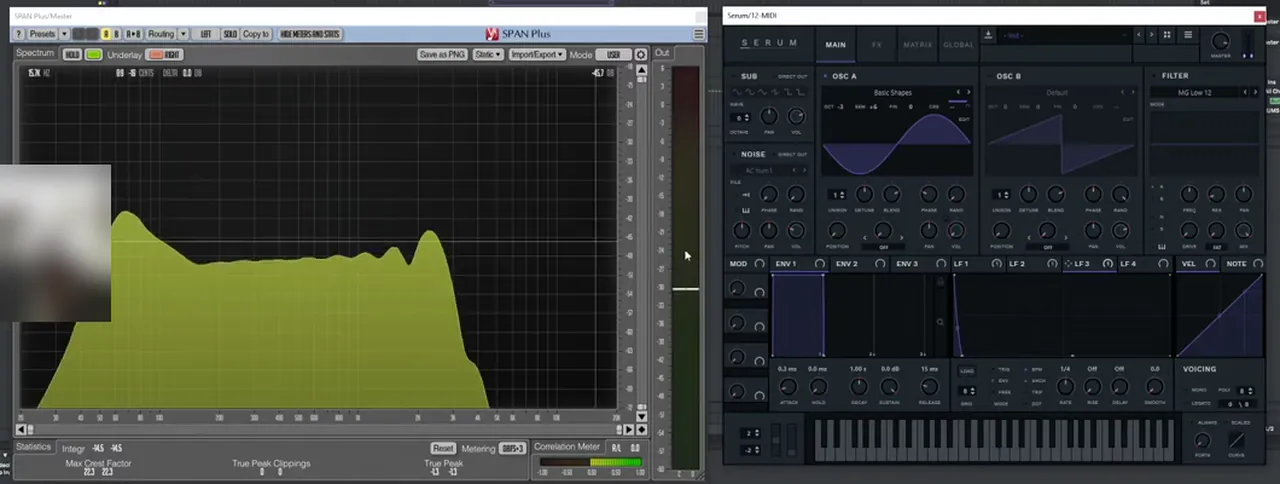
Copy the idea onto a third LFO: another pitch envelope on coarse, but much narrower and on quarter notes. On an analyser it adds what Jon Tho calls the “devil horns”, a bump of snap around 3 kHz that helps the kick cut through.
LFO 3 gets “pretty much the same thing” as the first pitch envelope, but on fourths and “way narrower”, assigned to coarse and made polar again (watch at 4:51). Jon Tho opens SPAN Plus next to Serum to show it: it “creates that thumpiness on the snap area, around the 3K hertz area”. His first setting is over the top, so he tweaks the amount on coarse until he’s happy.
Finally, in Serum’s FX tab he adds Distortion in Tube mode at “four-ish” on the drive, and no more, “because we’re gonna layer this with a couple more elements” (watch at 6:16).
5.Kick: noise layer, waveshaper and reverb
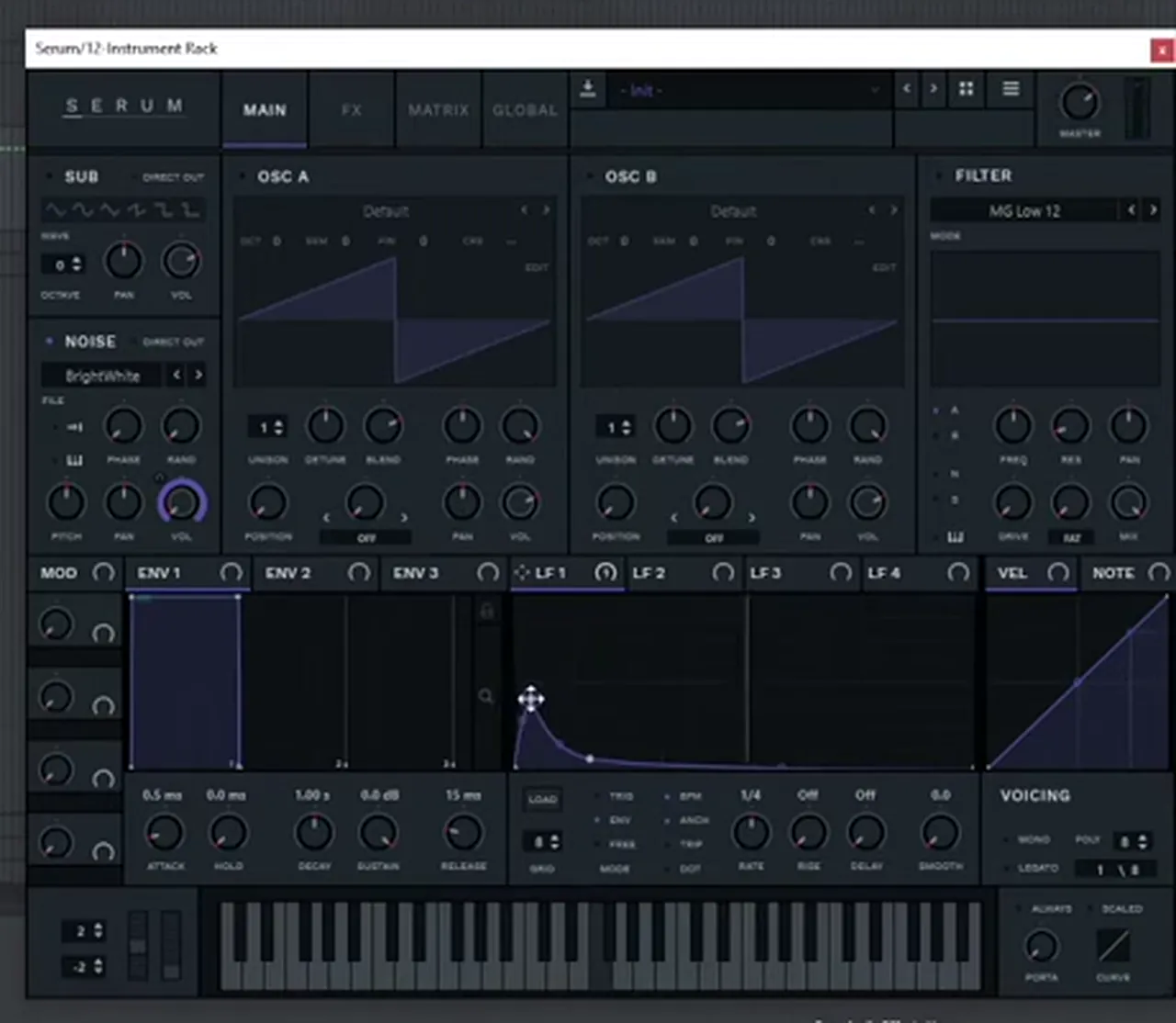
Put the sine kick in an Instrument Rack chain called “body”, add a second Serum chain with only noise and a short envelope that ramps in just after the transient, then glue both with a waveshaper at 100% wet.
A pure synth kick has “pretty much no acoustic input”, so Jon Tho adds a noise layer to make it sound more natural (watch at 6:39). He groups the first Serum into an Ableton Instrument Rack, names that chain body and adds a second chain with another Serum. There he switches Osc A off, turns up the noise oscillator on BrightWhite, and draws an envelope-mode LFO on its volume.
The key detail: at first it sounds like “a hi-hat playing on top of the kick drum”. Don’t put the noise right on the kick’s transient, or “the transient of the kick drum loses a bit of its power”: let it ramp up just after, until it feels like part of the kick.
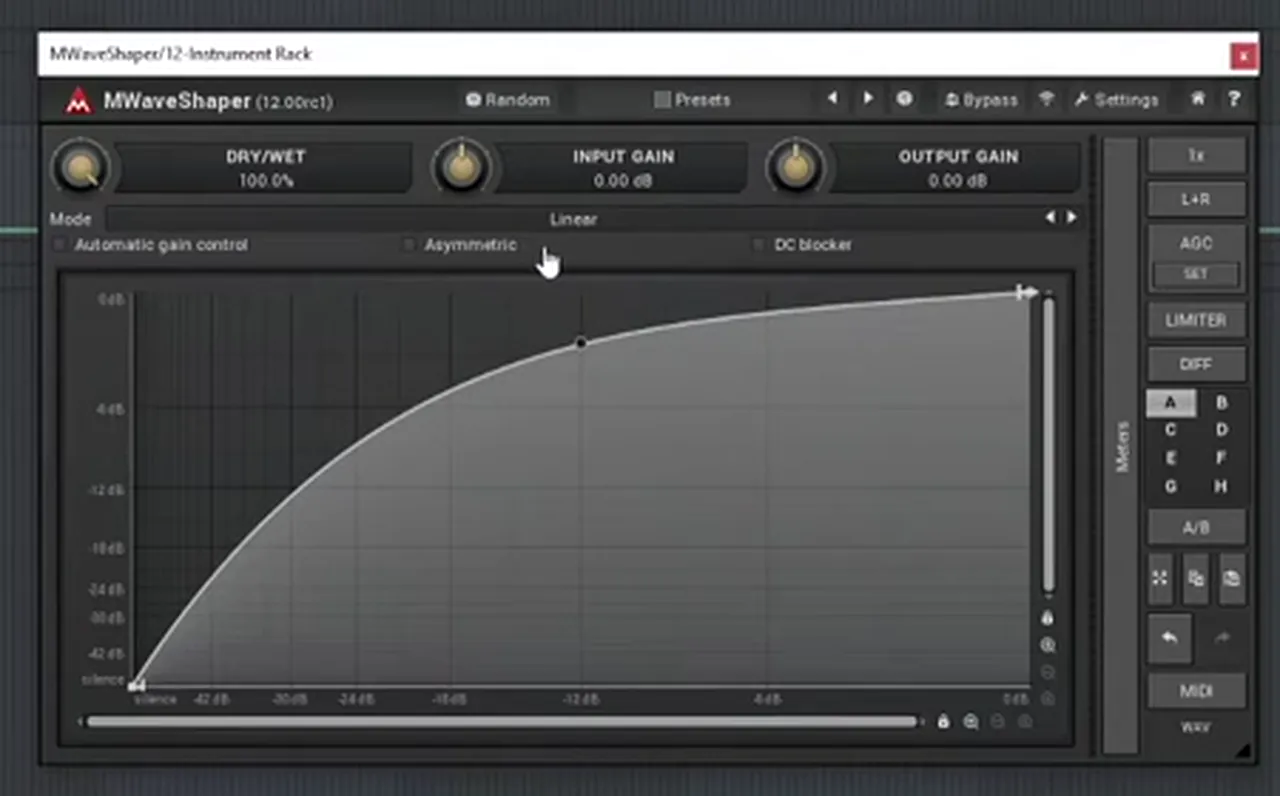
Outside the rack goes a waveshaper, “so we can distort the kick drum without bringing too many harmonics and too many artifacts” into the mix (watch at 8:15). Jon Tho uses MWaveShaper with dry/wet at 100%, then shapes the curve. It glues the body and the noise together and lifts the kick to “a higher spot on the mix”.
Listen: the kick without the waveshaper, then with it8 sec
For a bit of room on the noise only, he adds a convolution reverb (MConvolutionMB) with a plate on the noise chain, then shortens the noise’s volume envelope again (watch at 9:39). The kick “is starting to feel a bit more natural”.
6.Kick: test it under a break
A kick only proves itself in a beat. Load a drum break, fade out the break’s own kick hits, and play your synth kick from a MIDI track in its place, so you can keep tuning and shaping it as the track grows.
Jon Tho drags in a break from DNB Academy’s own sample packs. It sounds good on its own, but for neurofunk “this kick drum needs to be way more powerful” and “way tighter” (watch at 11:40). He creates a MIDI track with an F note for the new kick, puts fades on the break where its kicks are, and keeps the break’s snare “on spot”.
Listen: the synthesised kick replacing the break’s kick6 sec
Two tips from the end of the video (watch at 13:59). If you want EQ, put it before the waveshaper: the waveshaper also acts as a soft clipper or clipper, so an EQ after it will most likely start clipping. And keeping the kick on MIDI is the advantage: throughout the track you can tweak it, or make it “longer, more boomy”, to fit what the track turns into. For the drum-bus side (gain staging, clipping, parallel compression), carry on with our punchy drums tutorial.
Part 2 · The snare with Current Value
7.Snare: sine body, amp envelope and pitch envelope
Build the snare’s body like the kick: a sine with random phase at zero, an amp envelope that is “significantly shorter” than the kick’s, and a pitch envelope on another LFO. Keep the pitch drop quicker than a kick’s, or the snare sounds like a kick.
Current Value starts with a sine as the basic sound, random phase at zero, and “a similar amp envelope” to his kick, “only that it is … significantly shorter” (watch at 0:03). In the screenshot that is the Analog_BD_Sin wavetable on Osc A and LFO 1 in envelope mode on 1/8, drawn as a very short shape. Serum’s matrix shows LFO 1 going to A Vol.
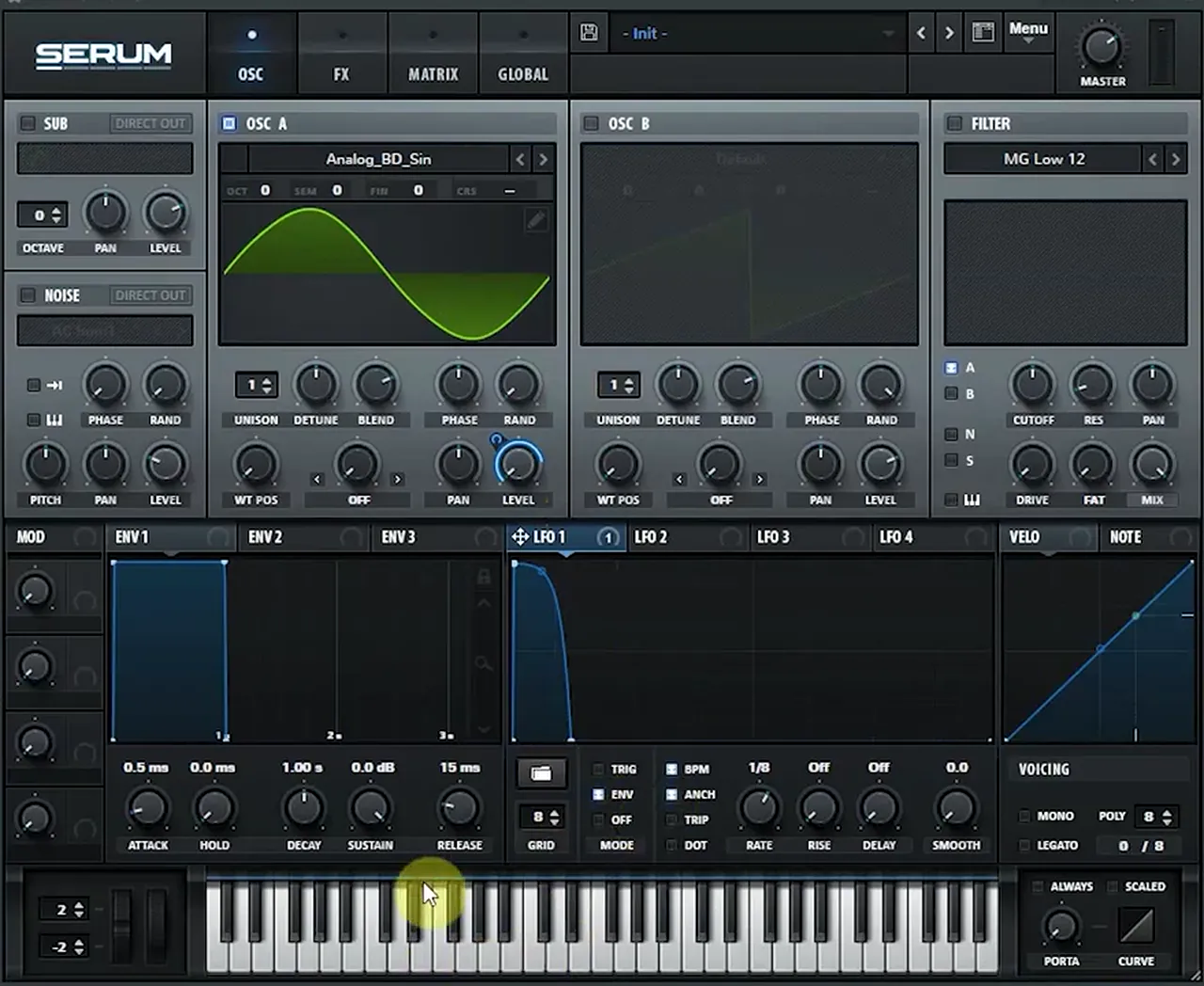
Then the pitch envelope, on LFO 2 “or any other LFO”, assigned to Serum’s master tune in the matrix: an electronic snare “makes use of a pitch envelope. Not necessarily, but it helps” the drum character (watch at 0:55). Expect to adjust it several times. Current Value finds his first try “too slow … too kick drum like”, and a later version “too long. It sounds like a knock now” (watch at 3:40).
8.Snare: the noise layer
Turn on Serum’s noise oscillator with a stereo noise, move its phase away from the kick’s noise, and give it its own amp envelope with a tiny extra spike at the very start. That spike of noise on the transient is what makes the snare click.
“Very important this time: the noise part.” Current Value uses a stereo noise, as he did on his kick (cv op noise in the screenshot), and changes its phase (73% on screen) so it is “slightly different from the other noise part” (watch at 1:55). Kick and snare rarely play at the same moment, but if they ever do, matching noise could cause “weird phasing effects or flanging”.
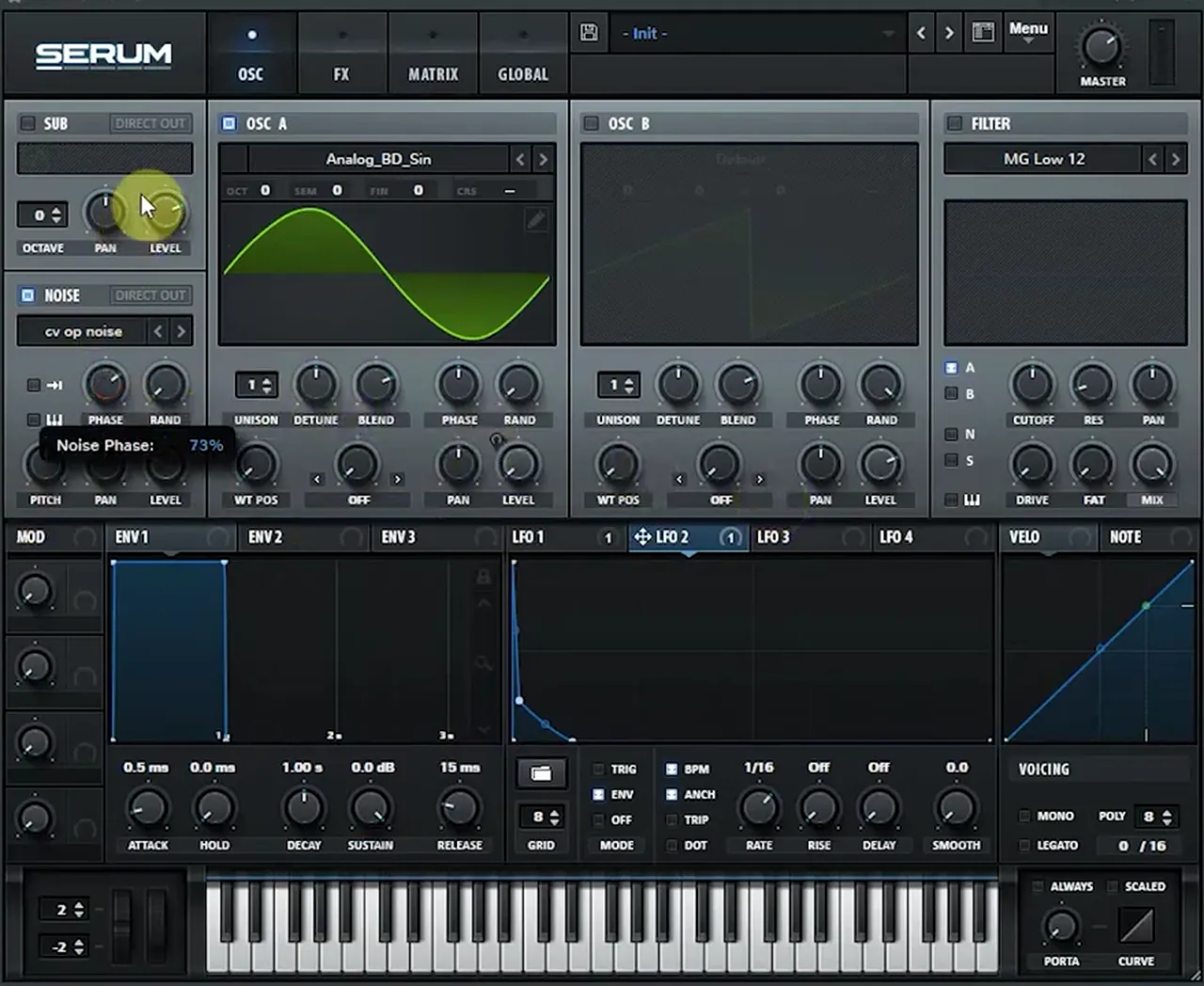
LFO 3 becomes the amp envelope for the noise. Its shape has “a small snippet of noise on top” at the very start, then the body, the same trick as on his kick: “the character for the snare drum can be largely improved by … supporting the transient with a little bit of noise” (watch at 2:42). Once the envelopes are dialled in: “You can hear the clicking now. That’s a very nice click in the beginning.”
Listen: the snare with the noise layer and its transient click8 sec
9.Snare: high-pass filter, distortion and EQ
Run the noise through a high-pass filter and modulate its cutoff with the same noise envelope. Then add distortion with its drive on an envelope for snap, and an EQ whose mid band gain follows another envelope for extra “knock”.
The stereo noise goes through a high-pass filter, which “makes this thing a bit more authentic” (watch at 5:30). In Serum that is the High 18 filter, and Current Value routes the noise envelope (LFO 3) to the filter cutoff as well, in parallel with the noise level: it “supports that hittiness”.
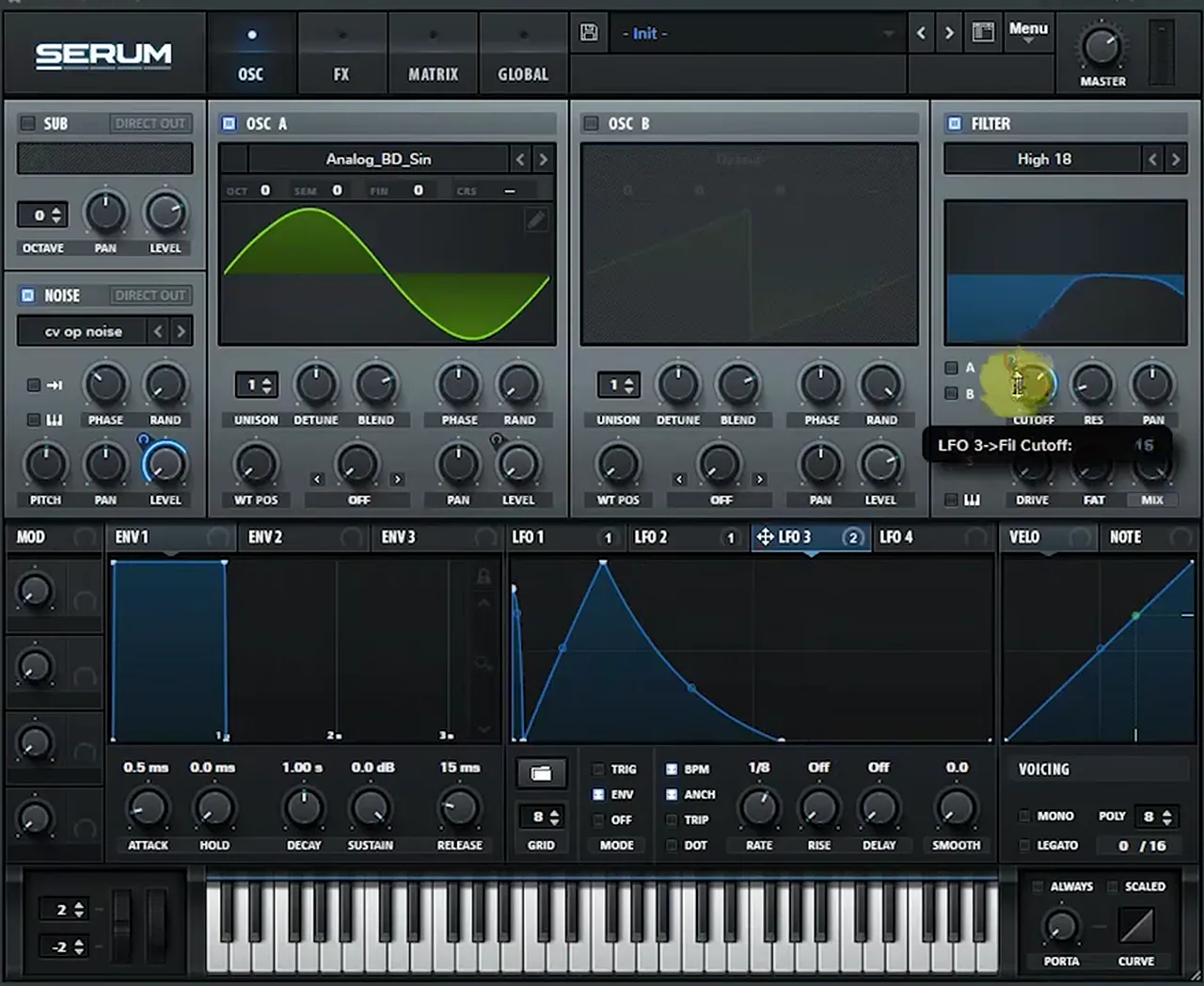
Next, distortion, “a question of character”. He adds Serum’s Distortion (Tube on screen) and automates the drive with an envelope, parallel to the noise and filter: “very snappy sound” (watch at 7:26). For more “knockiness” he adds Serum’s EQ and modulates the gain of its mid band with another envelope, LFO 4, because it needs different timings from the others. With it, the snare gets more delicate and knocky on the transient, and “more physical”.
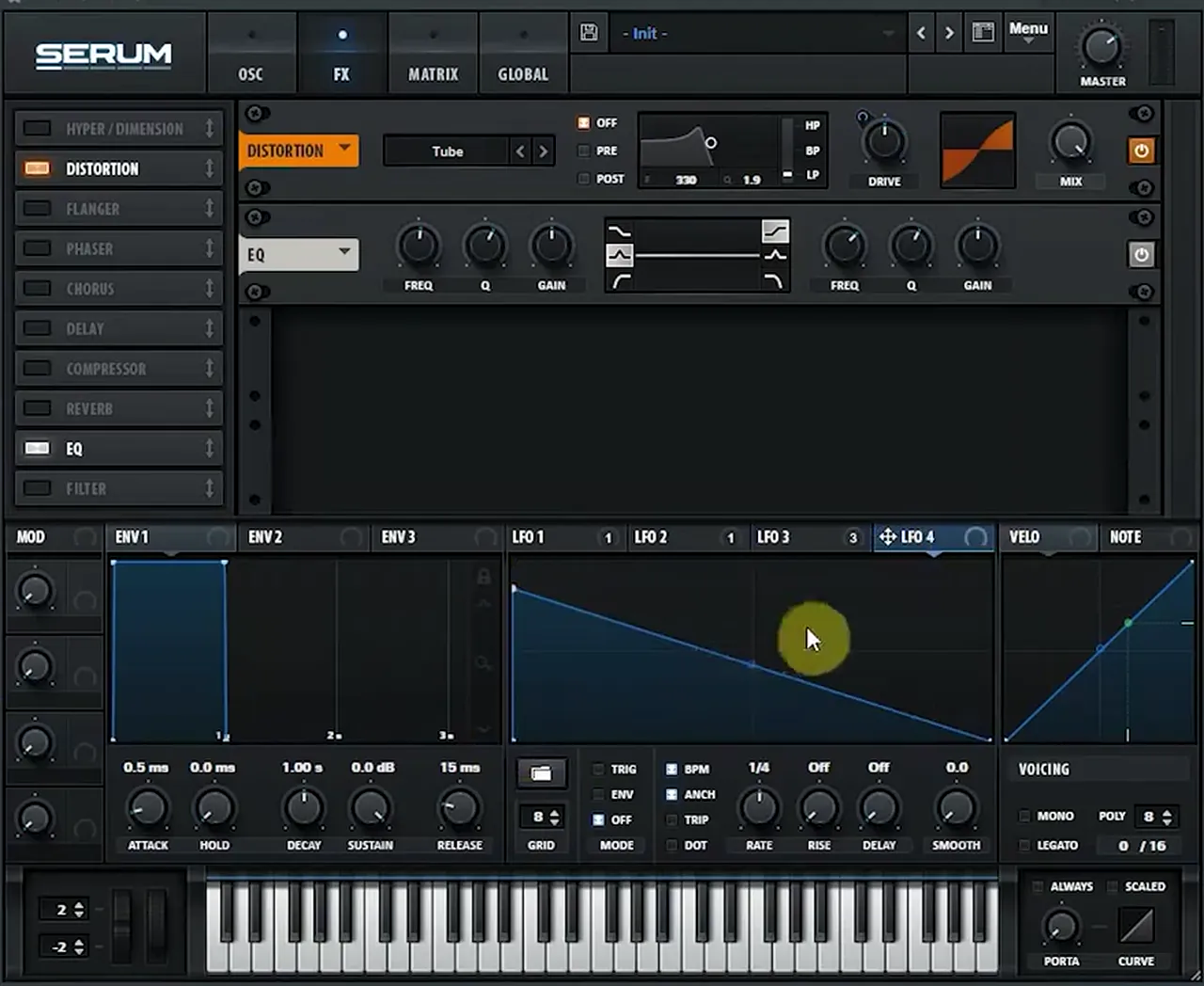
Listen: the finished snare with the EQ “knock” envelope5 sec
He also tries swapping the order of the effects; here it “doesn’t really change too much”, so he keeps distortion first. To hear how both sounds sit together in a mix, see the drums section of our DnB mixing guide.
Common DnB kick and snare mistakes
- Random phase left on. Every hit starts differently. Turn it to zero for both kick and snare.
- Too much pitch envelope. Both presenters dial it back from their first try. Too slow on the snare sounds like a kick; too long sounds like a knock.
- An attack that is too short. A harder click is good until it becomes overwhelming. Jon Tho stops around 0.3 to 0.4 ms.
- Noise right on the kick’s transient. It steals power from the hit. Let the kick’s noise ramp in just after.
- Identical noise on kick and snare. Move the snare noise’s phase so they never phase or flange against each other.
- Heavy distortion inside the synth. Keep it moderate if you plan to layer, and glue the layers afterwards with a waveshaper.
- EQ after the waveshaper. The waveshaper clips, so EQ before it.
- Judging the kick on its own. Test it under a break or a beat in your track, then retune it from MIDI.
Free download
A free DnB drum kit to build beats with
Synthesis is half the story: most producers layer a designed kick or snare with samples. The 174 Marathon Sample Pack is an all-round drum and bass pack we made for International Drum & Bass Day and our 174 Production Marathon:
- 100+ royalty-free samples
- Drums, bass, FX, melodics and more
- Audio files that work in any DAW
It’s one of seven free sample and preset packs in DNB Academy Free Access, along with the mixing and mastering e-books and the 3‑day DnB challenge. Join 40,000+ producers in Free Access. Free account, no card needed.
Go deeper
Current Value’s and Jon Tho’s full courses
The snare video is an extract from Current Value’s start-to-finish course, and the kick video comes from Jon Tho. Want to see a whole track built this way, or drums to layer with?
 Production courseCurrent Value production courseAbout 5 hours of a full track built with synthesis: drum, bass and pad synthesis, Serum and Ableton Operator workflows, post-processing, arrangement and mixing.
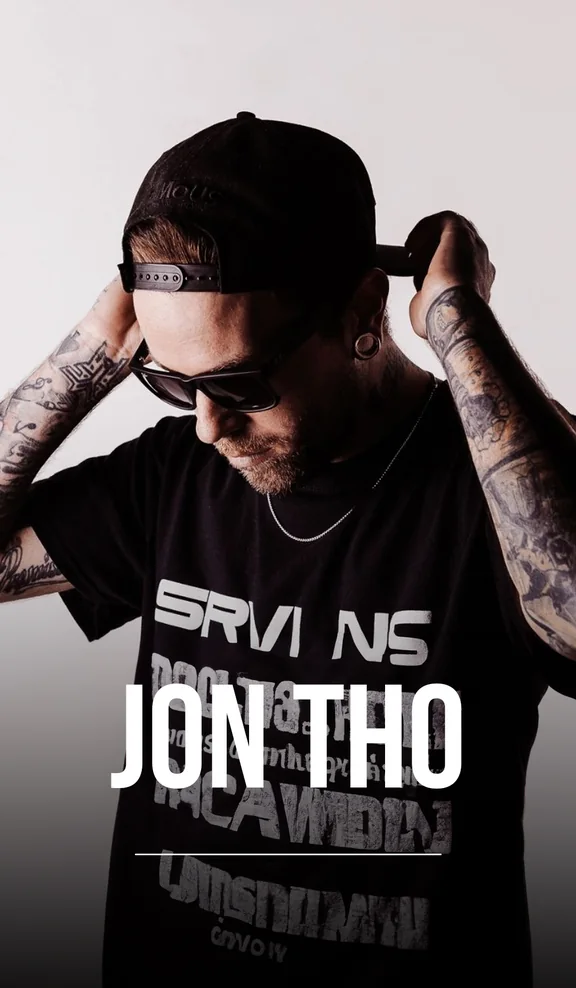 Production courseJon Tho production courseA track built from the ground up: designing your own drums, basses and synths and mixing them as you go, with the files, presets and templates.
 Sample packDNB Drums Vol. 1 sample packDrum & bass drum samples to layer with your synthesised kicks and snares.
Every artist course, preset bundle and sample pack is also in The Vault. Browse courses
Related tutorials
All tutorials → Drums · PatternsDrum and Bass Drum Patterns: How to Program DnB Beats14 min read · Video + guide
 Mixing · DrumsHow to Make DNB Drums Punchy: 3 Mixing Techniques8 min read · Video + guide
 Guide · MixingHow to Mix Drum and Bass: A Mixdown Guide for DnB19 min read · Guide
 Guide · BeginnersHow to Make Drum and Bass: A Step-by-Step Guide19 min read · Guide
FAQ: DnB kicks and snares
How do you make a DnB snare in Serum?
Start with a sine wave with random phase at zero, give it a very short amp envelope and a quick pitch envelope on an LFO. Then add a stereo noise layer with its own envelope and a small spike on the transient, run the noise through a high-pass filter, and add distortion and EQ with their own envelopes for snap and knock. That is how Current Value builds his snare in our video.
How do you make a DnB kick drum?
Use a sine wave with random phase off and the phase at 90 degrees, a short attack, a volume envelope and a fast pitch envelope on the coarse pitch, then tune it down a couple of octaves. Jon Tho adds a second, narrower pitch envelope for snap around 3 kHz, a short noise layer and a waveshaper to glue it all.
Can you synthesise a kick in Serum?
Yes. Serum’s sine oscillator, its LFOs in envelope mode and its noise oscillator are all you need. Draw one LFO as the volume envelope and another as a pitch envelope on the oscillator’s coarse tuning. The free Vital synth has the same building blocks.
Why set the kick’s phase to 90 degrees?
In our video Jon Tho calls 90 degrees the sweet spot of the sine for drum design: it gives the kick extra click and punch. With random phase turned off, every hit starts at that point. Move the phase elsewhere and the click fades.
What is the difference between a DnB kick and snare?
Both start from a sine with an amp and pitch envelope. The snare’s envelopes are much shorter and its pitch drop quicker, so it doesn’t sound like a kick, and a noise layer with its own envelope and filter does most of the work for the crack. The kick’s noise is only a short layer that supports the transient.
Should I synthesise drums or use samples?
Both work, and most producers mix them. Synthesis gives you a kick you can retune from MIDI and reshape at any point in the track; samples are fast and already sound finished. A free DnB drum kit such as the 174 Marathon Sample Pack is a good way to compare and layer the two.
Next steps
Build one kick and one snare from a sine wave, drop them into a two-step beat at 174 BPM and compare them with a sampled kit. Then take the beat further:
Free Access
Seven free DnB sample and preset packs, including the 174 Marathon Sample Pack, plus mixing and mastering e-books and a 3-day challenge.
Get free packsThe full guide
Tempo, drums, sub, mid bass, chords, arrangement and mixdown: every step of a DnB track.
Read the guideDNB Foundations
A structured drum and bass course with weekly live feedback calls on your tracks, drums included.
See Foundations1:1 Mentorship
Personal guidance on your music from a mentor, built around your goals.
See the mentorship50,000+ producers have joined DNB Academy, and our producer Discord has 5,300+ members.