Serum · Foghorn bass · Recreation
How to Make a Foghorn Bass Like IMANU & Buunshin’s “Nagow” in Serum
To make a foghorn bass in the style of IMANU & Buunshin’s “Nagow” in Serum, load a spectral wavetable (Creeper) with the Bend − warp mode, layer a sub and white noise, and push all three through tube distortion. A Band 24 filter moved by an LFO envelope adds the growl, then an EQ and a saturator outside Serum decide which harmonics get distorted. This is our own recreation, step by step, with the settings from the screen and audio of the patch as it grows.
This is a recreation for learning, inspired by the main bass in “Nagow”. It’s not the exact sound: it’s our own patch, built from an init preset, to teach the sound design ideas behind it. For a broader map of bass types, see our drum and bass bass guide.
Quick answer
How do you make a foghorn bass like IMANU & Buunshin’s “Nagow” in Serum?
Start from an init patch. Load Creeper from the Spectral wavetables on oscillator A, move the wavetable position and set the warp to Bend −. Turn on the sub and the noise (BrightWhite), add Tube distortion and turn random phase down. Add a Band 24 filter on oscillator A with LFO 1 in envelope mode on the cutoff, a multiband compressor before the distortion, a fast LFO on the noise level, a high-passed chorus and a moving EQ bell. Then EQ and saturate the audio in your DAW, and finish with OTT, reverb and chorus.
- Wavetable.Creeper with Bend − warp.
- Layers.Sub and BrightWhite noise into Tube distortion.
- Growl.Band 24 filter with an LFO envelope.
- Movement.Noise rattle, chorus and a moving EQ bell.
- Post-processing.EQ before a saturator picks the distorted harmonics.
- Finish.OTT, reverb and chorus.
Our recreation of the “Nagow” foghorn bass in Serum, from an init patch to the post-processed sound. Every step below links to the moment in the video.
What you’ll need
- Serum. The synth part uses Serum’s stock Creeper wavetable, BrightWhite noise, filter, LFOs and effects. No Serum? Our foghorn bass in Vital tutorial builds a similar sound in Vital, which is free.
- A DAW with an EQ and a saturator. The post-processing is where most of the character comes from. We use Ableton Live’s EQ Eight, Saturator, OTT, Reverb and Chorus, but any parametric EQ and saturator will do the core job.
- Time to experiment. As the video says, the key to this sound is experimenting: the warp knob, the filter cutoff, the wavetable and the EQ bells all change it a lot.
1.Pick a spectral wavetable and add Bend − warp
An init saw is too plain for a foghorn bass. A wavetable from Serum’s Spectral section, with the wavetable position and a Bend − warp mode dialled in, gives you a more aggressive, crunchy starting point.
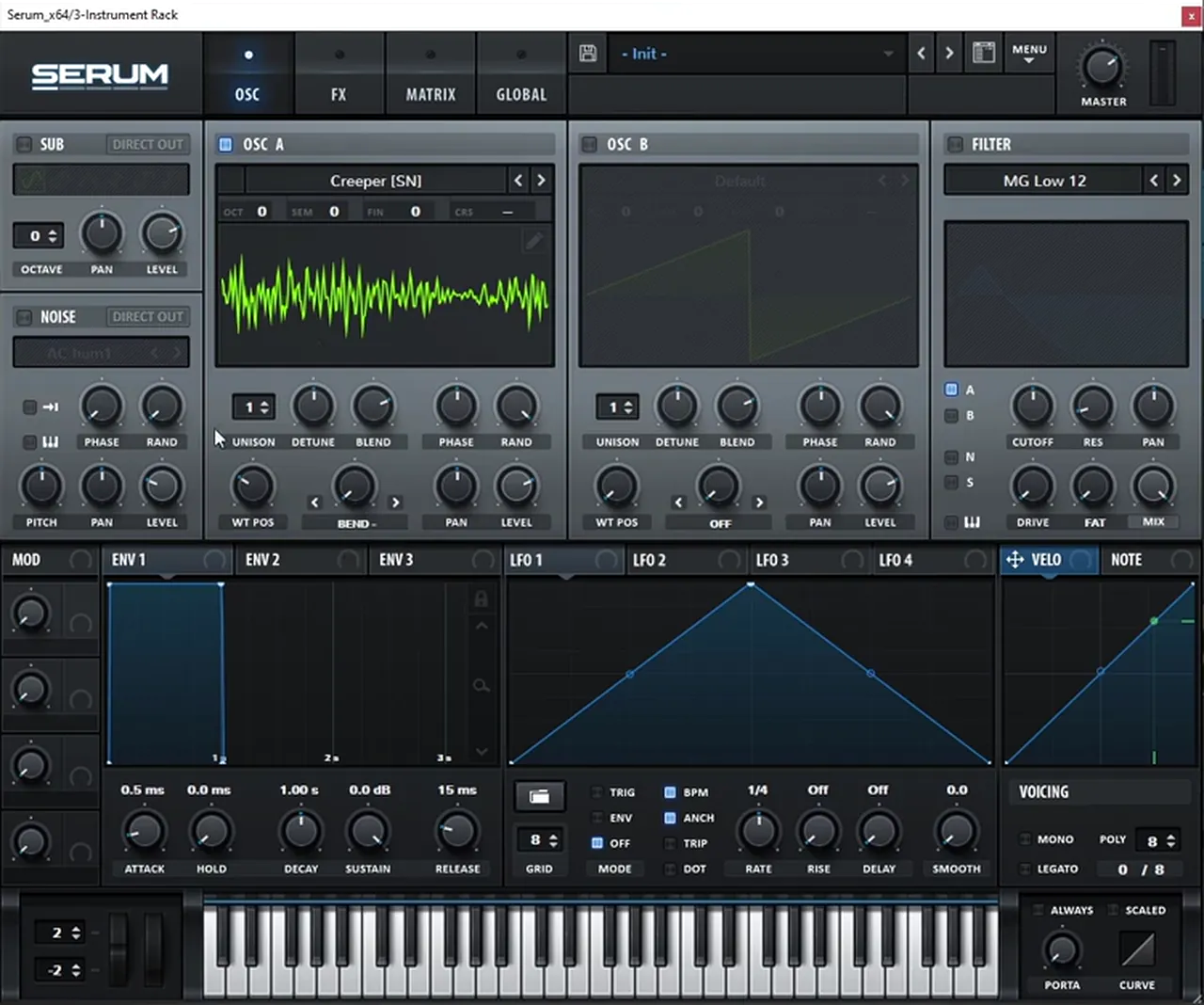
Initialise a patch in Serum (watch at 0:26). On oscillator A, load a wavetable from the Spectral section: on screen it’s Creeper [SN]. On its own it sounds even worse at first, but moving the WT POS knob makes it more interesting. Then set the warp mode to BEND − (watch at 1:05) and move the warp knob: the sound becomes more aggressive and crunchy.
2.Layer a sub and noise, then add tube distortion
The foghorn needs weight underneath and grit on top. Serum’s sub oscillator and a white noise layer sit under and over oscillator A, and one tube distortion glues all three together.
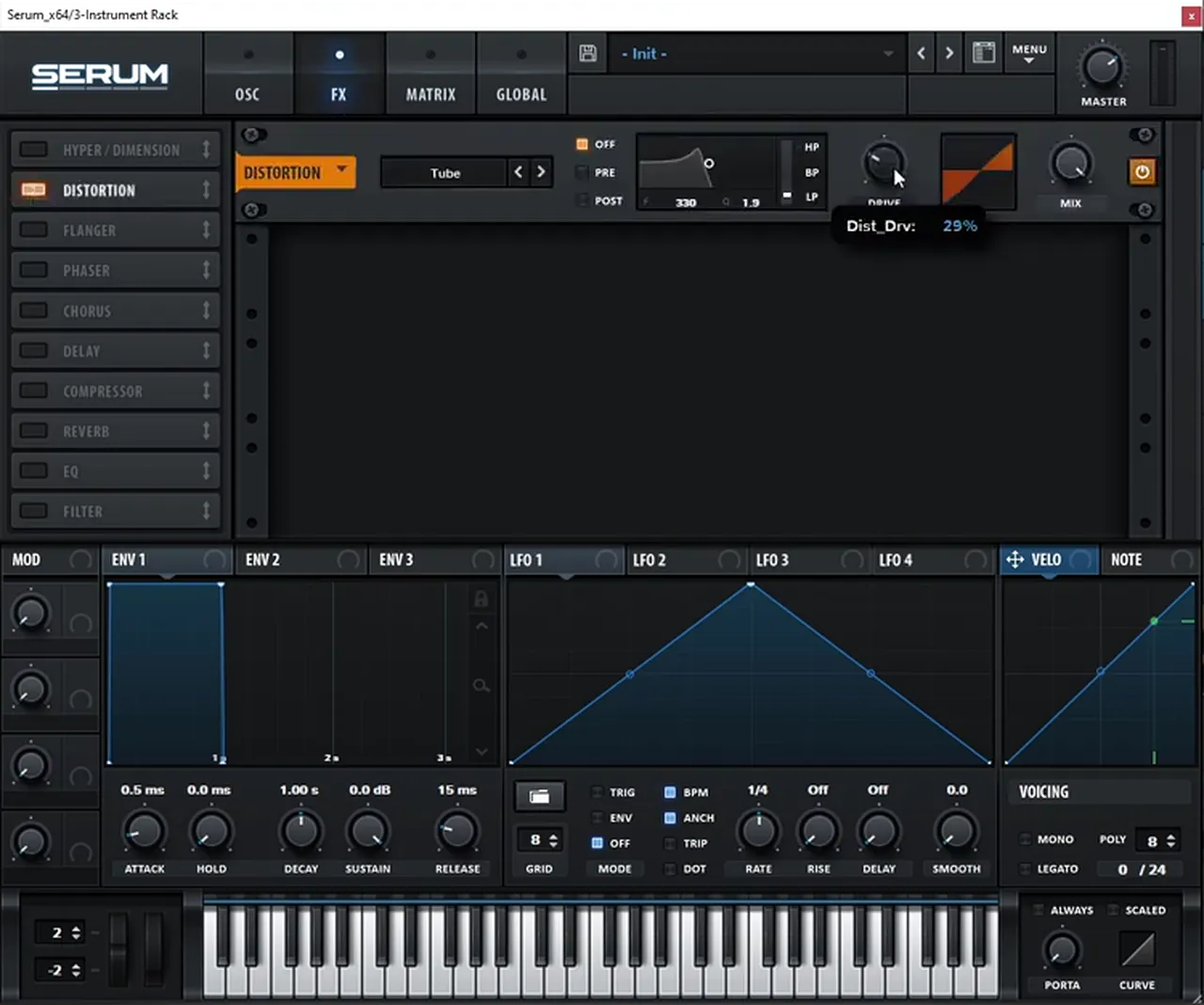
Turn on the SUB oscillator and the NOISE oscillator (watch at 1:24), and change the noise sample to BrightWhite. Then, on the FX page, add a Distortion set to Tube to distort the three layers together. The drive reads 29% on screen as it’s being set. You can already hear the potential of this setup.
3.Turn random phase down for a consistent tone
If every note sounds slightly different, that’s oscillator A’s random phase. Turning it down makes the bass start the same way every time, and the phase knob then lets you choose that starting point.
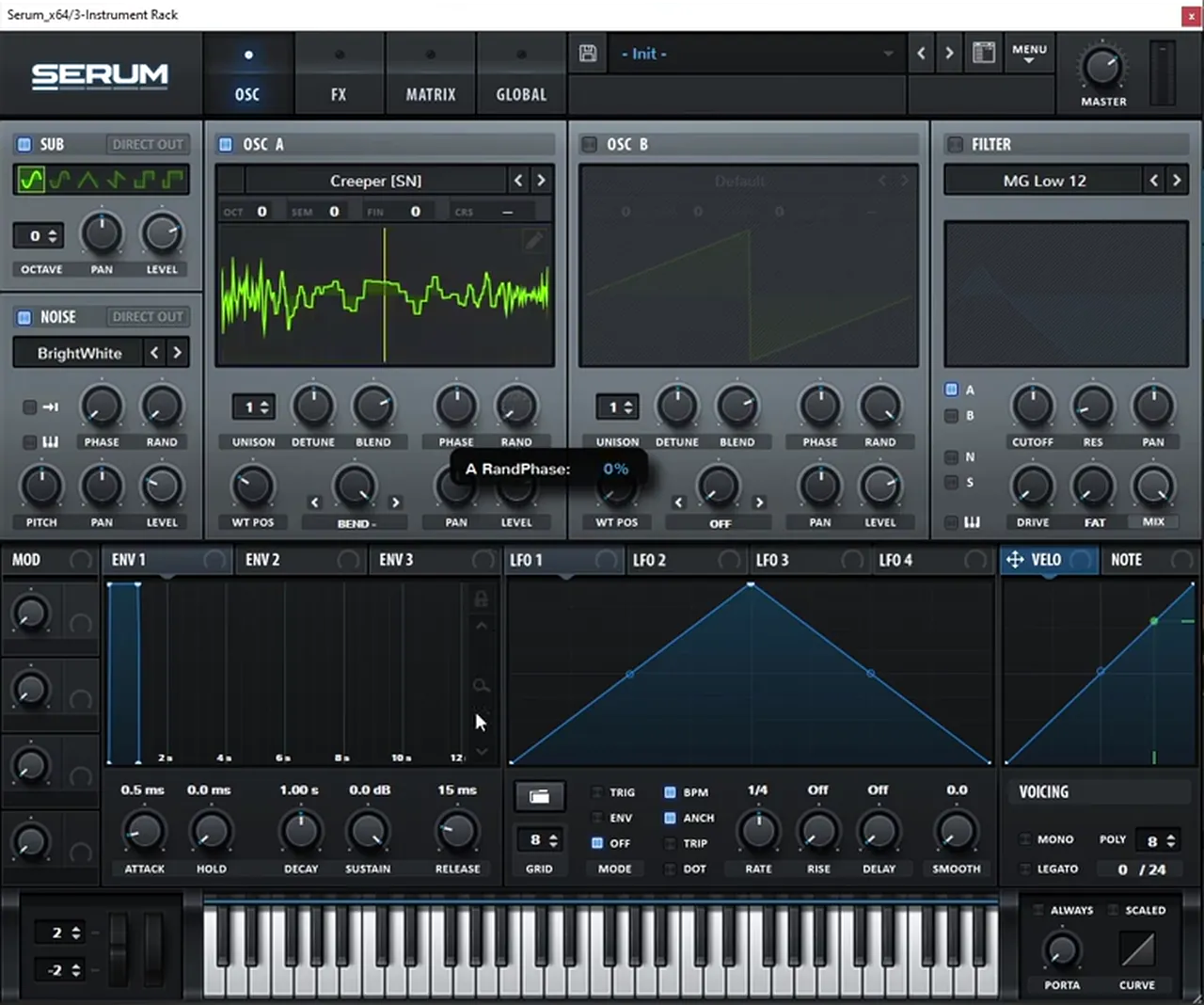
Notice that each time a note plays and the sound resets, the tone changes (watch at 1:55). That’s because oscillator A’s RAND (random phase) is turned all the way up. Bring it down to 0% and you get the same sound on every note. You can then experiment with the PHASE knob to change where the waveform starts.
Listen: Creeper with Bend minus warp, sub and noise through the Tube distortion, random phase off5 sec
4.Add a Band 24 filter with an LFO envelope
Filtering oscillator A before the distortion adds movement in the lower harmonics, which the distortion turns into a growl. A band-pass filter swept by a slow LFO in envelope mode shapes that growl over each note.
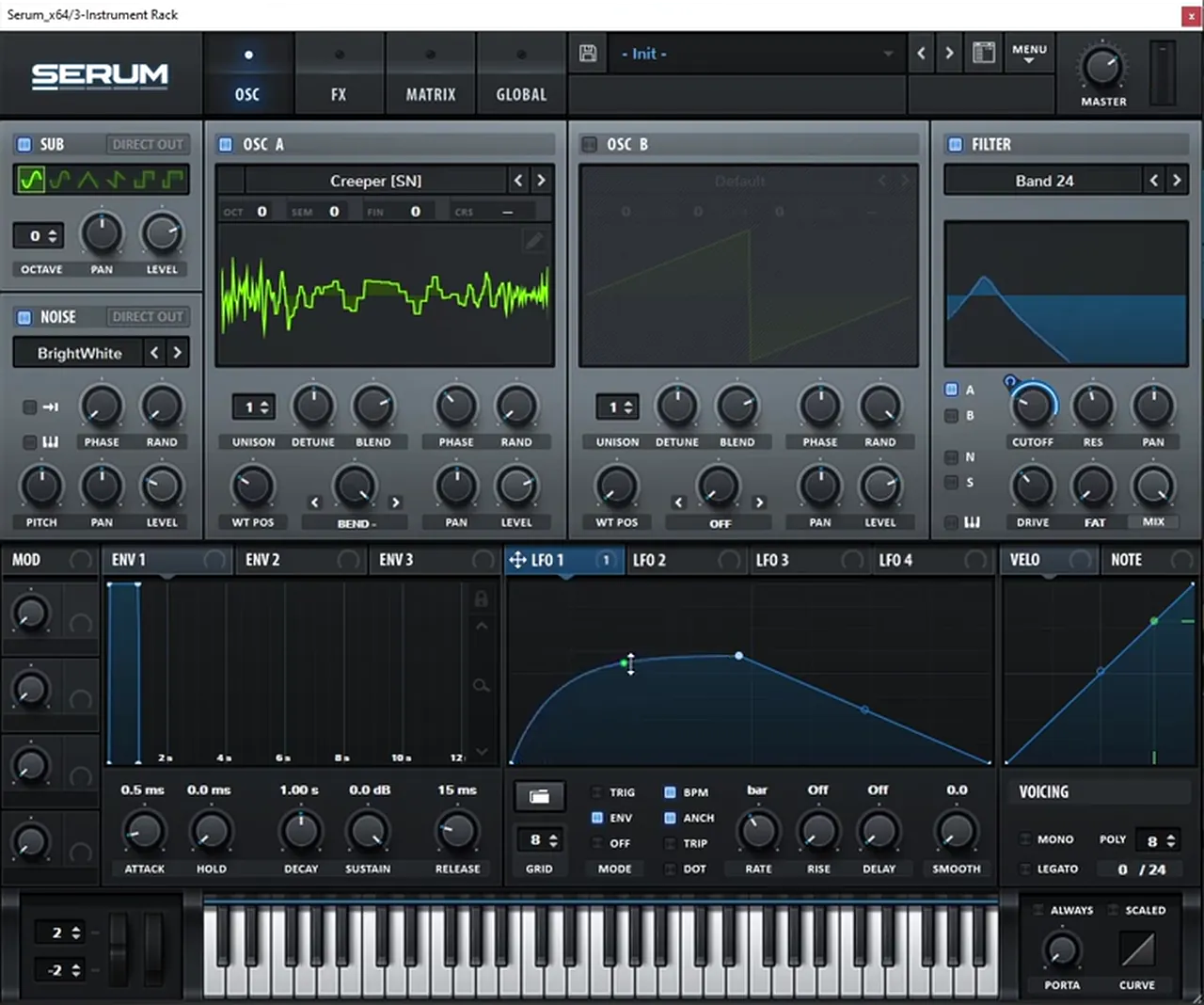
Turn on the FILTER for oscillator A (watch at 2:28). We want more movement in the lower harmonics before they hit the distortion, which creates that growly type of sound. Pick a band-pass: Band 24 on screen. Moving the cutoff already adds a growly, “bowly” movement. Now put LFO 1 on the cutoff, make it slower (1 bar), switch it to ENV mode, and play with its curve: raise the tension of the curve’s first point and bring the modulation amount a little lower (watch at 2:57).
For more on why filtering before distortion matters, our future DnB noise bass in Vital tutorial, also inspired by IMANU and Buunshin, works with the same pre-distortion idea.
5.Push the distortion with a multiband compressor
A multiband compressor placed before the distortion adds gain going into it, so the distortion works harder and brings up more noise. Rebalance the noise level afterwards.
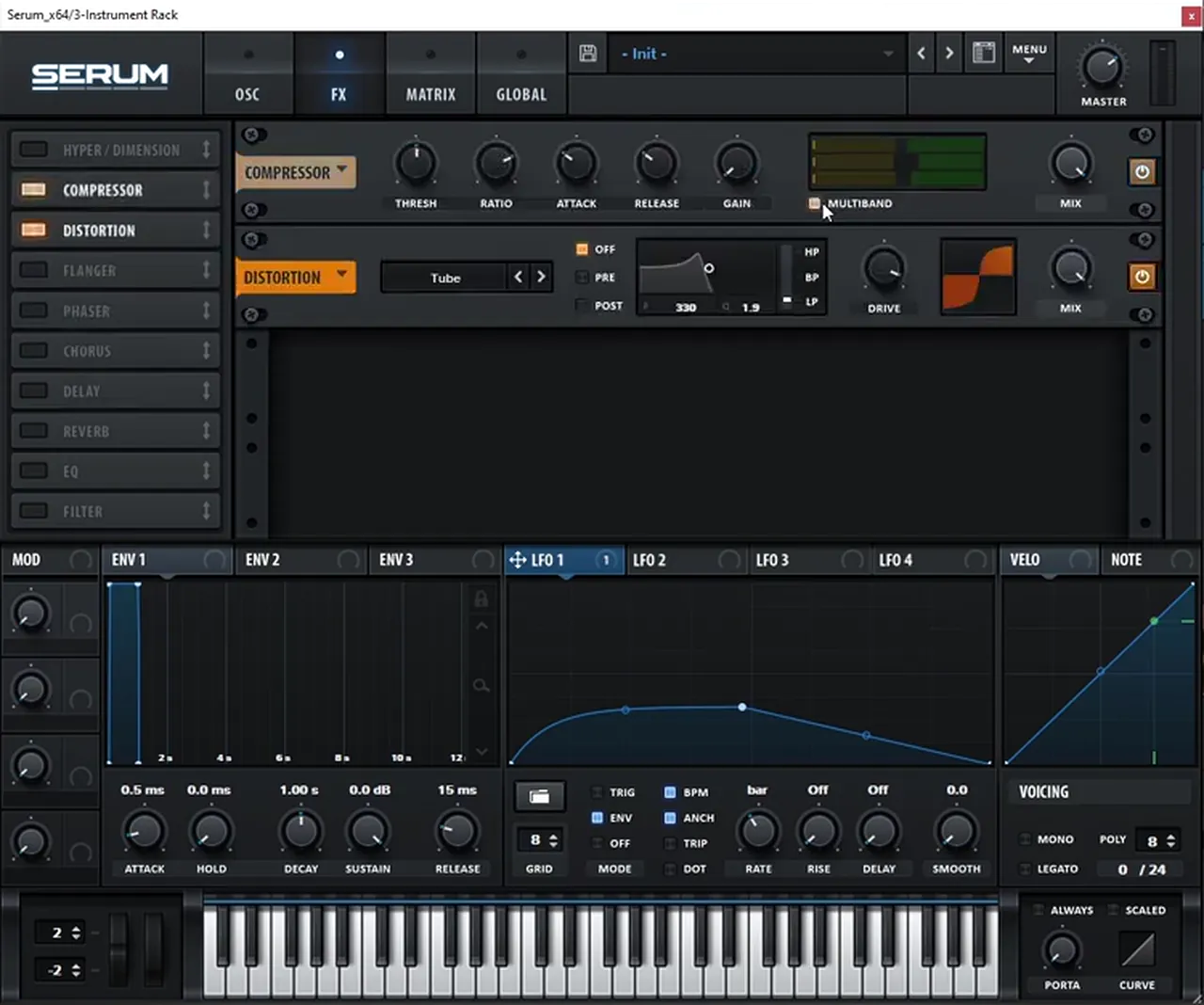
Go back to the effects and add a Compressor with MULTIBAND on, before the distortion (watch at 3:24). It’s there to add a bit more gain before the distortion. Because that creates more noise, bring the noise oscillator’s level a bit lower.
6.Add a noise rattle and a high-passed chorus
A fast LFO on the noise level makes the top of the bass rattle. A chorus with its high-pass on widens the harmonics while the sub stays mono.
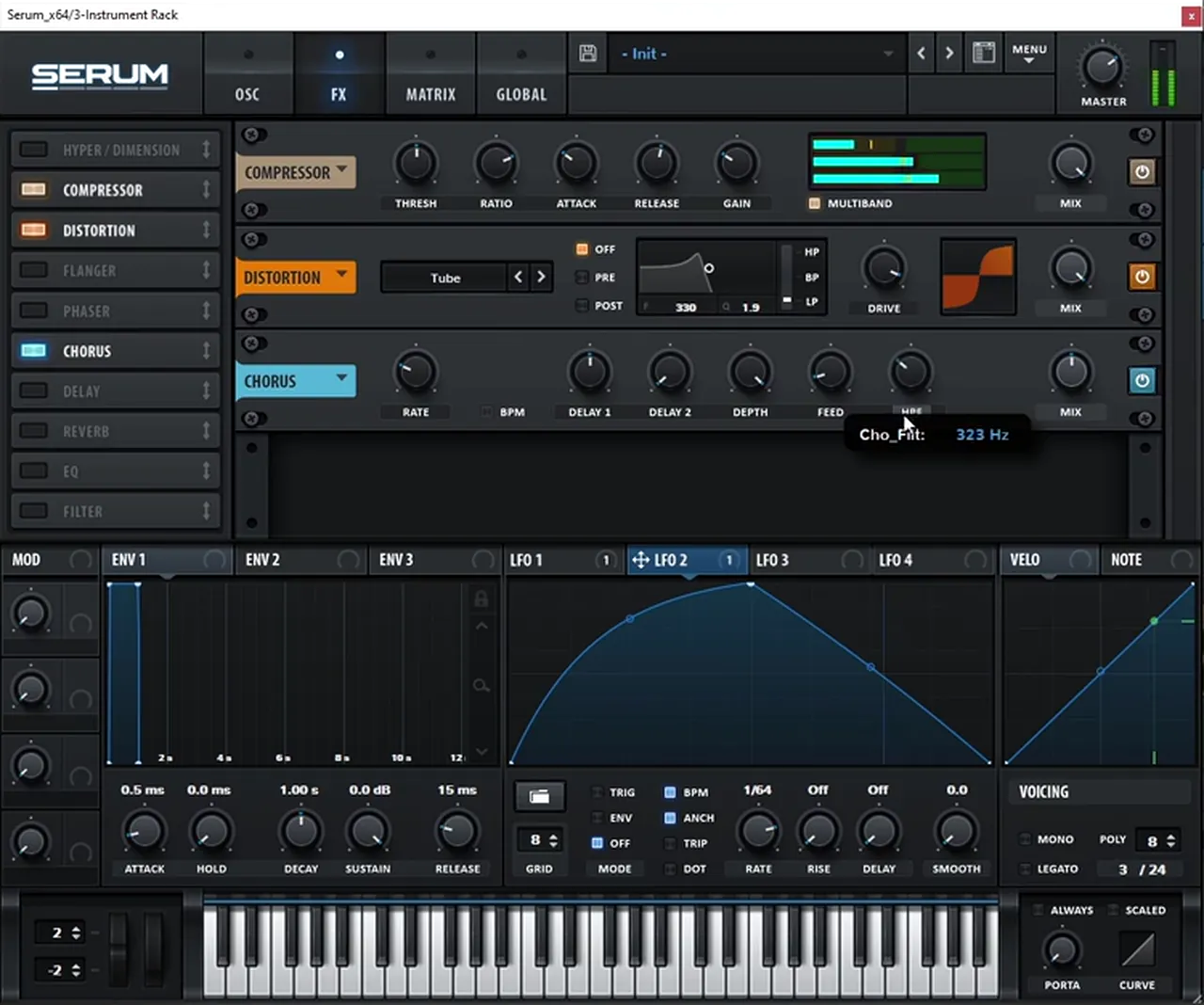
Map a different LFO, LFO 2, to the noise oscillator’s level (watch at 3:48). Increase its rate to create a rattle-type movement, and experiment with the LFO’s shape. We leave the rate at 1/64. Then add a Chorus and click its HPF button so the sub isn’t affected by it. Set the high-pass around 350 Hz (it reads 323 Hz on screen while being set), so the stereo feel is only on the harmonics above the sub, and bring the chorus mix a bit lower.
Listen: the patch with the Band 24 filter, multiband compressor and the LFO rattle on the noise7 sec
7.Move an EQ bell inside Serum
One more layer of movement: an EQ bell whose frequency is modulated by the same LFO as the filter, adding motion in the lower harmonics.
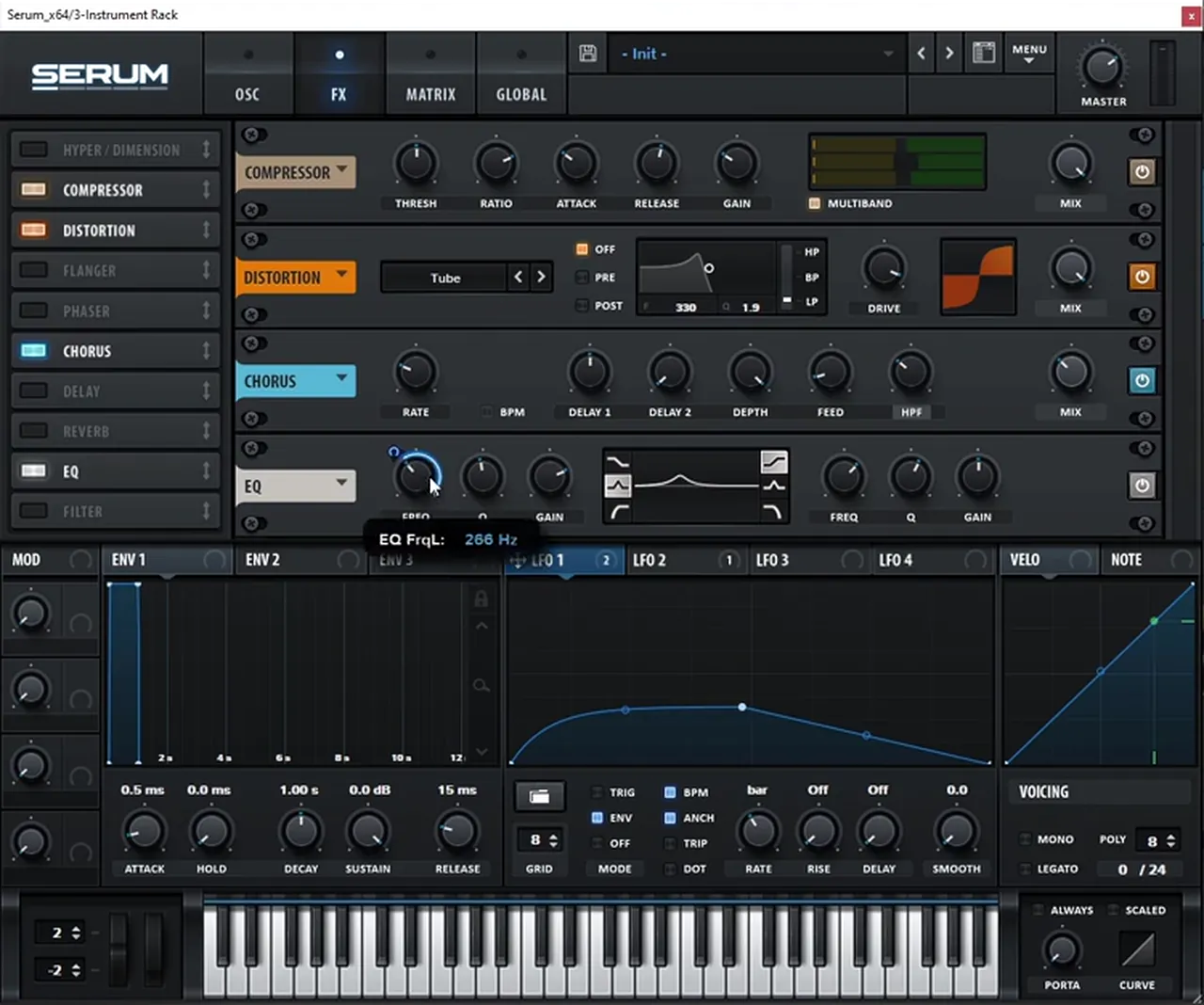
Add Serum’s EQ and use its bell (watch at 4:42). Map the same LFO 1 to the bell’s frequency (around 266 Hz on screen while setting it) and fine-tune the amount until the movement sounds right. That’s it inside Serum.
8.Post-process: an EQ into a saturator
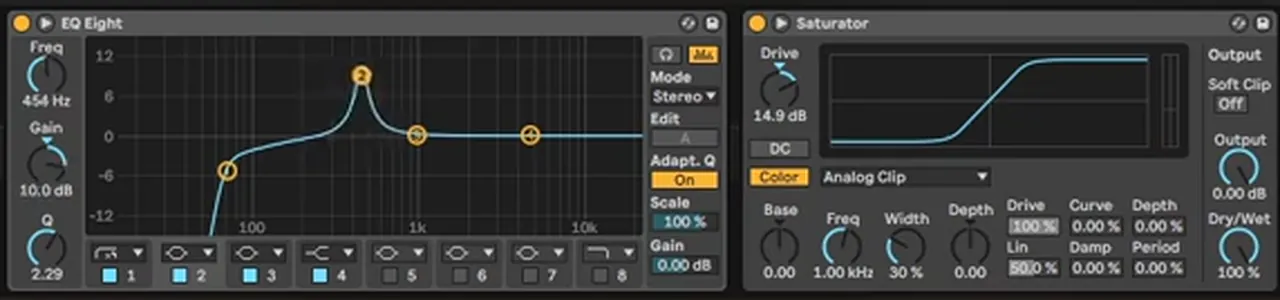
The most useful part of this sound happens after Serum. An EQ placed before a saturator decides which harmonics get distorted: cut the sub, then boost a bell in the low mids, around 450 Hz, for an evil, growly tone.
In Ableton, add an EQ Eight followed by a Saturator (watch at 5:24). Crank up the saturator’s drive (14.9 dB with Analog Clip on screen). Now any bell you boost in the EQ decides the tone you get after the distortion. First, get rid of the sub with a low cut: you don’t want to distort the fundamental. Then focus on harmonics in the low mids, which give that evil, growly sound. Around 450 Hz (454 Hz, +10 dB on screen) those growly harmonics get pretty noticeable (watch at 6:20). Playing with this bell gives you a lot of room to experiment.
If you want to see a different Serum bass shaped this way, our heavy DnB bass sound design in Serum tutorial also leans on post-processing.
9.Shelf the noise, then add OTT, reverb and chorus
A second EQ tames the noise with a shelf, OTT with its time all the way up adds density, and reverb plus a second chorus give the foghorn some space.
Add another EQ Eight to double up on the shaping (watch at 6:52). The noise felt like too much, so add a shelf: on screen a high shelf at 3.03 kHz, −4.83 dB. After the saturator, add OTT, pull the Time all the way up (1000%) and add some output gain. Then add some ambience with a Reverb (watch at 7:24), another Chorus, and a duplicate of the OTT after the chorus.

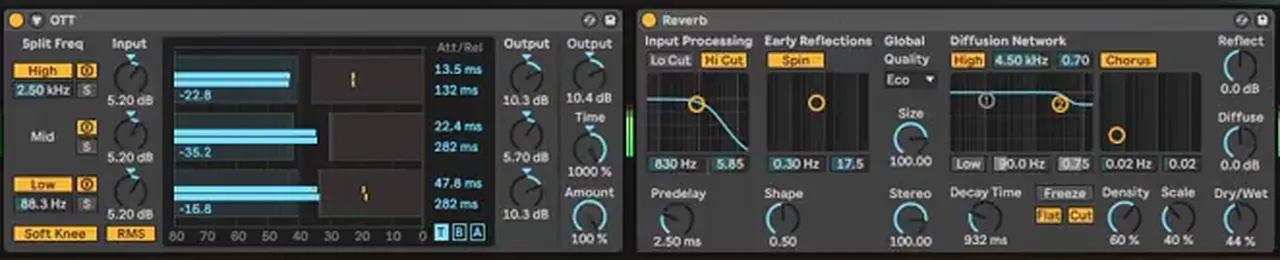
Listen: after the EQ, Saturator, OTT and reverb7 sec
10.Shape and modulate the distorted harmonics
Go back to the first EQ and keep adding points you want the saturator to distort. Modulating that EQ’s frequency adds another interesting movement, and boosts on the second or third harmonic, or a notch, can take the sound in new directions.
Return to the EQ before the saturator and add points you want to get distorted (watch at 7:48). You can really dial in the combination of harmonics this way, and with enough tweaking you may get close to the original. But once you understand it, experiment and make your own version. One suggestion from the video: modulate the frequency of this EQ’s bell (watch at 8:20). That adds quite an interesting movement. Also try boosting a bell a lot, try the second or third harmonic, or add a notch.
Listen: the EQ bell frequency moving in front of the saturator8 sec
After some fine-tuning, the video plays the final sound (watch at 8:58). The key, again, is to experiment: the Bend knob, the filter cutoff and the wavetable all change the result. For where a bass like this sits among the styles, see the neurofunk section of our subgenres guide.
Common mistakes making a foghorn bass in Serum
- Leaving random phase up. Every note will sound different. Turn it down and choose the start point with the phase knob.
- Distorting the sub. Cut the fundamental in the EQ before the saturator, and high-pass the chorus so the sub stays clean and mono.
- Filtering after the distortion. The Band 24 filter goes on the oscillator, before the distortion, so the moving low harmonics turn into a growl.
- Too much noise. The multiband compressor and OTT both bring the noise up. Lower the noise level and shelf the top end.
- Stopping inside Serum. The EQ-into-saturator stage is what shapes the final tone. Spend time on its bells.
- Chasing an exact copy. Use the recreation to learn the principles, then move the warp, cutoff and EQ until it’s your own sound.
Free download
Free samples to put your bass in a track
Got the bass? Give it drums and FX to play with. The 174 Marathon Sample Pack was made for International Drum & Bass Day and our 174 Production Marathon. It gives you:
- 100+ samples
- Drums and bass
- FX and melodics
- Royalty-free for your own tracks
It’s one of seven free sample and preset packs in DNB Academy Free Access, alongside the mixing and mastering e-books and the 3‑day DnB challenge. Join 40,000+ producers in Free Access. Free account, no card needed.
Go deeper
Bass design courses and Serum presets
Want to go further with distorted, post-processed basses in Serum?
 Production courseCurrent Value production courseAbout 5 hours of a full track built with synthesis: drum, bass and pad synthesis, Serum and Ableton Operator workflows, post-processing, arrangement and mixing.
 Production courseMaztek production courseNeurofunk: a technical approach to neuro drum & bass, from start to finish, in 6+ hours of video.
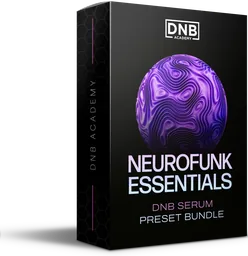 Preset bundleNeuro Essentials Serum preset bundle100 Serum presets for neurofunk, including 50 basses, plus FX, drums, pads and synths.
Every artist course, preset bundle and sample pack is also in The Vault. Browse courses
Related tutorials
All tutorials → Vital · Bass designHow to Make a Foghorn Bass in Vital6 min read · Video + guide
 Vital · Future DnBHow to Make a Future DnB Noise Bass Hit in Vital, Like IMANU and Buunshin6 min read · Video + guide
 Serum · RecreationHow to Make a Bass Like Buunshin’s “Acolyte” in Serum9 min read · Video + guide
 Serum · Bass designHeavy DnB Bass Sound Design in Serum with Current Value10 min read · Video + guide
FAQ: making a foghorn bass like IMANU & Buunshin’s “Nagow” in Serum
How do you make a foghorn bass like IMANU & Buunshin’s “Nagow” in Serum?
Start from an init patch. Load the Creeper wavetable from Serum’s Spectral section, move the wavetable position and set the warp to Bend −. Add the sub and BrightWhite noise, Tube distortion, and turn random phase down. Put a Band 24 filter on oscillator A with LFO 1 in envelope mode on the cutoff, then add a multiband compressor before the distortion, a fast LFO on the noise level, a high-passed chorus and a moving EQ bell. Finish with an EQ into a saturator, OTT, reverb and chorus.
Is this the exact bass from “Nagow”?
No. It’s our own recreation, built from an init patch. It’s close enough to teach the sound design principles behind a foghorn bass like this one, and the video encourages you to experiment and make your own version rather than copy it exactly.
Why does my Serum bass sound different on every note?
Oscillator A’s random phase is turned up. Each time a note resets, the waveform starts at a random point, which changes the tone. Turn RAND down to 0% and use the phase knob to choose a fixed starting point.
Why put an EQ before the saturator?
The EQ decides which harmonics hit the saturator hardest. Cut the sub so the fundamental isn’t distorted, then boost a bell in the low mids, around 450 Hz in the video, to bring out an evil, growly tone. Moving or modulating that bell changes the character of the distortion.
Can I make a foghorn bass in Vital instead?
Yes. Vital is free, and our foghorn bass in Vital tutorial builds a similar sound there. The ideas here, filtering before distortion and EQ before a saturator, work in any synth.
Next steps
Open Serum, load Creeper with the Bend − warp, add the sub, noise and tube distortion, and build the growl with the Band 24 filter and its LFO envelope. Then spend most of your time on the EQ before the saturator. For more bass types and when to use them, read our drum and bass bass guide; for more Serum sound design, try a bass like Noisia’s Diplodocus in Serum.
Free Access
Seven free DnB sample and preset packs, including the 174 Marathon Sample Pack, plus mixing and mastering e-books and a 3-day challenge for Ableton Live and FL Studio.
Get free packsThe full guide
Tempo, drums, sub, mid bass, chords, arrangement and mixdown: every step of a DnB track.
Read the guideDNB Foundations
A structured drum and bass course with weekly live feedback calls on your tracks.
See Foundations1:1 Mentorship
Personal guidance on your music from a mentor, built around your goals.
See the mentorship50,000+ producers have joined DNB Academy, and our producer Discord has 5,300+ members.