Serum · FM bass & noise hit · Recreation
How to Make a Bass Like Buunshin’s “Acolyte” in Serum
To make basses in the style of Buunshin’s “Acolyte” in Serum, build two sounds. The noise hit is a sine wave and a noise sample distorted together, split into a noise layer and a clean sub. The main bass adds harmonics to a sine step by step: FM from a second oscillator, sub and noise on a pluck envelope, distortion and an automated filter, then EQ, Overdrive, reverb, Saturator and OTT in your DAW. Below is our own recreation, with the settings from the screen and audio of the patches we built.
This is a learning recreation inspired by the basses in “Acolyte”, not the original sound. We built both patches from an init preset to show the principles behind them, so you can change a few things and get your own versions. For every bass type in one place, see our drum and bass bass guide.
Quick answer
How do you make a bass like Buunshin’s “Acolyte” in Serum?
For the noise hit, put a sine on oscillator A, turn on the noise oscillator and distort them together with Tube distortion, a multiband compressor with extra gain and an EQ that keeps the noise. Duplicate the patch and turn the copy into a low-passed sub. For the main bass, use oscillator B as a quiet sine that frequency-modulates oscillator A, automate the FM amount, add a sub and noise shaped by an LFO in envelope mode, then distortion and an automated low-pass filter. Edit oscillator B’s harmonics, then post-process with EQ, Overdrive, reverb, Saturator, OTT, a second EQ and chorus.
- Noise hit.Sine + noise into distortion.
- Split.A noise layer and a low-passed sub.
- FM.A quiet sine on oscillator B modulates oscillator A.
- Pluck.Sub and noise on an LFO envelope.
- Harmonics.Draw your own on oscillator B.
- Post-processing.EQ, Overdrive, reverb, Saturator, OTT and chorus.
The full walkthrough: a noise hit and an FM bass inspired by “Acolyte”, both from init patches in Serum. Each step below links to its moment in the video.
What you’ll need
- Serum. Both patches use stock parts only: the Basic Shapes sine, the noise oscillator, the FM (FROM B) warp mode, the wavetable editor, LFO 1 and the built-in effects. Prefer a free synth? Vital has a free version, an FM warp, a noise source and a harmonic editor, so the same ideas carry over.
- A DAW with an EQ, a band-focused distortion, reverb, a saturator, OTT and chorus. We use Ableton Live’s EQ Eight, Overdrive, Reverb, Saturator, OTT and Chorus. If you’re not on Ableton, the video suggests something like FabFilter Saturn or Trash 2: anything that lets you distort specific frequencies.
- Automation. Two moves in the main bass are DAW automation (the FM amount and the filter cutoff), plus a reverb dry/wet ride. Any DAW with clip or track automation will do.
1.Noise hit: start with a sine and a noise sample
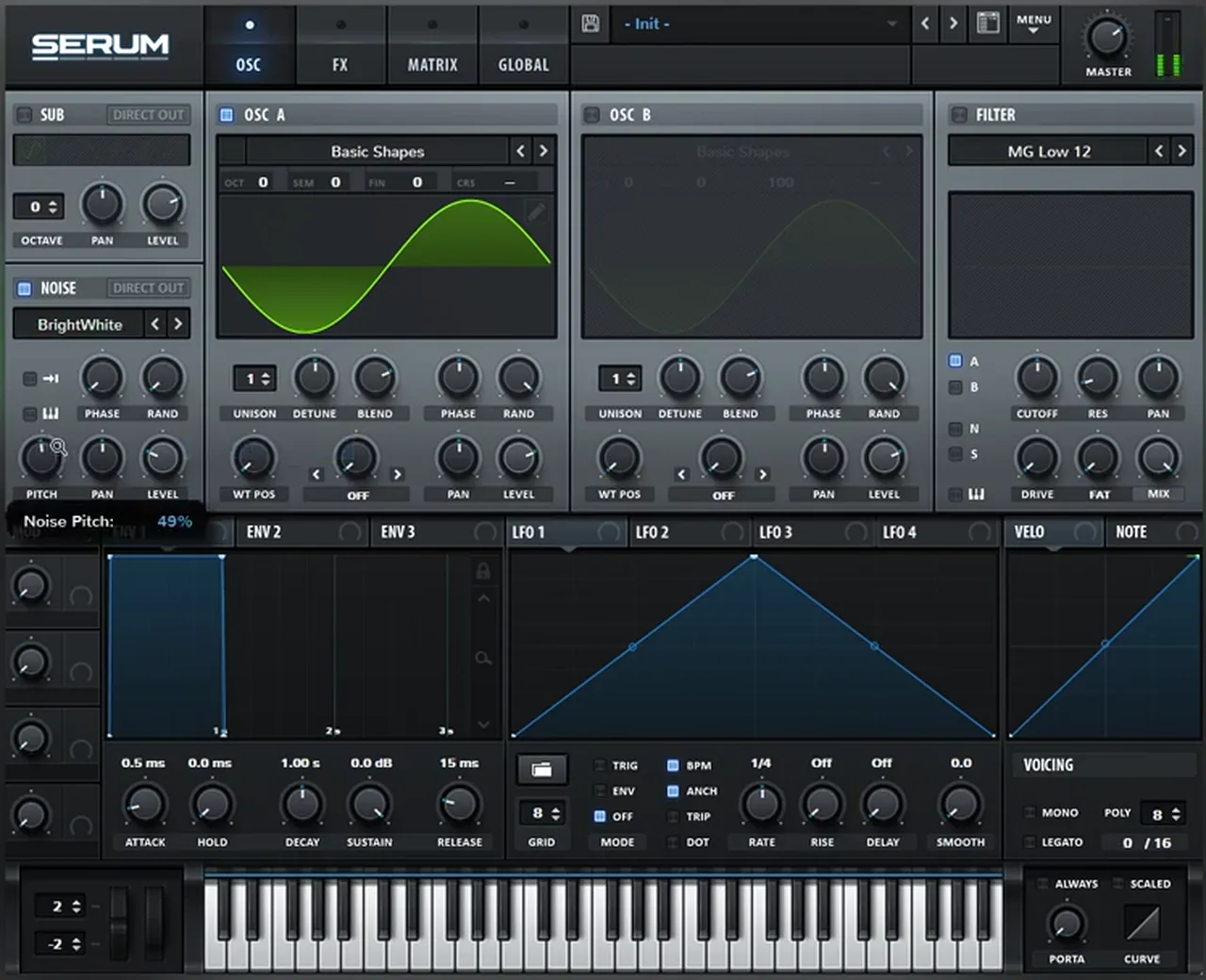
The first sound in the video is a short noise hit. Its recipe is simple: a sine wave and some noise, distorted together. The sine gives the distortion something tonal to bite on, and the noise gives it texture.
Initialise a patch (watch at 1:08). On oscillator A, pick the sine from the Basic Shapes wavetable (it sits in the Analog folder of the wavetable menu). Then switch on the NOISE oscillator. It starts on the AC hum1 sample; later (watch at 2:10) we swap it for BrightWhite, and the noise pitch reads 49% on screen. Changing the noise sample is one of the quickest ways to change the whole hit, so audition a few.
2.Distort, compress and EQ the noise layer
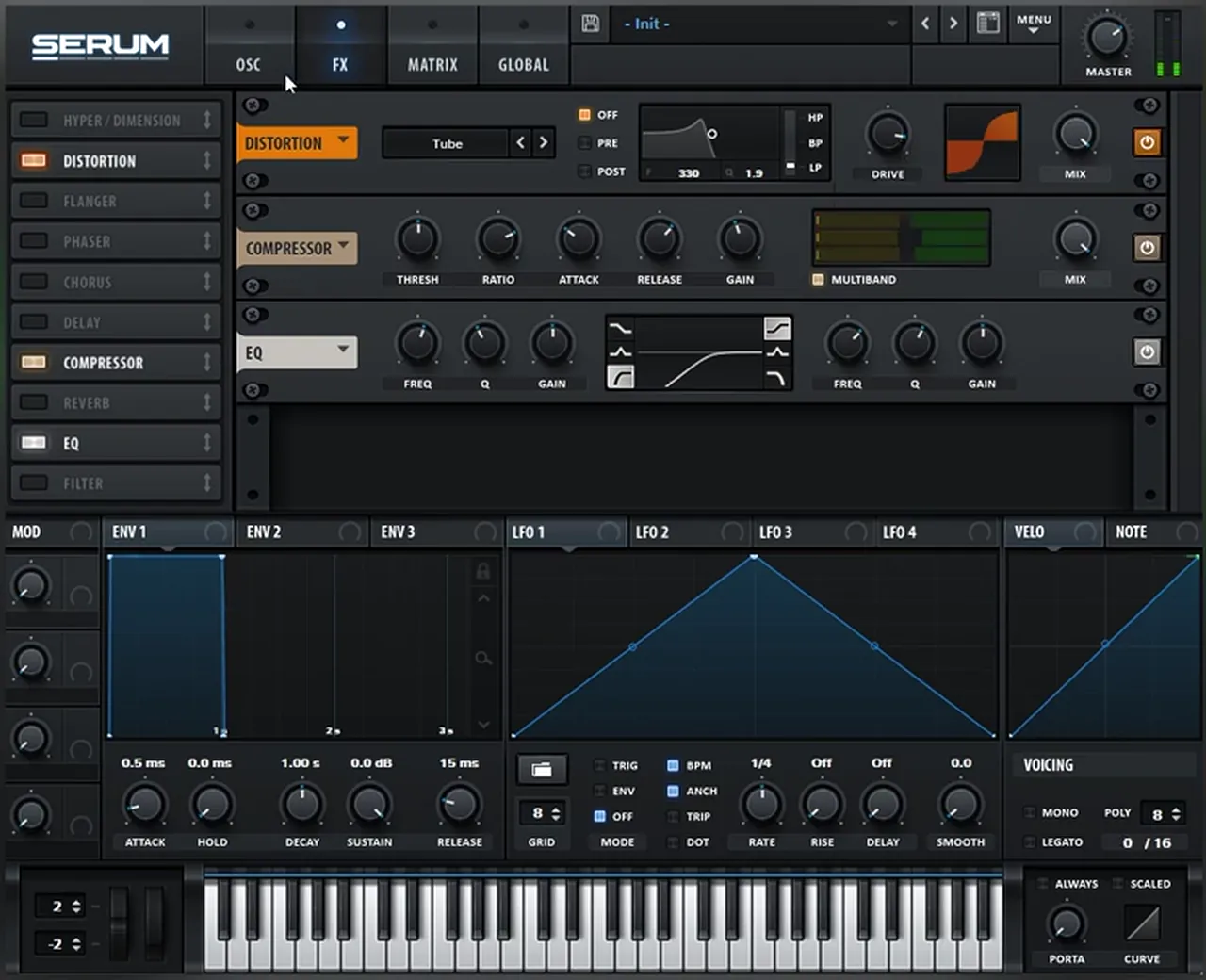
Distortion is what fuses the sine and the noise into one hit. A multiband compressor with added gain pushes the result harder, and an EQ takes away everything except the noisy part.
On the FX page, add Distortion on Tube so the two sources distort together (watch at 1:20). Next add a Compressor, switch on MULTIBAND and add some gain. Finally add Serum’s EQ and cut so that you keep the noise and lose the rest. Now play with the distortion amount: small changes in drive make a big difference to how harsh the hit is.
3.Duplicate the patch and turn the copy into a sub
Rather than asking one patch to do everything, split the hit into two layers. The copy becomes the inverse of the noise layer: low-passed, with less drive, no multiband, no noise and less gain. What’s left is a clean sub.
Duplicate the Serum track (watch at 2:18). On the copy, change the EQ’s band to a low pass and bring it down, lower the distortion drive, turn off the compressor’s multiband option, switch off the noise oscillator and bring the compressor’s gain down. Mix the two layers together and you have the full noise hit (watch at 2:46). Keeping the sub on its own layer means you can distort the top as hard as you like while the low end stays clean. Our DnB sub bass guide goes deeper on that low layer.
4.Change what distorts the noise for new variations
The waveform that hits the distortion alongside the noise shapes the result. Shift oscillator A by an octave, or add a second sine on oscillator B and detune it for a reese-like effect, and the same chain gives you a whole family of noise hits.
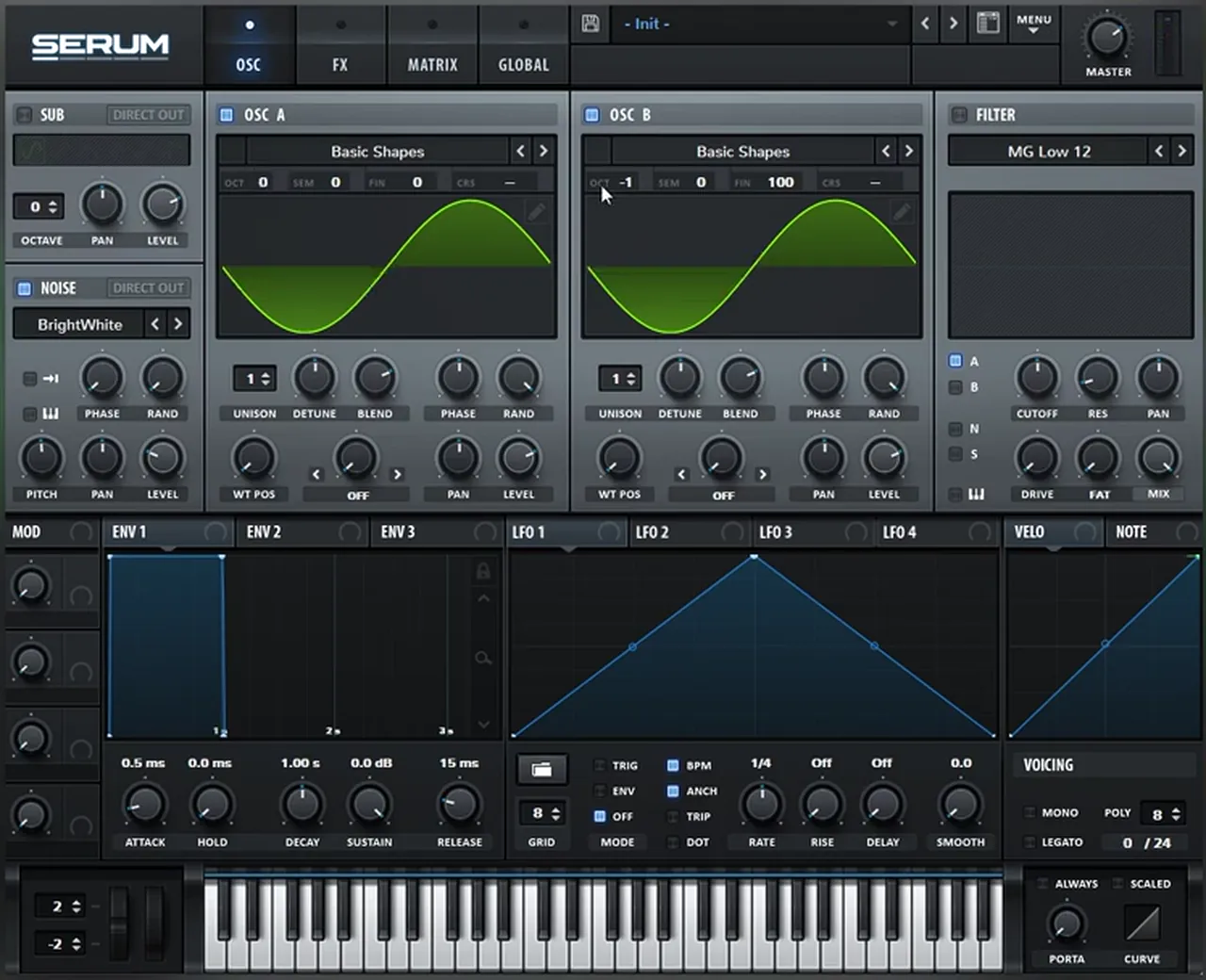
The principles matter more than the exact patch (watch at 1:45). Try oscillator A one octave down, one up or two down. Or turn on oscillator B with another sine and detune it against oscillator A: on screen it’s set an octave down with the fine tune at 100 (watch at 3:03). Two detuned sines beat against each other, which is the same idea behind a reese; see our reese bass guide for that sound on its own.
Listen: the noise patch with the detuned second sine5 sec
Noise hits like this are also the subject of our future DnB noise bass hit in Vital tutorial, if you’d like to build one in a free synth.
5.Main bass: frequency-modulate a sine from oscillator B
The main bass works on a different principle: add harmonics to a sine wave progressively, using FM, noise and distortion. The first step is FM. Oscillator B plays a sine at zero level and modulates oscillator A through the FM (FROM B) warp mode.
Open a new init Serum (watch at 3:23). Put a sine on oscillator A. Turn on oscillator B and bring its level all the way down: we only want it as an FM source, not as a sound. On oscillator A, set the warp mode to FM (FROM B) and move the warp knob. That movement is the core of the bass.
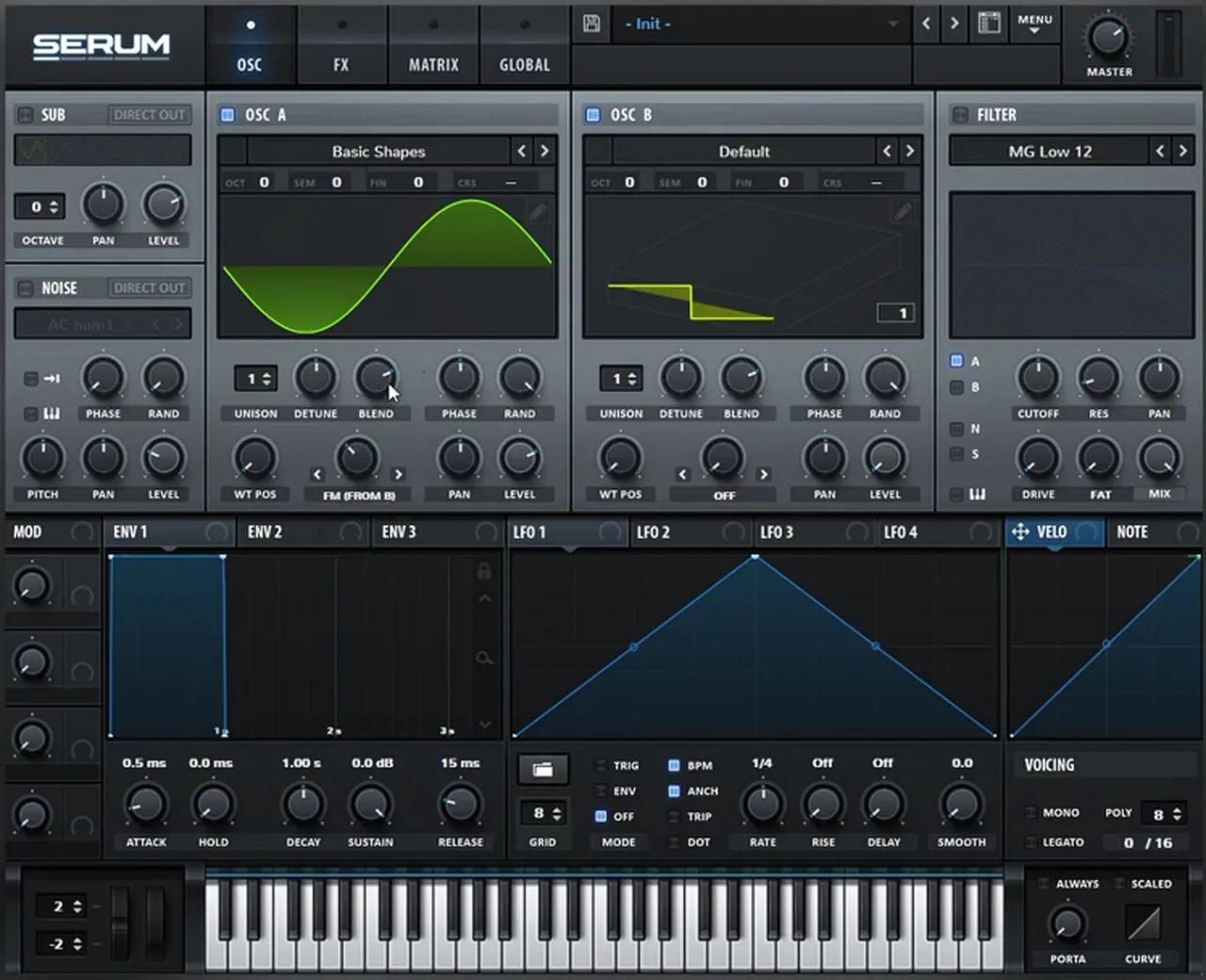
Make sure oscillator B is a pure sine too. Click the edit button to open its wavetable editor and place a single harmonic on bin 1 (watch at 4:00). Then experiment with oscillator B’s octave: it sits at +2 on screen for this part. Finally, automate the FM knob (oscillator A’s warp amount) in your DAW. In the video the automation rises across the first part of the clip and then holds (watch at 4:19).
6.Add a sub and noise, shaped by an LFO envelope
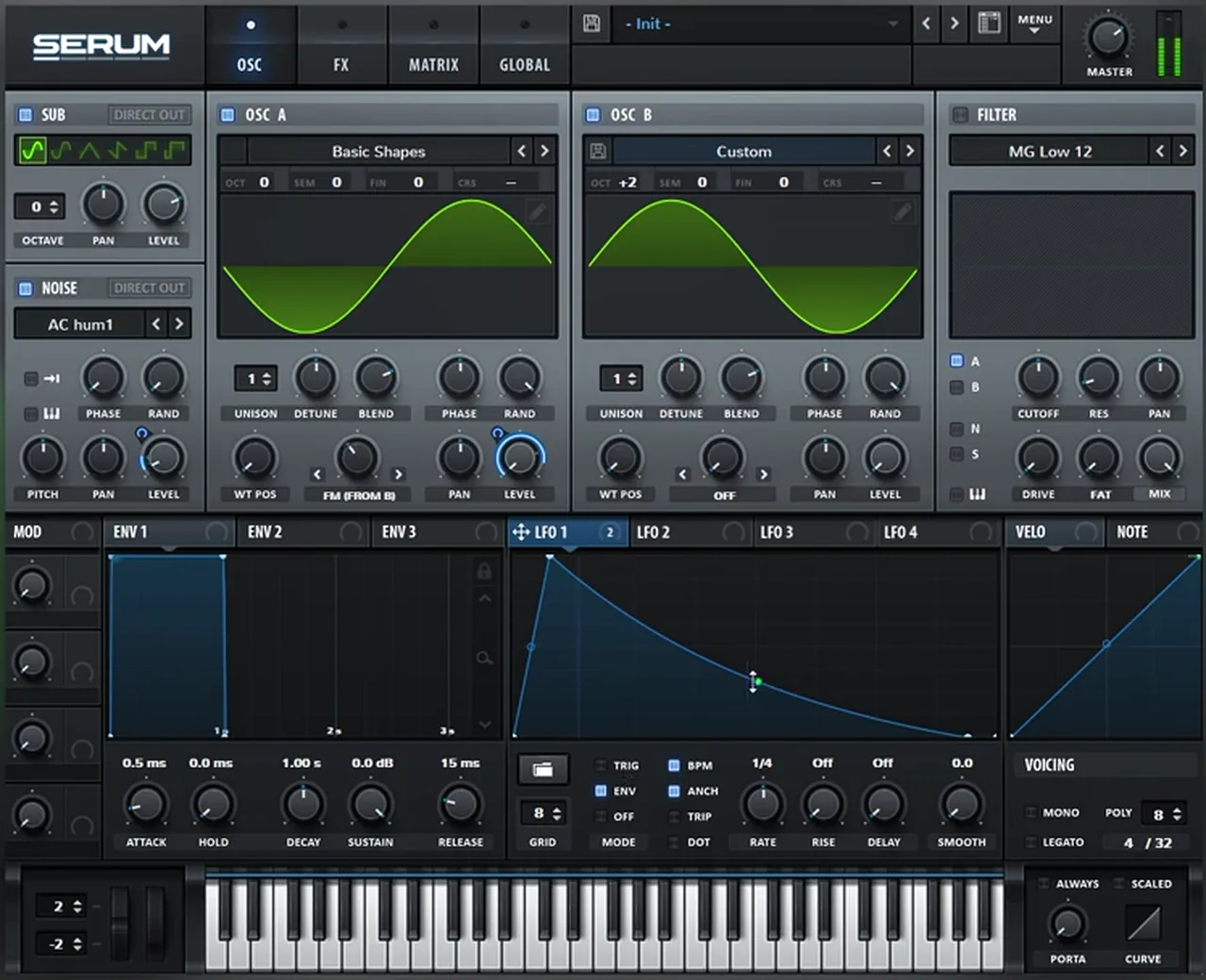
Next, more harmonics: switch on the sub and the noise. Then use one LFO in envelope mode as a pluck shape on oscillator A’s level and the noise level, so both hit hard at the start of each note and fall away.
Turn on the SUB oscillator (sine) and the NOISE oscillator, which is on AC hum1 in this patch (watch at 4:28). Map LFO 1 to oscillator A’s level and draw a pluck shape: a fast rise to the top, then a curved fall. Map the same LFO to the noise oscillator’s level as well (LFO 1 shows two destinations), and set the LFO mode to ENV so it runs once per note instead of looping.
7.Add distortion and an automated low-pass filter
Distortion brings out more harmonics from the FM, sub and noise. A low-pass filter whose cutoff is automated upwards then controls how much of that brightness you hear over time.
Go to the FX section and add Distortion (Tube on screen) (watch at 4:53). Then turn on the FILTER (MG Low 12, routed to oscillator A) and automate its cutoff (watch at 5:01). In your DAW the cutoff automation should climb gradually across the clip, opening the bass up as it plays.
8.Draw your own harmonics on oscillator B
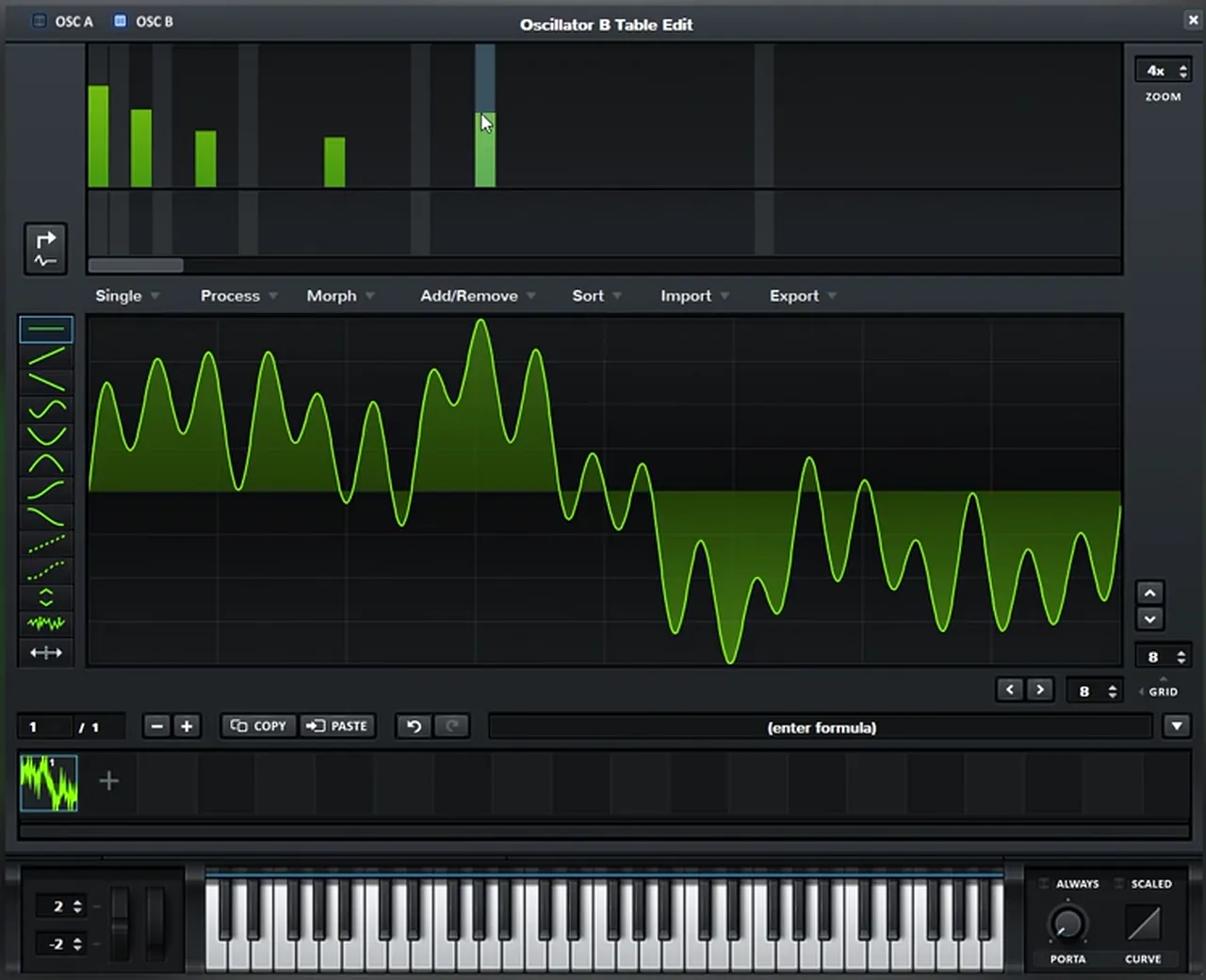
This is the important part. Set oscillator B back to octave 0, open its wavetable editor, switch to the harmonics view and add your own partials. Every harmonic you add to the FM source changes the tone of the whole bass.
Bring oscillator B’s octave down to 0 (watch at 5:18). Open the wavetable editor, click the button that switches the display to harmonics, and add your own: on screen there are a handful of bins of different heights, and the waveform becomes far more complex. That’s already a great start for the bass.
9.Post-process: EQ boosts, then Overdrive on the mids
After Serum, an EQ boosts to add more harmonics, and Overdrive distorts specific frequencies. Ableton’s Overdrive works on a band, so you can focus the distortion on the mids instead of the whole sound.
In Ableton, add an EQ Eight and use it to boost (watch at 5:45): on screen one bell sits at 278 Hz, +8.55 dB, with more boosts higher up. Then add Overdrive to distort certain frequencies (watch at 5:56). The chain on screen has two Overdrives: the first focused on the mids (its band moves between about 730 and 900 Hz while being set, drive 59%, dry/wet 20%), the second wider at 485 Hz (drive 46%, tone 100%, dry/wet 13%). Low dry/wet amounts keep the distortion as colour rather than a takeover.

10.Automate reverb, then Saturator and OTT
Reverb with an automated dry/wet makes the sound go from dry to very wet, as in the track. A Saturator then distorts everything, reverb included, and OTT brings up the tails of the noise and the reverb.
Add a Reverb and automate its dry/wet so it goes from dry to very wet (watch at 6:21); decay time reads 2.64 s on screen. Then saturate everything with a Saturator (13.1 dB of drive on Medium Curve on screen). Because the saturator comes after the reverb, the wet tail gets distorted too.
Listen: after the EQ, Overdrives, automated reverb and Saturator5 sec
Then add OTT (watch at 6:50). It messes with the phases of the sound a lot and pulls up the tails of everything, including the noise and the reverb. On screen its Time is at 155%.

Listen: with OTT pulling up the noise and reverb tails5 sec
11.Too intense? Go back into the patch and rebalance
Heavy post-processing exaggerates every element in the patch. When it’s too much, don’t reach for more plug-ins: go back into Serum and change the source, one element at a time.
In the video (watch at 7:03) four fixes happen in a row:
- Remove a harmonic from oscillator B’s table to calm the FM tone.
- Lower the noise level, because OTT made the noise too loud.
- Raise the start of the filter automation, because the initial cutoff position cut too much (watch at 7:27).
- Bring the sub level down, because the sub felt too strong (watch at 7:44).
Each of these changes the final sound more than any post-processing tweak would, which is the point: the elements of the patch are what really shape this bass.
12.Finish with a second EQ, chorus and final tweaks
One more EQ boosts specific frequencies, the noise and the harmonics in the mids, and a chorus widens the sound a little. Then fine-tune: octave, harmonics and FM movement.
Add another EQ Eight (watch at 8:03): a high shelf lifts the noise, and a bell adds harmonics in the mids (284 Hz, +3.84 dB on screen). Then add a Chorus to widen the sound a bit; on screen its highpass is at 1.00 kHz and its dry/wet at 28%, so only the upper part is widened. That’s the end of the chain.

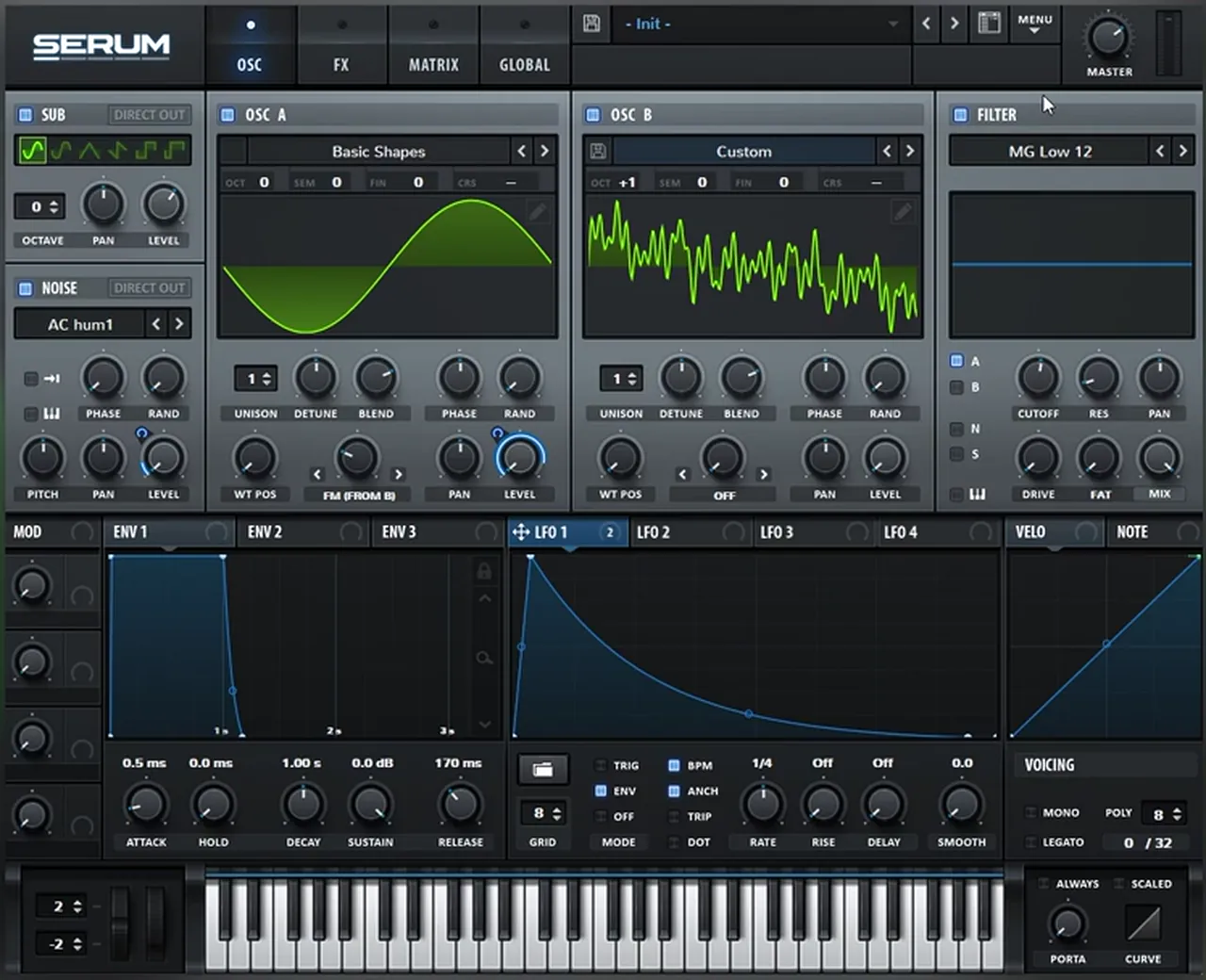
Remember what the sound is made of: noise, an FM layer and some sub, bricked together with distortion (watch at 8:28). So play with the distortion amount, the amount of sub, the combination of harmonics, the filter and the FM amount; each gives a different movement. To finish (watch at 9:36), we raise oscillator B’s octave (+1 on screen), tame some of the harmonics and bring down the FM movement. After a bit of fine-tuning, this is where it lands:
Listen: the finished bass after fine-tuning11 sec
For where a bass like this sits among the styles, see the neurofunk section of our subgenres guide.
Common mistakes with FM basses and noise hits in Serum
- Leaving oscillator B audible. In the FM bass, oscillator B is only a modulator. Keep its level all the way down, or it will muddy the sine you’re modulating.
- Distorting the noise hit and the sub in one patch. Split them. The noise layer can be as harsh as you want while the low-passed copy keeps the sub clean.
- A static FM amount. The movement comes from automating the FM knob and the filter cutoff. Without automation the bass sits still.
- Fixing everything with plug-ins. If the post-processed sound is too intense, change the patch: fewer harmonics, less noise, a higher filter start, a quieter sub.
- Too much reverb before the saturator. Automate the dry/wet so it only opens up where you want it; the Saturator and OTT will amplify whatever tail is there.
- Chasing an exact copy. This is a recreation to learn from. Change the noise sample, the octaves and the harmonics until it’s yours.

Free download
Free DnB samples for your next bass session
A bass only proves itself next to drums. The 174 Marathon Sample Pack, made for International Drum & Bass Day and our 174 Production Marathon, gives you material to build a loop around it:
- 100+ samples
- Drums, bass and FX
- Melodics and more
- Royalty-free for your own releases
You get it in DNB Academy Free Access, together with six more free sample and preset packs, the mixing and mastering e-books and the 3‑day DnB challenge. 40,000+ producers have joined Free Access. Free account, no card needed.
Go deeper
Future and neuro bass courses, plus Serum presets
Want more FM, noise and post-processing techniques for heavy basses?
 Production courseSynergy production courseNeurofunk / Future: drums, layered bass design, arrangement and mixdown, with presets, samples and project files.
 Production courseJon Tho production courseA track built from the ground up: designing your own drums, basses and synths and mixing them as you go, with the files, presets and templates.
 Preset bundle · SerumMolecular Serum preset bundle100 Serum presets for funky, techy, jump up and roller styles: 35 basses, 11 pads, 11 FX, 13 synths and 30 drum sounds, plus every preset as a WAV file.
Every artist course, preset bundle and sample pack is also in The Vault. Browse courses
Related tutorials
All tutorials → Vital · Future DnBHow to Make a Future DnB Noise Bass Hit in Vital, Like IMANU and Buunshin6 min read · Video + guide
 Serum · RecreationHow to Make a Foghorn Bass Like IMANU & Buunshin’s “Nagow” in Serum8 min read · Video + guide
 Serum · BassHow to Make a Reese Bass for Drum and Bass15 min read · Video + guide
 Serum · Bass designHeavy DnB Bass Sound Design in Serum with Current Value10 min read · Video + guide
FAQ: making basses like Buunshin’s “Acolyte” in Serum
How do you make a bass like Buunshin’s “Acolyte” in Serum?
Build two sounds. For the noise hit, distort a sine and a noise sample together with Tube distortion, a multiband compressor and an EQ, then duplicate the patch and turn the copy into a low-passed sub. For the main bass, let a quiet sine on oscillator B frequency-modulate oscillator A with the FM (FROM B) warp, automate the FM amount, add a sub and noise on an LFO envelope, distortion and an automated low-pass filter, and draw your own harmonics on oscillator B. Then add EQ, Overdrive, reverb, a Saturator, OTT, a second EQ and chorus.
Is this the exact bass from “Acolyte”?
No. It’s our own recreation, built from init patches in Serum. It isn’t the same sound, but it shows the principles behind it, so you can change the noise sample, the octaves or the harmonics and get different basses of your own.
Why turn oscillator B’s level all the way down?
In this patch oscillator B is only an FM source. Oscillator A’s FM (FROM B) warp uses it to add harmonics, so you don’t need to hear it directly. With its level down, the sound you hear is oscillator A being modulated, plus the sub and noise.
Why split the noise hit into two layers?
So the noise can be distorted hard while the low end stays clean. The copy of the patch gets a low-pass EQ, less drive, no multiband compression, no noise and less gain, which leaves a sub. Mixing the two layers gives you the full hit.
What can I use instead of Ableton’s Overdrive?
Anything that lets you focus distortion on specific frequencies. The video suggests FabFilter Saturn or Trash 2 if you’re not on Ableton Live.
Can I make this bass in Vital instead of Serum?
The principles carry over. Vital is free and has FM between oscillators, a noise sample source and a harmonic editor, so you can follow the same steps. Our future DnB noise bass in Vital tutorial is a good starting point for the noise hit.
Next steps
Start with the noise hit: a sine and a noise sample into Tube distortion, then split off a sub. Then build the FM bass, and spend your time on oscillator B’s harmonics and the automation. For more bass types and when to use them, read our drum and bass bass guide; for another Serum recreation from the same series, try a bass like Monrroe’s Out of Time in Serum.
Free Access
Seven free DnB sample and preset packs, including the 174 Marathon Sample Pack, plus mixing and mastering e-books and a 3-day challenge for Ableton Live and FL Studio.
Get free packsThe full guide
Tempo, drums, sub, mid bass, chords, arrangement and mixdown: every step of a DnB track.
Read the guideDNB Foundations
A structured drum and bass course with weekly live feedback calls on your tracks.
See Foundations1:1 Mentorship
Personal guidance on your music from a mentor, built around your goals.
See the mentorship50,000+ producers have joined DNB Academy, and our producer Discord has 5,300+ members.