Vital · Future DnB · Bass design
How to Make a Future DnB Noise Bass Hit in Vital, Like IMANU and Buunshin
To make a future DnB noise bass hit in Vital, layer two sine oscillators with a quiet white-noise sampler, FM oscillator 1 from oscillator 2, high-pass the noise, and give the pitch a fast envelope. Then notch, distort and multiband-compress the whole patch in Vital’s effects. It is our take on the signature noise stab you hear in a lot of future drum and bass, in the style of artists like IMANU and Buunshin, built from an initialised patch in our 4-minute video.
New to bass design? Our guide to every drum and bass bass type covers subs, reeses, neuro and more. This page builds one sound: a short, noisy future DnB hit.
Quick answer
How do you make a future DnB noise bass hit in Vital?
Start from an initialised patch. Load a sine in oscillators 1 and 2, turn on the sampler’s white noise at a low level, mute oscillator 2 and use it to FM oscillator 1 by about 3%. High-pass the noise around 2000 Hz, map envelope 2 to the pitch with a short decay, then add a notch filter around 500 Hz, distortion and a multiband compressor.
- Set up the layers.Two sine oscillators and the sampler on white noise.
- Add a little FM.Oscillator 2 silent, FMing oscillator 1 by about 3%.
- Filter the noise.Ladder 24 dB high-pass at around 2000 Hz.
- Add a pitch envelope.Envelope 2 on the pitch, 12 semitones, 0.6 s decay.
- Notch it.A digital notch around 500 Hz in the effects.
- Distort and compress.Drive up, then a multiband compressor after the distortion.
- Balance and fine-tune.More oscillator 1, a little less noise.
- Post-process.A little EQ and compression in your DAW.
Our 4-minute Vital tutorial on the future DnB noise hit. Every step below links to the moment in the video.
What you’ll need
- Vital. Everything in the patch uses Vital’s own oscillators, sampler, filters, envelope and effects. Vital has a free version, so you can follow along at no cost.
- A DAW. The video finishes in Ableton Live with EQ Eight and the Glue Compressor. Any DAW’s stock EQ and compressor will do the same job.
- A drum loop to test it with. A noise hit only really makes sense next to a kick and snare, so have a beat ready to check it in context.
1.Set up the oscillators: two sines and white noise
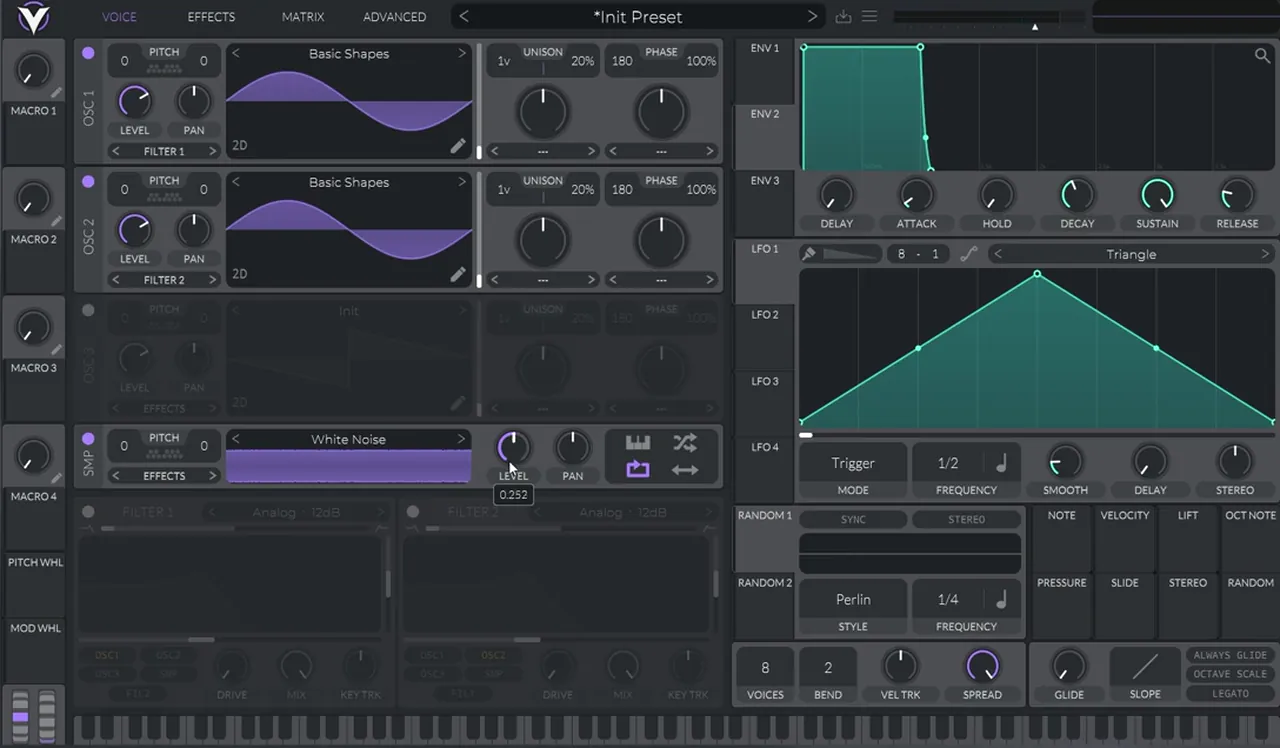
The noise hit is three layers: a sine in oscillator 1, a sine in oscillator 2 and white noise from Vital’s sampler. The sines give the hit its body and the noise gives it the bright, noisy top, so keep the noise low from the start.
Starting from an initialised patch (watch at 0:19), turn on oscillator 2 and load a simple sine wave from Basic Shapes in both oscillators. Then turn on the sampler and leave it on its default White Noise, but bring its level down to around 0.25. In the video the knob reads 0.252.
2.Add a little FM from oscillator 2
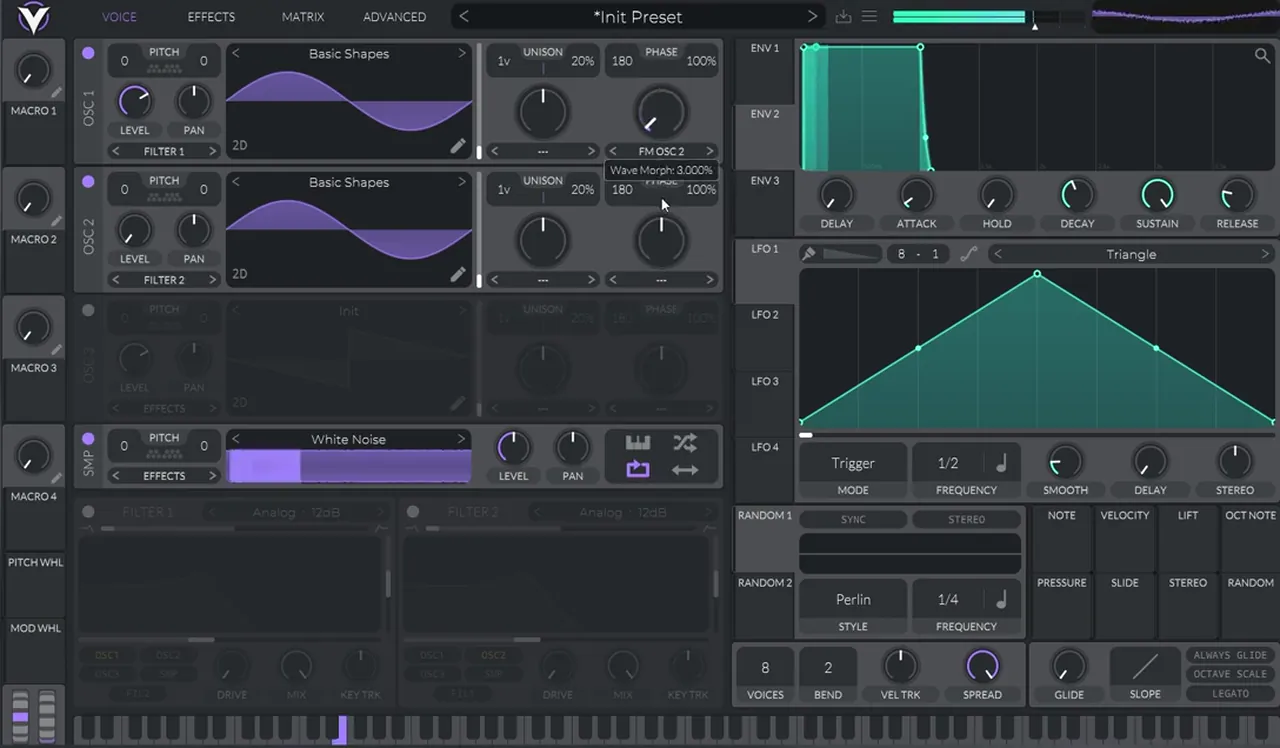
Use a silent oscillator 2 as an FM source for oscillator 1. You won’t hear oscillator 2 itself, only its effect on oscillator 1’s tone, and a small amount is plenty.
Bring oscillator 2’s level all the way down (watch at 0:40). On oscillator 1, set the phase/distortion mode to FM OSC 2 and turn the amount up to around 3%. The tooltip shows Wave Morph at 3.000%. FM between two sines adds extra harmonics to what was a plain sine wave.
3.High-pass the noise layer
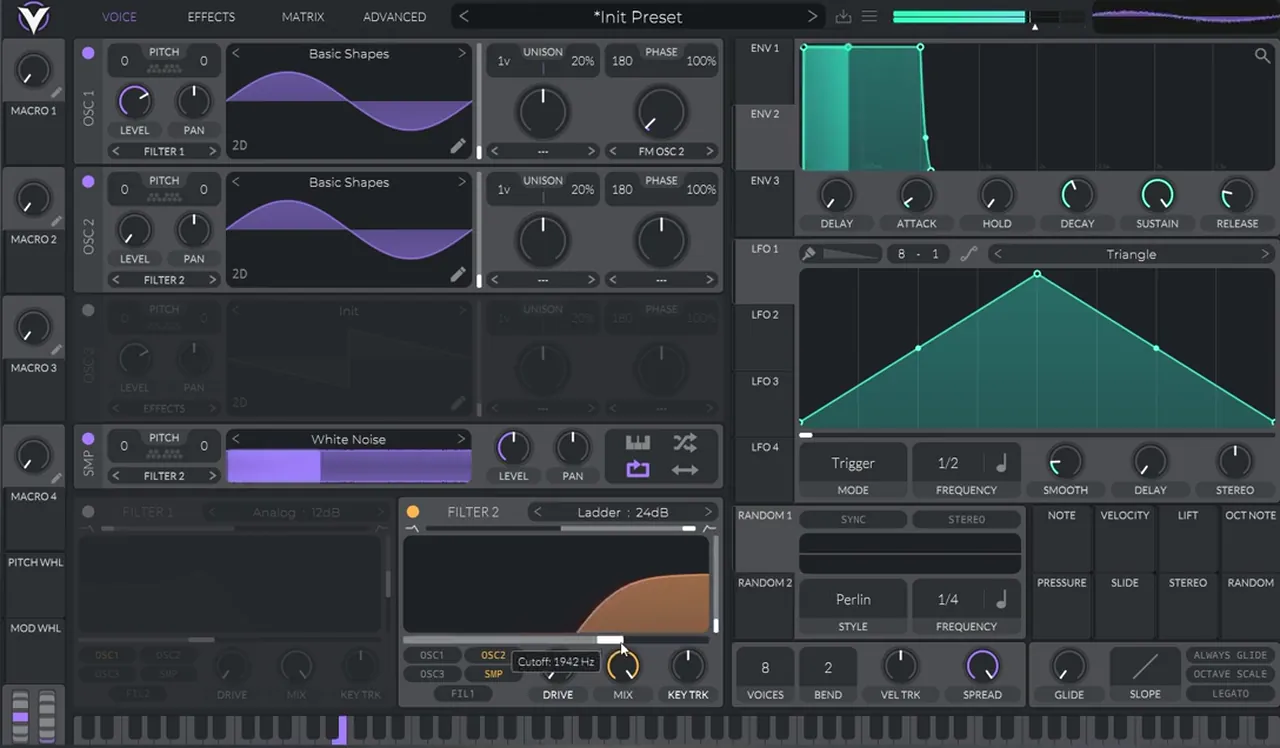
Give the noise its own high-pass filter, so it only adds top end above the sine body. The result is a lighter noise layer.
Route the sampler into filter 2 and change the filter’s mode to Ladder 24 dB (watch at 0:53). Switch it to high-pass, bring the resonance all the way down and set the cutoff to around 2000 Hz. In the video it lands at 1942 Hz. Oscillator 1 stays on filter 1, which is still switched off, so the sine body passes through untouched.
4.Add a pitch envelope for the hit
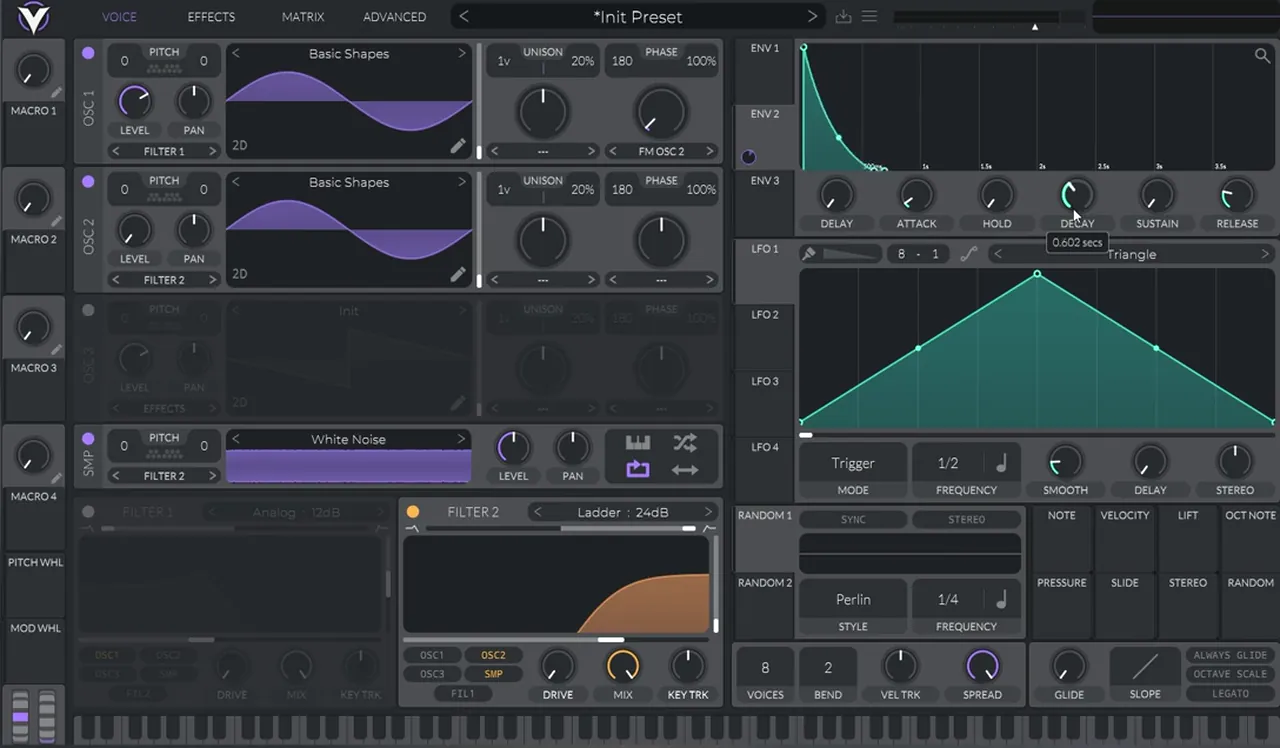
A fast pitch drop is what turns a sustained tone into a hit. Map envelope 2 to oscillator 1’s pitch with a range of 12 semitones, take the sustain to zero and set a short decay of about 0.6 seconds.
Drag envelope 2 onto the pitch of oscillator 1 and set the modulation range to 12 semitones (watch at 1:15). Bring envelope 2’s sustain all the way down and make a short decay: the knob shows 0.602 seconds. Then play with the curve of the decay: bending it changes how fast the pitch falls at the start of the hit.
5.Notch it in Vital’s effects
A notch filter in Vital’s effects cuts a narrow band out of the whole patch, around 500 Hz, before it reaches the distortion.
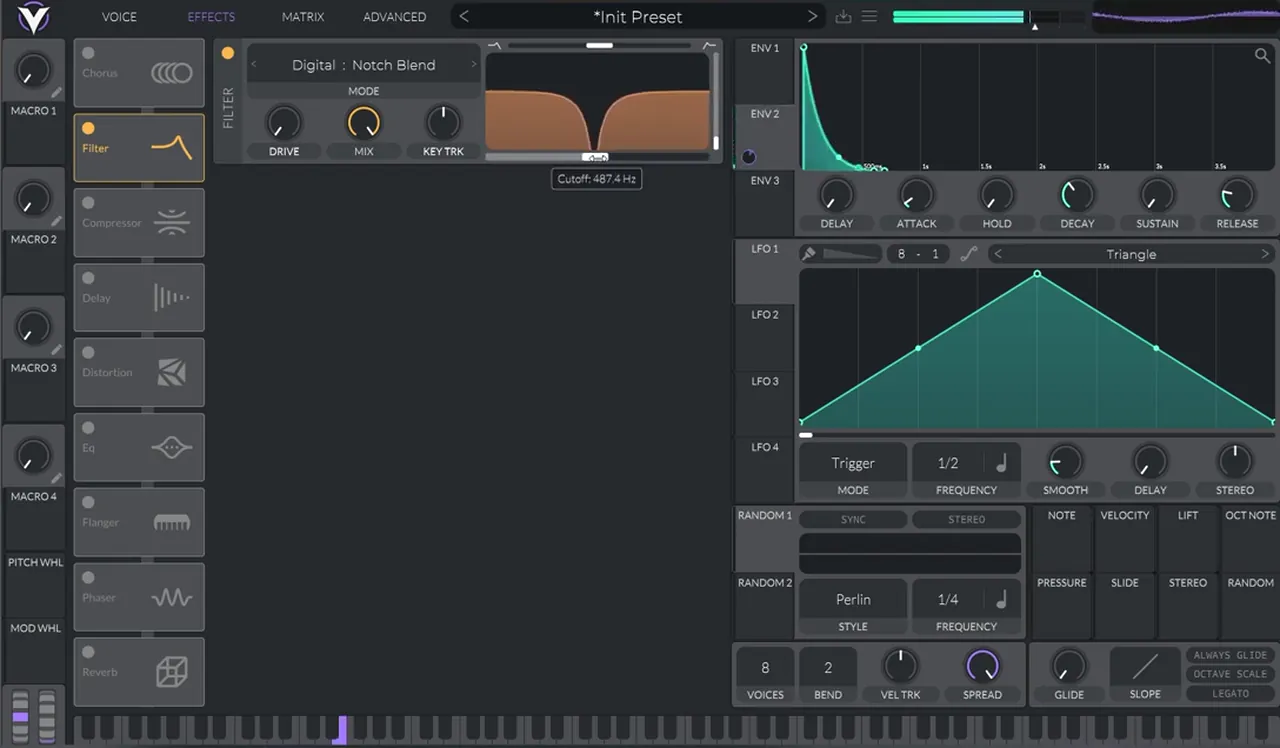
Jump to the effects, “where the magic happens” (watch at 1:36). Turn on the filter effect and change its mode to Digital, then Notch Blend. Move the fader on top of the filter display until it becomes a notch, bring the resonance all the way down and sweep the notch to around 500 Hz.
6.Distort it, then add a multiband compressor
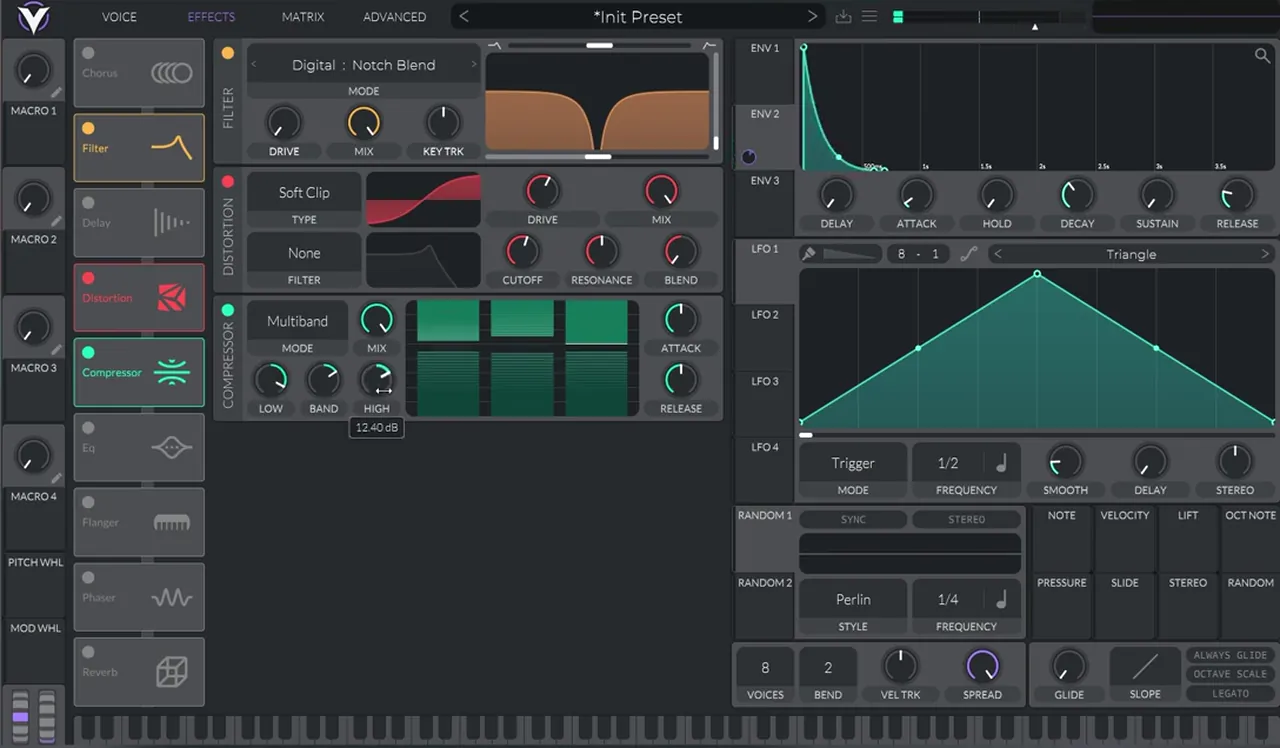
Turn on the distortion and boost the drive a bit, then add the compressor in multiband mode after the distortion. Then boost the lows and pull the highs down a little.
Turn on the distortion module and raise the drive a little (watch at 1:56). In the video it stays on its default Soft Clip type. As the video puts it: “we’re getting there”.
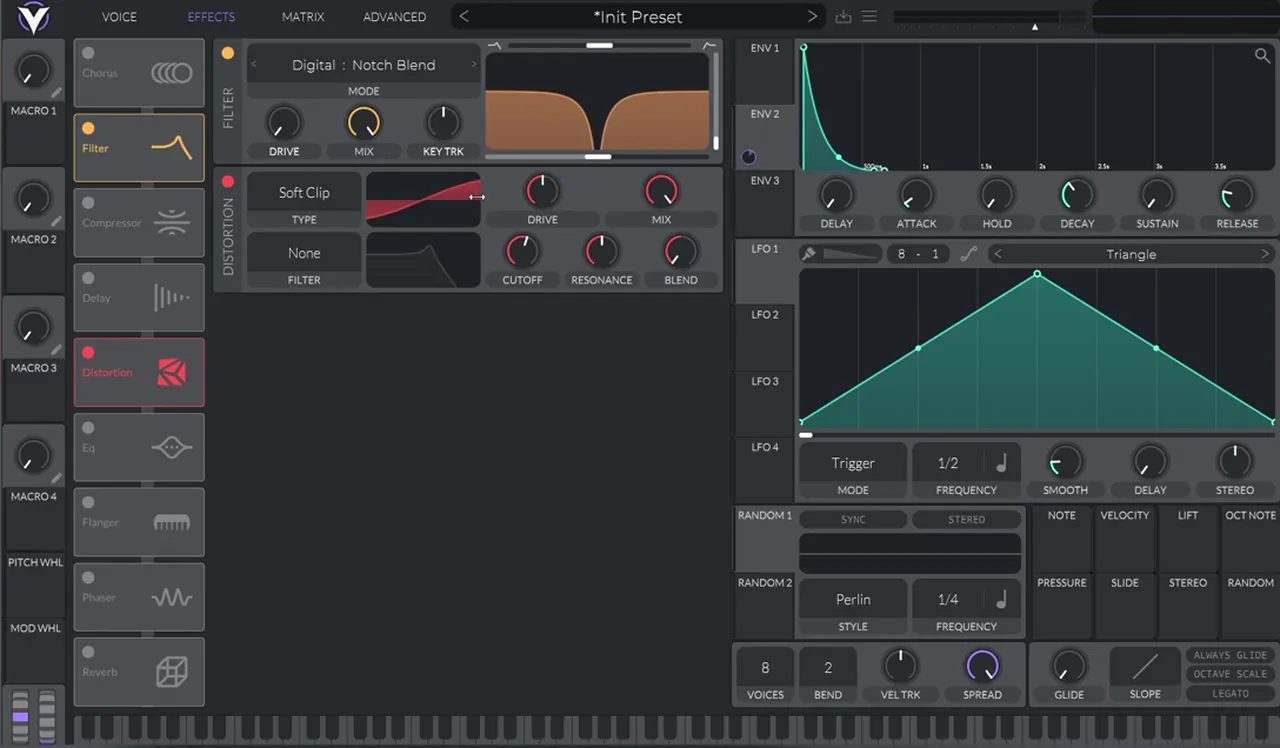
Listen: the noise hit with the notch filter and the distortion on5 sec
Next, turn on the compressor, set it to Multiband and drag it below the distortion so it comes after it (watch at 2:10). Then boost the low band and reduce the high band a bit.
7.Balance the layers and fine-tune
With the effects in place, rebalance the layers: more oscillator 1, a bit less noise. From there it is all fine-tuning by ear.
Back on the voice tab, turn oscillator 1 up and pull the sampler’s white noise down a little: it ends up at around 0.23 in the video (watch at 2:23). Then fine-tune by ear. You can change the filter, change the curve on the pitch envelope, change the FM amount or change the distortion. Small moves on any of these change the character of the hit, so play it against your drums as you go.
8.Post-process it in your DAW
Finish with a little EQ and compression on the Vital track, then listen to the hit in context with drums.
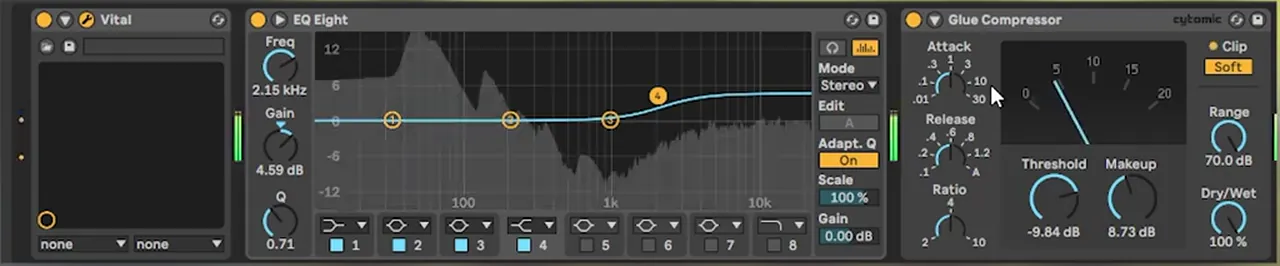
For post-processing, the video adds “a bit of EQ and compression” (watch at 2:58). On screen, EQ Eight has a high shelf (band 4) at 2.15 kHz boosted by 4.59 dB, and the Glue Compressor shows a threshold of -9.84 dB, 8.73 dB of makeup gain, Soft clip on and 100% dry/wet. Then it’s time to hear the sound in context.
Listen: the finished noise bass hit in context12 sec
Want a similar short, aggressive hit with a different flavour? Our neuro stab bass in Vital with Icicle builds one from a different starting point, and the free Vital Starter Preset Pack gives you finished patches to compare against.
Common mistakes with a future DnB noise hit
- Noise too loud. Start the sampler at around 0.25 and pull it lower once the effects are on. The sines carry the hit; the noise is the top layer.
- Leaving resonance up. Both the noise high-pass and the notch have their resonance all the way down in the video.
- Too much FM. About 3% from a silent oscillator 2 is enough. Distortion will exaggerate it later.
- A slow pitch envelope. Zero sustain and a short decay (about 0.6 s) make it a hit rather than a long drop.
- Compressor before the distortion. Put the multiband compressor after the distortion, as in the video.
- Judging it solo. Balance and fine-tune it against your drums, then check it in context.

Free download
Free Vital presets to go with your noise hit
Once your hit is built, take some finished drum and bass patches apart and compare. The Vital Starter Preset Pack is:
- A neuro DnB starter pack for Vital
- Neuro bass presets
- Pluck and lead presets
- Made for the free version of Vital
It’s one of seven free sample and preset packs in DNB Academy Free Access, alongside the mixing and mastering e-books and the 3‑day DnB challenge. Join 40,000+ producers in Free Access. Free account, no card needed.
Go deeper
Future DnB courses and Vital presets
Want to go beyond one sound and see how future and neuro tracks are built around it?
 Production courseScreamarts production courseNeurofunk / Future: high-impact basslines, cinematic atmospheres and sharp drums through a structured, step-by-step workflow.
 Production courseJon Tho production courseFuture / Deep: guided sessions and production assets on melodic leads, clean bass movement and atmospheric depth.
 Preset bundleIcicle Vital preset bundleDeep / Techy: Vital presets for deep, techy drum & bass.
Every artist course, preset bundle and sample pack is also in The Vault. Browse courses
Related tutorials
All tutorials → Vital · NeuroHow to Make a Neuro Stab Bass in Vital with Icicle8 min read · Video + guide
 Vital · Bass designDark, Minimal DnB Bass Sound Design in Vital7 min read · Video + guide
 Vital · Bass designHow to Make a Foghorn Bass in Vital6 min read · Video + guide
 Guide · SubgenresDrum and Bass Subgenres: 12 Types of DnBGuide
FAQ: future DnB noise bass in Vital
What is a future DnB noise bass hit?
It is a short, punchy bass stab with a noisy top layer, the kind of signature noise stab you hear in a lot of future drum and bass, in the style of artists like IMANU and Buunshin. In our Vital version, two sine oscillators give it body, high-passed white noise gives it the noisy top, and a fast pitch envelope, a notch filter and distortion turn it into a hit.
Can I make this noise bass with the free version of Vital?
Yes. The patch only uses Vital’s own sine waves from Basic Shapes, the sampler’s White Noise, the filters, an envelope and the built-in effects. Vital has a free version, so you can build it at no cost. The final EQ and compression happen in your DAW, and any stock EQ and compressor will do.
How do you FM one oscillator from another in Vital?
Turn on oscillator 2, then set oscillator 1’s phase/distortion mode to FM OSC 2 and raise the amount. In our patch it is about 3%, and oscillator 2’s level is turned all the way down, so you only hear its effect on oscillator 1, not oscillator 2 itself.
What filter settings does the noise layer use?
The sampler’s white noise goes to filter 2, set to Ladder 24 dB in high-pass mode with the resonance all the way down and the cutoff around 2000 Hz (1942 Hz in the video). That keeps the noise as a lighter top layer above the sine body.
Where does the notch filter go?
In Vital’s effects. Turn on the filter effect, choose Digital, then Notch Blend, move the fader on top until it becomes a notch, take the resonance down and set it to around 500 Hz. The distortion and then a multiband compressor come after it.
Is this the exact sound IMANU or Buunshin use?
No. It is our own take on the noise stab heard in a lot of future DnB, in the style of those artists, not a recreation of a specific track. Use it as a starting point and fine-tune the filter, envelope curve, FM amount and distortion until it fits your tune.
Next steps
Open Vital, initialise a patch and build the hit step by step, then try your own versions by changing the notch frequency, the FM amount and the envelope curve. To see where future DnB sits among the other styles, read our drum and bass subgenres guide.
Free Access
Seven free DnB sample and preset packs, including the Vital Starter Preset Pack, plus mixing and mastering e-books and a 3-day challenge for Ableton Live and FL Studio.
Get free packsThe full guide
Tempo, drums, sub, mid bass, chords, arrangement and mixdown: every step of a DnB track.
Read the guideDNB Foundations
A structured drum and bass course with weekly live feedback calls on your tracks.
See Foundations1:1 Mentorship
Personal guidance on your music from a mentor, built around your goals.
See the mentorship50,000+ producers have joined DNB Academy, and our producer Discord has 5,300+ members.