
Serum · Liquid bass · Recreation
How to Make a Classic Liquid Bass Like Netsky & Minos in Serum
To make a classic liquid bass like Netsky and Minos in Serum, start with a plain sine wave and add a single harmonic to it in the wavetable editor. Give it gentle movement with an LFO on the level, layer a sub underneath, then finish with a touch of soft clip, a chorus that only touches the upper harmonic, and a compressor. Below is our own recreation, presented by Paulo from DNB Academy, with every step, the values from the screen and audio of the patch as it grows.
This is a learning recreation of an old-school liquid bass sound, not an artist’s original sound or preset, and neither Netsky nor Minos is involved in the video. The point is the method: a sub plus one harmonic you choose on purpose. For every bass type in one place, see the liquid section of our drum and bass bass guide.
Quick answer
How do you make a classic liquid bass in Serum?
Load the sine from Basic Shapes on oscillator A. In the wavetable editor, add one harmonic at bin 6, at around 45%. Map LFO 1 to oscillator A’s level, set it to Trig with BPM off and find a rate you like. Turn on a sine sub and boost its level. Then add SoftClip distortion with a little drive, a chorus switched to its high-pass filter at around 300 Hz, and a compressor with the gain turned up.
- Sine.Basic Shapes on oscillator A, so you only hear a sub.
- Harmonic.Bin 6 at around 45% in the wavetable editor.
- Movement.LFO 1 on the level, Trig mode, BPM off.
- Sub.A sine sub, level boosted.
- Warmth.A little SoftClip and a high-passed chorus.
- Power.A compressor with the gain up.
The full walkthrough with Paulo from DNB Academy (4:11): an old-school liquid bass in the style of Netsky and Minos, built from an initialised Serum patch in Ableton Live. Each step below links to its moment in the video.
What a classic liquid bass does in a track
A classic liquid bass is warm, round and simple: a strong sub with a little tone on top, so it supports the chords and vocals instead of competing with them.
In heavier styles the mid bass is often the main event. In old-school liquid it plays a supporting role. Most of the weight sits in the sub, and a small amount of harmonic content on top lets you hear the bassline on smaller speakers and gives it a recognisable colour. That’s why this patch is so short: as Paulo puts it in the video, you basically need a sub and then a way to add harmonics to it to get the tone. Every step after that is about keeping the sub solid while the upper harmonic gets a bit of life.
If you’re new to the style, the liquid section of our subgenres guide explains where it sits next to the other styles of drum and bass.
What you’ll need
- Serum. The patch uses oscillator A, the wavetable editor, the sub oscillator, LFO 1 and the built-in Distortion, Chorus and Compressor effects. Don’t have Serum? Vital is free and can do the same job: a sine you can edit with harmonics, a sub, an LFO on the level, distortion, chorus and compression.
- A DAW. The video uses Ableton Live, but any DAW works, because everything happens inside the synth.
- A simple bassline to test with. A few long notes are enough to hear the harmonic and the movement.
1.Start with a sine wave
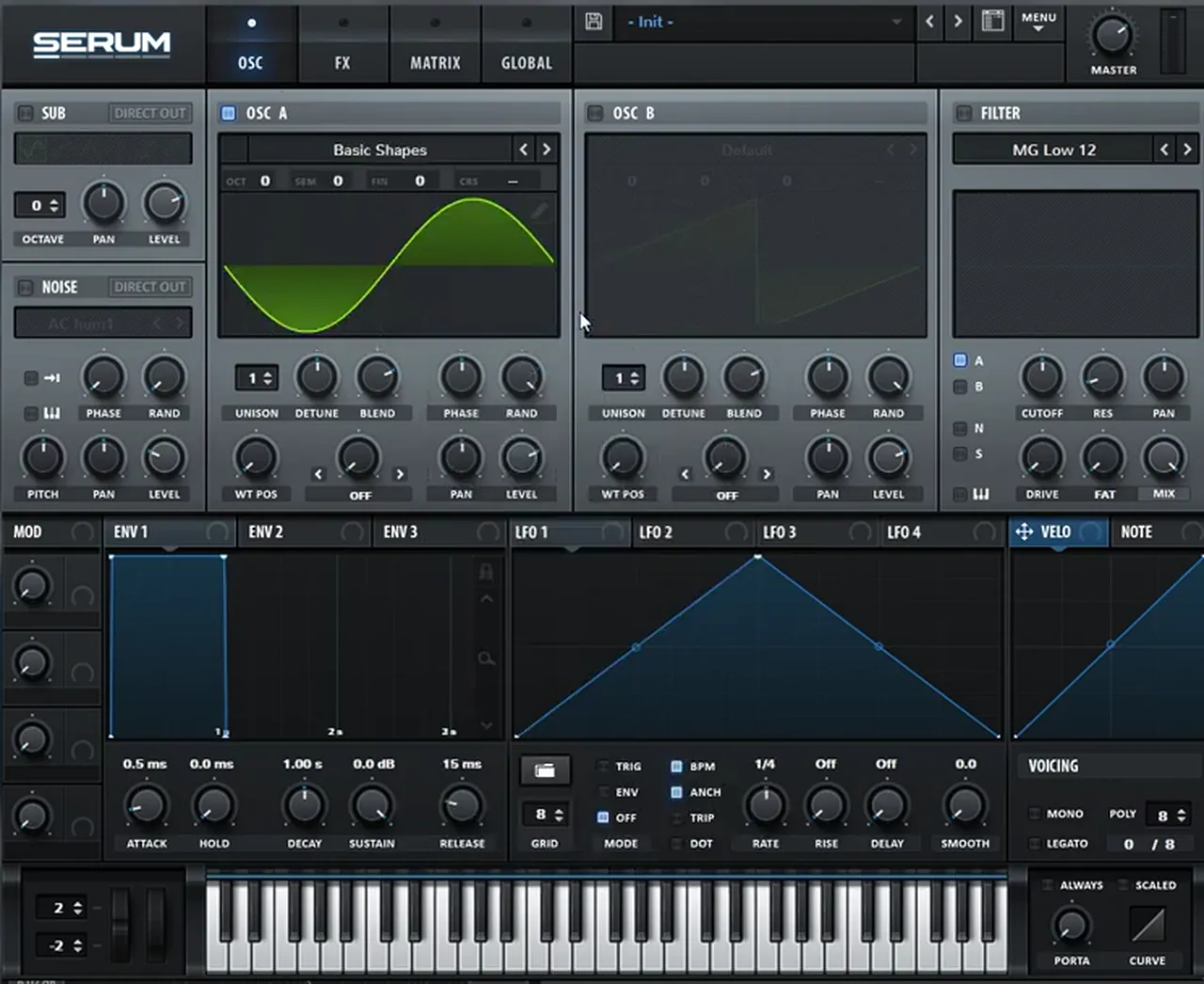
Load the Basic Shapes wavetable on oscillator A and pick the sine. On its own, you should hear just a sub.
Begin with an initialised Serum patch (watch at 0:49). On oscillator A, load the Basic Shapes wavetable and pick the sine. Oscillator B stays off for the whole patch. A sine has no harmonics of its own, so at this point the sound is just a sub: the blank canvas you’ll add tone to in the next step.
2.Open the wavetable editor and read the bins
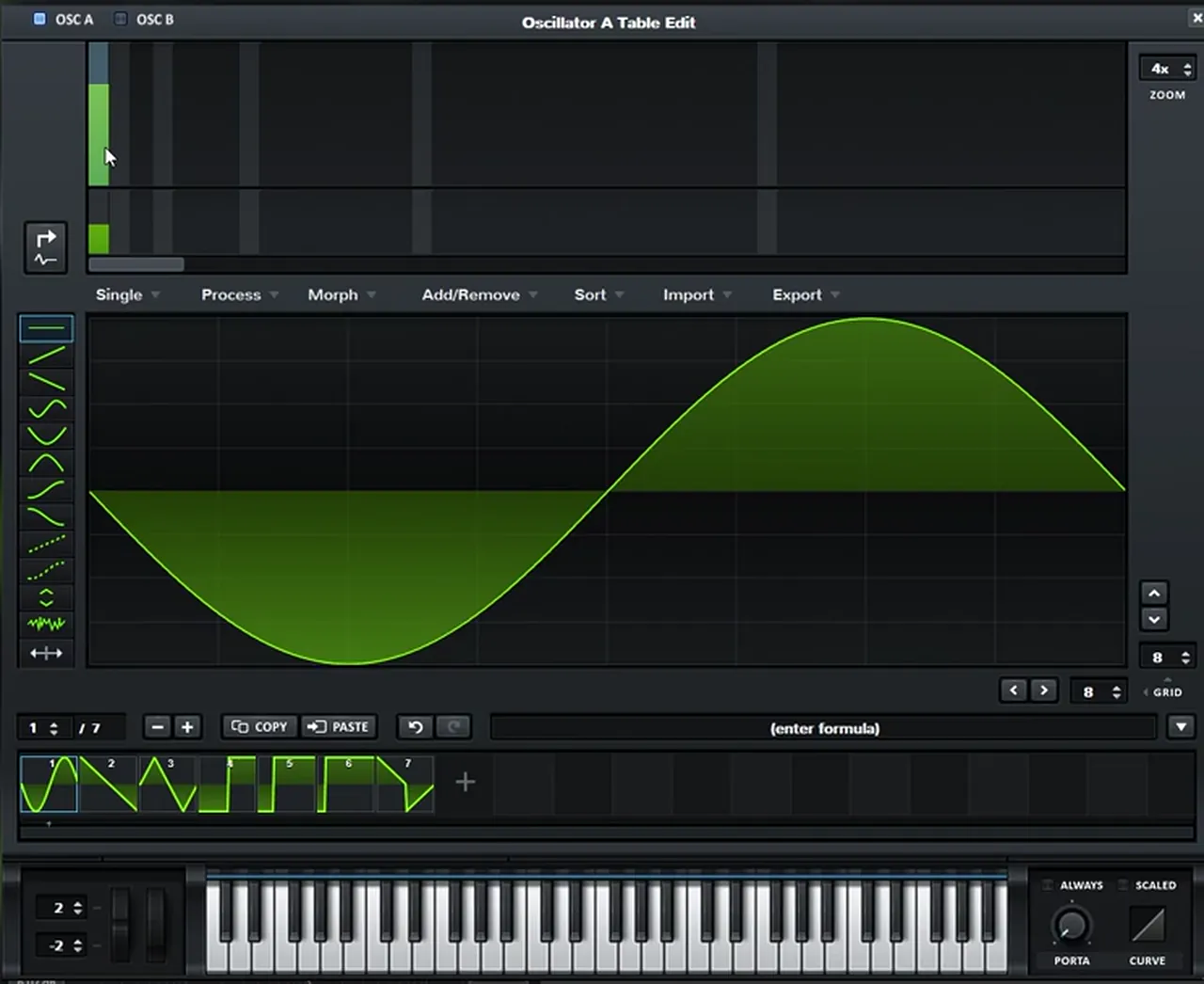
The wavetable editor can show the sine as harmonic bins. Each bin number multiplies the fundamental frequency by that whole number.
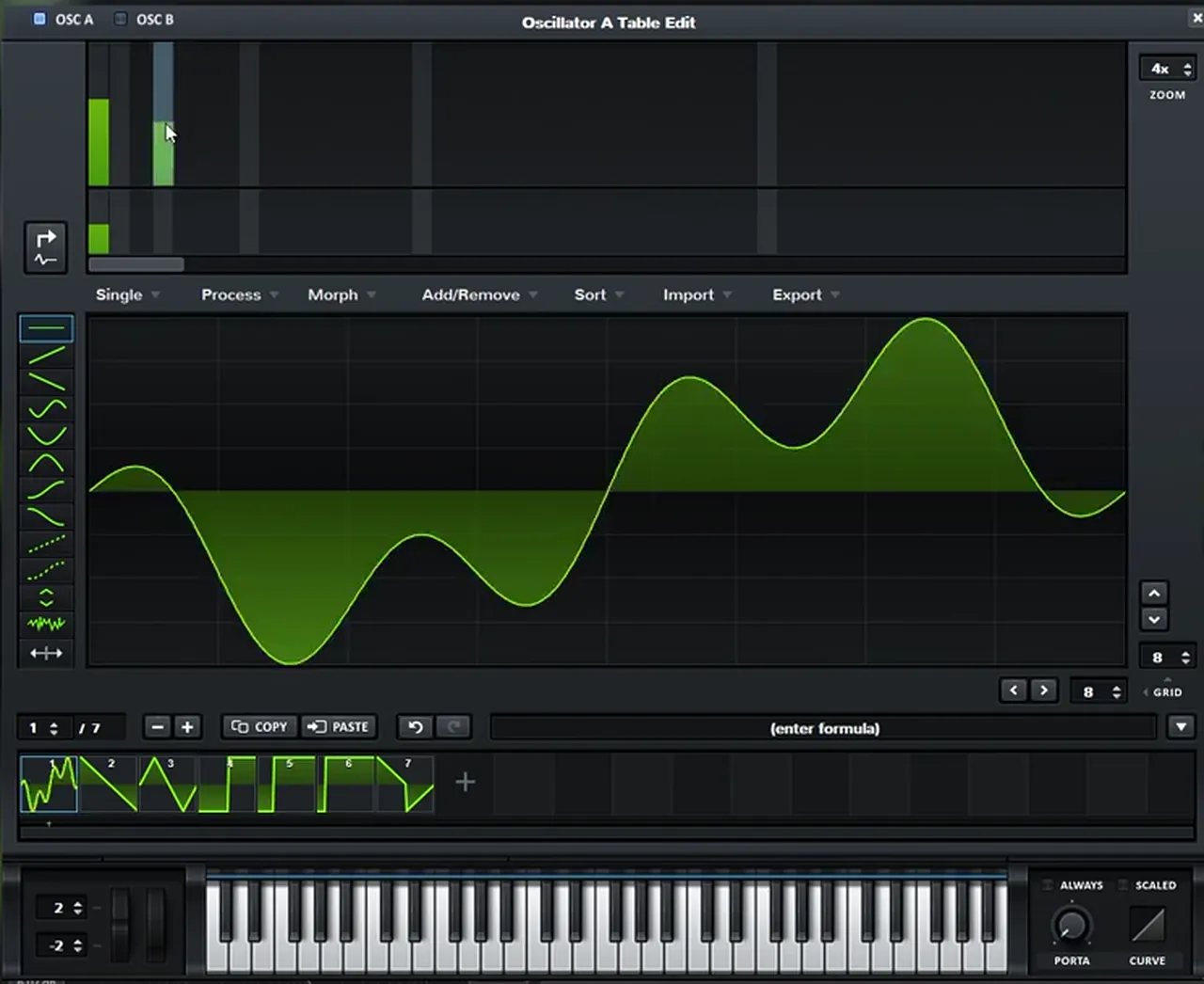
Open the wavetable editor (watch at 0:57) and click the button on the left of the editor that translates the sine’s harmonics into the window at the top. You’ll see bin 1, 2, 3, 4 and so on. With a pure sine, only bin 1, the fundamental, is up.
The numbers matter. Each bin multiplies the fundamental frequency by its number, so bin 2 is twice the fundamental and bin 10 is ten times it. Raising a bin adds exactly that harmonic to the wave, which is a precise way to give a sub some tone without reaching for a saw or a square and filtering it down.
3.Add one harmonic at bin 6
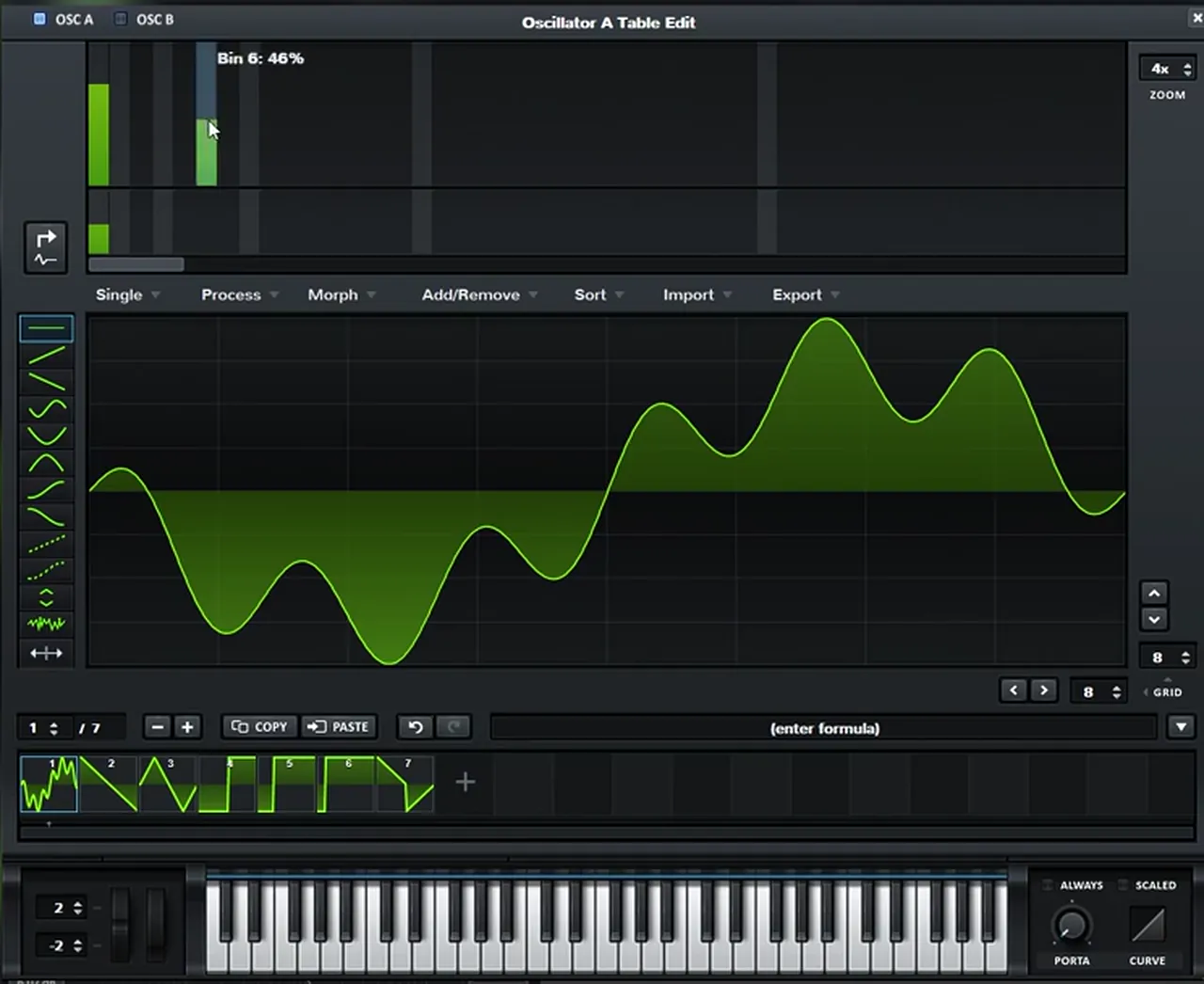
For this bass, the harmonic you need is in bin 6. Raise it to around 45% and leave the rest alone.
In the video Paulo auditions a few bins first (watch at 1:30). You can try other harmonics, and you can even mix several of them. For now, keep it simple: raise bin 6 to around 45% (the tooltip reads Bin 6: 46% on screen). The waveform changes from a smooth sine to a sine with a ripple on top, and that ripple is the tone of the bass.
4.Add movement with an LFO on the level
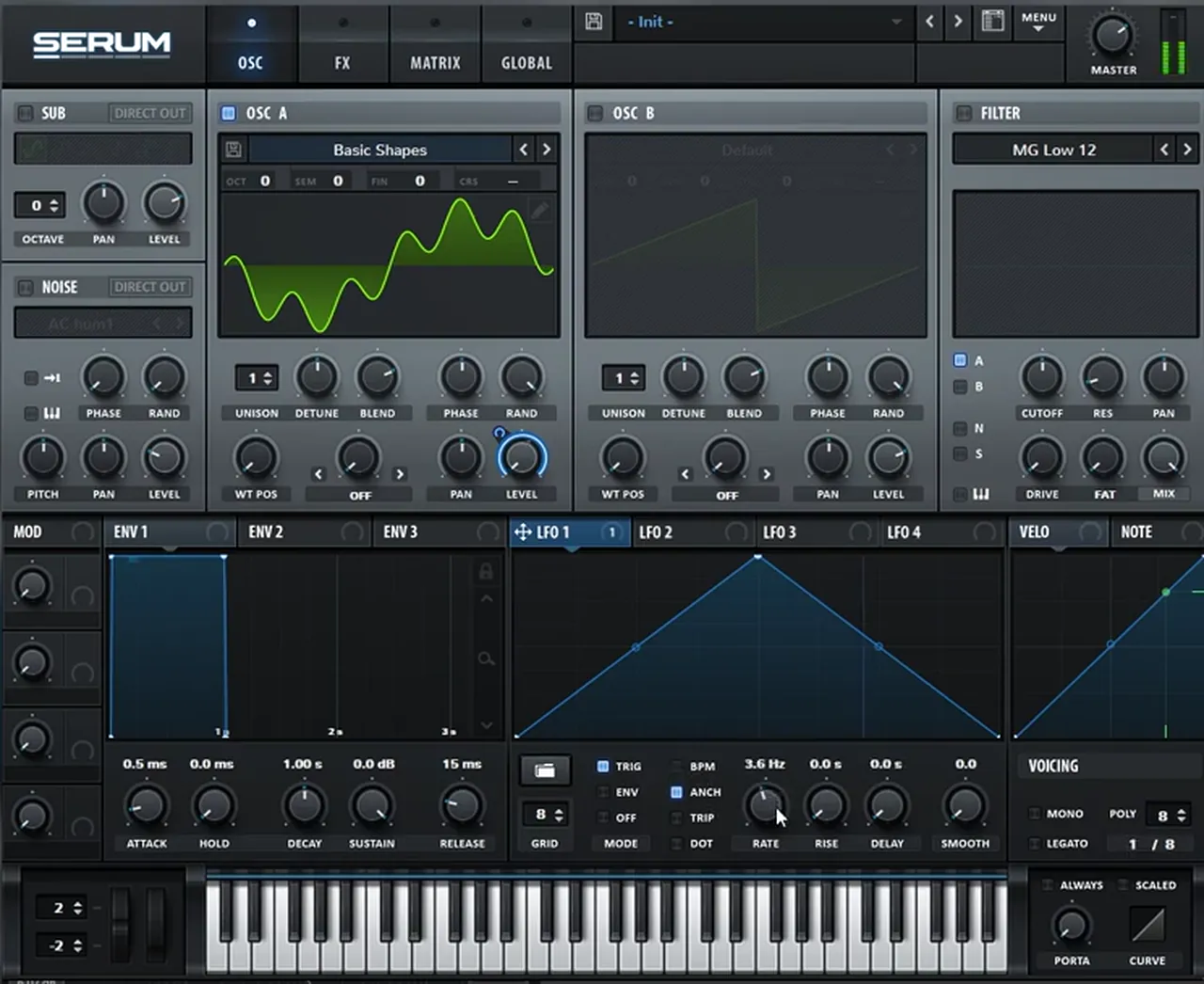
Map LFO 1 to oscillator A’s level, set it to Trig, turn BPM off and experiment with the rate. This gives the bass its gentle movement.
Back on the oscillator page (watch at 2:01), drag LFO 1 onto oscillator A’s level to create the movement. Set the LFO to Trig mode, so it restarts with every note, and turn off BPM so the rate is free instead of locked to the tempo. Then experiment with the rate. On screen it reads 3.6 Hz, and the LFO shape is bent into a curved rise and fall rather than a straight triangle.
Listen: the bin 6 harmonic with LFO 1 moving the level8 sec
5.Layer in the sub
Turn on Serum’s sub oscillator and boost its level, so there’s a strong fundamental under the moving harmonic.
The LFO moves oscillator A, so the low end moves with it. To fix that, layer in a sub (watch at 2:20) and boost its level so you have a stronger fundamental. On screen the sub uses the sine shape at octave 0, and it isn’t touched by the LFO, so it stays steady while the harmonic moves on top. For more on getting the low end right, read our guide to drum and bass sub bass.
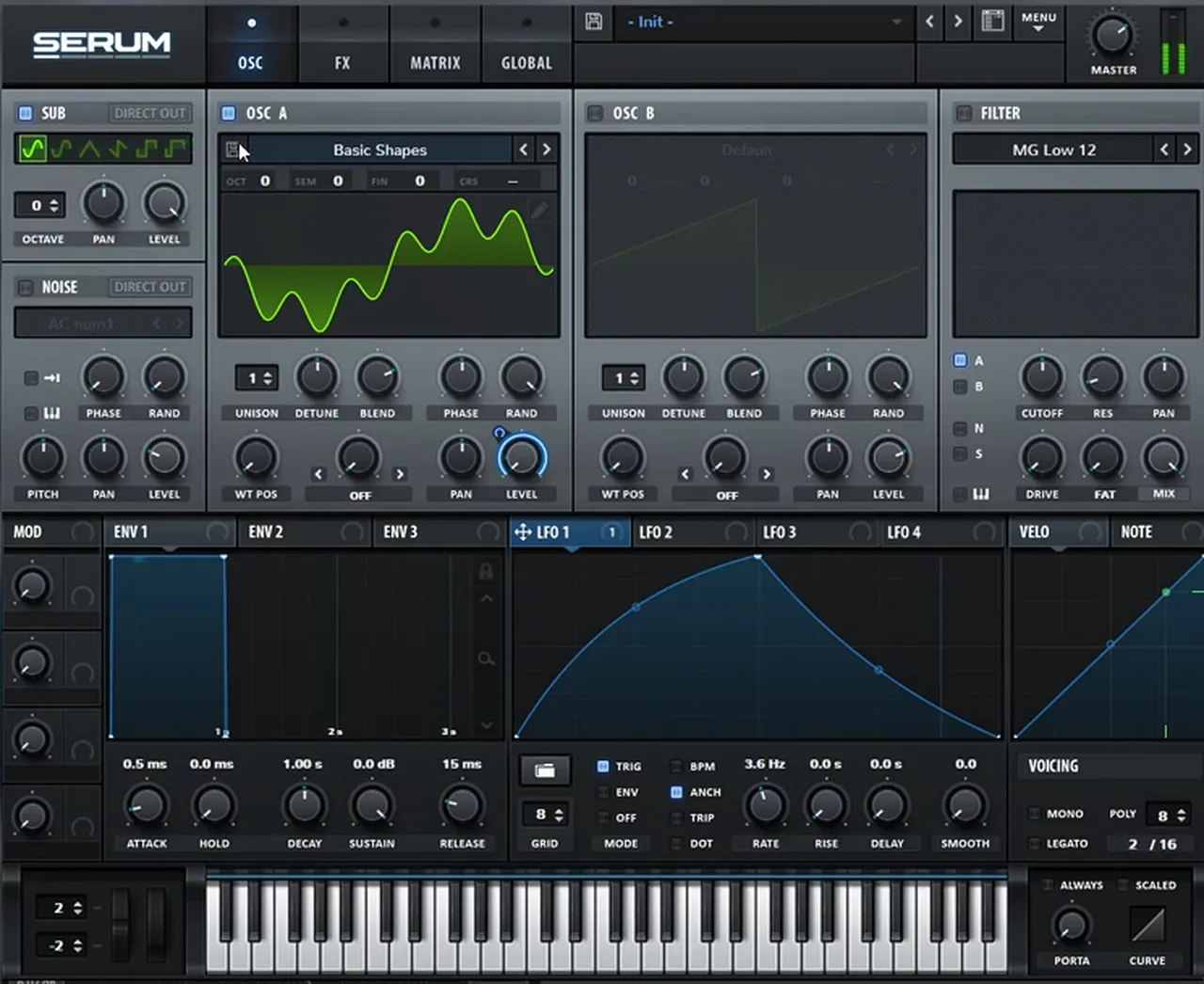
Listen: the patch with the sub layered in6 sec
6.Add a little SoftClip distortion
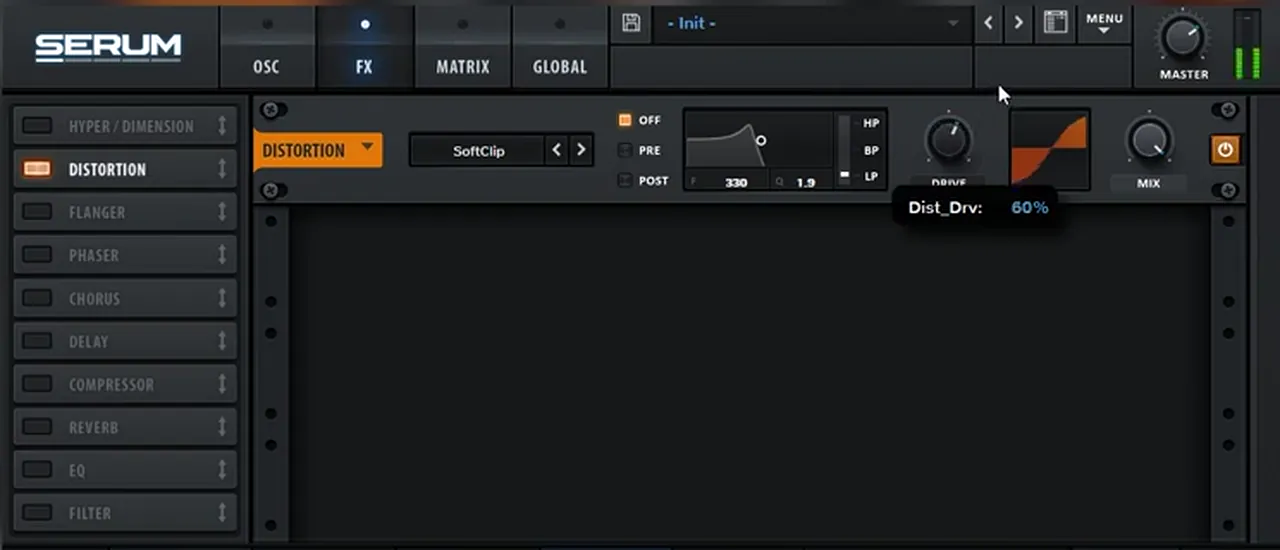
In the FX tab, turn on Distortion, select SoftClip and boost the drive just a little. This is warmth, not dirt.
Go to the FX tab (watch at 2:31), turn on Distortion and select SoftClip. Boost the drive just a little bit; it settles at around 60% on screen. Soft clipping rounds off the peaks gently, which adds a bit of extra harmonic content and density while the sound stays smooth, exactly what an old-school liquid bass needs.
7.Add a chorus, high-passed above the sub
Add a chorus, but switch its filter from low-pass to high-pass and set it at around 300 Hz, so it only affects the upper harmonic and leaves the sub alone.
Add a Chorus (watch at 2:43). You don’t want the chorus to affect the sub, so click the filter button to change it from a low-pass to a high-pass filter (the knob label changes to HPF) and set it at around 300 Hz. On screen the tooltip reads 340 Hz. That leaves the effect only on the upper harmonic: it gets wider and softer, while the sub underneath stays solid.
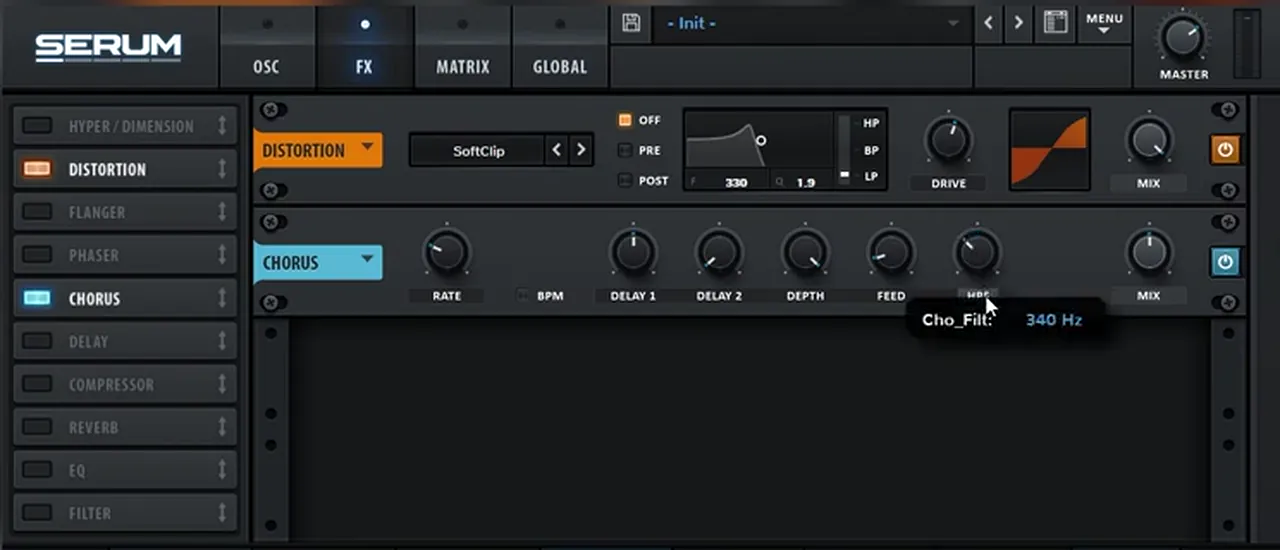
Listen: the patch after the high-passed chorus5 sec
8.Compress and boost the gain
Add Serum’s Compressor and boost the gain. Now you have a powerful, even sub with the harmonic sitting on top.
Finally, add the Compressor (watch at 3:04) and boost the gain. Our screenshot catches the tooltip at 7.8 dB while it’s still moving, so set yours by ear. The compressor holds the level steady and brings the quieter harmonic up, and the result is a pretty powerful sub. In the video Paulo then plays the bass in context with the rest of the project (watch at 3:13).
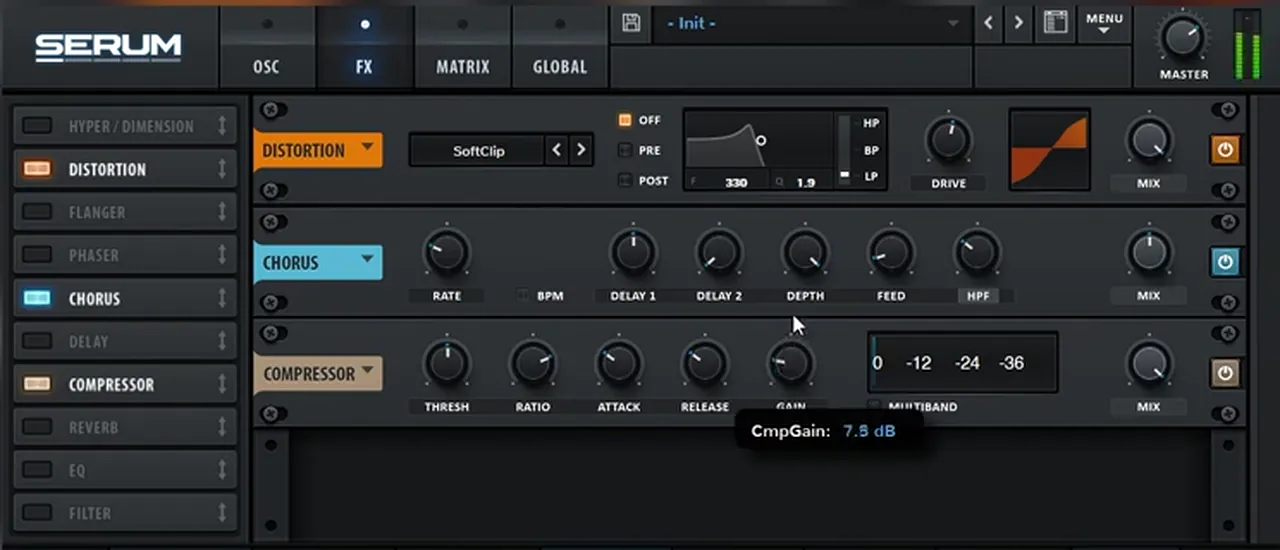
Listen: the finished patch with the compressor5 sec
9.Try other harmonics
The harmonic is the tone. Move it from bin 6 to bin 4 or bin 8 and the same patch gives you a different bass.
Once the chain is built, go back to the wavetable editor and experiment (watch at 3:24). You can change the harmonic from a 6 to a 4 or to an 8, which also sounds really cool, though the sound in the video stays on 6. Because every effect after the oscillator is already in place, swapping one bin is a quick way to build a small family of basses for different tracks.
How to play a classic liquid bass in a track
Keep the bassline simple and let it follow the chords. The sound has movement built in, so long notes often work better than busy patterns.
This kind of patch is made to support the music around it. A few practical tips for using it:
- Follow the chords. Playing the root note of each chord, or a simple line between them, keeps the low end clear under pads and pianos. Our liquid DnB chords guide shows how to write progressions to put it under.
- Let long notes breathe. The LFO is in Trig mode, so each new note restarts the movement. Long notes let you hear the whole movement; short, repeated notes restart it again and again.
- Test it against drums. A liquid bass that sounds big soloed can disappear under a rolling beat, or swamp it. Check it with your drums early; our liquid DnB drums tutorial shows how to build that beat.
- Change the bin, not the chain. If the bass clashes with a lead or vocal, try another harmonic before you reach for EQ.
Common mistakes with classic liquid basses
- Stacking too many harmonics. Mixing bins is fine, but this sound uses one. Start simple and add more only if the track needs it.
- Chorus on the sub. With the chorus filter left on low-pass, the effect reaches the low end. Switch it to high-pass, at around 300 Hz.
- Too much drive. The SoftClip drive only goes up a little. Past that point the bass stops sounding warm and smooth.
- Forgetting the sub. The LFO moves oscillator A’s level, so without the steady sub the low end pumps with it.
- Leaving the LFO on BPM. In the video BPM is turned off so the rate can be set freely. Find the rate by ear.
- Judging it soloed only. Check it in context with your drums and chords, as Paulo does at the end of the video.
Free download
Put your liquid bass over a real beat
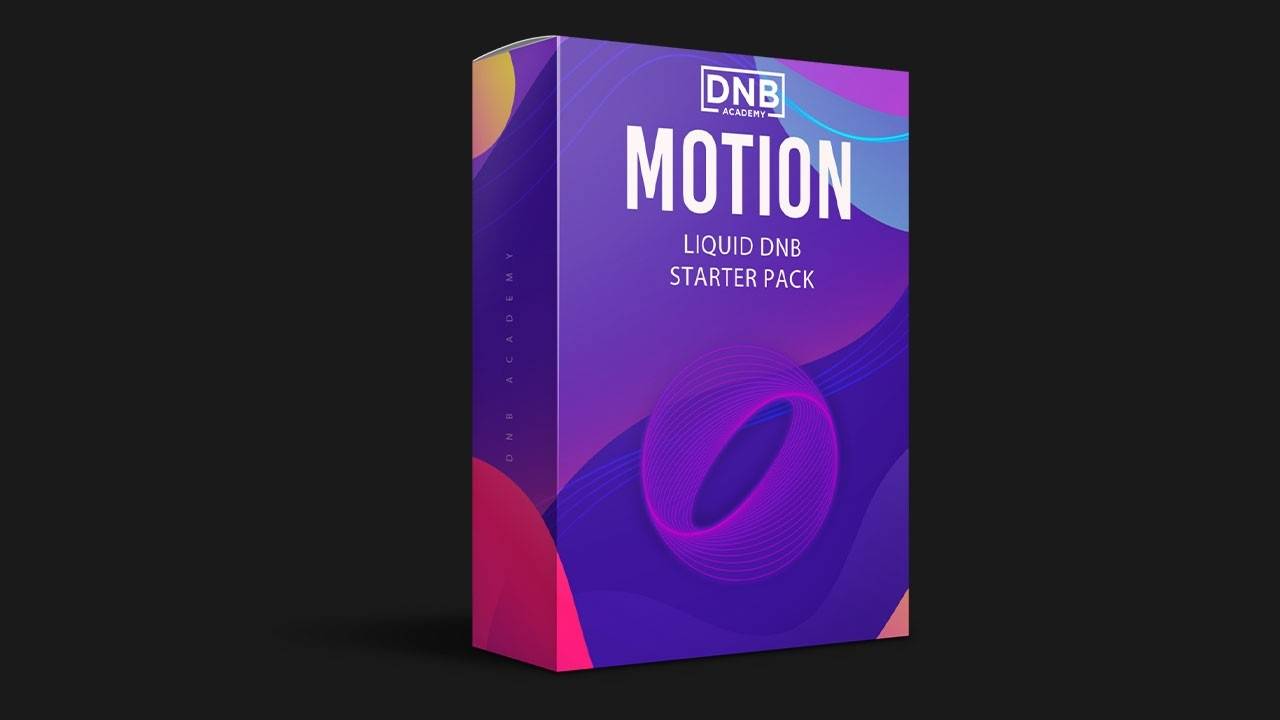
A warm bass like this is easy to overdo when you only hear it soloed. The Motion Liquid DnB Starter Pack gives you:
- 16 kicks, snares and top loops for rolling liquid drums
- 10 musical and FX samples
- 26 royalty-free samples in total
- FL Studio project files
It’s one of seven free sample and preset packs in DNB Academy Free Access, along with the mixing and mastering e-books and the 3‑day DnB challenge. Join 40,000+ producers in Free Access. Free account, no card needed.
Go deeper
More liquid sounds and full tracks
Want ready-made liquid sounds to take apart, or a full liquid track built from start to finish?
 Preset bundleTelomic Serum presets100 Serum presets for liquid, jungle and deep DnB, including 30 basses, 35 pads and 21 plucks.
 Production courseTelomic production courseA track from scratch in about 6 hours: music theory, bass synthesis and resampling, drums, atmospheres, arrangement, mixing and mastering, with the project file, stems, presets and samples.
 Sample packNova Future Liquid DNB sample packFuture and liquid DnB sounds: 25 drum loops, 15 top loops and 30 drum one-shots, plus bass loops, chords, melodies and 20 Serum presets.
Every artist course, preset bundle and sample pack is also in The Vault. Browse courses
Related tutorials
All tutorials → Serum · LiquidHow to Make a Liquid DnB Bass Like Random Movement in Serum18 min read · Video + guide
 Telomic · BassHow to Make Drum and Bass Sub Bass That Works on Any Speaker12 min read · Video + guide
 Liquid · ChordsHow to Write Liquid Drum and Bass Chords and Pianos18 min read · Video + guide
 FL Studio · LiquidHow to Make Liquid Drum and Bass in FL Studio11 min read · Video + guide
FAQ: making a classic liquid bass
How do you make a classic liquid bass like Netsky in Serum?
Start oscillator A on the sine from Basic Shapes. Open the wavetable editor and add one harmonic at bin 6, at around 45%. Map LFO 1 to oscillator A’s level in Trig mode with BPM off and set the rate by ear. Turn on a sine sub and boost its level, then add a little SoftClip distortion, a chorus switched to its high-pass filter at around 300 Hz, and a compressor with the gain turned up.
Is this Netsky’s or Minos’ actual preset?
No. It’s our own recreation of a classic liquid bass sound, built by Paulo from DNB Academy from an initialised Serum patch. Neither artist is involved in the video. The aim is to learn the method and use it for your own sound.
What do the harmonic bins in Serum’s wavetable editor mean?
Each bin is a whole-number multiple of the fundamental. Bin 1 is the fundamental itself, bin 2 is twice its frequency, and bin 10 is ten times its frequency. Raising a bin adds that harmonic to the wave.
Why high-pass the chorus?
So the chorus only affects the upper harmonic and leaves the sub alone. A chorus on the low end makes the sub weaker and less solid, so the filter is switched from low-pass to high-pass and set at around 300 Hz.
Which harmonic should I use?
The sound in the video uses bin 6. Bins 4 and 8 also sound good, and you can mix several harmonics, so try a few and keep the one that fits your track.
Can I make this bass in Vital?
Yes. Vital is free and has what you need: a sine oscillator you can edit with harmonics, a sub, an LFO on the level, distortion, chorus and compression. The names and screens differ, so follow the steps rather than the exact values.
Next steps
Build the sine and the bin 6 harmonic first, and only add the LFO and effects once that tone sounds right to you. For a second liquid bass in Serum, try our liquid DnB bass like Random Movement; to see a full liquid track come together, watch Telomic make a liquid DnB track in Ableton; and for more bass types and when to use them, see our drum and bass bass guide.
Free Access
Seven free DnB sample and preset packs, including the Motion Liquid DnB Starter Pack, plus mixing and mastering e-books and a 3-day challenge for Ableton Live and FL Studio.
Get free packsThe full guide
Tempo, drums, sub, mid bass, chords, arrangement and mixdown: every step of a DnB track.
Read the guideDNB Foundations
A structured drum and bass course with weekly live feedback calls on your tracks.
See Foundations1:1 Mentorship
Personal guidance on your music from a mentor, built around your goals.
See the mentorship50,000+ producers have joined DNB Academy, and our producer Discord has 5,300+ members.