Vital · Deep FM bass · Recreation
How to Make a Deep Bass Like Skeptical’s “Desire” in Vital
To make a deep bass in the style of Skeptical’s “Desire” in Vital, build two layers that move together. The main layer is a sine frequency-modulated by a quiet saw, with a sine sub, chorus, soft-clip distortion and a slowly moving 24 dB filter, then Erosion, OTT and an EQ sub boost. The second layer is a sine with hand-drawn harmonics whose level is automated. Below is our own recreation, with the settings from the screen and audio of the patches we built.
This is a learning recreation inspired by the bass in “Desire”, not the original sound. Paulo from DNB Academy builds both patches from an init preset in the free synth Vital. For more on the style, see the deep and minimal section of our DnB subgenres guide.
Quick answer
How do you make a deep bass like Skeptical’s “Desire” in Vital?
Play a low note with a slow pitch bend from up to down. Put a sine on oscillator 1 and a Basic Shapes saw on oscillator 2, turn oscillator 2’s level all the way down and use it to FM oscillator 1. Add a sine sub on oscillator 3, filter oscillators 1 and 2, then add chorus, soft-clip distortion and a 24 dB filter with slow modulation on the cutoff. Process with Erosion, OTT and an EQ that boosts the sub. Layer a second Vital patch: a sine with the 3rd and 5th harmonics added, a macro on its level, cut with an EQ.
- Movement.A slow pitch bend from up to down.
- FM.A silent saw modulates a sine.
- Sub.A clean sine on oscillator 3.
- Effects.Chorus, soft clip and a moving 24 dB filter.
- Processing.Erosion, OTT and a sub boost.
- Harmonics layer.A sine with its 3rd and 5th harmonics.
The full walkthrough by Paulo from DNB Academy: a deep bass inspired by “Desire”, built in two Vital patches. The sound design starts at 5:54; each step below links to its moment in the video.
What you’ll need
- Vital. Vital is free, and its free version is all you need here. Both patches use stock parts: the Basic Shapes wavetable, oscillator FM, the wavetable editor, a macro, an LFO and the built-in chorus, distortion, filter and EQ.
- A DAW with a noise distortion, OTT and an EQ. We use Ableton Live’s Erosion, OTT and EQ Eight on the sub layer. Any DAW with similar tools will do.
- Automation. The movement in this bass comes from a slow pitch bend and an automated macro, so you’ll want a DAW with clip or track automation.
1.Start with the pitch movement
The bass in “Desire” slides. Before touching an oscillator, set up that movement: a very slow pitch automation going from up to down on a low note.
Load an init patch in Vital (watch at 5:54). In the video the note is a low G, and the movement is drawn with the pitch wheel, which you then automate in your DAW so it glides slowly downwards. Get this right first: everything you add later moves with it.
2.Frequency-modulate a sine with a silent saw
The body of the bass is a sine wave on oscillator 1, with harmonics added by FM from oscillator 2. Oscillator 2 is a saw you never hear directly: its level goes all the way down, and it only shapes oscillator 1.
Put a sine on oscillator 1 and a saw on oscillator 2, both from the Basic Shapes wavetable; scroll through the wavetable frames to find the shape you want (watch at 6:21).
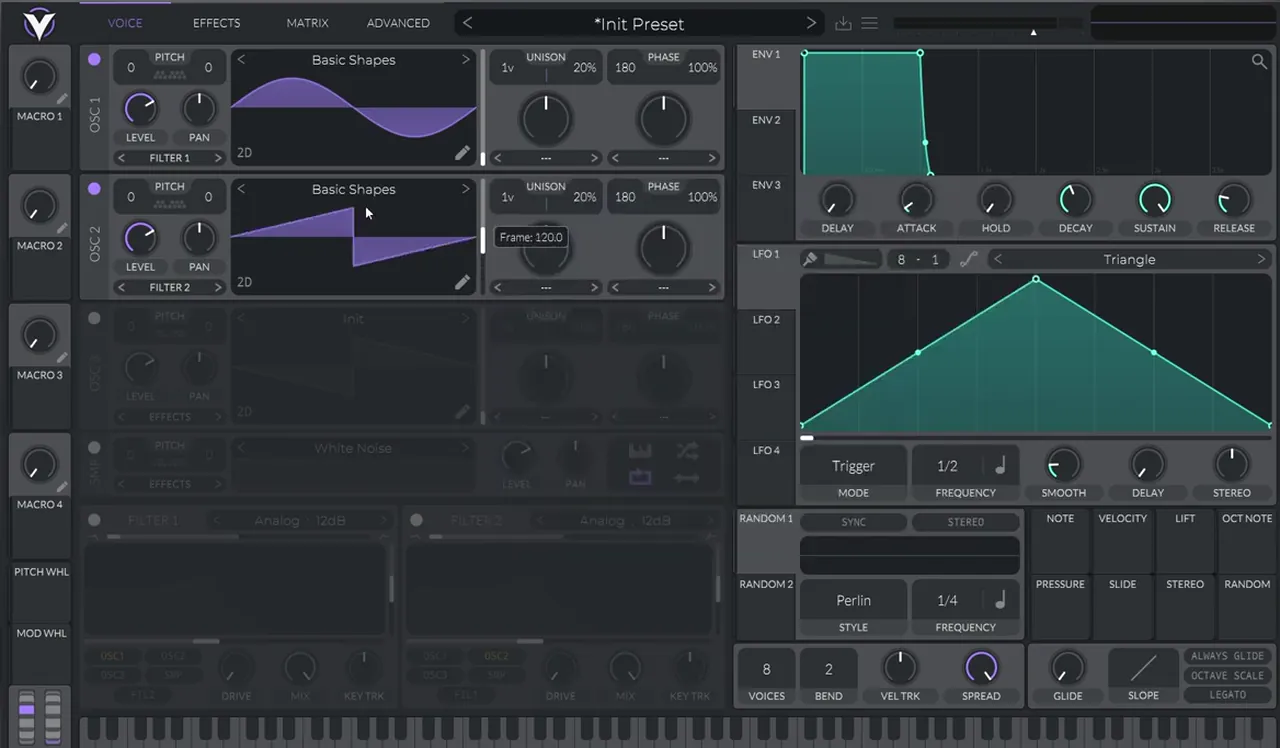
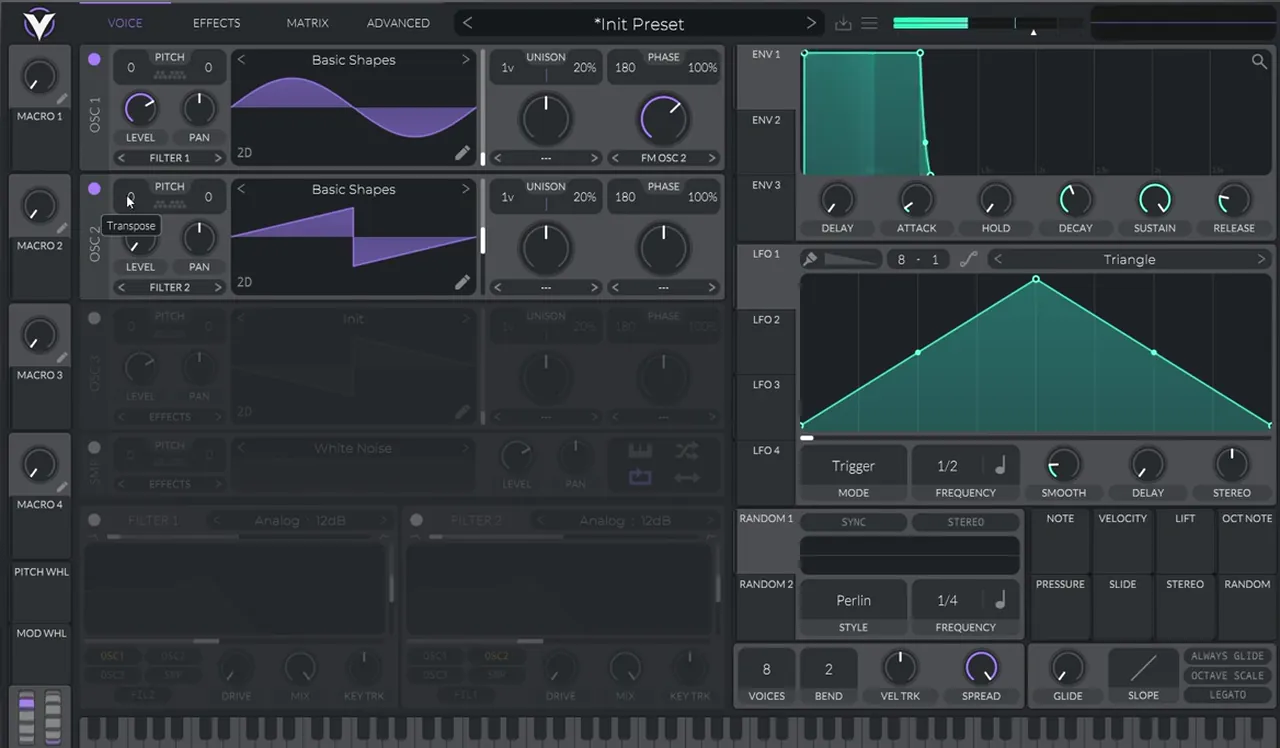
Now bring oscillator 2’s level all the way down and set oscillator 1’s mode to FM OSC 2. Boost the FM amount until the sine gets its harmonics (watch at 6:36). Then play with oscillator 2’s pitch: shifting the modulator changes which harmonics appear. Later in the video it sits at 12 semitones up.
3.Add a sine sub and filter the FM oscillators
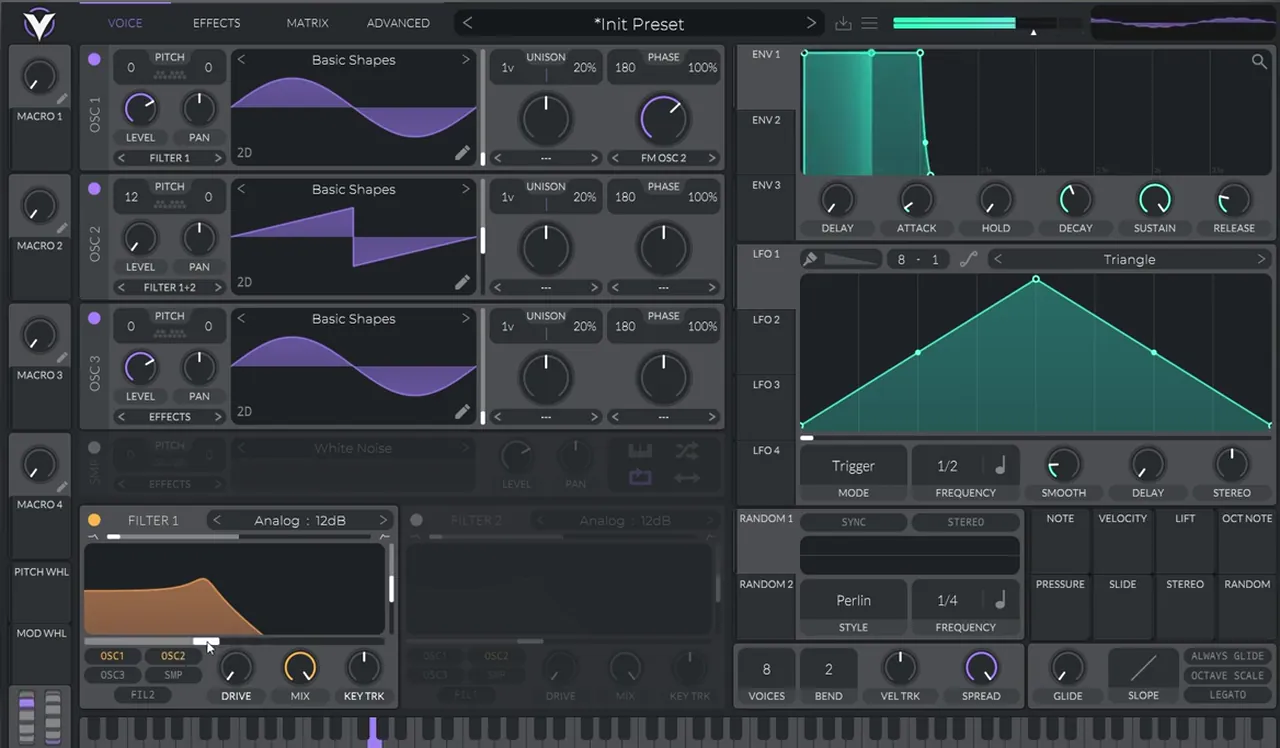
A deep bass needs a clean sub under the FM. Put another sine on oscillator 3 for the sub, then send oscillators 1 and 2 through a filter so you can control how bright the FM part is.
Turn on oscillator 3 with a sine (watch at 6:53). On screen it’s routed straight to the effects, while oscillators 1 and 2 go through Filter 1 (Analog, 12 dB). Bring the cutoff higher, then go back to the FM amount and experiment: the low harmonics you get from small FM changes are the interesting part.
Listen: experimenting with the FM amount9 sec
Keeping the sub on its own oscillator means you can push the FM part without losing the low end. Our DnB sub bass guide goes deeper on that layer.
4.Add chorus, soft-clip distortion and a moving filter
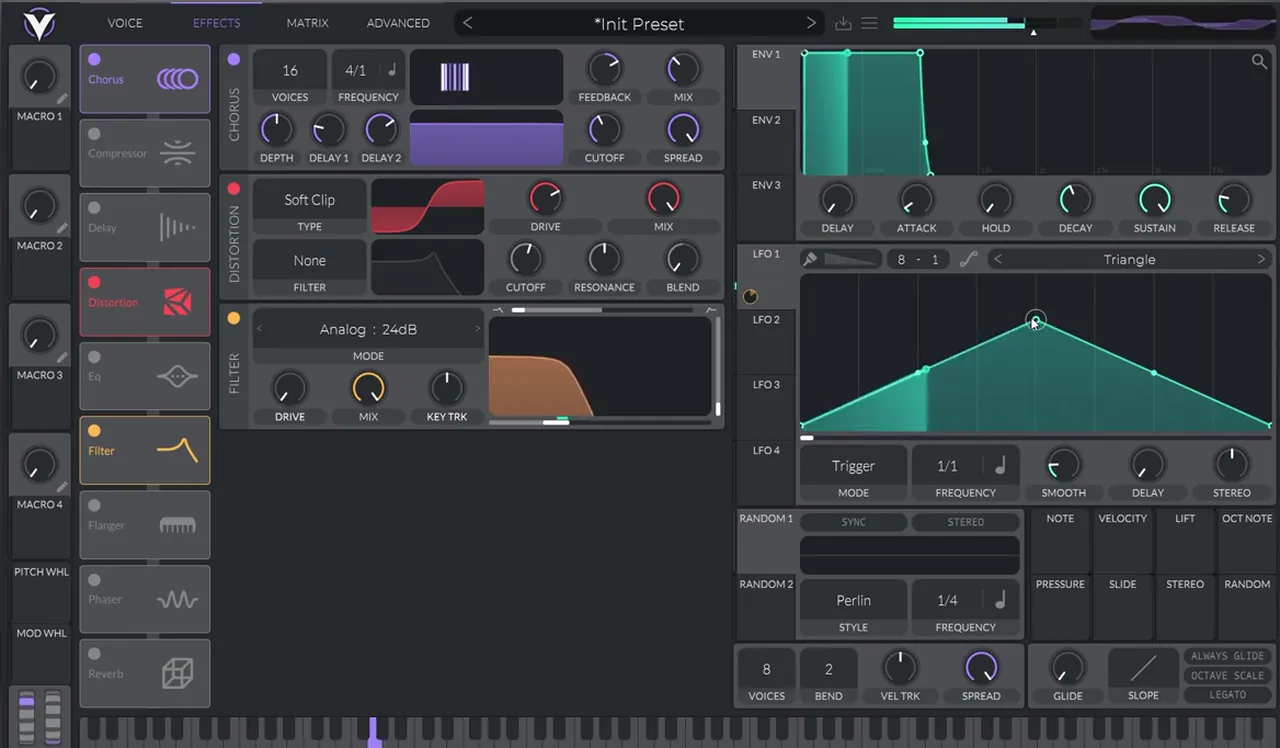
Inside Vital’s effects tab, the chain is chorus, distortion and a 24 dB filter. The chorus is what gives the bass its width and, as you’ll see below, part of its movement.
Add a Chorus (on screen: 16 voices, frequency 4/1) and a Distortion on Soft Clip (watch at 7:25). This already gives a good sound. For a variation, map macro 4 and use it to filter the sound.
Listen: the patch with chorus and soft-clip distortion6 sec
Then add Vital’s Filter effect with an Analog 24 dB curve and filter everything (watch at 7:49). Map an LFO to the cutoff and draw a slow movement, so the tone keeps shifting gently.
5.Process with Erosion, OTT and an EQ sub boost
After Vital, three plug-ins finish the layer: Erosion for a little noise, OTT for density, and an EQ to boost the sub.
In Ableton, add Erosion to add a bit of noise; on screen it’s on Wide Noise at 4.89 kHz, width 0.30 (watch at 8:19). Then add OTT, and finally EQ Eight with a boost on the sub; the screen shows a bell at 53.9 Hz with +7.31 dB of gain.

Listen: the sub layer after Erosion, OTT and the EQ boost4 sec
6.Why OTT on a sub works here
OTT will change the phase of the sub, and in this sound that’s the point. The movement in this bass comes from rhythmic phase cancellation between the chorus and OTT.
Listen to the sub together with its harmonics: it has a dynamic movement, a little like a reese (watch at 8:44). That effect isn’t made by detuned saws. It comes from the chorus and OTT working together on the phase. So OTT on basses is not a rule either way: it’s not something to always use or never use. Learn the fundamentals of sound design and you’ll know when it helps. For the classic version of that movement, see our reese bass guide.
7.Build the harmonics layer with hand-drawn partials
The second patch adds the upper tone. It’s a sine with two extra harmonics drawn in by hand, the 3rd and the 5th, with a macro on its level to recreate the movement of the track.
Open another init Vital and copy the same pitch movement (watch at 9:40). Switch the oscillator to the Basic Shapes wavetable and use the sine. Map a macro to the oscillator’s level and automate it, so the layer moves in and out like the bass in the track.
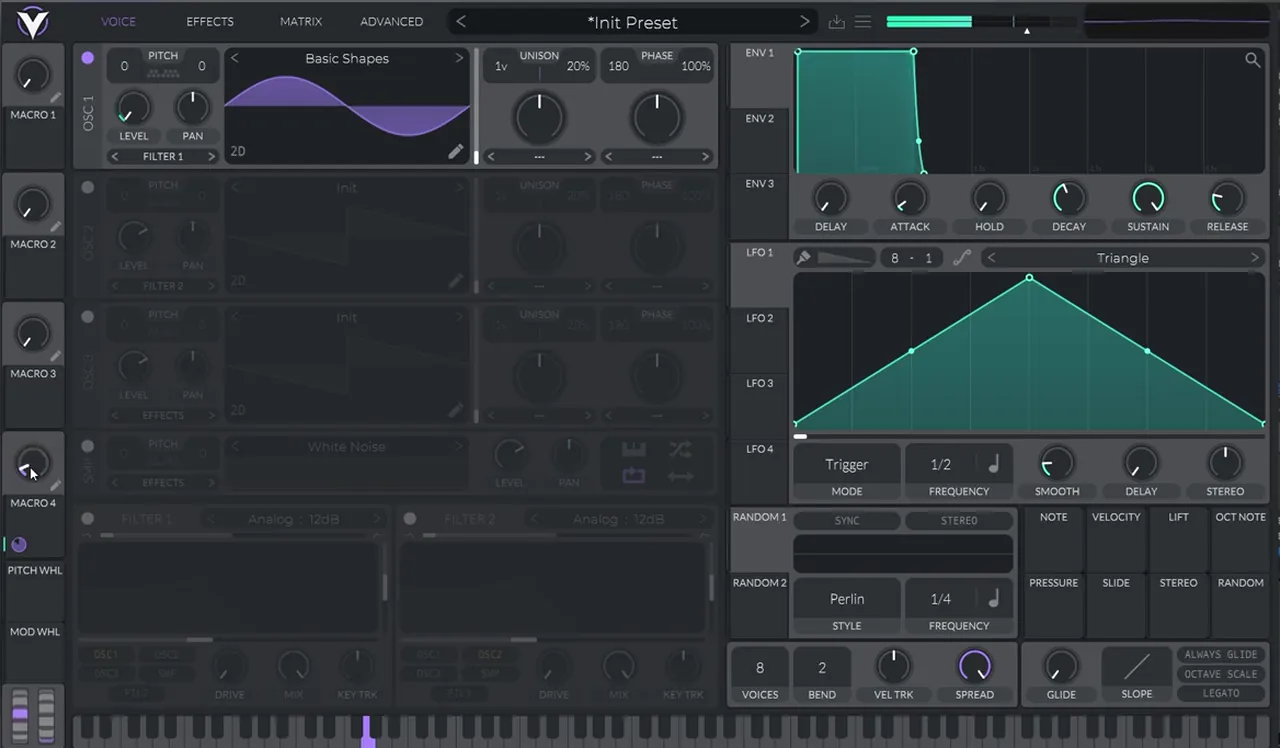
Now open the wavetable editor and add harmonics manually: the third and the fifth (watch at 10:10). Odd harmonics like these give the sine a hollow, slightly square-ish colour without making it buzzy.
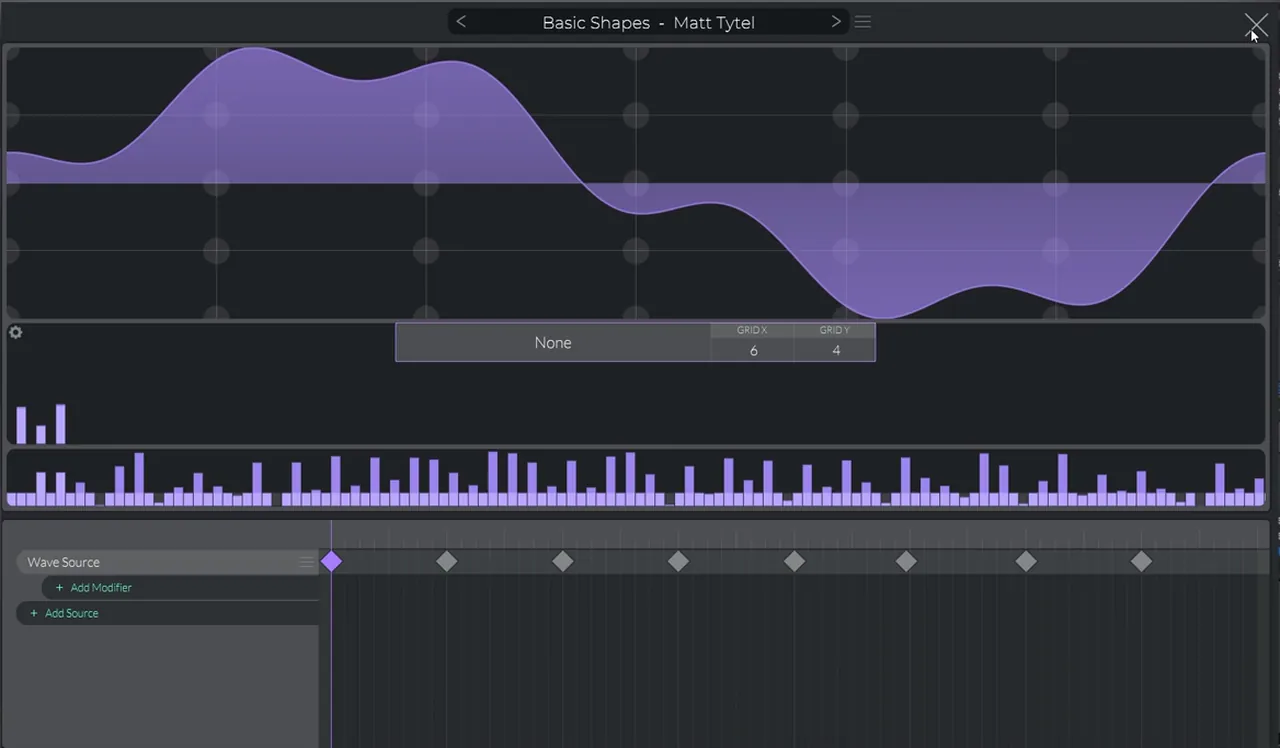
Listen: the sine with its 3rd and 5th harmonics5 sec
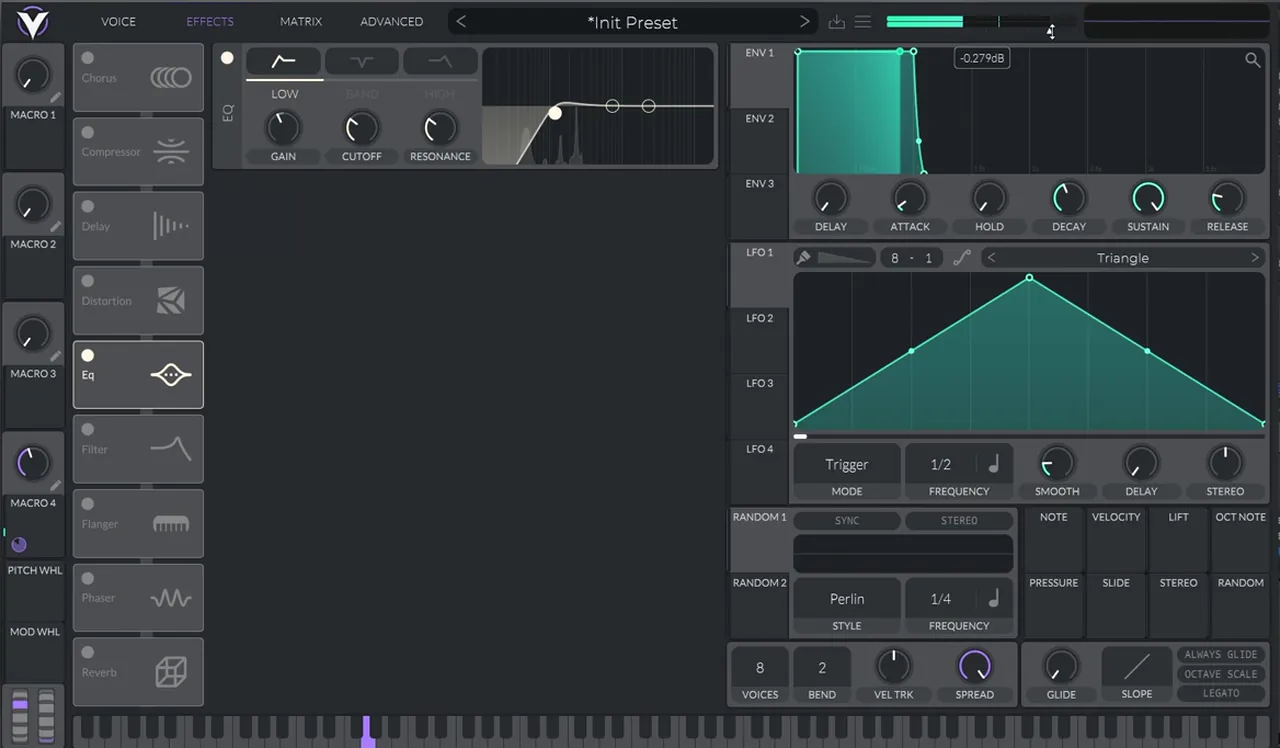
Cut the top off with Vital’s EQ effect, using its low-pass band, and add some gain (watch at 10:25). Play it together with the first patch and you have the final bass.
We built a different take on a Skeptical-style bass in Serum in our basses like Alix Perez and Skeptical tutorial, if you want to compare approaches.
Common mistakes with deep FM basses in Vital
- Leaving the modulator audible. Oscillator 2 is only there to FM oscillator 1. Keep its level all the way down.
- Sending the sub through Filter 1. On screen, oscillator 3 goes straight to the effects, so Filter 1 only shapes the FM oscillators and the sub stays clean.
- Too much FM. Push the FM amount up, then come back down: the low harmonics are where this sound lives.
- A static patch. The pitch bend, the cutoff LFO and the level macro are what make it move. Without them the bass sits still.
- Ruling OTT out by habit. Here the phase change from chorus and OTT is part of the sound. Check the sub on its own and with the harmonics layer before you decide.
- Chasing an exact copy. This is a recreation to learn from. Change the FM pitch, the harmonics and the movement until it’s yours.

Free download
More Vital patches to learn from, free
Built your first FM bass in Vital? Keep going with ready-made patches you can open up and study. The Vital Starter Preset Pack gives you:
- A neuro DnB starter pack for Vital
- Neuro bass presets
- Pluck and lead presets
- Works with the free version of Vital
You get it in DNB Academy Free Access, together with six more free sample and preset packs, the mixing and mastering e-books and the 3‑day DnB challenge. 40,000+ producers have joined Free Access. Free account, no card needed.
Go deeper
Deep and minimal presets, plus a full course
Want more deep, minimal basses in Vital, or a start-to-finish course in the style?
 Preset bundle · VitalALIX Vital preset bundleDeep / Minimal: 100 Vital presets (50 basses, 25 drums, 10 FX, 10 leads, 5 pads), plus every preset as a WAV file. The video shows a version of this bass in the pack.
 Production courseArkaik production courseMinimalist drum and bass in Logic Pro X: a 6+ hour start-to-finish course, from bass presets and drum processing to the mixdown, with the samples, presets, project file and stems.
 Preset bundle · VitalIcicle Vital preset bundleDeep / Techy: Vital presets for deep, techy drum & bass.
Every artist course, preset bundle and sample pack is also in The Vault. Browse courses
Related tutorials
All tutorials → Serum · Deep / MinimalHow to Make Basses Like Alix Perez & Skeptical in Serum10 min read · Video + guide
 Vital · Sound designHow to Make a Bass Like Bou & Mark XTC’s Breathe in Vital9 min read · Video + guide
 Telomic · BassHow to Make Drum and Bass Sub Bass That Works on Any Speaker12 min read · Video + guide
 Vital · Bass designHow to Make a Roller Bass in Vital8 min read · Video + guide
FAQ: making a deep bass like Skeptical’s “Desire” in Vital
How do you make a deep bass like Skeptical’s “Desire” in Vital?
Build two Vital patches. In the first, put a sine on oscillator 1 and a Basic Shapes saw on oscillator 2, turn oscillator 2’s level down and use it to FM oscillator 1, add a sine sub on oscillator 3, then chorus, soft-clip distortion and an Analog 24 dB filter with slow LFO movement on the cutoff. Process it with Erosion, OTT and an EQ that boosts the sub. In the second patch, add the 3rd and 5th harmonics to a sine, automate its level with a macro and cut the top with an EQ. Give both the same slow pitch bend from up to down.
Is this the exact bass from “Desire”?
No. It’s our own recreation, built from init patches in Vital by Paulo from DNB Academy. It isn’t the original sound, but it shows the principles behind it, so you can change the FM pitch, the harmonics or the movement and get basses of your own.
Is Vital free?
Yes. Vital has a free version, and everything in this tutorial uses stock Vital features: Basic Shapes, oscillator FM, the wavetable editor, macros, LFOs and the built-in effects.
Doesn’t OTT ruin the phase of a sub bass?
It changes the phase, and in this sound that’s part of the effect. The movement of the sub and its harmonics comes from rhythmic phase cancellation between the chorus and OTT. Using OTT on basses isn’t a rule either way; the fundamentals of sound design tell you when it helps.
Why is oscillator 2’s level all the way down?
Oscillator 2 is only an FM source. Oscillator 1’s FM OSC 2 mode uses it to add harmonics to the sine, so you don’t need to hear it directly.
Next steps
Start with the first patch: the pitch movement, the silent saw on FM, the sine sub, then chorus, soft clip and the moving filter. Add the harmonics layer once the sub sounds right. For more bass types and when to use them, read our drum and bass bass guide; for another Vital recreation, try a bass like Bou & Mark XTC’s Breathe in Vital.
Free Access
Seven free DnB sample and preset packs, including the Vital Starter Preset Pack, plus mixing and mastering e-books and a 3-day challenge for Ableton Live and FL Studio.
Get free packsThe full guide
Tempo, drums, sub, mid bass, chords, arrangement and mixdown: every step of a DnB track.
Read the guideDNB Foundations
A structured drum and bass course with weekly live feedback calls on your tracks.
See Foundations1:1 Mentorship
Personal guidance on your music from a mentor, built around your goals.
See the mentorship50,000+ producers have joined DNB Academy, and our producer Discord has 5,300+ members.