Serum · Deep minimal · Bass design
How to Make Basses Like Alix Perez & Skeptical in Serum
To make basses like Alix Perez & Skeptical, build three sounds in Serum: a short bass stab from a sine wave with a few added harmonics, Diode distortion, a falling LFO on the level and a quick pitch transient; a reverse tail made by resampling that stab; and a moving filler bass from a custom FM wavetable with an LFO on the wavetable position. Our 7-minute video recreates the deep, minimal basses of Alix Perez & Skeptical’s “Elephant Dreams” this way. Here are the steps, with screenshots, settings and audio.
New to bass design in Serum? Start with our guide to every drum and bass bass type. This page is a recreation of one deep, minimal style: three short, moving bass sounds that work together.
Quick answer
How do you make a bass like Alix Perez & Skeptical?
Start from a sine wave and add your own harmonics in Serum’s editor, then shape it into a short stab with Diode distortion, a falling LFO on the oscillator level and a very short LFO on coarse pitch. A high-passed chorus before the distortion is one of the keys. Resample the stab and reverse it for a tail, and add a filler bass from a resampled FM wavetable with a slow LFO on its position.
- Sine plus harmonics.Draw a few harmonics into a sine in the wavetable editor.
- Diode distortion.Turn the distortion on and set it to Diode 1.
- Falling level LFO.LFO 1 on the oscillator level, in envelope mode.
- Pitch transient.A very short, unipolar LFO 2 on coarse pitch.
- Chorus, then compression.High-passed chorus before the distortion, compressor and gain after.
- Reverse tail.Resample the stab, reverse it, fade it in and warp it.
- FM wavetable.Two sines, FM from B, random LFO, unison, resample to an oscillator.
- Move the wavetable.Slow LFO on position, chorus, multiband compression, EQ and a sub.
Our recreation of three deep, minimal basses inspired by Alix Perez & Skeptical, built in Serum inside Ableton Live. Every step below links to the moment in the video.
What you’ll need
- Serum. Every sound is built in Xfer Serum: the wavetable editor, two LFOs, the FX rack (chorus, distortion, compressor, EQ) and the Resample to OSC option. The same ideas work in Vital, which is free and has wavetables, FM, LFOs and the same kinds of effects.
- A DAW that can resample. The video uses Ableton Live, so reversing a clip is the R key and the warp modes are called Complex, Complex Pro and Texture. Any DAW that can record a bass to audio, reverse it and fade it in does the job.
- A sub. The filler bass gets a sub layered underneath. Our DnB sub bass guide covers that part in depth.
1.Start the stab from a sine wave with added harmonics
The first sound is a short, clean bass stab. Don’t start from a saw: start from a sine, which on its own is only sub, then draw in just a few harmonics of your own. That gives you a bass with a solid fundamental and a small amount of controlled tone above it.
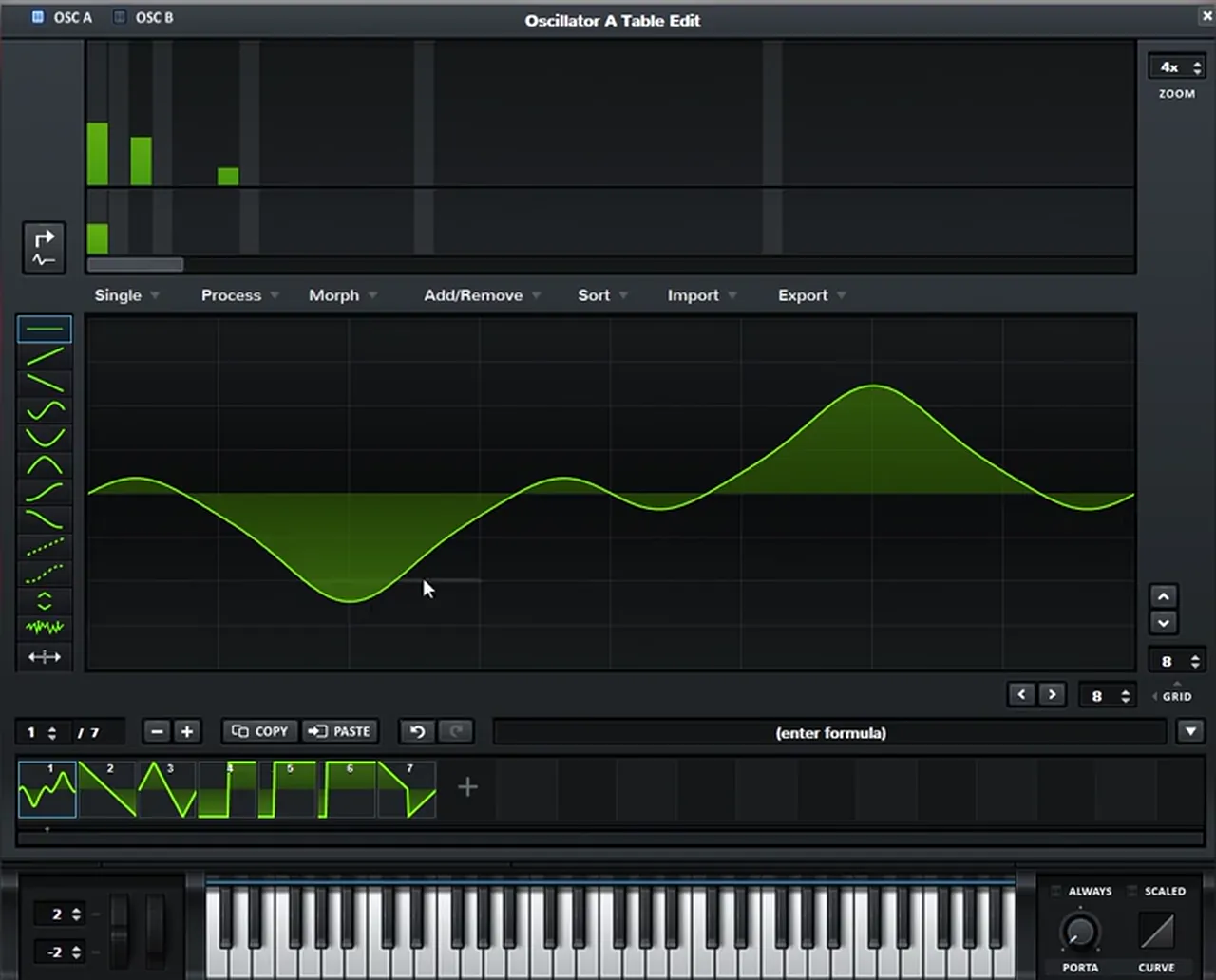
Initialise the patch, which loads a saw, and switch oscillator A to a sine wave (watch at 0:31). Open the wavetable editor and click the button that translates the sine’s harmonics into the FFT editor. Then add your own harmonics with the bars at the top. In our patch only a few low bars are raised, and the waveform becomes a sine with a couple of extra bumps in it (watch at 0:44).
2.Turn on the distortion and set it to Diode 1
A sine with a few harmonics is quiet and soft in the mids, so the next move is distortion. Go to the FX tab, turn the distortion on and set its mode to Diode 1. Now you can actually hear the bass on small speakers.
In the video the distortion goes on first so we can hear the sound (watch at 1:00), and the mode changes from the default Tube to Diode 1 a few seconds later. You’ll see the full effects chain in step 5.
3.Shape the stab with a falling LFO on the level
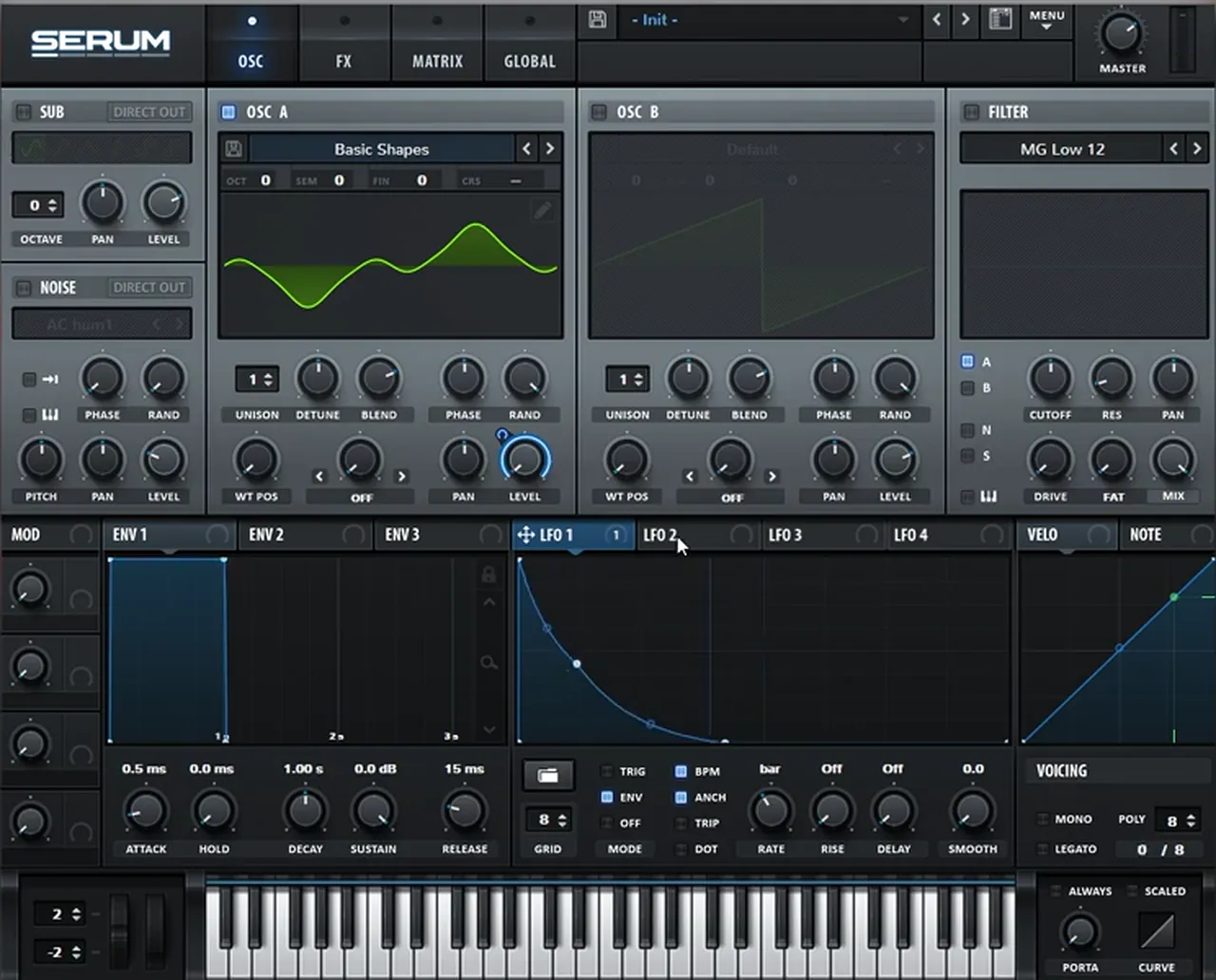
To turn a held note into a stab, modulate the level of oscillator A with LFO 1 and draw a falling shape. Set the LFO to envelope mode so it retriggers every time you hit a note, then slow it down and fine-tune the curve until the decay feels right.
Drag LFO 1 onto the level knob of oscillator A (watch at 1:13). Switch the mode to ENV, draw a shape that starts at the top and falls away, then make the LFO slower and fine-tune it (watch at 1:28). In our patch the rate ends up at one bar with BPM sync on, and the curve drops fast before easing out.
Listen: the stab with Diode 1 distortion and the falling level LFO, before the chorus7 sec
4.Add a transient with a short LFO on coarse pitch
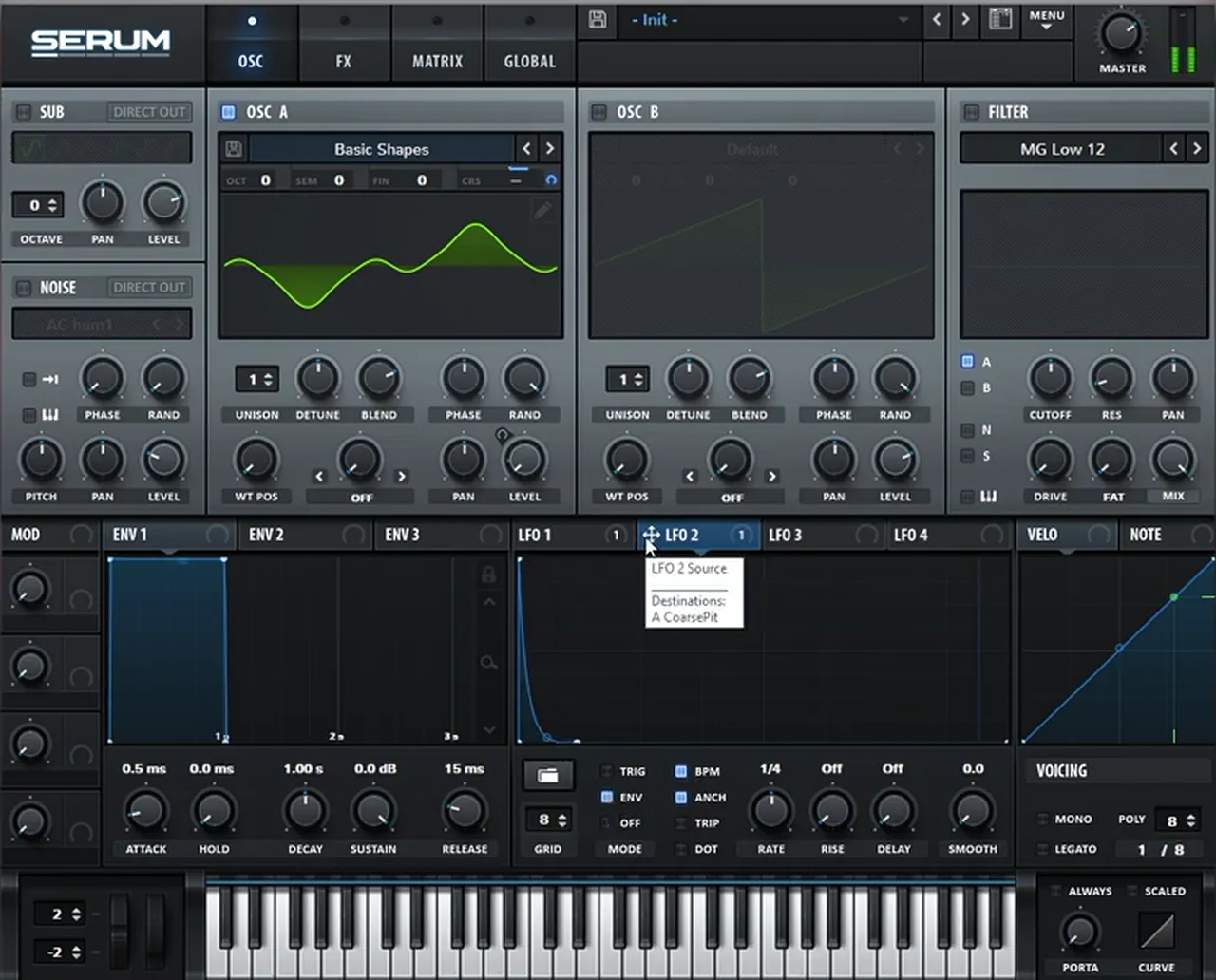
For a little click at the start of each note, use LFO 2 on the coarse pitch of oscillator A. Make the modulation unipolar, draw a falling shape that is really short and set it to envelope mode. The pitch drops in a split second, which reads as a transient rather than a pitch bend.
Map LFO 2 to oscillator A’s coarse pitch, then hold Shift and Alt and click the modulation to turn it unipolar (watch at 1:39). Draw a very short falling shape and set the mode to ENV. On screen, LFO 2 runs at 1/4 and its curve falls almost straight down at the very start.
5.Put a high-passed chorus before the distortion, then compress
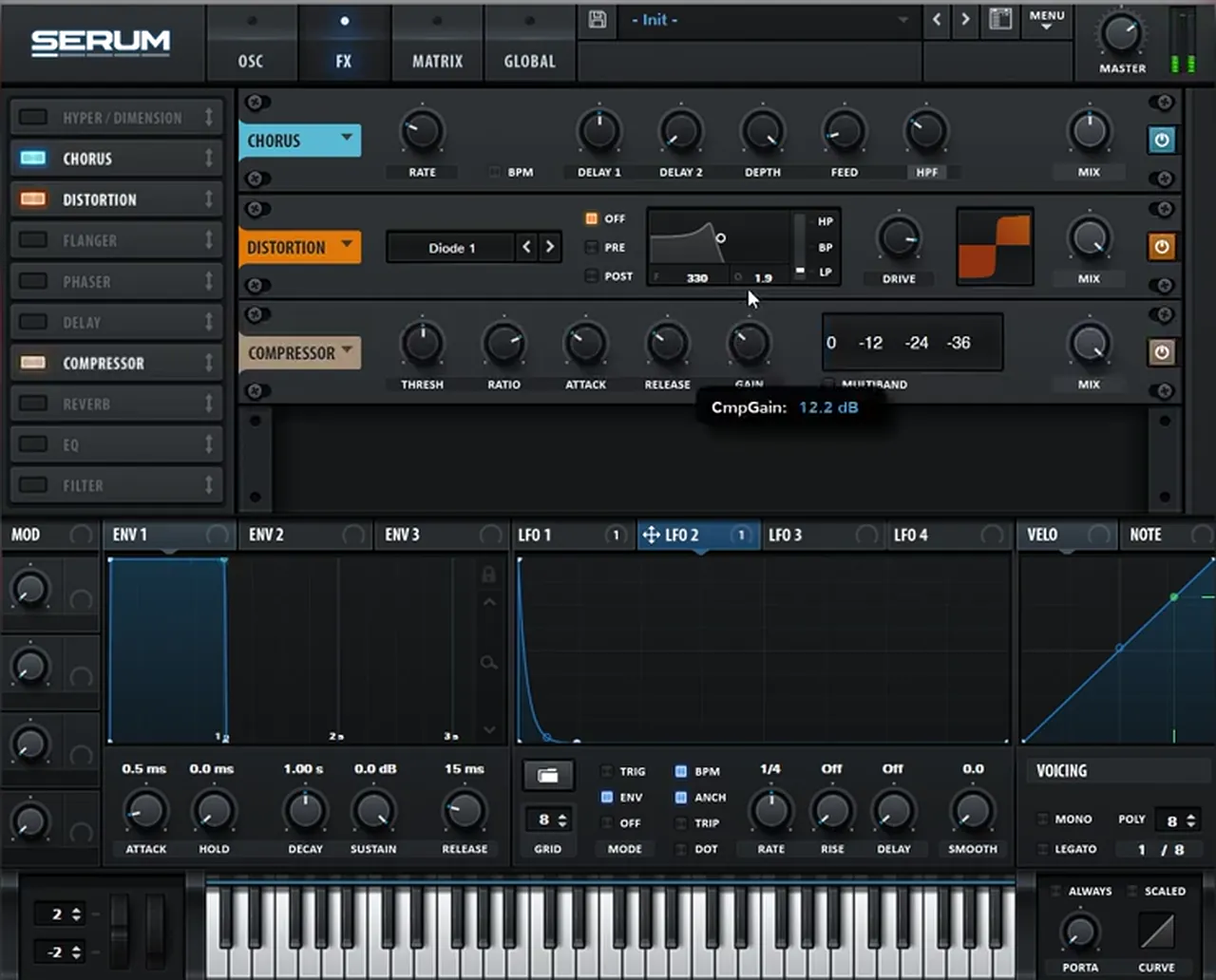
The chorus is one of the keys to this sound. Put it before the distortion, so the distortion works on the widened signal, and switch the chorus filter from low-pass to high-pass. Then only the top harmonics get the chorus and the sub stays clean and centred.
In the FX tab, add a chorus and drag it above the distortion (watch at 1:58). Change the chorus filter from LPF to HPF (watch at 2:11); in our patch its frequency sits around 315 Hz. Finish with a compressor and add a bit of gain (watch at 2:21). Our patch has about 12 dB of gain on the compressor. That is the first sound.
6.Make the reverse tail by resampling the stab
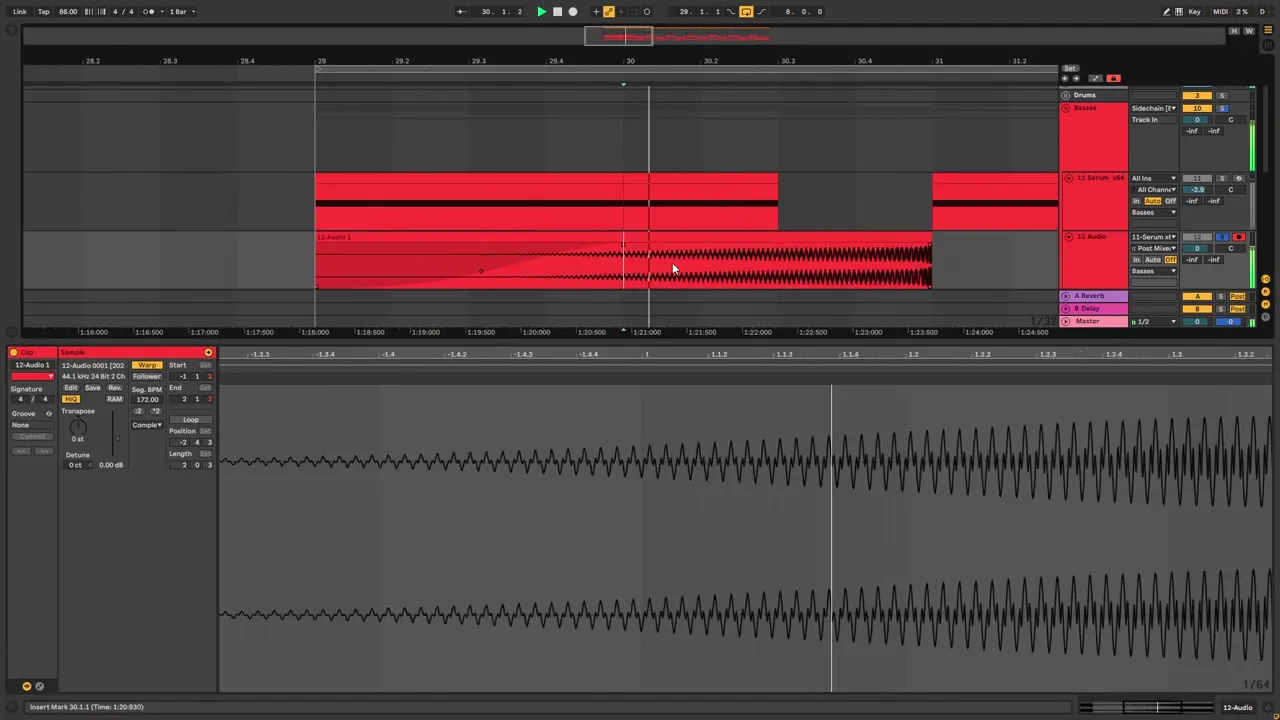
The second sound is a reverse tail that swells into the next stab. It is simply the first bass, resampled and reversed. Make the tail longer, record it to audio, reverse it and fade it in. To give it more noise and texture, double the clip’s original tempo and try a different warp mode.
Go back to the original patch, make the tail longer and make the MIDI note longer too (watch at 2:51). Add another channel and resample the bass onto it. Select the sample, hit R to reverse it and fade it in. For extra noise, open the sample, double its original tempo and change the warping mode to Complex, Complex Pro or Texture (watch at 3:20). Each one gives the sound a different texture. Then cut the sound where you want the tail to end, fade it in once more and repeat it through the sequence. More ways to reuse a bass like this are in our techy roller bass in Serum tutorial.
Listen: the bass stab followed by its reverse tail, soloed6 sec
7.Build an FM wavetable for the filler bass
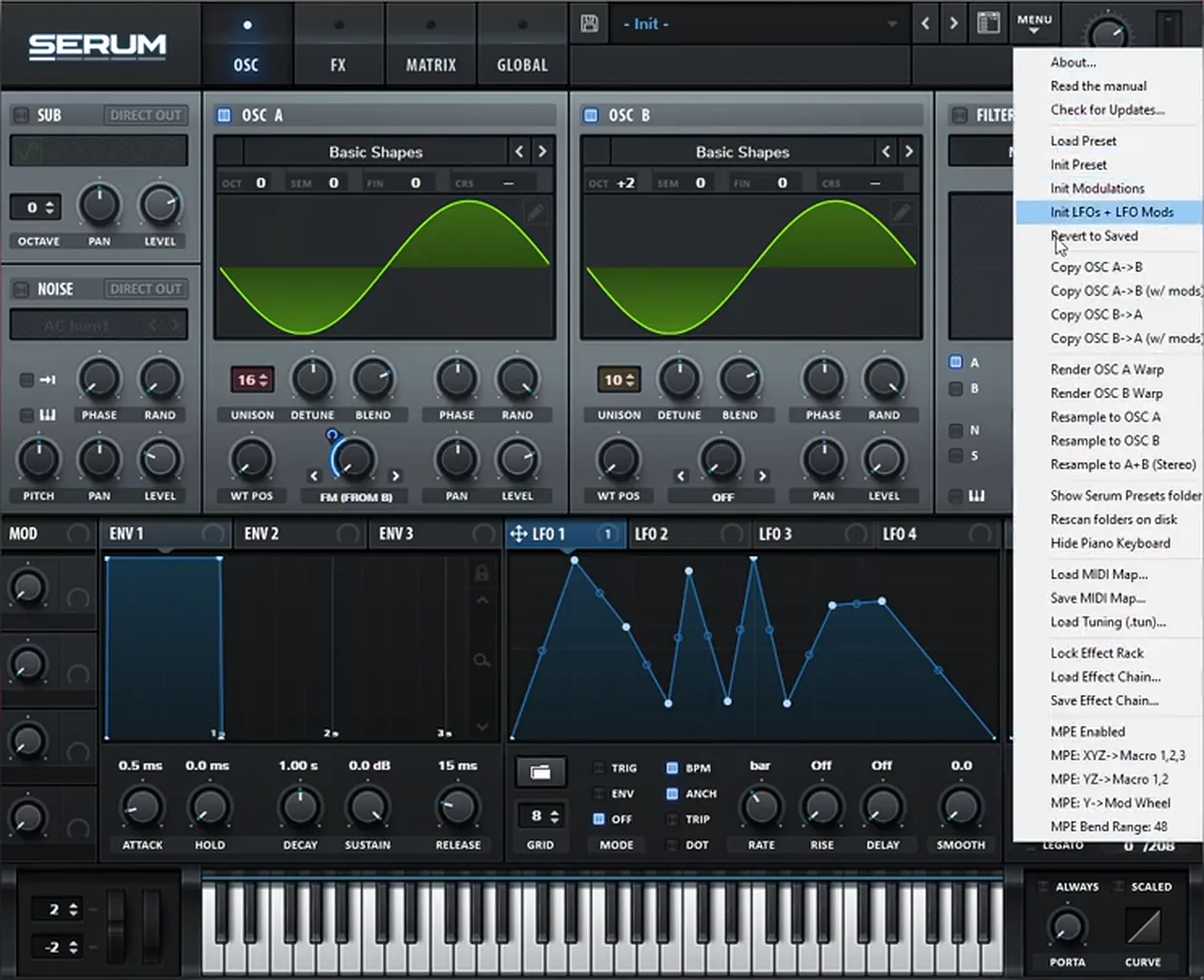
The third sound is a moving filler bass, and the key is the wavetable. Ours is a custom one made from sine waves modulating each other: two sines, FM from oscillator B, a random LFO on the FM amount and lots of unison, resampled back into an oscillator.
Load a sine wave into both oscillators and set oscillator A’s warp mode to FM (from B) (watch at 4:35). Play with the octave of oscillator B; on screen it ends up at +2. Then use another LFO to automate the FM amount with a random shape, drawn as a jagged line of peaks and dips. Add a bunch of unison (16 voices on A and 10 on B in our patch), then open Serum’s menu and choose Resample to OSC A or B (watch at 5:00). Serum renders what you hear into a new wavetable that you can scan through.
8.Move the wavetable and finish the filler bass
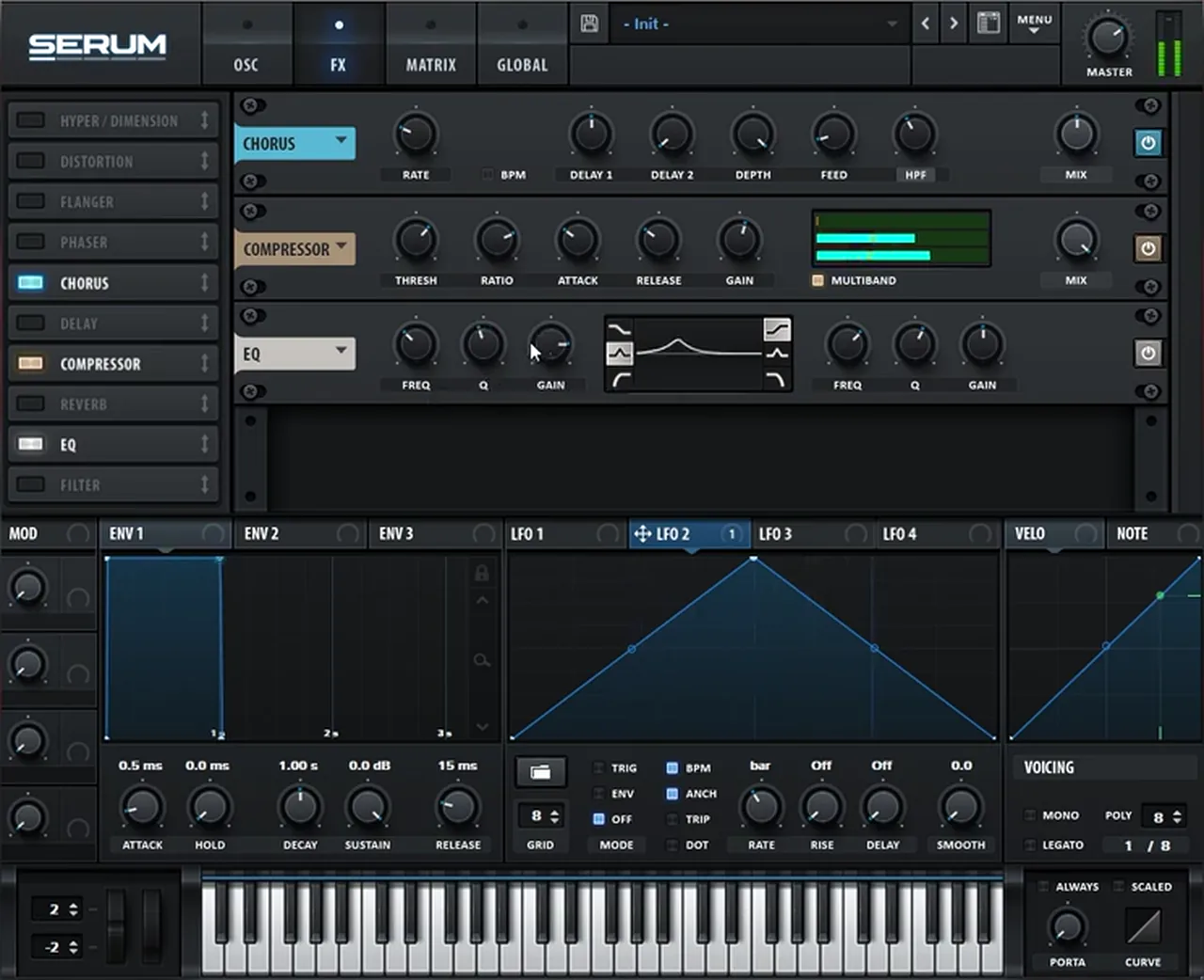
With the wavetable in place, map an LFO to the wavetable position and make it slower, so the bass scans through its frames as it plays. Then add chorus, a multiband compressor, an EQ and a sub layer underneath.
Drag an LFO onto the WT POS knob and slow it down (watch at 5:28). In our patch it is LFO 2 with the default triangle shape at a one-bar rate. Add a chorus and a compressor (watch at 5:41). You can set the compressor to multiband mode, take out the upward compression on the high band, set the threshold a bit lower (around -26 dB on screen) and compensate with the gain. Add an EQ to bring out the frequencies you want, and layer a sub under the bass; here Serum’s own sub oscillator is switched on with a sine (watch at 6:09).
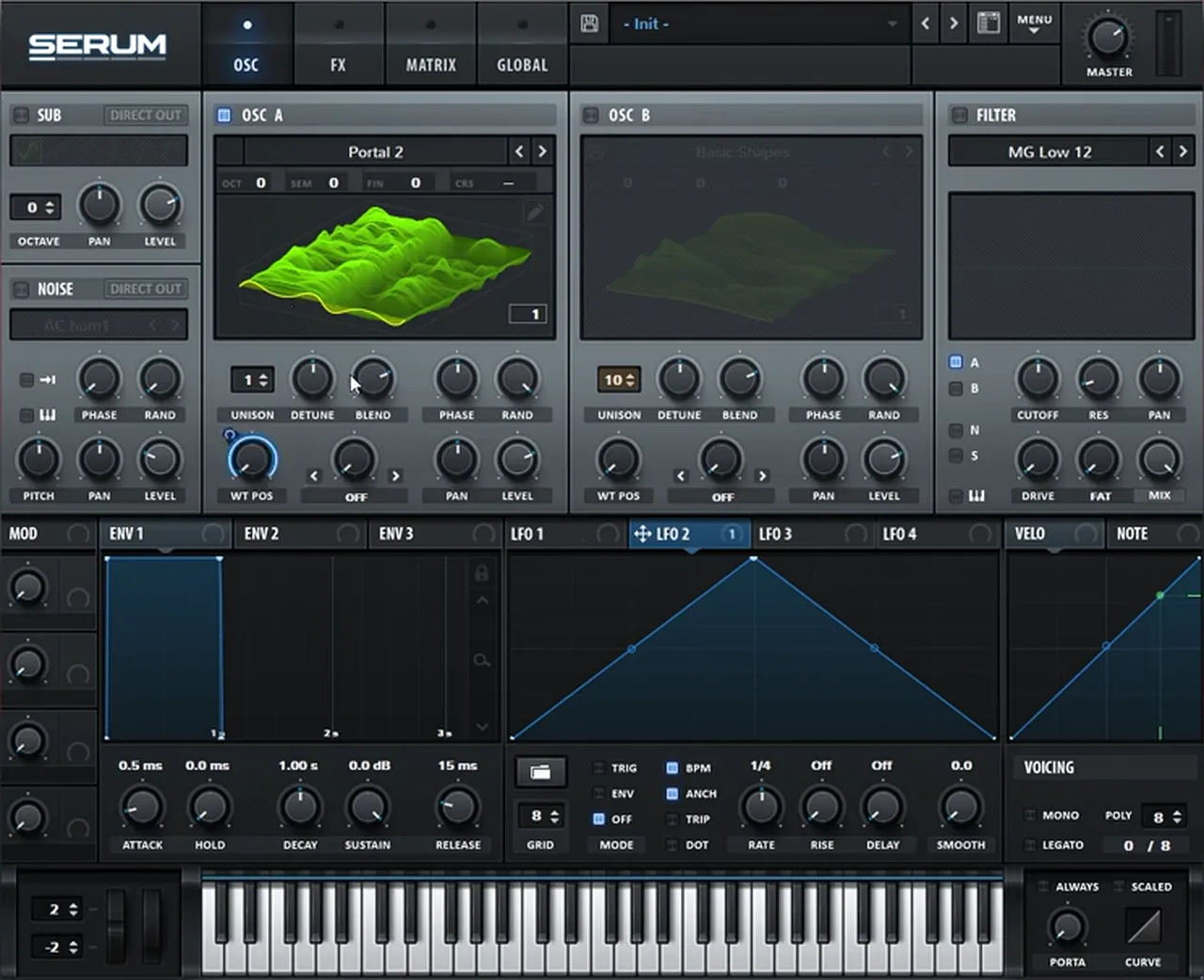
The shape of that LFO is where you can experiment: try different movements and listen to how the bass changes. In the video it stays on the default shape. For more bass movement ideas in Serum, see how we make a liquid DnB bass like Random Movement.
Listen: the filler bass with the LFO moving through the FM wavetable9 sec
The video then plays the three basses together in the loop. The sounds are short and sparse, with lots of space between them, which is typical of deep, minimal drum and bass. Our drum and bass subgenres guide explains where that style sits.
Common mistakes making deep minimal basses
- Starting with a saw. Saws give you lots of harmonics to control. Start from a sine and add only the harmonics you want.
- Chorus on the whole signal. A low-pass chorus spreads the sub too. Switch the chorus filter to high-pass so the low end stays clean.
- Chorus after the distortion. In this patch the chorus sits before the distortion, so the distortion works on the widened tone.
- A free-running LFO. Put the level and pitch LFOs in envelope mode, or the stab won’t retrigger on every note.
- A pitch transient that’s too long. Keep the coarse pitch LFO really short and unipolar, or it turns into a drop in pitch you can hear.
- A reverse tail that ends abruptly. Fade it in, cut it where it suits the next hit and fade it in again.
- No sub under the filler. A wavetable full of unison moves a lot. Layer a clean sub underneath.
Free download
Free samples to build a loop around your basses
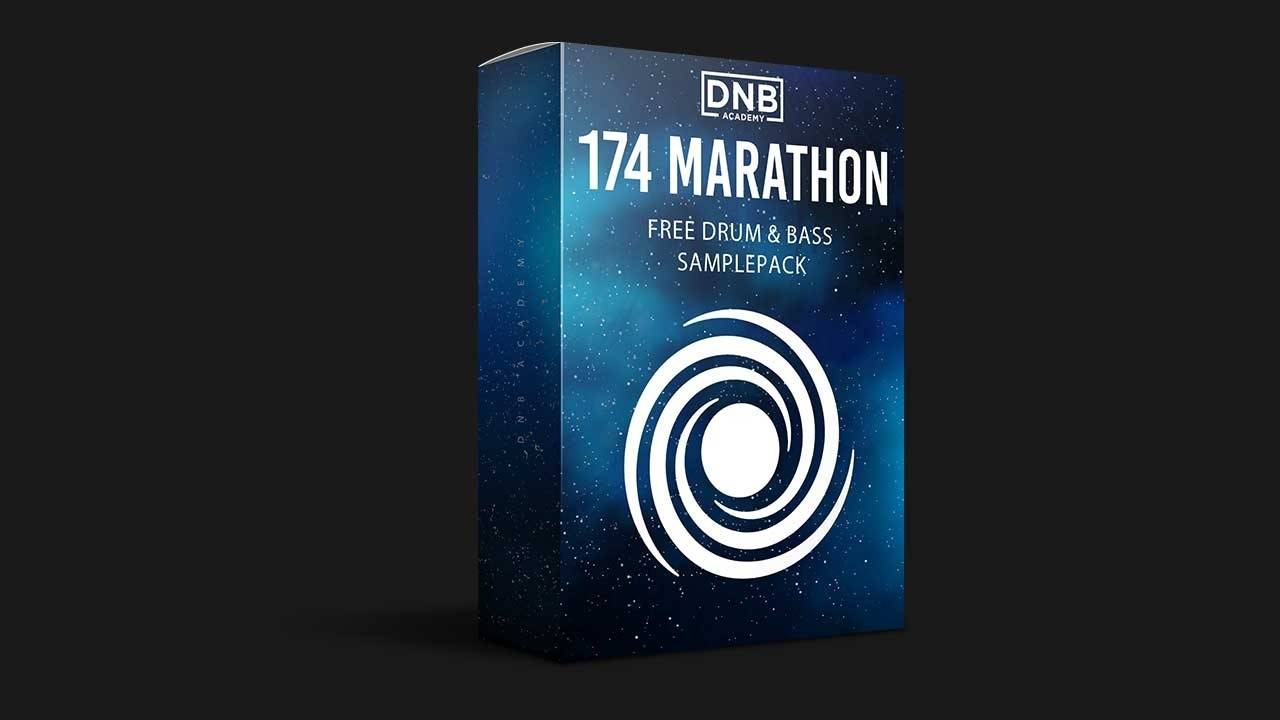
Three short basses need drums and space around them before you can judge them. The 174 Marathon Sample Pack gives you:
- 100+ royalty-free samples
- Drums, bass, FX, melodics and more
- Audio samples, so they work in Ableton Live or any other DAW
- Made for International Drum & Bass Day and our 174 Production Marathon
It’s one of seven free sample and preset packs in DNB Academy Free Access, alongside the mixing and mastering e-books and the 3‑day DnB challenge. Join 40,000+ producers in Free Access. Free account, no card needed.
Go deeper
Deep, minimal courses and sounds
Want a full deep, minimal track from start to finish, or ready-made sounds to study?
 Production courseArkaik production courseMinimalist drum and bass in Logic Pro X: a 6+ hour start-to-finish course, from bass presets and drum processing to the mixdown, with the samples, presets, project file and stems.
 Preset bundleGEST Serum presets100 Serum presets for techy, deep DnB, including 35 basses, 12 pads and 7 stabs, plus WAV files of the presets.
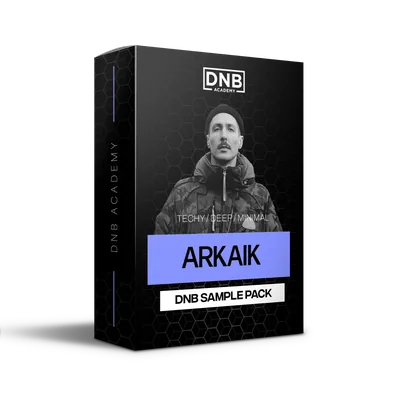 Sample packArkaik sample packDark, stripped-back sounds: 19 bass one-shots, 16 bass loops, 30 pads, drum one-shots, loops and FX.
Every artist course, preset bundle and sample pack is also in The Vault. Browse courses
Related tutorials
All tutorials →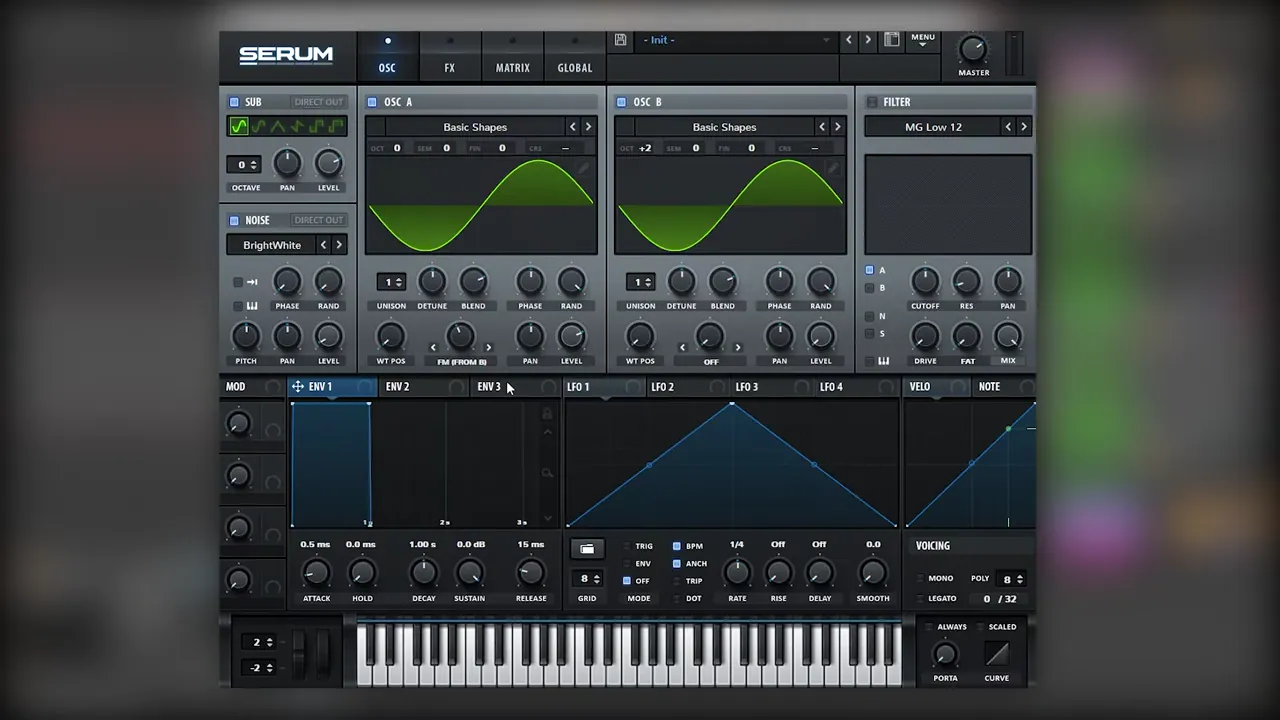 Serum · Bass designHow to Make a Techy Roller Bass in Serum7 min read · Video + guide
 Serum · BassHow to Make a Liquid DnB Bass Like Random Movement in Serum18 min read · Video + guide
 Serum · BassHow to Make a Reese Bass for Drum and Bass15 min read · Video + guide
 Guide · BassHow to Make Drum and Bass Bass: A Guide to Every Bass Type15 min read · Video + guide
FAQ: basses like Alix Perez & Skeptical
How do you make a bass like Alix Perez & Skeptical?
Our recreation uses three sounds in Serum. A short stab from a sine wave with a few added harmonics, Diode 1 distortion, a falling LFO on the oscillator level and a very short LFO on coarse pitch, with a high-passed chorus before the distortion. A reverse tail made by resampling and reversing that stab. And a filler bass from a resampled FM wavetable with a slow LFO on the wavetable position and a sub underneath.
What synth do you need for these basses?
The video uses Xfer Serum inside Ableton Live. Every step uses standard Serum features: the wavetable editor, LFOs in envelope mode, the chorus, distortion, compressor and EQ, FM between oscillators and Resample to OSC. Vital, which is free, has wavetables, FM, LFOs and similar effects, so you can follow the same ideas there.
Why put the chorus before the distortion?
In this patch the chorus is one of the keys to the sound. Placed before the distortion, it widens the tone that the distortion then works on. Switching the chorus filter from low-pass to high-pass means it only affects the top harmonics, so the sub stays clean.
How do you make a reverse bass tail?
Make the stab’s tail and MIDI note longer, resample the bass onto a new audio track, reverse the clip (R in Ableton Live) and fade it in. For more noise, double the clip’s original tempo and try the Complex, Complex Pro or Texture warp modes, then cut the tail where you want it and fade it in again.
How do you make a custom wavetable in Serum?
Load a sine wave into oscillators A and B, set oscillator A’s warp to FM (from B) and change oscillator B’s octave. Automate the FM amount with an LFO in a random shape, add plenty of unison, then choose Resample to OSC A or B from Serum’s menu. Serum turns the sound into a wavetable you can move through with an LFO on the wavetable position.
What free samples can I use with these basses?
The 174 Marathon Sample Pack has 100+ royalty-free samples, including drums, bass, FX and melodics, so you can build a loop around your basses. It is one of seven free packs in DNB Academy Free Access.
Next steps
Open Serum, initialise a patch and build the stab first: a sine with a few harmonics, Diode 1, a falling level LFO and a short pitch transient. Then resample it for the reverse tail and make your own FM wavetable for the filler. For the bigger picture, our guide to making drum and bass walks through a whole track.
Free Access
Seven free DnB sample and preset packs, including the 174 Marathon Sample Pack, plus mixing and mastering e-books and a 3-day challenge for Ableton Live and FL Studio.
Get free packsThe full guide
Tempo, drums, sub, mid bass, chords, arrangement and mixdown: every step of a DnB track.
Read the guideDNB Foundations
A structured drum and bass course with weekly live feedback calls on your tracks.
See Foundations1:1 Mentorship
Personal guidance on your music from a mentor, built around your goals.
See the mentorship50,000+ producers have joined DNB Academy, and our producer Discord has 5,300+ members.