Serum · Ableton Live · Bass design
How to Make a Bass Like Monrroe’s Out of Time in Serum
To make a bass like Monrroe’s “Out of Time”, build two layers on one simple bassline. The main bass is a Serum saw with a little unison, pushed through Tube distortion and a multiband compressor, then a low-pass filter whose cutoff an LFO keeps moving. The second bass is a duplicate with more unison, run through saturation, distortion, an automated filter, chorus, OTT and parallel reverb. Here is our recreation, step by step, with screenshots, settings and audio.
New to this kind of bass? Our reese bass guide covers the basics of detuned saws. This page recreates one specific sound: the bass from Monrroe’s “Out of Time”.
Quick answer
How do you make a bass like Monrroe’s Out of Time?
Write a slow four-note bassline (E, B, G, E in our recreation). In Serum, give a default saw 5 unison voices, add Tube distortion, a multiband compressor and an MG Low 24 filter around 100 Hz, and let a slow, hand-drawn LFO move the cutoff. Then duplicate it, raise the unison, strip Serum’s effects and rebuild the tone in Ableton with saturation, distortion, an automated low-pass, overdrive, chorus, EQ, OTT and parallel reverb.
- Write the bassline.Four long notes, root, fifth, third, root.
- Main bass in Serum.Default saw, unison 5, detune nudged up.
- Serum FX.Tube distortion, multiband compressor, MG Low 24 filter.
- Move the filter.LFO 1 on the cutoff, 2 to 8 bars, hand-drawn.
- Second bass.Duplicate, more unison, no Serum FX.
- Saturate and distort.Saturator, Pedal, then an automated Auto Filter.
- Finish the tone.Overdrive, chorus, EQ Eight, OTT, parallel reverb.
- Make fills.Octaves, waveforms and filter shapes.
Our 9-minute Serum tutorial recreating the basses from Monrroe’s “Out of Time”. Every step below links to the moment in the video.
What you’ll need
- Serum. Both basses start in Serum. Any synth with a saw wave, unison, distortion and a filter with LFO modulation can follow along, including Vital, which is free.
- Ableton Live, or any DAW. The second bass uses Ableton’s Saturator, Pedal, Auto Filter, Overdrive, Chorus, EQ Eight, OTT, Reverb and an Audio Effect Rack. In another DAW, any multiband distortion plugin does the Pedal and Overdrive job; FabFilter Saturn and iZotope Trash 2 are mentioned in the video.
- A bassline. A few long notes are enough. The sound comes from the movement, not from busy notes.
1.Write a simple four-note bassline
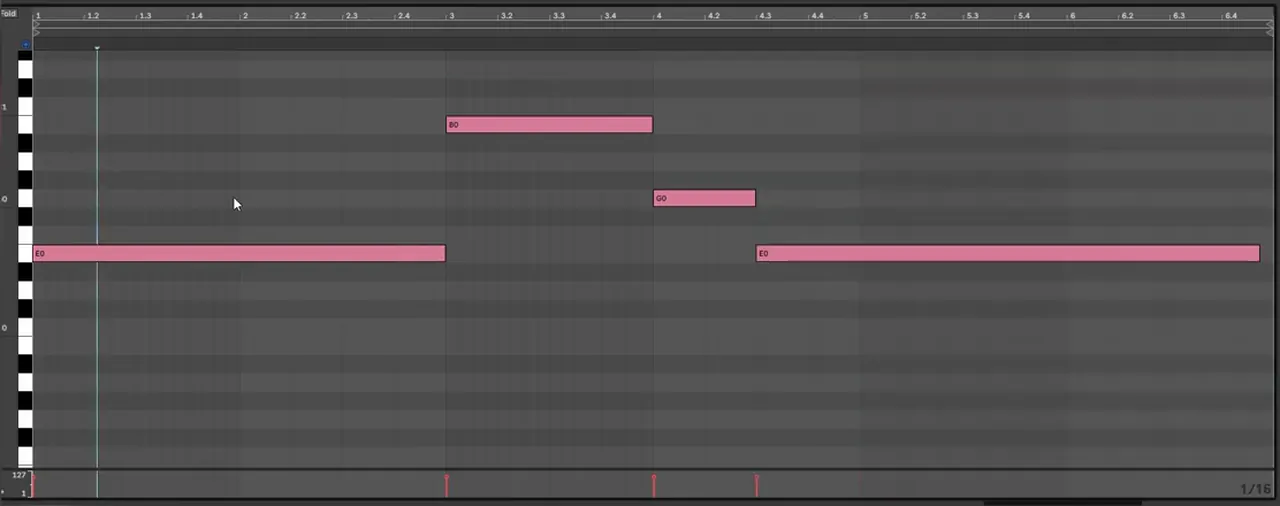
The bass in “Out of Time” moves slowly. In our recreation the track sits in E, and the main progression is 1, 5, 3, 1: a long E, then B, a short G, and back to a long E. Both basses play this same MIDI.
Before touching the synth, we look at the piano roll (watch at 1:03). The notes sit very low, at E0, B0 and G0, so the low end does the talking and the movement comes from the filter rather than the notes. If you’re writing your own version, keep the notes long and leave room for the filter to move inside them.
2.Main bass: a saw with a little unison
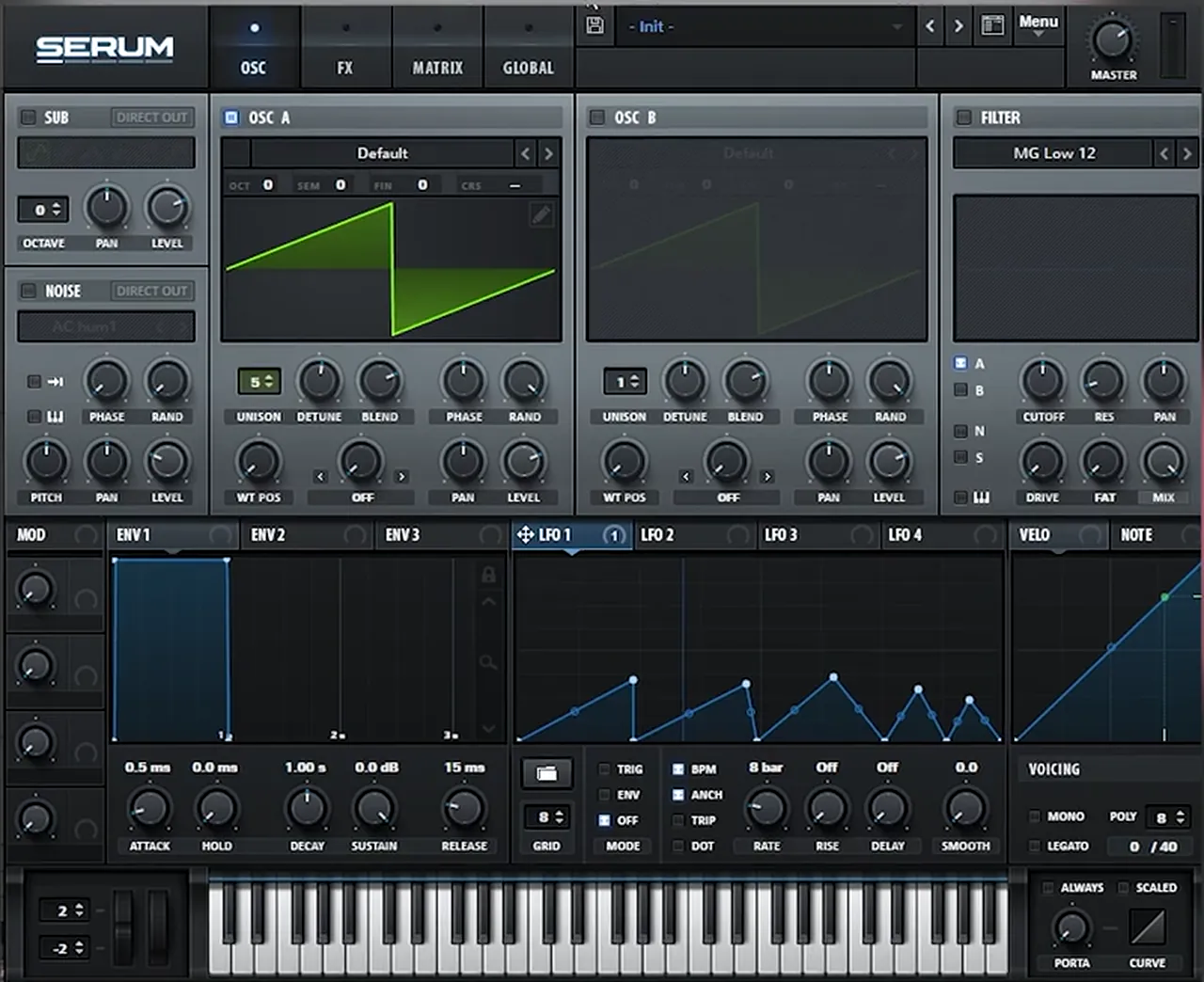
Start from Serum’s default saw in oscillator A. Add some unison and push the detune a little higher than the default, so the bass gets a slow, thick movement before any effects go on.
We play the raw saw first so you can hear the starting point (watch at 1:11). Then we set oscillator A’s unison to 5 voices and nudge the unison detune up a touch: you can see it move from 0.25 to 0.28. Oscillator B and Serum’s main filter section stay off. All the filtering happens in the FX rack in the next step.
3.Tube distortion, a multiband compressor and a low filter
Inside Serum’s FX rack, the chain is Distortion, Compressor, Filter. Distort the saw hard, compress it in multiband mode, then cut almost everything away with an MG Low 24 filter set to around 100 Hz.
On the FX page we load Distortion on the Tube setting and boost the drive a lot (watch at 1:34). Next comes the Compressor with Multiband switched on and some gain added. Last in the chain is a Filter set to MG Low 24, with the cutoff brought down to around 100 Hz. Distorting first and filtering last means the harmonics are there for the filter to reveal when it opens, but at rest the bass stays deep and round.

4.Move the filter with a slow LFO
The movement in this bass comes from an LFO on the filter cutoff. Map LFO 1 to the FX filter’s cutoff, slow it down to 2 bars or even 8 bars, and draw your own shape so the filter opens and closes in a rhythm that suits your track.
We map an LFO to the cutoff, set it to 2 bars and start drawing shapes (watch at 2:11). Then we slow it down further to 8 bars, which gives room to shape each part of the phrase exactly how you want it. The final shape is a few rising ramps followed by quicker peaks, so the bass swells, then wobbles faster near the end of the loop. We then check it against the reference with the track high-passed, so only the low end is compared.
Listen: the main Serum bass with the LFO moving the filter9 sec
5.Second bass: duplicate, more unison, no Serum FX
The higher bass that sits on top of the main one starts as a copy of it. Duplicate the track, raise the unison in Serum and remove all of Serum’s effects. Then build the new tone with Ableton effects on the same MIDI.
We duplicate the patch and its MIDI clip (watch at 3:04), then open Serum on the new track and turn the unison up; it ends at 13 voices. Every effect in Serum’s FX rack comes out. Keeping the same MIDI pattern means both basses always play the same notes, so they lock together and only their tone and movement differ.
6.Saturator, Pedal and an automated Auto Filter
Drive the duplicate into Ableton’s Saturator with matching output cut, shape it with Pedal, then filter all that distortion with an Auto Filter low-pass at 24 dB per octave. Automate the filter frequency in the arrangement so each note gets its own curve.
The first effect is Saturator (watch at 3:38). We boost the drive 13 dB and bring the output down 13 dB to keep the gain staging right, and set it to Medium Curve for a more aggressive sound. Next is Pedal: increase the bass, add some gain, boost the mids and bring down the treble, then try the modes. We leave it on Distort, at Gain 22%, Bass 79% and Treble -32%.
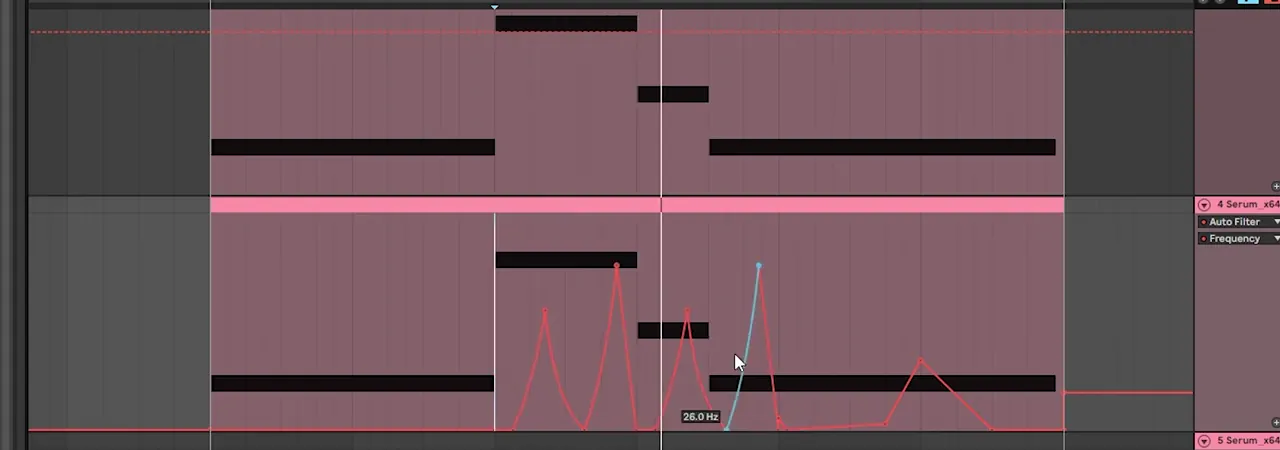
To tame the distortion, we add Auto Filter as a low-pass with a 24 dB slope (watch at 4:23) and automate its frequency. Experiment here: for example, make the first curve slower and the second one quicker. Our final shape has a few sharp peaks over the B and G notes, a single fast rise and a gentle bump on the last note.
Listen: the second bass with Saturator, Pedal and the automated Auto Filter8 sec
7.Overdrive, chorus, EQ, OTT and parallel reverb
Add Overdrive with low dynamics and high drive, then chorus. EQ the result to boost the low mids and filter out the highs, bring some highs back with OTT, and finish with a parallel reverb: a fully wet reverb on one chain of an Audio Effect Rack, blended with a dry chain.
In Overdrive we bring the dynamics low and boost the drive (watch at 5:15); on screen that’s Drive 91%, Dynamics 5.5% and Dry/Wet 50%. Then we experiment with Overdrive’s filter band. Not in Ableton? Any plugin that does multiband distortion will do the trick, for example FabFilter Saturn or iZotope Trash 2 (watch at 5:39).

Listen: the second bass after Overdrive, while we try its filter6 sec
Next come Chorus and EQ Eight (watch at 5:52). The EQ boosts the low mids and filters out the highs, then OTT brings the highs back, followed by some gain. Our OTT sits at Amount 44% with its output at 6.80 dB.

The last step is parallel reverb (watch at 6:16). Load a Reverb and set it to 100% wet, press Ctrl+G to group it into a rack, and create a second chain. Name one chain Wet and the other Dry, and remove the reverb from the Dry one. Now you have a dry signal and a fully reverbed signal side by side, so you can mix the two together with the chain volumes. This keeps the low end solid while the reverb adds space around it.

8.Make fills and variations with the second bass
Throughout the track, the second bass keeps changing. The quickest ways to get new fills from one patch are changing the octave, swapping the waveform, drawing new filter automation or adding an LFO to the filter, then choosing which parts of the track get each fill.
We go through the most useful parameters one by one (watch at 7:05). Changing the octave is one of the easiest; in the track that alone gives you a different fill. You can also change the waveform, for example to a square wave, then go back to the saw. In the filter you can try different shapes, draw a new automation curve, or add an LFO to the filter and combine it with an octave change. Then pick the bars of your track that should carry each fill. It’s worth going back to your own tracks with this type of bass and trying these moves on them too. For more on where a bass like this sits in a tune, see the bass section of our guide to every DnB bass type, and keep the lowest notes clean with our DnB sub bass guide.
Common mistakes making a Monrroe-style bass
- Busy MIDI. This sound lives on long notes. Let the filter, not the notes, create the rhythm.
- Filtering before distorting. In Serum the order is distortion, compressor, then filter, so there are harmonics for the filter to open into.
- A fast, generic LFO. Slow it to 2 or 8 bars and draw the shape yourself.
- Saturating without gain staging. When Saturator adds 13 dB of drive, take 13 dB off the output.
- Leaving the second bass fizzy. Low-pass the distortion with Auto Filter and cut the highs with EQ before OTT brings back only what you need.
- Reverb straight on the bass. Use a Dry and a Wet chain so the bass stays solid underneath.
- One pattern for the whole track. Use octaves, waveforms and filter shapes to give the second bass new fills.
Free download
Free samples to build your track around the bass
A bass like this needs drums and a track around it. The 174 Marathon Sample Pack gives you:
- 100+ royalty-free samples
- Drums, bass, FX, melodics and more
- Audio samples, so they work in Ableton Live and any other DAW
- Made for International Drum & Bass Day and our 174 Production Marathon
It’s one of seven free sample and preset packs in DNB Academy Free Access, alongside the mixing and mastering e-books and the 3‑day DnB challenge. Join 40,000+ producers in Free Access. Free account, no card needed.
Go deeper
Deep DnB courses and Serum presets
Want to go further than one bass patch, or start from ready-made Serum sounds?
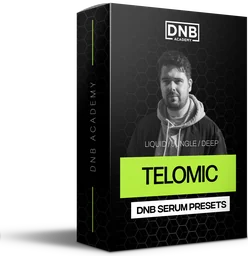 Preset bundleTelomic Serum presets100 Serum presets for liquid, jungle and deep DnB, including 30 basses, 35 pads and 21 plucks.
 Production courseTelomic production courseA track from scratch in about 6 hours: music theory, bass synthesis and resampling, drums, atmospheres, arrangement, mixing and mastering, with the project file, stems, presets and samples.
 Production courseKove production courseA start-to-finish track in Kove’s style: 8+ hours of video, with the project files, presets and samples.
Every artist course, preset bundle and sample pack is also in The Vault. Browse courses
Related tutorials
All tutorials → Serum · BassHow to Make a Reese Bass for Drum and Bass15 min read · Video + guide
 Serum · LiquidHow to Make a Liquid DnB Bass Like Random Movement in Serum18 min read · Video + guide
 Serum · RollersHow to Make a Techy Roller Bass Like DLR & Sofa Sound in Serum7 min read · Video + guide
 Guide · BassHow to Make Drum and Bass Bass: A Guide to Every Bass Type15 min read · Video + guide
FAQ: making a bass like Monrroe’s Out of Time
How do you make a bass like Monrroe's Out of Time?
Build two layers on one long-note bassline. The main bass is a Serum saw with 5 unison voices, Tube distortion, a multiband compressor and an MG Low 24 filter around 100 Hz, with a slow LFO moving the cutoff. The second bass duplicates it with more unison and no Serum effects, then goes through Saturator, Pedal, an automated Auto Filter, Overdrive, Chorus, EQ Eight, OTT and parallel reverb in Ableton.
What notes does the Out of Time bass play?
In our recreation the track is in E and the main progression is 1, 5, 3, 1: a long E0, then B0, a short G0 and a long E0 again. Both bass layers play the same MIDI.
What LFO settings move the filter?
LFO 1 is mapped to the cutoff of Serum’s FX filter (MG Low 24). Start at 2 bars, then slow it to 8 bars and draw your own shape. Ours rises in a few ramps and then wobbles faster towards the end of the loop.
Can I make this bass in Vital or another DAW?
Yes. Vital, which is free, has saw waves, unison, distortion, compression, filters and drawable LFOs. Outside Ableton, any multiband distortion plugin can replace Pedal and Overdrive; FabFilter Saturn and iZotope Trash 2 are mentioned in the video. Any rack or bus with a dry and a 100% wet reverb chain gives you the parallel reverb.
How do you add parallel reverb to a bass in Ableton?
Load a Reverb at 100% wet, press Ctrl+G to put it in an Audio Effect Rack and add a second chain. Name the chains Wet and Dry, remove the reverb from the Dry chain, then blend the two with the chain volumes.
How do you get different fills from the same bass?
Change the octave, swap the waveform (for example to a square wave and back to a saw), draw new filter automation or add an LFO to the filter, then choose which parts of the track get each fill.
Next steps
Load a default saw in Serum, write four long notes and get the main bass moving with a slow LFO before you build the second layer. To see where liquid and deep, minimal styles fit among the rest, read our drum and bass subgenres guide.
Free Access
Seven free DnB sample and preset packs, including the 174 Marathon Sample Pack, plus mixing and mastering e-books and a 3-day challenge for Ableton Live and FL Studio.
Get free packsThe full guide
Tempo, drums, sub, mid bass, chords, arrangement and mixdown: every step of a DnB track.
Read the guideDNB Foundations
A structured drum and bass course with weekly live feedback calls on your tracks.
See Foundations1:1 Mentorship
Personal guidance on your music from a mentor, built around your goals.
See the mentorship50,000+ producers have joined DNB Academy, and our producer Discord has 5,300+ members.