Serum · Deep, minimal bass · Ableton Live
How to Make Minimal Deep DnB Basslines in Serum
To make a minimal deep drum and bass bassline in Serum, start with a sine-based wavetable that already has a few extra harmonics, drop it low, and layer a second oscillator a fifth above with unison and the lows cut out of that layer only. Then add a touch of moving pink noise, saturation and compression, and get the rhythm from an automated EQ and a drawn sidechain rather than from lots of notes. Below is the whole chain from our deep, minimal bass video, with the settings from the screen and audio of each stage.
Deep, minimal basslines are about space: a clean low end, a darker textured layer on top and small movements that keep a sparse pattern interesting. If you’re new to the style, our guide to deep and minimal drum and bass explains where it sits, and the drum and bass bass guide compares it with every other bass type.
Quick answer
How do you make a minimal deep bassline in Serum?
From the init preset, load Analog_BD_Sin on oscillator A, add a few harmonics in the table editor and set the octave to -3. Put Basic Shapes on oscillator B, a perfect fifth up (+7 semitones) with 9 unison voices, and route a High 24 filter to oscillator B only. Add Hyper/Dimension, switch to mono with glide, and add quiet pink noise moved by an LFO. Then saturate, compress and thicken it, automate an EQ band for movement, send a little to a reverb and draw a volume sidechain around the kick.
- Source.Analog_BD_Sin with added harmonics.
- Layer.A unison fifth, high-passed on its own.
- Texture.Width, mono, glide and pink noise.
- Grit.Saturator, compression and Erosion.
- Movement.An automated EQ band.
- Space.A reverb return and a drawn sidechain.
The full walkthrough from DNB Academy: a deep, minimal bassline built from Serum’s init preset and finished in Ableton Live 12 at 174 BPM. Each step below links to its moment in the video.
What you’ll need
- Serum. Everything up to the distortion happens in one Serum instance: two oscillators, the noise oscillator, the filter, one LFO and the Hyper/Dimension, Compressor and Filter effects. Don’t have Serum? Vital is free and has the same building blocks, so you can follow every step.
- A DAW. The video uses Ableton Live 12 at 174 BPM, with Ableton’s Saturator and Erosion, FabFilter Pro-Q 3 and ValhallaRoom on a return track. Any saturation, an EQ you can automate and a reverb will do the same job.
- A drum loop and a sparse pattern. A short drum loop and a simple MIDI pattern with a few long notes. Deep, minimal basses need space, and most of the movement here comes from automation, not from busy notes.
1.Start with Analog_BD_Sin and add harmonics
The foundation is a sine-like wavetable with a few harmonics already in it. Editing those harmonics and dropping the oscillator three octaves gives you a deep, solid low end that still has enough upper content to cut through.
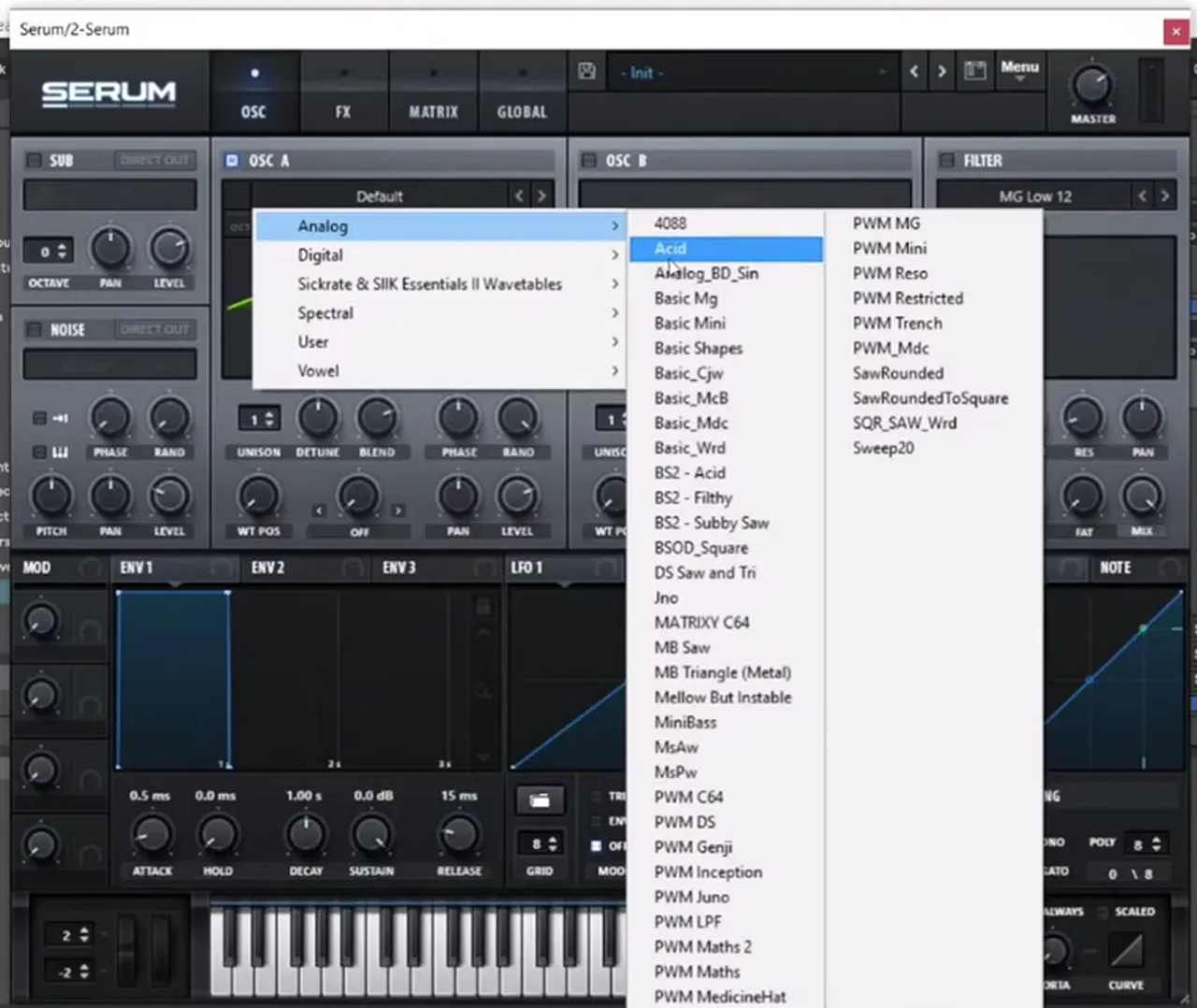
Start from Serum’s standard init preset (watch at 0:52). On oscillator A, open the wavetable menu and load Analog_BD_Sin from the Analog folder (watch at 0:58). It’s a good starting point for most deep basslines because it’s mostly sine with a little extra colour.
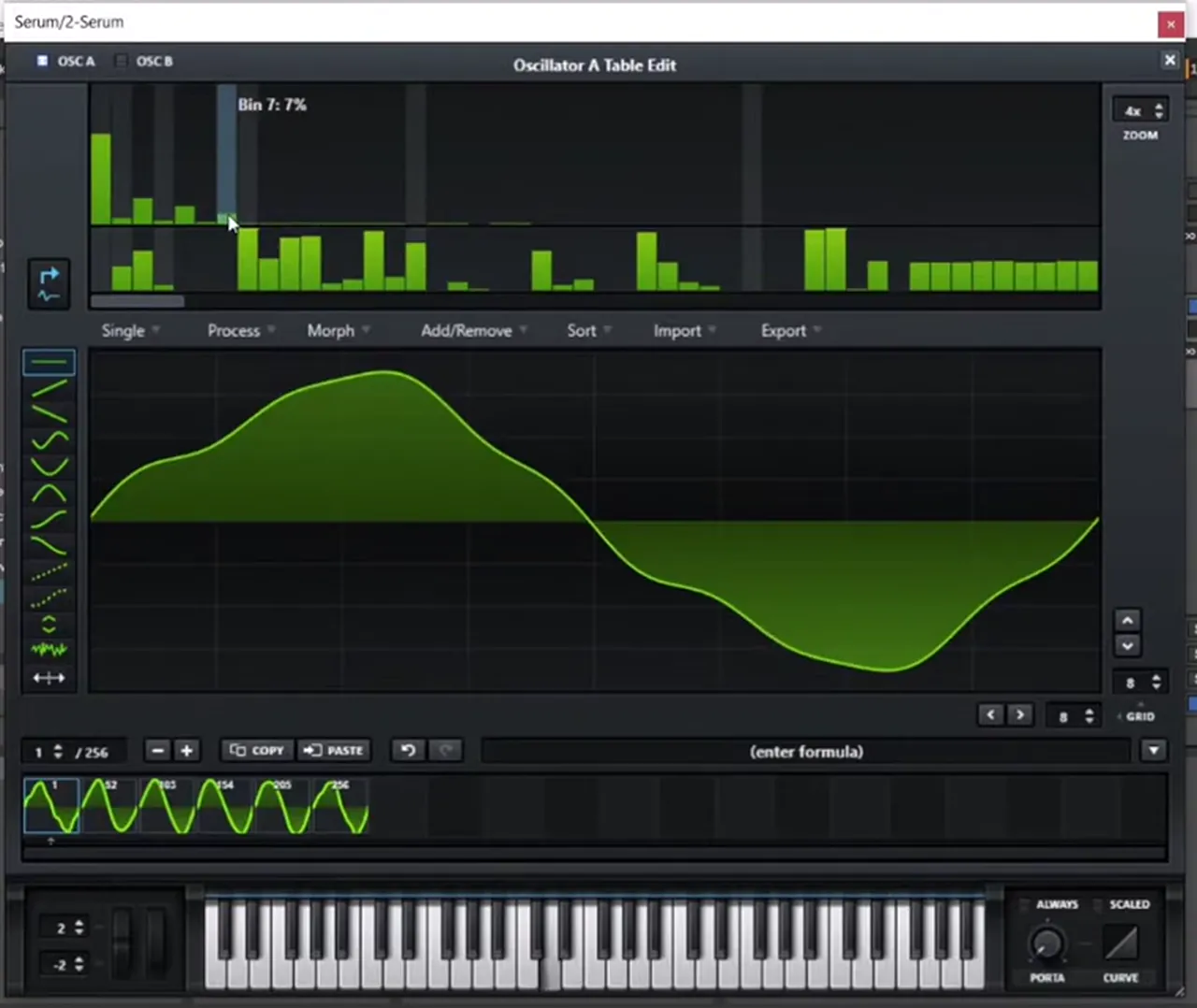
Next, click the pencil icon to open the table editor (watch at 1:05). The top half shows the harmonics as bars. Raise some of the harmonics that are already there to enhance them, and then add a few small in-between harmonics as well, which makes the tone a little more aggressive. Then pitch the oscillator down: on screen oscillator A ends up at octave -3.
Listen: the edited Analog_BD_Sin on its own, pitched down9 sec
2.Layer a fifth with unison, and high-pass only that layer
A second oscillator a perfect fifth above, spread with unison, gives the bass its deep, techy character. Cutting the lows out of that layer alone keeps the sub clean and adds a darker, textured edge.
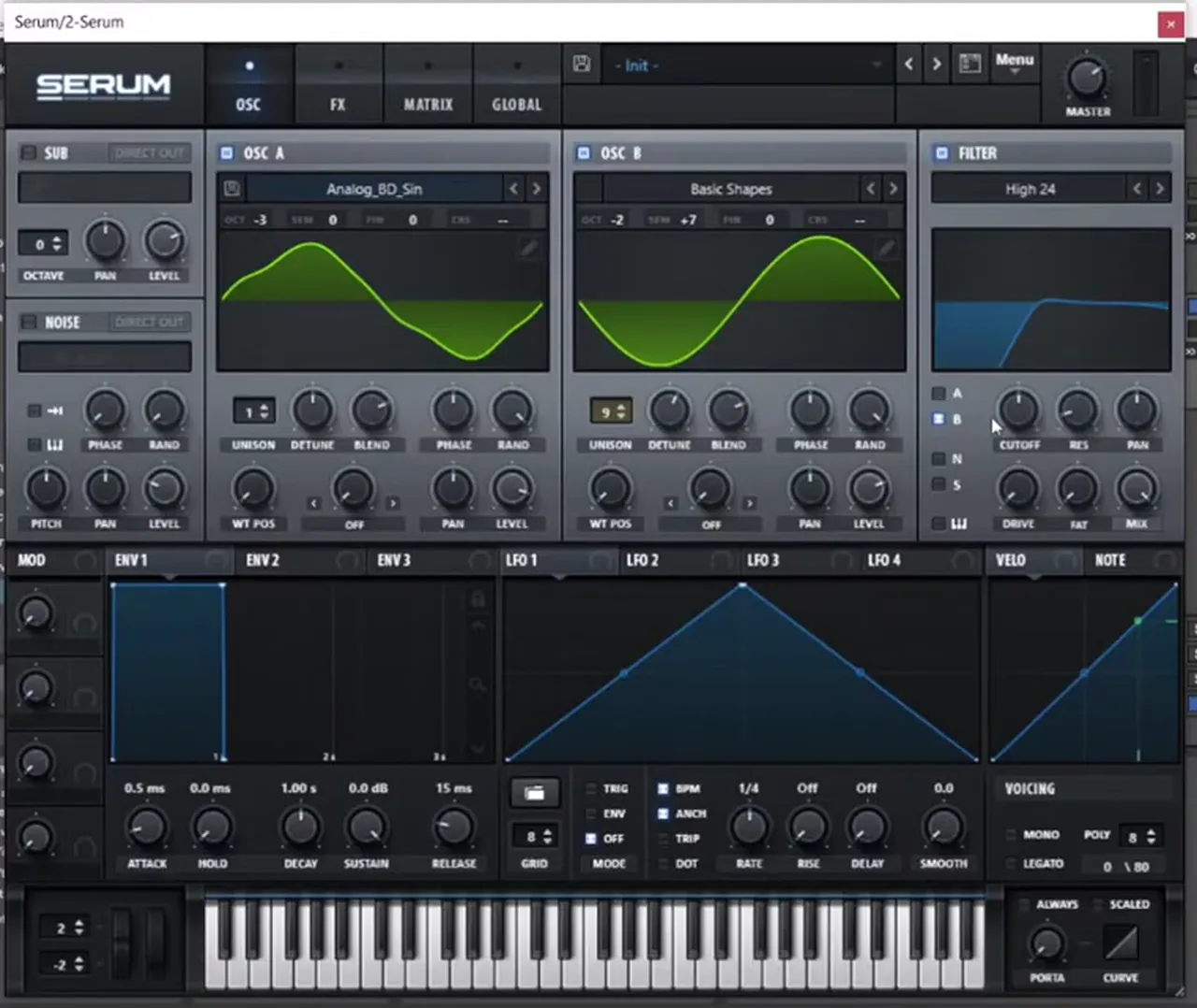
Turn on oscillator B and leave it on Basic Shapes at the sine position (watch at 1:51). Add some unison (it’s on 9 voices on screen) and tune it up a perfect fifth: +7 semitones. On screen oscillator B sits at octave -2, one octave above oscillator A. That alone already gives you some of the deep DnB vibe.
Now enable the filter, pick High 24 and route it to oscillator B only (B ticked, A unticked in the filter’s routing) (watch at 2:19). Raise the cutoff until the lows of the layer are gone. Oscillator A keeps the low end on its own, and the high-passed fifth sits on top as texture.
Listen: both oscillators, with the lows cut from the fifth layer9 sec
3.Add width, mono, glide and a little moving noise
A bit of dimension adds width to the top layer, mono with glide makes the pattern slide like one voice, and a quiet pink noise layer with some movement fills in the texture.
In the FX tab, add Hyper/Dimension for some extra width (watch at 2:47). Back on the oscillator page, set the voicing to Mono and add some glide with the porta knob (watch at 2:59), so overlapping notes slide into each other.
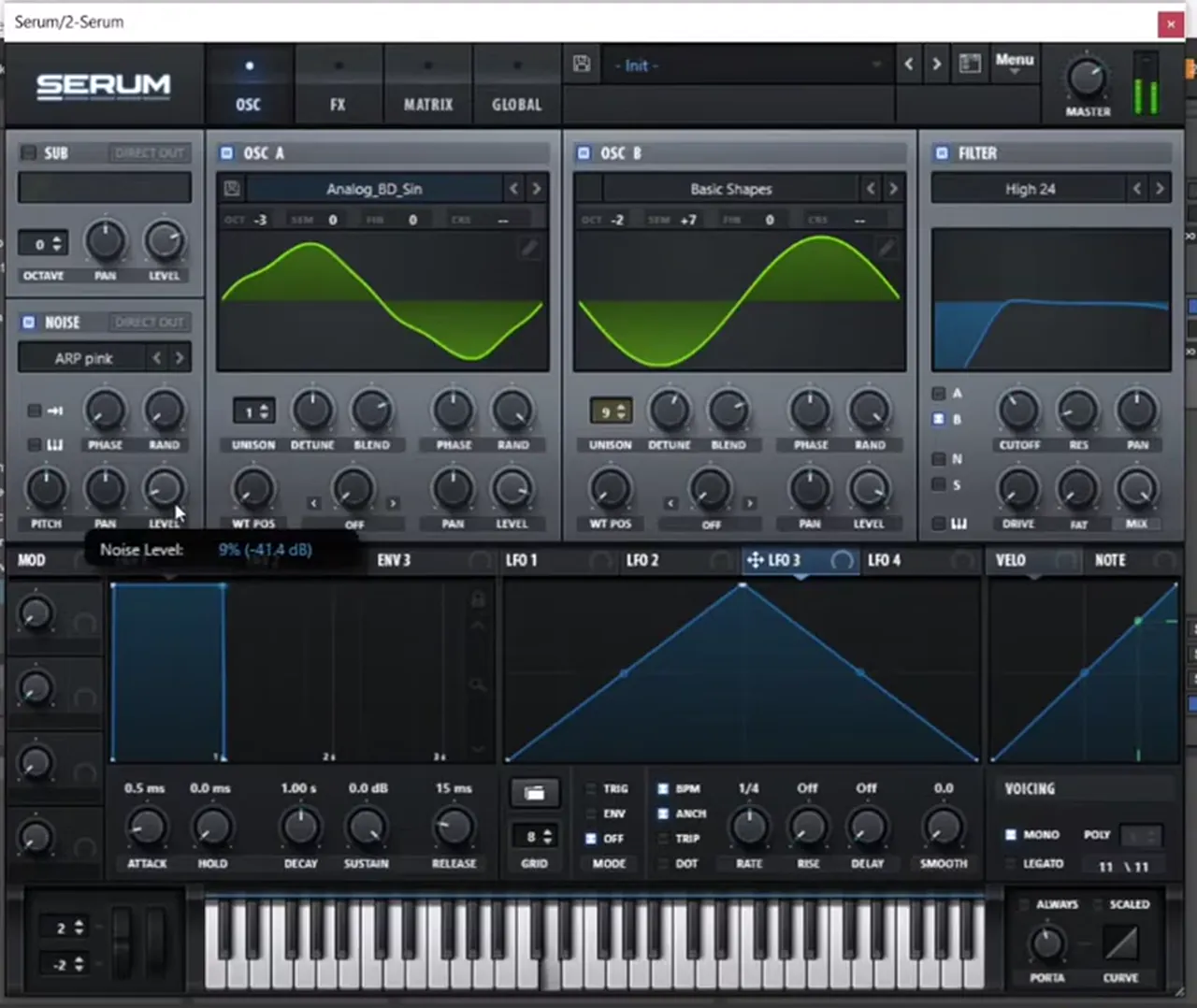
Then turn on the noise oscillator and load a pink noise (watch at 3:12). On screen it’s ARP pink at a low level (the tooltip reads 9%, about -41 dB, while it’s being set). To give the noise some movement, drag an LFO onto the noise level; in the video it’s LFO 3, synced to a dotted 1/8 with a quick rise and slower fall.
4.Saturate it, then add compression carefully
Distortion is what makes the bass come alive, and compression pushes it further, but compression also boosts the highs a lot, so you have to balance it against the envelope.
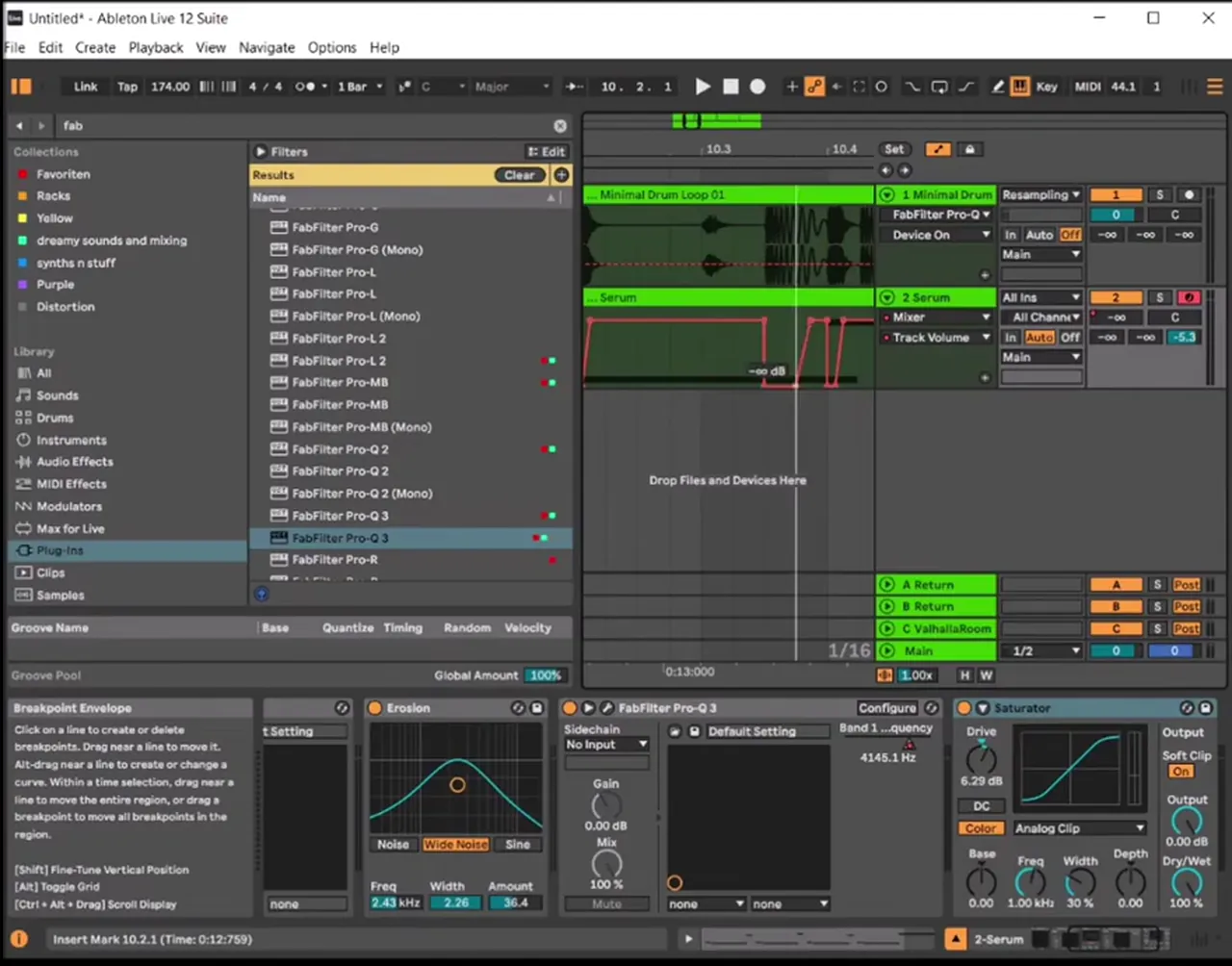
After Serum, add Ableton’s Saturator (watch at 3:42). On screen it’s on the Analog Clip curve with the drive at about 7.4 dB while it’s being set; later in the video the drive reads 6.29 dB with Soft Clip on. Just distorting it a little makes everything better.
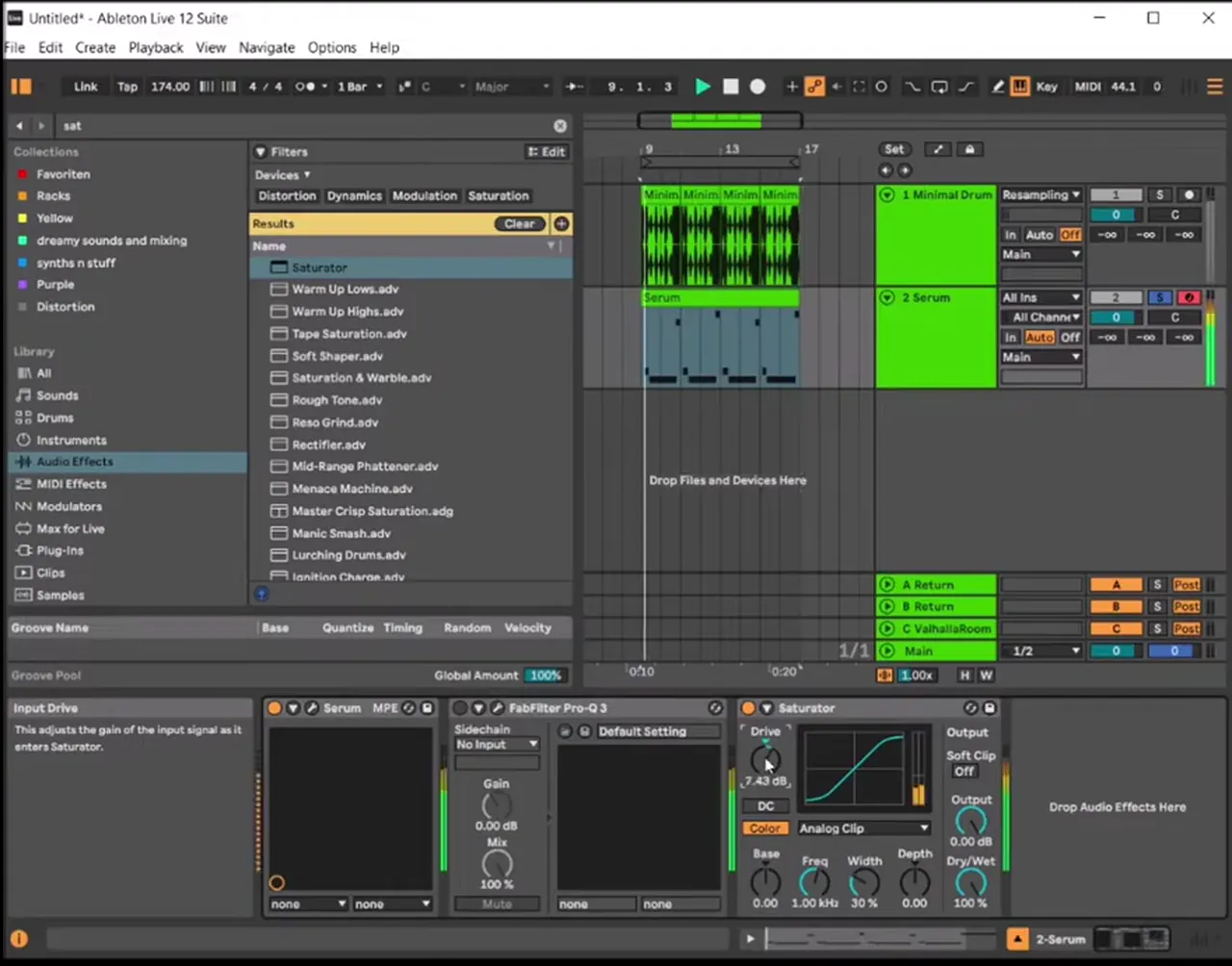
Listen: the bass with the Saturator added10 sec
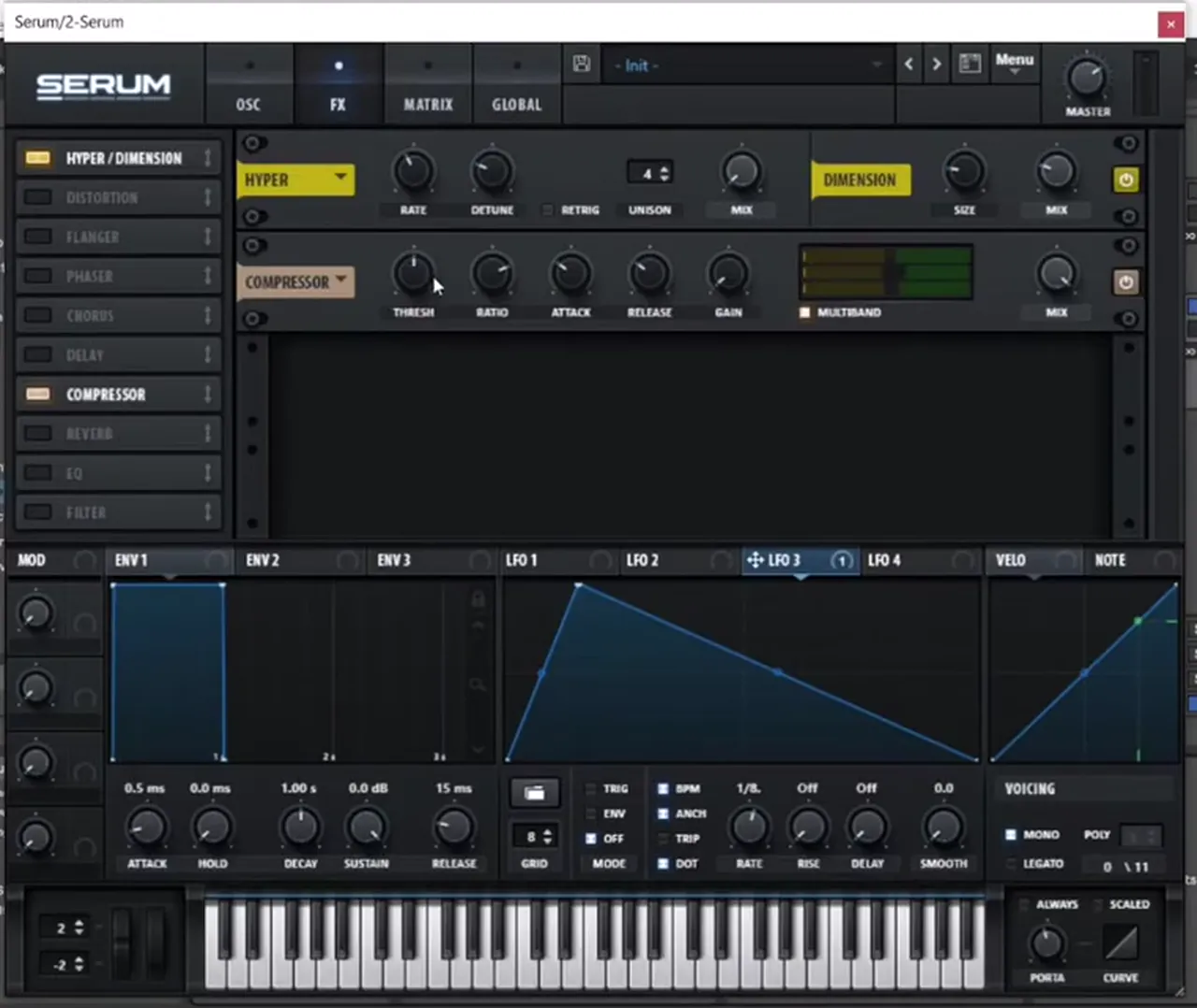
Then go back into Serum’s FX tab and add the Compressor (watch at 4:02). Be careful here: it drastically boosts the highs and pushes the sound a lot. The fix in the video is to go back to the amp envelope and soften it; on screen the attack of ENV 1 changes from 0.5 ms to 8.8 ms. You can also try changing the octave of oscillator B (watch at 4:40); on screen it moves from -2 to -1, which shifts where the fifth layer sits.
5.Thicken it with a little extra noise
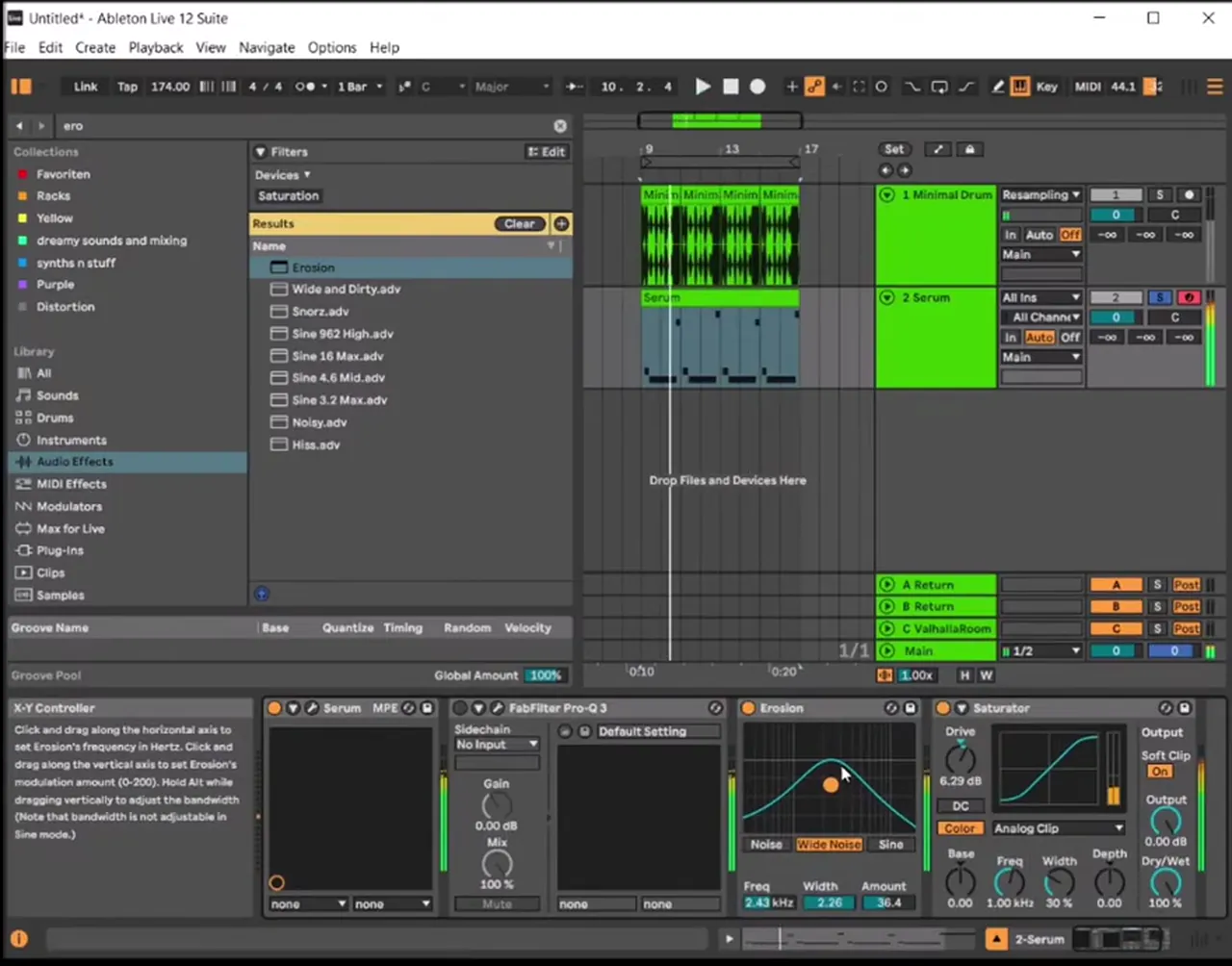
The compressed, saturated sound has a slightly bit-crushed quality that suits the style. A touch of extra noise from Ableton’s Erosion makes it thicker before the EQ.
Before the EQ, add Erosion in front of the Saturator (watch at 5:01). On screen it’s set to Wide Noise, with the frequency at 2.43 kHz, the width at 2.26 and the amount at 36.4. That makes the bass nice and thick without changing the notes.
6.Add movement with an EQ you automate
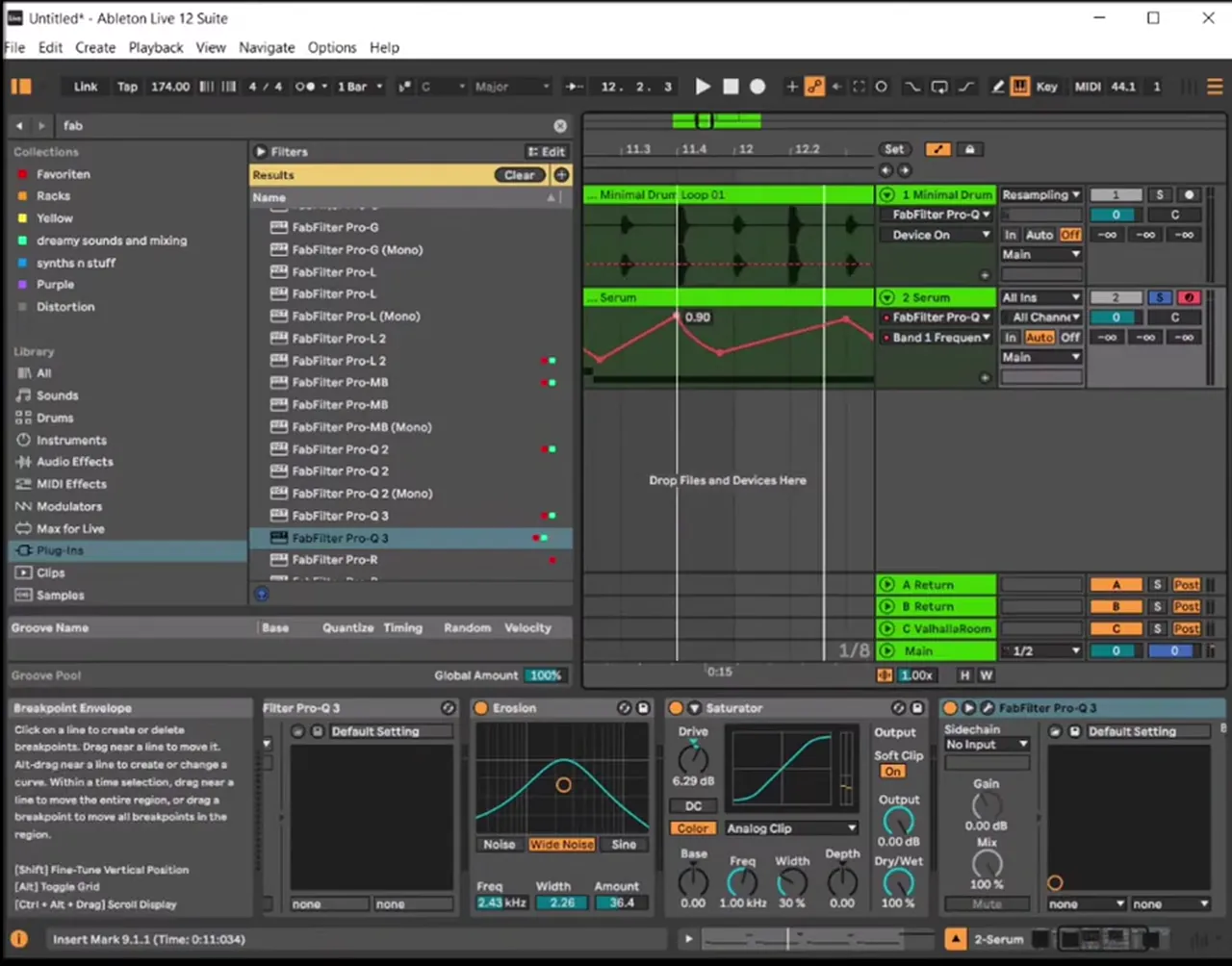
Automating one EQ band’s frequency is a simple way to make a sparse bassline move and even to give it its own rhythm.
Add an EQ after the chain; the video uses FabFilter Pro-Q 3 (watch at 5:23). On screen the band is a 12 dB/oct high cut, first set around 330 Hz. Then show the automation for that band’s frequency on the bass track and draw breakpoints, so the cutoff opens and closes across the bar. You can draw in your own rhythm this way, which is a fun way of making something rhythmic out of a single long note (watch at 6:12).
Listen: the bassline with the automated EQ movement13 sec
If you want to go further with movement in the low end, our sub bass guide covers how to keep the sub steady while the layers above it move.
7.Add a little reverb and a drawn sidechain
A small amount of reverb on a return gives the bass some air, and a sidechain drawn around the kick keeps the low end clean where the drums hit.
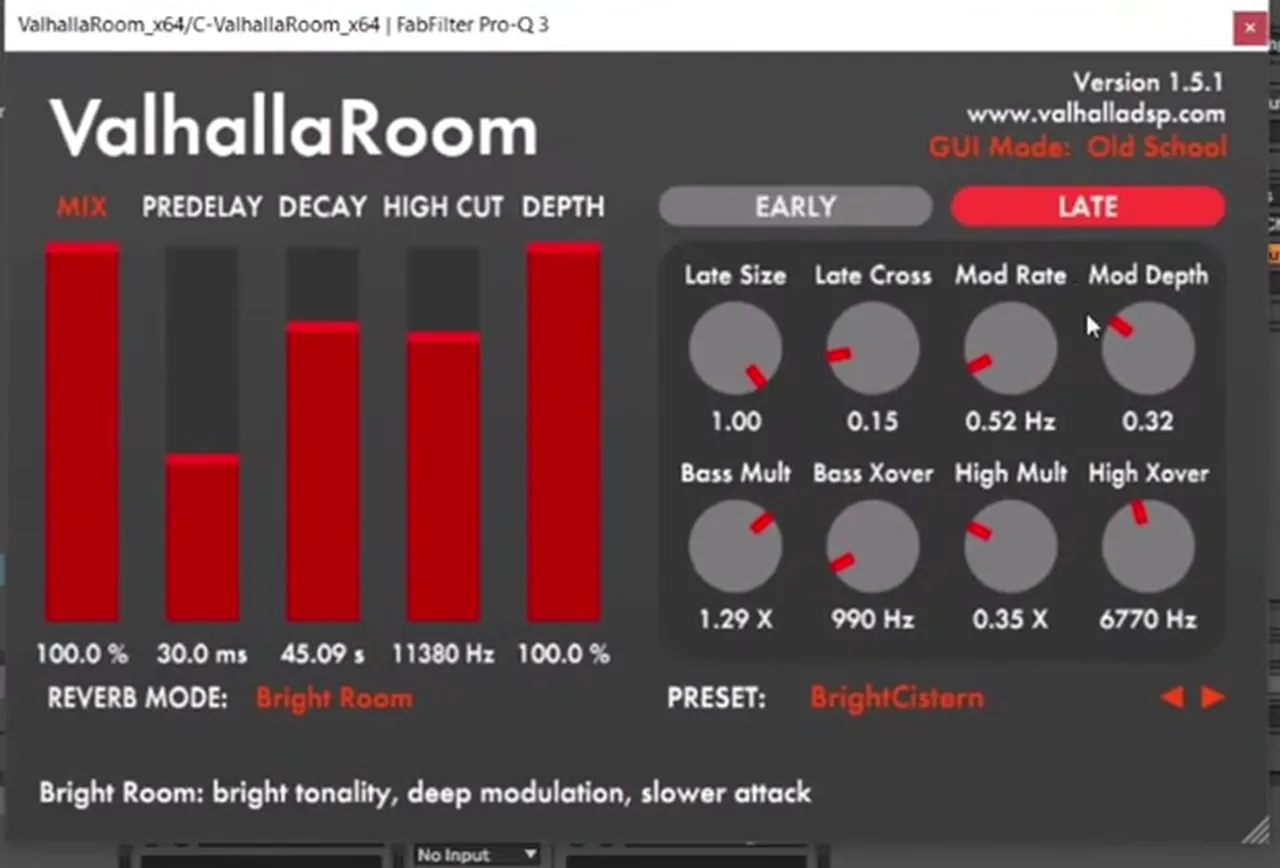
Send a little of the bass to a reverb on a return track (watch at 6:23). The video uses ValhallaRoom on the return with the BrightCistern preset (Bright Room mode, mix at 100% because it’s on a return), followed by an EQ on the same return to cut the low end out of the reverb. Keep the send low; it should be a small ambience, not a wash.
Finally, the sidechain (watch at 6:52). Here it’s drawn by hand: open the Track Volume automation on the bass track, look at where the kicks are and how long they last, and draw a dip down to silence for each kick. Where there’s no kick, leave the bass alone. You can sidechain however you like; drawing it is just the quickest way here and shows you exactly what’s being ducked. For the full picture on getting the kick and bass to sit together, see our guide on how to mix drum and bass.
8.Variations to try
Once the chain is in place, you have a lot of options (watch at 7:58):
- Another filter. Add Serum’s Filter effect, for example another low-pass (it’s on MG Low 6 on screen), and play with it for extra movement.
- Different wavetables. Swap the wavetables on either oscillator; the same processing chain gives a completely different character.
- Different notes. Try a completely different note or interval for the layer. The fifth is a starting point, not a rule.
That’s how you can get these deep, techy basslines: a simple source, one layer for texture and most of the interest coming from movement. For another deep, minimal approach in a different synth, try our bass like Alix Perez in Phase Plant.
Common mistakes
- Filtering both oscillators. If the high-pass hits oscillator A too, the sub disappears. Route the filter to oscillator B only.
- Too much noise. The pink noise should sit far in the background (single-digit percentages on screen). It’s texture, not a layer you hear on its own.
- Compressing without checking the highs. Serum’s compressor can brighten the bass a lot. Listen after adding it and soften the envelope if the attack gets harsh.
- Leaving the bass static. A minimal pattern with no movement sounds empty. Automate an EQ band, a filter or the noise so each bar changes a little.
- Reverb on the low end. Use a return with an EQ after the reverb so the sub stays dry and focused.
- Ducking where there’s no kick. Draw or set the sidechain to follow the actual kick pattern, and leave the bass alone in the gaps.
Free download
Free samples to build a deep, minimal loop
A sparse bassline like this needs drums and space around it to work. The 174 Marathon Sample Pack gives you:
- 100+ royalty-free samples
- Drums, bass, FX, melodics and more
- Audio samples, so they work in Ableton Live or any other DAW
- Made for International Drum & Bass Day and our 174 Production Marathon
It’s one of seven free sample and preset packs in DNB Academy Free Access, alongside the mixing and mastering e-books and the 3‑day DnB challenge. Join 40,000+ producers in Free Access. Free account, no card needed.
Go deeper
Deep, minimal courses and sounds
Want a full deep, minimal track from start to finish, or ready-made Serum sounds to study?
 Production courseArkaik production courseMinimalist drum and bass in Logic Pro X: a 6+ hour start-to-finish course, from bass presets and drum processing to the mixdown, with the samples, presets, project file and stems.
 Preset bundle · SerumBristol Tech Serum preset bundleTechy / Rollers: Serum presets for techy rollers.
 Preset bundleGEST Serum presets100 Serum presets for techy, deep DnB, including 35 basses, 12 pads and 7 stabs, plus WAV files of the presets.
Every artist course, preset bundle and sample pack is also in The Vault. Browse courses
Related tutorials
All tutorials → Phase Plant · Deep minimalHow to Make a Bass Like Alix Perez in Phase Plant7 min read · Video + guide
 Vital · Deep bassHow to Make a Deep Bass Like Skeptical’s “Desire” in Vital8 min read · Video + guide
 Serum · Deep minimalHow to Make Basses Like Alix Perez & Skeptical in Serum10 min read · Video + guide
 Guide · BassHow to Make Drum and Bass Bass: A Guide to Every Bass Type15 min read · Video + guide
FAQ: making minimal deep basslines in Serum
How do you make a minimal deep bassline in Serum?
Start from the init preset with Analog_BD_Sin on oscillator A, add a few harmonics in the table editor and drop it three octaves. Layer oscillator B a perfect fifth above with unison and high-pass only that layer. Make the patch mono with some glide, add a little moving pink noise, then saturate, compress and EQ it. Automating an EQ band and drawing a volume sidechain around the kick gives the bassline its rhythm.
Why high-pass only oscillator B?
Oscillator A carries the low end. Routing the High 24 filter to oscillator B alone removes the lows from the fifth layer, so the two layers don’t fight in the sub range and the bass gets a darker, textured edge on top of a clean low end.
Which wavetable is used for the bass?
Analog_BD_Sin from Serum’s Analog folder on oscillator A, edited in the table editor to add harmonics. Oscillator B uses Basic Shapes on its sine position. At the end of the video other wavetables and notes are tried, so treat these as a starting point.
How is the sidechain done?
In the video it’s drawn by hand: Track Volume automation on the bass track dips where the kick hits and stays flat where there’s no kick. A sidechain compressor or volume-shaping tool works too; drawing it is just a quick way to see exactly what’s ducked.
Can I make this bass in Vital?
Yes. Vital is free and has wavetable editing, two oscillators with unison, per-oscillator filter routing, noise, LFOs and effects, so every step here carries over. The Ableton devices used after the synth (Saturator, Erosion, an EQ and a reverb on a return) all have equivalents in other DAWs.
What BPM is the project?
174 BPM, in Ableton Live 12, with a short drum loop and a sparse MIDI pattern so the bass has room to move.
Next steps
Build the two-oscillator source first, then write a short, sparse pattern over a drum loop and add the EQ automation; that’s where the groove comes from. For a deep bass in the free synth, try our deep bass like Skeptical’s “Desire” in Vital; for more bass types and when to use them, read our drum and bass bass guide.
Free Access
Seven free DnB sample and preset packs, including the 174 Marathon Sample Pack, plus mixing and mastering e-books and a 3-day challenge for Ableton Live and FL Studio.
Get free packsThe full guide
Tempo, drums, sub, mid bass, chords, arrangement and mixdown: every step of a DnB track.
Read the guideDNB Foundations
A structured drum and bass course with weekly live feedback calls on your tracks.
See Foundations1:1 Mentorship
Personal guidance on your music from a mentor, built around your goals.
See the mentorship50,000+ producers have joined DNB Academy, and our producer Discord has 5,300+ members.