Phase Plant · Reese & harmonics · Recreation
How to Make a Bass Like Mefjus’ “Hear Me” in Phase Plant
To make a bass in the style of Mefjus’ “Hear Me”, build it as two layers. A reese plays the root notes and gets pushed through EQ-before-distortion until it’s heavily saturated. A second layer of slightly detuned saws plays the upper harmony. Both go into one group that widens the top end and soft-clips everything together. Below is our own recreation in Phase Plant and Ableton Live, presented by Paulo from DNB Academy, with the settings from the screen and audio of every stage.
This is a learning recreation inspired by the bass in “Hear Me”, not the original sound. It isn’t an exact copy; the point is what it teaches about saturation, harmony and layering. For every bass type in one place, see our drum and bass bass guide.
Quick answer
How do you make a bass like Mefjus’ “Hear Me”?
Split the sound into a reese and a harmonics layer. For the reese, stack two detuned saws, a sine sub and a filtered noise oscillator in Phase Plant, then boost a harmonic with an EQ before heavy distortion, split the signal into three bands with their own saturation, and soft-clip the result. For the harmonics layer, play the upper harmony with saws detuned by a couple of cents for a phasing movement, add a sine, boost the mids and saturate. Group both, widen only the top end, and soft-clip everything together.
- Two layers.A reese on the root, saws on the harmony.
- Reese.Two detuned saws, a sine and filtered noise.
- EQ before distortion.Boost a harmonic, then saturate.
- Multiband.Three bands, each saturated differently.
- Harmonics.Saws detuned by about 2 cents for phasing.
- Group.Widen the highs, then soft-clip it all.
The full walkthrough with Paulo from DNB Academy: a reese and a harmonics layer inspired by “Hear Me”, built in Phase Plant and processed in Ableton Live. Each step below links to its moment in the video.
What you’ll need
- Phase Plant. The video uses it because you can stack more oscillators than in Serum, so each harmonic can get its own source. The patches use analog saw and sine generators, a noise generator and a filter, plus Kilohearts effect modules loaded inside Phase Plant: Slice EQ, Distortion, Multipass, Faturator, 3-Band EQ and Limiter. Don’t have it? Vital is free, and the same layering ideas carry over if you spread the oscillators across more than one instance.
- A DAW with EQ, a saturator with soft clipping, chorus and a vocoder. We use Ableton Live’s EQ Eight, Saturator, Chorus and Vocoder, plus the Wider plug-in by Polyverse. Any equivalents will work.
- A simple MIDI idea. Low notes for the reese and a short upper line for the harmonics. The harmony matters more than any setting, as you’ll see in step 6.
1.Plan it as two layers in one group
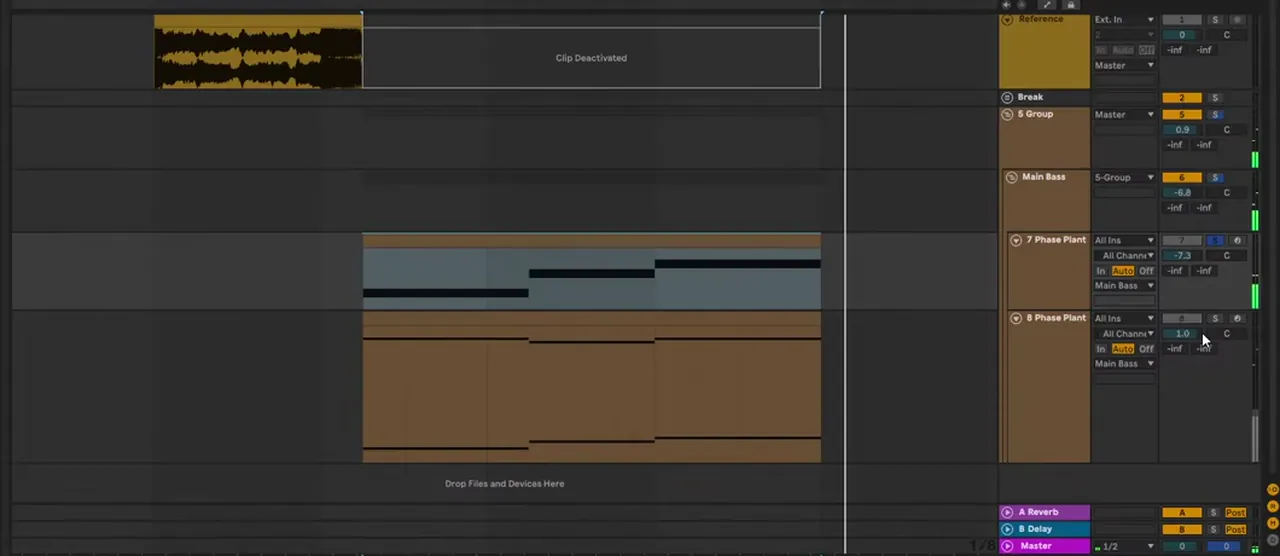
Rich, harmonic basses like this are easier to build in parts. One layer, a reese, plays the root note and gets saturated hard. A second layer plays the upper harmonics and the melody. Group processing, mostly distortion, then glues the two together.
In the session (watch at 1:09) there are two Phase Plant tracks, both routed into a group called Main Bass, where they’re saturated together. That’s the mindset for the whole sound: saturate a bass that plays the root, choose waveforms for the upper harmonics, and let group distortion turn them into one sound. Keeping the layers separate means you can decide exactly which harmonic comes from where.
2.Build the reese: two saws, a sine and filtered noise
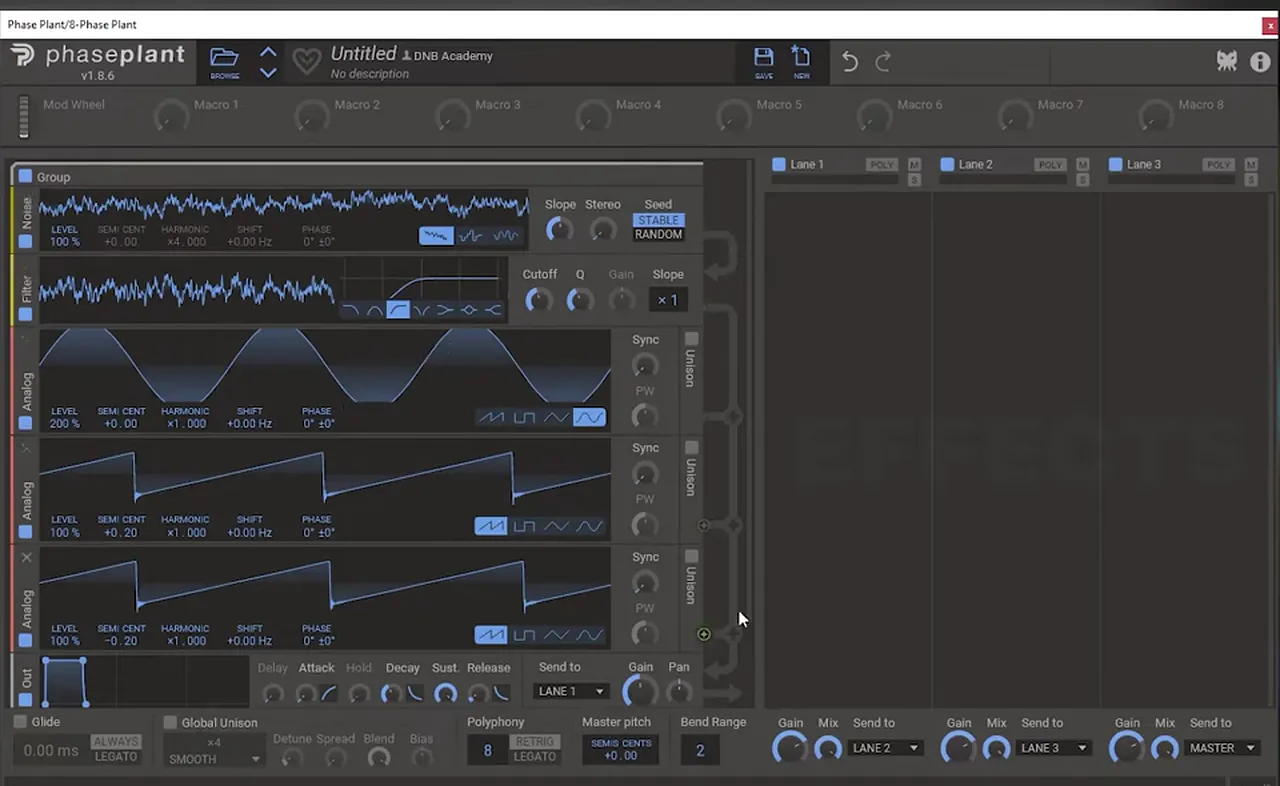
The reese itself is deliberately simple: two saw waves detuned against each other, a sine sub, and a noise oscillator with its own filter. On its own it doesn’t sound like much; the processing does the work.
In Phase Plant (watch at 2:41), add two analog saw generators and detune them away from each other; on screen one sits at +0.20 and the other at −0.20. Add a sine for the sub (its level reads 200% on screen). Then add a noise generator with a filter after it. The order matters: it’s the order in which signals reach the output, and we only want to filter the noise, not everything. Bring the noise down to 0% for now; you can revisit it later. For more on the basic sound, see our reese bass guide.
3.Use EQ before distortion to shape the harmonics
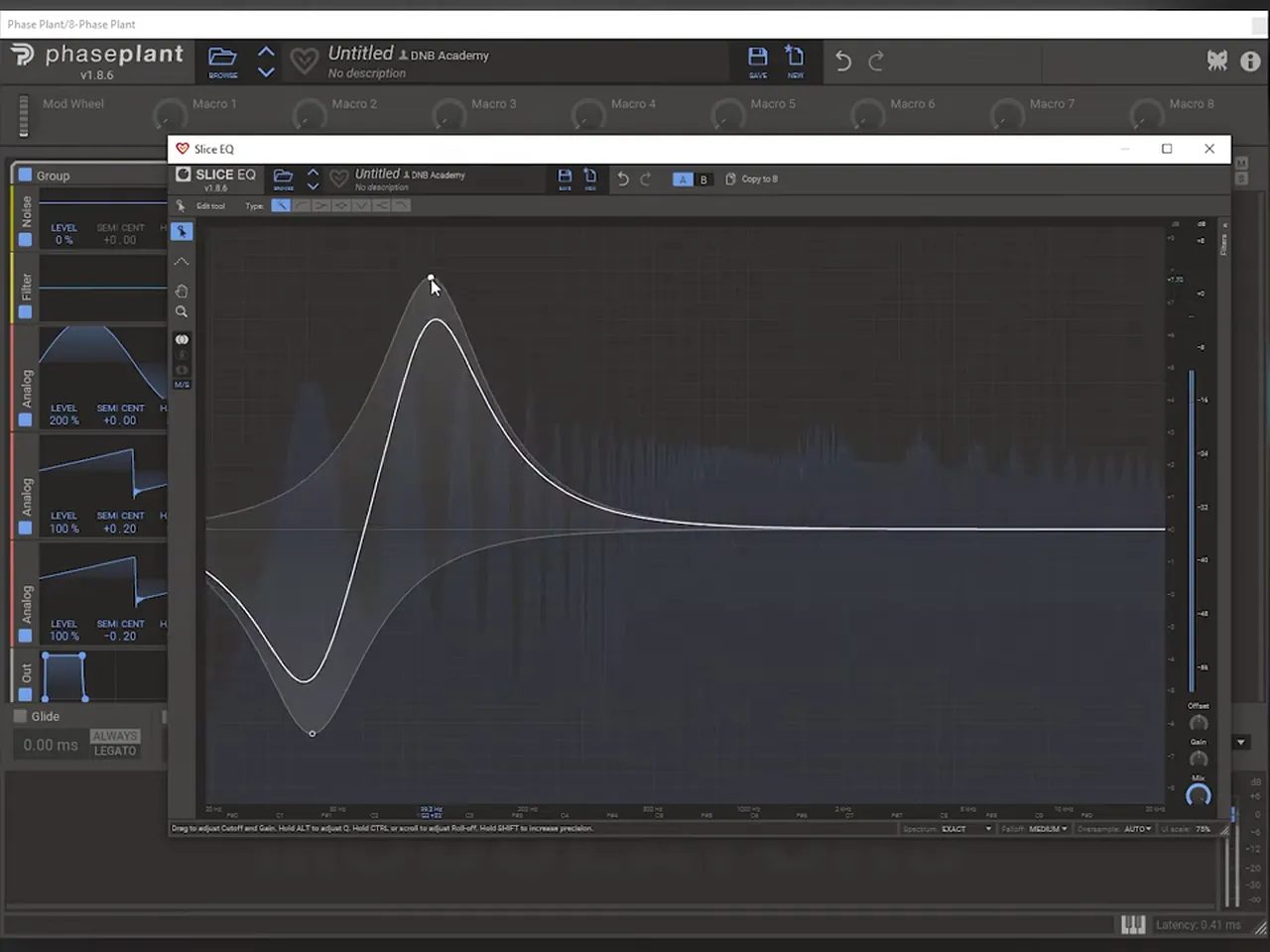
Put an EQ in front of a heavy distortion. Boosting one harmonic and cutting the sub changes what the distortion receives, so it changes the texture of everything that comes out. The more drive you add after the EQ, the more the EQ matters.
Add a Distortion module, set it to Saturate and push the drive a lot (watch at 3:45). Before it, add a Slice EQ and boost the second harmonic while bringing down something like the sub (watch at 4:15). You’re changing how the signal coming into the distortion is laid out in terms of harmonics. Move that EQ boost around with the drive high and listen to how much the character changes.
4.Saturate three bands separately with Multipass
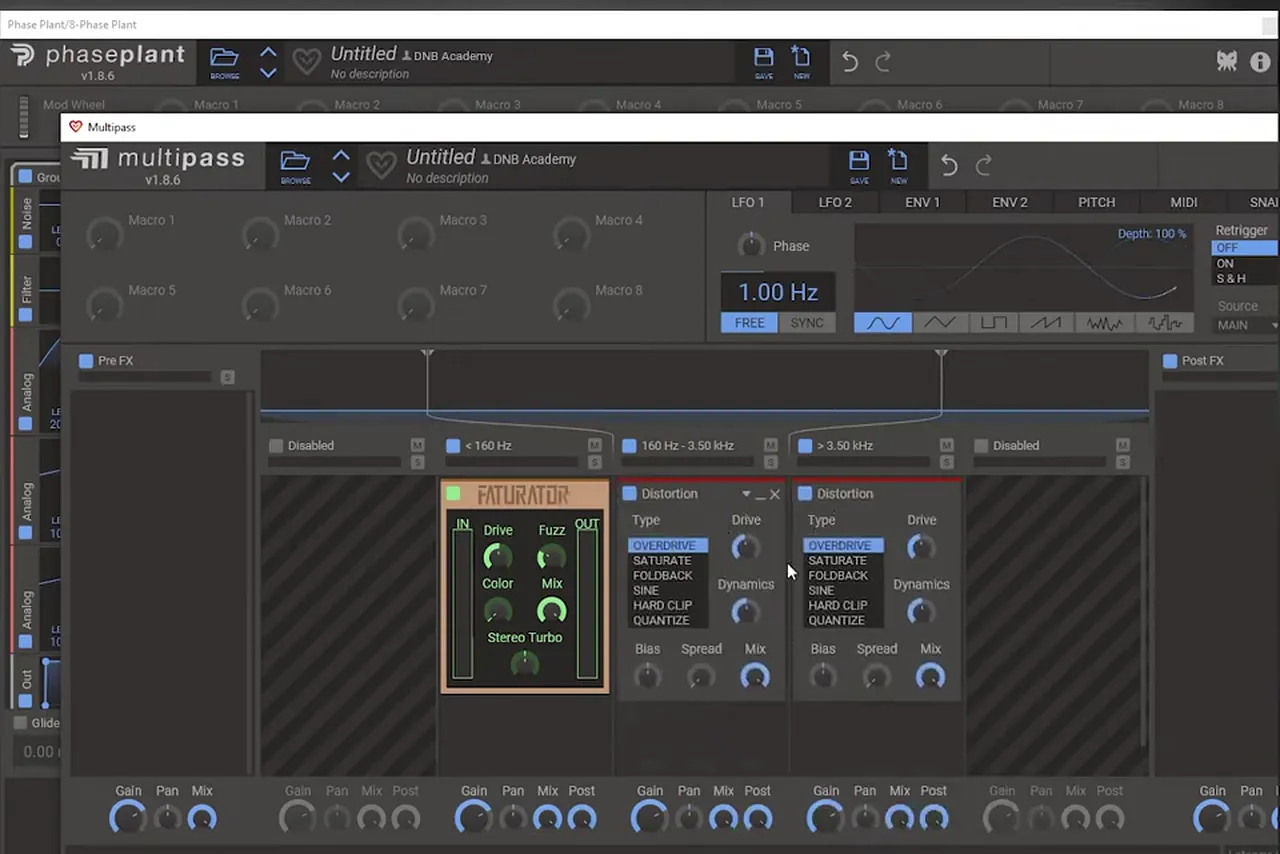
Instead of a third-party multiband distortion, the video rebuilds the idea inside Phase Plant’s Multipass: split the reese into low, mid and high bands and saturate each one differently.
Add Multipass and set two crossovers (watch at 4:56). The video copies the split it remembers from iZotope’s Trash 2: 160 Hz and 3.50 kHz. On screen the low band gets Faturator, and the mid and high bands each get a Distortion module on Overdrive. Then set the drive differently on each band, with a big change on the sub band. You can always move the crossovers later. Keeping everything inside Phase Plant was a choice, not a rule; any multiband distortion will do the same job.
After Multipass comes one more EQ that boosts a harmonic (the second harmonic again), followed by more saturation (watch at 6:00). Listen to how strong the very simple reese has become. From here, go back into that EQ and change things depending on how clean or distorted you want the reese.
Listen: the reese after the second harmonic boost and saturation6 sec
5.Boost the sub into a soft clipper
The reese’s post-processing is an EQ that boosts the sub and reduces the highs, followed by a soft clipper. It isn’t mixing; the aim is to distort as much as possible before soft clipping, so the sub eats into the frequencies above it.
In Ableton (watch at 7:12), the chain after Phase Plant is EQ Eight then Saturator. The EQ boosts the low end and rolls off the highs; the video calls it a bit of a meme EQ, because you’re not supposed to treat a sound like that. The signal is already clipping into the plug-ins, and boosting the sub further makes it sound very saturated in a way that moves. The Saturator is on Analog Clip with Soft Clip on. Once it’s soft-clipped it becomes messy, but with a lot of movement, which is what you’re after.

Now tweak that EQ while it plays (watch at 8:51): every change gives you a different movement. You can also bring the EQ closer to normal and push the saturation harder instead. The video keeps it very saturated on purpose, because the harmonics layer will be distorted on top of it.
Listen: the reese after the sub boost and soft clipping8 sec
6.Let the harmony do half the work
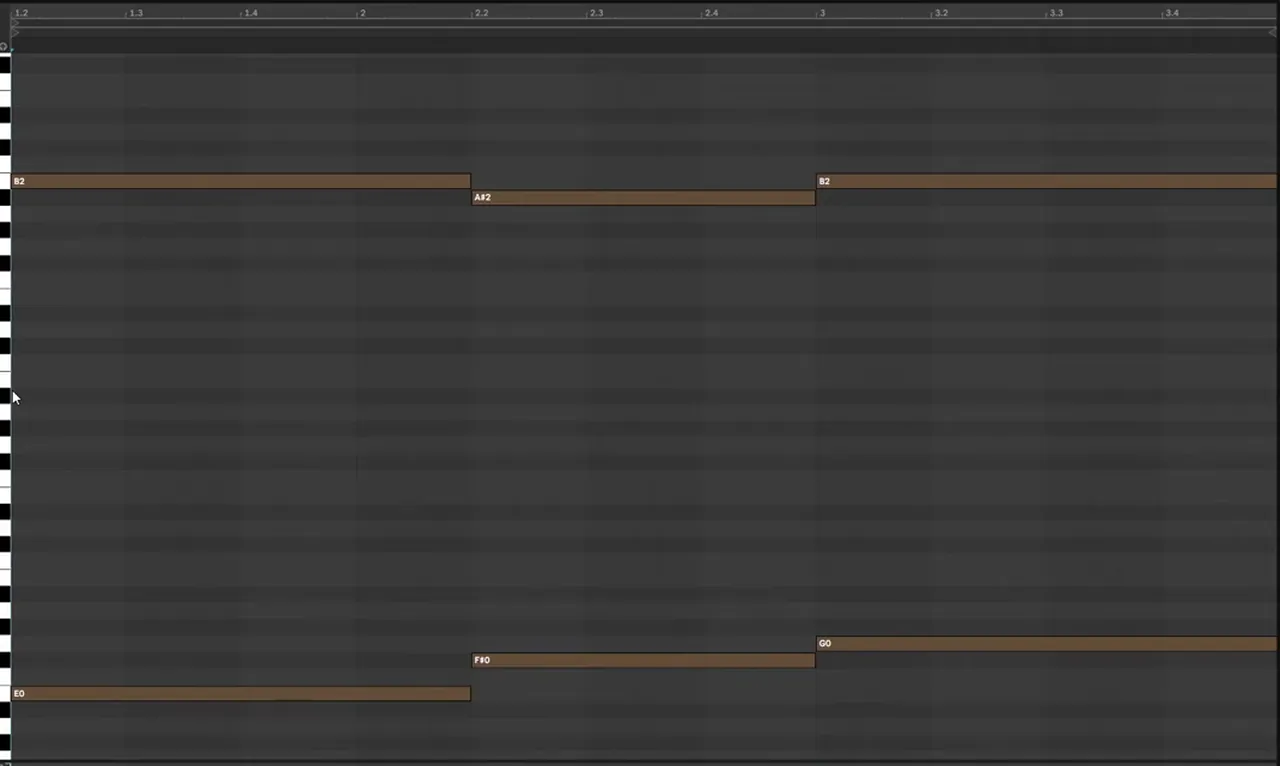
Played with a plain saw, the upper line already sounds like the track. That’s down to the harmony: the top notes move from a fifth to two major thirds above the bass, which makes the sound design much simpler.
Here are the harmonics layer’s notes (watch at 10:21). The low line follows what the reese is doing, but the high line plays different intervals above it:
- E and B: the top note is the fifth of the bass note.
- F♯ and A♯: a major third.
- G and B: a major third again.
Going from a fifth to a major third to another major third while the line climbs almost chromatically adds a cool feel to the harmony. Credit to the track’s arrangement here: with a harmony like this, the layer needs far less processing to sound right. For more on intervals in basslines, see our neuro bass patterns guide.
7.Build the harmonics layer from detuned saws
Stack saw waves that create their own movement. Unison with a small detune gives a flanger-like wobble in the top end; a second saw detuned by only about 2 cents doubles down on it with a phasing effect. A sine underneath plays the bass.
In a second Phase Plant (watch at 11:43), start with a saw and turn on unison with 3 voices, then bring the detune down a little. Put a Slice EQ on it in Exact mode and you can see the high frequencies wobbling in a wavy pattern. To double down on that, add another saw and detune it very slightly: about 2 cents (−0.02 on screen) (watch at 12:46). Layered together they give a phasing, almost laser-like movement. You get a feel for this the more you play with phasing. Finally add a simple sine to play the bass.
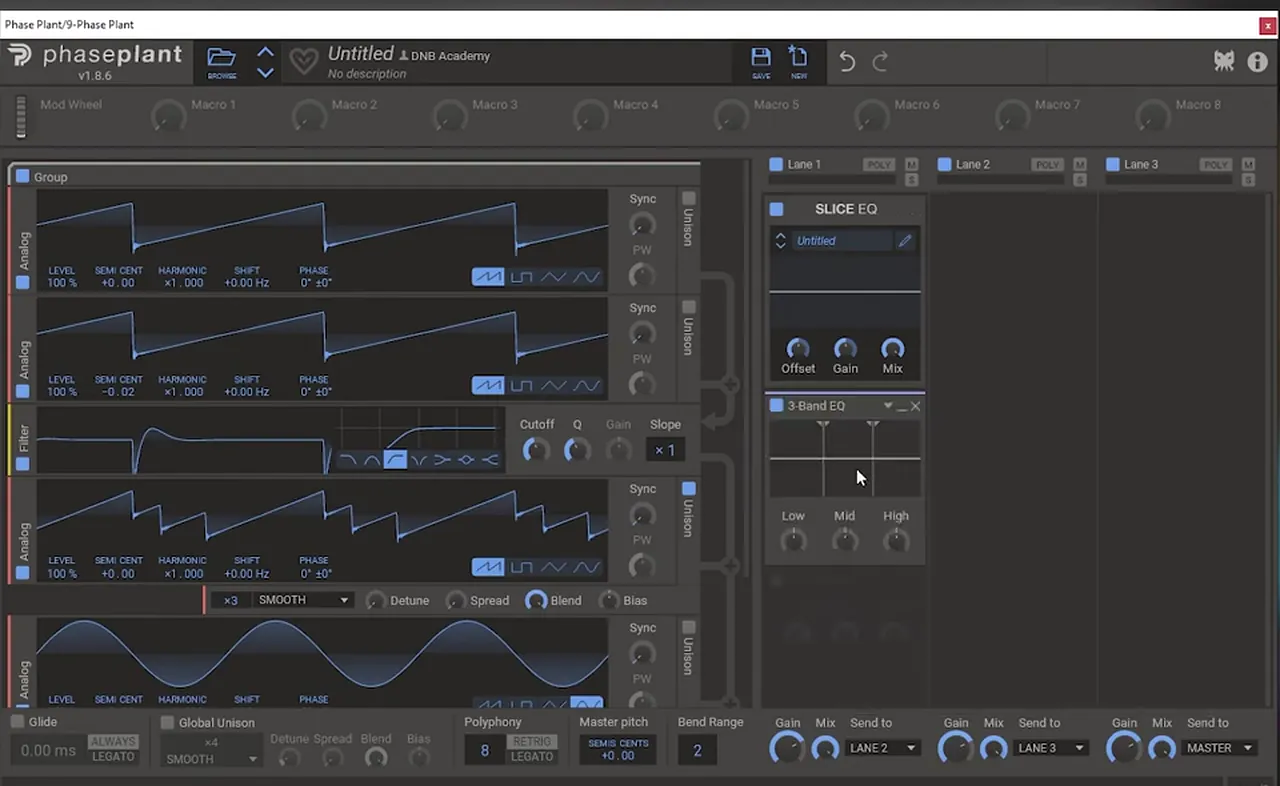
Then process it inside Phase Plant (watch at 13:31): a 3-Band EQ boosts the mids, where the meat of the sound is, and a Distortion saturates it. Compare it with and without the mid boost. After that comes another EQ that boosts the lows and the highs a lot. Again, this isn’t mixing: you want as many harmonics as possible so the layer can be soft-clipped and layered with the reese. A Limiter at the end can work, but in the video it sounded a little too transparent, so the clipping happens in the DAW instead.
8.Saturate the harmonics before they meet the reese
Same idea as the reese: EQ before saturation. An EQ Eight boosts the lows and highs even more while everything is already clipping, then Ableton’s Saturator soft-clips the layer. The difference is subtle, but you hear it in the very high end.
The chain in Ableton (watch at 14:43) is EQ Eight, a second EQ Eight and Saturator on Analog Clip with Soft Clip on. The first EQ pushes the lows and highs, the Saturator clips it, and the extra EQ cleans up the top end. The result has one very strong harmonic, and you can hear the movement from the detuned saws.

Listen: the processed harmonics layer with its phasing movement5 sec
9.Group, widen the top end and soft-clip everything
In the group, an EQ in mid/side mode boosts the highs, removes stereo information from the sub and boosts the sides. A widening rack adds chorus, stereo width and a noise layer on the highs only. Then everything is soft-clipped together once more.
On the Main Bass group (watch at 15:39), an EQ Eight in M/S mode boosts the highs (1.60 kHz, +14.3 dB on screen), takes the stereo out of the sub and boosts the sides. At first there’s nothing on the sides, so go back into Phase Plant, bring the spread up and add a chorus there (watch at 16:10). Now when you move the EQ around, you can hear why the sides get such a big boost.

Next is the widening rack used in many of our videos (watch at 16:42). It has three chains: the dry signal, a stereo chain with Chorus, Wider at 200% and a high-pass, and a high layer where the signal runs through Ableton’s Vocoder with a noise carrier, the formant boosted, then high-passed. On screen the stereo chain sits at −8.0 dB and the high layer at −6.8 dB under the dry signal. The stereo and noise layers stay up top, while the low end stays mono.

Finally everything is soft-clipped once more (watch at 17:33). That makes the bass a little wider and brighter, and clips the two layers into one sound.
Listen: both layers together after the group processing5 sec
It isn’t exactly the same as the original, but rebuilding it teaches a lot: the saturation workflow, thinking about harmony while you design, and how two layers interact. For where a bass like this sits among the styles, see the neurofunk section of our subgenres guide.
Common mistakes with saturated, layered basses
- Filtering everything. In the reese, the filter should only touch the noise. Check the routing order so the saws and sine pass the filter untouched.
- EQ after distortion only. The big tonal changes come from the EQ before the distortion. With the drive high, small boosts there change the whole texture.
- One distortion for all frequencies. Split the reese into bands so the sub, mids and highs can each be driven by a different amount.
- Detuning the second saw too far. The phasing in the harmonics layer comes from a very slight detune: about 2 cents in the video.
- Ignoring the harmony. If the upper line doesn’t sit on good intervals, no processing will fix it. Get the notes right first.
- Widening the sub. Keep stereo out of the low end in the group, and only widen the top.
- Treating it like a mix move. The extreme EQs here exist to feed distortion and clipping. Don’t copy them onto sounds you’re mixing.
Free download
Free neuro samples and an Ableton project
A saturated bass like this needs heavy drums around it. The Tentacles Neuro DnB Starter Pack gives you:
- 15 kicks, snares and top loops for heavy drums
- 25 neuro bass samples
- 10 FX samples
- 50 royalty-free samples in total, with Ableton project files
It’s one of seven free sample and preset packs in DNB Academy Free Access, alongside the mixing and mastering e-books and the 3‑day DnB challenge. Join 40,000+ producers in Free Access. Free account, no card needed.
Go deeper
Neurofunk courses for heavy, layered basses
Want more layering, saturation and post-processing techniques for basses like this?
 Production courseSynergy production course6+ hours of neurofunk production: multi-layered basslines, custom drum design, arrangement, mixing and mastering.
 Production courseCurrent Value production courseAbout 5 hours of a full track built with synthesis: drum, bass and pad synthesis, Serum and Ableton Operator workflows, post-processing, arrangement and mixing.
 Production courseMaztek production courseNeurofunk: a technical approach to neuro drum & bass, from start to finish, in 6+ hours of video.
Every artist course, preset bundle and sample pack is also in The Vault. Browse courses
Related tutorials
All tutorials → Vital · Bass designHow to Make a Bass Like Mefjus in Vital7 min read · Video + guide
 Serum · RecreationHow to Make a Lead Like Camo & Krooked and Mefjus’ “No Tomorrow” in Serum7 min read · Video + guide
 Serum · BassHow to Make a Reese Bass for Drum and Bass15 min read · Video + guide
 Serum · Neuro bassHow to Make a Bass Like Noisia’s Diplodocus in Serum9 min read · Video + guide
FAQ: making a bass like Mefjus’ “Hear Me”
How do you make a bass like Mefjus’ “Hear Me”?
Build it as two layers. A reese of two detuned saws, a sine sub and filtered noise plays the root notes and is saturated hard, using an EQ before distortion and a three-band split with different saturation per band, then soft-clipped. A second layer of saws detuned by about 2 cents plays the upper harmony. Both go into a group that widens only the top end and soft-clips everything together.
Is this the exact bass from “Hear Me”?
No. It’s our own recreation, built in Phase Plant and processed in Ableton Live. It isn’t exactly the same sound, but it shows the principles behind it: saturation, harmony and how two layers interact.
Why use Phase Plant instead of Serum?
Phase Plant lets you use more oscillators than Serum, so you can choose a specific source for each harmonic. The ideas still carry over to other synths, including Vital, which is free.
Why put an EQ before the distortion?
Because it changes how the harmonics are laid out when they hit the distortion. Boosting one harmonic and cutting the sub before heavy drive changes the texture of the whole sound, and the more drive you add, the more that EQ matters.
What notes does the harmonics layer play?
In the video, the low line goes E, F♯, G and the top line B, A♯, B. That makes a fifth, then a major third, then another major third above the bass, which is why even a plain saw already sounds close to the track.
Do I need Trash 2 for the multiband distortion?
No. The video rebuilds the idea in Phase Plant’s Multipass, split at 160 Hz and 3.50 kHz with separate saturation on each band. Any multiband distortion can do the same job.
Next steps
Start with the reese and the EQ-before-distortion trick; it’s useful on almost any bass. Then write a short upper line on good intervals and add the detuned saws. For another Mefjus-inspired sound, try our bass like Mefjus in Vital; for more bass types and when to use them, read our drum and bass bass guide.
Free Access
Seven free DnB sample and preset packs, including the Tentacles Neuro DnB Starter Pack, plus mixing and mastering e-books and a 3-day challenge for Ableton Live and FL Studio.
Get free packsThe full guide
Tempo, drums, sub, mid bass, chords, arrangement and mixdown: every step of a DnB track.
Read the guideDNB Foundations
A structured drum and bass course with weekly live feedback calls on your tracks.
See Foundations1:1 Mentorship
Personal guidance on your music from a mentor, built around your goals.
See the mentorship50,000+ producers have joined DNB Academy, and our producer Discord has 5,300+ members.