Serum · Harmonics & distortion · Recreation
How to Make Basses Like Bou’s “Poison” in Serum
To make basses like the ones in Bou’s “Poison” in Serum, build two simple patches from sine waves and let distortion do the work. Each patch combines two oscillators that hold the key harmonics, drives them through a low-passed Tube distortion so they generate new harmonics together, and bends the pitch down on every note. Below is our own recreation, presented by Paulo from DNB Academy, with the settings from the screen and audio of the second bass at each stage.
This is a learning recreation inspired by the basses in “Poison”, not the original sounds or presets. It isn’t an exact copy; the point is the concept of combining harmonics and letting distortion create new ones. For every bass type in one place, see our drum and bass bass guide.
Quick answer
How do you make basses like Bou’s “Poison”?
Make two Serum patches on a low D, each with a linear pitch bend down on the note. In the first, load sines on oscillators A and B and pitch B two octaves and ten semitones up. In the second, give oscillator B only a few added harmonics (bins 10, 12 and 14 in the video). Run both through a Tube distortion in pre mode with a low-pass filter, a chorus with its high-pass on, and a compressor with some gain. Then boost a harmonic with an EQ and finish with a multiband distortion: the lows pushed a little on the first bass, tape saturation on the mids of the second.
- Pitch bend.A linear bend down on every note.
- Two sines.The second pitched up to a chosen interval.
- Distortion.Tube, pre mode, low-passed.
- Chorus.High-passed so the sub stays clean.
- Second bass.Hand-picked harmonics on oscillator B.
- Post.An EQ boost and multiband distortion.
The full walkthrough with Paulo from DNB Academy: two basses inspired by “Poison”, built from initialised Serum patches and processed in Ableton Live. Each step below links to its moment in the video.
What you’ll need
- Serum. Both patches use only the oscillators, the harmonic editor and the built-in Distortion, Chorus and Compressor. Don’t have it? Vital is free and has sine oscillators, a harmonic-style wavetable editor and similar effects, so the same idea carries over.
- A DAW with an EQ and pitch-bend automation. The video uses Ableton Live at 175 BPM with EQ Eight.
- A multiband distortion. The video uses iZotope Trash 2 in multiband mode. Any multiband saturator that lets you treat lows, mids and highs separately will do the job.
1.Treat the sound as two patches
The bass in the recreation is two separate sounds that take turns: a first patch and a second patch, each on its own Serum instance. Building them separately keeps each one simple and lets you shape their harmonics independently.
In the session (watch at 0:57) the two basses sit on separate tracks, one after the other in the arrangement, with a drum break above them. Everything below starts from an initialised Serum patch.
2.Bend every note down
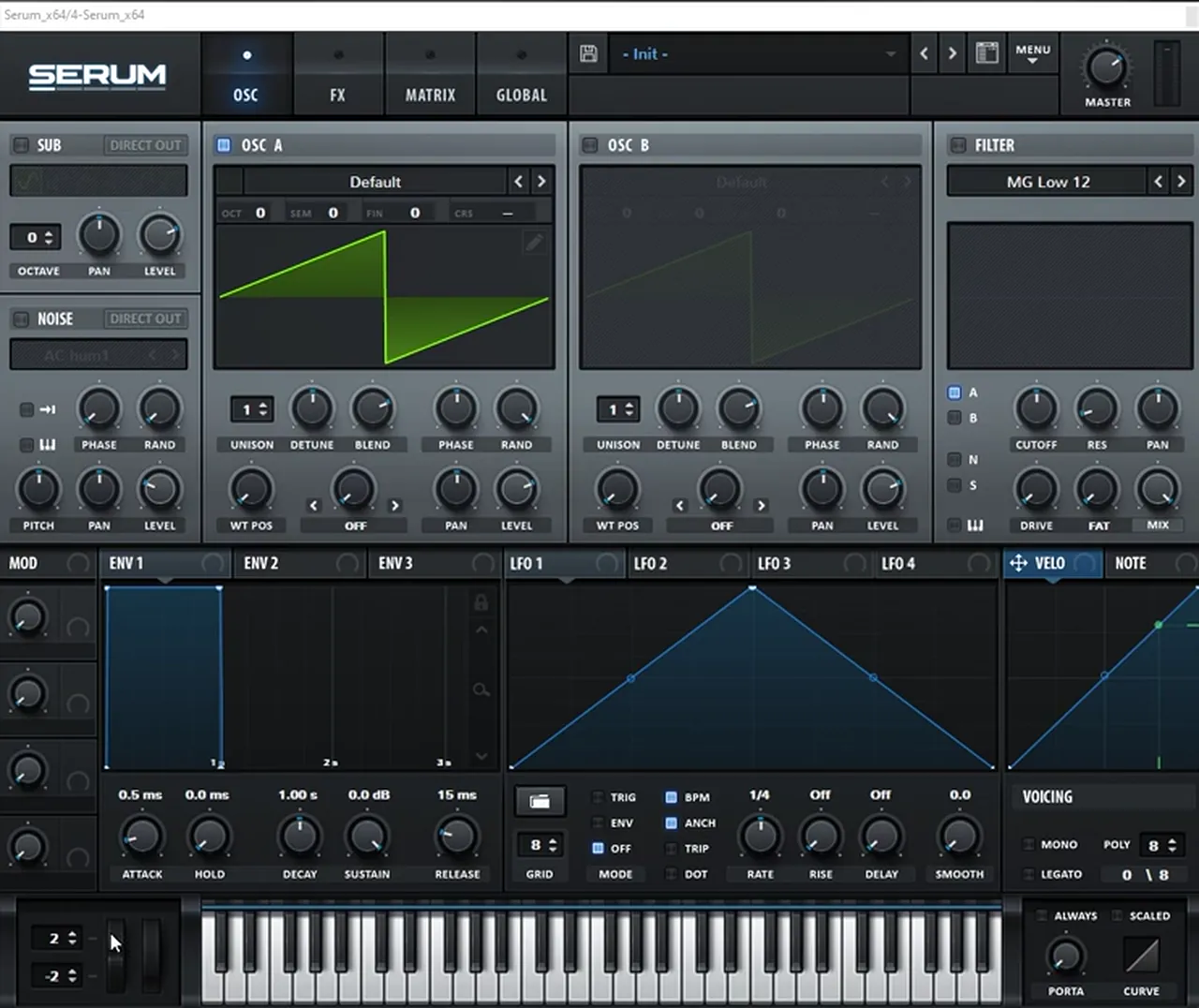
A short downward pitch bend on each note is a big part of the character. The first bass bends down two semitones in a straight line.
Play a low D and automate the pitch-bend wheel (watch at 1:10). It goes from 0 to −2 in a linear way. On screen Serum’s bend range reads 2 up and −2 down, so the full wheel movement equals two semitones.
3.Load two sines and pitch oscillator B up
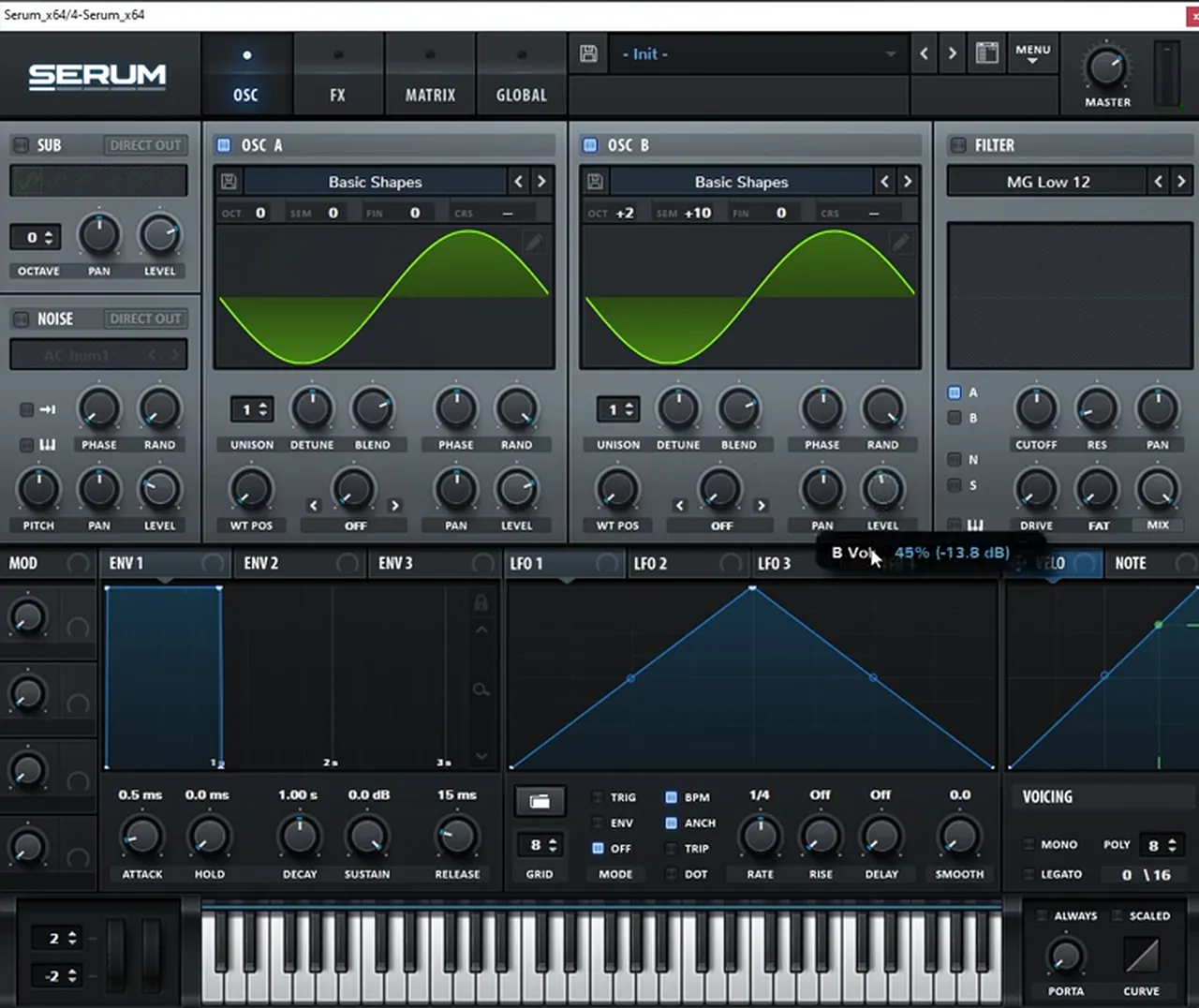
Two sines at a wide interval hold the key harmonics of the sound. On their own they’re clean; the distortion later combines them and creates new harmonics in between.
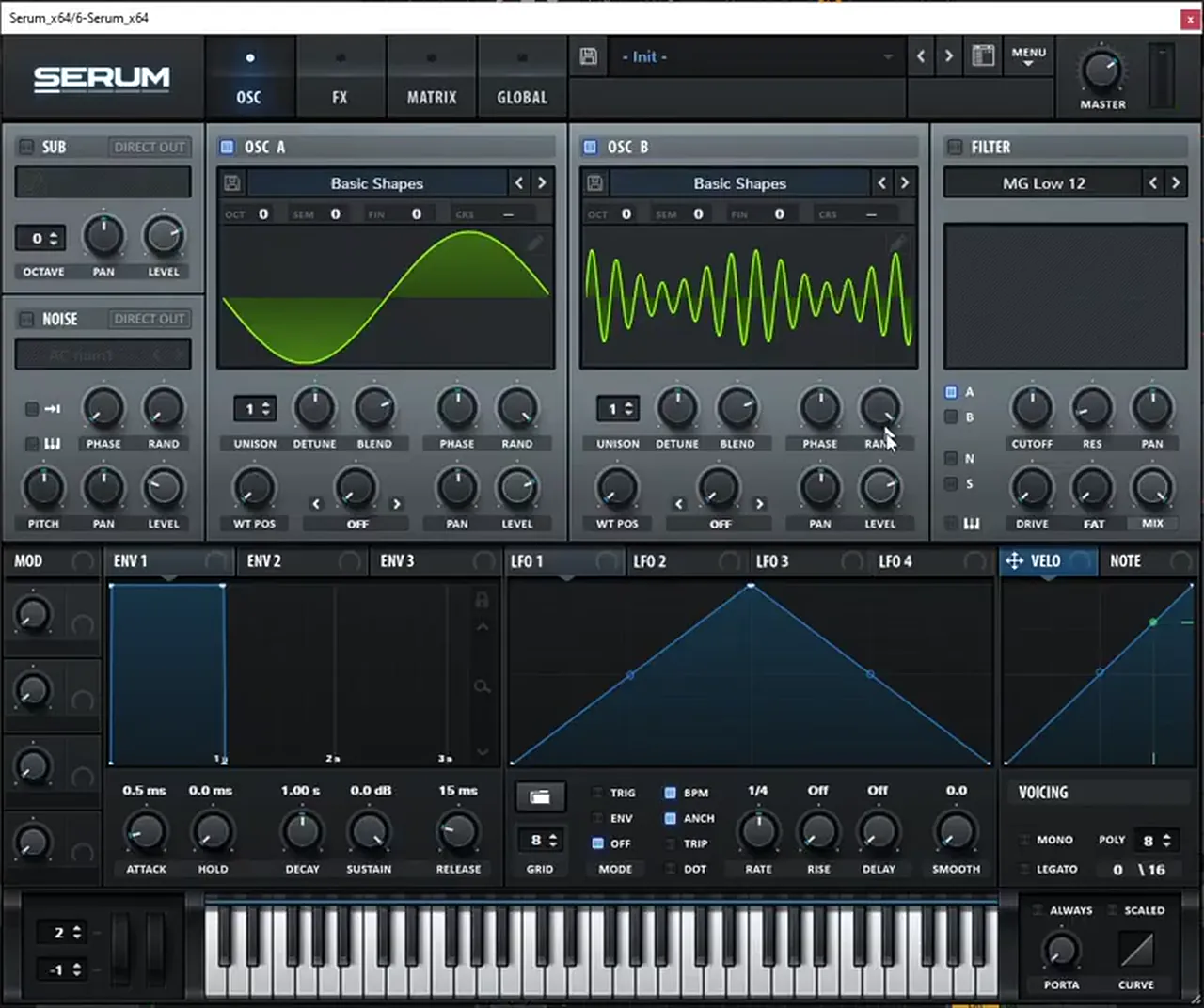
Load sine waves on both oscillators (watch at 1:35) and pitch oscillator B two octaves and ten semitones up (Oct +2, Semi +10). Then bring oscillator B’s level a little lower. The reason, in Paulo’s words, is that we want to combine two oscillators that contain the key harmonics of the main sound, then generate new harmonics that combine the two via distortion.
4.Distortion, chorus and compression in Serum
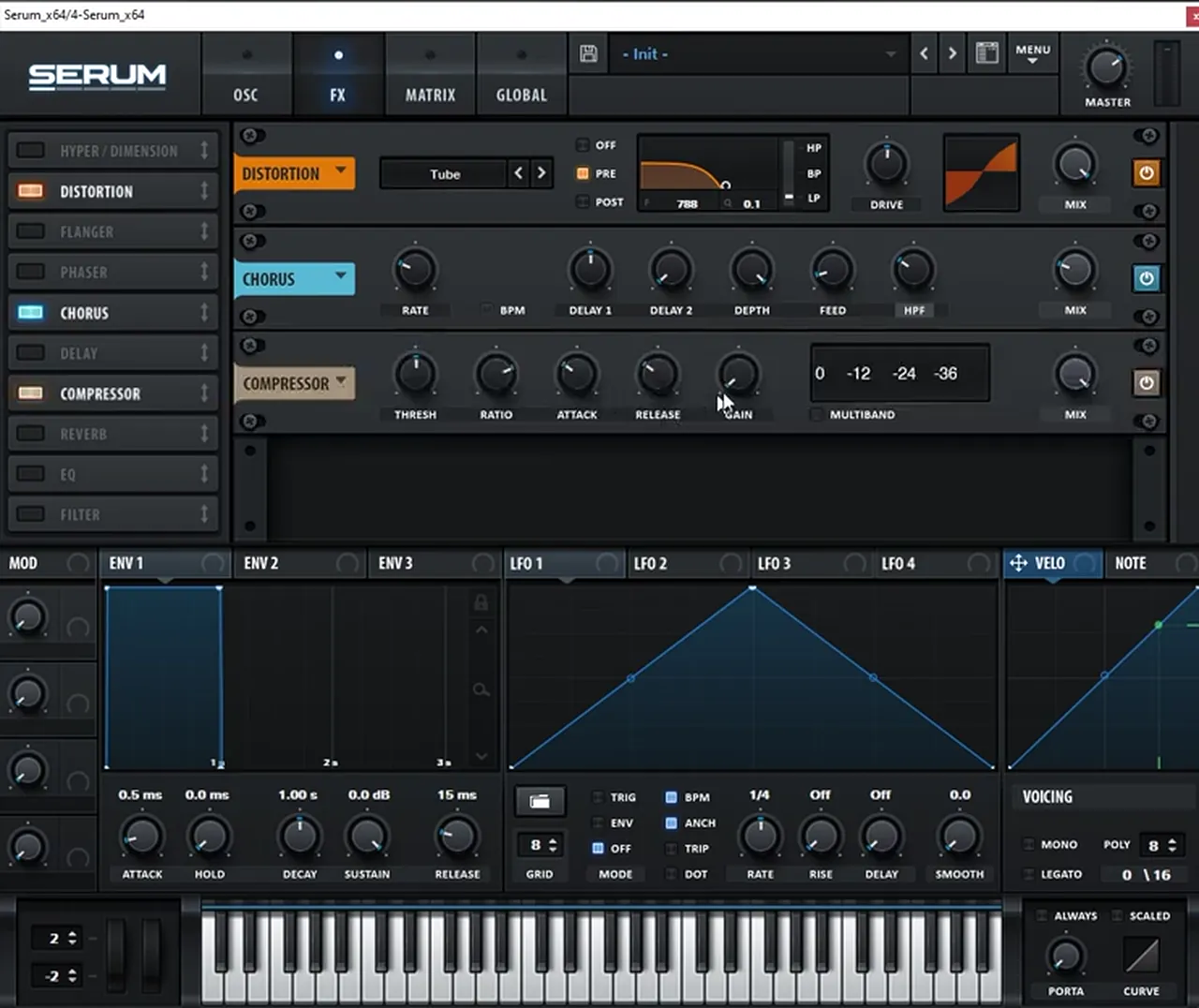
A low-passed distortion in pre mode is the engine of this bass. A high-passed chorus widens only the top, and a compressor with some gain evens it out.
In the FX tab, turn on the Distortion (watch at 1:59). On screen it’s set to Tube with the filter in pre mode on low-pass; Paulo filters below about 700 Hz (the readout shows 788 Hz). Then boost the drive (around 50% on screen). Next, add a Chorus with its high-pass filter on, so only the high harmonics are affected and not the sub. Finally, turn on the Compressor and add some gain.
5.Boost a harmonic, then use a multiband distortion
After Serum, an EQ boost picks out one harmonic, and a multiband distortion lets you push the lows without touching the mids and highs.
For post-processing (watch at 2:25), boost one harmonic with an EQ. In the video EQ Eight has a narrow boost around 160 Hz of about +7.5 dB.
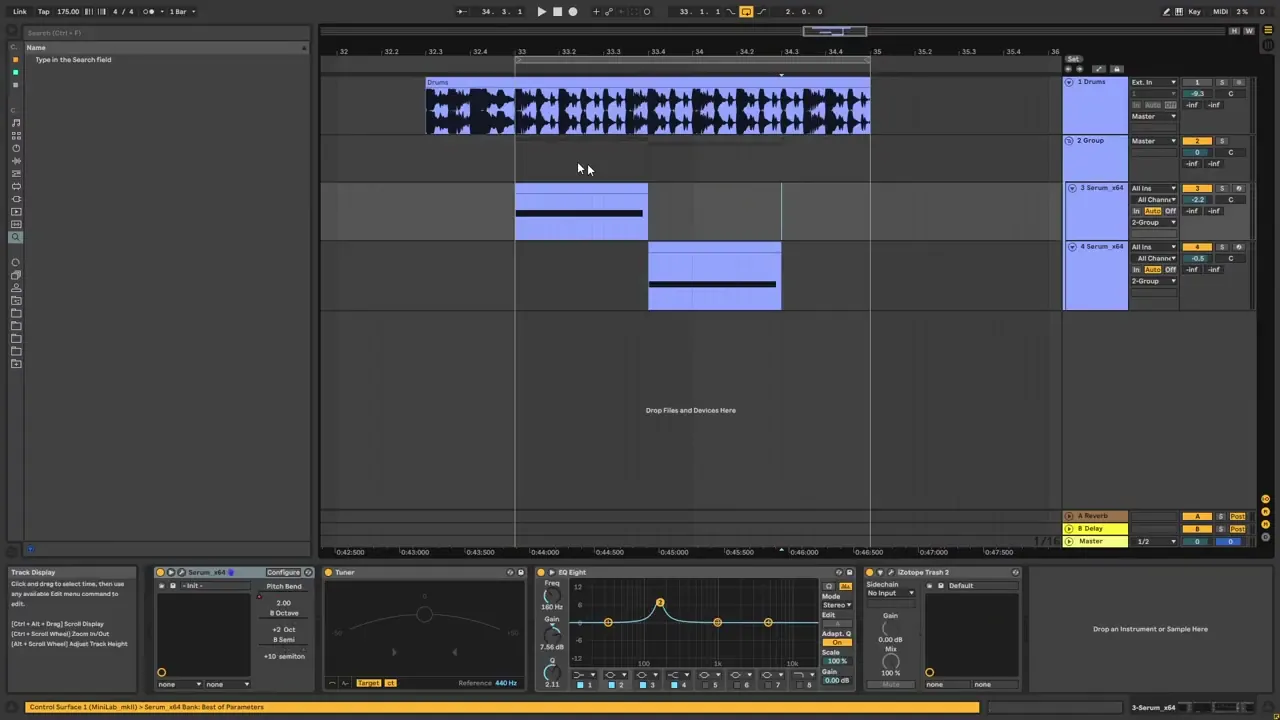
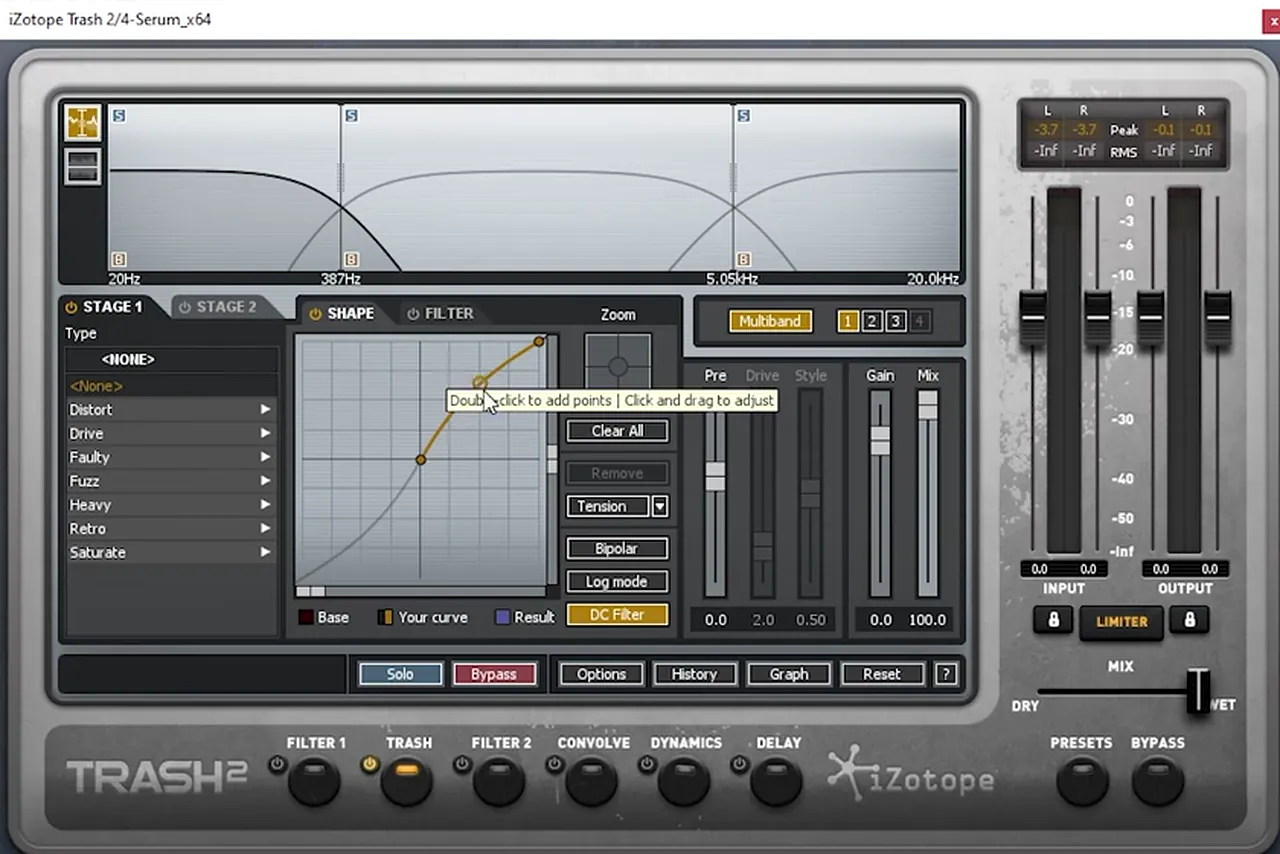
Then add Trash 2 in multiband mode. On the lows, draw a curve that boosts them a little; the mids and highs stay unaffected. On screen the bands are split at 387 Hz and 5.05 kHz. That’s the first patch done.
6.The second bass: hand-pick the harmonics
The second patch uses the same recipe, but instead of pitching oscillator B up, you build its waveform from a few chosen harmonics. That gives you exact control over which overtones the distortion gets to combine.
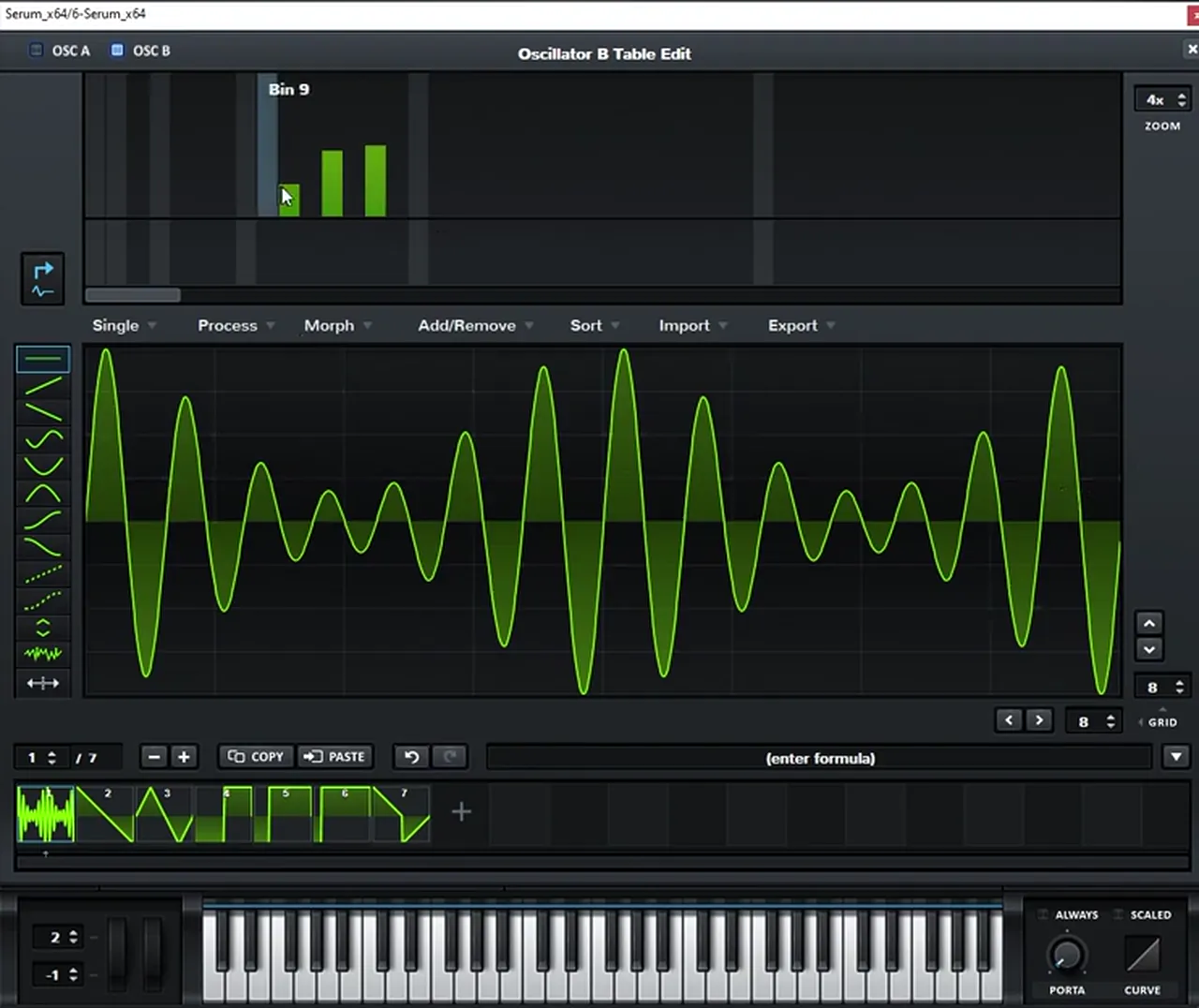
Open a new Serum (watch at 2:48), play another D and repeat the same pitch bend, but this time only one semitone down (the bend range reads −1 on screen). Load sines on both oscillators again. On oscillator B, open the harmonic editor, remove the initial harmonic (the fundamental) and add your own harmonics on bins 10, 12 and 14 (watch at 3:13). You should get a similar tone and a waveform that pulses like the one in the screenshot. You can always mix these harmonics differently; this ascending pattern is what worked best for recreating the original sound.
Listen: the second bass with its hand-picked harmonics6 sec
7.Process the second bass the same way, with tape on the mids
Repeat the first patch’s effects chain, then change one thing in the multiband distortion: tape saturation on the mids adds even more harmonics.
Repeat the effects (watch at 3:54): Distortion in pre mode, low-pass, boost the drive. This time Paulo moves the filter up to 1 kHz. Then the high-passed chorus with its mix lower, and some gain.
Listen: the second bass after the distortion5 sec
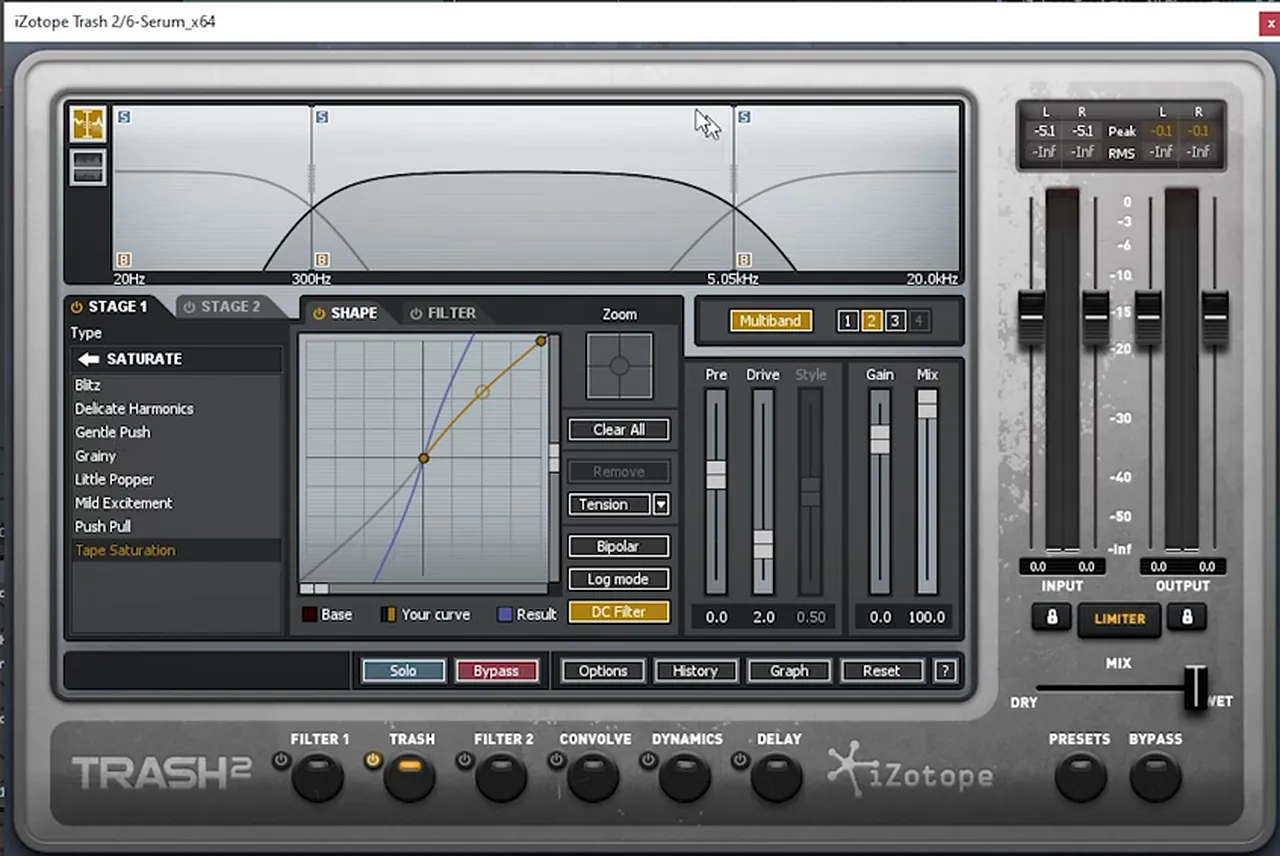
Then repeat the post-processing with the same Trash 2. Here the mids get Tape Saturation (from the Saturate types) to add even more harmonics, and the highs stay unaffected. With the drums back in, the second sound ended up too distorted, so the fix was simple: go back into Serum and bring down oscillator B’s level (watch at 4:40).
Listen: the second bass after the EQ and Trash 25 sec
8.Use the concept to make your own basses
You can always go back to any point and fine-tune the sound closer to the original, but the real value is the concept: combine harmonics, then let distortion create new ones.
Try it on the first bass (watch at 5:09): pitch oscillator B differently, for example three octaves and seven semitones, and it becomes a different bass. On the second bass, change the combination of harmonics, or play the sequence slower. These videos are for learning how a sound is made, then taking the concepts and applying them in your own way. For more on how heavy basses are built in this style, see our jump up drum and bass guide and the jump up section of our subgenres guide.
Common mistakes with harmonic, distorted basses
- Distorting the whole spectrum. The low-pass in the distortion’s pre mode decides what the distortion hears. Keep it in the hundreds of hertz on the first bass, and raise it only if you want more top end.
- Oscillator B too loud. The second sine or the hand-picked harmonics feed the distortion. If the result is harsh, turn oscillator B down before reaching for an EQ.
- Chorus on the sub. Switch the chorus’s high-pass on so only the high harmonics are widened.
- Skipping the pitch bend. The linear bend down on every note is part of the sound. Use two semitones on the first bass and one on the second, as in the video.
- Copying instead of learning. Treat the intervals and harmonic bins as a starting point. Change them and you get a new bass with the same technique.
Free download
Free samples to build a loop around your basses
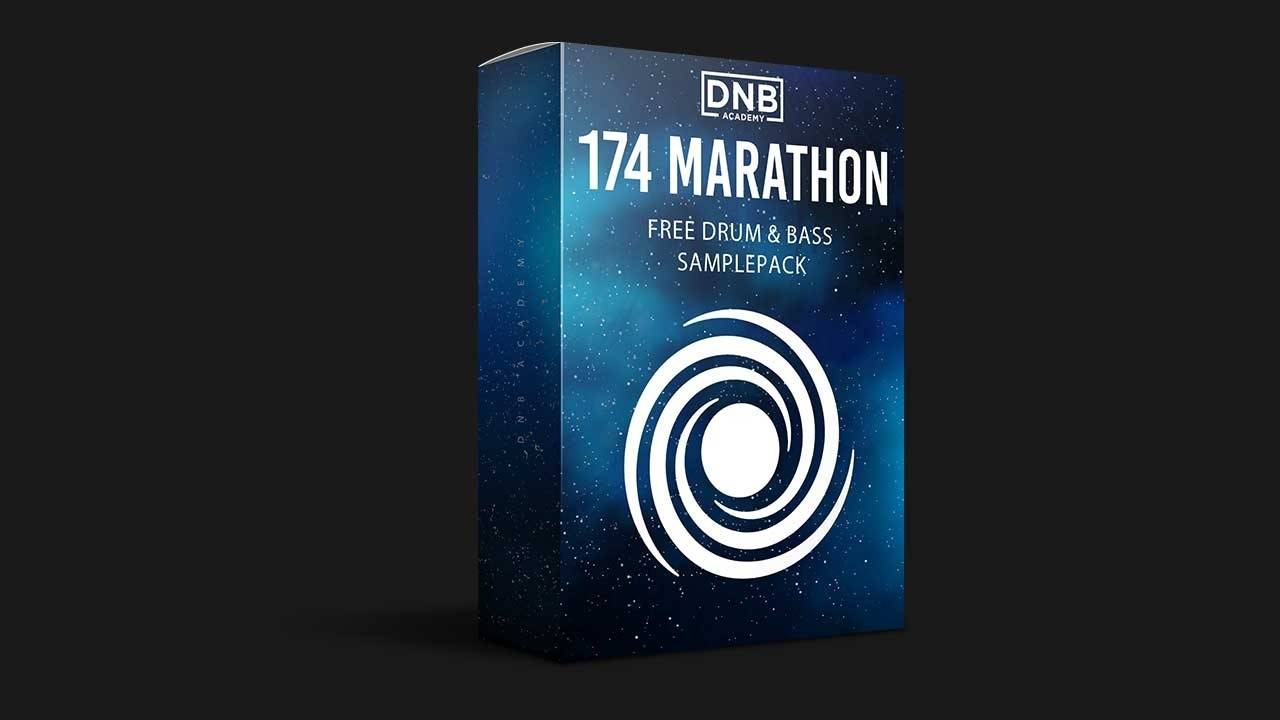
Two short, distorted basses need drums around them before you can judge them. The 174 Marathon Sample Pack gives you:
- 100+ royalty-free samples
- Drums, bass, FX, melodics and more
- Audio samples, so they work in Ableton Live or any other DAW
- Made for International Drum & Bass Day and our 174 Production Marathon
It’s one of seven free sample and preset packs in DNB Academy Free Access, alongside the mixing and mastering e-books and the 3‑day DnB challenge. Join 40,000+ producers in Free Access. Free account, no card needed.
Go deeper
Courses and presets for heavy dancefloor basses
Want a full club track from start to finish, or ready-made Serum basses to study?
 Production courseBass Brothers production courseA start-to-finish course of 7+ hours on making club-ready jump up and roller drum and bass, with the project files, presets and samples.
 Preset bundleFrenzy jump up Serum presets100+ Serum presets for classic and modern jump up: 53 basses plus leads, arps, pads, FX and drums.
 Preset bundleDutta Serum presetsJump up Serum presets in the style of Dutta: 76 basses and 14 synths, royalty-free.
Every artist course, preset bundle and sample pack is also in The Vault. Browse courses
Related tutorials
All tutorials → Vital · RecreationHow to Make a Bass Like Bou & Mark XTC’s “Breathe” in Vital9 min read · Video + guide
 Guide · Jump upHow to Make Jump Up Drum and Bass: Basslines, Wobbles and Formants19 min read · Video + guide
 Serum · RecreationHow to Make a Foghorn Bass Like IMANU & Buunshin’s “Nagow” in Serum8 min read · Video + guide
 Serum · Heavy bassHeavy DnB Bass Sound Design in Serum with Current Value10 min read · Video + guide
FAQ: making basses like Bou’s “Poison”
How do you make basses like Bou’s “Poison”?
Our recreation uses two Serum patches on a low D, each with a linear pitch bend down on the note. The first has sines on oscillators A and B, with B pitched two octaves and ten semitones up. The second gives oscillator B a few hand-picked harmonics instead. Both go through a Tube distortion in pre mode with a low-pass filter, a high-passed chorus and a compressor, then an EQ boost and a multiband distortion.
Is this the exact bass from “Poison”?
No. It’s our own recreation, built by Paulo from DNB Academy from initialised Serum patches. It isn’t exactly the same sound; the point is the concept of combining harmonics and letting distortion create new ones, so you can use it to make your own basses.
Why use two sine waves at such a wide interval?
The two sines hold the key harmonics of the sound. On their own they’re clean, but when the distortion processes them together it generates new harmonics that combine the two. Changing the interval, for example to three octaves and seven semitones, gives you a different bass.
How do you add your own harmonics in Serum?
Open oscillator B’s wavetable editor and switch to the harmonic view. Remove the initial harmonic (the fundamental), then raise the bins you want. The video uses bins 10, 12 and 14 in an ascending pattern, but you can mix them differently.
Why is the chorus high-passed?
With the chorus filter’s high-pass on, only the high harmonics are widened and moved. The sub stays mono and clean, which matters for a bass that has to hit hard on a club system.
Do I need Trash 2?
No. The video uses iZotope Trash 2 in multiband mode to push the lows on the first bass and add tape saturation to the mids on the second. Any multiband saturator or distortion that treats bands separately can do the same job.
Next steps
Start with the first bass: two sines, a wide interval and a low-passed Tube distortion. Once that works, build the second bass with your own choice of harmonics. For another Bou-inspired sound, try our bass like Bou & Mark XTC’s “Breathe” in Vital; for more bass types and when to use them, read our drum and bass bass guide.
Free Access
Seven free DnB sample and preset packs, including the 174 Marathon Sample Pack, plus mixing and mastering e-books and a 3-day challenge for Ableton Live and FL Studio.
Get free packsThe full guide
Tempo, drums, sub, mid bass, chords, arrangement and mixdown: every step of a DnB track.
Read the guideDNB Foundations
A structured drum and bass course with weekly live feedback calls on your tracks.
See Foundations1:1 Mentorship
Personal guidance on your music from a mentor, built around your goals.
See the mentorship50,000+ producers have joined DNB Academy, and our producer Discord has 5,300+ members.