Serum · Harmonics & movement · Recreation
How to Make a Foghorn Bass Like Skantia & Annix’s “Clapper” in Serum
To make a foghorn bass like the ones in Skantia & Annix’s “Clapper” in Serum, build the sound from a sub and two single harmonics, then move the level of each harmonic over the whole riff with long LFOs. Distortion, an automated reverb and a multiband drive do the rest. Below is our own recreation, presented by Paulo from DNB Academy, with the settings from the screen and audio of the patch at each stage.
This is a learning recreation inspired by the basses in “Clapper”, not the original sound or preset. The point is the workflow: combining harmonics and shaping their amplitudes by hand. For every bass type in one place, see our drum and bass bass guide.
Quick answer
How do you make a foghorn bass like “Clapper”?
Write an A and an E with a pitch bend into each note. In Serum, turn on the sub and load sines on oscillators A and B, then reduce oscillator A to harmonic bin 3 and oscillator B to bin 6, its octave. Add a filter, a Tube distortion and a Hall reverb whose mix rises over 8 bars. Map 8-bar LFOs in trigger mode to the oscillator levels so oscillator B takes over as oscillator A fades. After Serum, drive three bands in Trash 2 (crossovers near 200 Hz and 800 Hz), boost around 1 kHz, add reverb and pulse the sound with Auto Pan.
- Notes.A then E, bent into each note.
- Harmonics.Sub plus bins 3 and 6.
- FX.Filter, Tube drive, automated reverb.
- LFOs.8-bar shapes on the oscillator levels.
- Trash 2.One harmonic per band, driven separately.
- Post.EQ, reverb and Auto Pan.
The full walkthrough with Paulo from DNB Academy: a foghorn bass inspired by “Clapper”, built from an initialised Serum patch and processed in Ableton Live, followed by a run of variations. Each step below links to its moment in the video.
What you’ll need
- Serum. The patch uses the sub oscillator, two sine oscillators, the wavetable editor, three LFOs and the built-in Filter, Distortion and Reverb. Don’t have Serum? Vital is free and can do all of this: draw single harmonics, map LFOs to oscillator levels and add the same kinds of effects.
- A DAW with pitch-bend automation. The video uses Ableton Live at 175 BPM, with EQ Eight, Reverb and Auto Pan after Serum.
- A multiband distortion. The video uses iZotope Trash 2 in multiband mode. Any multiband saturator that treats lows, mids and highs separately will do the same job.
1.Write the notes and the pitch bend
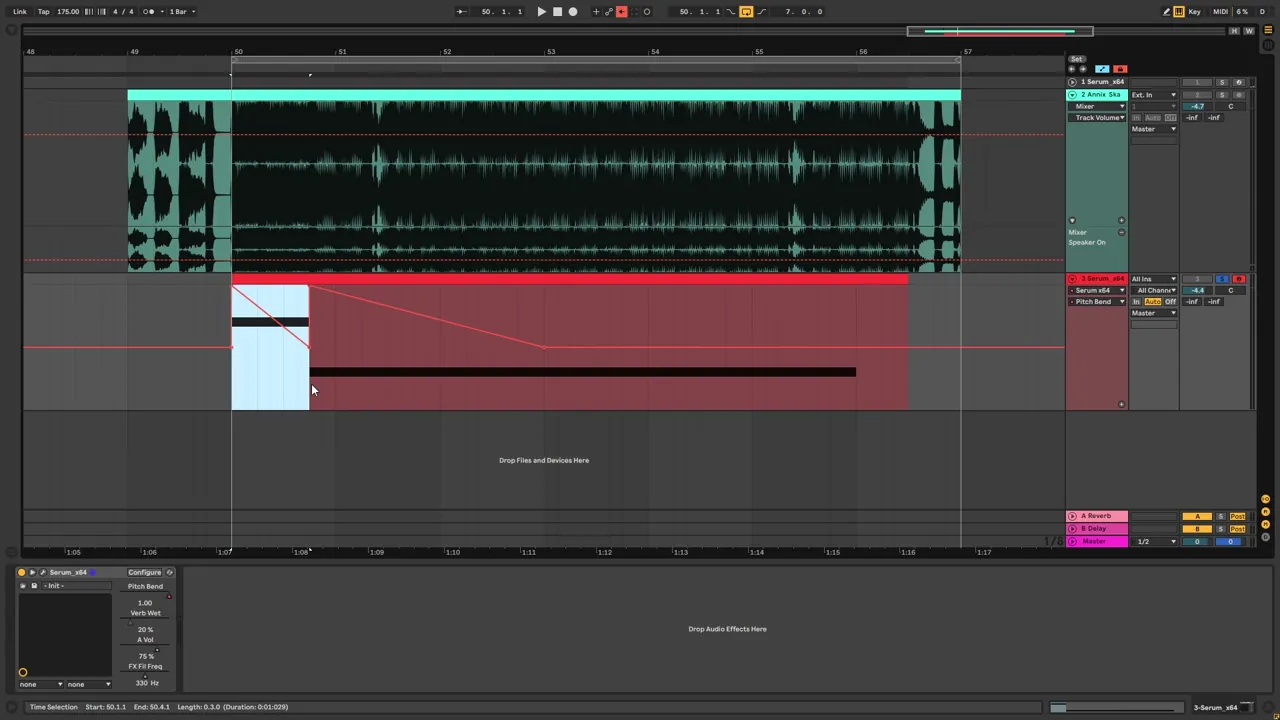
The riff is two long notes, an A and then an E, and each one starts with a pitch bend. The bend is part of the foghorn character, so program it before you touch any knobs.
In the session (watch at 0:55) the clip plays an A and then an E. The pitch-bend automation bends into the start of each note: on the first note it comes back to centre within the note, and on the second it ramps back more slowly and settles at a bar line. In Serum, the pitch-bend range at the bottom left reads 1 up and −2 down at this stage.
2.Build the sound from a sub and two harmonics
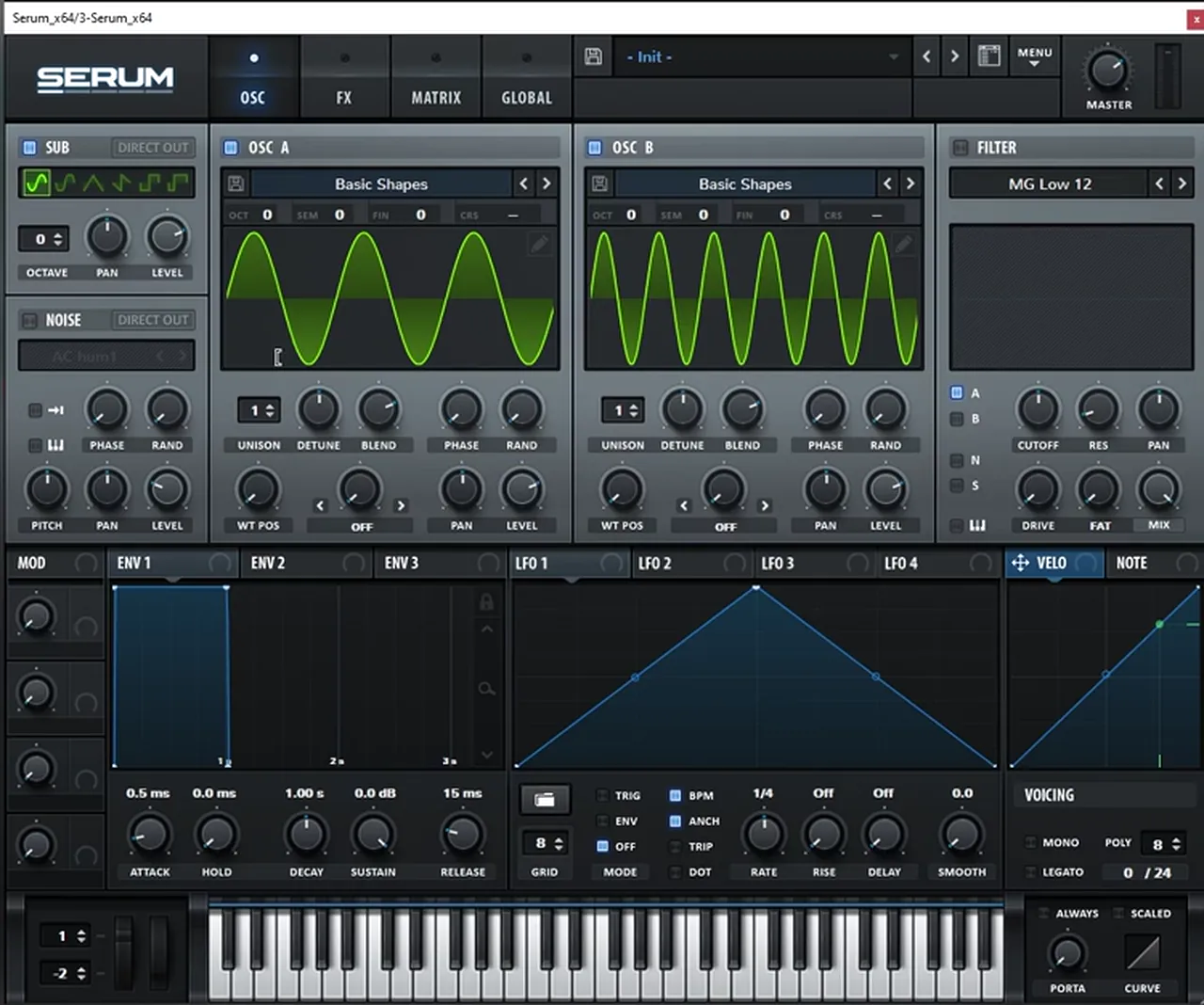
The key to this sound is the combination of a few harmonics plus distortion, and the movement you add to the level of each harmonic. Start with clean sines and reduce each oscillator to one harmonic.
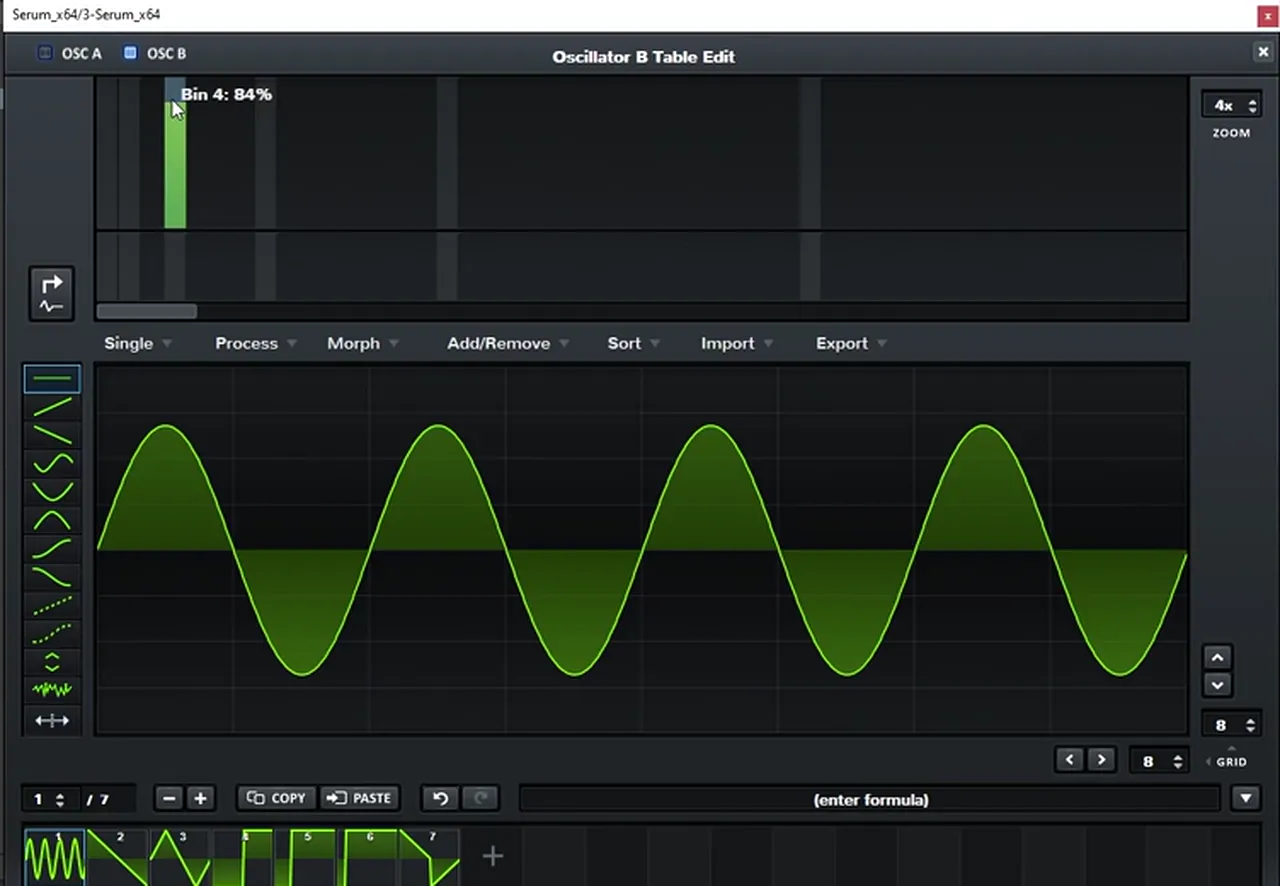
Turn on the sub and oscillator B, and load sine waves on oscillators A and B (watch at 1:44). At first that’s just a very big sine. Now set the harmonics in Serum’s wavetable editor: on oscillator A use bin 3, and on oscillator B use the octave of bin 3, which is bin 6. The oscillator displays now show three and six cycles of a sine.
Then bring the random (Rand) knob on the oscillators all the way down so every note sounds the same, and set the phase so each waveform starts at the beginning. That gives you a constant, repeatable starting point for the movement later on.
3.Add a filter, distortion and an automated reverb
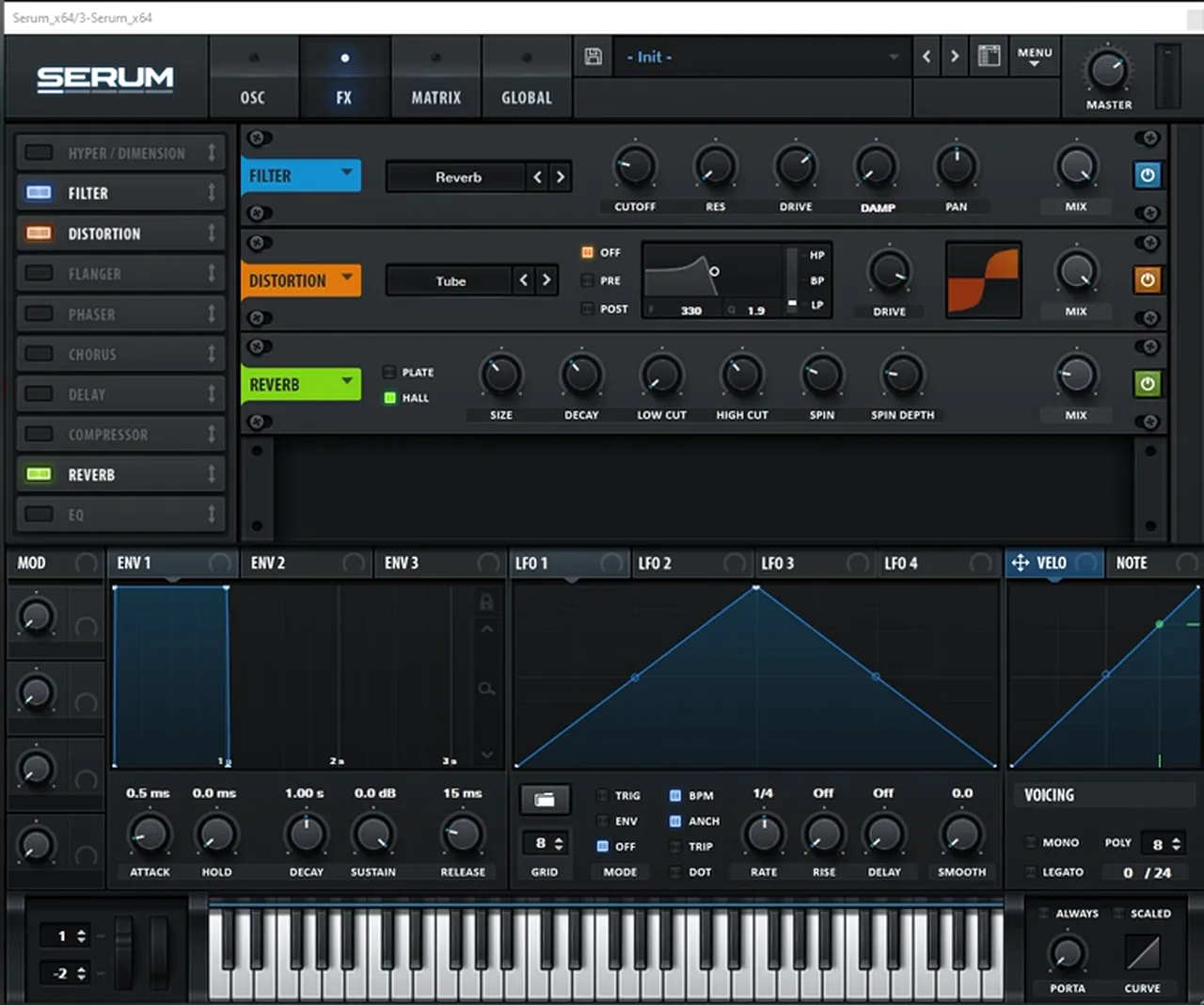
A filter before the distortion adds a bit of texture, the distortion combines the harmonics, and a reverb that rises over the riff gives you a whole phrase of variation from one patch.
In the FX tab (watch at 2:30), add a Filter before the Distortion, then a Reverb. On screen the filter type is Serum’s Reverb filter, the distortion is Tube and the reverb is set to Hall. Boost the distortion’s drive.
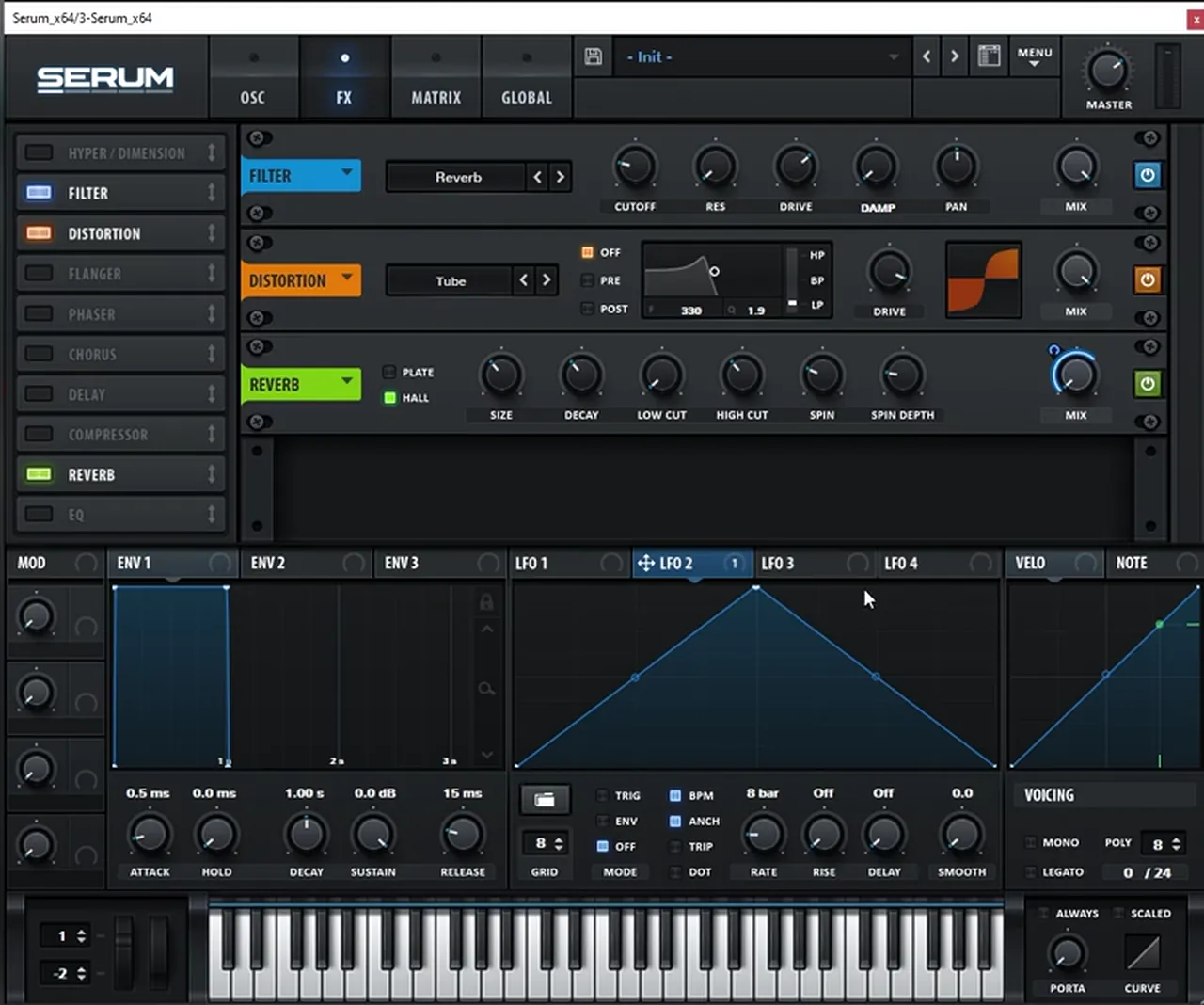
Now automate the reverb. Set LFO 2 to 8 bars, because the sound is a whole riff, and map it to the reverb’s mix. Draw a rising shape and leave the last point where the riff ends. As the phrase plays, the reverb grows, so one patch already gives you several variations of the sound.
Listen: sub, two harmonics, distortion and the rising reverb8 sec
4.Understand how the harmonic levels shape the sound
Before adding more modulation, it helps to hear what each harmonic does. Changing the amplitude of each one changes the whole character of the bass.
To illustrate it (watch at 3:31), Paulo brings the sub and oscillator A down, so oscillator B’s harmonic becomes far more prominent. Automate that harmonic’s level and you get a really cool movement. Leave it constant (around 40% in the video) and automate oscillator A instead, and you get the mids. The sub can be boosted too, but it gets overwhelming quickly.
You can also change the interval: pitch an oscillator up an octave, or move it a few semitones to make other intervals such as a fifth. All the movements and combinations of these three layers and their harmonics are the key to this type of sound, at least in this workflow of modulating the amplitudes by hand.
5.Move the oscillator levels with 8-bar LFOs
Now set the balance: a quiet sub, a lower oscillator A and oscillator B as the star of the show. Two long LFOs then hand the sound from one harmonic to the other across the riff.
Reset oscillator B, bring the sub down to around 7% and lower oscillator A (watch at 5:03). Map LFO 1 to oscillator B’s level, set the rate to 8 bars (the length of the riff) and the mode to trigger. Draw a shape that jumps up at the start and then falls, but don’t let it fade completely: as the phrase goes on, this harmonic combines with the reverb and creates another cool texture. To place points on the grid, double-click to add a point and hold Alt to snap it.
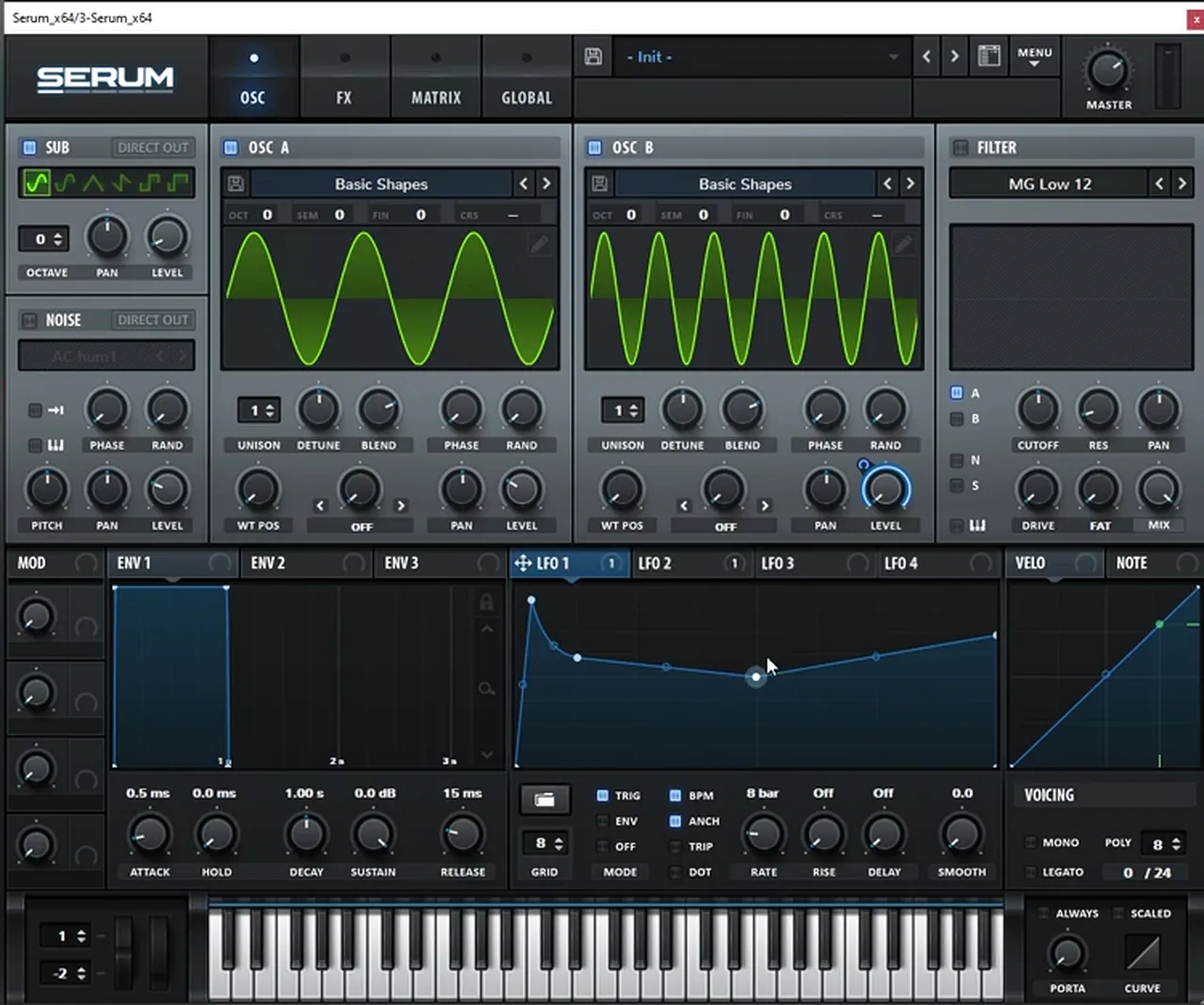
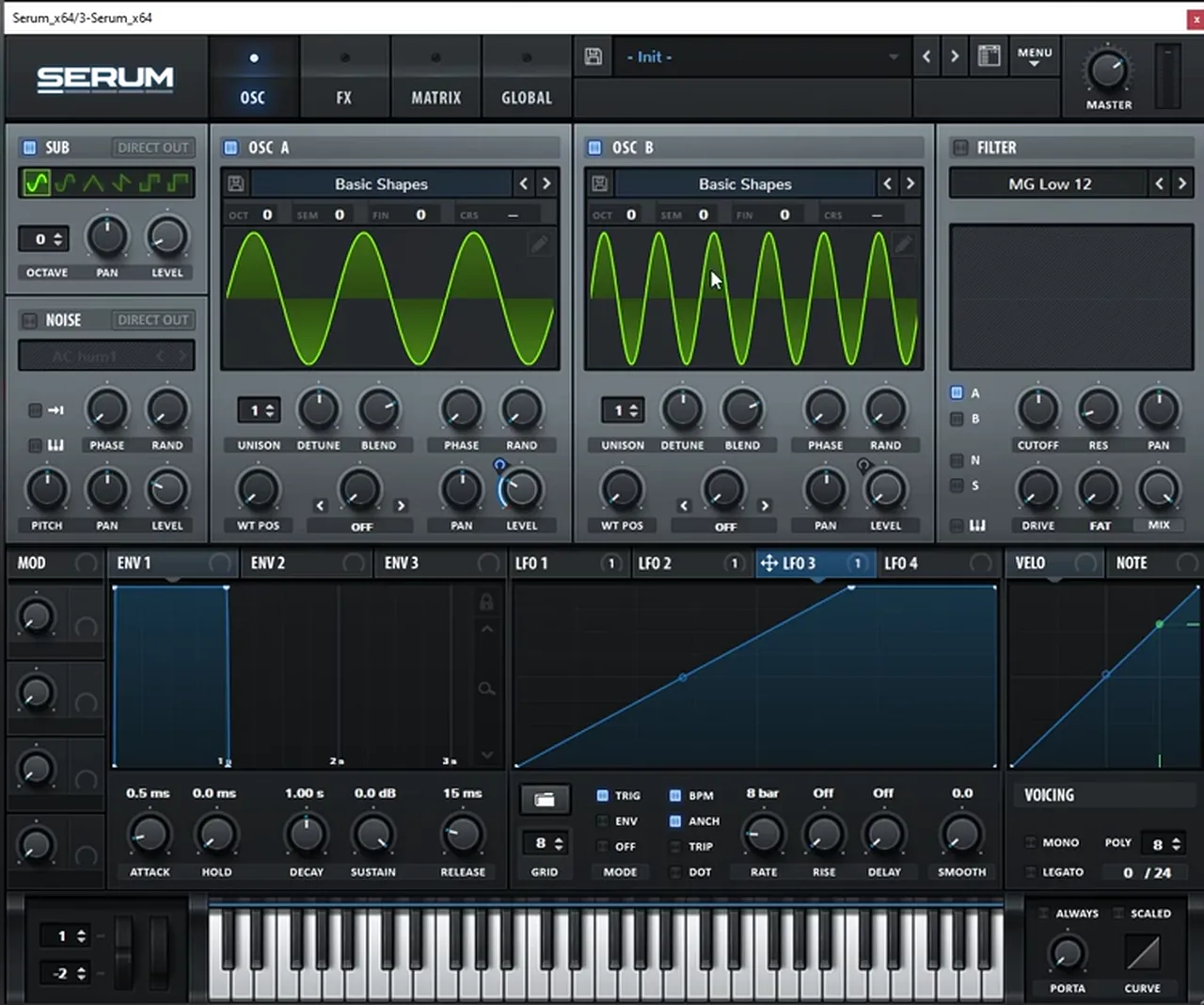
Next, make oscillator A fade out as oscillator B becomes more prominent (watch at 6:16). Use another LFO (LFO 3 on screen), again at 8 bars in trigger mode, and draw a rising shape. Map it to oscillator A’s level with the modulation going downwards (a negative amount), so as the LFO goes up, oscillator A goes down. As the riff progresses it removes amplitude from oscillator A, and the sound becomes cleaner because oscillator B is more present.
Listen: the patch with both LFOs moving the harmonic levels8 sec
6.Drive each band with Trash 2 in multiband mode
A multiband distortion lets you shape each harmonic on its own, because each band ends up holding one layer of the sound.
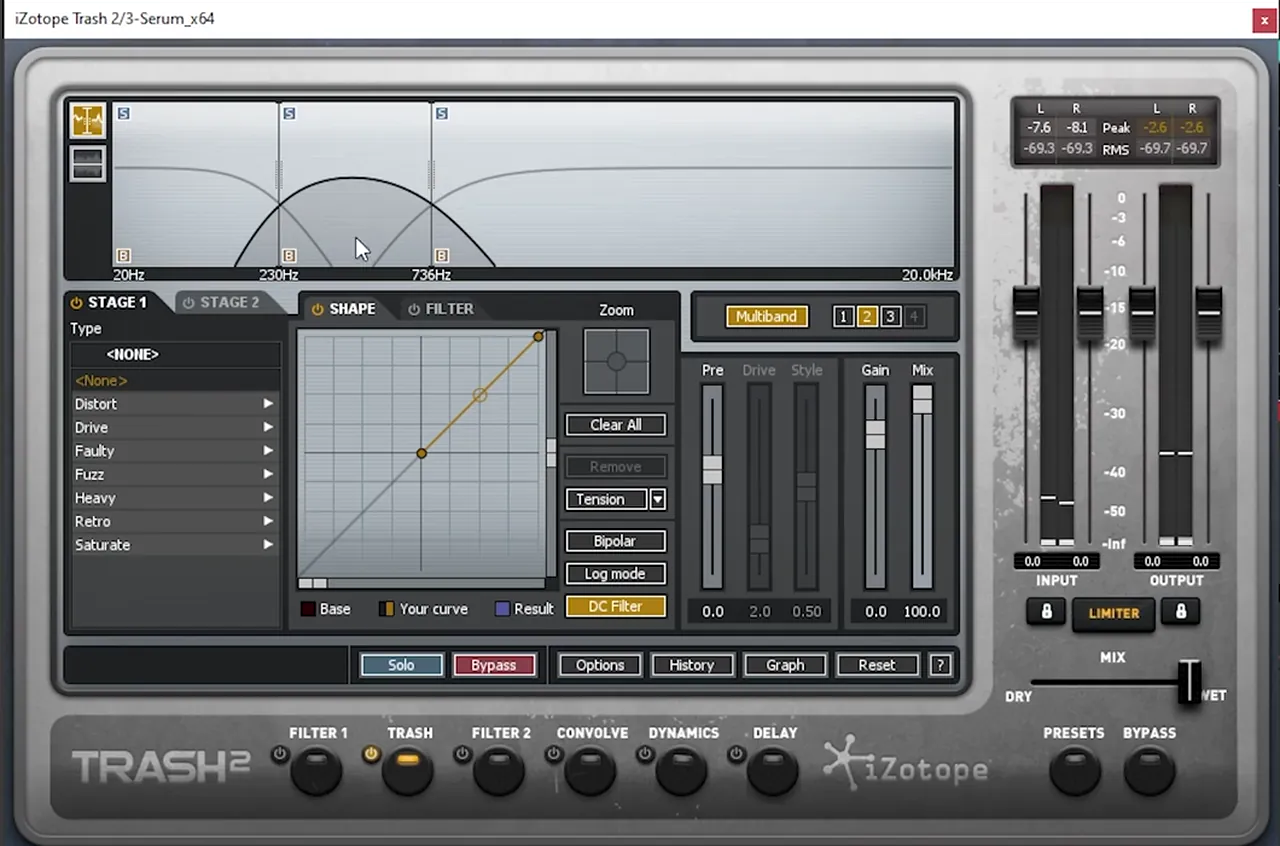
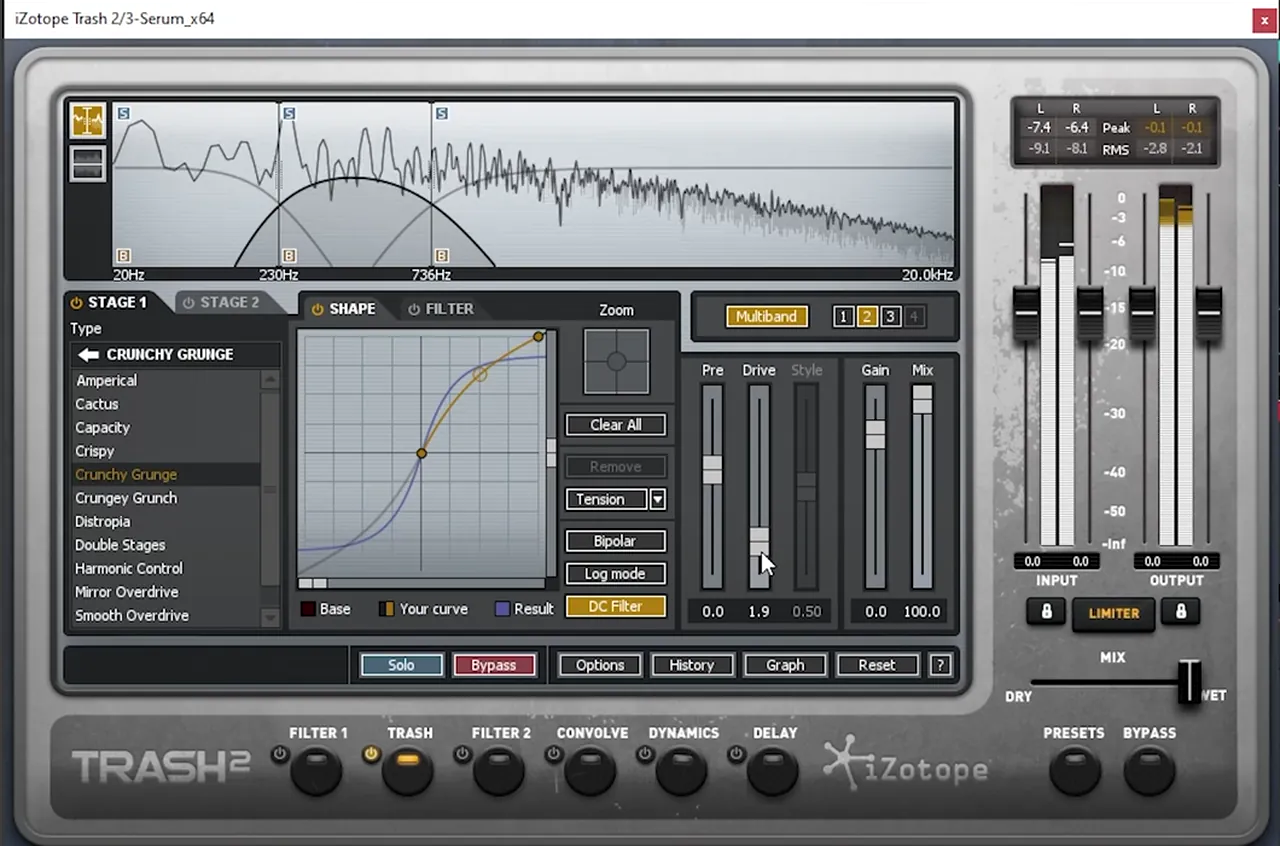
After Serum, add iZotope Trash 2 and set it to Multiband mode (watch at 6:56). Set the low band to around 200 Hz and the next crossover to around 800 Hz (the readouts show 230 Hz and 736 Hz). Now each band contains a specific harmonic: the low band is the sub, the middle band is oscillator A and the top band is oscillator B.
Then drive each band. On the low band, choose Crunchy Grunge from the Drive types and add a bit of drive (3.1 on screen). Use the same type on the middle band and boost it a little (1.9 on screen), then the same again on the top band, pushed harder. The point is to drive and shape each harmonic separately rather than distorting the whole sound at once.
Listen: after the Trash 2 multiband drive6 sec
7.Push the reverb filter, then EQ and reverb
This is the stage to experiment. Paulo goes back into Serum, doubles down on the Reverb filter, then finishes the tone with an EQ boost and more reverb.
He recommends trying all the different distortions and settings in Trash, and not only using Trash (watch at 8:15). Back in Serum, he boosts the Reverb filter’s drive a lot, adds even more reverb and experiments with the filter cutoff. This type of sound and workflow gives you a lot of room to go your own way.
Then leave Serum’s effects and add a regular EQ (EQ Eight in the video): a boost around 1 kHz and a bit of a boost in the highs. Finally, add a bit more reverb with a reverb plug-in after it. That’s the finished tone; the last step adds rhythm.
8.Add movement with Auto Pan
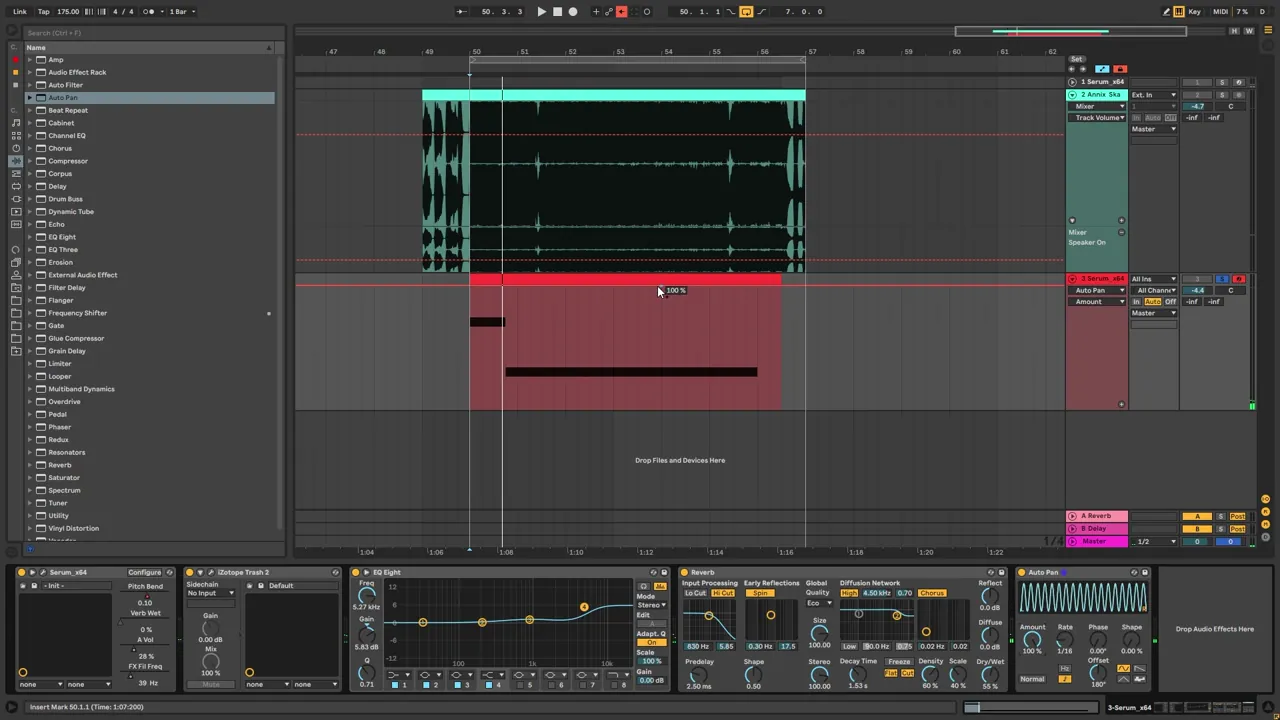
Auto Pan turns into an amplitude modulator when you set its phase to zero, which gives the end of the riff a fast, rhythmic pulse.
Add Ableton’s Auto Pan (watch at 9:27). Set the amount to 100% and the phase all the way down to 0: both channels now move together, so it works as an amplitude modulator, like another LFO. Set the rate to 1/16 notes and the offset to 180° so the shape starts at the very beginning, at zero. Then automate the amount so the pulse comes in where you want it, for example towards the end of the phrase.
Listen: the finished bass with the Auto Pan pulse7 sec
9.Make your own variations
Once the patch works, change the harmonics, intervals and movements and you get a new bass with the same technique. The second half of the video is a run of these experiments.
Ideas from the video (watch at 10:36):
- Other harmonics. On oscillator B, use bin 4 instead of 6, or its octave, bin 8. On oscillator A, try bin 2 instead of 3, or bin 8. Something extreme like bin 24 is too much.
- Other intervals. Pitch an oscillator up seven semitones for a fifth; in the video that gave a really nice variation.
- More brightness. Add some noise.
- A different riff. Play only the E, or bend the pitch up instead of down with the bend range raised to 2.
- Different LFO shapes. Redraw the level LFOs, move or delete points, and push the Auto Pan amount further.
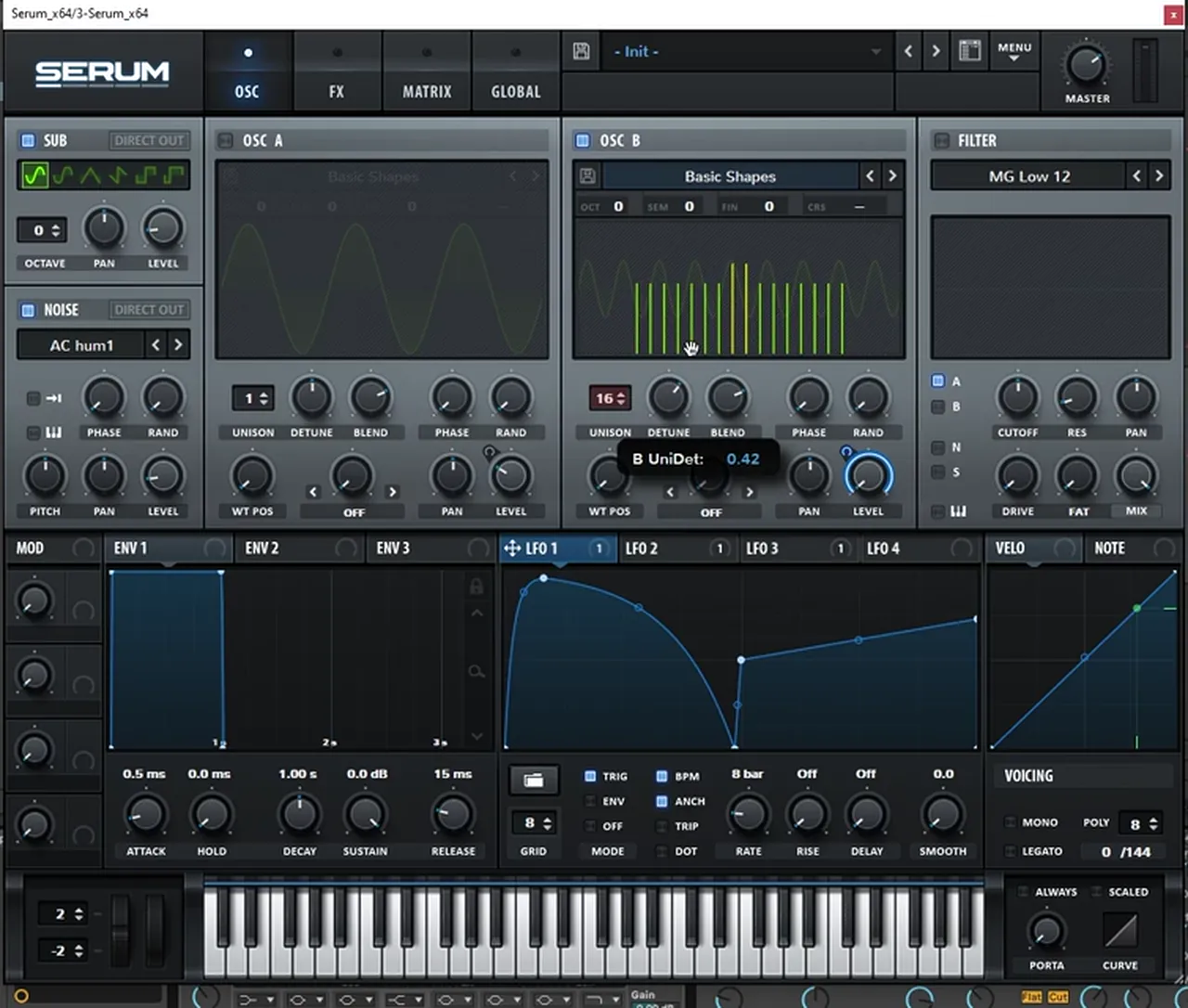
- Unison. Add unison voices to oscillator B (16 on screen) and play with the detune. Changing the detune changes the speed of the movement; Paulo also tries it with oscillator A switched off.
That’s how a recreation turns into a sound of your own: you learn how it was made, then apply the concept your way. For other horn-like basses, see our foghorn bass like IMANU & Buunshin’s “Nagow” and the foghorn bass in Vital. For where this style of bass sits, read the jump up section of our subgenres guide.
Common mistakes with harmonic foghorn basses
- Too much sub. The sub is a layer, not the star. Keep it low (around 7% in the video) and let oscillator B’s harmonic carry the sound.
- Letting a harmonic fade to silence. The level LFO on oscillator B shouldn’t drop to zero; the leftover harmonic mixing with the reverb is part of the texture.
- LFOs that don’t match the riff. Set the LFOs to the length of the phrase (8 bars here) and use trigger mode so every play starts from the same point.
- Distorting everything at once. Split the sound into bands that match your harmonics and drive each one on its own.
- Random phase left on. With Rand up, each note starts differently. Turn it down so the movement is consistent.
- Copying instead of learning. Treat the bins, intervals and shapes as a starting point and change them.
Free download
Free samples to put your foghorn riff in a loop
A riff like this comes alive next to punchy drums. The 174 Marathon Sample Pack gives you:
- 100+ royalty-free samples
- Drums, bass, FX, melodics and more
- Audio samples, so they work in Ableton Live or any other DAW
- Made for International Drum & Bass Day and our 174 Production Marathon
It’s one of seven free sample and preset packs in DNB Academy Free Access, alongside the mixing and mastering e-books and the 3‑day DnB challenge. Join 40,000+ producers in Free Access. Free account, no card needed.
Go deeper
Heavy bass courses and Serum sounds
Want a full dancefloor track from start to finish, or ready-made Serum basses to take apart?
 Production courseBass Brothers production courseA start-to-finish course of 7+ hours on making club-ready jump up and roller drum and bass, with the project files, presets and samples.
 Production courseCurrent Value production courseAbout 5 hours of a full track built with synthesis: drum, bass and pad synthesis, Serum and Ableton Operator workflows, post-processing, arrangement and mixing.
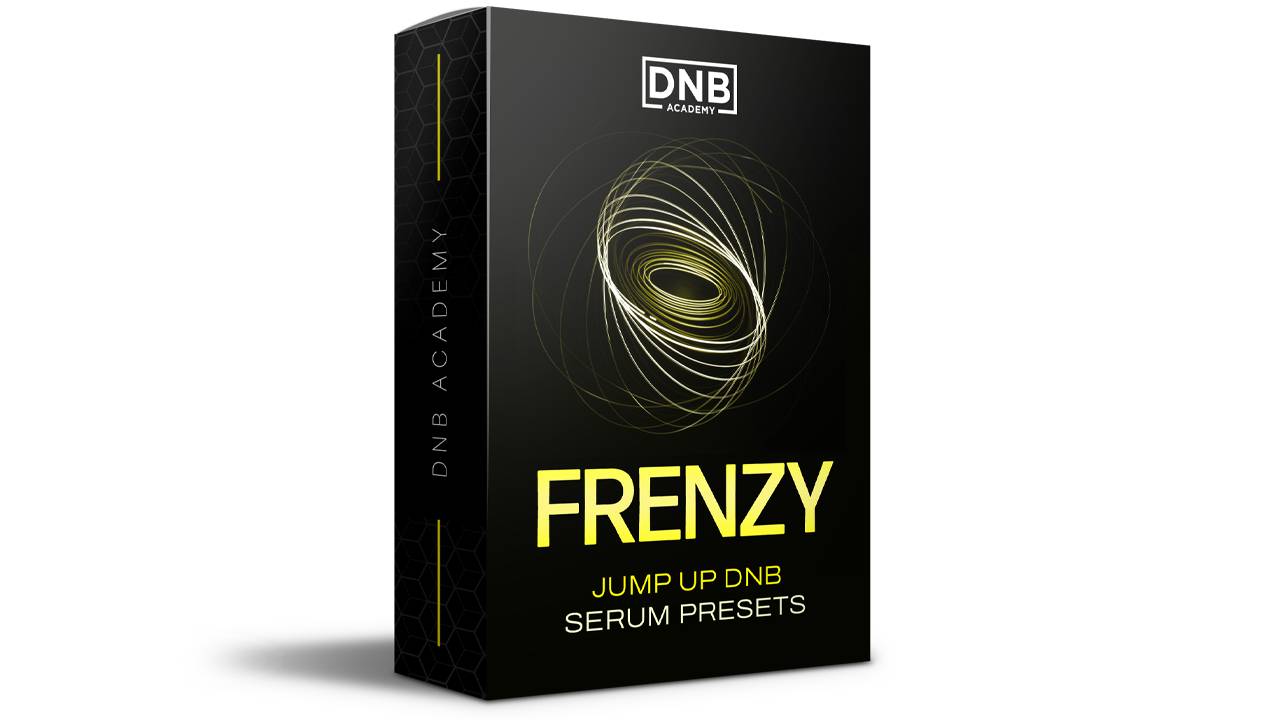 Preset bundleFrenzy jump up Serum presets100+ Serum presets for classic and modern jump up: 53 basses plus leads, arps, pads, FX and drums.
Every artist course, preset bundle and sample pack is also in The Vault. Browse courses
Related tutorials
All tutorials → Serum · RecreationHow to Make a Foghorn Bass Like IMANU & Buunshin’s “Nagow” in Serum8 min read · Video + guide
 Vital · Bass designHow to Make a Foghorn Bass in Vital6 min read · Video + guide
 Serum · RecreationHow to Make Basses Like Bou’s “Poison” in Serum7 min read · Video + guide
 Guide · Jump upHow to Make Jump Up Drum and Bass: Basslines, Wobbles and Formants19 min read · Video + guide
FAQ: making a foghorn bass like “Clapper”
How do you make a foghorn bass like Skantia & Annix’s “Clapper” in Serum?
Our recreation layers Serum’s sub with two sine oscillators reduced to single harmonics: bin 3 on oscillator A and its octave, bin 6, on oscillator B. A filter, a Tube distortion and a Hall reverb sit in Serum’s FX rack, with the reverb mix rising over 8 bars. Two 8-bar LFOs in trigger mode move the oscillator levels so one harmonic takes over as the other fades, then iZotope Trash 2 drives three bands separately, an EQ and reverb follow, and Auto Pan adds a fast amplitude pulse.
Is this Skantia and Annix’s actual preset?
No. It’s our own recreation in the style of the basses in “Clapper”, built from an initialised Serum patch by Paulo from DNB Academy. The aim is to learn the technique, combining harmonics and moving their levels, not to copy the original sound.
What does "bin 3" mean in Serum?
In Serum’s wavetable editor, each bin is a harmonic of the oscillator’s fundamental. Reducing a sine to bin 3 makes the oscillator play only the third harmonic; bin 6 is one octave above bin 3. Combining these single harmonics with the sub lets you build the sound one partial at a time.
Why automate the oscillator levels with LFOs?
The movement in this kind of bass comes from the changing balance of its harmonics. An 8-bar LFO in trigger mode on oscillator B’s level, and a rising LFO pulling oscillator A down, make one harmonic fade in while the other fades out across the whole riff, so a single patch gives you all the variations of the phrase.
Why use a multiband distortion on this bass?
With the crossovers at roughly 200 Hz and 800 Hz, each band of Trash 2 holds one part of the sound: the sub, oscillator A and oscillator B. That lets you drive each harmonic separately, gently on the lows and harder on the highs, without the sub turning to mush.
Can I make this bass in Vital?
Yes. Vital is free and lets you draw single harmonics in its wavetable editor, map LFOs to oscillator levels and add filter, distortion and reverb effects. Any multiband saturator can stand in for Trash 2, and Ableton’s Auto Pan works on any sound.
Next steps
Start with the core: a quiet sub, bins 3 and 6, a Tube distortion and two 8-bar LFOs on the levels. Once that moves the way you want, add the multiband drive and the Auto Pan pulse. For another harmonics-and-distortion recreation, try our basses like Bou’s “Poison” in Serum; for more bass types and when to use them, read our drum and bass bass guide.
Free Access
Seven free DnB sample and preset packs, including the 174 Marathon Sample Pack, plus mixing and mastering e-books and a 3-day challenge for Ableton Live and FL Studio.
Get free packsThe full guide
Tempo, drums, sub, mid bass, chords, arrangement and mixdown: every step of a DnB track.
Read the guideDNB Foundations
A structured drum and bass course with weekly live feedback calls on your tracks.
See Foundations1:1 Mentorship
Personal guidance on your music from a mentor, built around your goals.
See the mentorship50,000+ producers have joined DNB Academy, and our producer Discord has 5,300+ members.