Serum · Bass sound design · Deep & minimal
How to Make Basses Like Monty’s F4DE in Serum
To make basses like Monty’s F4DE in Serum, start from simple waves (sines, a saw, two detuned saws) and get the movement from modulation rather than heavy distortion: a triggered LFO on a filter, a fast LFO for the flutter, FM driven by an LFO, and hand-drawn LFO shapes on the oscillator levels. In our tutorial we recreate all four basses from the track in Serum. Here are the settings, with screenshots and audio of each recreation.
New to bass design? Our guide to every drum and bass bass type covers the basics. This page rebuilds four specific sounds, so you can see the principles at work.
Quick answer
How do you make a bass like Monty’s F4DE?
Build each sound from basic waves in Serum and shape it with modulation. Run a saw through a low-pass filter with a triggered LFO for a “whoop”, detune two saws for phasing and add a fast filter LFO for the flutter, use an LFO on FM for moving harmonics, and draw LFO shapes on the oscillator levels to match the rhythm of the riff.
- Bass 1: the whoop.A sine and a saw, with a triggered LFO on the filter.
- Bass 2: the flutter.Two detuned saws and a fast LFO on an FX filter.
- Bass 3: the FM sine.An LFO on FM, and a drawn shape on the levels.
- Bass 4: the harmonic sine.Layered sines, a 7th harmonic and a reverb throw.
Our 17-minute Serum tutorial recreating the four basses from Monty’s F4DE. It’s our own recreation by ear for learning, not the original patches. Every step below links to the moment in the video.
What you’ll need
- Serum. All four patches start from an initialised Serum. The ideas (LFOs on filters, FM, levels and FX) carry over to other wavetable synths, including Vital, which is free.
- A DAW with automation. We use Ableton Live to automate an EQ, the flutter LFO’s rate and a Utility gain. Any DAW that can automate a plug-in parameter will do.
- A few effects. iZotope Trash 2, Ableton’s EQ Eight, Erosion and Utility. Stock saturators and EQs can stand in for Trash 2.
- The right notes. Basses 1 to 3 are played on D sharp, in different octaves; bass 4 is played on F sharp.
1.Bass 1: a sine and a saw with a filtered whoop
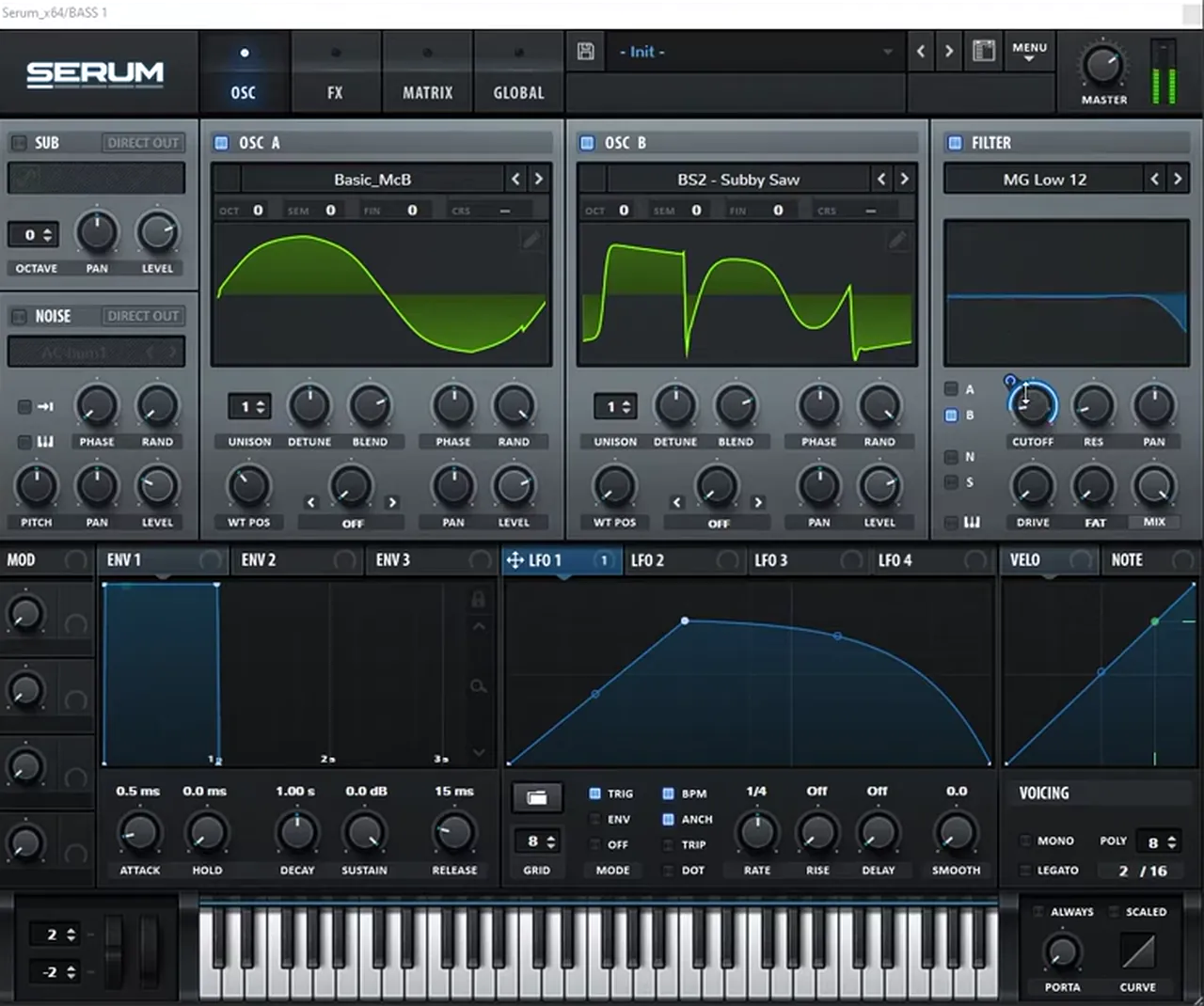
The first bass fuses a sine-like wave with a saw and makes a “whoop” by sweeping a low-pass filter with a triggered LFO. Only the saw goes through the filter, so the low end stays solid while the top opens and closes on every note.
In oscillator A, load the Basic_McB wavetable instead of the basic sine and move the wavetable position until the wave changes shape. Turn on oscillator B and load BS2 - Subby Saw rather than the regular saw (watch at 1:18). Turn on the filter (MG Low 12), send only oscillator B through it, and map LFO 1 to the cutoff. Set the LFO to trigger mode and draw a shape that rises, then curves down. If the modulation shows as bipolar, hold Shift and click it to make it unipolar, then bring the cutoff down and dial in the amount until you hear the whoop. For a consistent sound, turn the random phase all the way down.
The effects stay simple: a chorus left at its default settings, then Serum’s FX filter set to low-pass with LFO 1 on its cutoff too, again unipolar, to “double down on the low-passes”. After Serum comes the post-processing (watch at 3:16). In Trash 2, turn on multiband mode and right-click to remove a band so you have two. Load the Crispy mode on the low band and boost it a little; load Blues Driver on the high band and boost it a lot for energy on top.
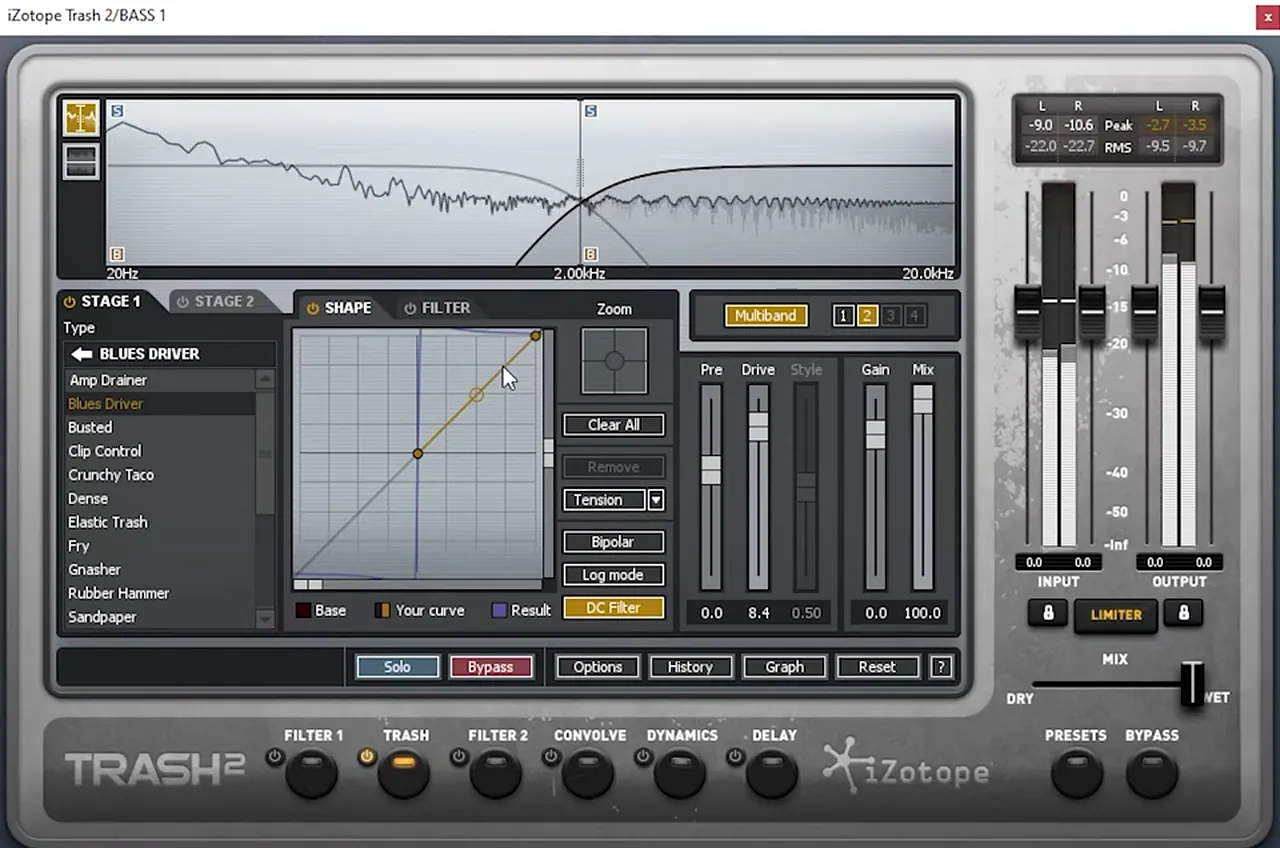
That combination creates a weird feedback-like resonance. It can sound cool, but it isn’t wanted here, so add an EQ that boosts the mid-range to make the bass fuller, then a second EQ with a low-pass whose frequency you automate in your DAW (watch at 4:16). That gives you your own wobble and gets rid of the resonance. Add or remove filter resonance depending on how clean you want the filtering, and try other waveforms in oscillator A; we wanted solid harmonics in this one.
Listen: bass 1, with the automated EQ low-pass making the wobble5 sec
2.Bass 2: phasing saws and the flutter
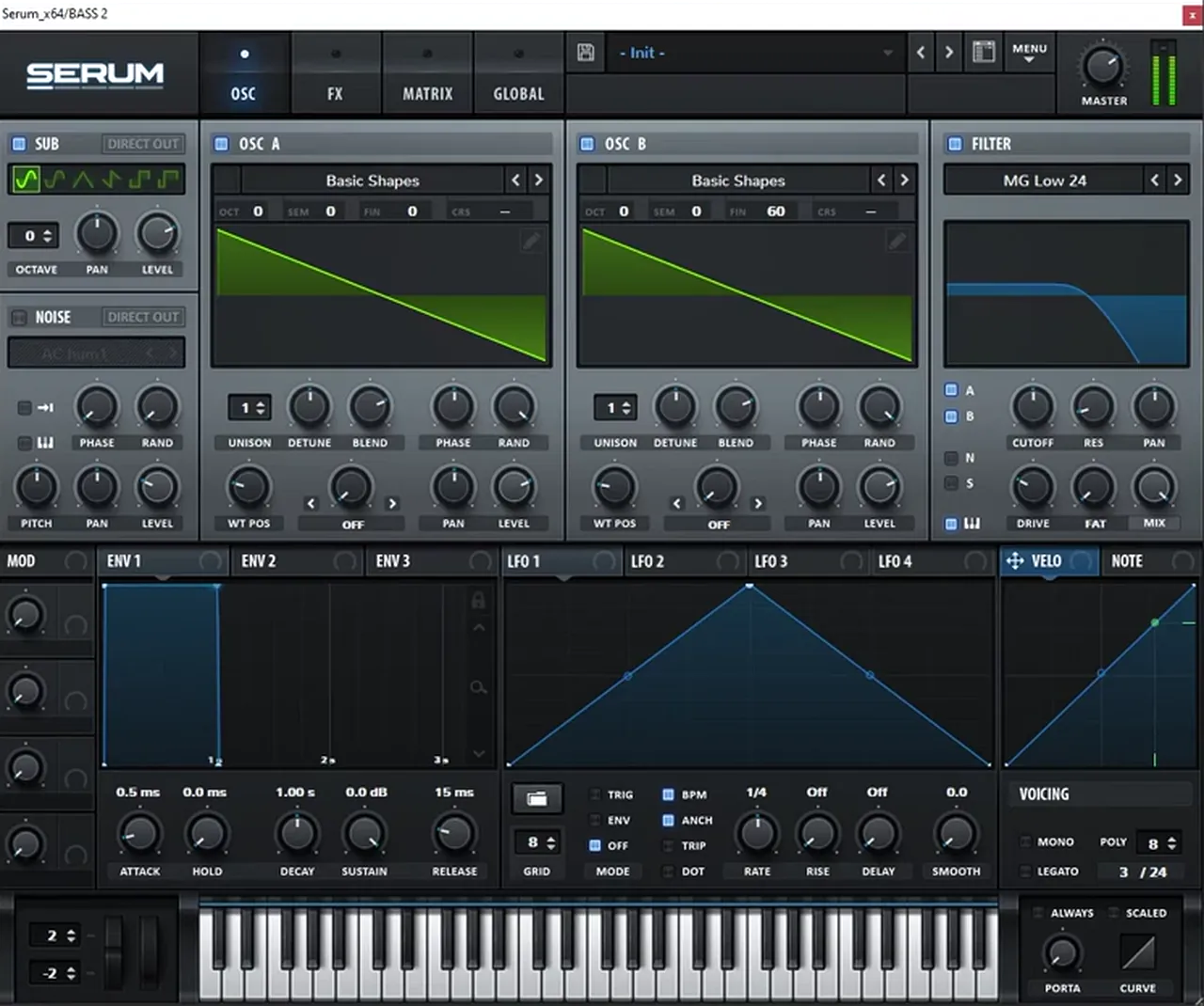
The fluttery bass is built on phasing: two saws slightly out of tune with each other, through a steep, driven low-pass filter. The flutter itself comes from a fast LFO on an FX filter, with its rate set in hertz and automated so the flutter slows down.
Play the same D sharp a couple of octaves up. Turn on the sub and oscillator B, load the basic saw in both oscillators, and set oscillator B’s fine tuning to 60 to get the phasing (watch at 5:25). Send both oscillators through the filter and change it to MG Low 24: a steeper filter stops a lot of the harmonics bleeding through. Boost the drive and enable key tracking so the filter follows the keyboard. Then bring envelope 1’s sustain all the way down so the sound fades over time. If you want more on detuned saws, our reese bass tutorial goes deeper.
Listen: bass 2 with the distortion drive boosted, before the flutter filter5 sec
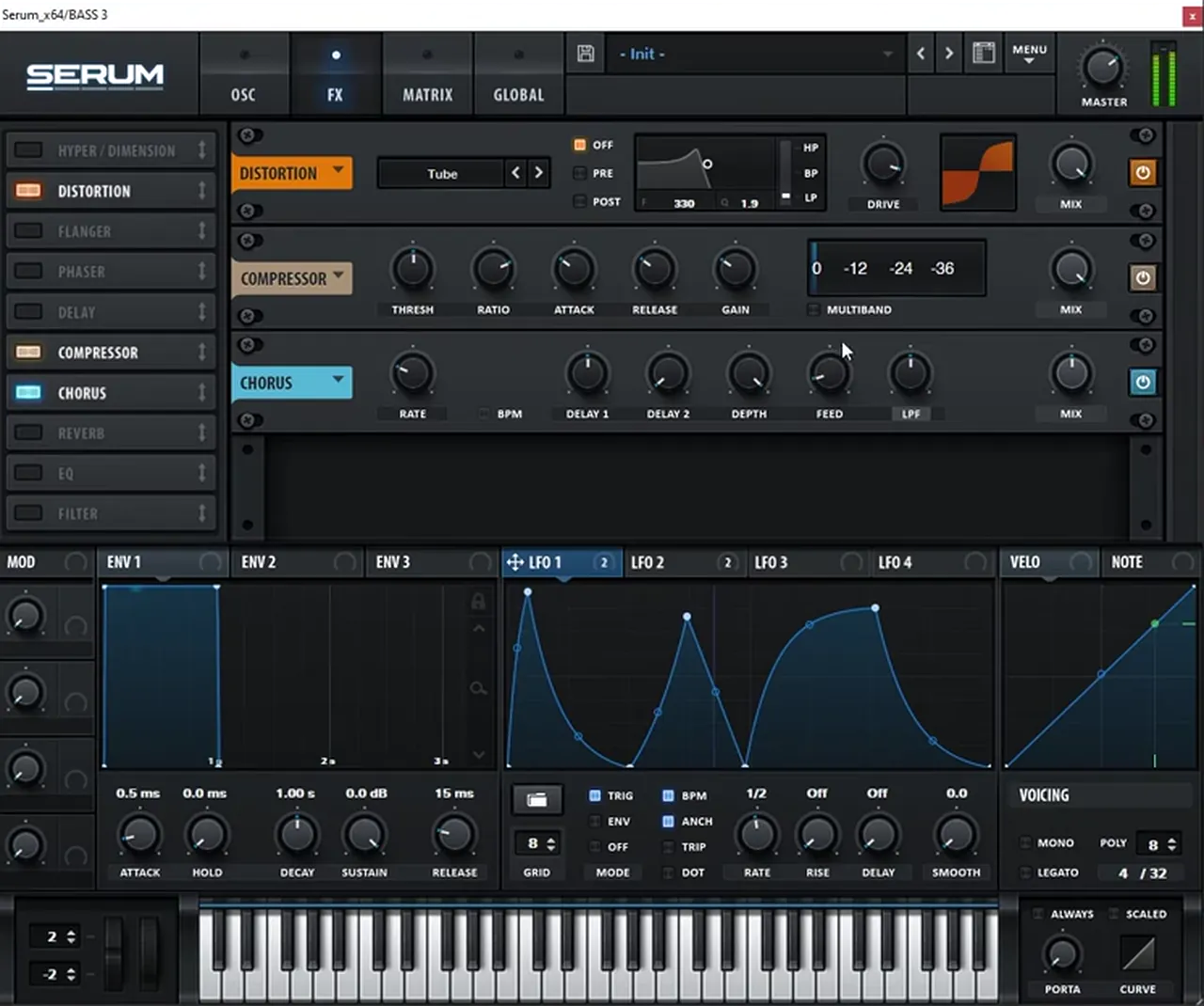
In the FX rack, turn on the distortion (Tube in our patch) and boost the drive a lot, then turn on the chorus, boost its mix and move its filter a little higher. Turn on the compressor just to add gain. Last, add a filter and map LFO 1 to it: bring the cutoff all the way down, make the modulation unipolar and set the amount to around 75. Turn off the LFO’s BPM sync and experiment with the rate (watch at 7:23).
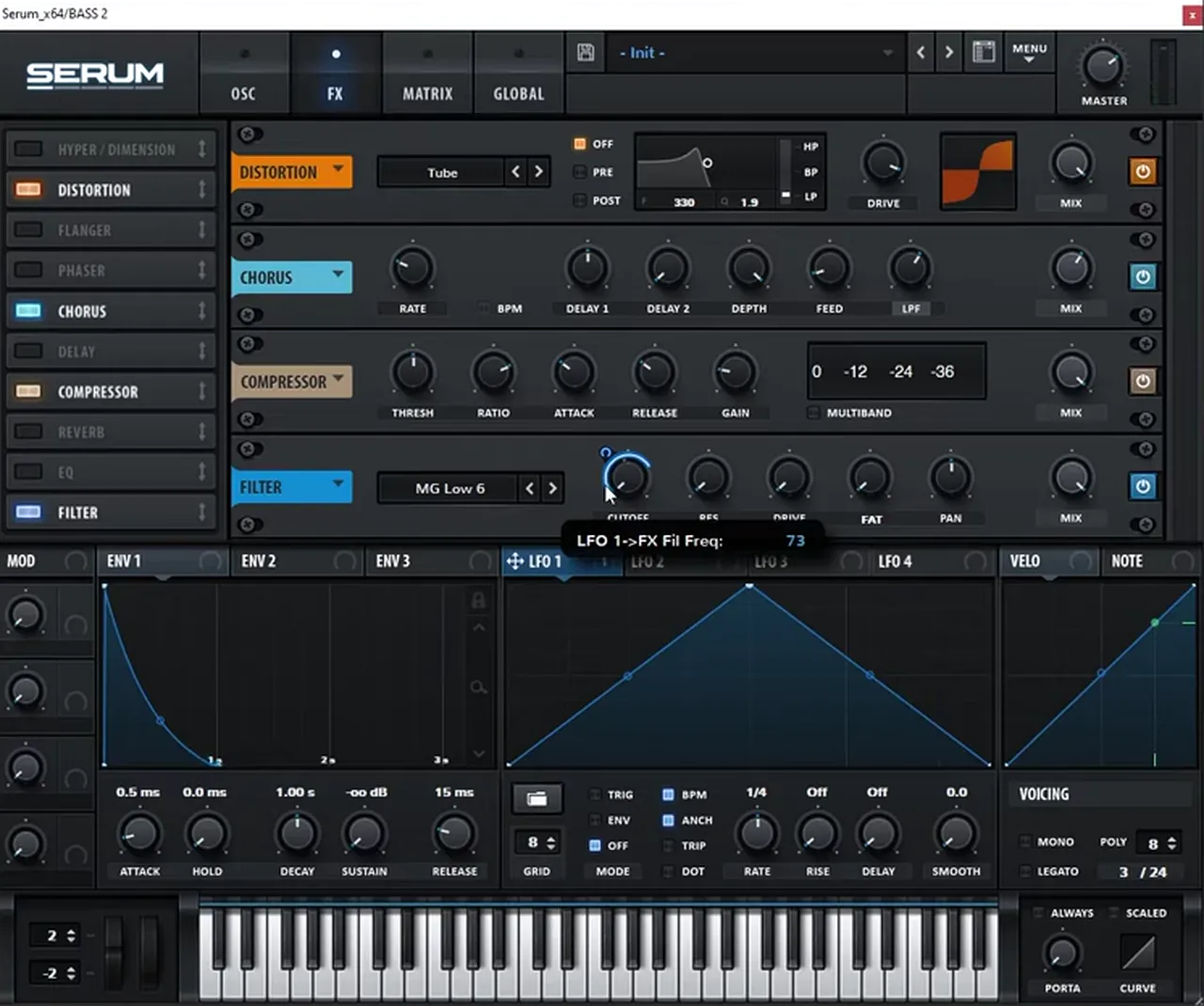
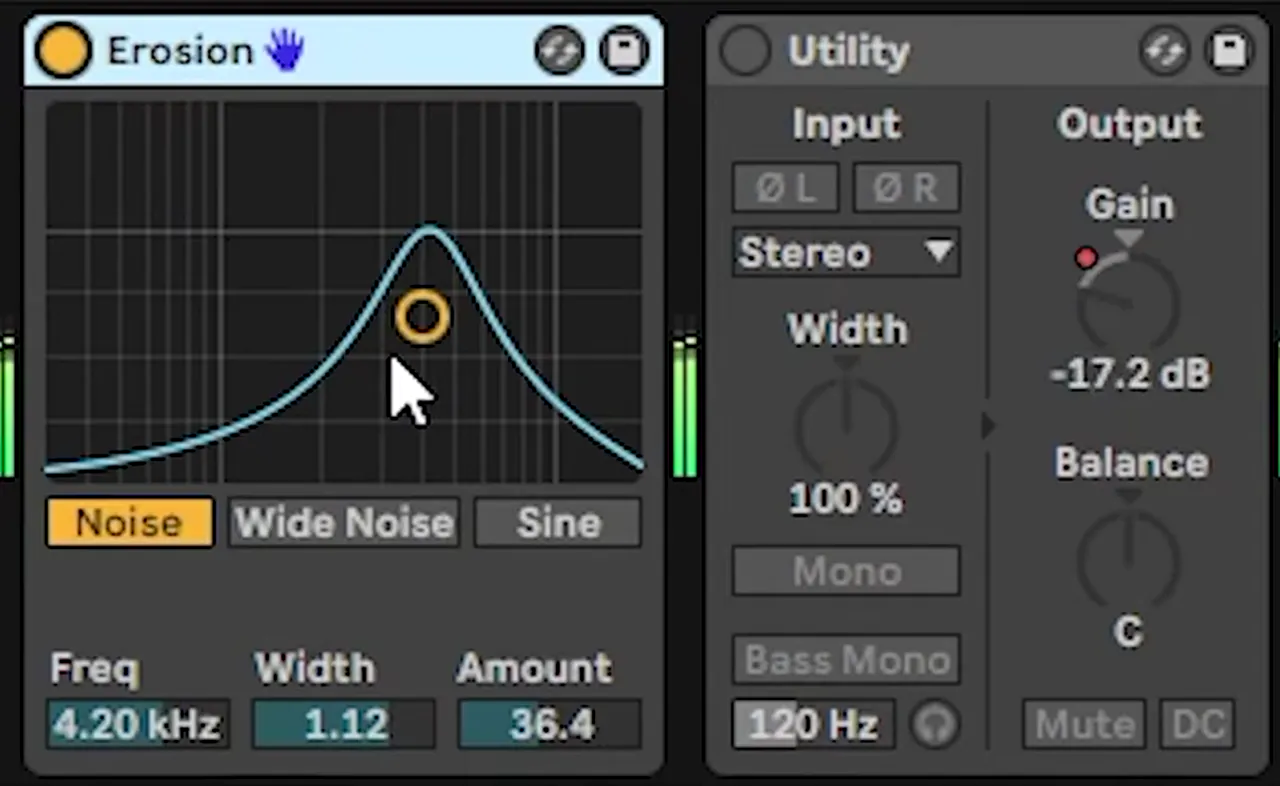
In our arrangement, the rate is automated in Ableton from 0.62 down to 0.58, which is 14.3 Hz down to 7.7 Hz: the flutter drops to about half its speed. For post-processing, add Erosion, a noise generator where you choose which part of the frequency spectrum gets the noise (watch at 8:02). Then add a Utility and automate its gain to shape the amplitude yourself, the same idea as the EQ on bass 1. Without it the sound is constant; with it, it plays like a one-shot. A subtle EQ to bring out the harmonics you want finishes it.
3.Bass 3: a sine with LFO-driven FM
The third bass is deep and clean: sines, a sub and a little noise, with FM from oscillator B adding harmonics. An LFO on the FM amount makes the harmonics progress over the note, and a drawn LFO shape on the levels gives the sound its rhythm.
Move down to a deeper D sharp (watch at 9:00). Load a sine in oscillator A and another in oscillator B, turn on the sub for an even bigger sine, and turn on the noise. Set oscillator A’s warp mode to FM (from B) to add harmonics and map an LFO to the FM amount, slowed down. At first it’s hardly noticeable, because oscillator B’s own sine swamps it, so bring oscillator B’s level down: now B is mainly a modulator of A. Bring the sub down too. A distortion in the FX rack lets you hear the subtle movement the FM adds. For extra evolution, set oscillator B’s warp to Sync and map the LFO to that as well.
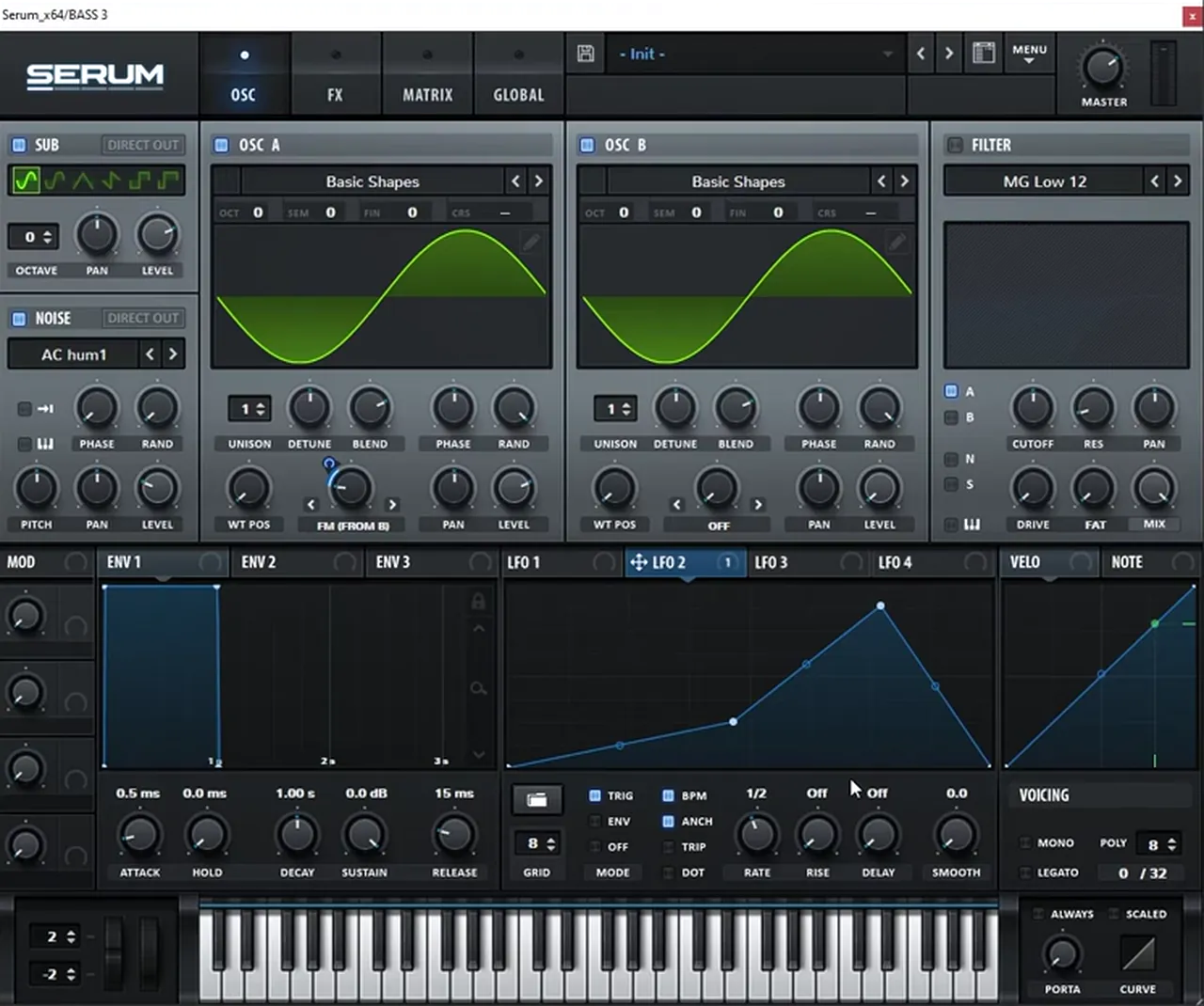
Now open LFO 1 and use it to create the whole shape of the sound (watch at 10:43). Map it to oscillator A’s level and to the noise level, bring the amount down, and draw the movement you want. We drew it to emulate the shape of the bass in the track, and set the LFO to trigger mode so it restarts on every note. Back in the FX, turn on the compressor to add gain, then add a chorus after the compressor. To vary the riff, try raising oscillator B by an octave or two.
Listen: bass 3, the FM sine with its drawn LFO shape6 sec
4.Bass 4: layered sines with a 7th harmonic
The last bass is built like a jump-up bass, but without much distortion. It layers sines, adds a third harmonic in the wavetable editor, and tunes a second, separately shaped sine to the 7th harmonic. A reverb throw drawn with an LFO gives it a tail.
Play an F sharp and layer sines in oscillator A, oscillator B and the sub (watch at 11:57). Set LFO 1 to half rate and envelope mode, draw a shape that resembles the movement in the track, and map it to oscillator A’s level. Turn on the noise and map LFO 1 to the noise level too, which gives you two pulses. Then open oscillator A in the wavetable editor: keep harmonic 1, the plain sine, and add harmonic 3, which multiplies the fundamental frequency by three and adds a fifth on top. For more on keeping sines clean in the low end, see our DnB sub bass guide.
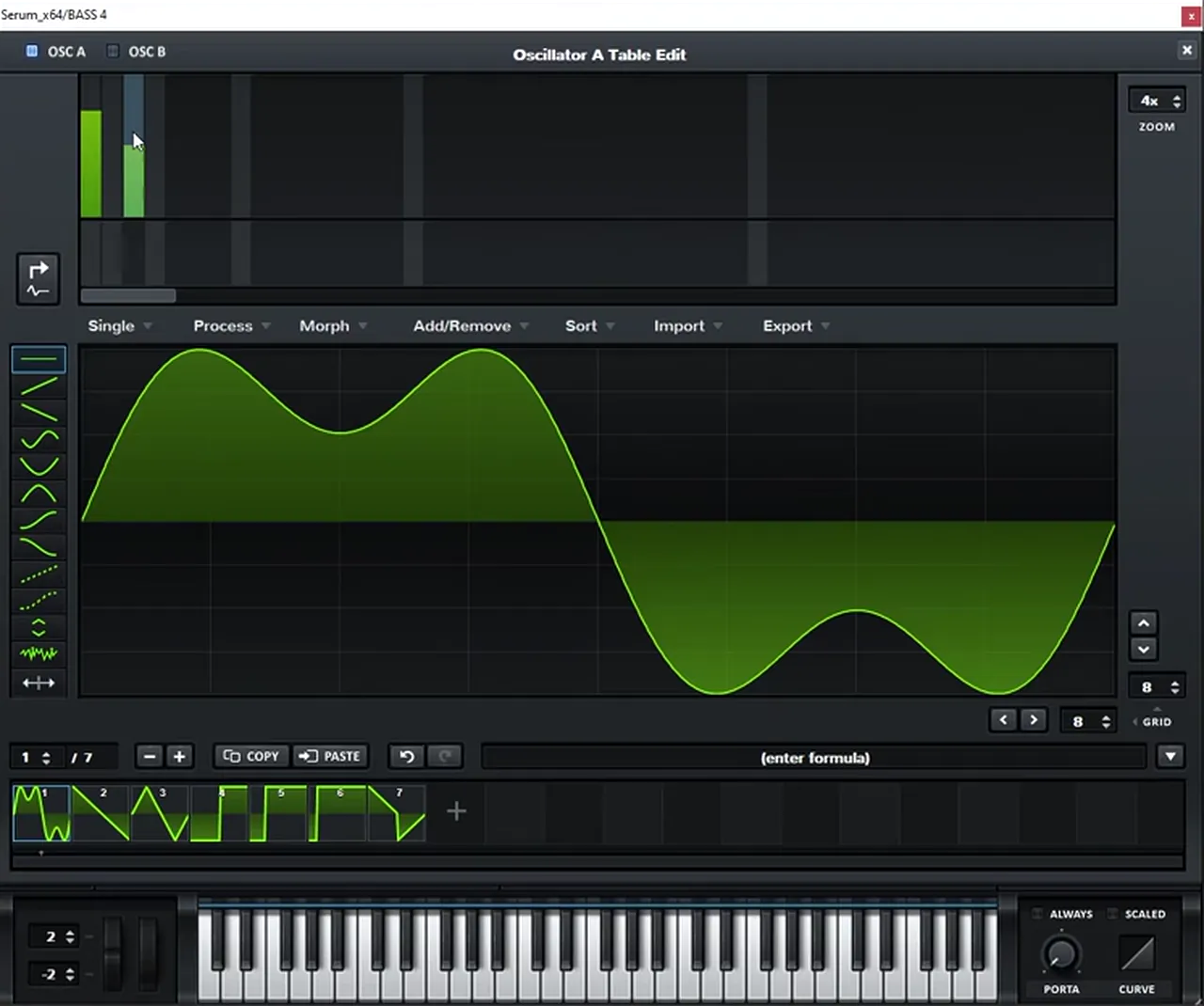
Keep oscillator B a plain sine: oscillator A’s phase is flipped, and you want this layer clean. A neat trick: hold Alt and drag LFO 1 onto another LFO slot to copy it (we use slot 4). Give the copy a bit more tail and map it to oscillator B’s level. It doesn’t sound special until you tune oscillator B two octaves and 10 semitones up, which gives you the 7th harmonic (watch at 14:02).
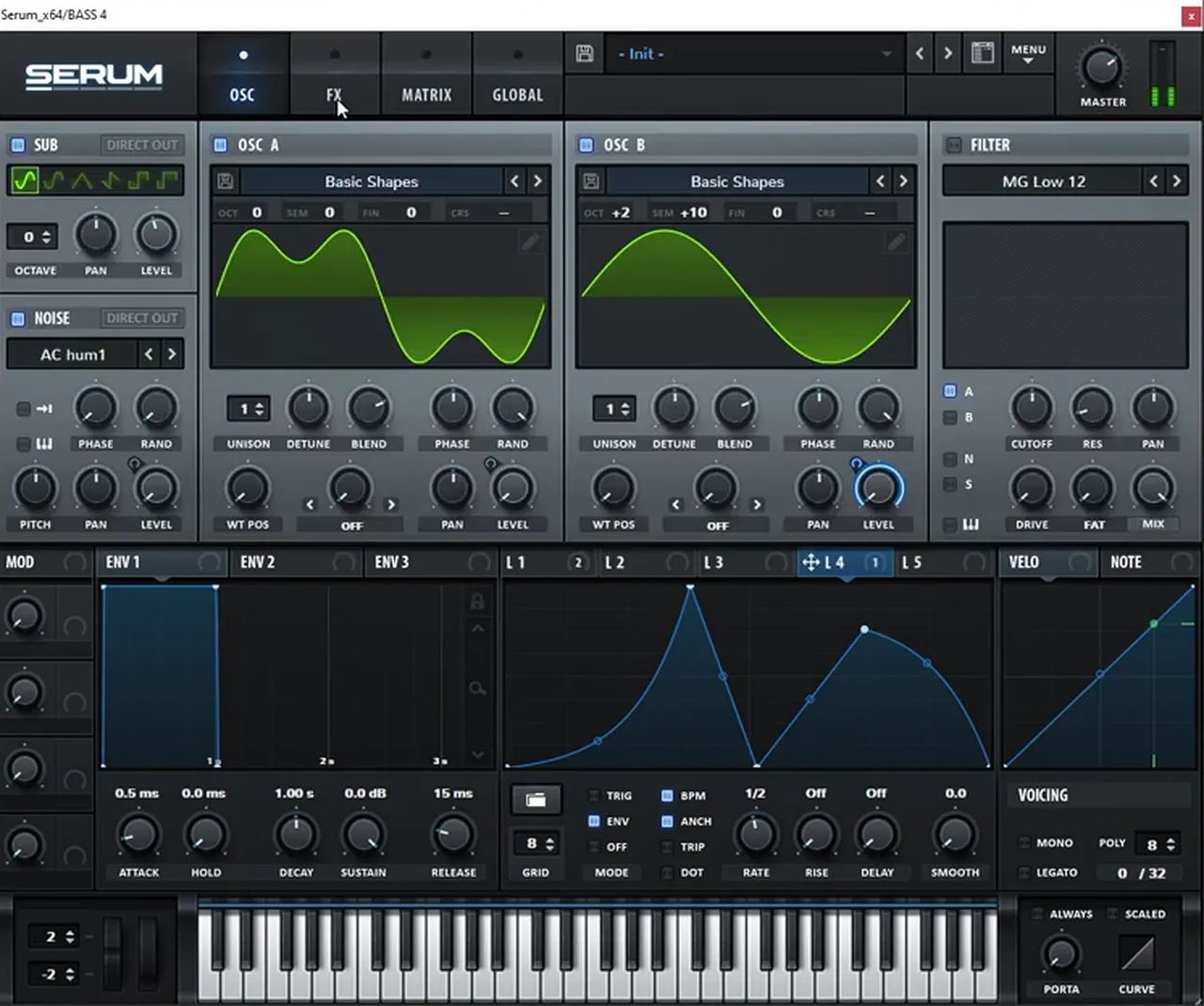
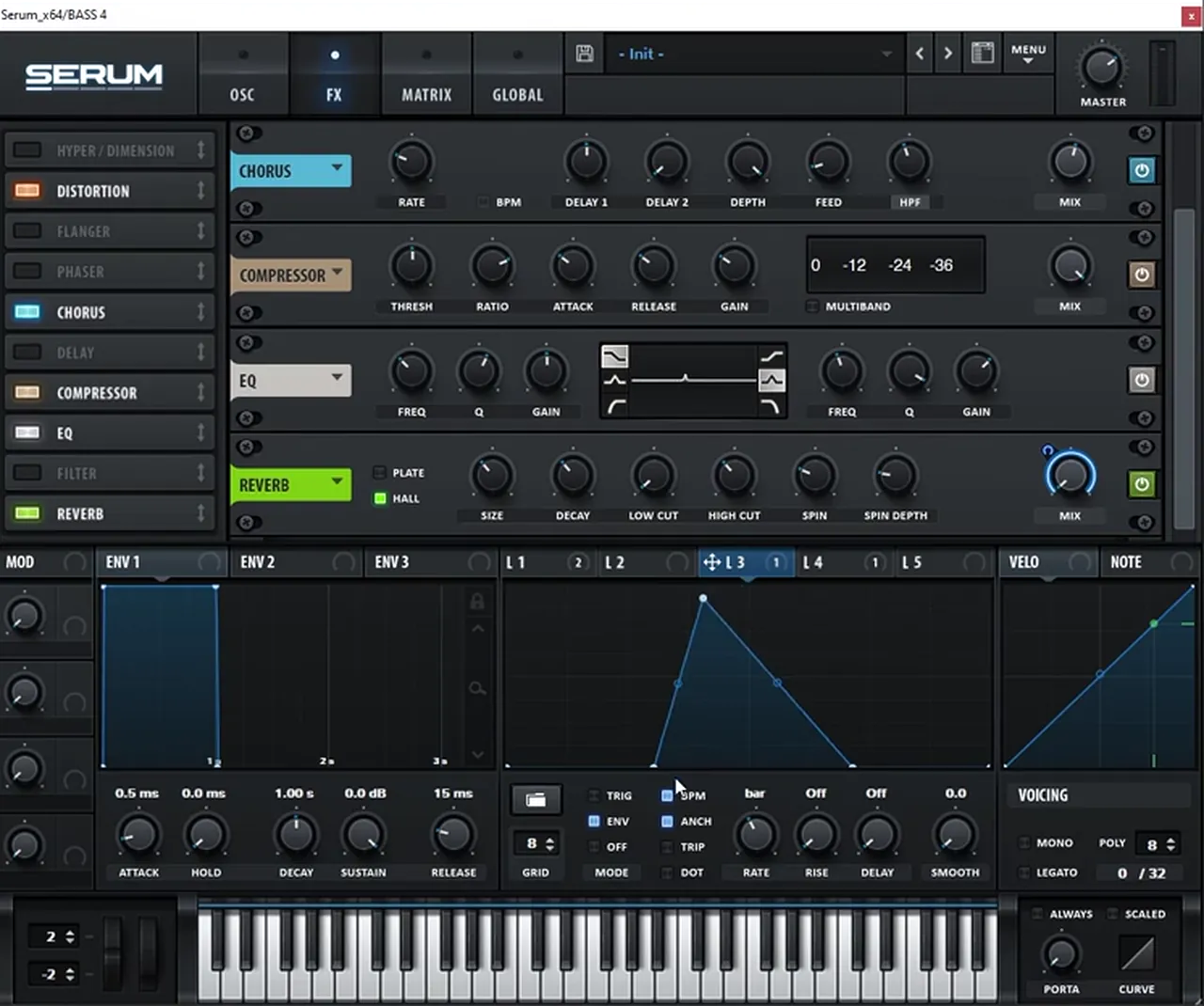
In the FX, add some distortion and a chorus, but switch the chorus filter from a low-pass (which would affect everything below 1,000 Hz) to a high-pass that affects everything above 600 Hz. Add gain with the compressor, then an EQ with a sharp bell to boost whichever harmonic you like. Finally, turn on the reverb and map an LFO to its mix: set the LFO to one bar and envelope mode, bring the mix down, find where the sound ends and draw the tail from there (watch at 14:57). That’s a reverb throw made by hand. Shape the reverb to taste (size, decay, low cut, plate or hall) and keep adjusting the EQ until you have the harmonics you want; we added some highs.
Listen: bass 4, the layered sines with the 7th harmonic and EQ6 sec
Hear them in context, then make them your own
The video ends with all four basses playing together in the arrangement (watch at 16:03). It isn’t a one-to-one remake, and that’s the point: the value is in the principles behind each sound, so you can turn them into basses of your own.
Swap the waveforms, change the octave of a modulator, redraw the LFO shapes to fit your own riff, or try the flutter LFO on a different sound. If you like this deep, minimal end of drum and bass, our drum and bass subgenres guide explains where it sits.
Common mistakes making basses like F4DE
- Reaching for distortion first. These basses get their character from modulation on filters, FM and levels; the distortion is there to bring out the movement.
- Bipolar modulation by accident. If a filter sweep goes the wrong way, make the modulation unipolar and bring the cutoff down.
- Free-running LFOs. Use trigger or envelope mode, and turn random phase down, so every note starts the same.
- A flutter locked to the tempo. Turn BPM sync off and set the rate in hertz, then automate it.
- Sustained notes where the riff needs one-shots. Pull the sustain down or shape the level with automation.
- Letting resonance run wild. Tame harsh feedback with a mid boost and an automated low-pass EQ.
Free download
Free sounds to build a track around your bass
A bass only comes alive against drums. The 174 Marathon Sample Pack was made for International Drum & Bass Day and our 174 Production Marathon:
- 100+ samples
- Drums, bass, FX, melodics and more
- Audio samples that work in any DAW
- Royalty-free, so you can release what you make
It’s one of seven free sample and preset packs in DNB Academy Free Access, along with the mixing and mastering e-books and the 3‑day DnB challenge. Join 40,000+ producers in Free Access. Free account, no card needed.
Go deeper
Deep, minimal Serum sounds and a full course
Want ready-made deep and minimal basses to study and tweak, or a whole track built in this style?
 Preset bundleALIX 2 Serum presets100 Serum presets for deep, minimal DnB: 50 basses, 25 synths, 12 drums, 8 FX and 5 pads, with every preset also included as a WAV.
 Preset bundleSurge Serum presets100 Serum presets for deep, minimal grooves: 60 basses, 10 pads, 9 FX, 8 drums, 7 leads and 6 arps.
 Production courseArkaik production courseMinimalist drum & bass from the first idea to the master in 6+ hours, starting with bass presets, with the samples, presets, project file and stems.
Every artist course, preset bundle and sample pack is also in The Vault. Browse courses
Related tutorials
All tutorials → Bass · GuideHow to Make Drum and Bass Bass: A Guide to Every Bass Type15 min read · Video + guide
 Serum · BassHow to Make a Techy Roller Bass Like DLR & Sofa Sound in Serum7 min read · Video + guide
 Serum · ReeseHow to Make a Reese Bass for Drum and Bass15 min read · Video + guide
 Vital · NeuroHow to Make Neuro Basses Like Noisia in Vital9 min read · Video + guide
FAQ: basses like Monty’s F4DE
How do you make a bass like Monty’s F4DE in Serum?
Start from simple waves and get the movement from modulation. In our recreation, bass 1 is a sine-like wavetable and a saw with a triggered LFO on the filter, bass 2 is two detuned saws with a fast LFO on an FX filter, bass 3 is a sine with LFO-driven FM, and bass 4 layers sines with a 7th harmonic and a reverb throw.
How do you make a fluttery bass in Serum?
Put a filter in Serum’s FX rack, map an LFO to its cutoff, bring the cutoff down and make the modulation unipolar. Turn off the LFO’s BPM sync so the rate runs in hertz. In our patch, the rate is automated from 14.3 Hz down to 7.7 Hz, so the flutter slows to about half its speed.
How do you make LFO modulation unipolar in Serum?
If the modulation on a knob shows as bipolar, hold Shift and click it, as shown in our video. The modulation then only moves the parameter in one direction from where you set it, so you can bring a filter cutoff down and let the LFO open it.
Can you make these basses in Vital?
The patches in our video are built in Serum, but the principles (LFOs on filters, FM driven by an LFO, drawn LFO shapes on levels and an LFO on a reverb mix) carry over to other wavetable synths, including Vital, which is free.
Are these Monty’s own presets?
No. They are our own recreation of the four basses, made by ear for learning. It is not a one-to-one remake: the aim is to understand the principles behind each sound so you can make your own.
Which free pack goes with this tutorial?
The 174 Marathon Sample Pack: 100+ royalty-free samples with drums, bass, FX and melodics, so you can put your new basses in a beat. It is one of seven free packs in DNB Academy Free Access.
Next steps
Open an initialised Serum, pick one of the four basses and rebuild it from the steps above, then change one thing (a waveform, an octave or an LFO shape) until it sounds like yours. To put it in a full tune, follow our step-by-step guide to making drum and bass.
Free Access
Seven free DnB sample and preset packs, including the 174 Marathon Sample Pack, plus mixing and mastering e-books and a 3-day challenge for Ableton Live and FL Studio.
Get free packsThe full guide
Tempo, drums, sub, mid bass, chords, arrangement and mixdown: every step of a DnB track.
Read the guideDNB Foundations
A structured drum and bass course with weekly live feedback calls on your tracks.
See Foundations1:1 Mentorship
Personal guidance on your music from a mentor, built around your goals.
See the mentorship50,000+ producers have joined DNB Academy, and our producer Discord has 5,300+ members.